1
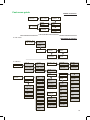
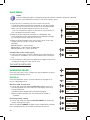
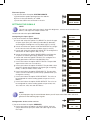
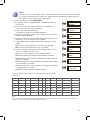
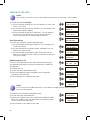
Firmware Update 1) Locate and select the option SYSTEM UPDATE. a) Download the update package from the website. b) Place in the root directory of a USB. c) Insert the USB in the connector in the unit. SYSTEM UPDATE ** WARNING ** CANCEL UPDATE SETTINGS THE SIGNALS NotE The unit can switch the input signals; alter their brightness, contrast and saturation conditions; and adjust the output carrier in RF. Locate and select the option SETTINGS Configuring the input signals 1) Locate and select the option INPUT. a) Locate and select the option CH1 BRIGHT to check the type of input signal (PAL), the video (X) and audio (X) detection, and configure the brightness of the video signal (1 to 255). b) Locate and select the option CONT SATURATION to configure the contrast and saturation of video signal (1 to 255). c) Locate and select the option INP AUDIO ATT to configure the attenuation of audio signal in dB (1 to 40). d) Locate and select the option SHARPNESS to configure the sharpness of video signal (High, Medium soft or None). e) Locate and select the option CODING. This configures the coding parameters: MPEG2 H.264/MPEG4 AVC. f) Locate and select the option ASPECT RATIO. The possible aspect ratio values are 4:3 and 16:9. g) Locate and select the option AV MODE. The possible values are AUTO (automatically detects the signal type, excepting RGB), C-VBS, S-Video, YPbPr, RGB. h) Locate and select the option STANDARD TV. The possible values are PAL and NTSC,(automatically updated when you change the country). i) Locate and select the option VIDEO BITRATE. The unit can be configured for a data coding speed at input of 4 to 10 Mbits/s. j) Locate and select the option AUDIO BITRATE. The unit can be configured for a data coding speed at input of 96; 128; 160; 192; 224; 256; 320 and 384 Kbits/s. GENERAL SETTINGS INPUT SERVICES CH1: PAL BRIGHT V:X A:X 128 CONT SATURATION 066 063 INP AUDIO ATT 20 SHARPNESS NONE CODING MPEG2 ASPECT RATIO 4:3 AV MODE AUTO STANDARD TV PAL VIDEO BITRATE 08.000 MBits/s AUDIO BITRATE 128 KBits/s NotE If you keep pressing the control button down you will accessthe information and configuration of the following input signals. Configuration of the carrier services 1) Locate and select the option SERVICES. a) Locate and select the option CH VIDEO AUDIO. Activate (ON) or deactivate (OFF) the video and audio signals of the first input. INPUT SERVICES CH VIDEO AUDIO ON OFF 25