1
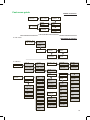
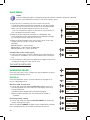
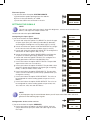
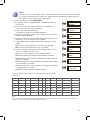
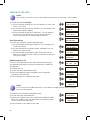
b) Locate and select CH LCN. Configure the LCN value of the signal. c) Locate and select CH SID (used by default as output channel). Service set identifier. d) Locate and select CH NAME. Assign a name to the signalJ in CH. NotE CH LCN 001 CH SID 0021 CH NAME CH1 If you keep pressing the control button down you will access the information and configuration of the following input signals. Configuration of the output signal NotE To introduce a sequence of digits in the display move the control button vertically to change the value of the current digit and horizontally to move between digits. NotE Position the cursor to the right of the current value and move the control button vertically to increase or decrease the current value. Hold the control button up or down to increase or decrease the current value more quickly. 1) Locate and select the option OUTPUT. a) Locate and select the CHANNEL. This option automatically changes the frequency, adapting to the center of the channel. b) Locate and select the option FREQUENCY. This option modifies the value of the channel, adapted to the frequency. Configure the output frequency value between 474 MHz and 862 MHz increments of 125 kHz. c) Locate and select the option ATTENUATION. Select the output attenuation between 0 and 25 dB. d) Locate and select the option OFDM MODE. Select the OFDM mode between 2K and 8K subcarriers. e) Locate and select the option BANDWIDTH. Select the bandwidth between 6, 7 and 8 Mhz. f) Locate and select the option GUARD INTERVAL. Select the guard interval between 1/32, 1/16, 1/8 and 1/4 of symbol. g) Locate and select the option CONSTELLATION. Select the modulation constellation between 16QAM and 64QAM. h) Locate and select the option CODE RATE.J Select the code rate between 1/2, 2/3, 3/4, 5/6 and 7/8. Network configuration OUTPUT NETWORK CHANNEL 21 FREQUENCY 474.000 MHz ATTENUATION 1.00 dB OFDM MODE 2K BANDWIDTH 8 MHz GUARD INTERVAL 1/32 CONSTELLATION 64 QAM CODE RATE 7/8 Note To introduce a sequence of digits in the display move the control button vertically to change the value of the current digit and horizontally to move between digits. 26