1
No POTS dial tone
•
ISDN link is not completely defined and is not in Standby mode.
•
The POTS line is set to Answer only, is disabled, or is busy with
data, and preemption is off.
•
The phone is not plugged in.
Problems with bandwidth management
ISDN Channel 2 does not support overflow for
channel 1
•
Verify that the maximum links to the remote router is set to 2.
•
Verify that Bandwidth-on-Demand has been set for the direction of
traffic.
•
Check that there are two phone numbers to the remote router.
Both ISDN channels are always used for traffic on
connection to the remote router
•
Verify that the bandwidth threshold is set > 0%.
•
Check maximum and minimum link settings.
Diagnostic Tools
Troubleshooting Help File
The Configuration Manager’s Help file features an extensive troubleshooting
section which is meant to help you diagnose and solve problems quickly
through a logical process of elimination.
This Troubleshooting file is also available as a freestanding application from
the Start menu.
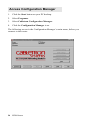
⇒ To access it, click the Start button on your PC desktop, click Programs,
Configuration Manager, and double-click Troubleshooting.
108 ISDN Router