1
c. Removal of printed cards
The Quantum printer has two output hoppers with a capacity of 500 cards each
(0.76 mm – 30 thou.) devoted to receiving the printed cards. Note that the first
printed card is on top of the cards.
NOTE !
The configuration of the output hoppers may be set from the properties of the
driver. See point 2 of section 2 of this manual for
further information on their use
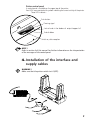
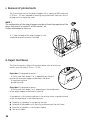
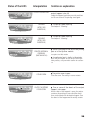
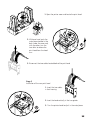
1. 1. Open the door of the output hopper as indicated and remove the cards as indicated.
d. Reject Card Boxes
The Quantum printer is fitted with two reject boxes, each of which may
contain up to 25 cards (0.76 mm – 30 mil)
Reject box 1 is designed to receive :
- all faulty cards from feeder 1 or 2, depending on the configuration of the output hoppers established in the driver
- all used cleaning cards
- printed test cards
Reject box 2 is designed to receive :
- all faulty cards from feeder 1 or 2, depending on the configuration
of the output hoppers established in the driver
A card present in the flip over module or in the printing station is ejected into one
of the two reject boxes in the following cases :
■
■
■
■
12
Detection of a problem in transporting the card
Detection of the problem with the rising and lowering of the print head
Detection of a problem in the flip over module
Torn or cut ribbon