1
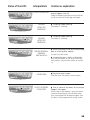
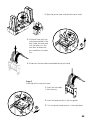
The ribbon must be correctly installed for the printer to work. Only use Evolis
ribbons. Evolis declines all responsibility if the printer or the print head is damaged through the use of an unapproved ribbon.
The ribbon is set automatically when the cover is closed.
6. Card management
a. Configuration
The Quantum printer has two card feeders and two card output hoppers which
may all work independently of the others. To this effect, there are four ways to
manage the loading and reception of the cards. The different modes may be set
from the properties of the Quantum printer driver (see chapter 2 for more information on the configuration of the printer driver).
Configuration of the feeders
• Automatic selection
The cards are taken alternately from feeder 1 then from feeder 2 until there
are none left.
When an error is detected in one of the feeders, the cards are taken automatically from the other feeder.
• Alternating mode
The cards are taken alternately from feeder 1 then from feeder 2 until there
are none left.
When an error is detected in one of the feeders, the printer stops and a printer internal error is displayed on the printer control panel.
• Feeder 1
The cards are only taken from feeder 1 until it is empty.
• Feeder 2
The cards are only taken from feeder 2 until it is empty.
Configuration of the output hoppers
• Automatic selection
The cards are received alternately in hopper 1 and then hopper 2.
When an error is detected in one of the hoppers, the cards are received in the
other hopper.
• Alternating mode
The cards are received alternately in hopper 1 and then hopper 2.
When an error is detected in one of the hoppers, the printer stops and a printer internal error is displayed on the printer control panel.
9