1
a) Create your Powerline Network step by step
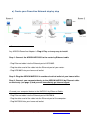
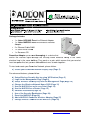
Figure 1 Hardware Connection
Any ADDON Powerline Adapter is Plug & Play and very easy to install:
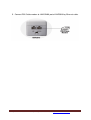
Step 1: Connect the ADDON HP5100S to the router by Ethernet cable
- Plug Ethernet cable into the Ethernet port of HP5100S.
- Plug the other end of the cable into the Ethernet port of your router.
- Plug HP5100S into your home wall outlet.
Step 2: Plug the ADDON NHP5010 in another electrical outlet of your house/office
Step 3: Connect your computer/device to the ADDON NHP5010 by Ethernet cable
or wirelessly (see page 3) and you will immediately get internet signal.
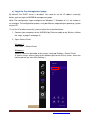
Connect your computer/device to the NHP5010 by Ethernet Cable:
- Plug Ethernet cable into the Ethernet port of NHP5010.
- Plug the other end of the cable into the Ethernet port of the computer.
- Plug NHP5010 into your home wall outlet.
For any further information on ADDON product, please visit our website: http://www.addon-tech.com
2