1
bellissimo 1 Way Video Entry System
Call Privacy
Once a call has been answered by one videophone no other videophones may join
in, view or listen to the call. If another videophones handset is picked up the
videophone will not activate; pressing the view button on another videophone will be
ignored.
User Activation (CCTV Mode)
While the system is idle, pressing the view button will activate the system and display
the picture at the entrance panel. Once activated, lifting the handset will enable
speech at the entrance and the lock button may now be used to release the door or
the user can hang-up. The picture will switch off after the preset talk-time.
Second camera
The Door Controller has the capability of driving a second ‘third party’ ‘CCTV’
camera, which is located nearby, and offering a different viewpoint. Pressing the
‘View/Camera’ button will alternate the view between the primary and secondary
camera (if enabled).
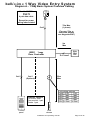
Extension Videophones
Additional videophones may be added to the basic system. The number of
extensions is limited only by power supply considerations. All videophones will ring
when called however typically only the Master unit will display a picture while ringing.
Once the master or extension videophone is ‘picked-up’ the picture will display on
that unit alone.
It should be noted that when the Master unit is left off-hook, extension videophones
will not ring; the red light will flash on the Master as a warning of this condition.
Lock Type and Operation
The door controller supports both fail-secure and fail-safe locks including magnetic
locks of up to 1A rating. The lock output is provided by relay contacts, which in the
event of power failure are open.
On pressing the lock button the lock timer will start and the door will unlock. The
picture (and speech if active) will persist for the first 3 seconds of lock operation. For
Lock Time settings see page 12.
Exit Button and Fire Switch
An input is provided for an exit button, which can be installed on the inside of the
door and allow residents to exit freely. Momentary operation of this button will
operate the lock release for the programmed lock time. A Fire switch or other
override device may use the same input to hold the door open indefinitely.
Trades Facility
Use of a time clock in conjunction with a trades button will allow free access during
the programmed time.
Installation and Operating Manual
Page 4 of 25