1
M580.book Page 129 Monday, April 18, 2011 11:18 AM
New Voicemail Message Alerts
Retrieving Your Voicemail Messages
When you receive a new voice message, your phone
alerts you and prompts you to call your voicemail.
You can review your messages directly from your
wireless phone or from any other touch-tone phone. To
dial from your wireless phone, either speed dial your
voicemail or use the menu keys.
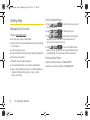
䊳
Press and hold
.
Note: When you are roaming off the Nationwide Sprint
Network, you may not receive notification of new
voicemail messages. Sprint recommends that you
periodically check your voicemail by dialing your tendigit wireless phone number. When your voicemail
answers, press
and enter your passcode.
Roaming rates apply when you access voicemail while
roaming off the Nationwide Sprint Network.
Your phone accepts messages even when it is turned
off. However, your phone notifies you of new messages
only when it is turned on and you are in a Sprint service
area.
Using One-Touch Message Access
䊳
Press and hold
voicemail box.)
. (Your phone will dial your
Text Messaging (SMS)
With text messaging (SMS), you can send and receive
instant text messages between your wireless device
and another messaging-ready phone. When you
receive a new message, it will automatically display on
your device’s screen.
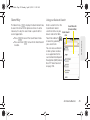
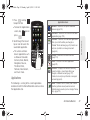
Messaging is available via the Messaging application
in your Applications screen. This icon (
) appears
in Status bar area when a new text message is
received.
3A. Sprint Service: The Basics
Sprint Service
To call your voicemail:
129