1
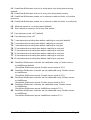
Type of mouse / system
Connected at bootup
Driver type Likely expected
data format
PS/2
PS/2
IntelliMouse / SmartView MS
IntelliMouse / SmartView MS
PS/2 only
IntelliMouse
PS/2 only
IntelliMouse
Suggested
restoration
PS/2
PS/2
PS/2
IntelliMouse
F5
F5
F5
F6
To restore lost mouse movement on a CPU connected to the SmartView
Multiscreen:
1) Select the CPU that has lost its mouse movement
2) Press the select key on the front of the SmartView Multiscreen for 5 seconds until
‘C’ is displayed. You are now in configure mode.
3) To restore a PS/2 mouse connection press
F 5 f
Or, to restore an IntelliMouse connection press
F 6 f
4) Exit from configure mode by typing
E f
5) Test the mouse movement by moving the mouse a short distance.
F5 - Restore PS/2 mouse function
F6 - Restore IntelliMouse function
2.12 Upgrading the SmartView's flash memory
The SmartView Multiscreen uses flash memory technology which enables the
firmware code to be upgraded by the user. Upgrades are performed by connecting a
PC's serial port to the SmartView's options port and running an upgrade program on
the PC. This upgrade program downloads the new firmware to the SmartView and
checks that the data has been programmed correctly.
SmartView Multiscreen
Installation and Use
Page 20