1
4.4 Keyboard hotkey combination
The keyboard hotkey combination is used to change a channel, set autoscan mode
or secure the product (so that the password needs to be typed before it can be used
again). The following keyboard hotkey combinations can be selected. These hotkey
combinations are used together with the command keys to trigger the required
SmartView Multiscreen function. The left and right alt key combination is particularly
suitable for extended keyboards where additional keys can be programmed to act as
a combination of other keys. Such keyboards are supplied with some Gateway 2000
computers. Programming spare keys to trigger the hotkey combination allows
channels to be selected via a single key stroke.
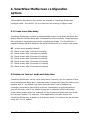
H1 - 'CTRL' and 'ALT' keys together (left or right hand keys operate) (default)
H2 - 'CTRL' and 'SHIFT' keys together (left or right hand keys operate)
H3 - 'ALT' and 'SHIFT' keys together (left and right hand keys operate)
H4 - 'RIGHT ALT' key
H5 - 'LEFT ALT' and 'RIGHT ALT' keys together
H6 - ‘LEFT CTRL’ and ‘LEFT ALT’ keys together
H7 - ‘RIGHT CTRL’ and ‘RIGHT ALT’ keys together
H8 - No hotkey enabled
4.5 Cycling between all channels or just the active channels
The SmartView Multiscreen can be set to cycle between all channels or just the
active channels when using ‘Hotkeys + Tab’ or a three button mouse to switch the
channel. This avoids wasting time viewing channels that are not active. Option are:
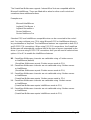
U7 – Cycle between all ports when switching with ‘Hotkeys + Tab’ or three button
mouse (default)
U8 – Cycle between active ports only when switching with ‘Hotkeys + Tab’ or three
button mouse
4.6 Firmware functions (version query, mouse restore and reset)
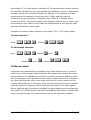
For technical support purposes, it may be necessary to find the firmware release
version for the control software in your SmartView Multiscreen. For example, if the
release version is v1.29 the response shown to F1f
F1f will be a brief display of
the digit ‘1’, then F2f
F2f will be a brief display of the digit ‘2’, then F3f
F3f will
be a brief display of the digit ‘9’. You can reset all of the configured options back to
SmartView Multiscreen
Installation and Use
Page 34