1
Getting Started
15
Installing RNS
Having checked that your computer meets the operating requirements, and upgraded
the drivers and adapters as necessary your computer is now ready for installing
RayTech RNS.
However, to make sure that RNS V5.0 operates correctly you should, before
installation, execute the Windows Add/Remove Programs utility and remove any
previously installed KiwiTech or RayTech program(s).
To run the Add/Remove Programs utility:
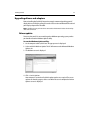
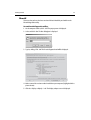
1. On the computer taskbar, click Start. The pop-up menu is displayed.
2. Select and click Control Panel. The control panel is displayed.
D6973_1
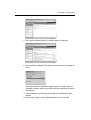
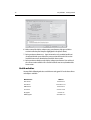
3. Click Add/Remove Programs. The Add/Remove Programs dialog box is displayed.
4. Select the program you wish to remove.
D6974_1
5. Click Change/Remove. The Change/Remove wizard is displayed.