1
Using the LCD Display Features
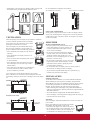
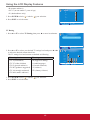
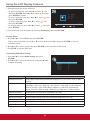
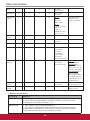
Changing Password
To change a new password:
1. Press MENU to display the OSD main menu.
2. Press ◄ or ► to select PARENTAL menu, then press ENTER to enter the menu.
3. Enter the password.
PARENTAL CONTROL
4. Press ▲ or ▼to select Change Password, then press ► to enter its
submenu.
Lock Parental Control
V-CHIP
Change Password
Keypad Lock
Source Lock
System Lock
MENU
:Return
:Move
:Go to Next Menu
ENTER
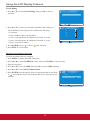
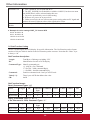
CHANGE PASSWORD
5. Enter the old password on Old PIN.
Old PIN
6. Enter your new password on New PIN.
New PIN
confirm
7. Enter your new password again on Confirm.
The screen will return to the PARENTAL CONTROL menu. This
indicates the password has been changed.
8. Press EXIT to exit the menu.
MENU
:Return
0-9
:Enter password
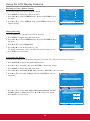
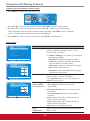
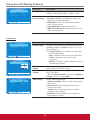
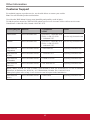
Blocking Selected Input Source
To block the selected input source:
1. Press MENU to display the OSD main menu.
2. Press ◄ or ► to select PARENTAL menu, then press ENTER to enter the menu.
3. Enter the password.
4. Press ▲ or ▼ to select Source Lock, then press ENTER to enter its
submenu.
PARENTAL CONTROL
Lock Parental Control
V-CHIP
Change Password
Keypad Lock
Source Lock
System Lock
MENU
:Move
ENTER
:Go to Next Menu
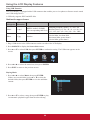
SOURCE LOCK
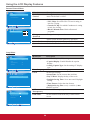
5. Press ▲ or ▼ to select the input source that you want to block.
Page 1/1
AV
6. Press ENTER to confirm.
A
:Return
YPbPr
DVI
icon indicates the selected input source has been blocked.
HDMI
7. Press EXIT to exit the menu.
PC
USB
MENU
18
:Return
:Move
:Page
ENTER
:On/Off