1
Optional equipment
protection against voltage surges and built-up static charges.
If optional equipment is to be installed, leave some space between
optional equipment and the LCD display set. Picture distortion
and/or noisy sound may occur if the LCD display set is positioned
in close proximity to any equipment emitting electromagnetic
radiation.
Section 810 of the National Electrical Code (NEC) in the U.S.A.
and Section 54 of the Canadian Electrical Code in Canada
provides information with in regard to proper grounding of the
mast and supporting structure, grounding of the lead-in wire to an
antenna discharge unit, size of grounding conductors, location of
antenna discharge unit, connection to grounding electrodes, and
requirements for the grounding electrode.
Small accessories
Keep small accessories in a safe place where children are unable
to reach.
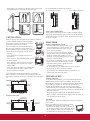
Antenna grounding according to the National Electrical Code,
ANS/NFPAFPA 70
Magnetic influence
Antenna
This LCD display contains a strong magnet in the speaker unit that
generates a magnetic field. Keep any items susceptible to magnetic
fields away from the speaker.
Ground clamp
Electric service
equipment
Sound
Antenna discharge
unit
Ground clamps
If you hear snapping or popping sound comes
from the LCD display continuously or frequently
while the LCD display is operating, unplug the
LCD display and consult your dealer or service
technician. It is normal for some LCD displays
to make occasional snapping or popping sounds,
particularly when being turned on or off.
Grounding conductors
Power service grounding
electrode system
Use in outdoor
CLEANING
This LCD display is not designed for outdoors
installation. Do not expose the LCD display to
rain, as it may result in a fire or an electric shock.
Also, do not expose the LCD display to direct
sunlight, as it may heat up and become damaged.
Cleaning the AC power plug
Unplug the AC power plug and clean it
regularly. If the plug is covered with dust and
gathers moisture, its insulation may deteriorate
and result in a fire.
Vehicle, ships and other vessels
Cleaning the screen surface/ cabinet of the LCD display set
Do not install this LCD display in a vehicle.
When cleaning this LCD display, unplug the
AC power cord. If not, it may result in electric
shock. Use a dry soft cloth to clean the cabinet
of the LCD display. To remove dust near
the screen, wipe it gently with a soft cloth.
Stubborn stains may be
removed with a cloth slightly dampened with a solution of mild
soap and warm water. Never use strong solvents such as thinner or
benzine for cleaning. If using a chemically pretreated cloth, please
follow the instruction provided on the package. The ventilation
holes can accumulate dust over time.
Car accidents may cause the LCD display to fall
down and cause injury.
Do not install this LCD display in a ship or vessel.
If the LCD display is exposed to seawater, it may
cause a fire or damage the LCD display.
Medical institutions
Do not place this LCD display in a place where medical equipment
is in use. It may cause the medical equipment to malfunction.
To ensure proper ventilation, we recommend you to remove the
dust periodically (once a month) using a vacuum cleaner, while the
LCD display is powered off.
Volume adjustment
• Adjust the volume to avoid disturbing your neighbors.
Sound carries easily at night. Therefore, we suggest you close the
windows or use headphones.
• When using headphones, adjust the volume to appropriate levels,
or hearing damage may result.
Disclaimer
Some chemical cleaners have been reported to damage the screen
and/or case of the LCD display. ViewSonic will not be liable for
damage resulting from use of these cleaners.
CARRYING THE LCD DISPLAY
ANTENNAS
Outdoor antenna grounding
Carry the LCD display as instructed
If an outdoor antenna is installed, follow the precautions below.
To prevent dropping the LCD display and causing serious injury,
you must follow these guidelines:
Do not install the outdoor antenna system near of overhead power
lines or other electric light or power circuits, or where it can come
in contact with such power lines or circuits.
• Disconnect all cables before carrying the LCD display.
• Carrying the large size LCD display requires at least two or three
people.
• When you carry the LCD display, place your hands as illustrated
and hold it securely. Do not put stress on the LCD panel and the
frame around the screen.
• When carrying the LCD display, do not subject it to shocks,
vibration, or excessive force.
WHEN INSTALLING AN OUTDOOR ANTENNA SYSTEM,
EXTREME CARE SHOULD BE TAKEN TO KEEP FROM
CONTACTING SUCH POWER LINES OR CIRCUITS AS
CONTACT WITH THEM IS ALMOST INVARIABLY FATAL.
Be sure the antenna system is grounded so that it can provide some
v