1
MIDI Implementation
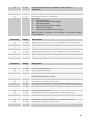
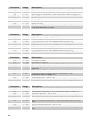
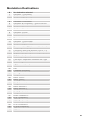
The Evolver receives MIDI data according to the mode controls in the Global Section.
In addition, there is interaction between some of the Program parameters that
determine the overall response of Evolver to MIDI data. Following are the Global
parameters that affect response to MIDI.
Global Parameters
MIDI Channel: ALL, 1…16 – Selects the MIDI channel to send and receive data, 1 to
16. All receives on any channel.
Poly Chain: Off, 2…20– Use this to link multiple Evolvers and Poly Evolvers into a
system with more voices by intelligently processing the keys hit and passing MIDI
data through to the Poly Chain MIDI out jack where it can be routed to another
Evolver or Poly Evolver. Note that MIDI clocks are handled separately per the MIDI
Clock parameter.
Local Control: Off, On – Enables or disables the internal connection between the
keyboard and panel controls and the synth electronics. This is useful with some
sequencers.
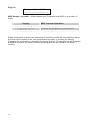
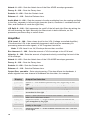
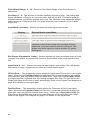
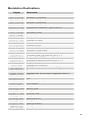
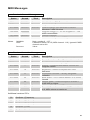
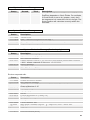
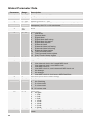
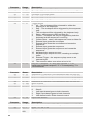
Clock: see table – Selects the MIDI clock status, and enables External sequencer
triggers, as follows:
Display
Internal
MIDI Clock Setting
MIDI clock is neither sent nor received
MIDI Out
MIDI clock is sent
MIDI In
MIDI clock is received
M In Out
MIDI clock is received and transmitted (use
with Poly Chain)
MIDI clock is received, but MIDI
start/stop/continue messages are ignored.
In no ss
36