1
Combo Parameters
Combos are used to make different combinations of Programs, and use them in
different ways. You can use up to four different Parts, each with its own set of 16
parameters.
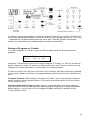
To edit the Combo parameters, first hit the desired COMBO PART Switch. The PARAM 1
knob now selects the parameter, and the PARAM 2 knob changes the value. The + and
– switches will increment/decrement the value also. The COMBO PART switches select
one of the four parts.
While playing a Combo, it is possible to edit the Program parameters of the individual
Parts, or of all the Parts together. If you turn a knob with no Parts selected (meaning
no Combo Part LEDs are on), the new value will go to all Parts. While this doesn’t
really make a lot of sense, since the Programs are often very different in each Part, it
turns out to be interesting to do quite often.
Otherwise, if you select a Part first, and then turn a knob, then just that Part will be
edited. This allows you to go between different parts while performing and change the
sound however you wish.
Note: You cannot save the individual programs in each Part while in Combo
mode. Since a Program can be used in many different Combos, saving the
changes will likely cause problems elsewhere.
Below we describe the 16 parameters for each Part. The upper LCD line shows the
Part number; lower lines are used for the parameter.
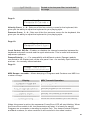
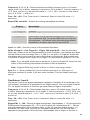
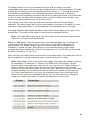
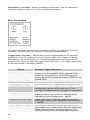
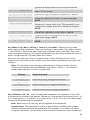
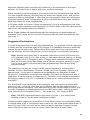
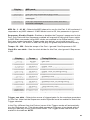
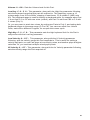
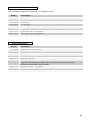
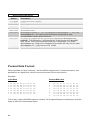
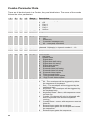
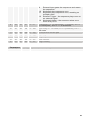
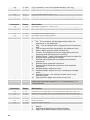
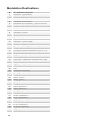
Mode: see table – Selects the polyphony of this Part. When a Combo is selected, it
starts assigning voices to Parts with Part 1. You cannot assign more than 4 voices.
For example, if you set both Part 1 and Part 2 to Poly 3, the total would be 6 voices,
so it obviously it will not work in a four voice instrument. In this case, it would assign
the first 3 voices to Part 1, and the last voice to Part 2, ignoring the rest of the Parts.
Looking at the voice LED’s on the front panel will help to see the voice operation.
Display
Off
Part Mode
Don’t use this Part
Poly 4
Assign 4 voices to this Part
Poly 3
Assign 3 voices to this Part
Poly 2
Assign 2 voices to this Part
Mono
Assign 1 voice monophonically to this Part
Program: 1…128 – Selects the Program to use for this Part.
Bank: 1…3 – Selects the Bank of the Program to use for this Part.
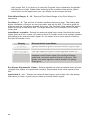
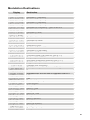
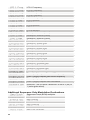
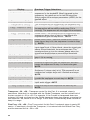
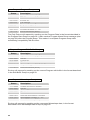
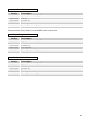
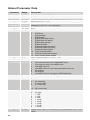
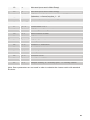
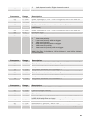
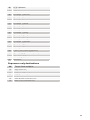
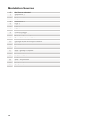
MIDI Mode: see table – Selects the Program to use for this Part.
44