1
Chapter 2: Installation
21
NOTE: Use only the power supply provided by Avocent.
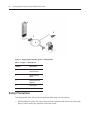
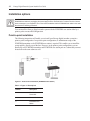
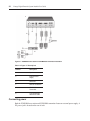
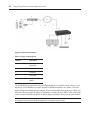
To connect power to the ECMS4000 user station and ECMS4000 transmitter:
1.
Plug the external power supply’s 2.5mm connector into the DC power jack on the rear of the
ECMS4000 user station and ECMS4000 transmitter.
2.
Connect the detachable IEC power cord to the power supply.
3.
Plug the IEC power cord into an appropriate wall outlet.
Networked installation
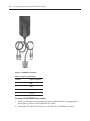
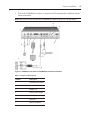
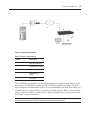
The following instructions will enable you to install your ECMS4000 user station and ECMS4000
transmitter in a networked configuration. In this installation, multiple ECMS4000 transmitters and
ECMS4000 user stations are attached via the same Ethernet network. In this case, it is important for
each unit to be configured with a unique IP address.
NOTE: In Desktop and Extender modes, the ECMS4000 user station and ECMS4000 transmitter can obtain their
IP address data from a DHCP server.
Transmitters and ECMS4000 user stations may be configured for use on a single subnet or for use
across routers. Use of routers, however, will cause a slight increase in end-to-end latencies, which
may not be acceptable for all applications.