1
3. Installation
Detector Circuit Connections
The left hand edge of the main PCB provides 14 connectors that can be used
for up to 8 zones.
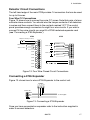
Four Wire CC Connections
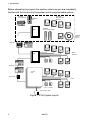
Figure 12 shows how to connect four wire CC zones. Note that pairs of alarm
contacts share contacts. You should wire the tamper contacts of all detectors
in series and then connect them to the contacts marked "A/T".The control
panel provides enough connectors for eight four wire circuits. If you wish to
connect 16 four wire circuits you must fit a 9755 hardwired expander card
(see "Connecting a 9755 Expander").
9750
9755
Tamper Contacts (in series)
A/T
Zone 09
Alarm contacts
CCT1
Alarm contacts
Alarm contacts
CCT9
Zone 10
CCT2
CCT3
Zone 11
Alarm contacts
CCT4
Zone 12
CCT10
CCT11
CCT12
CCT5
CCT6
Tamper contacts for zones 09 to 16.
A/T
CCT7
CCT8
Figure 12. Four Wire Closed Circuit Connections
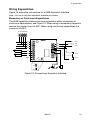
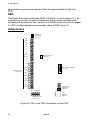
Connecting a 9755 Expander
Figure 13. shows how to wire a 9755 Expander to the control unit.
9750HWX
0V 12V CLK DATA
Control Unit
DATA
CLK
12V
0V
To other keypads
Figure 13. Connecting a 9755 Expander
Once you have connected an expander refer to the instruction supplied in
order to connect detectors.
496478
17