1
October 2013 – Ed.1.0
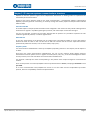
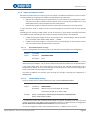
Call, answer and audio control:
Message
Address
Description
DEMCALL
E400
ACK_DEMCALL
CC
E400
ACK corresponding to DEMCALL
SIMCALL
CC
E400
Simulate user call
ACK_SIMCALL
E400
STARTAUDIO
CC
ACK_STARTAUDIO
E400
STOPAUDIO
CC
ACK_STOPAUDIO
E400
CC
CC
E400
CC
E400
CC
User call
ACK corresponding to SIMCALL
Audio activation – conversation begins
ACK corresponding to STARTAUDIO
Audio deactivation – conversation ends
ACK corresponding to STOPAUDIO
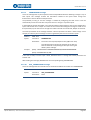
Inputs and outputs control:
Message
Address
Description
QRYPPORTCONFIG
CC
I/O configuration query
PPORTCONFIG
E400
WRITEPPORT
CC
ACK_WRITEPPORT
E400
READPPORT
CC
PPORT
E400
CC
I/O delivery values
CHANGEPPORT
E400
CC
Delivery caused by an input change
ACK_CHANGEPPORT
CC
E400
CC
E400
CC
E400
E400
Addresses delivery and I/O initial status
Outputs writing
ACK corresponding to WRITEPPORT
I/O reading
ACK corresponding to CHANGEPPORT
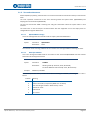
Inputs and outputs configuration (only in E401):
Message
Address
Description
CONFIGPPORT
CC
I/O configuration change
ACK_CONFIGPPORT
E401
E401
CC
ACK corresponding to CONFIGPPORT
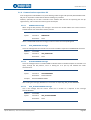
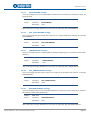
Test and maintenance:
Message
Address
Description
QRYSYSINFO
CC
Test of the system status
SYSINFO
E400
KEEPALIVE
CC
ACK_KEEPALIVE
E400
PLAYTONE
CC
ACK_PLAYTONE
E400
WORKINGMODE
CC
MODE
E400
EQUITEL E400 Family – Control and communications protocol
E400
CC
Result of the test status
E400
Maintenance of communications
CC
ACK corresponding to KEEPALIVE
E400
CC
E400
CC
Playing an audio tone
ACK corresponding to PLAYTONE
Working mode query
Answer to working mode
Page 8