1
BeatCompare
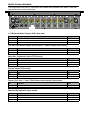
The BeatCompare microprocessor is a tool for
synchronised mixing music. The signal on the A and
the B side of the crossfader is continuously
searched for the presence of a beat. For this you
have to set the signal level which is transferred to
the crossfader at approximately 0dB (on PFL) and
open the fader.
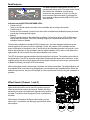
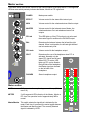
Indication on the BEAT/CROSSFADER-LED's:
• Continuously off
There is no channel routed to this side of the crossfader with a routing-select-switch.
• Continuously on
At least one the channels is routed to this side of the crossfader and the BeatCompare processor
is receiving not enough audio signal.
• Blinking
There is enough signal on this side of the crossfader. If a beat is found, the LED will blink along
with the beat of the music. If the LED is blinking irregular, no reliable beat has been found. The
indication is then not reliable.
The processor indicates on the adjust LED's (inside the up- and down triangles) which source and
how the speed of this source has to be adjusted. For this, the position of the crossfader and the
tempo of the beats of the signal on the A- and B-side of the crossfader are taken into account. Is the
fader in the left position (A can be heard), then the adjust indication of B is active. Is the fader in the
right position (B can be heard), then the adjust indication of A is active.
The LED in the arrow upwards indicates that the tempo has to be faster. The matching record has to
be played faster. The LED in the arrow downwards indicates that the tempo has to be slower, so the
matching record has to be played slower. When the signals both have the same tempo (even amount
of Beats Per Minute), the tempo LED will illuminate.
When both signals have the same tempo, the beats can still be incompatible. The adjust indication will
than indicate which record has to be slowed down or accelerated to get compatible beats. When the
beats are synchronous, the sync LED will light up. Now synchronized crossing using the crossfader is
possible.
Effect Sends (Channel 1 and 2)
The channels 1 and 2 (Mic 1 and Mic 2) both have a mono
effect send output which can be used to provide a signal for
effect equipment like reverbs and echoes. Default, the effect
sends are post-fader: the signal level depends on the position of
the fader. Pre-fader means the signal is fixed, not affected by
the fader.
With jumpers (situated on the Apollo main board), you can
select a pre- or postfader (see drawing) signal for both effect
send outputs.