1
Function Setup
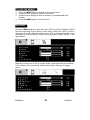
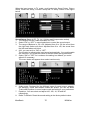
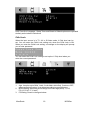
When the input source is in TV, AV or S-Video mode, you can select OSD Time
Out, Language, Child lock, Sleep Timer, CC Mode and Reset to Default. Shown in
the figure below:
1. OSD Time Out: Could set OSD display time from 10 seconds to 60
seconds
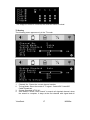
2. OSD language setting: Three languages provided - English, French and
Spanish.
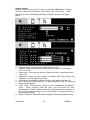
3. Child Lock Setup:
4.
5.
6.
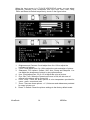
(1). Can enter the V-Chip level setting only if the Child Lock is ON to
enable the V-Chip. You could not enter V-Chip level setting if the Child
Lock Setup is OFF to disable the V-Chip.
(2). Lock code: Set up V-Chip password when lock code. Enter the 4digit password, which will be your choice. Default password is 0000.
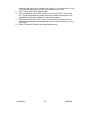
Sleep Timer: Set the sleeping timer and the alert function, which will indicate
the time left.
Closed Caption (CC) setting: Select CC1~CC4, TXT1~TXT4 or OFF.
Reset To Default: Reset the OSD settings.
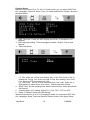
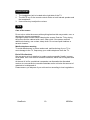
When the input source is in PC or Component mode, you can select OSD Time
Out, Language, Sleep Timer and Reset to Default; shown in the figure below:
ViewSonic
15
N2060w