1
D1256/D1257
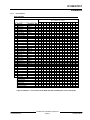
Installation
User Interface
#
138
139
140
141
142
143
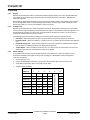
Custom Functions*
Custom Function 138
Custom Function 139
Custom Function 140
Custom Function 141
Custom Function 142
Custom Function 143
Report Levels
Force Arm ?
Area O/C ?
Restricted O/C ?
Perimeter O/C ?
Send Duress ?
Passcode Arm ?
Passcode Disarm ?
E/P
E
E
E
E
E
E
1
2
3
4
5
Authority Levels
6
7
8
9
P
P
P
P
P
P
P
E
E
E
E
E
E
E
E
E
E
E
E
E
E
E
E
E
E
E
E
E
E
E
E
E
M
I
M
D
P
D
P
D
P
D
D
E
E
E
10
11
12
13
14
E
E
E
E
E
15
E
♦Access Levels**
♦ Access Level ?
♦ Disarm Level ?
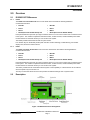
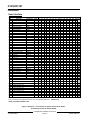
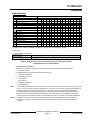
* Command Center Function Authority Level Options: Blank = Disabled, E = Enabled. A boldface P or E indicates that this
command center function is invisible in the [CMD Ctr functions] menu of the D5200 Programmer.
♦ D9412 only.
** Access Authority Level Options:
Access Level?
M = Any Armed State, P = Perimeter Armed, D = Disarmed, Blank = No Access
Disarm Level?
I = Disarm to Perimeter Instant, D = Disarm All, Blank = No Disarm Rights
Figure 8: Example 6 Continued – User Interface for D7212, D7412, D9112, D9412,
and D9124 (that uses the D9112LTB-EX)
Command Center Functions
The following command center function must be turned on to enable the DETECTOR RESET key.
•
#27 Reset Sensors
It is suggested that the items below be included in the menu.
•
•
•
•
•
•
#9 View Event Memory
#10 View Point Status
#12 Fire Test
#21 View Log
#29 Remote Program
#32 Display Rev
Note:
For D7212B and D9112B Control/Communicators, it is important to enable each of these items with an "E" and
not a "P." If any of the above items are enabled with a "P" then a custom function must also be established to
execute the menu item from the command center. This custom function would include the appropriate
embedded passcode to let the system function. For example, if View Event Memory were to be passcode
protected and the chosen passcode was 125600, the macro string would be A40125600E. Consideration
should be given to passcode protecting the command center function in combined burglary/fire applications.
Note 2:
For D7212, D7412, D9112 and D9412 Control Communicators, embedding passcodes inside Custom
Functions is not allowed. Therefore, any command used in Custom Function, should not be passcode
protected.
© 2000 Radionics
D1256/D1257 Installation Instructions
Page 15
74-06925-000-B