1
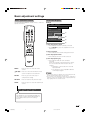
Basic adjustment settings
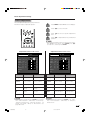
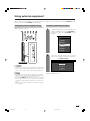
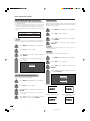
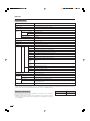
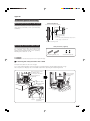
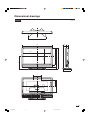
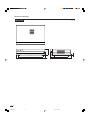
Manual setting for each channel
You can set some channel items manually. They are
Search, Fine (TV frequency), Colour sys., Sound sys.,
Label (Network name), Skip, Lock (Child Lock) and
Booster.
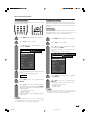
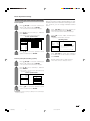
Search tuning
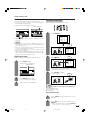
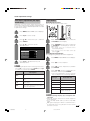
1
• The selected channel information displays.
2
1
Press a/b/c/d to select the channel you
want to edit, and then press ENTER.
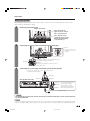
Press MENU and the MENU screen displays.
Press a/b to select “Search”, and then
press ENTER.
[Setup ... Programme Setup ... Manual Adjust]
MENU
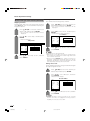
Press c/d to select “Setup”.
2
3
Search
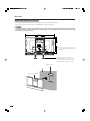
Press a/b to select “Programme Setup”,
and then press ENTER.
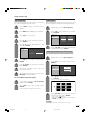
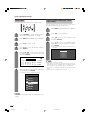
If you have already set the password, enter
it here.
Fine
[179.25]
Colour sys.
[AUTO]
Sound sys.
[B/G]
Label
[SAT.1]
179.25
NEXT
[Off]
STORE
Lock
[Off]
CANCEL
Booster
[Off]
Skip
MHz
• See page 56 for setting password.
4
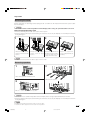
Press a/b to select “Manual Adjust”, and
then press ENTER.
5
Press c/d to select “Yes”, and then press
ENTER.
Programme Setup “Manual Adjust” menu
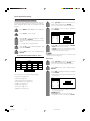
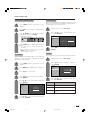
3
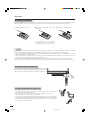
Press a/b to select item and press ENTER.
• NEXT: Search the next channel.
• STORE: Memorise the current display channel.
• CANCEL: Return to the previous screen. (The
search result will not be stored.)
NOTE
• Search tuning cannot be used when L’ is selected in Sound
system menu. (See page 25.)
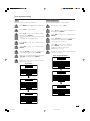
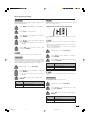
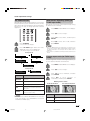
Fine tuning
01 SAT.1
02 PR07
03 KABEL
1
Press a/b/c/d to select the channel you
want to edit, and then press ENTER.
• The selected channel information displays.
2
Press a/b to select “Fine”, and then press
ENTER.
3
Press c/d to adjust the frequency, and then
press ENTER.
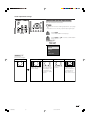
Next
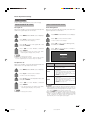
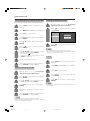
You can select one of the following settings.
1 Search (See page 24.)
2 Fine (See page 24.)
3 Colour system (See page 25.)
4 Sound system (See page 25.)
5 Label (See page 25.)
6 Skip (See page 26.)
7 Lock (See page 26.)
8 Booster (See page 26.)
• Adjust while checking the background picture
as a reference.
Search
Fine
[179.25]
Colour sys.
[AUTO]
Sound sys.
[B/G]
Label
179.25
MHz
[SAT.1]
Skip
[Off]
Lock
[Off]
Booster
[Off]
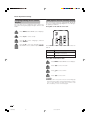
• Instead of the method above, you can also set
by directly entering the frequency number of
the channel with 0 – 9.
a
• 179.25 MHz: Press 1 s 7 s 9 s 2 s 5.
• 49.25 MHz: Press 4 s 9 s 2 s 5 s ENTER.
24
LC-65G5X(E)-c
24
05.10.17, 7:35 AM