1
INSTALLING THE IRIS X
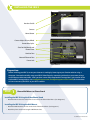
Handset Cradle
Camera
Home Button
Front of IRIS X (not powered on)
(Diagram 1)
Back of IRIS X
(Diagram 2)
Camera Adjust/Privacy Wheel
Removable Stylus
Slots for Wall Mount and
Phone Stand
Handset Port
Network Ethernet Port
Power Jack
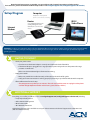
Preparation:
Before installing your IRIS X, ensure your Internet is working by browsing to your favorite website using a
computer. You need to initially setup your IRIS X Video Phone by connecting it directly to your router using a
wired Ethernet cable connection. After you have successfully completed the setup process, please refer to the
enclosed Wi-Fi setup guide or visit acndigitalsupport.com (acndigitalsupport.ca for Canada) for instructions
on how to connect your IRIS X to your Wi-Fi network.
STEP
1
Choose Wall Mount or Phone Stand
Installing the IRIS X Using the Video Phone Stand
C Attach the Phone Stand to either of the slots on the back of the Video Phone. (See Diagram 2).
Installing the IRIS X Using the Wall Mount
C Attach the Wall Mount to the slots on the back of the Video Phone. (See Diagram 2).
C Attach the phone to the wall using the Wall Mount slots.
Continued on reverse side