1
PL40NE01-1.book
84 ページ
2002年7月23日 火曜日 午後6時52分
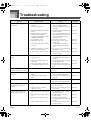
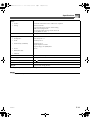
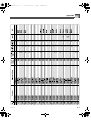
Troubleshooting
Troubleshooting
Problem
No sound when keyboard keys
are pressed.
Auto accompaniment does not
sound.
Sound output does not change
when key pressure is varied.
No sound produced by demo
tune play.
Memory contents deleted.
Possible Cause
Action
See page
1. Power cord is not connected
correctly.
1. Check to make sure the power
cord is connected correctly.
Page E-14
2. Power is not turned on.
2. Press the POWER button to turn
on power.
Page E-18
3. MAIN VOLUME knob setting is
too low.
3. Use the MAIN VOLUME knob to Page E-18
increase volume.
4. Playing in the accompaniment
keyboard range while the
accompaniment mode is CASIO
CHORD or FINGERED.
4. Auto accompaniment is turned
Page E-23
off, which is indicated when none
of the accompaniment mode
indicators are lit.
5. “Local Control” is off.
5. Turn on “Local Control”.
Page E-79
6. The melody part is off.
6. Use the mixer to turn on the
melody part.
Page E-47
7. The melody part volume setting
is too low.
7. Use the mixer to increase the
volume setting for the melody
part.
Page E-47
8. MIDI IN command has lowered
the master volume setting.
8. Use “System” to raise the “Total
M.Volume” setting.
Page E-80
9. “DSP Volume” setting is too low.
9. Use “System” to raise the “DSP
Volume” setting.
Page E-80
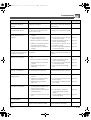
1. ACCOMP/SONG VOLUME knob
setting is too low.
1. Use the ACCOMP/SONG
VOLUME knob to increase the
volume.
Page E-26
2. Auto accompaniment parts are
turned off.
2. Use the mixer to turn on the auto Page E-47
accompaniment parts.
3. The volume settings of the auto
accompaniment parts are too low.
3. Use the mixer to increase the
volume settings of the applicable
parts.
Touch response is turned off.
Page E-47
Use the FUNCTION button to select a Page E-32
touch curve.
1. MAIN VOLUME knob set to
MIN.
1. Move MAIN VOLUME knob
more towards the MAX side.
Page E-18
2. Headphones connected to the
piano.
2. Disconnect the headphones from
the piano.
Page E-16
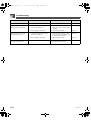
Lithium battery is dead.
Contact your CASIO Service Provider Page E-90
for replacement of the lithium battery.
Nothing happens when the
LAYER or SPLIT button is
pressed.
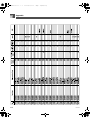
1. Upper2, Lower1, or Lower2 is off.
1. Use the mixer Mode to turn on the Page E-47
part on/off setting.
2. Upper2, Lower1, or Lower2
volume is too low.
2. Use the mixer Mode to raise the
part volume.
Page E-47
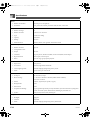
Some parts don’t play at all
during sequencer playback.
1. Mixer Mode part on/off setting is
off.
1. Use the mixer to make sure that
parts are turned on.
Page E-47
2. Mixer Mode part volume setting
is 0.
2. Use the mixer to check the
volume setting.
Page E-47
3. Song volume setting is too low.
3. Use the ACCOMP/SONG
VOLUME knob to raise the song
volume.
Page E-26
4. “DSP Volume” setting is too low.
4. Use “System” to raise the “DSP
Volume” setting.
Page E-80
E-84
426-E-086A