1
PL40NE01-1.book
86 ページ
2002年7月23日 火曜日 午後6時52分
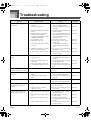
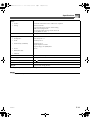
Troubleshooting
Problem
Keyboard keys do not light.
Keyboard keys do not light
during sequencer playback.
Keyboard keys do not light
during MIDI data play.
No sound when playing back
from the Music Library.
E-86
Possible Cause
Action
Key Lighting is turned off.
Turn on Key Lighting.
See page
Page E-21
1. The selected track does not have
any data recorded in it.
1. Select the track that contains the
data you want to control the key
lighting.
Page E-60
2. Key Lighting is turned off.
2. Turn on Key Lighting.
Page E-21
1. The data channel and navigate
channel are different.
1. Make the tune’s channel whose
notes you want to light the same
as the navigate channel.
Page E-79
2. Key Lighting is turned off.
2. Turn on Key Lighting.
Page E-21
Song volume setting is too low.
Use the ACCOMP/SONG VOLUME
knob to raise the song volume.
Page E-26
426-E-088A