1
PL40NE01-1.book
85 ページ
2002年7月23日 火曜日 午後6時52分
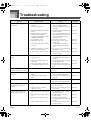
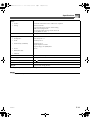
Troubleshooting
Problem
Possible Cause
Some parts stop playing at some Playback exceeds the maximum
point during sequencer
polyphony of the piano.
playback.
Cannot record auto
accompaniment rhythm.
No sound is produced when
playing MIDI data from a
computer.
Action
Use the mixer Mode to turn off some
tracks (parts) to reduce the number of
playback tracks.
See page
Page E-47
Trying to record auto accompaniment Select the system track and try
Page E-57
to a non-system track (non-system
recording auto accompaniment again.
tracks: Tracks 1 to 16).
1. MIDI cables are not connected
properly.
1. Connect MIDI cables properly.
Page E-66
2. The part is turned off or its
volume setting is too low.
2. Use the mixer to turn on the part
or increase its volume.
Page E-47
3. Receive channels are turned off.
3. Specify the channel using the
receive channel setting.
Page E-80
4. MIDI IN command has lowered
the master volume setting.
4. Use “System” to raise the “Total
M.Volume” setting.
Page E-80
5. The USB cable is not connected
properly.
5. Check to make sure the USB cable Page E-69
is connected properly.
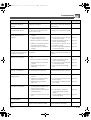
Playing on the keyboard
produces strange sound when
connected to a computer.
The computer’s MIDI THRU function
is turned on.
Cannot record data played on
the piano to a computer.
1. “Accomp MIDI Out” is turned
off.
1. Turn on “Accomp MIDI Out”.
Page E-79
2. Receive channels are turned off.
2. Specify the channel using the
receive channel setting.
Page E-80
3. The USB cable is not connected
properly.
3. Check to make sure the USB cable Page E-69
is connected properly.
4. “Real Time Message Out” is
turned off.
4. Turn on “Real Time Message
Out”.
Piano cannot receive exclusive
messages over MIDI IN.
No sound from the left speaker
or right speaker.
DSP effects are not applied even
when they are turned on.
Turn off the computer’s MIDI THRU Page E-79
function or turn off “Local Control” on
the piano.
The exclusive message device ID does Make sure the exclusive message
not match the piano’s device ID.
device ID matches the piano’s device
ID.
Page E-79
Page E-79
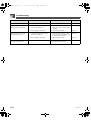
1. The mixer pan setting is at either
extreme.
1. Check the mixer pan setting.
Page E-48
2. MIDI IN command has shifted
master pan to either side.
2. Use “System” to adjust the “Total Page E-80
M.Pan” setting.
3. DSP Pan setting is shifted to
either side.
3. Use “System” to adjust the “DSP
Pan” setting.
Page E-80
1. The mixer DSP setting is turned
off for the part to which you are
trying to apply an effect.
1. Turn on the mixer DSP setting.
Page E-48
2. The mixer reverb send and chorus
send settings are 0.
2. Use the mixer to change the
reverb send and chorus send
settings.
Page E-48
3. DSP reverb send and chorus send
are 0.
3. Change the DSP reverb send and Page E-48
chorus send setting.
The mixer Mode pan effect is
not being applied.
DSP is turned on for the part.
Change the DSP pan setting.
Page E-48
Auto harmonize effect does not
work.
The current accompaniment mode is
normal or FULL RANGE CHORD.
Change the accompaniment mode to
CASIO CHORD or FINGERED.
Page E-23
426-E-087A
E-85