1
6. OPERATION CONTROLS AND FUNCTIONS
6.1 Front Panel
POWER
SYNC
HDMI
LINK
1
2
3
CAT5e / 6 / 7 OUT
LINK 1
LINK 2
LINK 3
LINK 4
LINK 5
LINK 6
LINK 7
4
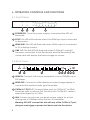
1 POWER LED: Once the power supply is connected the LED will
illuminate
2 SYNC: This LED will illuminate when the HDMI input port connected
to the source.
3 HDMI LINK: This LED will illuminate when HDMI output is connected
to TV or display monitor.
4 LINK 1~7: The link LED will illuminate when CAT5e/6/7 output(s)
has been connected to the Receiver(s) and the Receiver(s) has
connected with display that shows image on screen.
6.2 Rear Panel
CAT5e / 6 / 7 OUT
HDMI IN
HDMI OUT
1
2
3
4
5
6
7
LAN
IR IN
DC 24V
IR OUT
EDID
STD
1
2
3
4 5 6
SERVICE
TV
7 8 9
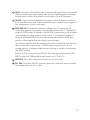
1 HDMI IN: Connect with source equipment such as DVD/Blu-ray or
PS3 player.
2 HDMI OUT: Connect to HDMI display for instant image display or
cascade with another family type Transmitter.
3 CAT5e/6/7 OUT 1~7: Connect these ports to CAT5e/6/7 to HDMI
Receivers (with or without PoE function) with CAT5e/6/7 cable to
extend the signal up to 100m.
4 LAN: Connect to intra-net or internet service system for a total
sharing rate of 100Mbps within the link of Transmitter.
3
Warning: DO NOT connect this slot with any of the CAT5e/6/7 port,
doing so may trigger a power shot down and ruin the device.