1
DATECS DPP-450
Programmer’s Manual
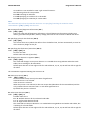
‘1’: Cell size 4.
91. Selecting the print direction in page mode (GS T)
Code: [1Dh] + [54h] + n
The command selects the current print direction and set starting point to (0, 0) according to
this direction. Accepted values of n:
0 or ‘0’ Printing from left to right, feed to bottom. Starting point in left top corner of the
page.
1 or ‘1’ Printing from bottom to top, feed to right. Starting point in left bottom corner
of the page. 2 or ‘2’ Printing from right to left, feed to top. Starting point in right
bottom corner of the page. 3 or ‘3’ Printing from top to bottom, feed to left. Starting
point in right top corner of the page.
In page mode this command changes immediately the print direction. In standard mode the new
value is memorized and used after entering page mode.
The command is supported in firmware version 1.42 or higher.
92. Selecting standard mode (GS U)
Code: [1Dh] + [55h]
The command switches from page mode to
standard mode. The whole memory area of page
mode is cleared.
The command is invalid in standard mode.
The command is supported in firmware version 1.42 or higher.
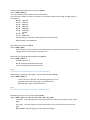
93. Setting the print area width (GS W)
Code: [1Dh] + [57h] + n1 + n2
This command sets the print area width in dots (1/203 inches). This command only works when it is
entered at the beginning of a line. The defined value of print area width is n1+256*n2 dots. The
default value depends on the mode 104mm paper roll and 832dots.
The command is valid in standard mode only.
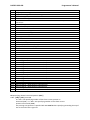
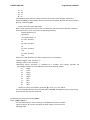
94. Drawing a rectangular box with selected thickness in page mode
(GS X) Code: [1Dh] + [58h] + xL + xH + yL + yH + dxL + dxH + dyL +
dyH + n + d
xL and xH
Low and high byte of the horizontal position of the top left corner of the box in the
active page.
Low and high byte of the vertical position of the top left corner of the box in the
yL and yH
active
page.
dxL and dxH
Low and high byte of the width of the box.
dyL and dyH
Low and high byte of the height of the box.
n
Filling mode:
0 or ‘0’
Area under the box is cleared (white).
1 or ‘1’
Area under the box is filled (black).
2 or ‘2’
Area under the box is inverted.
d
Box thickness (from 1 to 64).
The coordinates are relative to the left corner of the page, defined using ESC W (The print