1
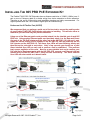
LED indicators will provide visual operational status of the 865 PRO units.
Mode – Yellow Solid LED
Off = CO unit
On = CPE unit
Sync
– Green slow to fast flicker LED on power up – indicates negotiation of a link
– Green solid LED indicates link established and rapid pulse is traffic
Act
– Yellow LED
Off = No device attached or detected
On = Solid, indicates the presence of local LAN
On = Blinking, indicates the presence of local LAN traffic
Power – Green Solid LED indicates the unit is receiving 12V power
Performing the On-Site Installation
After removing the Enable-IT 865 PRO PoE Extender Kit from the box, and performing the Out
Of The Box Testing (OOTBT), all that remains to install the unit on-site is to mount the unit, build
the interconnect wiring, add voice lines if needed, and attach the LAN device cabling with the
provided Ethernet Patch cords.
Mounting the Enable-IT 865 PRO PoE Extender Units
The Enable-IT 865 PRO extended Ethernet solution is designed for quick wall mounting.
Choose a location to mount each of the Enable-IT 865 PRO’s where the maximum distance
does not exceed 3,500ft (1,066m) total between devices to be connected. When wallmounting the Enable-IT 865 PRO unit it is recommended that you use the appropriate screw
anchors for your mounting surface. If mounting on existing plywood use wood screws; if
mounting onto drywall or sheetrock, use plastic drywall anchors to secure your installation.
Building the 865 PRO Interlink Wiring
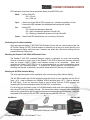
The most important aspect of the installation is the correct wiring of the Interlink cabling.
The 865 PRO Interlink port (RJ-45 interface) carries this 2-pair or more signaling over the RJ-45
(pins 1 & 2) - used as transport for 240Mbps VDSL2 data and (pins 4 & 7) - used as transport
for PoE Power. If you use more than 2-pair or more of wiring, such as a CAT5 segment, the
remaining RJ-45 pins can transport native 802.3af PoE, or are unused.
For all wiring you will need to crimp a RJ-45 Male head to each end of the contiguous wire run
and using all RJ-45 pins straight through. We recommend using a category rated twisted pair
cable as it is optimized for high throughput frequencies isolated from cross-talk noise. Insert the
completed RJ-45 ends into the 865 PRO Interlink port on each 865 PRO unit.
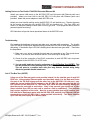
865 PRO CPE
865 PRO CO
RJ-45 Interlink Cabling up to 3,500 feet
All Rights Reserved © 1997 - 2015 Enable-IT™, Inc.
Page 3
! of 9
!