1
Winmate E430 Series PDA
User Guide
3.7Sound and Notifications
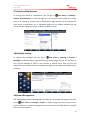
To change the sound or notifications, you can go to
Start menu > Settings >
Sounds & Notifications. In Sounds page you can set when will enable the sounds
such as for events or screen taps. In Notifications page you can set the sounds for
each event in drop-down list. In Vibrations page you can enable vibration for tap
screen and the vibrate type such as short, medium or long.
3.8Backlight Setting
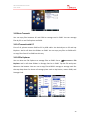
To change the backlight, you can go to
Start menu > Settings > System >
Backlight. In Battery Power page and External Power page you can set the time to
turn off the backlight if E430 is not used for a specific time. And you can use
drop-down list to select the time. In Brightness page you can adjust the brightness by
scroll bar.
3.9Power Management
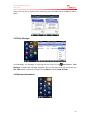
The setting about Power Management will help you to extend the battery life time.
Go to
Start menu > Settings > Power. In Battery page you can see the current
status of battery. In advanced page you can turn off screen if E430 idle for a specific
time to save the power.
19