1
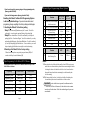
1-7 Turbo mode requires the connection of the emergency brake wire for either
automatic or manual transmission vehicles. With this mode, engine will
continue running for two minutes after key is turned off if the emergency
brake was set before the key was turned off and the foot brake was not
being pressed when the key was turned off.
1-8 This feautre is needed for diesel engine when you don’t use glow plug wires.
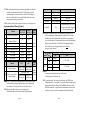
Programming Menu #2 (Security Options)
Ignition Kill
Optional
Factory Default
Programming
Setting - Button I Setting - Button II
Method
Feature
2-1
Cold Start with Temp Sensor
OFF
ON
2-2
Timer Start or Minimum Interval
between Cold Starts
Passive Arming
Anti-jacking
Ignition Controlled Door Lock
Aux 1 Output
Aux 2 Output
Siren Duration
3 Hr
1.5 Hr
2-3
2-4
2-5
2-6
2-7
2-8
Feature
2-9
2-10
Channel Expander
Passive Arming with the
Channnel Expander
Passive Locking, too No Passve Locking Remote
controller
OFF
ON
OFF
ON
0.5 Sec
Latch
0.5 Sec
Latch
30 Sec
60 Sec
OFF
ON
Note : 2-1 Cold start mode requires installation of the temperature sensor.
In the default factory setting, Cold Sensor input works as Remote Start
Activation Input. A Ground pulse to this wire will start the vehicle
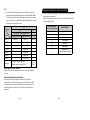
2-4 With this option, Panic mode becomes Anti-Jacking mode.
The differences between Panic mode and Anti-Jacking mode are:
Anti-Jacking Mode
IV for 2 seconds
1.5 minutes
Ignition-Kill
N/A
Activated immediately if key is not on.
If key is on, activated in 30 seconds
after pressing the Button IV
N/A
2-5 Automatic Transmission Vehicle: This programmable option enables your
vehicle to automatically lock the doors upon starting the vehicle with a key.
In addition, the vehicle will automatically unlock the doors upon pulling the
key out from the ignition. This option must be chosen at the time of installation.
Manual Transmission Vehicle or Turbo Mode: This Programmable option
will locks the doors after starting the vehicle with a key and the
emergency brake is released.
2-9
Setting
Contents
2-6
Programming
Method
Non using of Channel Using of Channel
Expander module Expander module Option
Programmer
When Option 2-9 is on
Non using of Passive Using of Passive (CM3 -Series)
Mode with remote Mode with remote
Page 10
Panic Mode
Button
IV for 2 seconds
Siren
1.5 minutes
Installation required
Starter-Kill
Starter Kill
Activated immediately
2-7
off
Off
Pluse
on
off
Latch
on
Latch
On
1-99, Latch
Pluse
1-99, Latch
2-6 & 2-7
You can program the duration between 1 to 99 seconds.
You can program the “Latch Mode” also.
2-9 If you need more than 2 Aux outputs, you can interface the CM3000 with
Channel Expander for 7 Aux outputs. If you take this Channel Expander option
and you turn on the Passive setting of the Nu4000R, the four buttons of the
Nu4000R operate these 7 outputs instead of normal button functions such as
arm/disarm or start/stop. Refer to the manual of the Channel Expander.
Page 11