1
Troubleshooting
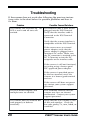
If the scanner does not work after following the previous instructions, refer to the chart below for possible problems and how to
fix them.
Problem
The scanner fails to power-up. The
LED is not lit and no tones are
emitted.
Possible Causes/Solutions
The interface cable is loose or not
plugged into the POS Terminal.
Verify that the interface cable is
connected to the POS Terminal
Connector.
Verify that the scanner interface is
compatible with the POS Terminal.
If the scanner uses an external
power adapter, verify that the
power adapter is plugged into a
functional AC outlet. Make sure
the DC connector is attached to the
DC Y-Conector, or into the DC
receptacle on the interface cable.
If the scanner is still not functional,
try testing using a known good
PSC approved power adapter.
If the scanner is provided power
by the host terminal, move the
scanner to a known good terminal
and test.
If the scanner still does not power
up, contact your system support
personnel.
The LED flashes brightly, and
multiple tones are emitted.
This condition indicates that the
scanner may have an internal
malfunction. Contact your system
support personnel.
The scanner does not read the bar
code properly or behaves
erratically.
Verify that the scan window is free
of dirt and smudges. Check the
bar code quality, i.e., torn, faded, or
wrinkled.
20
VS800™ Scanner User's Guide