1
• Flashes from dim to bright once per second – indicates the
scanner is in the Sleep Mode due to an extended time of
inactivity.
• Flashes repeatedly accompanied by a series of tones – indicates a failure has occurred. If the scanner exhibits this behavior or behaves erratically, contact your service personnel.
Audible Indicator
A Speaker produces an audible indicator of scanner operation:
• Normal – A single tone indicates the scanner read a "good"
bar code.
• Passed Selftest – A series of four tones when power is first
applied indicates the scanner has passed the Selftest.
• Error Tone – A series of tones sound to alert the operator of a
possible system or component failure. (Refer to Troubleshooting section).
Switch Button
Pressing the Switch momentarily "wakes up" the scanner if it is in the
Sleep Mode.
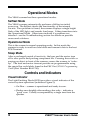
Motion Sensor
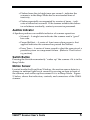
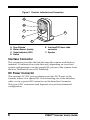
Located inside the Front Scan Window, the motion sensor detects a
change in ambient light levels caused by moving an item in front of
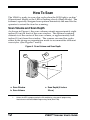
the scanner, and wakes up the scanner if it is in Sleep Mode. Figure
2, below, shows the indicators, controls, and connectors of the VS800
scanner.
VS800™ Scanner User's Guide
5