1
Getting the DV Camera Ready
Connecting the DV Camera
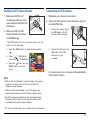
1. Make sure the SD card*
containing the files you wish
to download is inserted in the
DV camera.
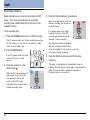
1. Make sure your computer is turned on.
2. Make sure that the USB
Switch function is switched
to USB Mode ( ).
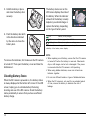
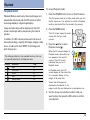
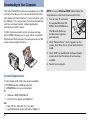
2. Connect the DV camera to your computer, using the
provided USB cable.
•
Connect the narrow end of
the USB cable to the DV
camera’s USB connector.
•
Connect the flat end of the
USB cable to the USB
connector of your
computer.
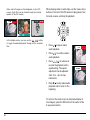
If the USB Switch is set to the incorrect mode, you will
need to do the following:
a.
Press the MENU button to enter the Setup mode
( ).
b. Select “
” – USB Switch,
then select
—“USB Mode”.
c.
Press the
button, then the
MENU button to exit the
menu.
In a few moments, your computer will automatically
detect the DV camera.
NOTE:
• With an SD card installed in your DV camera, the system
reads both contents from the SD card and the DV
camera’s internal memory.
• Without an SD card installed in your DV camera, the
system reads contents from the internal memory alone.
• The SD card may be placed into any card reader device.
The files stored on the card can then be read from the
card reader and copied to the computer.
* SD card is optional and is not included with your purchase.
51