1
CFX-9850GB Plus
Note 1I • Formula-Generated Lists
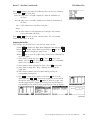
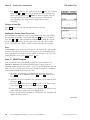
Enter the data into a list. (See Note 1A.) Move the cursor to another list,
arrow up to highlight the list name, and press EXE . Enter the formula for
the operations you wish to perform. For example, if List 2 is defined as List 1
plus 47, highlight List 2, press OPTN , then press F1 (LIST) F1 (List) 1 4 7 EXE .
If you get an error message, press AC/ON . Make sure you have highlighted the
name of the list before you enter the list operation. You can perform
operations with list variables the same way you do with numbers. You can
add, subtract, multiply, divide, or do any other mathematical operation.
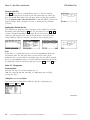
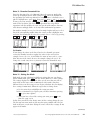
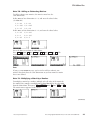
For another example, let List 1 be a list of rectangle lengths and let List 2 be a
list of the corresponding widths. Move the cursor so that it highlights List 3
and enter the formula for the area of a rectangle, List 1 List 2, by pressing
OPTN F1 (LIST) F1 (List) 1 F1 (List) 2 . Press EXE .
List Formulas
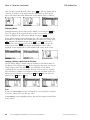
If you change the values in the list referred to in a formula, you must
reenter the formula in order to update the values in the new list. For
example, let List 1 be {2, 3, 4} and define the name of List 2 to be 3 List 1.
Now edit one of the entries in List 1; for example, change the 3 to 5. To
change the second entry in List 2, you must reenter the formula for List 2.
Note 1J • Setting the Mode
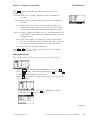
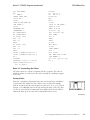
Each mode on your calculator has different settings that you can change.
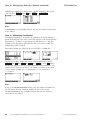
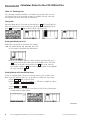
While in RUN mode, press SHIFT [SET UP]. Arrow down to see more settings.
The settings displayed in the screens above are the ones that you will use
most often in this course while in RUN mode. Other modes may have
different choices on their setup screens. If your calculator does not display
these settings in RUN mode, follow the steps below to change them.
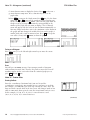
a. Use the arrow keys to highlight the setting you want.
b. Press a function key to register your selection. Sometimes pressing
F6 (¤) gives more options.
c. When you have selected the settings you want, press EXIT to exit
from the setup screen.
In this class you will need to change some of these settings during the year.
The list may not mean much to you now, but your textbook will refer you
back to this note several times during the course. All of these settings do not
appear in all modes.
(continued)
©2003 Key Curriculum Press
Discovering Algebra Calculator Notes for the Casio CFX-9850GB Plus
21