1
2. Software Description
2.3 supported models
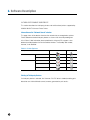
The table below lists the KONICA MINOLTA devices supported by each of the Universal
Printer Drivers.
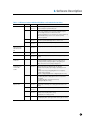
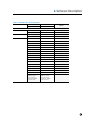
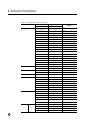
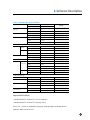
Table 2-3-1 KONICA MINOLTA products supported by Universal Printer Driver
Individual
Child Drivers (*1)
KONICA MINOLTA Common Child Drivers (*2)
bizhub series
magicolor & pagepro series
bizhub 350/250/200
bizhub C353P
magicolor 4650EN/DN
bizhub 362/282/222
magicolor 8650DN
magicolor 5550/5570
bizhub 500/420/360
bizhub C200
magicolor 5650/5670
bizhub 501/421/361
bizhub C360/C280/C220 (*4)
magicolor 5450
bizhub 750/600
bizhub C650/C550/C451 (*4)
magicolor 4695MF
bizhub 751/601
bizhub C652/552 (*4)
pagepro 4650/5650
bizhub C250/C250P
bizhub C20P
bizhub C252/C252P
bizhub C30P/C31P
bizhub C352/C352P/C300
bizhub 40P
bizhub C353/C253/C203
bizhub C20
Common
Child Drivers (*3)
Other products
bizhub C360/C280/C220.
bizhub C450/C450P/C351
bizhub C650/C550/C451
bizhub C35/C35P/magicolor
4750
bizhub C652/C552/C452
bizhub C652DS/C552DS
(*1) This indicates a printer driver supporting an individual model. The devices listed in
this column can print using nearly the same functionality as a normal driver. See Table
2-3-2 Differences between Individual Child Drivers and Production Version Drivers for
details about the differences between normal child drivers and Individual Child Drivers.
(*2) This signifies common printer drivers for KONICA MINOLTA devices. There are two
types: one for the bizhub series, and one for the magicolor and pagepro series.
(*3) These are common printer drivers included with third-party products. Only the main
functionality is available. (See section 2.4).
(*4) The supported drivers depend on the device's firmware. The Individual Child Driver
can be used if the latest firmware is used.
6