1
Chapter 8
Configuring the Trunk and Subtended Interfaces
Configuring T1/E1 Multiplexing over ATM
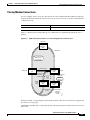
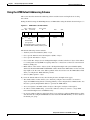
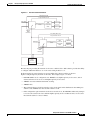
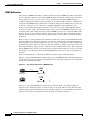
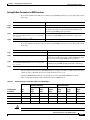
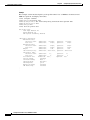
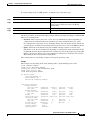
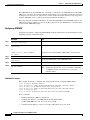
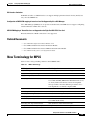
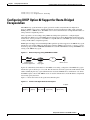
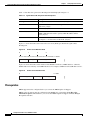
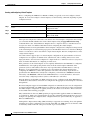
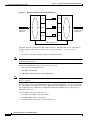
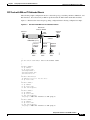
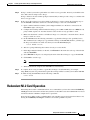
Figure 8-1
IMA Inverse Multiplexing and Demultiplexing
IMA group
IMA group
PHY
Link #1
PHY
Link #2
Single ATM cell
stream from
ATM layer
PHY
PHY
Original cell
stream passed
to ATM layer
PHY
48998
Link #3
PHY
IMA virtual link
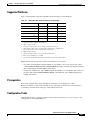
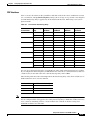
Depending upon the installed I/O module (1DS3+8T1 I/O or 8xE1 I/O), IMA can be configured by a
grouping of the following physical links (see the “Supported Platforms” section on page 8-9):
Note
•
T1
•
E1 (Only the Cisco 6015 DSLAM supports the 8xE1 I/O module.)
See the “Supported Platforms” section on page 8-9 for detailed information on platform-specific support
of the network I/O modules.
The DS3+T1/E1 IMA NI-2 supports three modes of operation:
Note
•
DS3 trunk with 8xT1 IMA subtend
•
8xT1 IMA trunk/subtend
•
8xE1 IMA trunk/subtend (Cisco 6015 DSLAM only)
The type of network I/O module (1DS3+8T1 I/O or 8xE1 I/O) detected at system startup determines the
mode of operation.
The eight links on the DS3+T1/E1 IMA NI-2 can be independent ATM links or can be configured into
one or more IMA groups. There are four static IMA groups. Each IMA group can contain from zero to
eight T1/E1 links. Any combination of independent T1/E1 links and IMA groups is allowed, up to
eight T1/E1 links total.
Some examples of allowed combinations are:
•
Two links and one IMA group with six links
•
Four IMA groups with two links in each
•
Four links and two IMA groups with two links in each
Configuration Guide for Cisco DSLAMs with NI-2
8-8
OL-2074-03