1
CS3000
CS2000
Operation Manual
Version 3.0
Revision 1
Table of Contents
CS3000/2000
Operation Manual
Version 3.0
Revision 1
Worldwide Sales, Euphonix Inc. 11112 Ventura Blvd. #301, Studio City, CA 91604
Voice: (818) 766-1666 / Fax: (818) 766-3401
Corporate HQ, Euphonix Inc. 220 Portage Ave, Palo Alto, CA 94306-2242
Voice: (650) 855-0400 / Fax: (650) 855-0410 / Web Page: www.euphonix.com
Publish Date: October 1997
Operation Manual Part Number: 840-05134-01
In the interest of continued product development, Euphonix reserves the right to make improvements
in this manual and the product it describes at any time, without notice or obligation.
CS3000, CS2000, MixView, Crescendo, Total Automation, SnapShot Recall, Audio CUBE, Digital Studio Controller,
DSC, GainBall and GainCurve are trademarks of Euphonix Inc.
©1996 Euphonix Inc. All rights reserved worldwide. No part of this publication may be reproduced, transmitted,
transcribed, stored in a retrieval system, or translated into any language in any form
by any means without written permission of Euphonix Inc.
ii
Euphonix CS3000/2000 Operation Manual
Table of Contents
TABLE OF CONTENTS
SECTION 1 : INTRODUCTION ................................ 1 - 1
System Component:............................................................................. 1 - 3
The Mix Controller ................................................................................................... 1 - 3
The Audio Tower ...................................................................................................... 1 - 4
The Support Computer ............................................................................................ 1 - 5
The Patchbay ........................................................................................................... 1 - 5
I/O Channel Module ................................................................................................ 1 - 6
Master Module ........................................................................................................ 1 - 7
The DSC ................................................................................................................... 1 - 8
This Manual ............................................................................................................. 1 - 9
Useful Symbols ........................................................................................................ 1 - 9
The DSC (Digital Studio Control) Module ...................................... 1 - 11
Master Control Panel ............................................................................................ 1 - 12
Dedicated Keys ...................................................................................................... 1 - 13
Using the Dedicated Keys ..................................................................................... 1 - 14
Assignable Rotary Control Set .............................................................................. 1 - 15
Mode Select Keys ................................................................................................. 1 - 16
Equalizers .............................................................................................................. 1 - 17
Dynamics ............................................................................................................... 1 - 18
Assignable Keys .................................................................................................... 1 - 19
Channel/Route Select Keys ................................................................................... 1 - 20
Track Assign Keys .................................................................................................. 1 - 21
Transport Controls ................................................................................................. 1 - 21
Monitor Section ..................................................................................................... 1 - 21
Assignable Moving Faders .................................................................................... 1 - 22
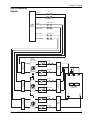
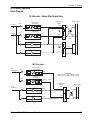
CS3000D I/O Block Diagram (Rev F) ............................................... 1 - 23
CS3000P/B I/O Block Diagram (Rev F) ............................................ 1 - 24
CS2000 I/O Audio Block Diagram (Rev E) ...................................... 1 - 25
CS3000 Master Audio Block Diagram (Stereo Outputs) .............. 1 - 26
CS3000 Master Audio Block Diagram (Aux & Monitor Outputs) 1 - 27
SECTION 2 : GETTING STARTED ............................ 2 - 1
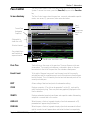
The Screen Display ............................................................................. 2 - 3
Startup Screen ......................................................................................................... 2 - 3
Status Bar ................................................................................................................ 2 - 4
The SmartDisplay and Master Control Panel ................................. 2 - 5
Save Your Work ................................................................................... 2 - 5
MAKE A BACKUP!!! ................................................................................................ 2 - 5
File Hierarchy ....................................................................................... 2 - 6
A typical MixView file tree: .................................................................................... 2 - 6
Mounting Disks .................................................................................... 2 - 6
System Data Organization .................................................................. 2 - 7
List Selection ........................................................................................ 2 - 8
Disk Selection....................................................................................... 2 - 8
Euphonix CS3000/2000 Operation Manual
iii
Table of Contents
Projects ................................................................................................. 2 - 9
New Project ............................................................................................................. 2 - 9
Project Comments ................................................................................................... 2 - 9
Rename Project ..................................................................................................... 2 - 10
Delete Project ........................................................................................................ 2 - 10
Copy Project ........................................................................................................... 2 - 10
Titles..................................................................................................... 2 - 11
Title Hierarchy ....................................................................................................... 2 - 12
New Title ............................................................................................................... 2 - 12
Title Comments ...................................................................................................... 2 - 13
What’s in a Title? ................................................................................................... 2 - 13
Save Title ............................................................................................................... 2 - 13
Load Title ............................................................................................................... 2 - 13
Title Utilities Menu ................................................................................................ 2 - 14
Title Rename, Delete and Copy ............................................................................. 2 - 14
Backing Up Title onto a Removable Cartridge ...................................................... 2 - 15
Title Setup Menu ................................................................................................... 2 - 15
Mixes ................................................................................................... 2 - 16
SECTION 3 : SNAPSHOT RECALL ........................... 3 - 1
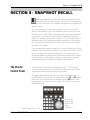
The Master Control Panel .................................................................. 3 - 3
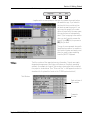
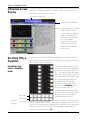
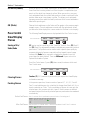
Interactive Screen Display ................................................................ 3 - 4
Recalling (RCL) a Snapshot ................................................................ 3 - 4
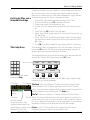
Assignable keys (seen in snapshot mode) .............................................................. 3 - 4
Snapshot Mode ....................................................................................................... 3 - 5
SpinKnob ................................................................................................................. 3 - 5
Numeric keypad, [+]/[–] keys ................................................................................... 3 - 5
Storing (STO) a Snapshot ................................................................... 3 - 6
Using the Master Control Panel .............................................................................. 3 - 6
IMPORTANT! .................................................................................................................. 3 - 6
IMPORTANT! .................................................................................................................. 3 - 7
Rename a Snapshot ................................................................................................ 3 - 7
Single Channel SnapShot Recall ...................................................... 3 - 7
Nulling Controls.................................................................................... 3 - 8
Standard Faders ...................................................................................................... 3 - 8
Motorized Faders ..................................................................................................... 3 - 8
Auto Null Selected (a) ............................................................................................. 3 - 9
Manual Null Selected (m) ....................................................................................... 3 - 9
Zeroing the Desk ................................................................................ 3 - 10
CLEAR All Snapshot Memories ....................................................... 3 - 10
Match Current Position .................................................................... 3 - 10
Auto-Backup....................................................................................... 3 - 11
Recalling the Backup Snapshot ...................................................... 3 - 12
Isolate During SnapShot Recall ...................................................... 3 - 12
Items NOT Stored as part of SnapShot Recall ............................. 3 - 12
SECTION 4 : TUTORIAL ...................................... 4 - 1
Signal Flow Diagram Symbols ........................................................... 4 - 3
Channel Blocks .................................................................................... 4 - 4
iv
Euphonix CS3000/2000 Operation Manual
Table of Contents
Routing Parameters............................................................................. 4 - 4
Source ...................................................................................................................... 4 - 4
Assign ...................................................................................................................... 4 - 4
Mode ....................................................................................................................... 4 - 4
Exercise 1 Stereo Source/Stereo Fader/Stereo Bus/Monitor ..... 4 - 5
Source ...................................................................................................................... 4 - 5
Assign ...................................................................................................................... 4 - 5
Mode ....................................................................................................................... 4 - 6
Meters ................................................................................................... 4 - 6
Channel (I/O) Meter Selection ................................................................................ 4 - 7
Metering Presets ..................................................................................................... 4 - 8
Master Module Meter Selection ............................................................................ 4 - 8
Stereo Output Faders .............................................................................................. 4 - 9
Save That Console ................................................................................................... 4 - 9
Monitor Source Selection ....................................................................................... 4 - 9
Universal Input Amplifiers (UIAs) M1 & M2 .................................. 4 - 10
Bus/Tape switching ............................................................................................... 4 - 10
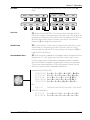
Equalizers ............................................................................................ 4 - 11
Phase Reverse, Filter, Phantom Power .................................................................. 4 - 11
Stereo Linking EQs ................................................................................................ 4 - 12
Adjusting EQ with the DSC ................................................................................... 4 - 13
Default EQ Values .................................................................................................. 4 - 13
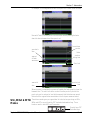
EQ Screen Display ................................................................................................. 4 - 14
Frequency Range ................................................................................................... 4 - 14
EQ Routing Source ................................................................................................. 4 - 14
EQ Curves .............................................................................................................. 4 - 15
Q Range ................................................................................................................. 4 - 16
Musical Note Value Display .................................................................................. 4 - 16
Adjusting the EQ Using Keypad ............................................................................ 4 - 17
Copying EQ values ................................................................................................. 4 - 17
Cascading 2 EQs to Produce an 8-Band EQ ........................................................... 4 - 18
Insert Points........................................................................................ 4 - 18
Exercise 2 Stereo Inserts into Audio Path ..................................... 4 - 19
Insert Diagrams, Pre- & Post-EQ .................................................... 4 - 20
Exercise 3 Multitrack Monitoring ................................................... 4 - 21
Clear Channel ........................................................................................................ 4 - 21
Clear Block ............................................................................................................. 4 - 21
Copy Channel ......................................................................................................... 4 - 21
Copy Block ............................................................................................................. 4 - 21
Clear/Copy Objects ................................................................................................ 4 - 21
Recalling the Default Snapshot (Zeroing the Console) ......................................... 4 - 22
Construct Signal Path ............................................................................................ 4 - 23
Block Copy ............................................................................................................. 4 - 23
Copy One Setting ................................................................................................... 4 - 23
Add EQ ................................................................................................................... 4 - 24
I/O Metering for Multitracking .............................................................................. 4 - 24
Mono Insert Point .................................................................................................. 4 - 24
Sound! ................................................................................................................... 4 - 24
Exercise 4 Multitrack Routing ......................................................... 4 - 25
Source .................................................................................................................... 4 - 25
Assign .................................................................................................................... 4 - 25
Mode ..................................................................................................................... 4 - 25
Bus Summing Amps .............................................................................................. 4 - 26
Euphonix CS3000/2000 Operation Manual
v
Table of Contents
MT Bus to Out3................................................................................... 4 - 26
L4 Bus/Tape Switching ..................................................................... 4 - 27
Querying a Channel’s Bus/Line Routing ........................................ 4 - 27
Adding EQ To M1 ................................................................................................... 4 - 27
Saving to a Snapshot ............................................................................................ 4 - 27
Stereo Inputs to Multitrack ................................................................................... 4 - 28
Auxiliary Sends .................................................................................. 4 - 29
Overview ............................................................................................. 4 - 29
Aux Modes .......................................................................................... 4 - 29
Exercise 5 ............................................................................................ 4 - 29
Mono Independent Mode ...................................................................................... 4 - 29
Fader Source Tracking ..................................................................... 4 - 31
Exercise 6 ............................................................................................ 4 - 31
Configuring Aux Send Modes .......................................................... 4 - 32
Mono Ind Modes (mono in/mono out) .................................................................. 4 - 32
Level/Pan Linked Modes (mono in/stereo out) (stereo in/stereo out) .................. 4 - 32
Mono Independent ”0dB” Locked Mode ............................................................... 4 - 32
Exercise 7 ............................................................................................ 4 - 33
Mono Pan Mode .................................................................................................... 4 - 33
Mono Pan Center Locked Mode ............................................................................ 4 - 34
Mono mode ........................................................................................................... 4 - 34
Exercise 8 ............................................................................................ 4 - 35
Stereo Balance mode ............................................................................................ 4 - 35
Stereo Center Locked mode .................................................................................. 4 - 36
Stereo Individual mode ......................................................................................... 4 - 36
Stereo Reverse Modes .......................................................................................... 4 - 36
Copying an Aux Setup ....................................................................... 4 - 36
SOLO AFL and PFL ............................................................................. 4 - 37
AFL Mode .............................................................................................................. 4 - 37
KILL SOLO Mode (Solo In Place) ............................................................................ 4 - 38
Kill Solo Safe ......................................................................................................... 4 - 38
Intercancelling Solo Mode .................................................................................... 4 - 38
PFL Mode ............................................................................................................... 4 - 38
Direct Outputs .................................................................................... 4 - 39
Default DIR Assignment ........................................................................................ 4 - 39
Changing the Default ............................................................................................ 4 - 39
The Combiner ..................................................................................... 4 - 41
Combiner/DIR Experiments ................................................................................... 4 - 42
Master Module Signal Flow Options .............................................. 4 - 46
Main Stereo Outputs ............................................................................................. 4 - 46
Stereo Bus Insert Points ........................................................................................ 4 - 46
Switching the Stereo Insert Point ......................................................................... 4 - 47
Stereo Output Level ............................................................................................... 4 - 47
Stereo Output Balance .......................................................................................... 4 - 47
0.00dB .................................................................................................................... 4 - 47
External Monitor Inputs ......................................................................................... 4 - 48
Talkback ................................................................................................................. 4 - 50
Oscillator ............................................................................................................... 4 - 50
CLIP Indicator Options ........................................................................................... 4 - 52
D Monitor/Phones ................................................................................................. 4 - 53
Monitor SET Options ......................................................................... 4 - 54
Monitor AutoMute ................................................................................................ 4 - 54
Monitor Link .......................................................................................................... 4 - 54
vi
Euphonix CS3000/2000 Operation Manual
Table of Contents
Monitor Dim .......................................................................................................... 4 - 54
Monitor Combinations and Examples ................................................................... 4 - 55
Film Monitor Mode ................................................................................................ 4 - 55
Film 4-Track Dolby Monitoring Diagram ............................................................... 4 - 56
Film 5.1 Monitoring Diagram ................................................................................ 4 - 57
M/S (Sum & Difference) Modes ...................................................... 4 - 58
Stereo Width Effect Using M & S Signal Encoding .............................................. 4 - 58
M/S Decoder ......................................................................................................... 4 - 58
M/S Channel Operation Block Diagram ................................................................ 4 - 59
MIDI Machine Control ...................................................................... 4 - 60
Tape Transport and Locate .............................................................. 4 - 60
Locate Menu System ........................................................................ 4 - 62
Cue List and Menu ............................................................................. 4 - 63
Cue Points ........................................................................................... 4 - 64
Virtual Timecode and the “VTM” .......................................................................... 4 - 64
Locating to a Manual Entry ................................................................................... 4 - 64
Locating using Shuttle Mode (SpinKnob) .............................................................. 4 - 64
Storing and Locating to Cues ................................................................................ 4 - 64
Locating to the Head/Tail ...................................................................................... 4 - 65
Locating to the Mark Point .................................................................................... 4 - 65
Locating from the Cue List .................................................................................... 4 - 65
Capture Cues “On The Fly” .................................................................................... 4 - 66
Recall A Cue (Locating) ......................................................................................... 4 - 66
Next Cue/Last Cue ................................................................................................ 4 - 67
Editing the Cue List ............................................................................................... 4 - 67
Assigning Custom Cue Names .............................................................................. 4 - 68
Duplicating Individual Cues ................................................................................... 4 - 68
Deleting Cues from the Cue List ........................................................................... 4 - 68
Deleting the Entire Cue List .................................................................................. 4 - 68
Saving the Cue List ................................................................................................ 4 - 68
RollBack and PreRoll ........................................................................ 4 - 69
Cycling ................................................................................................. 4 - 69
Locating To Start (LTS) Function ..................................................... 4 - 70
Fader Names ...................................................................................... 4 - 70
SECTION 5 : THE PATCHBAY ................................ 5 - 1
Half-Normalling .................................................................................... 5 - 4
The Euphonix Patchbay System ........................................................ 5 - 5
Patchbay Layout .................................................................................. 5 - 6
Channel Patch Unit .................................................................................................. 5 - 7
User Connections .................................................................................................... 5 - 7
Channel Inputs and Outputs .............................................................. 5 - 8
Inputs ....................................................................................................................... 5 - 8
Outputs .................................................................................................................... 5 - 8
Insert Points ............................................................................................................. 5 - 8
Normalling the Multitrack Returns ......................................................................... 5 - 9
Normalling the Multitrack Sends ............................................................................ 5 - 9
Normalling the Dynamics ........................................................................................ 5 - 9
Normalling the Audio CUBE .................................................................................. 5 - 10
Master Patch Unit.............................................................................. 5 - 11
User Connections .................................................................................................. 5 - 11
Euphonix CS3000/2000 Operation Manual
vii
Table of Contents
Master Inputs and Outputs .............................................................. 5 - 12
External Inputs Ext 1 In (A, B & C), Ext 2 In (A, B & C) .......................................... 5 - 12
Auxiliary Bus Outputs (A1-A8) ............................................................................... 5 - 12
Stereo Bus Outputs ST1 Out (A, B & C), ST2 Out (A, B & C) ................................. 5 - 12
Monitor Outputs (Mon A Out, Mon B Out, Mon C Out) ........................................ 5 - 12
Monitor Outputs Continued… .............................................................................. 5 - 13
Talkback In/Out (TB Out, TB In) ............................................................................. 5 - 13
Mults ..................................................................................................................... 5 - 13
Tie-Line Patch Unit ............................................................................ 5 - 14
System Supplied Without Euphonix Patchbays ........................... 5 - 14
SECTION 6 : MOVING FADERS .............................. 6 - 1
Moving Faders (DSC) .......................................................................... 6 - 3
Moving Faders (Channel) ................................................................... 6 - 3
Moving Faders vs Standard Faders: ........................................................................ 6 - 3
SmartDisplay Menus ........................................................................... 6 - 4
Moving Fader Options ......................................................................... 6 - 4
Motors ON/OFF ....................................................................................................... 6 - 5
Touch ON/OFF .......................................................................................................... 6 - 5
Release ON/OFF ...................................................................................................... 6 - 6
Slaves follow On/Off ............................................................................................... 6 - 6
First Punch Manual ............................................................................. 6 - 7
SECTION 7 : AUTOMATION .................................. 7 - 1
Overview ............................................................................................... 7 - 3
Setup ...................................................................................................... 7 - 3
Timecode Reference ................................................................................................ 7 - 3
Reference Source Select ......................................................................................... 7 - 4
New Mix ................................................................................................ 7 - 4
The Mix Snapshot ................................................................................................... 7 - 5
Creating a New Mix ................................................................................................ 7 - 5
Naming a New Mix ................................................................................................. 7 - 5
New Mix Dialog .............................................................................................................. 7 - 5
Mix Comments ........................................................................................................ 7 - 6
Mix Screen ..................................................................................................................... 7 - 6
Mix Menu ................................................................................................................ 7 - 6
Introduction to the Automation Template ............................................................... 7 - 7
DSC Dedicated Automation Keys ..................................................... 7 - 8
Switching Automation On................................................................... 7 - 9
The Punch key .......................................................................................................... 7 - 9
Object Select keys ................................................................................................... 7 - 9
Recording Moves............................................................................... 7 - 10
Fader Moves .......................................................................................................... 7 - 10
Null Lights ............................................................................................................. 7 - 10
Punch Out .............................................................................................................. 7 - 10
Initial Pass .................................................................................................................... 7 - 10
Pan Move ............................................................................................................... 7 - 10
Mute Move ............................................................................................................ 7 - 10
Pass Control........................................................................................ 7 - 11
Screen Anatomy .................................................................................................... 7 - 11
Pass Tree ................................................................................................................ 7 - 11
Event Count ........................................................................................................... 7 - 11
viii
Euphonix CS3000/2000 Operation Manual
Table of Contents
EDIT ....................................................................................................................... 7 - 11
CUES ...................................................................................................................... 7 - 11
SNAPS ................................................................................................................... 7 - 11
AUX A-D ................................................................................................................ 7 - 11
PAN BAL ................................................................................................................ 7 - 11
UF and LF (Faders) ................................................................................................. 7 - 12
ON (Mute) .............................................................................................................. 7 - 12
Pass Control SmartDisplay Menus ................................................. 7 - 12
Saving a Mix/Undo/Redo ...................................................................................... 7 - 12
Clearing Passes ..................................................................................................... 7 - 12
Packing Passes ...................................................................................................... 7 - 12
View menu .................................................................................................................... 7 - 13
View Scale .................................................................................................................... 7 - 13
Full/Half Screen ............................................................................................................ 7 - 13
Show Automation Viewer .............................................................................................. 7 - 13
Zoom Factor ................................................................................................................. 7 - 14
Trim Mode ........................................................................................... 7 - 14
WIn, WOut & WThr Modes .............................................................. 7 - 15
ABS WIn Mode ...................................................................................................... 7 - 16
ABS WOut Mode ................................................................................................... 7 - 16
ABS WThr Mode ................................................................................................... 7 - 17
Trim WIn, WOut, WThr .......................................................................................... 7 - 17
Punch Menu ....................................................................................... 7 - 17
Monitor Before Record (MBR) ........................................................ 7 - 19
Exercise 1 ............................................................................................ 7 - 19
Engaging MBR mode ............................................................................................. 7 - 20
Aborting MBR Mode ............................................................................................. 7 - 20
Punching-In ................................................................................................................. 7 - 20
More on Templates ........................................................................... 7 - 20
Set Mode ............................................................................................................... 7 - 21
Dyn Mode .............................................................................................................. 7 - 21
Isolate Mode ......................................................................................................... 7 - 21
Safe Modes ........................................................................................................... 7 - 21
Set Safe ........................................................................................................................ 7 - 21
Iso Safe ........................................................................................................................ 7 - 22
Dyn Safe ....................................................................................................................... 7 - 22
SnapShot Suppression .......................................................................................... 7 - 22
Suppression Menu ................................................................................................ 7 - 22
Suppression Screen ............................................................................................... 7 - 23
Automated EQ..................................................................................... 7 - 23
EQ Object key ........................................................................................................ 7 - 23
Writing EQ Moves ................................................................................................. 7 - 23
All Parameter Punch .............................................................................................. 7 - 23
Individual Parameter Punch ................................................................................... 7 - 23
Playing EQ Moves .................................................................................................. 7 - 23
Monitor Before Record (MBR) ............................................................................... 7 - 24
Automation Editing ............................................................................ 7 - 24
Edit Operations ...................................................................................................... 7 - 24
Edit Template ...................................................................................... 7 - 26
Edit Descriptions ................................................................................................... 7 - 26
Edit Region .......................................................................................... 7 - 26
Manual Timecode entry ......................................................................................... 7 - 26
Using Cue/Locate points ....................................................................................... 7 - 27
On-The-Fly ............................................................................................................. 7 - 27
Offline Trim ............................................................................................................ 7 - 27
Euphonix CS3000/2000 Operation Manual
ix
Table of Contents
Pass Join ............................................................................................. 7 - 28
Example ........................................................................................................................ 7 - 28
Exercise 2 ............................................................................................ 7 - 28
Pass Join Event Entry ............................................................................................ 7 - 29
Viewing the Pass Join List .................................................................................... 7 - 29
Join Template ..................................................................................... 7 - 29
Object Included/Excluded ...................................................................................... 7 - 30
Execute the Join .................................................................................................... 7 - 31
Editing the Pass Join List ...................................................................................... 7 - 31
The Base Pass ....................................................................................................... 7 - 31
Import Mix ........................................................................................... 7 - 32
Group Coalesce.................................................................................. 7 - 33
Automated SnapShot Recall ............................................................ 7 - 33
Event Parameters .................................................................................................. 7 - 34
Recording Automated SnapShots ......................................................................... 7 - 34
Automated SnapShot Event List ........................................................................... 7 - 34
Playback of SnapShot Events ................................................................................ 7 - 34
Editing The SnapShot Event List ........................................................................... 7 - 34
Add Events to the List ................................................................................................... 7 - 35
Event Parameters .................................................................................................. 7 - 35
Select Event to Edit ............................................................................................... 7 - 35
Last Event Recalled ............................................................................................... 7 - 35
CHAN Parameter ................................................................................................... 7 - 36
Channel/MIDI Preset Number ............................................................................... 7 - 36
Timecode Editing ................................................................................................... 7 - 37
Capture Current Time ............................................................................................ 7 - 37
Simultaneous Events ............................................................................................. 7 - 37
Event Mode ........................................................................................................... 7 - 37
SnapShot Suppression and Automated SnapShots ................... 7 - 38
SECTION 8a : GROUPING SYSTEM ......................... 8 - 1
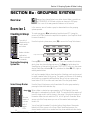
Overview ............................................................................................... 8 - 3
Exercise 1 .............................................................................................. 8 - 3
Creating A Group ................................................................................. 8 - 3
Turning the Grouping System On ............................................................................ 8 - 3
Select Group Master ............................................................................................... 8 - 3
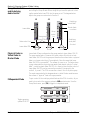
Select Group Slaves ................................................................................................ 8 - 4
Meters in Group Mode ............................................................................................ 8 - 4
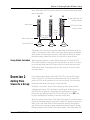
Fader/DCA Control .................................................................................................. 8 - 5
Group Master Fader and Underlying Audio Control ................................................ 8 - 6
Physical Fader vs. Virtual Fader in Master Mode ................................................... 8 - 6
INDependent Mode ................................................................................................. 8 - 6
Group Status Indication ........................................................................................... 8 - 7
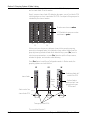
Exercise 2 Adding More Slaves to a Group ................................... 8 - 7
Exercise 3 Creating More Groups .................................................... 8 - 9
Existing Groups Display ........................................................................................... 8 - 9
Select Group Master ............................................................................................... 8 - 9
Select Group Slaves ................................................................................................ 8 - 9
Fast Access to Group Control .......................................................... 8 - 11
Deleting Groups ................................................................................. 8 - 11
Delete an Individual Group .................................................................................... 8 - 11
Delete All Groups .................................................................................................. 8 - 12
Storage & Recall of Group Data ...................................................... 8 - 12
x
Euphonix CS3000/2000 Operation Manual
Table of Contents
Single Level Groups........................................................................... 8 - 12
Group Solo Modes ............................................................................. 8 - 12
Group PFL - NO! ..................................................................................................... 8 - 12
Group AFL Normal Mode ....................................................................................... 8 - 12
Group AFL Kill Mode ............................................................................................. 8 - 13
Group AFL Intercancelling Mode ........................................................................... 8 - 13
SECTION 8b : FADER LINKING .............................8 - 14
Overview ............................................................................................. 8 - 14
Fader Links Setup .............................................................................. 8 - 14
SECTION 9 : DYNAMICS ..................................... 9 - 1
Features................................................................................................. 9 - 3
ES108A Wiring ...................................................................................... 9 - 4
The ES108A Front Panel...................................................................... 9 - 5
The ES108A Rear Panel ...................................................................... 9 - 7
Dynamics Software Setup ............................................................... 9 - 11
Accessing/Assigning Dynamics ............................................................................ 9 - 11
Dynamics Configuration/Assignment Window Details ............... 9 - 13
Clearing All Dynamics Assignments ..................................................................... 9 - 13
Auto Assign 1 Dynamics per Channel ................................................................... 9 - 14
Auto Assign 2 Dynamics per Channel ................................................................... 9 - 15
Assigning Individual Dynamics Processors ........................................................... 9 - 16
Assigning Dynamics to the ST1 and ST2 Buses ................................................... 9 - 17
Linking Adjacent Dynamics Processors ................................................................. 9 - 18
Crosspatching Dynamics Assignments ................................................................. 9 - 20
Saving Dynamics Assignments ............................................................................. 9 - 21
Inserting the Dynamics in the Signal Path ............................................................ 9 - 21
Stereo Dynamics Insert ......................................................................................... 9 - 22
Dynamics on both Upper & Lower Faders ............................................................. 9 - 23
Adjusting the Dynamics & Filters .......................................................................... 9 - 24
Dynamics Screen............................................................................... 9 - 25
Gain Curve ............................................................................................................. 9 - 25
GainCurve, GainBall and the Side-Chain .............................................................. 9 - 26
GainCurve and GainBall Examples ........................................................................ 9 - 26
Bargraph Meters ................................................................................................... 9 - 28
The GainBall and RMS vs. Peak Detectors ........................................................... 9 - 29
Adjusting Dynamics........................................................................... 9 - 30
Dynamics Page 1 ................................................................................................... 9 - 30
Dynamics Page 2 ................................................................................................... 9 - 31
Accessing Dynamics Parameters with the Numeric Keypad ................................ 9 - 32
Copy Dynamics Settings ........................................................................................ 9 - 33
Assignable Function Keys ..................................................................................... 9 - 33
Page 1 Numeric Keypad Select Compressor/Gate ............................................... 9 - 34
Page 2 Numeric Keypad Select Filters .................................................................. 9 - 35
Key Inputs ........................................................................................... 9 - 36
Filters ................................................................................................... 9 - 37
Filters Pre-Compressor/Gate ................................................................................. 9 - 37
Filters Only ............................................................................................................. 9 - 37
Filter Types.......................................................................................... 9 - 38
Euphonix CS3000/2000 Operation Manual
xi
Table of Contents
Dynamics Factory Presets (Modes) ............................................... 9 - 39
Dynamics Factory Presets: Expander Mode .......................................................... 9 - 40
Dynamics Factory Presets: Peak Limiter Mode ..................................................... 9 - 41
Dynamics Factory Presets: Gate and Auto Comp Mode ....................................... 9 - 42
Dynamics Factory Presets: Ducker Mode .............................................................. 9 - 43
Dynamics Factory Presets: Filters Only Mode ....................................................... 9 - 44
Dynamics Factory Presets: Dynamic Notch/De-esser Mode ................................ 9 - 44
MixView Display ................................................................................................... 9 - 45
Dynamic Notch Mode Parameters ........................................................................ 9 - 45
Calibration Procedure ............................................................................................ 9 - 46
Dynamics User Presets .................................................................... 9 - 47
SECTION 10 : THE AUDIO CUBE ...........................10 - 1
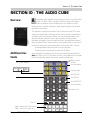
Overview ............................................................................................. 10 - 3
Additional Aux Sends ........................................................................ 10 - 3
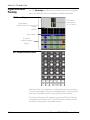
Hyper-Surround Panning ................................................................. 10 - 4
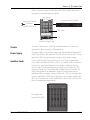
Chassis .................................................................................................................. 10 - 5
Power Supply ......................................................................................................... 10 - 5
Quad Bus Cards ..................................................................................................... 10 - 5
Interconnections .................................................................................................... 10 - 6
Bus Inject Inputs .................................................................................................... 10 - 6
Bus Inserts ............................................................................................................. 10 - 6
System Configurations Cube Input Assignments .................................................. 10 - 6
Cube Configuration ............................................................................ 10 - 6
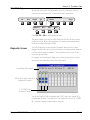
View the Template ......................................................................................................... 10 - 7
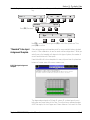
“Standard” Cube Input Assignment Template ...................................................... 10 - 7
M-56 Cube Input Assignment Template ....................................................................... 10 - 7
F-32 Cube Input Assignment Template ......................................................................... 10 - 8
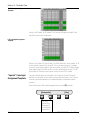
”Special” Cube Input Assignment Template ......................................................... 10 - 8
M-40 Cube Input Assignment Template ....................................................................... 10 - 8
Direct Outputs ..................................................................................................... 10 - 10
I/O Configuration ................................................................................................. 10 - 10
Cube Metering ..................................................................................................... 10 - 11
Diagnostics Screen .............................................................................................. 10 - 11
Operational Configuration ................................................................................... 10 - 12
Define Bus Types ........................................................................................................ 10 - 12
Bus Link and Insert ..................................................................................................... 10 - 12
Defining Buses ................................................................................. 10 - 13
Exercise 1 .......................................................................................... 10 - 13
Cube Aux Masters ............................................................................................... 10 - 14
Stereo Aux Sends ....................................................................................................... 10 - 14
Naming Aux Sends ..................................................................................................... 10 - 14
Buss Kill ..................................................................................................................... 10 - 15
Control Initialization ................................................................................................... 10 - 15
Aux Copy .................................................................................................................... 10 - 16
Bus Iso ....................................................................................................................... 10 - 16
Pan Bus Masters ................................................................................................. 10 - 16
Bus Kill ....................................................................................................................... 10 - 16
SECTION 11 : HYPER-SURROUND ........................11 - 1
Overview ............................................................................................. 11 - 3
Panner Rotary Control Set ..................................................................................... 11 - 3
Panner Assignable Key Set ................................................................................... 11 - 3
xii
Euphonix CS3000/2000 Operation Manual
Table of Contents
Exercise 1 ............................................................................................ 11 - 4
Setting Up a 5.1 Panner ........................................................................................ 11 - 4
Selecting a Format ................................................................................................ 11 - 5
Selecting a Channel .............................................................................................. 11 - 5
Selecting a Bus ...................................................................................................... 11 - 5
Next Block ............................................................................................................. 11 - 5
Understanding The Panner controls .............................................. 11 - 6
Using the Panner ................................................................................................... 11 - 6
Naming the Panner ................................................................................................ 11 - 6
The Rotary Controls ............................................................................................... 11 - 6
EXERCISE 2 ......................................................................................... 11 - 9
Setting Up an LCR Panner ..................................................................................... 11 - 9
Changing Bus Numbers ......................................................................................... 11 - 9
Shared Buses ......................................................................................................... 11 - 9
Setting Up a Surround Only Panner .................................................................... 11 - 10
EXERCISE 3 ....................................................................................... 11 - 10
Preset library ....................................................................................................... 11 - 11
Storing & Naming Presets ................................................................................... 11 - 11
Standard Formats ................................................................................................ 11 - 11
Partial and Multiple Formats ............................................................................... 11 - 11
Custom Formats ................................................................................................... 11 - 12
SECTION 12 : MIDI REMOTE CONTROL................... 12 - 1
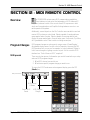
Overview ............................................................................................. 12 - 3
Program Changes .............................................................................. 12 - 3
MIDI presets .......................................................................................................... 12 - 3
Assigning MIDI Presets ......................................................................................... 12 - 4
Assigning MIDI Channels ...................................................................................... 12 - 4
Assigning MIDI Program Changes ........................................................................ 12 - 4
Assigning MIDI channel Names ............................................................................ 12 - 5
Sending Multiple MIDI Program Changes ............................................................ 12 - 5
Linking Presets to Console SnapShots .......................................... 12 - 5
Remote Control of Console SnapShots .......................................... 12 - 6
Remote Control of External Equipment (OUT) ............................... 12 - 7
Remote Control of Console Objects by External Equipment (IN) 12 - 9
APPENDICES................................................... A - 1
System Setup Window ...................................................................... A - 3
Fader Pan/Balance Mode Theory .................................................... A - 5
Aux Send Mode Theory ..................................................................... A - 6
Front ...................................................................................................... A - 8
Rear ....................................................................................................... A - 8
Outside.................................................................................................. A - 8
Surface ................................................................................................. A - 8
Model # ................................................................................................. A - 9
CS3000-2-40 ......................................................................................... A - 9
CS3000-3-72 ......................................................................................... A - 9
CS3000-4-104 ....................................................................................... A - 9
Audio Tower Dimensions ................................................................ A - 10
Euphonix CS3000/2000 Operation Manual
xiii
Table of Contents
This page intentionally left blank
xiv
Euphonix CS3000/2000 Operation Manual
Section 1: Introduction
1
INTRODUCTION
EUPHONIX MIXING SYSTEMS
Euphonix CS3000/2000 Operation Manual
1-1
Section 1: Introduction
This page intentionally left blank
1-2
Euphonix CS3000/2000 Operation Manual
Section 1: Introduction
SECTION 1 : INTRODUCTION
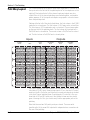
T
he Euphonix CS3000 & CS2000 are digitally controlled analog audio
mixing systems. The system foundation consists of four component
parts: the digital Mix Controller, the Audio Tower, the patchbay, and the
support computer.
System Component:
The Mix Controller
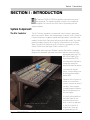
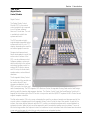
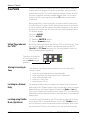
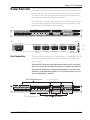
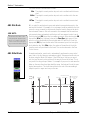
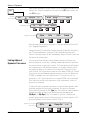
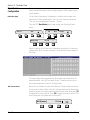
The Mix Controller resembles a conventional control surface in many ways,
with rotary controls, faders, and routing displays. However, the Mix Controller
is basically a group of computer systems working together, connected to the
remotely located Audio Tower via a multi-way serial cable snake. This snake
passes information from the Mix Controller to the electronics in the Audio
Tower. Every block of 8 faders in the Mix Controller is a computer, as is the
Master Controller and the Digital Studio Controller (DSC).
When a fader within a group of 8 faders is moved, that section’s computer
interprets the movement and sends instructions down the serial line to the
appropriate audio card. The
gain of the Digitally Controlled Attenuator (DCA)
associated with that fader is
changed by exactly the
amount the fader has moved.
In the event of a power
failure, console settings can
be retrieved from batterybacked RAM.
Operation of the Euphonix is
similar to a conventional
console. However as you will
see later, there are many
incredibly powerful features
that only a system such as
this can support.
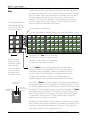
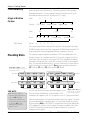
96-fader CS3000, model # CS3000D-4-96
Euphonix CS3000/2000 Operation Manual
It is worth looking briefly at
the Audio Tower so you
understand what occurs
when controls are adjusted
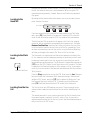
on the Mix Controller. A
single Audio Tower can
accommodate up to 56
1-3
Section 1: Introduction
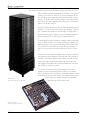
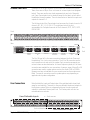
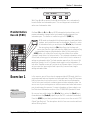
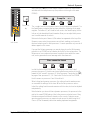
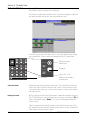
The Audio Tower
faders worth of audio. Consoles above 56 faders have two Audio Towers; the
first houses the audio electronics for 48 faders, and the second for up to 56
faders, making a potential maximum of 104 faders. The bottom 4
channel slots in the first Tower of a 2-Tower system house the
bus link cards, which bridge the audio between the two Audio
Towers. The Master Audio Module resides in the bottom of the
first Tower while the Submaster Audio Module is in the second
Tower as its Master Section.
A single I/O Audio Module includes all the analog electronics for
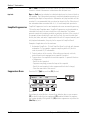
2 faders or 1 channel strip. Each module also includes 2 equalizers, 2 variable input amps, 4 line input amps, 3 output amps, a
stereo/dual-mono direct output, a 6-into-1 Combiner (submixer),
4 aux send gain DCAs as well as the 2 stereo fader DCAs.
As audio goes through the channel, it passes from the patchbay
to an I/O Audio Module in the Tower, and back out again to the
patchbay and/or to the various buses that run within the Tower.
This is similar to a conventional console. What is different is
that all of the controls are located remotely in the Mix Controller.
Great care has been taken in designing the circuitry to maintain
the highest possible integrity in the audio path. Wiring lengths
are kept to a minimum; digital control signals are kept clear of
audio signal paths; high-grade components are utilized; and
each stage of the signal flow has been optimized for low noise,
low distortion, and low crosstalk.
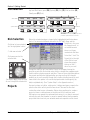
Audio Tower
Audio processing for up to 56 faders
The result is an electronically well-managed audio control
system. Since all of the analog audio circuitry is in a remote
Tower, the Euphonix Mix Controller is sleek and compact, freeing
up valuable control room real estate. The remote location of the
Audio Tower also causes the system to generate
very little heat in the control room.
I/O Audio Module
Audio processing for 2 faders
1-4
Euphonix CS3000/2000 Operation Manual
The Support Computer
Section 1: Introduction
The Euphonix system includes a high-speed, 19” rack-mounted support
computer. The support computer is connected to the Mix Controller via a high
speed data link which enables it to manage all of the other computers in the
Mix Controller. It drives the screen display and the disk storage facilities as
well. During automation the support computer keeps track of all the moves
and transfers mix data to and from the Mix Controller. The computer, associated hardware and the MixView software package, is often referred to as the
MixView Platform.
In the unlikely event of a support computer failure, the Mix Controller and
Audio Tower can operate on the fly without it. Remember that within the Mix
Controller are many individual computers responsible for audio control. They
will continue to function and you will have complete control of the audio and
local snapshot store and recall functions. However, you will not have access to
automation, file management, or the screen display, since these require a
functioning support computer. Integrated Euphonix optional components like
the Audio CUBE and ES108A Dynamics also require support computer access.
MixView, the Euphonix system software, eliminates the need for a mouse,
although one is supplied for future facilities. The QWERTY keyboard is used
for naming files and can be found in a convenient sliding tray under the
CS3000/2000’s frame.
The support computer also handles disk storage of mix and other information.
It has an internal hard disk and a standard 3.5” high-density floppy drive for
updating system software. Current systems are also shipped with a removable
media drive for session data import and export. All Euphonix systems are
compatible so you can track in one city and instantly reconfigure a CS3000/
2000 on the other side of the globe to exactly match where you left off.
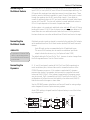
The Patchbay
Systems include high-quality Euphonix patchbays. As a custom option, systems may be supplied without patchbays. This is generally discouraged since
Euphonix patchbays are tested with the system to ensure signal integrity
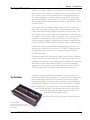
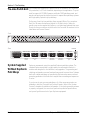
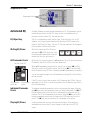
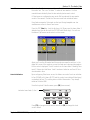
throughout the system. The Euphonix patch system has one dual 48-jack row
for each group of 8 faders, and one for the Master Audio Module. The patchbay is enclosed in a 1U connectorized case. A 56-fader system would have
eight 1U-high patchbays. Each patchbay connects to the Audio Tower
with a high-grade multi-way cable terminated in 90-pin Elco
connectors with gold-plated contacts.
Using the Index and Table of Contents listing, this manual
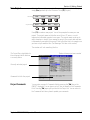
Channel Patchbay
There are two 48-jack rows of halfnormalled jacks with Elco connectors on
the rear panel
Euphonix CS3000/2000 Operation Manual
1-5
Section 1: Introduction
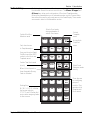
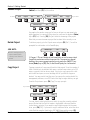
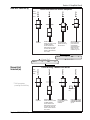
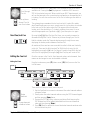
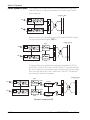
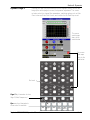
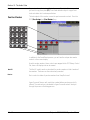
I/O Channel Module
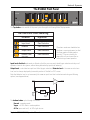
0
0
6
6
24
18
42
36
60 33
U
B
Outputs 1, 2, & 3 Source display
12
48
60 33
Output Source
Select
PPM/VU meters
6
42
12
48
3
30
6
36
0
24
3
30
Channel Block
3
12
0
18
6
6
3
12
F
M1 2 M1 2
L1 2 L1 2
L3 4 L3 4
Out 1 Out 2
L
M1 2
L1 2
L3 4
Out 3
Channel Attention key
Universal Input
Blocks, M1 & M2
Aux Send
Blocks
M1 Phantom Power indicator
Phase Rev & Hi Pass Filter indicators
Input Pad indicator
M2 Phantom Power indicator
Phase Rev & Hi Pass Filter indicators
Input Pad indicator
Aux/Cue A & B
Pwr
M1
M1 Gain control
M1 Attention key
Pad
ovld
Pwr
M2
M2 Gain control
M2 Attention key
Pad
ovld
A
Aux Sources A & B display
M1 M2
L1 L2
L3 L4
Aux Assignment A & B display
A1
A3
A5
A7
Aux A Send control
PAN BAL
ovld
BUS
A2
A4
A6
A8
B
Aux B Send control
A & B Attention key
Aux/Cue C & D
C
Aux Sources C & D display
M1 M2
L1 L2
L3 L4
Aux Assignment C & D display
A1
A3
A5
A7
Aux C Send control
PAN BAL
ovld
BUS
A2
A4
A6
A8
D
Aux D Send control
C & D Attention key
Upper Fader Block
Pan/Bal control
Fader Source display
Pan Control Null LED
Fader Null indicators
Fader Assignment display
Fader Label strip
Input
Input
M1 M2
L1 L2
L3 L4
M1 M2
L1 L2
L3 L4
BUS
BUS
25 1 2 26
PAN BAL
27 3 4 28 ovld
Upper Fader Routing
to the 12 buses
29 5 6 30
31 7 8 32
33 9 10 34
35 11 12 36
37 13 14 38
39 15 16 40
Lower Fader Routing
to the 12 buses
41 17 18 42
43 19 20 44
45 21 22 46
47 23 24 48
DIR
ST1
ST2
CS3000B, CS3000P, &
CS3000F Upper Fader
Assign Display
Upper Fader Block Attention key
PFL
1 2
3 4
5 6
7 8
9 10
11 12
1 2
3 4
5 6
7 8
L
9 10
F
11 12
DIR
ST1
ST2
PAN BAL
ovld
PFL
PFL
AFL
AFL/Kill Solo
Group Master indicator
AFL
Long-Throw
Automated fader
Grp
ON
Fader ON (Mute)
Lower Fader Block
Pan Control Null LED
M1 M2
L1 L2
L3 L4
EQ•Dyn
1 L
ON
Fader Label strip
Input
Fader Source display
Grp
Pan/Bal control
PAN BAL
ovld
Fader Null indicators
EQ•Dyn1 Attention key
2 R
EQ•Dyn2 Attention key
Fader Assignment display
BUS
DIR
ST1
ST2
Lower Fader Block Attention key
PFL
PFL
AFL
AFL/Kill Solo
Group Master indicator
Grp
Motorized Long-Throw
Automated fader
ON
Fader ON (Mute)
1-6
Euphonix CS3000/2000 Operation Manual
Section 1: Introduction
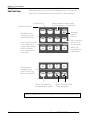
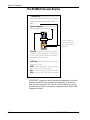
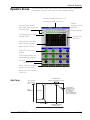
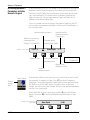
Master Module
0
6
6
12
18
24
Software Configurable Master
PPM/VU meters
30
36
42
48
0
18
36
30
36
42
12
48
60 33
24
6
42
12
18
3
30
6
12
0
24
3
6
3
12
0
0
6
6
3
48
60 33
0
6
18
24
3
36
42
12
Meter Assignment indicators
A1
A5
A2
A6
A3
A7
A mon
C mon
D mon
4
5
6
7
8
9
10
11
12
13
14
15
16
17
18
19
20
21
22
23
24
A1
A3
ON
A5
ON
BAL
SET
A7
ON
ON
BAL
ovld
BAL
ovld
A2
ovld
A6
ON
A8
ON
ovld
A monitor
BAL
ovld
A4
ON
ovld
ovld
ST1 A1
A3
A5
A7
ST2 A2
A4
A6
A8
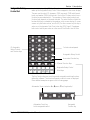
Oscillator
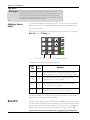
Patch
TB MIC
BUS
DIM
Kill
B monitor
BAL
ovld
Talkback/Osc Destination display
Talkback/Osc Attention key
Talkback ON
AFL/Kill Solo Block
Solo Monitor Selection display
AFL/PFL control
Solo Attention key
B
C
Active
C monitor
ST1
Solo
ST2
Ext—
C pre
DIM
Talkback/Oscillator Block
BAL
SOLO
A
DIM
SET
Monitor Source Selection
A8
Ext 2
ovld
Monitor C Set key
Monitor C Level control
Monitor C Dim key
R
A7
3
SET
Monitor B Set key
Monitor B Level control
Monitor B Dim key
60 33
ST2
2
ovld
Monitor A Set key
Monitor A Level control
Monitor A Dim key
A6
12
48
Ext 1
B mon
ON
Monitor A B & C Blocks
L
6
42
1
8 Aux Send Master Blocks
Aux 1 Send control
Aux 1 Send ON
Aux 2 Send ON
60 33
R
A5
A4
A8
36
60 33
ST1
L
3
30
12
48
0
24
6
42
12
48
60 33
osc
36
6
42
12
48
60 33
Solo
36
18
3
30
3
12
0
24
3
30
6
42
12
48
60 33
36
18
6
6
3
12
0
24
3
30
6
18
0
6
6
3
12
0
24
3
30
6
18
0
6
6
3
12
0
0
6
6
3
12
0
0
6
6
3
monitor SET
A1•2
A3•4
A5•6
A7•8
Ext 1
Ext 2
ST1
ST2
Left
Right
Stereo
Mono
Monitor D Block
Monitor D Ext2 Level control
Monitor D Attention key
D monitor
Monitor Source Selection keys
ON
ON
Each stereo output has a fader ON key
and Attention key
Stereo Output 1 & 2 Blocks
Monitor Mode keys
Euphonix CS3000/2000 Operation Manual
1-7
Section 1: Introduction
The DSC
Color Graphics
Display
Timecode Window
continuously displays
incoming code and code type
Unique Dynamics & EQ display
screens provide real-time visual
display of processing status
Snapshot List showing the
50 snapshots instantly
available to the engineer by
use of the Master Control
Panel or Assignable keys
Built-in TFT active-matrix color
graphics screen eliminates the
need for an external graphics
monitor. When adjusting EQ &
dynamics, controls on the screen
are mapped down to the
Assignable Rotary Control Set at
the top of the DSC to provide
interactive control display &
parameter indication.
Assignable Rotary
Controls
12 assignable Rotary controls
with illuminated switches can
be selected to adjust EQ,
Dynamics, Aux sends, and Bus
Masters.
Assignable Rotary control
Assignable key
Automation keys for punching
Rotary control and switches
showing Iso, Dyn, & Trim status.
Other lists include Disks,
Projects, Titles, Mixes,
Passes, and Cue Points.
Selection is made from
SmartDisplay Function keys.
i d t
i d t
i d t
i d t
1
9
i d t
i d t
i d t
i d t
2
10
3
11
i d t
i d t
i d t
i d t
4
12
i d t
i d t
i d t
i d t
5
13
6
14
7
15
8
16
i d t
i d t
i d t
i d t
i d t
i d t
i d t
i d t
Mode Select for Rotary controls
Pg 1
Pg 2
Pg 3
EQ
Dyn
Aux
Rotary Control Mode keys
Machine Control
MIDI Machine Control of
multiple machines.
i d t
i d t
i d t
Pan
Bus
Assign
Master
Slct
REC
onln
2
Slct
REC
onln
1
3
Slct
REC
onln
4
Slct
REC
onln
13
5
Mstr
Ctrl
6
Slct
REC
onln
TC
Slave
List
Pg 4
1
Slct
REC
onln
i d t
!
1
2 @
2
3
14
15
Q
tab
Solo
25
Route
#
3
16
27
A
Z
spc
28
39
Pg 4
Faders
Store
Mon
Mon
Preset
Studio
Macro
Snap
Shot
Cnfg
5 %
5
6
17
18
R
^
6
7 &
7
8
19
20
T
29
10 )
0
11 _
-
12 +
=
22
23
24
I
O
P
36 "
'
48
J
K
L
35 :
;
M
45 <
,
46 >
.
47 ?
/
32
33
44
N
(
9
21
H
43
B
9
U
31
G
42
V
*
8
Y
30
F
41
C
X
Page Select for
Assignable keys
Pg 3
D
40
Assignable key
Pg 2
E
S
38
8-character
Alphanumeric display
Pg 1
Select
$
4
4
W
26
shft
37
Chan
Assignable Keys
34
del
ent
Monitor Controls
& Keys
Currently unimplemented.
Programmable Monitor Macro
keys with 8-character
Alphanumeric displays.
Twin Moving Faders
Twin moving faders with
Automation, Solo, & Mute keys.
You have the ability to assign
any channel to these faders for
central moving fader control &
automation.
32 Dedicated Keys for use
during routing and automation
to speed up access time.
Dedicated Keys
1-8
1
2
4
6
8
1
2
4
6
8
Rec
Rec
Rec
Rec
ComMic
Auto
Talk
Grp
Grp
Attn
Rec
Loc
Pnch
Tplt
Mode Select for
Assignable keys
SnapShot Mode key
Channel Selection
48 Routing, Solo, &
Attention keys
4 Sets of Bus/Tape and Record
Keys that can be assigned to any
individual or group of tracks.
Track & Machine indicators
Record Arm key
Machine/MIDI
Transport controls
Master Control Panel
Auto
SS
Mix
On
Pass
Rec
Pass
Ctrl
Set
Iso
Dyn
Fader
A
Pan
B
On
C
D
Trim
ATO
W in
W out
Abs
Offset
MBR
Move
Rec
Glide
7
8
9
M1
M2
DIR
All
aux
4
5
6
+
Bus
2
3
-
Grps
Mtrs
Dedicated Fast Access keys
Safe
Setup
Snap
F1
i d t
i d t
i d t
i d t
Safe
Safe
Solo
Solo
L1
L2
ST1
All
upper
1
On
On
L3
L4
ST2
All
lower
0
F2
Grps
F3
Del
*
SmartDisplay
SmartDisplay Function keys
F4
Clr
DIR
Enter
System
Esc
Clear Current Selection
Numeric Keypad
SpinKnob for data entry
and list scroll
ST
Euphonix CS3000/2000 Operation Manual
Section 1: Introduction
can be used as a reference guide. However, we strongly suggest that you go
through the Tutorial, which uses examples to illustrate how the system
operates. Section 2 explains the file structure and how to save your work.
Subsequent sections then take you through operation of the whole console
using examples and exercises. Section 7 covers the automation system in
detail. Section 9 describes the operation of the software-integrated Euphonix
ES108A Dynamics unit. Section 10 describes the operation of the softwareintegrated Euphonix Audio Cube and various available multi-format bus
options and functions. The fastest way to become a fully-functional Euphonix
user is to go through the Tutorial section while sitting in front of the console.
This Manual
The following are used to illustrate various concepts throughout this manual:
Useful Symbols
Setup
F1
Snap
Auto
F2
File
F1
F3
Pass
SmartDisplay menu. These icons are used repeatedly throughout this text to
show how to navigate through the console menu trees. Lines connecting one
SmartDisplay to another indicate movement through the menus by pressing
one of the four Special Function keys. In the example to the left, the F3 key
should be pushed in the upper menu to go to the lower menu.
Grps
F4
Tplate Punch
F2
F3
F4
SpinKnob. This icon is used to show that you can use the SpinKnob on the DSC
to cycle through available menu options in the SmartDisplay and through lists
on the screen display.
+ & – keys. These keys are often used in conjunction with or instead of the
SpinKnob to cycle through menu options and lists. These icons are an example
of how the keys on the console are represented throughout this text.
+
Bus
DIR
F1
7
8
9
4
5
6
1
2
3
0
Enter
Del
F2
F3
Master Control Panel Numeric keypad. This keypad is used to make menu
selections in the SmartDisplay. Note the Enter key, which often must be
pressed to confirm a numerically keyed entry. Don’t confuse this with the
keypad on a QWERTY keyboard.
F4
F
Function keys on the QWERTY keyboard. These are used to choose some
system functions that only require occasional access.
B
M1 2 M1 2
L1 2 L1 2
L3 4 L3 4
Out 1 Out 2
Pwr
M1 2
L1 2
L3 4
Out 3
Console blocks. The functional control blocks that make up the Mix Controller
surface are sometimes represented by icons such as this one, which shows
the M1 Input block with gain pot, block attention key, and indicators.
M1
Pad
ovld
Euphonix CS3000/2000 Operation Manual
1-9
Section 1: Introduction
Block diagram symbols. These symbols represent the functional blocks of
audio circuits and are used to illustrate the finer points of signal flow and
routing through the console.
PWR
Universal Input Amplifier, with phantom power, gain, phase reverse, and highpass filter
Line Input with buffer
Line Input
AUX BUS
1 - 8
Fader
Aux A
Aux B
LF
Auxiliary Bus
4-Band EQ
4 Band EQ
Line Output with buffer
Line Out
Direct Output with buffer
Direct Out
∑
Combiner
Bus
∑ Summing
Amp
6-into-1 Combiner with summing amplifier
Bus Summer with summing amplifier
Un-normalled patch point
Half-normalled patch point
Fully-normalled patch point
SIDE NOTE:
When you try to solo wet, make
sure that the aux sends to FX
devices you are using have been
set as post-fader sends (the
default setting is pre-fader). Press
the appropriate aux block attention
key, select the mode, and then
toggle [F4] through the options to
choose either PLF (Post Lower
Fader) or PUF (Post Upper Fader).
1 - 10
Side Notes give solutions to potential problems and general hints about using
product features effectively.
Note: Throughout this manual, keys to be pressed are represented
by bold type and brackets as shown in this example: [Esc].
Euphonix CS3000/2000 Operation Manual
Section 1: Introduction
The DSC
(Digital Studio
Control) Module
Digital Control
The Digital Studio Control
Module (DSC) is the central
control module that is required
to run MixView software
Versions 2.4 and later. The unit
is available to retrofit into
systems without it.
The DSC provides a highly
sophisticated integrated control
surface with built-in color TFT
display, eliminating the need for
an external graphics monitor.
Designed with present and
future development in mind, the
entire control surface of the
DSC is under software control.
Software updates continue to
add functionality to the surface
and extend system control for
external MIDI effects devices,
and GPI relays for fader starts,
speaker mutes, and multitrack
machines.
The Assignable Rotary Control
Set at the top of the module can
be used to adjust EQ and
dynamics parameters, Audio
CUBE aux sends, bus trims, and
multi-format panning. The DSC supports MIDI Machine Control, Assignable Moving Fader control and Assignable Keys with 8-character alphanumeric displays. The Master Control Panel (the SmartDisplay, SpinKnob, &
keypad) at the bottom right of the DSC works in conjunction with the QWERTY keyboard for Mix Controller and
support computer interface.
The flat active-matrix, 256-color screen, eliminates the need for an external monitor and becomes part of the
console surface, integrating with the Assignable Rotary Control Set at the top of the module. As part of the
surface, the screen display interacts with the DSC controls, providing the engineer with unique feedback on
system and control status which would be impossible with conventional mixing console systems. The use of
this technology enables the Euphonix to build on traditional console interfaces and at the same time introduces
a new and exciting way of controlling an entire studio as an integrated system.
Euphonix CS3000/2000 Operation Manual
1 - 11
Section 1: Introduction
The Master Control Panel on the DSC is used in conjunction with the screen
display as the primary user interface for the console. The Function keys (F1,
F2, F3 and F4) below the SmartDisplay are used to access SmartDisplay
menus. The SpinKnob and +/– keys scroll through lists on the DSC screen.
Specific menu and key functions are detailed in the appropriate sections of
this manual.
Master Control Panel
Switches automation On/Off
Shows when automation is ready to
record any action (replaces the REC
key on the Master Control Panel).
Selects Group menu in
SmartDisplay.
Go to Pass menu
Selects Meter menu in
SmartDisplay
Mix
On
Pass
Rec
Pass
Ctrl
Setup
Snap
F1
F2
Grps
Mtrs
System
Grps
F3
7
8
9
4
5
6
+
Bus
1
2
3
-
Panic Key - Allows you to
regain control of the desk in the
event of support computer
malfunction. Audio level & pan,
routing, EQ, and snapshot
functions will operate normally.
F4
Clr
Esc
Numeric keypad, SpinKnob,
+/– keys, and other keys in
this area are used to navigate through SmartDisplay
menus and perform menuspecific functions.
DIR
0
1 - 12
Enter
Del
*
ST
Euphonix CS3000/2000 Operation Manual
Dedicated Keys
Section 1: Introduction
The Routing keys in the lower left section are used to route signals through
the individual channels to various console buses. The All aux, All upper, and
All lower keys allow quick configuration of Punch and Template modes.
Others allow immediate access to automation modes such as Trim and Absolute without the need to go through menus in the SmartDisplay. These modes
are covered in detail in the Automation section.
Selects Block Key
Attention mode
Fast, direct access
to Template modes.
Keys used to select Fader/
Pan/Mute and Aux ABCD
controls in the Punch and
Template menus.
Selects Trim Punch mode
directly
When lit, touch punch-in
from Assignable Moving
Fader is activated.
Routing Keys.
M1, M2, L1, L2, L3, L4 allow
fast source selection.
ST1, ST2, and DIR allow fast
access when assigning faders
to their sources.
Euphonix CS3000/2000 Operation Manual
Selects Punch mode
during automation &
selects Punch menu
Selects
Template
menu
Attn
Pnch
Tplt
Auto
SS
Set
Iso
Dyn
Safe
Fader
A
Pan
B
On
C
D
Trim
ATO
W in
W out
Abs
Offset
MBR
Move
Rec
Glide
M1
M2
DIR
All
aux
L1
L2
ST1
All
upper
L3
L4
ST2
All
lower
Access Auto
SnapShot
menu
Select Punch
Extension modes
directly.
These keys are
for configuring
groups of
controls. They
operate only in
Template and
Punch menus.
1 - 13
Section 1: Introduction
Using the
Dedicated Keys
Below are the basic functional descriptions of the Dedicated Keys. A more
detailed description can be found in the Automation section. The purpose of
these keys is to provide quick access to menu items in the SmartDisplay.
Access template on screen display
and Template menu in SmartDisplay.
Punch Mode Key
Attention Mode Key
Attn
Automation modes
change directly from
these Dedicated Keys
Set
Used in conjunction with
Mode Change keys to
configure the template
and allow different
control combinations in
Punch mode.
Select individual
Automation Punch
control of Fader, Pan,
Mutes, and Aux ABCD
Pnch
Iso
Tplt
Dyn
Auto
SS
Safe
Fader
A
Pan
B
On
C
D
Fader
A
Pan
B
On
C
D
Trim
ATO
W in
W out
Selects Trim mode when
running automation system
Automated
snapshot
functions
Use in conjunction
with Set, Iso, &
Dyn during automation. Also
accessable from
SmartDisplay
Write In, Write Out, Write
Through automation.
See the Automation section for a full description of the key functions labelled above.
1 - 14
Euphonix CS3000/2000 Operation Manual
Section 1: Introduction
Located at the top of the DSC, the 12 continuous-turn encoder controls that
make up the Assignable Rotary Control Set are mapped to the screen display.
They are used to control EQ, dynamics, CUBE aux sends, CUBE multi-format
buses, and master CUBE bus trim levels. Each of the 12 rotary controls has a
Function key associated with it. The operation of these rotary controls and
Function keys depends on the mode selected. The actual function of both the
knob and the key is indicated by the graphics on the screen display. On some
screens only the knob is active, as in the EQ. On other screens only the key is
active, as in the dynamics Side Chain Listen key (DYN, Page 2). Sometimes
both control and key are active as in the case of Bus Master Level & Mute.
Assignable Rotary
Control Set
12 Assignable
Rotary Controls
and Function keys
i d t
i d t
i d t
i d t
i d t
i d t
i d t
i d t
i d t
i d t
i d t
i d t
i d t
i d t
i d t
i d t
i d t
i d t
i d t
i d t
Assignable Rotary Control
i d t
i d t
i d t
i d t
Associated Function key
i d t
i d t
i d t
i d t
For future development
4 Special Function Keys
Pg 1
Pg 2
Pg 3
EQ
Dyn
Aux
Pg 4
List
Pan
Bus
Assign
Master
Chan
Assignable Rotary Control
Select keys
The four Function keys are used for general assignable switching functions
defined by software. Their function depends on which screen is displayed.
More detailed examples are given in the following pages.
Automation Status Indication: Iso, Dynamic, Trim (if applicable)
i d t
i d t
Automation Punch key
for the assignable switch
Euphonix CS3000/2000 Operation Manual
i d t
i d t
Assignable
Function key
1 - 15
Section 1: Introduction
Mode Select Keys
At the bottom of the Rotary Assign area are the Rotary Control Select keys.
These keys select different control functions for the assignable control set,
such as EQ, dynamics, auxes, multi-format panning, etc.
Four Page keys switch between pages/screens
of functions. Sometimes only Page 1 is used.
In Dynamics mode, for example, Page 1 shows
gate/compress parameter controls and Page 2
shows filter adjustment controls.
Pg 1
Pg 2
Pg 3
EQ
Dyn
Aux
Selects EQ
control mode
1 - 16
Pg 4
List
Pan
Bus
Assign
Master
Selects Audio Cube
Aux Send control mode
Selects ES108A
Dynamics/Filters
control mode
Not yet implemented
Chan
Selects Audio Cube
Bus Master control
mode for auxes or
multi-format pans
Selects Audio Cube
Multi-Format Bus
Panning screens &
controls
Not yet
implemented
Euphonix CS3000/2000 Operation Manual
Section 1: Introduction
With the EQ mode selected from the DSC, pressing an EQ attention key
located in the lower fader block (or a DSC Channel Selection key) will cause
the EQ user interface to appear on the screen display. This includes the EQ
curve and the EQ controls and switches which are mapped down to the
Assignable Rotary Controls and Function keys. Adjusting a hardware knob
turns the virtual knob on the screen in real time, so you can see the exact
parameter value as well as see the effects of any changes on the displayed
curve, also in real time.
Equalizers
EQ
From the DSC
Just below the Assignable Rotary Controls are 4 Function keys. Their functions
are shown at the bottom of the screen. Pressing clear will zero the EQ, setting
all gains to 0 and all frequencies to their default positions. Scale range can be
switched from the default 15 dB scale to the 30 dB full scale. Scale mode can
be switched from a display in Frequency (Hz) to the same values in
Notes (as shown by 1/3rd octave
marks). The Function key on the far
right switches the entire EQ in or out
of the signal path.
Scale Calibration and scale
Mode can be toggled. 15 dB or
30 dB, Frequency or Note
display.
Knobs are mapped as
seen on screen display.
For EQ, active knobs are
outlined here.
In the EQ screen,
Pg 1 accesses EQ1 and Pg 2
accesses EQ2
EQ key accesses the EQ
screen
i d t
i d t
i d t
i d t
i d t
i d t
i d t
i d t
i d t
i d t
i d t
i d t
i d t
i d t
i d t
i d t
i d t
i d t
i d t
i d t
i d t
i d t
i d t
i d t
i d t
i d t
i d t
i d t
Pg 1
Pg 2
Pg 3
EQ
Dyn
Aux
Euphonix CS3000/2000 Operation Manual
Pg 4
Clear, scale Calibration, scale
Mode, and EQ In/Out switches
controlled by the 4 lower
Function keys. On some screens
these keys are unused.
List
Pan
Bus
Assign
Master
Chan
1 - 17
Section 1: Introduction
Dynamics
On systems equipped with dynamics, pressing the [Dyn] key will access the
Dynamics menus and screen. Now either the EQ attention key on the channel
strip or the channel selection keys on the DSC can be used to access the
assigned dynamics channel. If no dynamics are assigned to a particular desk
channel, the screen display will reflect this. Setup and assignment procedures
as well as other available modes are covered in the Dynamics section.
Depending on the Dynamics Preset selected, there may be two pages for
dynamics; using the gate/comp as an example, Page 1 is shown below left and
displays gate and compressor characteristics. Page 2 (below right), selected by
pressing the [Pg 2] key at the bottom of the Assignable Rotary Control section,
allows the filters and switching functions of the processors to be controlled.
Page 1 - Gate/Compressor
Special Function keys
are designated at the
bottom of the screen
Page 2 - Filters & Switch Functions
i d t
i d t
i d t
i d t
i d t
i d t
i d t
i d t
i d t
i d t
i d t
i d t
i d t
i d t
i d t
i d t
i d t
i d t
i d t
i d t
i d t
i d t
i d t
i d t
i d t
i d t
i d t
i d t
Pg 1
Pg 2
Pg 3
EQ
Dyn
Aux
Pg 4
List
Pan
Bus
Assign
Master
Chan
Page 2 key switches to the
Filters screen; Page 1 back to
the Compress/Gate screen
Selects the Dynamics screen
1 - 18
Euphonix CS3000/2000 Operation Manual
Section 1: Introduction
Situated at the top right of the DSC, this control panel has many uses. The 8character display to the left of each Assignable Key is used to tell the operator
what the function of the key is. Its function depends on what mode or page is
currently selected. Software-defined controls enable Euphonix to add new
features to any of the control sections of the console.
Assignable Keys
8-character
Display
Assignable
Key
Page keys for accessing
multiple layers within a mode
Assignable Keys
Mode select
1
9
2
10
3
11
4
12
5
13
6
14
7
15
8
16
Pg 1
Pg 2
Pg 3
Pg 4
Faders
Store
Mon
Mon
Preset
Studio
Macro
Snap
Shot
Select
Cnfg
Assignable Keys are shown here in Macro mode, Page 1 (the Macro and Pg 1
keys are both lit). On this page the individual Assignable Keys are factoryprogrammed to run pre-defined macros which call up various console meter
configurations. The 8-character display indicates the meter configuration that
will be called up if the button to the right of it is pressed. Macros are NOT
user-definable, but there are a couple of files that can be auto-loaded on
bootup (access System Setup by pressing the QWERTY keyboard [F10] key and
type in the name of the factory-programmed macro file desired. V26.MAC and
CONSOLE.MAC are two files that are currently provided in MixView).
The Assignable Keys are also used for other tasks, including quick store and
recall of snapshots, monitor select for external audio device playback, and
configuration of MIDI communications.
Euphonix CS3000/2000 Operation Manual
1 - 19
Section 1: Introduction
The 48 numbered Select keys have multiple uses. An amber blinking LED
indicates the selected channel. After selecting a block attention key (mic pre,
aux, upper/lower fader, EQ1 or 2) on a channel strip, you can access the same
block of any other channel via these switches. For example, press channel 1’s
EQ1 block attention key. Now use these Select keys to select channel 5.
Channel 5’s EQ1 block is now displayed. Channel copying can also be done
from this location (see the Tutorial section). If no block has been selected,
these keys default to lower fader block selection.
Channel/Route Select
Keys
Future implementation of
tape machine attention
keys for MIDI Machine
Control track arming.
Selects Upper or Lower faders
Select keys for Attention, Routing, Solo, and Track Arming
1
Slct
REC
onln
2
Slct
REC
onln
1
3
Slct
REC
onln
4
Slct
REC
onln
13
5
Slct
REC
onln
Mstr
Ctrl
Slct
REC
onln
6
TC
Slave
Solo
Route
Green LED
shows multitrack
assignments
#
3
3
14
15
Q
25
26
37
spc
#
3
28
6
17
18
R
29
D
40
X
5 %
5
E
S
39
Z
$
4
16
27
38
4
W
A
shft
Red LED not yet
implemented
3
2 @
2
tab
Machine Control/
Timecode Source
Select keys. Selects
various machine
control and automation slave modes.
See details in the
Automation section .
Amber LED shows
Attention mode
!
1
30
8
19
20
Y
31
G
42
V
7 &
7
T
F
41
C
^
6
(
9
21
10 )
0
11 _
-
12 +
=
22
23
24
I
O
P
del
J
K
L
35 :
;
36 "
'
45 <
,
46 >
.
47 ?
/
48
M
32
33
44
N
9
U
H
43
B
*
8
34
ent
Pressing the DSC [Solo] key puts Select keys
into Solo mode. The keys can then be used to
solo upper or lower faders, as determined by
the Upper and Lower Fader Select keys.
The DSC [Route] key is used during routing to the multitrack buses.
Multitrack routing to 24 multitrack buses is done from upper faders in
a standard console configuration. Depending on jumper selection in
the Audio Tower, 12 multitrack buses can be made available to both
the upper and lower faders. CS3000P and CS3000B systems are
shipped configured with 12 multitrack buses available from all faders.
Press the DSC [Route] key, and the numbered Select keys become multitrack
bus assignment keys. The bus assignments are indicated by a green LED. With
the Route key light extinguished, select channel 1 from the Select keys. Notice
the amber LED lit above key #1; press the up arrow key. Now press the [Route]
key and begin pressing 1 through 12 Select keys consecutively. Observe the
green LEDs light above each Select key that you press. Now look at channel
1’s upper fader. You will see the MT Assign indicator light, showing that
multitrack buses 1 through 12 are assigned.
Routing from the lower faders in 12-bus systems is accomplished in the same
way. The hidden-til-lit multitrack indicators on the faders of a standard 12-bus
console will show appropriate numbering for the buses (1-12 for upper and
lower faders instead of 1-24 for upper faders only).
1 - 20
Euphonix CS3000/2000 Operation Manual
Section 1: Introduction
Track Assign Keys
Rec
Rec
Rec
Rec
These keys are for future implementation. At this time the displays are used to
monitor MIDI timecode returning to the DSC. Note: this reader does not
display frames.
Transport Controls
The Transport keys are used for MIDI Machine Control of compatible tape
transports such as the Tascam DA-88™ and the Alesis ADAT™.
Auto
Rec
Loc
These keys allow the user to control external machines that support MIDI
Machine Control protocol, as well as to control the automation without
external code using the console’s VTM (Virtual Tape Machine). The MMC keys
support Play, Record, Stop, Forward, Rewind, Cycle, Shuttle, Locate to Cue,
Next Cue, Last Cue, and RollBack.
The Euphonix VTM is effectively an internal timecode generator. When the
DSC Mstr Ctrl and T/C Slave keys are off, then internal timecode can be
generated. See the Tutorial and Automation sections for additional details.
Monitor Section
This section is for future implementation. Currently, all monitor facilities are
controlled via the Master Module.
1
2
4
6
8
1
2
4
6
8
ComMic
Talk
Euphonix CS3000/2000 Operation Manual
1 - 21
Section 1: Introduction
Assignable Moving
Faders
The Assignable Moving Faders are used for central control of any channel’s
upper and lower faders. Using the Channel/Route Select keys, or any fader
block key, gain attention of a channel strip. Now that channel’s upper and
lower faders and mutes can be controlled directly from the Assignable Moving
Faders. It is possible for the engineer to record automation fader moves and
mutes on any channel from the DSC. During automation playback, the moving
faders will track the programmed moves.
Upper Fader Control
Grp
Lower Fader Control
Grp
Indicates that fader
selected is an upper fader
Indicates that fader
selected is a lower
fader
Fader Null Indicators
i d t
i d t
i d t
i d t
Safe
Safe
Solo
Solo
On
On
Automation Punch Key
Automation Mode Indicator
(Iso, Dyn, Trim)
Mute Punch Key
Mute
Note: The Assignable Moving Faders currently only work in Absolute
mode. Future software releases will enable the use of other automation modes.
1 - 22
Euphonix CS3000/2000 Operation Manual
Key
9
12
15
21
30
2
4
6
Key
MIDI
Mon
Key
2
4
6
9
12
15
21
30
MIDI
Mon
Key
Euphonix CS3000/2000 Operation Manual
MIDI
Mon
Key
2
4
6
9
12
15
21
30
MIDI
Mon
9
12
15
21
30
MIDI
Mon
Key
9
12
15
21
30
2
4
6
2
4
6
9
12
15
21
30
MIDI
Mon
Key
MIDI
Mon
∑
The console aux
buses can be linked
into the Cube buses
integrating the two
Aux systems into one
Bus Insert
IN/OUT
1 of 48
possible
Bus
Master
Via the Cube
48
3
Direct Bus
Inject Inputs
with link switch
4
2
1
The Dirs can be configured
as dedicated mono or stereo
post fader feeds from a lower
or upper fader.
Key
2
4
6
Assignable Aux 1 2 3 4 48
Sends
from every fader
up to 48
In the current revision of channel
electronics, the Group Bus output
can be sent to Out 3 in place of
the M1 signal freeing up the Dir 1
and Dir 2 outputs for use as post
fader feeds to the Cube.
9
12
15
21
30
2
4
6
ES108A Dynamics
MIDI
Mon
2
4
6
9
12
15
21
30
The Out 3 pre fader output is
typically used as a third insert
send paired with L3.
Dynamic Range
Processor/Emulator
ES108 A
Each optional dynamics
provides variable hipass & low-pass filters.
Dynamics
6:1
6:1
6:1
M2/Bus
CMB/M1
Dir 1 & Dir 2
Assignable Direct Outputs
6:1
6:1
Assignable pre fader
outputs - Can be used as
insert sends or general
purpose pre-fader outputs.
OUT 1, 2, 3
PWR
PAD
Lo - Med - Hi
PWR
PAD
Lo - Med - Hi
Combiner
Provides additional pre-fader output.
Combiner
CMB
6:1
L4/Bus
EQ1
12
6
3
0
3
6
U
B
60 33
48
42
36
30
24
18
12
6
0
F
12
6
3
0
3
6
L
60 33
48
42
36
30
24
18
12
6
0
Right
Meter
Left
Meter
Allows any combination
of pre fader inputs to be
sent to DIR1, DIR2 and
back into M1 input.
Post Upper Fader, left and/or right.
These post fader selections are commonly used
to feed the Cube main inputs for Multi-Format
Panning, additional aux sends, or mix minus
feeds.
Post Lower Fader, left and/or right.
Group Bus Output
This is the default assignment. Dir2 typically
feeds the multitrack recorder inputs.
Bus # equals channel #.
Available selections are:
Dir 2
Dir 2
Dir 1
Out 3
Out 2
Out 1
L4
L3
L2
L1
M2
M1
Assignable EQ
UFR
MT
CMB
LFR
L4
L2
M2
CMB
MT
LFL
UFL
L3
L1
M1
Out 3 & CMB
Bus/M1 switch
EQ2
Two per channel. These
EQ can remain as
individual, be cascaded
to produce an 8 band
EQ, or stereo linked.
M2 L2 L4
6:1
6:1
6:1
6:1
6:1
6:1
6:1
6:1
PAN BAL
ovld
DCA
R / even
DCA
L / odd
ON
Grp
AFL
PFL
BUS
DIR
ST1
ST2
2 R
1 L
EQ•Dyn
M1 M2
L1 L2
L3 L4
Input
DCA
R / even
DCA
L / odd
ON
Grp
AFL
PFL
1 2
3 4
5 6
7 8
9 10
11 12
1 2
3 4
5 6
7 8
L
9 10
F
11 12
DIR
ST1
ST2
BUS
M1 M2
L1 L2
L3 L4
PAN BAL
ovld
∑
Input
D
DCA
C
DCA
B
DCA
A
DCA
A1
A2
A3
A4
A5
A6
A7
A8
A1
A2
A3
A4
A5
A6
A7
A8
A1
A2
A3
A4
A5
A6
A7
A8
A1
A2
A3
A4
A5
A6
A7
A8
Automated Aux Sends
ST1-L
ST1-R
ST2-L
ST2-R
AFL-L
AFL-R
PFL-L
PFL-R
1
2
3
4
5
6
7
8
9
10
11
12
13
14
15
16
17
18
19
20
21
22
23
24
ST1-L
ST1-R
ST2-L
ST2-R
AFL-L
AFL-R
PFL-L
PFL-R
ST1 ST2 Solo
1-24 (bus 1 to channel1 etc...)
Bus Summing Amp
Aux Buses
1-8
Source - Mode - Assign
M1 L1 L3
MT Buses
Section 1: Introduction
CS3000D I/O Block Diagram (Rev F)
1 - 23
Section 1: Introduction
CS3000P/B I/O Block Diagram (Rev F)
ES108 A
Dynamic Range
Processor/Emulator
Key
2
4
6
9
12
15
21
30
2
4
6
9
12
15
21
30
MIDI
Mon
Dynamics
Key
2
4
6
9
12
15
21
30
MIDI
Mon
Key
2
4
6
9
12
15
21
30
MIDI
Mon
Key
2
4
6
9
12
15
21
30
Each optional dynamics
provides variable hipass & low-pass filters.
Key
Mon
MIDI
2
4
6
2
4
6
Key
9
12
15
21
30
Mon
MIDI
9
12
15
21
30
MIDI
Mon
Key
2
4
6
9
12
15
21
30
MIDI
Mon
4
2
48
3
1
The Dirs can be configured
as dedicated mono or stereo
post fader feeds from a lower
or upper fader.
Key
ES108A Dynamics
MIDI
Mon
The Out 3 pre fader output is
typically used as a third insert
send paired with L3.
In the current revision of channel
electronics, the Group Bus output
can be sent to Out 3 in place of
the M1 signal freeing up the Dir 1
and Dir 2 outputs for use as post
fader feeds to the Cube.
∑
Direct Bus
Inject Inputs
with link switch
Assignable Aux 1 2 3 4 48
Sends
from every fader
up to 48
Via the Cube
Bus
Master
1 of 48
possible
Bus Insert
IN/OUT
The console aux
buses can be linked
into the Cube buses
integrating the two
Aux systems into one
M1
Lo - Med - Hi
Lo - Med - Hi
6:1
6:1
6:1
CMB/M1
M2/Bus
L4/Bus
Assignable EQ
EQ1
6
3
0
3
6
0
6
12
18
24
30
36
Left
Meter
Right
Meter
6
3
0
3
6
12
UFR
MT
CMB
LFR
L4
L2
M2
CMB
MT
LFL
UFL
L3
L1
M1
Out 3 & CMB
Bus/M1 switch
EQ2
Two per channel. These
EQ can remain as
individual, be cascaded
to produce an 8 band
EQ, or stereo linked.
6:1
PWR
PAD
PWR
PAD
M2
L1
L3
L2
L4
Out 1
Out 2
Out 3
Dir 1
Dir 2
Dir 2
OUT 1, 2, 3
Combiner
0
6
12
18
24
30
36
42
48
12
60 33
42
L
48
U
B
60 33
F
Allows any combination
of pre fader inputs to be
sent to DIR1, DIR2 and
back into M1 input.
CMB
Assignable pre fader
outputs - Can be used as
insert sends or general
purpose pre-fader outputs.
6:1
6:1
Dir 1 & Dir 2
Assignable Direct Outputs
Available selections are:
Group Bus Output
This is the default assignment. Dir2 typically
feeds the multitrack recorder inputs.
Bus # equals channel #.
Post Lower Fader, left and/or right.
Post Upper Fader, left and/or right.
These post fader selections are commonly used
to feed the Cube main inputs for Multi-Format
Panning, additional aux sends, or mix minus
feeds.
Combiner
Provides additional pre-fader output.
DCA
A
DCA
B
DCA
C
D
DCA
A1
A2
A3
A4
A5
A6
A7
A8
A1
A2
A3
A4
A5
A6
A7
A8
A1
A2
A3
A4
A5
A6
A7
A8
A1
A2
A3
A4
A5
A6
A7
A8
Automated Aux Sends
1
2
3
4
5
6
7
8
9
10
11
12
ST1-L
ST1-R
ST2-L
ST2-R
AFL-L
AFL-R
PFL-L
PFL-R
ST1 ST2 Solo
1-24 (bus 1 to channel1 etc...)
Bus Summing Amp
Aux Buses
1-8
Source - Mode - Assign
M2 L2 L4
M1 L1 L3
6:1
6:1
6:1
6:1
BUS
2
4
6
8
10
12
2
4
6
8
ON
DCA
L / odd
PAN BAL
ovld
∑
Input
M1 M2
L1 L2
L3 L4
1
3
5
7
9
11
1
3
5
7
11 12
DIR
ST1
ST2
L
9 10
F
PFL
AFL
Grp
6:1
DCA
R / even
1 L
2 R
DCA
L / odd
ON
6:1
DCA
R / even
PAN BAL
ovld
6:1
Input
M1 M2
L1 L2
L3 L4
EQ•Dyn
PFL
BUS
DIR
ST1
ST2
AFL
Grp
6:1
1
2
3
4
5
6
7
8
9
10
11
12
ST1-L
ST1-R
ST2-L
ST2-R
AFL-L
AFL-R
PFL-L
PFL-R
MT Buses
Euphonix CS3000/2000 Operation Manual
1 - 24
Euphonix CS3000/2000 Operation Manual
PWR
PAD
PWR
PAD
M1 has
CMB/Input
switch
6:1
M2 & L4
have
Bus/Input
switch
DYN1
DYN2
EQ1
EQ2
This symbol represents a six (6)
input selector/summing circuit.
It can select and sum any
combination of the inputs.
1-24 (Channel 1 picks up
bus 1 etc..)
Bus Summing Amp
BUS
1-24
L4
L3
L2
L1
M2
M1
Dynamics
Each optional dynamics
provides variable hipass & low-pass filters
OUT 1, 2, 3
6:1
OUT1
6:1
OUT3
signals post
EQ &
Dynamics
M1,M2
L1,L2,L3,L4
6:1
OUT2
Can be used as insert sends
or general purpose pre-fader
direct outputs
6:1
6:1
6:1
PFL
PFL
ST1 L
ST2 L
Solo L
PFL
PFL
ST1 L
ST2 L
Solo L
1
3
5
7
9
11
13
15
17
19
21
23
A1
A3
A5
A7
A1
A3
A5
A7
ST1 R
ST2 R
Solo R
2
4
6
8
10
12
14
16
18
20
22
24
ST1 R
ST2 R
Solo R
Combiner: Allows any
combination of pre fader inputs
to be sent to DIR1, DIR2 and
back into M1 input
DCA
DCA
DCA
6:1
LF
DCA
D
DCA
C
DCA
B
DCA
A
DCA
6:1
UF
6:1
6:1
6:1
6:1
6:1
6:1
DIR1
DIR2
DCA
48
4
DCA
DCA
DCA
3
DCA
DCA
DCA
DCA
2
1
DCA
DCA
48
4
3
2
1
Additional
Aux Sends, Multi-Format mix
stems, Mix Minus feeds
From 4 to 48 buses
Audio Cube
Optional
Multi-Format Buses
C & D Automated
Aux Sends
A & B Automated
Aux Sends
DIR 1 & DIR 2 source assignments are:
1- The group bus summing amp for feeding multitrack
recorders. This is the default assignment.
2- Post Lower or Upper Fader for feeding Cube inputs,
providing additional aux sends, mix minus feeds, and
Multi-Format buses as shown.
3- The Combiner, providing an additional pre-fader output.
A2
A4
A6
A8
A2
A4
A6
A8
Section 1: Introduction
CS2000 I/O Audio Block Diagram (Rev E)
1 - 25
Section 1: Introduction
CS3000 Master Audio Block Diagram (Stereo Outputs)
STEREO 1 BUS
L
R
∑ BUS
AMP
Bal
Out
∑ BUS
AMP
Bal
Out
Pre-fader feed to
ST1 C
ST1
Stereo
pre-fader
insert relays
linked together
Bal
Out
ST1 feed to
Mon Select
& Meters
Bal
Out
Bal
Out
ST1L(A)
ST1R(A)
ST1L(B)
ST1R(B)
ST1L(INS)
ST1L(C)
External
Stereo
Comp
Bal
Out
ST1R(INS)
ST1R(C)
STEREO 2 BUS
L
R
∑ BUS
AMP
Bal
Out
∑ BUS
AMP
Bal
Out
Pre-fader feed to
ST2 C
ST2
Stereo
pre-fader
insert relays
linked together
ST2 feed to
Mon Select
& Meters
Bal
Out
Bal
Out
Bal
Out
ST2L(A)
ST2R(A)
ST2L(B)
ST2R(B)
ST2L(INS)
ST2L(C)
External
Effects
Device
Bal
Out
1 - 26
ST2R(C)
ST2R(INS)
Euphonix CS3000/2000 Operation Manual
Section 1: Introduction
CS3000 Master Audio Block Diagram (Aux & Monitor Outputs)
Aux Bus
1 - 8
Talkback Select and
Feeds to Buses
∑
Aux Masters
Bus
Amp
Bal
Out
∑
Bus
Amp
Bal
Out
∑
Bus
Amp
Bal
Out
∑
Bus
Amp
Bal
Out
∑
Bus
Amp
Bal
Out
∑
Bus
Amp
Bal
Out
∑
Bus
Amp
Bal
Out
∑
Bus
Amp
Bal
Out
Left
∑
Bus
Amp
Right
∑
Bus SOLO
Amp
Sine
Osc
AUX 2
EXT TB IN
∑
Mic
Amp
TB OUT
or
AFL/
PFL
Bus
ST1 ST2
Bus
EXT1A L
Ext
In
B
Ext
In
C
Ext
In
A
Ext
In
B
Ext
In
C
Ext
In
∑
EXT1 (L)
EXT1C L
EXT1A R
EXT1B R
∑
EXT1 (R)
EXT1C R
EXT2A L
A
Ext
In
B
Ext
In
EXT2B L
∑
EXT2 (L)
EXT2C L
C
Ext
In
A
Ext
In
EXT2A R
EXT2B R
B
Ext
In
∑
EXT2 (R)
EXT2C R
C
∑
AUX 4
AUX 5
AUX 6
AUX 7
AUX 8
Even
A
EXT1B L
AUX 3
Ext
In
This symbol represents a
multiple input selector/summing
circuit. It can select and sum any
combination of the inputs.
AFL/PFL Select
Stereo, Mono, Left, Right Select
Solo Bus
A1
A3
A5
A7
EXT1 L
EXT2 L
ST1 L
ST2 L
Monitor Select
∑ (L)
∑
Bal
Out
A2
A4
A6
A8
EXT1 R
EXT2 R
ST1 R
ST2 R
∑ (R)
∑
Bal
Out
A1
A3
A5
A7
EXT1 L
EXT2 L
ST1 L
ST2 L
∑ (L)
∑
Bal
Out
Mon
A
A2
A4
A6
A8
EXT1 R
EXT2 R
ST1 R
ST2 R
∑ (R)
∑
Bal
Out
A1
A3
A5
A7
EXT1 L
EXT2 L
ST1 L
ST2 L
∑ (L)
∑
Bal
Out
∑
Bal
Out
∑
Bal
Out
∑
Bal
Out
A2
A4
A6
A8
EXT1 R
EXT2 R
ST1 R
ST2 R
Mon
B
Mon
C
∑ (R)
Ext2C
Mon
D
ST1 Post Fader Feed
Euphonix CS3000/2000 Operation Manual
MON A (L)
MON A (R)
MON B (L)
MON B (R)
MON C (L)
MON C (R)
Solo
MultiTrack
Bus 1-24
Odd
C pre
TalkBack
Mic
AUX 1
MAIN & PHASE
METER MODULE
(optional)
ST2 Post Fader Feed
1 - 27
Section 1: Introduction
This page intentionally left blank
1 - 28
Euphonix CS3000/2000 Operation Manual
Section 2: Getting Started
2
GETTING STARTED
EUPHONIX MIXING SYSTEMS
Euphonix CS3000/2000 Operation Manual
2-1
Section 2: Getting Started
This page intentionally left blank
2-2
Euphonix CS3000/2000 Operation Manual
Section 2: Getting Started
SECTION 2 : GETTING STARTED
M
The Screen
Display
any of the controls on the CS3000/2000 are similar to those on
conventional consoles; faders, meters, pans, aux sends, mute
switches, etc. A big difference is the software interface displayed on the TFT
screen and the alphanumeric SmartDisplay located on the Master Control
Panel.
The screen display acts as an extension of the console surface and interacts
with selections on the console. For example, when you select an EQ, the
screen shows the actual EQ curve and changes in real time as EQ is adjusted.
Input
EQ 1
M1 M2
L1 L2
L3 L4
EQ•Dyn
PAN BAL
ovld
1 L
2 R
BUS
DIR
ST1
ST2
Startup Screen
Blue highlighted window
bar indicates that EQ
window is active.
M1
15
15
12
12
9
9
6
6
3
3
0
0
3
3
6
6
9
9
12
12
15
15
21
41
82
165
330
659 1.3K 2.6K 5.3K 11K
21K
When you first start up the CS3000/2000 you will notice the screen below. The
thin window bar at the top of any window list is highlighted in blue indicating
when it is active. According to this screen, there is no title or mix currently
loaded into the console.
EQ Window
Euphonix CS3000/2000 Operation Manual
Status Bar
Snapshot Window
2-3
Section 2: Getting Started
The Status Bar is an important part of the screen display, giving the user
comprehensive system feedback in a very compact space. The symbolic nature
of the information (the use of meaningful icons, colors, etc.) gives the operator
more information at a glance. Much of the information in this diagram will be
covered in the Tutorial and Automation sections, so don’t worry about understanding everything now. This diagram is only to give you an overview of what
the graphics on the screen display represent.
Status Bar
Currently Lower
Selected Fader
Channel Indicator Fader Name
Current Mix
Current Title
TC Display
SMPTE = 30 Frame
DROP = 30 Drop
EBU = 25 Frame
FILM = 24 Frame
Title Head
Group Status
Gray - OFF
Yellow - ON
(MSTR/IND)
Status Window
Mix Status
Gray - OFF
Green - ON
Red - ON + Pass Enabled
Memory Bar
Yellow <90% used
Red
>90% used
[Alt-M] for Memory Status
Current Position Marker
relative to title head
and tail times
Title Tail
Pass Bar Indicator
Green - Playback
Red - Recording
Last Recalled Snapshot
(includes Automated SnapShots)
With MIX ON
Current Pass
Gray <90 Passes
Red >90 Passes
Last Recalled Snapshot
(includes Automated SnapShots)
During RECORD
Start Time Position
(of first punch-in)
# of Moves
Total number of
moves recorded
End Time Position
(of last move)
2-4
Euphonix CS3000/2000 Operation Manual
The SmartDisplay
and Master
Control Panel
Section 2: Getting Started
The SmartDisplay is located at the top of the Master Control Panel on the DSC
(See the Introduction section). The SmartDisplay tells you what each of the
four function keys (F1-F4) do if you press them. Their actions vary depending
on the menu displayed; use them to navigate through the console menus.
SmartDisplay
top-level
Main Menu
Setup
Snap
System
Setup
Snap
F2
F3
7
8
9
4
5
6
+
Bus
1
2
3
-
Enter
Del
Clr
*
F2
F3
F4
F4
DIR
0
Grps
Grps
F1
F1
System
ST
Master Control Panel
with SmartDisplay
Save Your Work
7
Esc
8
9
Clr
Esc
At any time, pressing the [Esc] key one or more times will get you back to this
Main menu.
From the top-level Main menu, [F1] (Setup) accesses the Console Setup
menus, [F2] (Snap) the Snapshot menu, [F3] (System) the File system & console
int/external communication menus and [F4] (Grps) the Groups menus. These
menus are covered in detail later.
Save your work on the hard disk in the support computer. The information you
save on the internal hard disk can be transferred to a removable medium for
backup or additional storage. Systems are currently shipped with a 3.5” floppy
drive and a removable cartridge drive.
It is best to begin by naming a project. Naming a new project creates a
directory (“folder”) on the support computer’s hard drive into which all your
work can be saved and later retrieved (these functions will be described later).
The computer now has a place to store your titles, which contain snapshots,
mixes, and other important console information.
The support computer effectively has 3 disk drives:
A: 3.5” high-density 1.4MB floppy drive - for updating software.
C: Internal hard drive - for saving your work.
D: Removable cartridge drive - for backups and archiving your work.
The removable cartridge D: drive is what you would normally use to transport
projects or individual titles for use in another studio, or for backup purposes.
Floppy disks may also be used to back up smaller files.
MAKE A BACKUP!!!
BACK UP YOUR DATA! We cannot stress this fact enough. Keep at least one
recent backup on hand in case you have any problems with your system, and
keep a second in case you have problems with the first backup. As with any
computer-based system, regular and complete backups are essential to protect
your system files.
Euphonix CS3000/2000 Operation Manual
2-5
Section 2: Getting Started
File Hierarchy
Euphonix console data is organized in a basic “file system” structure. The
drives are at the top of the hierarchy, followed by projects, titles and mixes.
Remember that drive C: is the computer’s internal hard drive, that D: is the
removable disk drive and that A: accesses the 3.5” floppy:
A typical MixView
file tree:
Disks:
A:
Projects:
NFL Football
Titles:
(RAM based)
C:
D:
Surround Demo
AES
Nightly News
RKK
NAB
Mixes:
#1
#2
#3
#4
Montage Final1
Passes:
1
2
3
4
5…
IBC
Montage Final2
Also stored under the title name are 50 SnapShots, title template, title setup,
ES108A Dynamics and Audio Cube assignments, MX464 Master Expander GPI
relay assignments, factory-programmed macros, comments, and cues.
Mounting Disks
The Euphonix support computer can address a SCSI drive attached to it for
storage. Normally, all computer hard disks (C: drive, etc.) appear in the Drive
list window when accessed. If you insert a DOS (IBM-compatible) formatted
removable cartridge into the D: drive, the list does not show the disk immediately. The disk must be mounted first. To do this, make sure you are at the toplevel Main menu; if not, press the DSC [Esc]ape key repeatedly, then press
[F3] (System), [F1] (File), [F1] (Disk) and then [F2] (Read):
[F-Link], [GPI] & [MIDI] are used for
internal fader linking and communication
with external equipment
Main Menu
System Menu
Setup
Snap
System
Grps
Disk
Project
Title
Mix
F1
F2
F3
F4
F1
F2
F3
F4
File
F-Link
GPI
MIDI
Disk:
F1
F2
F3
F4
F1
SIDE NOTE:
After inserting a floppy or
removable disk, make sure you
press the [F2] (Read) key,
otherwise the system will not
recognize the new disk. As soon
as you press [F2] all disks
attached to the system will
appear in the list.
2-6
Disk Menu
Read
F2
File Menu
F3
F4
[Project], [Title] & [Mix] select
You will now see that the word ‘mounting’ appears in the the appropriate lists and show
options available for that list
Disk list and the SmartDisplay. If the cartridge is DOS
formatted it will appear in the list. This applies to the 3.5” floppy drive as well.
Euphonix software does not include disk format routines for floppies. You must
use pre-formatted IBM-compatible disks. You can format floppies by quitting
MixView (press [Alt-Q] on the QWERTY keyboard) and issuing the appropriate
DOS commands if you wish, but it’s simpler to buy pre-formatted disks. Refer
to the DOS manuals that came with the support computer if you need to
format your own floppies.
Euphonix CS3000/2000 Operation Manual
Euphonix CS3000/2000 Operation Manual
5
Pro 12
jec
ts
• Project Comments
• Project Creation Date/Time
• Title List - *limited only by disk capacity
HD
un
li
Tit mited
les
*
• CS3000
• ES108A
• Title Comments • Title Setup
• Title Name
• Last Mix used
• Mix List (200 Mixes)
Project
• Cube
• MIDI
Sn 5
ap 0
S
ho
ts
User
SnapShots
Title Setup
Info
MISC:
includes:
2
Mi 00
xes
• CS3000
• ES108A
Automation
• Cube
• MIDI
• Automation Database (1000 Passes)
• Automation Templates (CS3000)
• Punch Templates • Punch Modes
• Groups
System Data
Organization
Mix
SnapShots
Mix Setup
Info
MIDI in/out
MIDI Program changes
MIDI SnapShot linking
TC frame standard
Lower Fader Names
Buses (48)
Panner Panners (16)
Aux Buses (48)
Mix
GPI Fader assignments
Head/Tail times
TOD/Input TC
Cue TC position/name
Cue List (999 Cues)
CleaR DISPLAYS:
includes: Upper Fader Names
MX464 MASTER EXPANDER:
includes: Setup Data
• Mix Comments • Mix Setup
• Mix Name
• Last Mix used
• Last Mix update Date/Time
• Auto SnapShots (999 SnapShots)
Title
Dynamics assignments
AUDIO CUBE:
includes: Bus Names
Panner Names
Aux Names
Cube Configuration
ES108A:
includes:
Section 2: Getting Started
2-7
Section 2: Getting Started
You can change the currently selected list by invoking the Disk list. From the
top-level Main menu, press [F3] (System), [F1] (File), [F1] (Disk) and then [F2]
(Read):press [F1] (Disk):
List Selection
Main Menu
Setup
Snap
System
Grps
Disk
Project
Title
Mix
F1
F2
F3
F4
F1
F2
F3
F4
File
F-Link
GPI
MIDI
Disk:
F1
F2
F3
F4
F1
System Menu
Disk Menu
Read
F2
File Menu
F3
F4
Remember: Pressing the [Esc] key moves
you back up the menu tree one level
Disk Selection
Disk drive list now selected
(will be highlighted in blue)
C: disk now selected
Disk space used on the
selected disk
Clr
Esc
+
Bus
DIR
*
ST
SpinKnob or [+]/[–] keys are used
to scroll through the selected list
Projects
2-8
Notice the selected window is shown by the highlighted blue title bar above
the list. You can select different disks with the DSC [+]/[–] keys and the
SpinKnob. In this case,
the floppy drive (A:) is
not visible because
there is no floppy
inserted into the drive.
Select the C: disk. The
Project list to the right
of the Disk list now
shows the projects
that are on the C:
drive. As you scroll
through the disks you will see that the Project list changes showing the
projects on each disk. Notice that when a disk is selected the computer reads
from it and then displays projects and titles. There will be a slight delay before
the projects and titles are displayed after you stop scrolling; this interrupt
enables you to scroll smoothly through the list without having to wait for each
lower-level list to update. Lists can be displayed sorted chronologically (by
date) or alphabetically. (See “System Setup” in the Appendix section.)
A project contains only titles, nothing else. It defines and gives a name to the
space on the disk in which your titles are stored. Titles are the files that
contain the actual session information. Before doing anything else, create a
project so there is a defined area on the disk in which to save your work.
Although you can operate the system without saving, it is so easy to save and
retrieve your work that it makes no sense to operate without having named a
project and title into which your valuable mixes and snapshots can be stored.
Euphonix CS3000/2000 Operation Manual
Section 2: Getting Started
Go to the File menu. If you are in the Drive menu at the top of the last page,
simply [Esc]ape back up to the File menu. Press [F2] (Project):
New Project
File Menu
Project Menu
Disk:
Project
Title
Mix
F1
F2
F3
F4
New?
ReNm?
Del?
Copy?
F1
F2
F3
F4
Press [F1] to create a new project. You will be prompted to name your new
project. The project name could be the record, film or TV series, or could
represent an individual operator’s user space. The project name can be up to
eight characters in length. Upon naming the project, the current date and time
is automatically assigned to the project. Notice that the title list is empty since
you have not yet named a title. (See Naming a Title later in the section)
The window will look something like this:
Date and time project was created
The Project Bar is highlighted in
blue showing that the window
is currently active
Currently selected project
Comments field for the project
Project Comments
You can enter a project’s Comments field by pressing the [Tab] key on the
QWERTY keyboard. You can type in up to 4 lines of remarks in the Comments
field. Pressing [Tab] again gets you back to the Project list. You can return to
the Comments field at any time to update your comments.
Euphonix CS3000/2000 Operation Manual
2-9
Section 2: Getting Started
You can rename a project from the File menu by pressing [F2] (Project), [F2]
(ReNm?) and then [F3] (Yes) to confirm:
Rename Project
File Menu
Disk
Project
Title
Mix
New?
ReNm?
Del?
Copy?
F1
F2
F3
F4
F1
F2
F3
F4
Rename Proj?
F1
F2
Yes
[No]
F3
F4
Project Menu
A prompt on the monitor screen will allow you to type in a new name (up to
eight characters for a project). When done you can press the keyboard [Enter]
key or [F3] (Yes). Pressing [F4] ([No]) will abort the renaming of the project.
Note that you cannot rename a project that contains titles currently in use.
Delete Project
To delete a project, go to the Project menu and press [F3] (Del?). You will be
prompted for confirmation in the SmartDisplay:
SIDE NOTE:
Delete Proj?
As with renaming projects, a
project containing titles
currently in use cannot be
deleted.
Copy Project
F1
F2
Yes
[No]
F3
F4
!! Danger !! This will delete all enclosed titles as well as associated
SnapShots and mixes within the project file. To prevent accidental
deletion, the screen prompt requires you to press the QWERTY keyboard [Enter] key or [F3] (Yes) in the SmartDisplay for confirmation.
Copying a project will copy every title within that project. Since the number of
titles is limited only by available disk space, and each may contain up to 200
mixes, a project’s size can be very large. If you try to copy a project to a disk
with insufficient space, an error message will tell you that the copy was
aborted. You may want to limit the size of your project to avoid potential file
management problems, since DOS limits how large a single directory can get.
From the Project menu, press [F4] (Copy?) to copy a project:
Project Menu
New?
ReNm?
Del?
Copy?
F1
F2
F3
F4
Copy to Disk ?
F1
F2
[OK]
F3
F4
You now have to select a disk drive on which to copy the currently selected
project. Notice that the Disk list header is highlighted in blue and that the
current drive is selected. If you want to copy the entire project to the same
drive, press [F4] ([OK]). If you want to copy to a different drive, select the drive
in the Disk list using the SpinKnob or DSC [+]/[–] keys and then press [F4].
2 - 10
Euphonix CS3000/2000 Operation Manual
Section 2: Getting Started
The following menu appears:
Copy Proj ?
F1
F2
Yes
[No]
F3
F4
…together with a screen prompt so that you can rename the project before
you make the copy. If you intend to
copy back to the current drive then
you must rename the project. If you
try to copy the project to the same
disk as a project with the same name,
the copy process will automatically
abort. If you’re copying to the another
drive, you don’t need to rename the
project. Press [F3] (Yes) to proceed or
[F4] ([No]) to abort.
The use of screen prompts along with
SmartDisplay questions is common in
the Euphonix system and mainly used
when you need to type something
from the QWERTY keyboard.
The titles contain all the important session information. Projects are simply
designated storage areas (like folders in Windows or Macintosh operating
systems). An example of a typical Title window, showing the titles contained
in a project is shown below. (See “Titles and Files” in the Appendix section for
a breakout of all system files found on the CS3000 system hard disk.)
Titles
Title Window:
Date and time of
title creation
Comments
Window
Euphonix CS3000/2000 Operation Manual
2 - 11
Section 2: Getting Started
Title Hierarchy
Disk A: Floppy
movable
Disk C: Internal HD
Project 1-Synclav 2 Project 2-DEMO II
Disk D: ReProject 3-RKK
Title 1 The Montage
Title 2 AES Paris Montage
Reebok Demo
Audio Cube Assignments
Dynamics Assignments
MX464 GPI Relay Assignments
Comments
Setup
Cues
Macros
Snapshots (50)
Mixes
Title 3
All this is saved
with the title
Mix 1
Title
Snapshot
Template
Dynamic moves (passes)
Mix
Mix 2 - Current Mix
Snapshot
Template
Dynamic moves (passes)
Current title and mix are
displayed in the Status Bar
Loading a title
also loads the
last current mix
with its SnapShot
& template
Mix 3
Snapshot
Template
Dynamic moves (passes)
New Title
From the File menu, press [F3] (Title), then [F1] (New) to create a title in your
new project:
File Menu
Disk
Project
Title
Mix
F1
F2
F3
F4
New?
Load?
Save?
Utils
F1
F2
F3
F4
A window will appear on the screen display allowing you to name your new
title. Enter the name of the title by typing in the keyboard and then press
[Enter].
2 - 12
Euphonix CS3000/2000 Operation Manual
Section 2: Getting Started
You can enter comments about a particular title by pressing the Tab key when
the title has been highlighted. When in the Comments field, simply type in
your comments and press Tab again to exit. To move between titles when in
the Title list, use the SpinKnob or the DSC [+]/[–] keys.
Title Comments
Now that you have a title you can start to work and save what you do. When a
new title is created, the current set of snapshots in the console gets saved to
the new title’s SnapShot list.
What’s in a Title?
Every title contains:
50 Snapshots - Up to 50 snapshots are stored with each title. The Snapshot
list is shown on the right-hand side of the screen display.
Audio Cube - Bus allocations, bus names, bus linking and inserts, and I/O
switch settings.
Dynamics - Assignments of CS3000/2000 channels to ES108A channels.
MX464 Master Expander - GPI relay assignments.
Mixes - Up to 200 mixes can be stored within a title.
Cues - Up to 999 cue points can be used to place and view events.
Macros - These function keys allow a single button press to carry out a
number of factory-programmed actions.
Title Setup - Time display type, timecode type, Head & Tail times, etc.
Comments - User comments pertaining to the title.
Save Title
At any time you can save the current title by going to the Title menu and
pressing [F3] below the SmartDisplay. This saves anything in the title that you
may have changed since the last save such as snapshots, comments, cues,
etc. When you save a title that has mixes and you have made changes to the
mixes, a prompt will come up on the screen asking if you would like to save
the changes. If you reply “yes”, changes are saved to the mix, its SnapShots
and automation templates. The next time you load the title, it will load the last
mix and bring back that mix’s snapshot and template.
Load Title
The diagram below shows how to get to the Title menu from the top-level
Main menu. Press [F3] (System), [F1] (File), [F3] (Title) and then [F2] (Load?) to
load a title:
Main Menu
System Menu
Setup
Snap
System
Grps
Disk
Project
Title
Mix
F1
F2
F3
F4
F1
F2
F3
F4
File
F-Link
GPI
MIDI
New?
Load?
Save?
Utils
F1
F2
F3
F4
F1
F2
F3
F4
Euphonix CS3000/2000 Operation Manual
File Menu
Title Menu
2 - 13
Section 2: Getting Started
Now select another title using the SpinKnob or the DSC [+]/[–] keys. When the
desired title is highlighted in the list, press [F2] to load it. You will be
prompted with the following menu:
Load Title ?
F1
F2
Yes
[No]
F3
F4
The monitor screen will also show a prompt. To load the selected title, press
[F3] or the [Enter] key on the DSC Numeric keypad. Pressing [F4] or [Esc]cape
will abort the title load. Note that when you load a new title, you will lose
whatever title information is currently in the desk.
SIDE NOTE:
The newly selected title’s 50 snapshots will now be loaded into the console’s
memory, ready for instant access, together with the mix that was in memory
when the title was last saved. If the title did not have any saved mixes, an
“untitled mix” is loaded. As you load a title, the last mix is loaded together
with the last mix snapshot and template.
When a title is loaded the last
saved mix of that title is also
loaded and the console is reset
with the mix’s snapshot &
automation template.
Loading a title usually takes less than a minute (unless there is quite a lot of
automation data) allowing you to move quickly between songs, shows or
whatever you do. Remember that you cannot load a project, as the project is
simply a directory area for storing your titles.
There are a few more file management features to explore before you move on
to the SnapShot Recall section of this manual. These features include renaming and copying titles. You may need to refer back to this section of the
manual when you want to create, copy, rename or delete a project or title or
save files to a removable cartridge. Some of these file utilities are accessed
from the SmartDisplay Util menu or from the keyboard function keys.
Title Utilities Menu
File Menu
We have already looked at the Title menu’s New, Load and Save commands.
Now let’s look at the Utils options. From theFile menu, press [F3] (Title) and
then [F4] (Utils):
Disk
Project
Title
Mix
New?
Load?
Save?
Utils
F1
F2
F3
F4
F1
F2
F3
F4
Title Utilities Menu
Title Rename, Delete
and Copy
2 - 14
ReNm?
Del?
Copy?
Setup
F1
F2
F3
F4
Title Menu
Function keys [F1], [F2] and [F3] allow titles to be renamed, deleted and
copied. The interface is exactly the same as with projects. Use the Copy
command when backing up your title to the removable disk drive. After
selecting Copy, you will be prompted to select the destination disk and project
folder for the copy in exactly the same way as you had to select the disk for
copying a project.
Euphonix CS3000/2000 Operation Manual
Section 2: Getting Started
When the currently selected title is copied, you will be given the chance to
rename the title before the copy is made. You cannot rename a title that is in
use. You cannot copy a title to a disk without a project name on that disk.
Make sure to create a project on a disk before attempting to copy to that disk.
Backing Up Titles onto a To make a backup copy of a title on a removable cartridge:
1. Insert a DOS, preformatted removable cartridge in the D: drive.
Removable Cartridge
2. Go to the Disk menu; press [F2] to perform a disk read.
3. Create a new project on the removable D: disk .
4. Go back to into the original project and select the title you wish to back
up.
5. Select Title Copy [F3] from the Title Utility menu.
6. At the ‘Copy to Disk?’ prompt select the D: drive with the SpinKnob or the
DSC [+]/[–] keys.
7. At the “Copy to Proj?” prompt select the project name on the removable
disk drive that you want to copy the title into using the SpinKnob or DSC
[+]/ [–] keys.
8. Press [OK] to confirm and make the copy, renaming the file if necessary.
Title Setup Menu
The final menu in the File System menus is the Title Setup menu. Access this
by pressing [F4] from the Title Utility menu (see previous page, last menu). A
window opens showing current settings on the screen.
The SmartDisplay allows you to set various options which are stored with the
selected title. From the Title Utilities menu, press [F4] (Setup):
7
8
9
4
5
6
1
2
3
0
Enter
Del
Title Utilities Menu
Current Position
Marker
Del?
Copy?
Setup
F1
F2
F3
F4
Title Head
Key in the timecode number,
followed by [Enter]
T/C Display
ReNm?
T/C Standard
F1
F2
00:00:00
F3
F4
You can use [F1], [F2], the SpinKnob or the DSC [+]/[–] keys to toggle through
the options so you can set parameters:
Title Head - Sets a start reference TC address used by the Current Position
Marker displayed in the TC Display, (upper right corner of the DSC display
screen). Using the Numeric keypad, enter the timecode value that you wish the
display to reference from, followed by the DSC [Enter] key.
Title Tail - Sets an end reference TC address used by the Current Position
Title Tail Marker. The head and tail times need not be exact; they are only used for the
Title Head
start and end points in the Pass Control window. Locate to Head is an option in
Pass Bar Indicator.
the Cue list. Represented by a green or red line along the bar, it is used during
Shows the location of the
automation so that you can see what part of the title was changed.
current automation pass Start
and End times in relation to the Film o/s - Sets a TC offset number which is applied to film’s incoming
Head and Tail of the title.
feet|frames reference in order to sync your mixes to film.
Euphonix CS3000/2000 Operation Manual
2 - 15
Section 2: Getting Started
T/C Standard - Allows the timecode type to be changed manually although
the type will automatically be selected after reading incoming timecode for a
couple of seconds. A manual change is useful if you want to perform off-line
editing and need to change the timecode type to match a particular standard.
With incoming timecode from a multitrack or video reference generator, the timecode type will automatically be selected and displayed in
the upper right hand corner of the DSC display screen. The Function keys
[F3] and [F4] toggle through the options: Film 24, EBU 25, SMPTE 30, Drop
Frame.
TC Display - [F3] and [F4] toggle between hh:mm:ss display or Day/Time
display.
Mixes
2 - 16
Mixes contain all automation data. The file management menus for mixes are
similar to those for projects and titles; you will find Utility menus allowing
mixes to be renamed, copied, and deleted. (See the Automation section for
more about mixing.)
Euphonix CS3000/2000 Operation Manual
Section 3: SnapShot Recall
3
SNAPSHOT RECALL
EUPHONIX MIXING SYSTEMS
Euphonix CS3000/2000 Operation Manual
3-1
Section 3: SnapShot Recall
This page intentionally left blank
3-2
Euphonix CS3000/2000 Operation Manual
Section 3: SnapShot Recall
SECTION 3 : SNAPSHOT RECALL
B
efore even attempting to look at signal routing you should learn how
the SnapShot Recall system operates. This is one of the most powerful
features of the console and it will completely change the way you approach all
aspects of mixing.
All controls and switches on the console may be stored to any one of 50
memory locations within a title. They can then be instantly recalled to reset
the entire console. EVERYTHING is stored from the channel strip (and almost
every function on the Master Control Module) including fader levels, pan
position, EQ settings, aux send levels, routing, etc. The only things that don’t
get saved as part of the SnapShot are monitor configurations, solo configurations, and some other settings that are more logically stored with the mixes.
See page 3-10 for details.
If you are learning the system you may wish to save your tutorial work. Section
2 detailed how to name a project and title so you can work on the console and
save your SnapShots for access at a later session. If you don’t do this, any
changes you make to the SnapShots will be lost when another title is loaded.
In Section 4 there is a full tutorial on routing. It is quite useful to save your
routing experiments into SnapShots as you go through the tutorial.
The Master
Control Panel
Find the Master Control Panel at the bottom of the DSC. This is the main
control area in the console and is conveniently located nearest to you in the
center-position monitor sweet spot for that very reason.
The diagram below shows the Master Control Panel. The alphanumeric
SmartDisplay tells you what the four Function Select keys ([F1] to [F4]) directly
below it will do if you press them. At any time, pressing [ESC] one or more
times will return you to the Main menu shown in the Master Control Panel’s
SmartDisplay below:
Mix
On
Pass
Rec
Pass
Ctrl
Setup
Snap
F1
F2
7
8
9
4
5
6
+
Bus
1
2
3
-
Euphonix CS3000/2000 Operation Manual
0
Enter
Del
Mtrs
System
Grps
F3
F4
Clr
DIR
Master Control Panel on DSC
Grps
*
ST
Esc
Returns you
step by step
back up the
menu
hierarchy
3-3
Section 3: SnapShot Recall
Interactive Screen
Display
The list in the right half of the screen lists the SnapShots in the console. When
a new title is created and named (see Section 2), the current set of console
SnapShots is stored in the the new title.
Currently Selected Title
Currently Active SnapShot
SnapShot selected in SmartDisplay ready for recall.
As you change the SnapShot
number, the highlight bar
will move up and down the
list. In this example,
SnapShot #1 shown highlighted here is the same
SnapShot that is currently
active as well.
Recalling (RCL) a
SnapShot
SnapShots are recalled via the DSC Assignable Keys or the Master Control
Panel. When you recall a SnapShot, the entire console is reset in less then one
SMPTE frame (1/30th of a second).
Assignable keys
(seen in SnapShot
mode)
Page keys
Mode keys
SnapShot
Mode key
3-4
1
9
2
10
3
11
4
12
5
13
6
14
7
15
8
16
Pg 1
Pg 2
Pg 3
Pg 4
Faders
Store
Mon
Mon
Preset
Studio
Macro
Snap
Shot
Select
Cnfg
You have one-button recall of all 50
SnapShots from the DSC Assignable
keys located in the upper right of the
DSC. The SnapShot name will appear
in the 8-character display to the left
of the Assignable key. Using the Page
keys located below the bank of 16
Assignable keys, you can page
through the 50 SnapShots 16 at a
time. Press the [SnapShot] Mode
key. Now select any one of 4
SnapShot pages by pressing a Page
key. Now press the Assignable key to
the right of the desired SnapShot
number to instantly recall it.
Note that SnapShot selection using
the DSC SnapShot keys or the DSC [+]/[–] keys is a destructive process that
“clears” all console settings by loading another SnapShot. For non-destructive
SnapShot list scrolling, use the SpinKnob to highlight a stored SnapShot
location on the screen and press [F4].
Euphonix CS3000/2000 Operation Manual
Section 3: SnapShot Recall
To get to the SnapShot Recall menu from the Master Control Panel, simply
press [F2] (Snap) in the Main menu of the SmartDisplay. You are now in
SnapShot mode.
SnapShot Mode
Setup
Snap
Auto
Grps
F1
F2
F3
F4
**SS=1
a
RCL
1
F1
F2
F3
F4
Turn the SpinKnob and you will see the number on the far right end of the
SmartDisplay change. You can spin to any number from 1 to 50. These represent the 50 SnapShot Recall memories in the current title. Pressing [F4] will
instantly recall the selected SnapShot.
SpinKnob
**SS=1
a
RCL
1
F1
F2
F3
F4
The number in the left of the display is the most recently recalled SnapShot.
Move the SpinKnob until 11 shows in the right side of the SmartDisplay, then
press [F4]. SnapShot 11 will recall and the desk will instantly reset to whatever is stored there (note that you lose current console settings if they are not
saved). Also, the number to the left will update to show that 11 is now the
current SnapShot.
Numeric keypad,
[+]/[–] keys
8
9
4
5
6
+
Bus
1
2
3
DIR
Enter
Del
a
RCL
11
F1
F2
F3
F4
You can also go to a particular SnapShot memory location by entering the
number on the keypad. To select SnapShot 27, press the [2] key, then the [7]
and then the [Enter] key. This is the same as using the SpinKnob to get to a
number. When you press [F4] the desk resets to SnapShot 27.
7
0
**SS=11
The [+]/[–] keys next to the SpinKnob will reset the console to the next
SnapShot up (+) or down ( – ) from the current number shown in the
display above F4. The only difference with these keys is that each time
you press the key, the SnapShot memory resets the console without
having to press F4. This is invaluable for sequential SnapShot recall in
live performance work.
Euphonix CS3000/2000 Operation Manual
3-5
Section 3: SnapShot Recall
SnapShots can be stored using the DSC Assignable
Keys or the Master Control Panel. From the DSC Assignable Keys section, press the SnapShot mode key. This
puts the Assignable Keys in SnapShot mode. Next press
the Store key and name your SnapShot from the keyboard, then select the SnapShot page (Pg 1-4). Each
page displays 16 SnapShots except Page 4 which
displays 49 & 50 and the Default, Auto Null On/Off, and
Physical keys. Store the SnapShot to a specific
SnapShot number by pressing the corresponding
Assignable Key. For example, to store console settings
into SnapShot memory 16, press the [Snap]shot Mode
key, the [Store] key, name the SnapShot, press the [Pg
1] key and then press the #16 SnapShot Assignable Key.
This procedure saves the current state of the console to
SnapShot memory #16.
Storing (STO) a SnapShot
DSC Assignable
keys
SnapShot Assignable key
Store key
SnapShot Mode
key
Page key
Assignable keys
Mode Select
1
9
2
10
3
11
4
12
5
13
6
14
7
15
8
16
Pg 1
Pg 2
Pg 3
Pg 4
Faders
Store
Mon
Mon
Preset
Studio
Macro
Snap
Shot
Select
Using the Master
Control Panel
Cnfg
Another way to store a SnapShot is to use the Master Control Panel. Use the
SpinKnob or the numeric keypad to select 16 in the display above F4.
**SS=11
a
RCL
16
F1
F2
F3
F4
Next press [F3]. This toggles between Store (STO) and Recall (RCL) as indicated above [F3]. It also brings up a prompt on the screen display so you can
enter the name of the SnapShot from the keyboard. It is possible to save the
SnapShot without naming it. Press [F4] to store.
IMPORTANT!
Make sure STO not RCL shows in the display above F3 before you press F4 or
you will lose your SnapShot! You can also press the [Enter] key instead of F4
to store the current console into the SnapShot indicated above F4.
**SS=11
Press [F4]:
Momentary display:
Then:
3-6
F1
a
STO
16
F2
F3
F4
STORED
16
...SnapShot
F1
F2
F3
F4
**SS=16
a
RCL
16
F1
F2
F3
F4
The current desk has now been stored to 16. Note that the left number now
indicates that 16 is the active SnapShot and [F3] has returned to RCL.
Euphonix CS3000/2000 Operation Manual
Section 3: SnapShot Recall
A red box in the SnapShot list on the DSC screen, indicates that the adjacent
SnapShot is stored in the Mix Controller’s RAM only. The new SnapShot will
not be saved to disk until you save the title. When you are finished with a title,
save the title and all SnapShot data will be saved to disk (subsequently
Color of box indicates whether
indicated with a green box). Recalling another title without saving the previous
SnapShot has been saved
title first, will overwrite any SnapShot data added since the last title save.
IMPORTANT!
Rename a SnapShot
To rename a SnapShot, first select the SnapShot number, then press the [F1]
key on the QWERTY keyboard. This brings up an entry dialog on the DSC
screen. Type in the new name and press the [Enter] key.
Single Channel
SnapShot Recall
The two asterisks (**) shown in the left of the SmartDisplay indicate that the
SnapShots are working globally, i.e., EVERY control and switch on EVERY
channel and the Master Section will be recalled or stored. Only the functions
listed on page 3-12 are not included in the SnapShots. SnapShots can also be
recalled or stored on a channel by channel basis. For example, while still in
Global SnapShot mode, recall SnapShot 1. The SmartDisplay appears like this:
**SS=1
a
RCL
1
F1
F2
F3
F4
??SS–>
a
RCL
:
F1
F2
F3
F4
Press [F1] to enter Single Channel SnapShot mode:
B
M1 2 M1 2
L1 2 L1 2
L3 4 L3 4
Out 1 Out 2
Pwr
M1 2
L1 2
L3 4
Out 3
M1
Channel You are now in Single Channel mode. The display asks you to select a
Attention channel. Press the channel attention key at the very top of the channel strip
key
you wish to affect. We will use channel 5 for this example. The selected
channel number will now show in the left of the SmartDisplay where the ??
was, followed by the SnapShot number currently active in that channel.
Pad
ovld
5SS–>1
a
RCL
:1 ok
F1
F2
F3
F4
Using the Assignable Keys, SpinKnob or numeric keys, select SnapShot #10.
Make sure you’re in Recall (RCL) mode above F3. Using the Assignable Keys
won’t require pressing F4.
All other channels will
maintain their current
settings while channel 5
is updated to the
settings stored in
SnapShot location #10.
5SS–>10
a
RCL
:10 ok
F1
F2
F3
F4
You have now copied the contents of SnapShot 10 into channel 5 exclusively.
Notice that the number following the “SS” updates to show that SnapShot 10
is now active in channel 5. Press [F1] to return to Global SnapShot mode.
Euphonix CS3000/2000 Operation Manual
3-7
Section 3: SnapShot Recall
Nulling Controls
Standard Faders
Input
Null
indicators
M1 M2
L1 L2
L3 L4
EQ•Dyn
PAN BAL
ovld
1 L
When a SnapShot is recalled you will notice a number of red indicators on the
console light up. As you recall a SnapShot, the audio electronics in the Tower
instantly reset to match the SnapShot audio levels. These levels may be
different from the actual physical positions of the controls, in which case a red
“null” indicator lights up next to the control. At this point the audio is under
computer control. Green means a control is aligned with the computer level
and red means the control is not aligned.
Try recalling any SnapShot that lights one of the fader red null indicators. Go
to that fader and move the fader in the direction of the red arrow. As the fader
passes through the null point, control is regained and the red indicator will go
out (in Auto-Null mode only – see below).
2 R
BUS
DIR
ST1
ST2
PFL
There are two options available for nulling recalled controls; Manual Null and
Auto Null. These modes can be switched from the DSC Assignable Keys (see
bottom of page 3-10) or by pressing [F2] from the SnapShot menu. This toggles
between the different modes:
Auto Null
AFL
**SS=10
a
RCL
10
F1
F2
F3
F4
**SS=10
m
RCL
10
F1
F2
F3
F4
Grp
ON
Manual Null
The “a” indicates Auto Null, “m” indicates Manual Null.
In Auto Null, the fader or knob automatically regains control of the audio when
it passes through the null point. For fader nulling, the red arrow indicates
which direction the fader needs to be moved to reach the null point.
With Manual Null, the fader null indicator goes green when the fader matches
the audio. You must press the block key to regain control of the nulled fader.
For fast operation the Auto Null option is better. The Manual Null mode is
most useful when you just want to exactly match all the faders to the
SnapShot position. When you have moved the faders to the null, rather than
having to hit all the individual block keys, you can simply switch to the Auto
Null mode. When you move the faders away from the null they will automatically activate.
Motorized Faders
3-8
In some instances, nulling does not operate as described above when used
with motorized faders. See the motorized faders portion of the Automation
Section for more information.
Euphonix CS3000/2000 Operation Manual
Section 3: SnapShot Recall
Auto Null Selected (a)
Fader AutoTakeover from a Snapshot
Red
Green
Red
Recall Snapshot.
Fader has been moved
so RED indicator
shows direction the
fader has to be moved
to reach the null point.
Fader is disconnected
from audio.
Store
Snapshot
**SS=11
m = Manual Null*
**SS=11
Manual Null
Selected (m)
m
RCL
As the fader passes
through the null
point, control is
automatically
regained and the
fader becomes
active. The red
indicators go out.
Move fader
towards the null
position shown by
the red arrow.
a
RCL
11
a = Auto Null
11
Fader Nulling - Manual Null Mode
Red
Green
Red
* Nulling requires
pressing the block key
Fader Block
Key
Store
Snapshot
Euphonix CS3000/2000 Operation Manual
Recall Snapshot.
Fader has been moved
so RED indicator
shows direction the
fader has to be moved
to reach the null point.
Fader is disconnected
from audio.
Move fader to the
null position shown
by the green
indicator.
Press the Block Key to
null and restore control
to the fader.All indicators
go out.
3-9
Section 3: SnapShot Recall
The same nulling laws apply to rotary controls as faders, although the red
indicator does not show the direction of the null point. When the control
passes through the null point the red LED goes out and the rotary control is
now active.
PAN BAL
Each time you recall a SnapShot, it is not necessary to null every control. You
will instantly hear the recalled settings. Null a control only if you need to
modify an audio level.
Zeroing the Desk
!!CAUTION!! When in the SnapShot Mode, pressing the Default key in Page
4 of the DSC Assignable Keys (see diagram bottom of page) or pressing the
M1 assignment key on the Master Control Panel will allow you to zero the
desk. It will deselect all routing and turn down every gain control. Try this to
see the effect. Many of the controls will show a red indication since their
physical position will now be different from the actual audio settings.
CLEAR All
SnapShot
Memories
!!EXTRA CAUTION!! When in the SnapShot menu, pressing [Clr] followed by
[F3] will allow you to completely clear the SnapShot memory. It will not reset
the desk, so all of your current routing and levels will remain intact. This can
be useful if you want to create a new title, clear out the SnapShot memory
and store the current desk settings as the first SnapShot.
In both cases, as a precaution against totally destroying a good mix, the
SmartDisplay will ask if you are sure you want to do this. You need to confirm
by pressing [F3] (Yes). If you wish to abort, press [F4] ([No]) or press [Esc].
**SS= Sure?
F1
Match Current
Position
[No]
F3
F4
F2
A simple way to make the audio level match the current physical position of
the controls and faders is to press the Assignable Key labelled “Physical” in
page 4 when in SnapShot mode. Instantly, all null indicators go out indicating
that the audio levels now match the position of the controls. This can also be
done from the Master Control Panel. Press the ST* button in the Master
Control Panel keypad.
DSC Assignable
Keys Section
1
49
9
2
50
10
3
11
4
12
5
13
6
DEFAULT14
7
15
PHYSICAL
8
16
AUTONULL
Recall Default
(Zero) SnapShot
Master Control
Panel keypad
+
Bus
-
Match levels
to Controls
Pg 1
Pg 2
Pg 3
Pg 4
Faders
Store
Mon
Mon
Preset
Studio
Macro
Snap
Shot
Select
3 - 10
Yes
Cnfg
Toggle Auto/Manual
Null Mode
DIR
*
ST
Match
Euphonix CS3000/2000 Operation Manual
Section 3: SnapShot Recall
Normally if the power fails while you are working on a computer-based
console, you might lose changes made since you last saved your settings.
However, the Euphonix has a built-in automatic backup system which stores
the entire console to battery-backed RAM on a regular basis. You can set the
frequency of this auto-backup procedure from the Console Backup menu. If you
ever need to recall the backup SnapShot it is also done via this menu. From
the Main menu, press [F1] (Setup), [F2] (Cnsl), [F4] (Backup) and then [F2] (Int):
Auto-Backup
Main Menu
Setup Menu
Setup
Snap
System
Grps
Macs
Cnfg
Diag
Backup
F1
F2
F3
F4
F1
F2
F3
F4
Mstr
Cnsl
Meter
MFdr
Backup:
Int
Rcl
F1
F2
F3
F4
F1
F2
F3
Backup Interval Menu
backup interval
F1
F2
:
5 min
F3
F4
Console Menu
Backup Menu
F4
This is the time between auto-backups. The time interval can be changed by
keying in a new number using the numeric keypad, or by stepping up and down
with the DSC [+]/[–] keys. The range is 1 to 99 minutes.
Press [Esc] once to get to the Backup menu.
Recalling the
Backup SnapShot
Backup:
Int
Rcl
F1
F2
F3
F4
If your studio experiences a power failure, or if you do something catastrophic,
like recalling a SnapShot when you meant to store it (see page 3-4), you can
recall the last auto-backup.
From the Backup menu, press [F3] (Rcl) to enter the Recall Auto-Backup menu:
RCL
F1
backup SnapShot
F2
F3
?
F4
Pressing [F4] will now restore the last backup SnapShot. Press [Esc] once to
get to the Backup menu:
Backup:
Int
Rcl
F1
F2
F3
F4
[F4] is for future use and is not active in current software revisions.
Euphonix CS3000/2000 Operation Manual
3 - 11
Section 3: SnapShot Recall
The backup SnapShot is taken in the background while you work. It is worth
mentioning that the shorter your interval time is, the less time you have to
recall the SnapShot should you need to. If your interval is set to 1 minute and
you experience a power failure, once the power is restored you have only 1
minute to recall your backup SnapShot before it is updated again. Of course,
setting the interval too high has the obvious disadvantage of allowing the
operator to lose more work in this scenario.
Isolate During
SnapShot Recall
The new template system described later in this manual allows parts of the
console to be isolated from SnapShot Recall. Any sections of the console that
have been configured in Isolate (yellow color on the template screen) will not
change when a SnapShot is recalled. This very useful feature is ideal for
recording when you may want to leave a group of faders set at their levels
when recalling a SnapShot. Broadcasters and live sound engineers also use
this facility to isolate sections of the console from the recall system.
Items NOT Stored
as part of
SnapShot Recall
Some master functions are intentionally not stored in order to prevent unwanted changes when moving from one SnapShot to another. These items are:
Monitor Levels, KillSolo/Afl, Intercancel Solo, Dim Level, Mono Level, Monitor
Set On/Off, T/B On/Off, Monitor Link, Clip Level & Monitor Left/Right selection. Groups are not stored with a SnapShot, but with each mix and with the
title.
3 - 12
Euphonix CS3000/2000 Operation Manual
Section 4: Tutorial
4
TUTORIAL
EUPHONIX MIXING SYSTEMS
Euphonix CS3000/2000 Operation Manual
4-1
Section 4: Tutorial
This page intentionally left blank
4-2
Euphonix CS3000/2000 Operation Manual
Section 4: Tutorial
SECTION 4 : TUTORIAL
P
lease read Section 2 before proceeding with the Tutorial so that you can
store and recall the routing setups you construct. You will need an audio
source to route through the patchbay; it can be a CD player, DAT machine, or
even a tone generator. We will begin by introducing the functional components
of the audio path. In the first exercise, we’ll route audio signals from the
patchbay to the stereo bus and then to the monitors.
Signal Flow
Diagram Symbols
Each channel strip has a number of audio elements that, depending on your
routing setup, can form two completely separate mono or stereo signal paths.
The SnapShot Recall system will save a particular signal path routing for
instant recall making console setup simple, quick, and flexible.
The symbols below represent the elements within the channel strip.
2 Universal Input Amps (UIA) - Will accept both microphone and line levels
and impedances. Variable gain control. Designated M1 & M2. M2 has the
option of bus/tape switching. M1 can be fed by the Combiner.
PWR
Line Input
AUX BUS
1 - 8
Aux A
Aux B
4 Band EQ
4 Line Inputs - Fixed at unity gain, for line level (+4dBu) signals. Designated
L1, L2, L3, & L4. L4 has the option of bus/tape switching.
4 Aux Send controls - 2 blocks each with 2 sends feeding 8 buses. They are
source-assignable from any of the channel strip’s 6 inputs. They can be pre/
post, upper or lower fader as well as completely separate from the fader path.
2 EQs, 4-band parametric - Assignment of the EQs can be 1 per fader (1
upper and 1 lower), linked and assigned to a stereo fader (upper or lower), or
cascaded to produce an 8-band parametric EQ, and assigned to a fader (upper
or lower). EQs are assigned to the signal path via source input assignments.
2 Long-Throw (100 mm) Automated Faders - Each has pan/balance and
mute.
LF
Line Out
Direct Out
∑
Combiner
3 Line Outputs - Designated Out1, Out2, and Out3 (pre-fader).
2 Direct Outputs - Designated Dir1 & Dir2. They can be sourced from the bus
summing amp, combiner, or post-fader signals. Assignable as 1 stereo or 2
mono. Dir2 has 2 parallel feeds available from the patchbay.
1 Combiner - This is a 6-into-1, unity-gain mixer.
Bus
∑ Summing
Amp
1 Bus Summing Amp - Takes the multitrack bus associated with that channel
and amplifies it to line level.
Busing - Each channel strip can access 2 sets of Stereo buses, 24 Multitrack
buses, 8 Aux send buses, Stereo Solo (PFL/AFL) bus.
Euphonix CS3000/2000 Operation Manual
4-3
Section 4: Tutorial
The channel strip is organized into 7 channel blocks. Each block has its associated attention key located within the block. These are the Channel block,
Universal Input blocks (M1 & M2), Aux Send blocks (A/B & C/D), Upper Fader
Source Indicators block, and Lower Fader block. Take a moment to identify the individual blocks
of a channel strip on your console using the diagram on page 1-6.
Channel Blocks
Input
M1 M2
L1 L2
L3 L4
EQ•Dyn
PAN BAL
ovld
When you press a block attention key, you can control that block via the
Master Control Panel and the DSC. You will then be able to configure the
signal path of that block directly from the DSC.
1 L
2 R
BUS
DIR
ST1
ST2
Assign Indicators Press the lower fader block attention key on channel 16. You will notice that
the SmartDisplay on the Master Control Panel shows the following menu:
Fader Block
Key
16LF->
SRC
MODE
ASGN
PFL
AFL
F1
F2
F3
F4
Grp
ON
Routing
Parameters
“16LF” means that the Master Control Panel now controls channel 16’s lower
fader block. The arrow indicates that the routing for that block is described in
the menus to the right. We have to select the input source (SRC) for the fader,
the mode (MODE) of the fader, and the output assignment (ASGN) for the
fader’s signal. Source and assign selection can be done directly from the DSC
Dedicated Keys section. Sources and assignments are indicated on every block
by hidden-til-lit displays for easy reference.
Mode Modes are used to select how signals are routed and combined through the
7
8
9
4
5
6
1
2
3
0
Enter
Del
two DCAs of each fader or aux send block. Mode selections can be selected
directly from the DSC Numeric keypad or by scrolling through modes using the
SpinKnob. Until you gain familiarity with the options, press SmartDisplay key
[F3] (MODE) and use the SpinKnob to find the mode you need. If you are
familiar with the modes, you can enter the corresponding mode number, then
press the DSC [Enter] key. A complete listing of available modes to each
block can be found in the Appendix section.
or
M1
M2
DIR
All
aux
L1
L2
ST1
All
upper
L3
L4
ST2
All
lower
DSC Source/Assign
Dedicated Keys
Source Source selections can be any of the console channel strip’s 6 inputs. They are
M1, M2, L1, L2, L3, and L4. M1 and M2 are commonly thought of as microphone preamplifiers, but are actually universal input amplifiers (U.I.A.s) that
accept a wide range of levels and impedances. Each of these inputs is
equipped with phase reverse, high-pass filter, and phantom power. The DCA
for M1 can be used for the Combiner. L1 - L4 are simply non-variable, line-level
amplifiers. Both M2 and L4 inputs have the option of bus/tape switching.
Assign Assignment selections are ST1, ST2, Multitrack group buses (24 from upper
fader only, or 12 from upper and lower faders depending on Audio Tower
jumper configuration - see technical manual for details), Direct Outputs (Dirs 1
& 2), and Aux buses 1 - 8 (from the aux blocks only).
4-4
Euphonix CS3000/2000 Operation Manual
Section 4: Tutorial
Exercise 1
In this exercise we will construct a stereo signal path to route a stereo source
through the console and out to the monitors.
Stereo Source/
Stereo Fader/
Stereo Bus/
Monitor
Begin this exercise from a “Default” (or zeroed) console, and create a new title
in which to store your Tutorial work. Patch your sound source into the M1 &
M2 inputs of a channel. We will use channel 16 for this example. A compact
disc makes a good sound source because it’s usually 45 minutes of uninterrupted signal. Start playing the sound source you are going to use now.
Source Press channel 16’s lower fader block key. Notice that the menu in the SmartDisplay has changed to this:
Source Dedicated keys
M1
M2
DIR
All
aux
L1
L2
ST1
All
upper
L3
L4
ST2
All
lower
Assign Dedicated keys
Input
M1 M2
L1 L2
L3 L4
16LF–>
SRC
MODE
ASGN
F1
F2
F3
F4
This means that you now have control of channel 16’s lower fader from the
DSC. Select the source by pressing the [M1] & [M2] Dedicated keys. Notice
that when you press these keys, the M1 & M2 Source LEDs light in channel
16’s lower fader block. If you press [M1] again, notice that it toggles the M1
source off. In this case, only the M2 input is feeding the fader. Press [M1]
again to re-select it, checking the final routing by looking at the Source display
next to the pan/bal control of the fader block as seen in the diagram to the
left. Select [L1] through [L4] in the same way. Selections will appear in the
SmartDisplay:
M1 & M2 only
are sourced from
lower fader
SRC–>
M1 M2
L1 L2
F1
F2
F3
L3 L4
F4
While in the SRC menu, pressing the DSC [Clr] key clears all input selections.
Clear the selections and select only M1 & M2.
Assign Next we will select an assignment to send the fader output to a desired
destination. In our example we will assign to the ST1 bus. Press the DSC [ST1]
Dedicated key. You will now see that ST1 Assign LED lights in 16’s lower fader
block. Try deselecting ST1 by pressing the [ST1] Dedicated key again, and
selecting [ST2] as the destination. ST2 is a completely separate stereo bus
with its own master fader, insert and patch points. Re-select only ST1.
The signal path we have set up now looks like this:
STEREO 1 BUS
L
R
M1
PWR
M2
PWR
LF
Euphonix CS3000/2000 Operation Manual
4-5
Section 4: Tutorial
Mode
SIDE NOTE:
The default fader
mode is mono.
Let’s select a MODE for the lower fader block. This can be done directly from
the Numeric keypad or by using the SpinKnob. If you are familiar with the
modes by number (see Appendix A-3), enter the mode number and then press
the DSC [Enter] key. In our example we will use Mode 7-Stereo. Press 7 (you
will see 7 blinking in the SmartDisplay) then press the DSC [Enter] key. The
other way to select modes is to use the SpinKnob. First press [F3] to access
the Mode menu:
16LF–>
SRC
MODE
ASGN
F1
F2
F3
F4
16LF–>
MODE
F1
F2
7:Stereo
F3
F4
Using the SpinKnob, scroll through the modes until you see Mode 7:Stereo.
There is no need to press Enter when using the SpinKnob, just [ESC]ape back
up the menu tree.
The Bal LED below the fader’s Pan/Bal control will light, indicating that you
have now placed a balance control in the signal path. The signal flow diagram
is now:
STEREO 1 BUS
L
R
M1
PWR
BAL
M2
PWR
LF
Modes are a very important and powerful part of the routing structure of the
console. You should experiment with modes and be familiar with all of them.
See Appendices 3 and 4.
Meters
If you began the Tutorial with a “Default” (zeroed) console (all faders, controls
down and routing unassigned), then the meters will be in their OFF mode. We
will assume this is the case and set up the meters now.
We will show how to set the meter modes globally for all channel I/O meters
and then for individual channels via the SmartDisplay Meter menus. We will
also set the meters for the Master Module.
4-6
Euphonix CS3000/2000 Operation Manual
Section 4: Tutorial
Global Channel (I/O)
Meter Mode Selection
SIDE NOTE:
Assigning meter modes
globally by using the DSC
Mtrs key, always overrides
and changes any individual
channel meter assignments.
For the global setup, press the DSC [Mtrs] key, then [F2] (I/O):
Mode
I/O
Master
F1
F2
F3
**CH->Aud:OFF
F1
Meter Menu
F4
Aud->OFF
F2
F3
Meter Config Menu
F4
The two asterisks (**) preceding the channel designator indicate that we are
affecting all I/O meters simultaneously.
Metering Mode Presets Metering presets allow you to easily configure meter pairs. Pressing any of the
DSC Numeric keypad keys recalls these Meter selection presets. Following is
a list of the available presets:
KEY
7
8
9
4
5
6
1
2
3
[0]
[1]
[2]
[3]
[4]
[5]
[6]
[7]
[8]
[9]
—
—
—
—
—
—
—
—
—
—
LEFT METER:
E Rev
F Rev
Aud:OFF Aud:OFF
Aud:M1
Aud:M1
Aud:L3
Aud:L1
Aud:MT
Aud:L3
Aud:LFL
Aud:CMB
Aud:UFL Aud:MT
Lvl:UF
Aud:LFL
Lvl:M1
Aud:UFL
--Lvl:UF
--Lvl:M1
RIGHT METER:
E Rev
F Rev
Aud:OFF Aud:OFF
Aud:M2
Aud:M2
Aud:L4
Aud:L2
Aud:L4
Aud:L4
Aud:LFR
Aud:MT
Aud:UFR Aud:CMB
Lvl:LF
Aud:LFR
Lvl:M2
Aud:UFR
--Lvl:LF
--Lvl:M2
Individual Channel (I/O) Pressing the DSC [*ST] key while the Meter Config menu is visible, switches
Meter Mode Selection you into individual meter config mode. There is another way to set meter
B
M1 2 M1 2
L1 2 L1 2
L3 4 L3 4
Out 1 Out 2
Pwr
M1 2
L1 2
L3 4
Out 3
M1
1CH->
OUTs
METER
Route
F1
F2
F3
F4
1CH->Aud:OFF
F1
Pad
ovld
Pwr
modes for individual channels. Press a channel’s attention key located just
under the I/O channel’s meter array, then press [F3] (METER):
M2
Aud->OFF
F2
F3
F4
Starting with unconfigured meters, attention is initially directed to the right
channel meter as indicated by the arrow between Aud and OFF shown above.
Press [F2] to direct attention to the left meter:
Pad
ovld
1CH->Aud->OFF
F1
Euphonix CS3000/2000 Operation Manual
F2
Aud:OFF
F3
F4
4-7
Section 4: Tutorial
Pressing [F2] again toggles the meter mode between Aud (Audio signal) and
Lvl (DCA level). This menu structure allows each meter’s source to be assigned
using the SpinKnob or [+]/[–] keys.
The following list details available selections:
LEFT METER:
Aud: M1, L1*, L3, CMB*, MT, LFL, UFL, OFF
Lvl:
UF, UP, A, C, M1, OFF, LF, LP, B, D, M2
+
Bus
DIR
SIDE NOTE:
Any combination of sources you
cannot monitor directly can be
monitored using the Combiner.
Master Module Meter
Selection
RIGHT METER:
Aud: M2, L2*, L4, MT*, CMB*, LFR, UFR, OFF
Lvl:
LF, LP, B, D, M2, OFF, UF, UP, A, C, M1
An asterisk (*) indicates that choice is available only for F Rev ch. hardware.
Now we will set the Main meters in the master section. [Esc]ape once to get
to the Meter menu, then press [F3] to select the Master Meter options. There
are 10 master metering modes available. These modes are explained in detail
in Appendix 7. Choose Mode 2 using the SpinKnob. This mode allows you to
meter Aux buses 1-4, ST1, and ST2 signal levels:
mME–>DISP
F1
2: A1-A4
STs
F3
F4
F2
From the Meter menu, press [F1] (Mode):
**ME=
RMS
18-42
F1
F2
F3
PEAK
6-33
+18 to -42dB
range
F4
+6 to -33dB
range
[F2] selects different meter characteristics. [Clr] will set the meters to the
default settings shown above. [F3] selects the range of the meter. The 0 VU
point is the same for both ranges, only the high and low limits change. The
mode selection is global and affects both channel and master meters.
ovld
ovld
BAL
BAL
ST1
ST2
ON
4-8
Stereo The next step in completing the signal path is to turn on channel 16 and bring
Output up channel 16’s lower fader. You’ll find the fader ON button, a.k.a. “mute”, at
Faders the bottom left of the fader block. A green LED above the ON button shows
that the fader is on. Bring the fader up to 8 on the scale. This represents 0 VU
or “unity gain”. Press the ST1 [ON] button and bring the master fader to the 8
(unity gain) mark. Assuming you have successfully setup the Master meters
and your audio source is playing, you should now see the audio levels on ST1
output.
ON
Euphonix CS3000/2000 Operation Manual
Section 4: Tutorial
SET
A monitor
DIM
SET
The CS3000/2000 is equipped with 3 monitor speaker outputs labelled A, B &
Monitor
ST1
C. Each monitor section has its own Level control, DIM, and SET keys. We will
Source
ST2
assume there are amplified speakers connected to the “A” Output. We will
Selection
BUS
Kill
B monitor
SOLO
A
B
DIM
C
Active
SET
C monitor
It is useful to note that the selections in the Monitor Set area are additive and
not intercancelling. This means that you can listen to both ST1 and ST2 out of
Monitor A. In fact, you could listen to a sum of all 8 monitor sources.
Solo
Ext—
DIM
listen to ST1 through Monitor A. First, turn Monitor A’s level control down
(fully counter-clockwise). Next, press A’s [SET] key and the Monitor Set area,
located below the monitor controls, will reflect A’s output selections. Press the
[ST1] key in the Monitor Set area. Now slowly turn Mon A’s level control up to
hear the audio. The 4 lower keys in this area determine the mode of the
selected monitor output; either (Left or Left to both), (Right or Right to both),
Stereo or Mono. Try toggling between them now while the sound source is
playing.
C pre
D monitor
monitor SET
A1•2
A3•4
A5•6
A7•8
Ext 1
Ext 2
ST1
ST2
Left
Right
Stereo
Mono
Save That Console
A1-A8 are the Aux buses and Ext1, Ext2 are external patchable inputs for tape
returns, reverse talkback, etc. Each EXT input is actually made up of three
stereo inputs which can be summed together. So on the Master patchbay
there are three stereo inputs for EXT1 labelled EXT1(A), EXT1(B) and EXT1(C).
There are three similarly labelled inputs to EXT2 (see page 5-12).
You will also notice that a menu comes up in the SmartDisplay when you press
the [SET] key. This menu allows you some additional options for each monitor
output. These options are detailed later in this section.
With any computer-based system, regular saving of work is essential. The
same is true with your Euphonix System. You may need to refer back to
Section 3 for details on snapshot store and recall procedures. Storing a
snapshot can be done from the DSC’s Assignable Keys section. Press the
[SnapShot] mode key, then the [Store] key, then name the snapshot if you
wish and press the Assignable Key for the snapshot location you wish to use.
For this example, try using snapshot location #10.
Remember that the red indicator next to the snapshot number on the screen
indicates it is not stored to disk yet. It will not be stored to disk until the next
time you save your title. After the title is saved, the indicator will turn green.
This concludes Exercise 1.
Euphonix CS3000/2000 Operation Manual
4-9
Section 4: Tutorial
Universal Input
Amplifiers (UIAs)
M1 & M2
Let’s return to the channel and adjust the input levels to assure a reasonable
gain structure. To do this we need to look in more detail at the Universal
Inputs (M1 & M2). Press M1’s block key to access its control parameters.
U.I.A. Menu
M1
Pwr
16M1–>
low/
0.0dB
Cnfg
F1
F2
F3
F4
Pad
Notice that the actual gain level is shown in dB, and that the level in the
display changes along with the signal level of the left channel as you rotate
the gain pot. The input amps can toggle between 3 gain ranges by pressing
keys 1, 2, or 3 on the numeric keypad or by pressing the DSC [+]/[–] keys. The
ranges are:
ovld
Mix
On
Pass
Rec
Pass
Ctrl
Setup
Snap
F1
F2
Grps
Mtrs
System
Grps
F3
7
8
9
4
5
6
+
Bus
1
2
3
-
F4
Clr
Esc
DIR
1/Low
2/Med
3/High
0.0dB to +24.0dB
+20.0dB to +44.0dB
+40.0dB to +64.0dB
(lights PAD LED in M1 or M2 block)
(PAD LED off)
(PAD LED off)
Set the gain now by turning the M1 gain pot until the null indicator goes out,
and then adjust the level while watching the meters (about +12dB for a CD
player). If the gain is set too high, the clipping indicator will light in the
respective input block. Clip Indicator threshold adjustment is covered later in
this section.
When using the two U.I.A.s as a stereo source (as we are), it may be preferable to lock the two gain controls together to form a single stereo input gain
low gain
high gain
control. To do this, press the M1 or M2 block key. Press the [*ST] key on the
med gain
Stereo Link Master Control Panel. This will lock the two controls, disable the M1 level
control, and allow the M2 level control to be the master. You should see an
asterisk (*) in the SmartDisplay above F2 and the null indicator on the M1
control becomes permanently lit, indicating that the M1 control is disabled.
0
Enter
Del
*
ST
Stereo link asterisk above F2
SIDE NOTE:
Bus/Tape switching
Multitrack Return
PWR
M2
From Bus Summing Amp
16M1–>
*low/
4.0dB
Cnfg
F1
F2
F3
F4
They can be unlinked simply by pressing the [*ST] button again when in M1 or
M2 input menus. The * indication in the display goes away to show that the
input blocks are now separately controlled.
The M2 input can monitor the channel’s bus signal. Press M2’s block attention
key, then press [F2] below the SmartDisplay. If the multitrack return is
normalled into M2 then [F2] acts as a bus/tape switch.
16M2–>
Bus/
4.0dB
Cnfg
F1
F2
F3
F4
Acts as bus/tape switch
4 - 10
Euphonix CS3000/2000 Operation Manual
Section 4: Tutorial
Phase Reverse, Filter,
Phantom Power
Pwr
Each U.I.A. has phase reverse, high-pass filter (3dB down at 100Hz), and
phantom power control. Press the M1 block key to access the U.I.A. menu then
press [F4] (Cnfg) to access the U.I.A. Configure menu:
M1
Pad
ovld
16M1–>
PWR
Ø
F1
F2
F3
F4
[F2], [F3], & [F4] toggle the options on and off. If selected, the appropriate
indicator will light in the M1 block and a square indicator appears next to the
selected item in the SmartDisplay menu.
Press [F4] to turn on the filter and observe the SmartDisplay menu:
SIDE NOTE:
Cnfg assignments do
not carry over between
stereo linked U.I.A.
inputs.
16M1–>
PWR
Ø
F1
F2
F3
F4
Also observe the filter icon light in the M1 block of the selected channel. Press
[F4] again to toggle the filter off.
Equalizers
EQ LED illuminates when
assigned to an input
Each channel strip is equipped with two 4-band equalizers. Each EQ can be
assigned to any one of the 6 input sources. When assigned to the same source
“cascaded”, the EQs form a 8-band parametric EQ. Stereo linked, the two EQs
track each other, which is to say they’re both equal masters and can control
each other.
Input
M1 M2
L1 L2
L3 L4
EQ•Dyn
PAN BAL
ovld
Let’s set up a stereo EQ in the lower fader signal path. With the DSC EQ key
lit, press the EQ•Dyn 1 attention key, located in channel 16’s lower fader
block. You will see that the SmartDisplay shows channel 16’s EQ1 parameters,
and the DSC screen now displays the EQ frequency response curve.
1 L
2 R
SIDE NOTE:
16E1–>
lmG
0.0dB
–>>-
F1
F2
F3
F4
The EQ is not yet in circuit, as shown by the open insert icon (–> >-) above F4.
In this case we want EQ1 to be inserted into the signal path just after M1
input. To do this, go to the DSC Source Dedicated Keys and press M1. The EQ1
indicator comes on in the channel fader block showing that the EQ is now in
circuit. Also the source M1 is shown in the DSC screen and SmartDisplay:
The EQ1 and EQ2 keys are located
in the lower fader block for
convenience. They are not
necessarily part of the lower fader
signal path.
Euphonix CS3000/2000 Operation Manual
16E1–>
lmG
0.0dB
–>M1>-
F1
F2
F3
F4
4 - 11
Section 4: Tutorial
Select EQ2’s source in a similar manner by pressing the EQ•Dyn 2 attention
key then the [M2] Source Dedicated Key. As before, this routing selection is
also seen in the far right of the SmartDisplay within the insert icon.
16E2–>
lmG
0.0dB
–>M2>-
F1
F2
F3
F4
The EQ may be switched in and out of circuit by pressing [F4] or by pressing
the rightmost of the 4 Function keys just below the Assignable Rotary Control
Set. (See the Introduction Section.)
This is our signal path now:
STEREO 1 BUS
L
R
EQ1
M1
PWR
4 Band EQ
Stereo Link
M2
BAL
PWR
4 Band EQ
LF
EQ2
Stereo Linking EQs
As mentioned earlier, the two EQs may be linked together to form a stereo
pair. When in the EQ menu, press the [*ST] key on the Master Control Panel.
When stereo linked, both EQs are adjusted in tandem to give you a true stereo
4-band parametric. At any time you can unlink the two EQs by pressing the
[*ST] key again. When the two EQs are working in stereo, the SmartDisplay
indicates this with a “*”.
Indicates stereo link
SIDE NOTE:
The Page 1 and Page 2
buttons on the DSC both
illuminate to indicate
when a pair of EQs is
stereo linked.
16E2–>
*lmG
0.0dB
–>M2>-
F1
F2
F3
F4
In addition, the screen display indicates “Stereo EQ 1” instead of “EQ 1” on
the EQ title bar.
When you stereo link EQs by pressing the [*ST] key, all of the parameters of
the selected EQ are copied into the other EQ. For example, if EQ1 is selected
when you press the [*ST] key, EQ1’s curve is copied into EQ2. Likewise, if EQ2
is selected when you press the [*ST] key, EQ2’s curve is copied into EQ1.
STEREO 1 BUS
L
R
EQ1
M1
PWR
4 Band EQ
Signal path after
stereo linking EQs
Stereo Links
M2
BAL
PWR
4 Band EQ
LF
EQ2
4 - 12
Euphonix CS3000/2000 Operation Manual
Section 4: Tutorial
Adjusting EQ with the
DSC
Once the EQ is accessed, the Assignable Rotary Control Set at the top of the
DSC is mapped to the EQ. The control assignments are shown on the screen
display along with the actual EQ graph:
Controls mapped to
DSC Rotary Controls
These switches
are mapped to the
DSC Function keys
just below the
Rotary Control Set.
SIDE NOTE:
Default EQ Values
Refer to the Introduction section for more information on the mapping of these
controls. As soon as an EQ attention key is pressed, that EQ curve is automatically drawn on the screen display. As you make adjustments from the DSC
Rotary Controls, the EQ curve is updated in real-time on the screen. This gives
you a clear visual representation of the EQ response.
The EQ curve can be flattened either by pressing the assignable function key
corresponding to the Clear function in the DSC screen or the [Clr] key when in
the EQ SmartDisplay menu. This sets default values for frequency and Q as
well as setting all gains to 0. It is like centering the Gain, Q, and Frequency
knobs on a conventional console EQ. The list below shows the default values:
Band
Frequency
Note
Q
10.5kHz
2.64kHz
330Hz
82.4Hz
E9
E7
E4
E2
n/a
0.51
0.51
n/a
High
High Mid
Lower Mid
Low
EQ 1
(M1)
15
15
12
12
9
9
6
6
3
3
0
0
3
3
6
6
9
9
12
12
15
Default values with
no routing selected
15
21
Euphonix CS3000/2000 Operation Manual
41
82
165
330
659 1.3K 2.6K 5.3K 11K
21K
4 - 13
Section 4: Tutorial
EQ Screen Display
Info Bar
EQ(1) or EQ(2)
EQ Routing (bypassed)
EQ 1
(M1)
15
15
12
12
9
Low Range
(Red)
Lower Mid-Range
(Yellow)
High Mid-Range
(Green)
9
High Range
(Blue)
6
6
3
3
0
0
3
3
6
6
9
9
12
12
15
15
21
41
Gain/Attenuation in dB
82
165
330
659 1.3K 2.6K 5.3K 11K
21K
Frequency in Hz
Frequency Range
The frequency range of each of the 4 bands is shown on the screen. The high
mid and the low mid have extended ranges to allow them to overlap with the
high and low bands, thus making two bands available in the high and low
regions.
EQ Routing Source
When you select a source for the EQ (M1, M2, L1, L2, L3, L4), that source
appears in the EQ graph info bar. If the source is selected but the EQ is bypassed (“out”), the source appears in parentheses as seen in the diagram
above.
4 - 14
Euphonix CS3000/2000 Operation Manual
Section 4: Tutorial
EQ Curves
As the EQ parameters are adjusted, the graph instantly displays an accurate
representation of the EQ response curve. The illustration below shows the low
gain increased to +12dB at 82.4Hz. Note that +12dB refers to the infinite limit
of the EQ boost (the horizontal asymptote to the curve) and not to the amount
of boost at the actual filter cut-off frequency. This is typical of an analog EQ.
EQ 1
Adjusting Low Gain
+12dB @ 82.4Hz
M1
15
15
12
12
9
9
6
6
3
3
0
0
3
3
6
6
9
9
12
12
15
15
21
41
82
165
330
659 1.3K 2.6K 5.3K 11K
21K
Changing the low frequency to 165Hz will change the curve as seen below:
EQ 1
Adjusting Low Gain
+12dB @ 165Hz
M1
15
15
12
12
9
9
6
6
3
3
0
0
3
3
6
6
9
9
12
12
15
15
21
41
82
165
330
659 1.3K 2.6K 5.3K 11K
21K
Press the DSC [Clr] key to clear the EQ and boost the upper-mid gain by 12dB
@2.64kHz. With the Q value at 0.51, the EQ graph will look like this:
EQ 1
Adjusting Upper-Mid
Gain +12dB @ 2.64kHz
M1
15
15
12
12
9
9
6
6
3
3
0
0
3
3
6
6
9
9
12
12
15
15
21
41
82
165
330
659 1.3K 2.6K 5.3K 11K
21K
The SmartDisplay shows the parameter values changing in real time as you
adjust the EQ.
Euphonix CS3000/2000 Operation Manual
4 - 15
Section 4: Tutorial
Musical Note Value
Display
The EQ can be switched from Frequency to Note mode. In Note mode, the
horizontal scale on the graph as well as the SmartDisplay frequency values
will show musical notes on a 12 note, A440 scale as the controls are adjusted.
Note mode can be entered while in EQ mode by pressing the Special Function
key corresponding to the Notes function in the DSC screen (see diagram
below), or by pressing the SmartDisplay [F3] key:
Screen display
EQ screen
[F1] clears EQ and
resets to default
Special Function keys
of Assignable Rotary
Control Set
[F3] changes
to Note mode
i d t
i d t
i d t
Pg 1
Pg 2
Pg 3
EQ
Dyn
Aux
i d t
Pg 4
List
Pan
Bus
Assign
Master
Chan
SmartDisplay in Musical Note mode
16E1–>
F1
Q Range
4 - 16
lmF
E7
F2
F3
–>M1>F4
The range of the Q on the mid bands is variable from 0.32 at its broadest to
11.6 at its narrowest. The default Q value is 0.51.
Euphonix CS3000/2000 Operation Manual
Section 4: Tutorial
Adjusting the EQ
Using Keypad
The EQ can be adjusted using the numeric keypad and the SpinKnob on the
DSC Master Control Panel. The 12 keys that make up the numeric keypad
select the parameter that the SpinKnob adjusts:
Attenuation/Gain
Frequency/Note
Q
Key not used
High
7
8
9
High Mid
4
5
6
+
Bus
Lower Mid
1
2
3
-
Low
0
Clr
Esc
DIR
Enter
Del
*
ST
Recalls default value for
selected parameter
• Actual EQ parameter values are shown in the SmartDisplay as well as on
the screen display.
• Pressing the DSC [Del]ete key clears the selected band to its default
values.
• To add low boost, press the [0] key and turn the SpinKnob clockwise,
watching the screen display to see the curve as it adjusts. You can also
nudge the values up and down using the [+] & [–] keys.
• To adjust the high-mid gain, press the [4] key and turn the SpinKnob.
• To adjust the high-mid center frequency, press the [5] key and turn the
SpinKnob.
• To adjust the high-mid Q, press the [6] key and turn the SpinKnob.
• Since there is no Q control for the high and low bands, the 9 key has no
effect.
Copying EQ values
EQ parameters can be copied from one EQ to another. Once you’ve adjusted an
EQ to your liking, press [F1] in that EQ’s SmartDisplay menu. You will see
question marks above F1 asking where to copy the EQ values. Press any EQ
attention key and the whole EQ curve will be copied into that EQ.
????<–16EQ1
F1
F2
Gs/Fs/Qs
F3
F4
The SmartDisplay is showing you that the Gains, the Frequencies and the Qs
will be copied across.
Euphonix CS3000/2000 Operation Manual
4 - 17
Section 4: Tutorial
Cascading 2 EQs to
Produce an 8-Band EQ
SIDE NOTE:
The diagram below shows the signal path with two EQs in cascade mode:
Current software does not
allow the composite EQ curve
to be shown on one graph.
You must view the EQ1 and
EQ2 curves separately.
M1
Up to now we have only covered placing one EQ in each signal path (i.e., EQ1
to M1 and EQ2 to M2). It is possible for both EQs to be assigned to a single
source. Select M1 as the source for both EQ1 and EQ2. In this case EQ2
follows EQ1 and they are in cascade mode. Now you have an 8-band parametric EQ.
STEREO 1 BUS
L
R
EQ1
EQ2
4 Band EQ
4 Band EQ
PWR
ST* In/Out Switching
Link Only
PAN
LF
At this point you should be listening to the audio source through the console.
Save your work to a SnapShot (either SnapShot #10 or another SnapShot
location if you wish). Review the exercise a couple of times and try making
slight variations to the EQ, pan, or fader levels and save them to SnapShots.
Then, while listening to the audio source, recall different SnapShots and listen
to the effect of the variations you’ve saved.
Insert Points
Unlike conventional consoles which provide 1 fixed insert point, the CS3000/
2000 allows you to build insert points into the signal path when and where
they are required. Each channel can have up to 3 insert points. This could
provide a pair of insert points for a stereo fader and the third insert point could
be used for a mono fader.
Each channel has 4 line inputs (L1, L2, L3, L4) and 3 pre-fader line outputs
(Out1, Out2, Out3). Line 4 or Mic 2 inputs are usually used as multitrack
returns because of their bus/tape switching capabilities. This leaves 3 in/out
pairs to build the 3 insert points, and Out1/L1, Out2/L2, and Out3/L3 are
typically used as these insert send/return pairs.
4 - 18
Euphonix CS3000/2000 Operation Manual
Section 4: Tutorial
Exercise 2
Stereo Inserts
into Audio Path
Source indicators illuminate
as Out 1, 2, & 3 sources are
selected. M 1 B2 M 1 2 M 1 2
L1 2 L1 2 L1 2
L3 4 L3 4 L3 4
Out 1 Out 2 Out 3
In this exercise we will construct a post-EQ stereo insert point inserted into
the signal path. First we will send M1 & M2 to Out1 & Out2 respectively. Outs
1 & 2 appear at the patchbay and are now effectively the insert sends. The
fader’s source will be Line Inputs 1 & 2 which are now effectively the insert
returns. This is shown in the signal flow diagrams on the next page.
Press channel 16’s lower fader block key. Now deselect M1 and M2 as the
fader source and select L1 and L2 instead. The fader is now being fed from
Line Inputs 1 & 2.
The CD source, still coming in on channel 16’s M1 & M2 inputs (from Exercise
1), is no longer routed anywhere. We will send it to Outs 1 & 2.
Press the channel block attention key at the top of channel 16.
Pwr
M1
Pad
ovld
16CH–>
OUTs
METER
Route
F1
F2
F3
F4
16CH–>
OUT1
OUT2
OUT3
F1
F2
F3
F4
16CH–>
OUT1
F1
F2
Press [F2] to select
the Output menu:
Press [F2] to select the Source menu for Output 1:
M1
M2
L1
L2
L3
L4
Dedicated Source
Assign keys
?
F3
F4
Select [M1] using the DSC Dedicated Keys. M1 is now routed to Output 1. This
is indicated in the SmartDisplay and in the Out1 display at the head of the
channel.
16CH–>
OUT1
M1
F1
F2
F3
F4
Press [Esc] once to return to the Output menu and then F3 to select the Source
menu for Output 2. Select [M2] as the source for Output 2.
Euphonix CS3000/2000 Operation Manual
4 - 19
Section 4: Tutorial
Insert Diagrams,
Pre- & Post-EQ
At this point, you should patch an external device, such as a stereo limiter,
across the Out1/L1 and Out2/L2 insert points. The signal flow looks like this:
EQ1
M1
PWR
4 Band EQ
SIDE NOTE:
Stereo Links
M2
When an EQ and an Out are
both assigned to the same
source, the EQ always comes
first in the signal path.
PWR
4 Band EQ
EQ2
Insert send
patch points
OUT1
OUT2
STEREO 1 BUS
L
R
Stereo Limiter
L1
Line Input 1
Insert return
patch points
BAL
L2
Line Input 2
LF
To put the EQ post-insert point, change the EQ source from M1 & M2 to L1 &
L2 to produce this signal path:
M1
PWR
Stereo Links
M2
PWR
Insert send
patch points
EQ1 & EQ2 placed after L1 & L2
instead of M1 & M2
OUT1
OUT2
STEREO 1 BUS
L
R
Stereo Limiter
EQ1
L1
Insert return
patch points
Line Input 1
4 Band EQ
BAL
L2
Line Input 2
4 Band EQ
LF
EQ2
To bypass the insert point, select M1 and M2 rather than L1 & L2 as the
sources for both the EQ and the fader (this can be done with one button press
using the SnapShot Recall system).
This concludes Exercise 2.
4 - 20
Euphonix CS3000/2000 Operation Manual
Section 4: Tutorial
Exercise 3
Multitrack
Monitoring
Start by clearing channels 1 through 24. Press channel 1’s channel block
attention key at the very top of the channel strip. Next press the [Clr] key on
the Master Control Panel. You will see the following message in the SmartDisplay prompting you to confirm:
Clear Channel
B
M1 2 M1 2
L1 2 L1 2
L3 4 L3 4
Out 1 Out 2
Pwr
The next group of exercises and examples will require a multitrack recording
system. Multitrack returns are usually normalled to Line Input 4 (L4) and/or to
Universal Input 2 (M2) because of their unique bus/tape switching capabilities.
We will assume your multitrack is normalled to L4 on channels 1-24. If it is
not, you will need to use the appropriate source when we specify L4. First let’s
set up a monitor mix on the lower faders.
M1 2
L1 2
L3 4
Out 3
M1
Channel
attention
key
Pad
ovld
1CH–>
Sure?
Yes
[No]
F1
F2
F3
F4
Press [F3] and channel 1 will be cleared of all routing, levels will be fully
attenuated, and EQs will be zeroed.
Clear Block
Clearing can be done on an individual block basis as well. To do this, press the
block attention key instead of the channel attention key before pressing the
[Clr] key.
Copy Channel
Next, copy the cleared channel 1 into channels 2 through 24. Make sure you
have attention of channel 1 by again pressing 1’s channel attention key.
Channel Menu
SIDE NOTE:
When copying whole channel or
block settings, levels for faders,
pans, auxes, UIAs, EQ parameters and MT assignments are
NOT copied. However, all other
routing information is copied.
1CH–>
OUTS
METER
Route
F1
F2
F3
F4
Press [F1] and you will see the following in the SmartDisplay asking you to
select the channels to copy to:
????<-1
Copy Function
F1
entire Channel
F2
F3
F4
Now, channel 1’s contents (cleared in this case), will be copied into any
channel whose channel block attention key you press. Press channel attention
keys 2-24 or the DSC’s channel/route select keys.
Copy Block
SIDE NOTE:
MT assignments will NOT be
copied with block copy. They must
be copied using a channel’s
attention key and subsequent
ASGN menu item.
Like clearing, copying can also be done on an individual block-by-block basis.
To copy a block, press the block attention key instead of the channel attention
key before pressing [F1]. Pressing subsequent block keys will copy the settings
across to new blocks. If no keys are pressed after F1, the copy function will
time out and the SmartDisplay will revert to the Channel/Block menu.
Euphonix CS3000/2000 Operation Manual
4 - 21
Section 4: Tutorial
Clear/Copy Objects
Clearing/copying may also be performed on objects such as Pan, Faders, etc.
Recalling the Default
Snapshot
(Zeroing the Console)
Instead of having to copy cleared channel strips throughout the console to
clear it (zero the controls), a “default” SnapShot has been provided in software
and can be recalled at any time.
To recall the default SnapShot via the Assignable keys, press the DSC
[SnapShot], [Pg 4] and then [DEFAULT] key:
1
49
9
2
50
10
3
11
4
12
5
13
6
DEFAULT14
7
15
PHYSICAL
8
16
AUTONULL
Recalls Default
Snapshot
Pg 1
Pg 2
Pg 3
Pg 4
Faders
Store
Mon
Mon
Preset
Studio
Macro
Snap
Shot
Select
Cnfg
Now press the SmartDisplay [F3] (Yes) key to confirm:
F1
Sure ?
Yes
[No]
F2
F3
F4
Remember that when you recall the default Snapshot, you lose the current
settings on the desk. If you don’t want to lose the settings, save them to a
SnapShot location first.
4 - 22
Euphonix CS3000/2000 Operation Manual
Section 4: Tutorial
Construct Signal Path
Press channel 1’s lower fader block key. Select [L4] as its source, [ST1] as its
assignment and the mode to #5 (Mono Pan). The button sequence is:
1.
2.
3.
4.
Press Ch 1 [LF block key] and go to the Master Control Panel.
Press [L4] Dedicated Key (sources the fader from L4 input).
Press [ST1] Dedicated Key (sends the fader to Stereo bus 1).
Select Mode 5 (Mono Pan) using the SpinKnob or DSC keypad.
The signal flow now looks like this:
STEREO 1 BUS
L
R
BUS
L4
PAN
Line Input 4
LF
Next we will do a block copy of channel 1’s lower fader routing and mode into
channel 2 through 24. Press channel 1’s lower fader block key and then [F1]:
Block Copy
Input
M1 M2
L1 L2
L3 L4
EQ•Dyn
Fader block key
PAN BAL
ovld
1LF–>
SRC
MODE
F1
F2
F3
ASGN
F4
1 L
????<–LF
2 R
F1
BUS
DIR
ST1
ST2
F2
SRC/MD/ASGN
F3
F4
Press the lower fader block key on channels 2-24 successively.
PFL
Remember that the copy function will time out after 10 seconds if no block
keys are pressed, so don’t hesitate too long after you engage the copy function. If the copy function does time out before your finished copying, you will
need to press [F1] again to re-engage. After the last channel is copied, either
wait for the Copy mode to time out or press the DSC [Esc] key to cancel copy.
AFL
Grp
ON
Copy One Setting
Slct
REC
onln
1
Slct
REC
onln
13
Slct
REC
onln
!
1
2 @
2
3
14
15
Q
tab
Solo
25
26
Route
37
spc
E
28
S
39
Z
$
4
16
27
38
4
W
A
shft
#
3
D
To copy just one setting within a block, first go to that menu in the SmartDisplay before copying. For example, to copy just the mode setting, first press
channel 1’s lower fader block attention key. Then press [F3] to select the Mode
menu (it should be in #5, MnPan mode). Now press [F1]. The display shows
that only the mode setting will be copied. Pressing another channel’s block
attention key will copy only the mode across. Basically, whatever is shown in
the right side of the SmartDisplay in Copy mode will be copied across giving
absolute control over what is copied from one block or channel to another.
As a convenient alternative, you can use the DSC’s Channel/Route Select keys
to direct attention and carry out your copy operations.
40
X
C
Euphonix CS3000/2000 Operation Manual
4 - 23
Section 4: Tutorial
Sound!
Turn the faders on and bring up their levels. Assuming the Monitor section is
set up from Exercise 1, you should be able to do a monitor mix of your multitrack program to ST1.
Add EQ
To add EQ to an input, press the desired channel’s [EQ•Dyn](1) attention key.
Source the EQ from L4 by pressing the [L4] Dedicated key. This will insert the
EQ into circuit.
STEREO 1 BUS
L
R
The signal flow now looks like:
BUS
L4
PAN
4 Band EQ
Line Input 4
LF
Don’t forget to save your work to a SnapShot as the mix progresses, and
remember to save your title.
I/O Metering for
Multitracking
Go to the I/O Meter menu (from the Main menu or the DSC Mtrs key) and
select L4 for the right meter. Press [F2] to direct attention to the left meter and
select MT. These assignments meter multitrack bus out (MT) and L4 together
allowing you to see both the multitrack send and the return.
Mono Insert Point
We will use Output 3 and Line Input 3 for our insert send/return. Source Out3
from L4 and source the lower fader from L3. Switch the insert in and out by
toggling the fader source between L3 and L4 (L3 in, L4 out). The insert send is
Out3’s patch point and the return is L3’s patch point. The ES108A Dynamics
processor, or other outboard processor, can be patched in at this time.
This is our signal path now. It is a mono path with pre-insert EQ:
BUS
L4
4 Band EQ
Line Input 4
Pre-insert EQ
STEREO 1 BUS
L
R
OUT3
Line Output 3
Dynamics
Processor
L3
PAN
Line Input 3
LF
SIDE NOTE:
Remember to de-assign inserts when not needed. There is no normalling of insert send/returns at the patchbay, so if no device is
patched or normalled into the insert send/return loop, the signal path will not be complete and no signal will reach the fader. In
systems outfitted with 2 dynamics processors per channel, the insert send/return pairs Out1/L1 and Out2/L2 are usually
normalled through the ES108A processors. The normalling is done at the patchbay.
4 - 24
Euphonix CS3000/2000 Operation Manual
Section 4: Tutorial
As with our stereo channel inserts from Exercise 2, the EQ is placed postinsert point by sourcing the EQ from L3 rather than L4:
BUS
L4
Line Input 4
OUT3
Post-insert EQ
STEREO 1 BUS
L
R
Line Output 3
Dynamics
Processor
L3
Line Input 3
PAN
4 Band EQ
LF
If you have assigned an insert loop, either complete the loop using patch
cables, insert a processor device, or un-assign the inserts before continuing.
This concludes Exercise 3. Make sure to save your work in a new snapshot
location.
Exercise 4
Multitrack Routing
This exercise looks at routing the signal (microphones, instruments, etc.) to the
multitrack recording system. We will route the input signal (in this case a
microphone), to the multitrack via the upper fader.
Source Make sure the monitor Level pots are turned down to avoid the possibility of
acoustic feedback. Plug a microphone into channel 1’s M1 patch point. Set up
the gain and phantom power by selecting the correct options from M1’s input
block (see Universal Input Amplifiers earlier in this section). Press channel 1’s
upper fader block key and select the [M1] input using the DSC Dedicated Keys.
This connects the microphone to the upper fader.
Assign From the SRC menu, pressing [F2] will cycle the SmartDisplay menu through
7
8
9
4
5
6
1
2
3
0
Enter
Del
the three setup menus, SRC, MODE, & ASGN. Go to the ASGN menu or just
press the [+Bus] key as a shortcut:
1UF->ASGN
DSC Keypad
or
Slct
REC
onln
1
Slct
REC
onln
13
Slct
REC
onln
!
1
F1
2 @
2
3
14
15
Q
tab
Solo
25
26
Route
37
spc
E
28
S
39
Z
$
4
16
27
38
4
W
A
shft
#
3
D
40
X
C
DSC Channel Selection keys
F2
MT ?
F3
F4
You are being asked to select a multitrack bus. Enter the desired bus numbers
(1 and 2 for the sake of our exercise), from the numeric keypad and then press
Enter after each assignment. Observe the bus assignment area of channel 1’s
upper fader. You will see that the bus numbers you’ve assigned are lit. A more
expedient way to accomplish this is to use the DSC Channel Selection keys.
Make sure the up arrow located to the left of the Assignable Key is lit to
select the upper fader. Press the [Route] key to put the DSC Channel Selection
keys into Route mode. Press the desired keys to assign multitrack buses.
Mode Press [F2] again to cycle to the MODE menu. If you have a mono source and
you intend to pan between a pair of multitrack buses, set the mode to “Mono
Pan”. If you have a mono source and you want to assign it to only one bus or
Euphonix CS3000/2000 Operation Manual
4 - 25
Section 4: Tutorial
equally to two buses, select Mono mode. For this experiment choose “Mono
Pan” mode. The M1 signal is now assigned via the upper fader and pan, to
multitrack buses 1 and 2. This follows standard conventions of an I/O strip.
Bus Summing Amps
The signal is sent down buses 1 & 2 to the associated bus summing amps. As
in conventional in-line consoles, the summing amp resides in the I/O of the
same number, (i.e., bus amp 1 resides in channel 1, bus 2 in channel 2, etc.).
From there the signal is sent out DIR1 & DIR2 of the channel. DIR1 & DIR2
output assignments default to the multitrack bus output. There will be more
information on DIRs later in this section.
If the multitrack machine is switched to input, you will be able to monitor the
signal by bringing up lower faders 1 & 2, as they should already be on
(unmuted) and routed to ST1.
MT Bus to Out3
For certain signal routing situations, the MT bus can be sent from Out3. This is
useful when the Dir 1 & Dir 2 connectors must be used to feed a 2/channel
Cube for example. Another example may be to obtain a stereo post fader
direct feed using Dir 1/2.
To set the Out3/MT routing, press the channel attention key at the top of the
channel, [F2] (OUTs) and then [F4] (OUT3):
16CH->
OUTs
METER
Route
F1
F2
F3
F4
16CH->
F1
F2
16CH->OUT3
F1
OUT1
OUT2
F3
OUT3
F4
?
F2
F3
F4
Now press the [+Bus] or [F3] keys to assign the MT bus to Out3.
M1
M2
L1
L2
1CH->OUT3
F1
L3
L4
U
B
F
M1 2 M1 2
L1 2 L1 2
L3 4 L3 4
Out 1 Out 2
4 - 26
F3
F4
If M1 had been previously set as the Out3 source, MT replaces it. You may
also use the DSC Source Assign keys to assign additional sources to Out3.
60 33
60 33
F2
MT
When MT is selected to the Out3 bus, the M1 Out3 channel I/O source matrix
LED remains lit (for both M1 and MT assignments) along with the B LED (MT
for the CS2000).
L
M1 2
L1 2
Indicates MT selected as Out3 source
Out3, M1 designation
L3 4
Out 3
Euphonix CS3000/2000 Operation Manual
Section 4: Tutorial
As mentioned earlier, it is common to normal multitrack outputs to L4 because
the L4 input can be switched to monitor either the machine output (normal
setting) or the bus feed. Switch between L4 return and bus output by pressing
the channel attention key at the top of the channel I/O strip, [F4] (Route), [F2]
(L4) and then press [F3] for Bus or [F4] for Line (Tape) return:
L4 Bus/Tape
Switching
B
M1 2 M1 2
L1 2 L1 2
L3 4 L3 4
Out 1 Out 2
Pwr
M1 2
L1 2
L3 4
Out 3
M1
16CH–>
OUTs
METER
Route
16CH–>
L4
DIRs
CMB
F1
F2
F3
F4
F1
F2
F3
F4
Routing Menu
Pad
ovld
16CH–>L4
IN:
BUS
LINE
F1
F2
F3
F4
Line 4 Bus/Tape Menu
When viewing an individual channel’s meter settings and L4 is selected as the
Querying a
Channel’s Bus/Line meter source, you will see an arrow to the left of the L4 designation:
Routing
16CH->Aud:OFF
Aud->L4
F1
F2
F3
F4
The arrow designates whether the L4 source is currently coming from the line
feed in the patchbay or from the MT Bus. An upward pointing arrow designates Bus mode while a downward pointing arrow designates a Line/Tape
feed. L4 sourcing, however, cannot be changed from this menu. The arrow is
shown here just a convenient way to determine where your signal is currently
sourced from. This indication is not available via the global [Mtrs] key.
Adding EQ To M1
To EQ the M1 input, simply select EQ1 on channel 1 and source it from M1.
There are two EQs per channel, so both the source mic on the upper fader and
the tape return on the lower fader can be EQed.
Saving to a Snapshot
The console is now configured for mixing the multitrack program on the lower
faders. Save this basic configuration to a snapshot and name it “Basic Mix
Setup”, for example. Now whenever you start a mix, you won’t need to
reconstruct this setup from scratch. Just recall your “Basic Mix Setup” snapshot (channel 1 is also set for tracking in this snapshot).
Euphonix CS3000/2000 Operation Manual
4 - 27
Section 4: Tutorial
The signal path now looks like this:
Multitrack Buses
1 2
M1
PWR
PAN
4 Band EQ
Channel 1
Upper Fader
Mic Source Signal Path
Channel 1
Lower Fader
Multitrack Monitor Signal Path
DIR1
Bus
∑ Summing
Amp
Direct Out 1
Multitrack
Machine
UF
BUS
L4
Line Input 4
STEREO 1 BUS
L
R
OUT3
Line Output 3
Effects
Device
L3
Line Input 3
PAN
4 Band EQ
LF
Stereo Inputs to
Multitrack
A stereo microphone, or a pair of microphones, can be routed to the multitrack
buses using only one fader. To route a stereo mic to tape, source channel 1’s
upper fader from both M1 & M2. Next, select fader mode 7: Stereo. Now link
M1 & M2 together by pressing either of the M1/M2 block keys, and pressing
the [*ST] key. You can also insert a stereo EQ on these inputs and link them by
selecting the source of EQ1 & EQ2 to be M1 & M2 respectively. Now route the
upper fader to a pair of multitrack buses.
The signal path will look like this:
Multitrack Buses
EQ1
M1
odd
PWR
4 Band EQ
Stereo Links
BAL
M2
even
PWR
4 Band EQ
UF
EQ2
This concludes Exercise 4.
4 - 28
Euphonix CS3000/2000 Operation Manual
Section 4: Tutorial
Auxiliary Sends
There are eight (8) auxiliary send buses which have their master gain controls
labelled A1 to A8 in the upper part of the CS3000/2000 Master Module. Each
of the eight masters has a gain control and an on/off key.
Overview
There are four (4) aux send controls on every CS3000/2000 Mix Controller
channel I/O strip labelled A, B, C and D and divided into two console aux
blocks (A/B) & (C/D). Each of the controls is capable of independent addressable operation, can be sourced from any of the channel’s six (6) inputs and
assigned to any of the eight aux buses. The controls can be configured as
individual level controls or combined into level/pan pairs, deriving signal either
pre or post, Upper or Lower fader.
A1
ON
BAL
ovld
A2
ON
Aux Master A1 & A2
In order to configure the aux sends, you need to determine from where the aux
signals are to be sourced. Traditionally, these sources tend to be signals from
console faders.
Aux Modes
There are three styles or modes of aux sends:
ovld
1. Mono In/Mono Out
2. Mono In/Stereo Out
3. Stereo In/Stereo Out
The console default for an unconfigured aux block is Mono In/Mono Out a.k.a..
Mono Independent mode. This mode sums all source selections made to the
control and sends the summed signal equally to all bus assignments.
For the sake of clarity, we will start all exercises with an unconfigured aux
send. Use the DSC [Clr] key to clear your selected aux send. We will also
assume that channel 16’s lower fader is sourced from L4 as a tape return and
assigned to the ST1 bus output.
Exercise 5
In this exercise, we will setup aux sends A thru D to feed aux buses 1 thru 4
respectively.
Mono Independent
Mode
Press channel 16’s aux A/B block attention key to display the Aux Status menu:
Aux Status Menu
16A->
ON
pre
F1
F2
F3
F4
SIDE NOTE:
Since aux sends A/B and C/D share their
respective aux blocks, the DSC [left
arrow] and [right arrow] keys are used
to direct attention between them.
Left and right DSC arrow keys
The console default is pre fader, aux send ON. Confirm that console attention
is directed to aux send A. (See side note) Pressing an aux block attention key
always gives you quick access to aux mutes (F2) and pre/Post routing (F3).
Euphonix CS3000/2000 Operation Manual
4 - 29
Section 4: Tutorial
M1
M2
DIR
L1
L2
ST1
Press the DSC [L4] key to directly assign the aux source routing:
Aux Source Menu
16A->
F1
L3
L4
L4<-p. .
F2
F3
F4
ST2
Press the DSC keypad [1] key to directly assign the aux send to aux bus 1:
Aux Assign Menu
7
8
16A->
BUS
1
F1
F2
F3
9
4
5
6
1
2
3
F4
Press the DSC [right arrow] key to direct attention to aux send B. Confirm
that B is now displayed in the SmartDisplay menu:
16B->
ON
pre
F1
F2
F3
F4
As before, press the [L4] key to directly assign the aux source routing and then
press the DSC keypad [2] key to directly assign aux send B to aux bus 2:
16B->
F1
F2
F3
L4<-p. .
16B->
BUS
F4
F1
F2
2
F3
F4
Press channel 16’s aux C/D block attention key to display the aux menu. As
before, confirm that C is now displayed in the SmartDisplay menu.
Repeat the previous steps for aux sends C and D. Once completed, you can
verify routing by feeding a test tone to L4 and trying the aux sends. Be sure the
aux bus master controls are turned up and unmuted. Here is a typical signal
flow diagram for Aux sends A and B:
AUX BUS
1 - 8
Aux A
Mono Independent
Post Lower Fader
Aux B
Link
L4
STEREO 1 BUS
L
R
BUS
Line Input 4
PAN
4 Band EQ
LF
This concludes Exercise 5.
4 - 30
Euphonix CS3000/2000 Operation Manual
Section 4: Tutorial
For reference, the possible aux send pre/Post routing configurations as seen in
the Aux Status menu are:
pre
PostLF
PostUF
pre lower & upper fader
post lower fader
post upper fader
Fader Source
Tracking
Aux source selections are independent from fader source selections by
default. However, if desired, you can set any aux send to “track” a fader’s
source selection changes using the Fader Source Tracking feature.
Exercise 6
In this exercise, we will setup aux sends A thru D to source track channel 16’s
lower fader source selections.
Press channel 16’s aux A/B block attention key to display the Aux Status menu
and confirm that console attention is directed to aux send A. Press [F4] (down
arrows), then [F2] (SRC) to display the Aux Source Select menu:
16A->
ON
pre
F1
F2
F3
Aux Source Select Menu
16A->
F4
SRC
F1
16A->
SRC ?
F1
F2
MODE
F2
F3
ASGN
F4
<-p . .
F3
F4
SIDE NOTE:
F4 is used to set the aux send Fader Source Tracking. A lower case letter “p”
After setting Fader Source Tracking, denotes pre fader routing and an upper case letter “P” denotes post fader
routing, while two dots “ . .” denotes fader tracking disabled. To select Post
the aux source selection changes
immediately to match that of the
Lower Fader Source Tracking, press [F4]:
designated fader, overriding any
previous aux settings. Note that
the previous aux settings are
not restored if tracking is later
dis-engaged. After removing
Fader Source Tracking, the aux
send retains the fader settings it
inherited but no longer follows any
fader source selection changes.
16A->
SRC ?
F1
F2
<-PLF
F3
F4
Repeat the previous steps for aux sends B, C and D. Once completed, the aux
sends’ sources will automatically “track” whatever sources have been selected to the channel’s Lower fader.
You can verify source tracking with the following steps:
1. Press channel 16’s fader block attention key.
2. Remove the L4 source selection by pressing the [L4] source select key
and confirm that L4 has also been removed as an aux send source.
3. As you select or deselect other fader sources (M1, L3, etc.), notice that
the Aux source indicator lights track the Lower fader source display.
As mentioned earlier, control of aux send muting and pre/Post routing is still
possible from the top-level Aux Status menu.
Euphonix CS3000/2000 Operation Manual
4 - 31
Section 4: Tutorial
Once source tracking is enabled, an aux control’s routing is automatically set
to Post fader. After setting an aux send to track an Upper fader, the PostLF
option becomes unavailable in the top level Aux Status menu. Conversely, if
tracking is set to Lower fader, the PostUF option becomes unavailable.
This concludes Exercise 6.
Mono Independent
”0dB” Locked Mode
Additionally, you can lock the Mono Ind aux level control at 0dB. You can
access this mode from the top-level Aux Status menu by pressing [F4], [F3] and
then [F3] again:
16A->
ON
pre
F1
F2
F3
Aux Mode Select Menu
16A->
F4
SRC
F1
MODE
F2
16A->
Mono
0dB
L/P?
F1
F2
F3
F4
ASGN
F3
F4
1B->
Mono
0dB
L/P?
F1
F2
F3
F4
The small square indicates that the 0dB lock is engaged.
Configuring Aux
Send Modes
CS3000/2000 aux sends can be configured many different ways for different
applications. It is essential that the aux Modes be set before Source and
Assign primarily because under certain conditions, aux mode selection will
clear source and assign selections.
There are two mode groups. These are Mono Independent and Level/Pan
linked.
M1 M2 ... L4
Mono Ind Modes
(mono in/mono out)
Mono Ind mode configures the A, B, C and D aux sends as
independent controls, each with separately selected source
modes and assigns. The first two Exercises delt exclusively with
Mono Ind mode.
Level/Pan Linked Modes L/P mode links the A/B or C/D aux block pairs
into mono in, stereo out level/pan linked
(mono in/stereo out)
configurations or stereo in, stereo out level/
(stereo in/stereo out)
M1 M2 ... L4
Bus 1 2 ... 8
Odd
Even
Odd
Even
balance linked configurations.
Odd
4 - 32
Even
Euphonix CS3000/2000 Operation Manual
Section 4: Tutorial
For the benefit of existing users who have upgraded to MixView 3.0 from
earlier versions, the following chart provides a review of the available modes:
Aux Send Mode Comparison Chart
Mono Ind Modes
mono in/mono out
2:Mn@0dB
3:
MnInd
1A->
Mono
0dB
L/P?
F1
F2
F3
F4
1A->
Mono
0dB
L/P?
F1
F2
F3
F4
L/P Modes
Stereo Modes
mono in/stereo out
4: MnCPan
5: MnPan
6:
Mono
stereo in/stereo out
1AB->
MnPan
Ctr
Ind?
F1
F2
F3
F4
1AB->
MnPan
Ctr
Ind?
F1
F2
F3
F4
1AB->
Mono
---
Ind?
F1
F2
F3
F4
7:
Stereo
8:
*
StCtr
9:
StInd
10:
MixView v2.7
Designations
11: StCRev
MixView v3.0
Menus
12:
* This is actually a Mono mode but is only accessible via the
Level/Pan menus. It sums all inputs and outputs, disables the
upper control of the A/B and C/D aux sends and is here only for
backwards title compatibility.
Exercise 7
Mono Pan Mode
StRev
1AB->
Stereo
Bal
Ind?
F1
F2
F3
F4
1AB->
Stereo
Ctr
Ind?
F1
F2
F3
F4
1AB->
Stereo
Ind
Ind?
F1
F2
F3
F4
1AB->
StRev
Bal
Ind?
F1
F2
F3
F4
1AB-> StCRev
StIRev
Ctr
Ind?
F1
F2
F3
F4
1AB->
StIRev
Ind
Ind?
F1
F2
F3
F4
In this exercise, we will setup channel 16’s aux send A & B as a mono in/
stereo out level and pan feed.
Press channel 16’s aux A/B block attention key to display the Aux Status menu
and confirm that console attention is directed to aux send A:
16A->
ON
pre
F1
F2
F3
F4
To change to stereo linked mode, press the [*ST] key and then [F3] (Yes):
AB
Stereo Aux ?
Yes
[No]
F1
F2
F3
F4
Bal
Ind?
F3
F4
16AB->
F1
Euphonix CS3000/2000 Operation Manual
*
Stereo
F2
4 - 33
Section 4: Tutorial
Press the [*ST] key again to select MonoPan mode:
M1
M2
DIR
L1
L2
ST1
L3
L4
ST2
16AB->
MnPan
Ctr
Ind?
F1
F2
F3
F4
Press the DSC [L4] key to directly assign the aux source routing:
16AB->
L4<-p. .
F1
F2
F3
F4
Press the DSC keypad [1] & [2] keys to directly assign the aux send to aux bus
1 & 2:
7
8
9
4
5
6
1
2
3
16AB->
BUS
1 2
F1
F2
F3
F4
Whenever a stereo linked mode is set, the aux A (C) pot becomes the pan
control and the aux B (D) pot becomes the level control. The aux send is now
ready for use.
This concludes Exercise 7.
Remember that direct access to any aux mute and pre/Post parameters is
always available from the top level Aux menu, simply by pressing any aux
send attention key.
Mono Pan Center
Locked Mode
There are some additional mono-in variations which bear mentioning at this
time. From the Aux Status menu, press [F3] to lock the pan control signal at
the center:
16AB->
MnPan
Ctr
Ind?
F1
F2
F3
F4
Mono mode
An additional mode is accessible from this Level/Pan Mode menu. This Mono
mode sums all inputs and outputs, disables the upper control of the A/B and
C/D aux sends and is included here only for backward title compatibility with
earlier versions of software.
SIDE NOTE:
Press [F2] to select Mono mode:
This mode is rarely used and
should not be confused with the
similarly displayed Mono
Independent mode.
4 - 34
16AB->
Mono
---
Ind?
F1
F2
F3
F4
Euphonix CS3000/2000 Operation Manual
Section 4: Tutorial
Exercise 8
In this exercise, we will setup channel 16’s aux send A & B as a stereo in/
stereo out level and pan feed.
Stereo Balance mode
Press channel 16’s aux A/B block attention key to display the Aux Status menu
and confirm that console attention is directed to aux send A:
16A->
ON
pre
F1
F2
F3
F4
Press the [*ST] key and then [F3] (Yes) to change to stereo linked mode:
AB
Stereo Aux ?
Yes
[No]
F1
F2
F3
F4
Bal
Ind?
F3
F4
16AB->
F1
M1
M2
DIR
L1
L2
ST1
L3
L4
ST2
*
Stereo
F2
The most commonly used stereo mode is Stereo Balance mode. Press the
DSC [L3] & [L4] key to directly assign the aux source routing:
16AB->
F1
L3 L4<-p. .
F2
F3
F4
Press the DSC keypad [1] & [2] keys to directly assign the aux send to aux bus
1 & 2:
7
8
9
4
5
6
1
2
3
16AB->
BUS
1 2
F1
F2
F3
F4
As with the mono in/stereo out modes, the aux A (C) pot becomes the pan
control and the aux B (D) pot becomes the level control. The aux send is now
ready for use.
Whenever a stereo-in mode has been selected, an asterisk appears in the
SmartDisplay menu to remind you that stereo mode has been selected. To
verify this, press the [Esc] key to backup to the Aux Config menu and/or press
the aux send A block attention key to view the Aux Status menu:
Aux Config Menu
16AB-> * SRC
MODE
Aux Status menu
16AB-> * ON
pre
F1
F2
F3
ASGN
F4
This concludes Exercise 8.
Euphonix CS3000/2000 Operation Manual
4 - 35
Section 4: Tutorial
Stereo Center Locked
mode
There are some additional stereo-in variations which bear mentioning at this
time. Press [F3] to select Stereo Center Locked mode and lock the balance
(pan) control signal at the center:
16AB->
Stereo
Ctr
Ind?
F1
F2
F3
F4
Stereo Individual mode To get separate left and right controls instead of a level/balance combination,
press [F3] again to select Stereo Individual mode:
Stereo Reverse Modes
Copying an Aux
Setup
16AB->
Stereo
Ind
Ind?
F1
F2
F3
F4
Additionally, stereo Balance, Center Locked and Individual modes are available
with reversed input signal pairs. Press [F2] to select Stereo Reverse mode:
16AB->
StRev
Ind
Ind?
F1
F2
F3
F4
You can copy an aux send’s setup only from the top-level Aux Status menu.
Press the attention key for the aux send block you want to copy, then press
[F1] to copy the setup:
????<- * ON
F1
F2
pre
F3
F4
Press the attention key of any aux sends you wish to copy into and observe
that the channel I/O’s lighted aux display changes to match that of the original
aux control or control pair:
12AB-> * ON
F1
F2
pre
F3
F4
If you are copying an aux send configured from a Level/Pan mode (any Stereo
Out), both A/B (C/D) blocks are copied. If you are copying an aux send set to
Mono Ind mode (Mono Out), then A and B blocks must be copied separately.
When you copy an aux send configured in Mono Ind mode to an aux send
configured as a stereo block, only the single aux block (A or B) is replaced. The
other half of the stereo block is cleared back to Mono Ind mode with no SRC or
ASGN settings.
4 - 36
Euphonix CS3000/2000 Operation Manual
Section 4: Tutorial
SOLO AFL and PFL
Each fader block is affected by these solo modes. The functions of these keys
are configured in the SOLO menus. Access these menus by pressing the
[SOLO] block key in the Master Module.
Kill
SOLO
A
Solo Menu
B
mSO->
SAFE
CLR
Cnfg
F1
F2
F3
F4
C
Active
PFL
[F2] allows faders to be Safed (isolated from the Kill Solo mode).
[F3] clears any selected AFL or PFL buttons on the console.
[F4] goes to a configuration submenu for setting different solo options:
mSO-> NORMAL
AFL
F1
Grp
F2
ALL
ASGN
F3
F4
Press [F4] to access the Monitor Assign menu:
ON
mSO->
A
B
C
F1
F2
F3
F4
To allow the AFL/PFL signal to feed Mon C, press [F4]:
mSO->
A
B
C
F1
F2
F3
F4
The square next to “C” indicates that Mon C has been selected. An indicator
also appears in the SOLO block on the Master Module to show the selection.
Pressing [F4] again would toggle this selection off. Solo can be assigned to
any or all of the three monitor outputs. The ability to isolate a monitor from
Solo is useful if you are using one of the monitors for a headphone feed.
mSO-> NORMAL
F1
AFL Mode
Kill
SOLO
A
B
C
Active
Controls AFL/PFL Level
F2
ALL
ASGN
F3
F4
The AFL, or Normal mode is set from this menu. [F2] toggles operation between Normal (AFL) or Kill Solo mode. In AFL mode, when a fader AFL button
is pressed, a stereo After Fader Listen signal is sent via the AFL bus to the
Solo Level control, then to the monitor outputs that were selected in the Solo
Assign menu. The AFL signal is taken after the fader and pan control so the
stereo placement reflects placement in the mix. The solo signal replaces the
normal monitor signal. The main stereo buses are NOT interrupted. The Solo
Level knob (not the MON knob) controls the signal’s level.
Euphonix CS3000/2000 Operation Manual
4 - 37
Section 4: Tutorial
KILL SOLO Mode
(Solo In Place)
mSO->
KILL
ALL
ASGN
F1
F2
F3
F4
Pressing [F2] in the Configuration (Cnfg) menu toggles between Normal (AFL)
& Kill Solo operation. When in the Kill Solo mode, pressing an AFL key next to
a fader will cut all other faders. This mode implements “solo in place”.
SIDE NOTE:
When you want to solo wet, make
sure that the aux sends to FX
devices you are using have been
set as post-fader sends (the
default setting is pre-fader). Press
the appropriate aux block attention
key, select the mode, and then
toggle [F4] through the options to
choose either PLF (Post Lower
Fader) or PUF (Post Upper Fader).
Very often you want to leave effects returns on during a Solo operation to
“solo wet”. Solo Safe mode allows you to do this. From the Solo menu, (press
the solo block key), press [F2]:
Kill
SOLO
A
Solo Menu
mSO->
SAFE
CLR
Cnfg
F1
F2
F3
F4
C
Active
mSO-> select
F1
Kill Solo Safe
Intercancelling Solo
Mode
B
F2
SOLO
SAFEs
F3
F4
Now you can select which faders you want to be Solo
Safed by pressing fader AFL keys. Safed faders show a
green indication above the fader AFL key. [Esc]ape out
of this menu. Now if you select any fader’s AFL key to
put it in Kill Solo, those faders set in the Safe mode will
not mute.
AFL
Turns green
when Safed
From the Solo menu press [F4] to get to the Configuration (Cnfg) menu:
mSO-> NORMAL
F1
F2
ALL
ASGN
F3
F4
Pressing [F3] toggles between All mode and I/C (Intercancelling mode). When
in the All mode, the AFL keys latch on until they are individually or globally
deselected (by pressing [F3] from the Solo menu). When the I/C mode is
active, pressing a second [AFL] key deselects the first so that only one fader is
soloed at a time.
PFL Mode
PFL
4 - 38
Pressing a [PFL] key on any fader block sends a Pre Fader Listen signal to the
AFL/PFL bus and out via the Solo level control. PFL can be in mono or stereo;
the fader mode determines which. PFL will operate in the same mode that the
AFL button is in (i.e., I/C or All. There is no such thing as Kill solo for PFL).
Euphonix CS3000/2000 Operation Manual
Section 4: Tutorial
Direct Outputs
Each channel has two DIRect outputs to the patchbay (labeled DIR1 and DIR2).
The two DIRs can be used as separate mono feeds or as a stereo direct out.
The DIR source is configurable to be the group bus amp, post upper fader, post
lower fader, or the Combiner (the 6:1 submixer).
Default DIR Assignment The default output assignment for both DIRs is from the group bus amp, so in a
typical system, either DIR1 or DIR2 patchpoint may be normalled to feed the
multitrack recorder inputs. We recommend that DIR2 be used for two reasons:
first, an additional DIR2 output patchpoint (mult) is provided allowing a second
multitrack recorder to be connected, and second, DIR1 is typically used to
feed the Cube inputs when the system is so equipped.
Besides group outputs, DIR1 and DIR2 can also be used as separate post-fader
feeds for additional effects devices, for clean feeds from each fader, and as a
way of achieving minimum-signal-path multitrack routing.
Changing the Default
If the DIR assignment is not changed from default, multitrack bus 1 appears at
channel 1’s DIR 1 and 2 output patchpoints, bus 2 appears at channel 2’s DIR 1
and 2 output patchpoints, and so on.
The default DIR assignments can be changed on a channel by channel basis in
two ways. The first uses the DIR DSC Dedicated Assign key to create a stereo
assignment to DIRs 1 & 2. The second is from the channel menus accessed via
the channel block key just above the M1 block.
Via the DIR Dedicated Key
First, press any fader attention key.
Then press the [DIR] button in the assign area of the DSC Dedicated keys:
16CH–>
SRC
MODE
ASGN
F1
F2
F3
F4
16CH–>
ASGN
DIR
F1
F2
F3
F4
Using the DSC Dedicated Key method, the following assignments are made:
DIR1 will be fed from the fader’s left output and DIR2 will be fed from the
fader’s right output.
With a pan/balance control in circuit, the levels of the direct outputs will
follow the pan/balance control.
Via Channel Menus
If you press the channel block attention key you will notice that the Direct
Outputs (DIRs) can also be assigned from here. This allows custom configurations to be made. The easiest way to understand this is by way of example.
Euphonix CS3000/2000 Operation Manual
4 - 39
Section 4: Tutorial
If for example, a stereo source is feeding into the upper fader via M1 & M2,
we can construct a mono summed, post-fader output of this source without
putting the fader in mono mode. We will use DIR1 for the example. Selecting
DIR from the DSC’s dedicated assign keys (as previously described) will only
provide the left signal (M1) to DIR1. To get a truly mono sum of M1 & M2 ,
both M1 & M2 must be assigned to DIR1.
B
M1 2 M1 2
L1 2 L1 2
L3 4 L3 4
Out 1 Out 2
Pwr
M1 2
L1 2
L3 4
Out 3
M1
To set up this mono feed, first go to the channel menu by pressing the channel
block key:
16CH–>
OUTs
METER
Route
F1
F2
F3
F4
16CH–>
L4
DIRs
CMB
F1
F2
F3
F4
16CH–>
DIR1
OUT:∑
F1
F2
F3
Press [F4] to select
routing options:
Pad
ovld
Press [F3] to assign
the DIRs:
BUS
F4
The square to the left of “BUS” indicates that the DIR is being fed from the
channel bus amp. As mentioned, this is the default DIR assignment and is
normally the main feed to the multitrack recorder. BUS will be deselected
when any of the other 5 sources are selected. Use the SpinKnob to view the
different options. The following signals can be set to feed the Direct Outputs:
BUS Channel’s Multitrack Bus summing amp output (default configuration)
CMB The Combiner output
UFL Post-Upper Fader Left
UFR Post-Upper Fader Right
LFL Post-Lower Fader Left
LFR Post-Lower Fader Right
Pressing [F2] toggles the menu between DIR1 and DIR2 selection:
16CH–>
DIR1
OUT:∑
F1
F2
F3
16CH–>
DIR2
OUT:∑
F1
F2
F3
BUS
F4
BUS
F4
Exactly the same sources are available for DIR2.
4 - 40
Euphonix CS3000/2000 Operation Manual
Section 4: Tutorial
In this example, a mono feed of the stereo upper fader is required. While
viewing the DIR1 menu, use the SpinKnob to see UFL, press [F4] to select. Spin
to UFR and press [F4] again.
Remember that any number of these 5 additional sources may be additively
routed to the Direct Output so make sure only UFL & UFR are selected. If you
deselect all of the 5 additional sources, BUS is automatically selected again.
The fact that any number of these 5 additional sources may be additively
routed to the direct output is a powerful feature. It is possible, for example, to
select UFR, UFL, LFR, LFL to create a mono sum of both post-fader feeds to a
DIR output.
As with other block menus, pressing [F1] will allow the DIR output settings to
be copied to other channel blocks.
Each channel has its own unity gain mono submixer called the Combiner. It can
be fed from any (or all) of the 6 channel inputs. Its output can feed to DIR1 &
DIR2, or can be picked up by the M1 UIA.
The Combiner
[Esc] back to the Channel Route menu and press [F4] to select the CoMBiner.
16CH–>CMB
F1
F2
?
F3
F4
Like the fader, aux, and Out1, 2, & 3 blocks, the Combiner can be fed from any
combination of the 6 input sources (M1, M2, L1, L2, L3, & L4).
M1
M2
DIR
All
aux
L1
L2
ST1
All
upper
L3
L4
ST2
All
lower
Sources to the Combiner are selected by pressing any of the six DSC Dedicated source keys. The selected sources are shown in the SmartDisplay:
16CH–>CMB
F1
F2
M1 M2 L1 L2 L3 L4
F3
F4
The Combiner’s output is a mono sum of the selected sources. Its output can
then be fed to one or both of the DIRs by selecting CMB as a source in the DIR
menu.
Euphonix CS3000/2000 Operation Manual
16CH–>
DIR1
F1
F2
OUT: ∑
F3
CMB
F4
4 - 41
Section 4: Tutorial
As mentioned, the Combiner’s output can be switched into the M1 input in
place of the M1 patch point. First press the [M1] block attention key and then
[F2] to select the Combiner as the M1 source:
EQ1
M1 has
CMB/M1
switch
M1
EQ2
16M1–>
low /
+20.0dB
Cnfg
F3
F4
+17.0dB
Cnfg
F3
F4
PWR
PAD
F1
M2
F2
PWR
PAD
L1
L2
L3
16M1–>
CMB /
L4
F1
BUS
1-24
From
Combiner
F2
If you do this, you will not be allowed to source the Combiner from M1. This
prevents a feedback loop from occurring.
To gain a better understanding of the Combiner, here are three examples of
how it can be used.
Combiner/DIR
Experiments
B
M1 2 M1 2
L1 2 L1 2
L3 4 L3 4
Out 1 Out 2
Pwr
M1 2
L1 2
L3 4
Out 3
Example 1 - Providing a pre-fader mono signal of M1 & M2 to DIR1
In this example, a stereo mic pair is coming into M1 & M2 of a selected
channel. Press the channel attention key to invoke the Channel menu, then
press [F4] (Route) and [F4] (CMB):
16CH–>
OUTs
METER
Route
F1
F2
F3
F4
16CH–>
L4
DIRs
CMB
F1
F2
F3
F4
M1
Pad
ovld
16CH–>CMB
F1
M1 & M2 to Combiner
F2
?
F3
F4
Now press the [M1] & [M2] DSC Dedicated ASGN keys and the Combiner will
source from M1 & M2.
16CH–>CMBM1 M2
F1
F2
F3
F4
If you have equalized M1 & M2 the Combiner will be fed post EQ. Press [Esc]
once to invoke the Route menu. Press [F3] to select the DIR 1 menu:
4 - 42
16CH–>
DIR1
OUT:∑
CMB
F1
F2
F3
F4
Euphonix CS3000/2000 Operation Manual
Section 4: Tutorial
Combiner to DIR1
Assign the Combiner to DIR1 by using the SpinKnob to spin to CMB & then
press [F4]. The square next to CMB shows that DIR1 is being fed from the
Combiner.
The signal flow diagram for this configuration is shown here:
STEREO 1 BUS
L
R
EQ1
M1
PWR
4 Band EQ
Stereo Links
M2
BAL
PWR
4 Band EQ
LF
M1
EQ2
M2
DIR1
Direct Out 1
∑
Combiner
Example 2 - You want to mono 4 line inputs, equalize this signal and
then send it to the stereo buses.
Patch Signal to Inputs
Select a channel and patch 4 sources, say 4 voices of a sampler, into L1, L2,
L3, & L4.
Set Combiner Source
Go to the Combiner menu ([channel block key] followed by [F4] and then [F4]
again) and select L1, L2, L3, L4 as the sources. These will add together as a
1:1:1:1 mix.
16CH–>CMB
F1
F2
L1 L2 L3 L4
F3
F4
Combiner to M1
Now go to the M1 Block menu. Press F2 to select the Combiner rather than
M1’s patch point.
Insert EQ
Next, press the channels EQ1 attention key and select M1 as its source using
the DSC Dedicated Assign keys.
Lower Fader Source, Assign,
Mode
Source the lower fader from M1, assign it to ST1 and put it in Mono Pan
mode.
Euphonix CS3000/2000 Operation Manual
4 - 43
Section 4: Tutorial
This is the signal flow diagram we’ve constructed in Example 2:
L1
Line Input 1
L2
Line Input 2
L3
Line Input 3
BUS
L4
Line Input 4
∑
Combiner
STEREO 1 BUS
L
R
EQ1
M1
PWR
PAN
4 Band EQ
LF
Note also that you still have M2 free for an additional input, with EQ, to the
stereo buses via the upper fader! The versatile architecture of the Euphonix
console makes this type of routing flexibility possible.
Example 3 - Feed a microphone signal to the DIR2 output and thus the
multitrack input without using a fader.
This is a very useful mode for feeding sources directly to the multitrack
without using console faders thus reducing the signal path. With this routing
scheme, the inputs (in this case a microphone), will feed that channel’s group
output only. A source in channel 16’s M1 input for example will feed multitrack
input 16 without repatching.
First, go to the Combiner menu by pressing the channel block key, [F4] (Route)
then [F4] again (CMB). Select M1 as its input using the DSC Dedicated Assign
keys.
If you have assigned an EQ to M1, the feed to the Combiner follows the EQ.
Press [Esc] once then [F3] to select the DIR2 menu. Using the SpinKnob, spin
to CMB and press [F4].
4 - 44
Euphonix CS3000/2000 Operation Manual
Section 4: Tutorial
The M1 gain control now controls the signal level feeding the multitrack.
Below is a diagram of the signal path now:
EQ1
M1
PWR
4 Band EQ
DIR2
DIR1
Direct Out
Multitrack
Machine
∑
Combiner
BUS
L4
Line Input 4
This still leaves both faders free and plenty of channel inputs to feed them.
The lower fader could act as a multitrack monitor to the two stereo buses with
insert point, while the upper fader can source another input, with insert point
and EQ, to the multitrack buses and the stereo buses.
DIR1
Direct Out
Multitrack
Machine
∑
Combiner
BUS
L4
Line Input 4
STEREO 1 BUS
L
R
OUT3
Line Output 3
Effects
Device
L3
PAN
Line Input 3
LF
EQ2
M2
PWR
4 Band EQ
Multitrack &
Stereo Buses
OUT1
Line Output 1
Effects
Device
L1
Line Input 1
UF
Euphonix CS3000/2000 Operation Manual
4 - 45
Section 4: Tutorial
Master Module
Signal Flow
Options
So far we have mainly concentrated on routing within the Channel I/O Module.
It is worth just looking at the signal flow options available in the Master
Module and how the various outputs get to the patchbay.
Main Stereo Outputs
There are two independent stereo buses called ST1 and ST2, both having
three independently buffered post-fader outputs. On the Master patchbay you
will see these outputs as ST1 - A, B, & C and ST2 - A, B, & C.
Stereo Bus Insert Points Notice on the Master patchbay that each of the Stereo C outputs is also
labeled (Ins. Send) and next to each Stereo C output is a pair of patch points
labeled (Ins. Rtn.). When the stereo insert is activated, the C output becomes
the pre-fader insert send and the Ins. Rtn. patch points return to the stereo
fader. The diagram below details the stereo insert send/return feature in a
block diagram.
The signal flow for Stereo 1 outputs is as follows:
STEREO 1 BUS
L
R
ST1L(A)
BUS
∑ AMP
Bal
Out
BUS
∑ AMP
Bal
Out
ST1R(A)
Pre-fader feed to
ST1 C
(Left & Right)
ST1
Stereo
pre-fader
insert relays
linked together
ST1L(B)
Bal
Out
ST1R(B)
Bal
Out
ST1L(INS)
ST1L(C)
Bal
Out
External
Stereo
Comp
Bal
Out
4 - 46
ST1R(C)
ST1R(INS)
Euphonix CS3000/2000 Operation Manual
Section 4: Tutorial
Switching the Stereo
Insert Point
After pressing the [ST1] or [ST2] attention key and then pressing [F4] (…),
pressing [F4] again will switch the stereo insert point in and out. The icon
above F4 changes to “–>>–” when the insert point is switched in. This icon
also shows just to the left of the main fader when the insert is switched IN.
The diagram opposite shows that ST1C is used as the stereo send and ST1
INS is used as the return jacks.
Stereo Output Level
If you press either of the main stereo output block keys, the menu displays the
actual level of the fader in decibels.
ovld
BAL
mS1->
LVL
+3.25dB
…
F1
F2
F3
F4
You will notice that there is 6dB gain available when the fader is at the
top of its travel. With this menu showing, the fader level can be changed
using the SpinKnob, or [+]/[–] keys.
ST1
0.00dB
+
Bus
DIR
If you need to exactly set the fader at the 0.00dB level, press the [Clr] key. If
the fader was not already in the 0.00dB position, its gain is exactly set to
0.00dB and the null LEDs light to indicate that the fader is disabled as if a
snapshot had been recalled. To regain control of the fader, move it up to the
green null position and press the block key.
ON
mS1->
LVL
+0.00dB
…
Switches to
the BAL menu
Pressing [F4] will change this menu to the BAL menu as shown below.
F1
Stereo Output Balance
F2
F3
F4
An offset between left and right levels can be entered on the main stereo
outputs. Simply press the stereo fader block key and F4 to get to the BALance
menu. The SpinKnob and the + & – keys can be used to enter the offset
amount in 0.25dB intervals. Turning the knob clockwise will move the image to
the right of center and turning the knob counter-clockwise will set the balance
off to the left. The amount of the offset is shown in the SmartDisplay and the
BAL indicator lights at the top of the appropriate ST block to show that offset
exists on that stereo output. The illustration below shows a 0.25dB offset to
the right (i.e., the left channel output is 0.25dB lower than the right channel).
mS1->
BAL
-0.25dB
––
F1
F2
F3
F4
This puts a gain offset on the main stereo output. Except in special cases, this
setting should generally be left at 0.00dB, without any offset.
Euphonix CS3000/2000 Operation Manual
4 - 47
Section 4: Tutorial
External Monitor Inputs Earlier we described the way sources can be routed to the 3 monitor outputs,
A, B, & C. Brief mention was made of the two external inputs to the monitor
matrix, EXT1 & EXT2.
SET
A monitor
Just to recap, each of the three (3) monitor outputs, A, B, & C can be fed by
any or all of the following sources: Aux 1-8, EXT1, EXT2, ST1, & ST2. These
are selected by first pressing the Monitor Set button in one of the monitor
blocks and then by selecting the appropriate source keys in the Monitor Set
area.
DIM
SET
B monitor
Each of the 2 EXTernal inputs will allow up to 3 stereo sources to be selected
simultaneously. The 3 inputs to EXT1 are labelled on the patch as EXT1A L/R,
B L/R, & C L/R. The 3 inputs to EXT2 are similarly labeled. From the top-level
menu, press [F1] (Setup), [F1] (Mstr) and then [F2] (EXT1) to route these inputs
to EXT1:
DIM
SET
C monitor
DIM
Setup
Snap
System
Grps
TB
EXT1
EXT2
…
F1
F2
F3
F4
F1
F2
F3
F4
Mstr
Cnsl
Meter
MFdr
mX1->
A
B
C
F1
F2
F3
F4
F1
F2
F3
F4
monitor SET
A1•2
A3•4
A5•6
A7•8
Ext 1
Ext 2
ST1
ST2
Left
Right
Stereo
Mono
Toggles between the
EXT1 & EXT2 menus
F2, F3 and F4 can each be toggled to select any combination of the three
sources to the EXT1 input. A square next to the input letter indicates that the
source has been selected. The SmartDisplay below shows that inputs B & C
are feeding EXT1.
mX1->
A
B
C
F1
F2
F3
F4
Routing for EXT2 is achieved in a similar manner. To get to the EXT2 menu,
press [F1] (mX1->), or [Esc]ape and then [F3] (EXT2).
This facility is very useful for post work as two sets of three stereo stems can
be simultaneously monitored as a 1:1 mix (i.e., feed off-tape stereo music into
EXT1A, effects to EXT1B and dialog into EXT1C).
4 - 48
Euphonix CS3000/2000 Operation Manual
Section 4: Tutorial
By selecting all three together a 1:1 mix of music, dialog, and effects can be
monitored if EXT1 is selected. If there are more than three stripes, say for
example an additional stripe for audience reaction, these feeds can be
patched into EXT2 A, B, & C. If both EXT1 and EXT2 are selected to a monitor,
then up to 6 stereo stripes may be auditioned together. The signal flow looks
like this:
Tape
Returns
1
3
5
2
4
6
External Input
Selection
Monitor A
Set Selection
EXT1L(A)
Buffer
Amp
EXT1L(B)
A
Buffer
Amp
B
Buffer
Amp
C
Buffer
Amp
A
Left
SUM
∑ AMP
EXT1L(C)
EXT1R(A)
EXT1R(B)
Buffer
Amp
B
Buffer
Amp
C
EXT1R(C)
One of two
External Input
Selectors
Right
SUM
∑ AMP
A1
A3
A5
A7
EXT1L
EXT2 L
ST1L
ST2L
A2
A4
A6
A8
EXT1R
EXT2 R
ST1R
ST2R
∑
SUM
AMP
Left
Stereo Feed
to
Monitor A
Level
Control
∑
SUM
AMP
Right
EXT1 Selector
feed to
B & C Monitors
SIDE NOTE:
Third-party switching devices can be
integrated with the Euphonix system
to provide true PEC/direct switching.
Euphonix CS3000/2000 Operation Manual
4 - 49
Section 4: Tutorial
While we are in the Master menu it is worth looking at a couple of the other
available options. Return to the Master menu by [Esc]aping back to the toplevel menu and pressing [F1] (Setup) and then [F1] (Mstr):
Talkback
ST1 A1
A3
A5
ST2 A2
A4
A6
TB
EXT1
EXT2
…
F1
F2
F3
F4
We have already looked at the EXT menus so let’s examine the Talkback
options. Press [F1] or the Talkback/Osc block key:
BUS
Talkback/Oscillator
block attention key
mTB–>
SRC
OSC
ASGN
F1
F2
F3
F4
The menus allow up to three sources (Talkback mic, Oscillator, and a patched
mono external input) to be routed to the aux, multitrack, and main output
buses. The mic is keyed when either of the talkback ON keys is pressed. Press
[F2] to select which sources are to feed the buses:
1
2
4
6
8
ComMic
mTB–>
OSC
PATCH
MIC
F1
F2
F3
F4
Talk
Talkback Mic
On keys
ST1 A1
A3
A5
A7
ST2 A2
A4
A6
A8
Oscillator
Patch
TB MIC
F2, F3, & F4 toggle the three sources on and off in any combination. For
example, F2 & F4 could give you talkback with a slate tone. Remember that
the SnapShot Recall system will store these settings with each snapshot.
Selected sources are indicated with a square in the SmartDisplay, as shown
above, and by lit LEDs in the talkback block.
BUS
The PATCH input allows any source to replace or add to the other two
sources such as a pink noise generator. It can be found on the lower row,
jack 92, of the Master patchbay (page 5-12). The talkback mic plugs into the
XLR input under the Mix Controller and is selected by pressing [F4].
Oscillator
From the Talkback menu, press [F4] (OSC):
Talkback Menu
Oscillator Menu
4 - 50
mTB–>
SRC
OSC
ASGN
F1
F2
F3
F4
mTB–>
OSC
FREQ
LEVEL
F1
F2
F3
F4
Euphonix CS3000/2000 Operation Manual
Section 4: Tutorial
Pressing [F3] selects the Oscillator Frequency menu:
ST1 A1
A3
A5
A7
ST2 A2
A4
A6
A8
mTB–>
OSC
100Hz
OFF
F1
F2
F3
F4
F4 allows the oscillator to be swiched on or off, with indication
in the SmartDisplay and in the Talkback block:
Oscillator
Patch
TB MIC
BUS
mTB–>
OSC
F1
7
8
9
4
5
6
1
2
3
0
Enter
Del
100Hz
F2
ON
F3
F4
+
Bus
The SpinKnob selects the frequency. Note that keys 1,
2, and 3 on the DSC Numeric keypad select 100Hz,
1kHz and 10kHz respectively for fast tone selection.
100Hz 1kHz 10kHz
DIR
The [+]/[–] keys can also be used to increase or decrease the frequency, 1/12th
octave step with each keypush.
If you hit [F3] the freqency reading changes from Hz to notes on an A440 scale.
mTB–>
OSC
B5
ON
F1
F2
F3
F4
The SpinKnob now selects notes which are indicated in standard MIDI notation (middle C is C3). The SpinKnob and DSC [+]/[–] keys, only select frequencies which match notes, hence they cannot be used to select the 100Hz, 1kHz
and 10kHz frequencies because these don’t match a note value.
From the Oscillator menu, press [F4] (LEVEL):
Oscillator Menu
mTB–>
OSC
FREQ
LEVEL
F1
F2
F3
F4
mTB–>
OSC
0.0dB
F1
F2
F3
+
Bus
ON
DIR
F4
The SpinKnob selects the level and F4 toggles the oscillator on and off. Again,
the [+]/[–] keys can be also used to change the level. Range is ±20dB, where
0dB = +4dBu.
Euphonix CS3000/2000 Operation Manual
4 - 51
Section 4: Tutorial
From the Talkback menu, press [F4] (ASGN):
Talkback Menu
Assign (Destination) Menu
ST1 A1
A3
A5
A7
ST2 A2
A4
A6
A8
Oscillator
Patch
BUS
TB MIC
mTB–>
SRC
OSC
ASGN
F1
F2
F3
F4
mTB–>
ASGN:
F1
F2
A1
F3
F4
The SpinKnob will select the various destinations for the
selected talkback sources. To select an individual source,
press [F4]. A square appears next to the source in the
SmartDisplay and an indication of the destination is shown
on the Master Control Panel in the talkback block area.
When the Talkback key is pressed the mic signal is sent to the selected
destinations. Any of the three monitors can be dimmed when the Talkback key
is pressed by setting this feature from the individual Monitor menus.
CLIP Indicator Options
Pwr
M1
Pad
ovld
Each block has a level detect circuit which will light the CLIP LED when a
preset level has been exceeded. The threshold above the +4dBu nominal level
at which the CLIP indicator lights can be set for between +10dB and +24dB.
Return to the Master menu, either by [Esc]aping back up or by pressing the
Master Module [MASTER] key.
TB
EXT1
EXT2
…
F1
F2
F3
F4
Above F4 is a row of dots showing that there are further menus available.
Press [F4] (…):
METER
F1
F2
CLIP
…
F3
F4
Pressing [F1] (METER) allows the Master meters to be set. These options were
covered earlier in this section and the options available are detailed in Appendix 9.
4 - 52
Euphonix CS3000/2000 Operation Manual
Section 4: Tutorial
[F3] selects the CLIP level options:
mCL–>
CLIP
+24dB
F1
F2
F3
F4
The desired level is set by spinning to the desired level with the SpinKnob or
with the DSC [+]/[–] keys. This level can also be set by keying in the value, on
the numeric keypad, followed by Enter.
Normally this would be set to +24dB which would indicate actual clipping.
Some engineers prefer to set the level slightly lower as a warning that the clip
level is being approached. In other words, it can be set so that the indicator
acts as a warning rather than a direct indication that clipping has occurred.
D Monitor/Phones
PHONES
SOURCE
A
B
C
PHONES
CS2000 Phones Block
Hardware differences between the CS3000 and CS2000 series consoles as
concern the D Monitor block require some explanation. The CS2000 has three
headphone jacks located on the connector plate under the Mix Controller, fed
from an amplifier in the Audio Tower. In a standard CS2000, the phones may
be sourced from any one of the three monitors, A, B or C. These choices are
also reflected in the Phones monitor block on the Master Module.
In a standard CS3000, the hardware configuration is changed to allow signal
sourcing from the Solo, the Ext2C or a Mon C pre-level control feed to these
headphone jacks. These changes are reflected on the Master Module’s D
monitor block.
Solo
Ext—
C pre
D monitor
If desired, the CS2000 can be modified to provide the same capabilities as the
CS3000. Contact Euphonix Customer Support for details. Press the D monitor
block key:
CS3000 D Monitor Block
m D->
Solo
Ext2
Cpre
F1
F2
F3
F4
On a CS3000, [F2], [F3], and [F4] toggle the feed from the three Monitor
selectors, with only Ext2C fed prior to the D Monitor Gain control. You can
select any combination of Solo, Ext 2C or Cpre to the phones. On a CS2000,
you can select any combination of Mon A, B or C to the phones. The rotary
Phones control operates as a volume control.
Euphonix CS3000/2000 Operation Manual
4 - 53
Section 4: Tutorial
Monitor SET
Options
SET
A monitor
ST1
ST2
When you wish to set a source for a monitor output, press the [SET] key in the
appropriate monitor block. You will notice that as well as being able to set the
source for the monitor in the monitor SET area, you can also set certain
options for the monitor from the SmartDisplay Monitor Set menu which
appears when you press the set key. From the Monitor Set menu, press [F2] to
set the Dim level:
BUS
DIM
Monitor Set Menu
SET
Kill
B monitor
SOLO
m C–>
DIM
I/C
LINKC
F1
F2
F3
F4
+
Bus
-
A
DIR
B
DIM
C
m C–>
LVL
-20dB
TB
F1
F2
F3
F4
Active
SET
C monitor
Solo
Monitor This sets the level that the monitor will dim when you press the [DIM] button.
Dim It defaults to -20dB, and can always be reset to this value by pressing the
Ext—
DIM
C pre
D monitor
monitor SET
A1•2
A3•4
A5•6
A7•8
Ext 1
Ext 2
ST1
ST2
Left
Right
Stereo
Mono
Monitor AutoMute
[CLR] button when in this menu. You can change the amount of dim by turning
theSpinKnob or using the DSC [+]/[–] keys. Pressing [F4] will automatically
make the monitor dim when the [TB MIC] key is pressed. The square to the
left of TB in the menu, indicates when this function is enabled.
[Esc] back to the Monitor Set menu, or just press the Monitor [SET] key again.
Press [F3] (I/C) to toggle the Automute function. This function switches off the
speaker unless its SET key is selected. You would set the Automute function
on when you wanted to use 2 or 3 of the monitor outputs as intercancelling
monitors (e.g., you wanted to switch between two or three monitors in the
same room, such as small and large monitors and only wanted one speaker
active at a time). When Automute is selected a square indicator lights to the
left of the I/C indication in the SmartDisplay.
Each monitor has this function, so you could set it on Monitor B and C but not
on A. In this example, monitors B and C would be intercancelling (I/C) and
would switch from B to C as you hit the appropriate [SET] key. Monitor A
would always be on and could therefore be used as a studio loudspeaker feed.
Monitor Link
This last option allows one monitor output to be controlled by another
monitor’s level control. You could use this for 4-channel or 6-channel monitor
level control. Go to the Mon C Set menu and press [F4] a couple of times.
Notice that it sequences between LINKC, LINKA, and LINKB. Set it to LINKB:
m C->
DIM
I/C
LINKB
F1
F2
F3
F4
Now both Monitor B and C are controlled from Monitor B, so you have a single
level control for each of the B and C outputs. You will notice that both B and C
4 - 54
Euphonix CS3000/2000 Operation Manual
Section 4: Tutorial
dim functions operate from Monitor B’s DIM key. Monitor C’s Level control and
DIM key are not operational in this mode.
This setup is perfect for 4-track monitoring during film mixing. With all three
monitors fed from one monitor level control you can address monitoring for 6track film formats. You can set different feeds to each monitor by selecting the
appropriate source in the monitor SET area for each output.
Monitor Combinations
and Examples
The Automute function and the Link function allow for a lot of different
monitoring combinations.
Normally the monitors work as three independent simultaneous outputs, each
sending its own source selection to its output via the level control. There is
only one set of EXT selectors so whatever combination of EXT A, B and C
inputs that has been selected will be picked up by each monitor when EXT is
selected as a source to the monitors.
It also makes it very easy for the engineer to send an external feed, say a
demo DAT, to the musician, simply by selecting an EXTernal input to feed the A
output. As these sources are additive, the DAT playback would be mixed with
the ST1 mix so the musician could play along with his demo.
These outputs can also be used as a simple 1:1 stereo line level submixer with
the capability of summing up to 6 separate stereo sources via the EXTernal
inputs down to one stereo output (Monitor Output) via a level control (which
gives unity gain when fully turned up). This is not the normal use for a monitor
selector but it is there if you need it.
If you select I/C in all three monitor menus you can select between three
different monitors in the control room, only one feed will be active at any one
time. You can also send the AFL/PFL signal to any combination of the three
monitors. (See Solo AFL and PFL earlier in this section)
Film Monitor Mode
For 4-track monitoring, set a pair of monitor outputs to be linked, say A and B
both linked to B. All you have to do is to set Monitor A to LINKB as mentioned
on the previous page. Different studios may use different monitor outputs for
the L-R and Center-Surround pair.
If you are mixing 4-track for film, ST1 bus can be used for the main left, right
pair and ST2 can be used for the center and mono surround speakers. Set
Monitor A to pick up ST1 and feed the left and right speakers from A Output.
Set Monitor B to pick up ST2 and feed the B left to the center speaker and the
B right feed to the mono surrounds. Now Monitor B level control will give you
4 channel level control.
The signal flow diagram on the next page shows the use of a Dolby 4-2-4
Surround Sound Encoder. What you hear on the monitors is the encoded, then
decoded 4-channel sound, as would be heard in a theater. The Dolby Matrix
includes switching to allow you to listen to the encoded stereo signal and the
discrete 4-channel signal prior to the decoder.
Euphonix CS3000/2000 Operation Manual
4 - 55
Section 4: Tutorial
Film 4-Track Dolby
Monitoring Diagram
ST1 L
Left
Stereo
Output 1
ST1 R
Right
Dolby
DS4
Surround
Sound
System
ST2 L
4 Track Decoded Output
Center
Stereo
Output 2
ST2 R
Surround
Dolby Encoded Stereo
to Layback Machine
and to EXT1 B Input for
Stereo Encoded Monitoring
A Left
EXT1A L
Bal
Out
EXT1 A
Left & Right
A Right
EXT1A R
MON A
Power
Amp
Bal
Out
A & B Mon Link. LnkB
selected in Monitor A's
Menu.
EUPHONIX
CONSOLE
B Left
EXT2A L
Screen
Bal
Out
EXT2 A
Center & Surround
Power
Amp
B Right
EXT2A R
MON B
Bal
Out
Mon B
Controls
both A & B
4 - 56
Euphonix CS3000/2000 Operation Manual
Section 4: Tutorial
Film 5.1 Monitoring
Diagram
CUBE
Front (L)
ST2
Front (R)
Insert Return
Center
EXT2A (L)
Boom (LFE)
EXT2A (R)
Surround (L)
EXT1A (L)
Surround (R)
EXT1A (R)
Bus
Outputs
Mon C
Controls
both A & B
C Left
Mon C
Selector
Bal
Out
C Right
MON C
Power
Amp
B
Bal
Out
L
Screen
C
R
B Left
Mon B
Selector
Bal
Out
Power
Amp
EUPHONIX
CONSOLE
B Right
MON B
Bal
Out
SL
SR
A Left
Mon A
Selector
Bal
Out
Power
Amp
A Right
MON A
Euphonix CS3000/2000 Operation Manual
Bal
Out
4 - 57
Section 4: Tutorial
M/S (Sum &
Difference) Modes
The comprehensive internal routing structure of each channel allows for some
interesting operational modes with M (Left and Right mono sum) and S (Left &
Right difference) signals.
Stereo Width Effect
Using M & S Signal
Encoding
This is where a stereo signal is fed into the channel and split up into a mono
sum and a stereo difference signal. The amount of stereo spread can be
adjusted from mono, to normal stereo, to extra-width stereo, with no effect on
mono compatibility.
The best way to experience this is to try it with any stereo source. Patch up
the left (A) and right (B) signals as shown on the next page, using the upper
parallel feed jacks on the half-normalled patchbay to send the left signal to
both M1 and L2 inputs. Patch the right signal to both M2 and L1 the same way.
Select the upper and lower fader sources as shown (i.e., M1, M2, L1, & L2 to
the upper fader, and L1 & L2 to the lower fader). Set the upper fader pan/bal
mode to 10 (Stereo Reverse) and the lower mode to 6 (Mono without pan).
If you only have the lower fader up then you will hear a mono signal. As you
add more of the upper fader, the summed signal changes from mono to normal
stereo (when both upper and lower fader gains exactly match). Increasing the
upper fader even more begins to give you an extra-width stereo image, but
with complete mono compatability.
You can check the mono compatability by switching the monitor outputs to
mono and moving the upper fader up and down. You will notice that this has
no effect on the mono output.
M1 and M2 must also be set to exactly the same gain as L1 and L2. As L1 and
L2 are set for +4dB input, make sure the gains in M1 & M2 blocks also show
+0.0dB in the SmartDisplay menu (+4dB with gain controls fully counterclockwise).
You should adjust the upper fader stereo balance control while listening in
mono, only to the upper fader signal, to get a minimum signal. This ensures
that the M1 & M2 inputs feeding the upper fader sum equally.
M/S Decoder
The signal diagram at the bottom of the next page shows how you can decode
an M & S signal into Left and Right signals. Note however that if this is an M
& S microphone pair, the console cannot provide phantom power to both mics.
Make sure that the M1 and M2 gains are set exactly the same as the L1 and
L2 gains. This may require an external mic preamp to get the L1 and L2 gains
hot enough.
In both these examples you can use L3 and L4 instead of L1 and L2 if you wish.
4 - 58
Euphonix CS3000/2000 Operation Manual
Section 4: Tutorial
M/S Channel Operation
Block Diagram
M/S Encoder - Stereo Effect Signal Flow
A (Left)
Fader Source
Select
Phase Reverse
Switched In
M1
-A
PWR
Stereo 1 Bus
L
R
M1
A-B
B-A
L1
B (Right)
S
Phase Reverse
Switched In
M2
-B
PWR
BAL
M2
A-B
UF Mode 10: Stereo
Rev
L2
L1
B
B-A
L1
Line In 1
A+B
M
L2
A
L2
Line In 2
LF
Mode 6: Mono
MS Decoder
A-B
(S Difference)
Phase Reverse
Switched Out
M1
A-B
PWR
The Math:
Left = M + S = 2A = (A+B) + (A-B)
Right = M - S = 2B = (A+B) - (A-B)
Phase Reverse
Switched In
M2
-(A-B ) = -A+B
PWR
Fader Source
Select
A+B
(M Mono)
M1
L1
Stereo 1 Bus
L
R
A
A+B
L1
Line In 1
BAL
M2
L2
B
A+B
Line In 2
Euphonix CS3000/2000 Operation Manual
L2
LF
Mode 7: Stereo
4 - 59
Section 4: Tutorial
MIDI Machine
Control
Some MMC (MIDI Machine Control) devices can be controlled directly from
the DSC’s transport keys. This convenient feature, designed primarily for the
TASCAM DA-88 protocol, enables the operator to control these machines right
from the console. These controls are also used to locate the automation
system when editing off-line. The MMC device is connected to the DSC, as the
MX464 is, via the MIDI Breakout Cable under the Mix Controller. See your
software release notes or the Euphonix Installation and Service Manual for
configuration info. The Euphonix TT007 Machine Control unit, included with
the CS3000, also allows CS series consoles to serially control outboard audio
and video tape machines. See your Euphonix dealer for more info on the
TT007. This section assumes that your MMC system is already fully functional.
Tape Transport
and Locate
Tape transport, locate, and cueing is done via MMC from the DSC, eliminating
the need for additional remote controls. This system currently supports popular
digital 8-track MDMs, such as the Tascam DA-88™ and the Alesis ADAT™.
The Transport keys can also control the Euphonix Virtual Tape Machine (VTM).
This is essentially an internal timecode generator available only to the Euphonix system for various off-line operations. The timecode is not available
externally.
Locate
Locate
Cycling
Previous
Next
Shuttle/ Enable/
Rollback
Cue
Cue
Jog
Disable
Auto
Rec
Loc
Locate to Rewind
Selected Cue
(Cue Menu
Access)
Forward
Stop
Play
Record
Stop Sends MMC Stop command.
Play Sends MMC Play command. This key lights when transport is in Play or
external play speed timecode is detected.
Rewind/ Sends MMC Rewind/Forward command. These keys light to show the direcForward tion of transport at non-play speeds. When in Jog/Shuttle mode, one or the
other will flash in combination with the Shuttle/Jog button to indicate the
speed and direction of the shuttle.
4 - 60
Euphonix CS3000/2000 Operation Manual
Section 4: Tutorial
Rec
Record Sends MMC Record command. Only one-touch record is presently supported.
Pressing Play while recording will drop MMC device out of Record mode.
Cycle Enable/disable cycling. More about this later.
Shuttle/Jog When MMC is used to control an external tape machine, the SpinKnob can be
used as a shuttle/jog wheel to advance or rewind tape at variable speeds. The
Rewind and Forward buttons light to indicate direction of shuttle. The faster
the button blinks, the faster the shuttle speed selected. Pressing Stop or the
Shuttle button a second time will exit Shuttle mode.
Note: Many digital 8-track machines do not support frame-accurate remote
timecode tracking or jog control.
Previous/ Used to move between consecutive cues in the Cue list when in Cue mode.
Next Cue Will automatically locate MMC device to the cue.
Loc
Locate Used to enter the Cue menu and activate the Cue list in the DSC. Pressing Loc
will locate to an entered timecode value, allowing the user to move quickly to
any location on the tape.
RollBack/PreRoll RollBack allows the user to roll the tape back a determined amount from the
current position. PreRoll is a user-definable amount of time that is added to
any Locate, Cycle, or RollBack.
Auto
Auto The Auto function is currently unsupported.
Euphonix CS3000/2000 Operation Manual
4 - 61
Section 4: Tutorial
Locate Menu
System
The Locate menu is accessed by pressing the DSC Transport Control [Loc]ate
key. When first pressed, the SmartDisplay menu allows the user to enter a
timecode position or a Cue Number:
Locate Menu
00:00:00.00
Mark
Cue
F2
F3
F4
F1
7
8
9
4
5
6
1
2
3
To locate to a specific timecode address, type in the numbers using the DSC
Numeric keypad. Type in the TC address in hrs:mins:secs.frames as the
address field is filled from right to left. If you make a mistake, you can use the
[Del] key as a backspace key or press the [Clr] key to clear the entry. It is not
necessary to type leading zeros. Once you see the desired timecode value in
the SmartDisplay, press [Enter]. If the entered timecode value is a valid
address, MixView will locate the VTM (or MMC device) to that address. If not,
the software will calculate a valid address and display it in the menu waiting
for you to confirm the calculation with another press of the [Enter] key. As an
exercise, type in 7 minutes, 35 seconds and 20 frames:
00:00:07.35
Mark
Cue
TC address field fills from right to left
F1
00:07:35.20
Mark
Cue
F2
F3
F4
Press the [Enter] key to create a cue at the value shown in the DSC timecode
window and locate to the new address:
Since you do not have to enter leading zeros, you can rapidly enter cue points.
You can also use the SpinKnob to trim the timecode value.
This method is useful for entering known timecode values from an EDL or Cue
list. If you are using an MMC device and you have a lot of cues to input, using
the internal VTM saves time by not having to wait for the machine to locate
before entering the cue time. If controlling a MMC device, the [Mstr Ctrl] key
must be lit (see the Automation section). Turn it off to use the VTM and then
remember to toggle [Mstr Ctrl] back on when you want to use MMC again.
Once a position has been located using the Enter key, the timecode position is
remembered so that pressing the [Loc] key twice at any time locates to the
last recalled position.
4 - 62
Euphonix CS3000/2000 Operation Manual
Section 4: Tutorial
The Cue List menu and screen are viewed by pressing [F1] (down arrow) from
the Locate menu:
Cue List and Menu
Locate Menu
F1
Cue List Menu
F1
00:00:00.00
Mark
Cue
F2
F3
F4
Cycle
Head
Edit
F2
F3
F4
Manipulation of cues is done via the Cue List menu and its submenus. The Cue
List screen itself does not appear until the Cue List menu is displayed:
A typical Cue list
Cycling Indicator
Mark
Position
Yellow numbers on black
background indicate
current position of MMC
device or VTM
RollBack
Cycling
Start T/C
Cycling
End T/C
Current Cue
Name Field
White numbers on red
background indicate timecode value being edited
The Cue List includes the Title Head and Tail for reference. The Title Head and
Tail are shown in the Pass Control screen cue window as well. These points
are edited in the Title Setup menu:
Setup
Snap
System
Grps
New?
Load?
Save?
Utils
F1
F2
F3
F4
F1
F2
F3
F4
File
F-Link
GPI
MIDI
ReNm?
Del?
Copy?
Setup
F1
F2
F3
F4
F1
F2
F3
F4
Disk
Project
Title
Mix
F1
F2
F3
F4
Euphonix CS3000/2000 Operation Manual
T/C Display
F1
F2
hh:mm:ss
F3
F4
4 - 63
Section 4: Tutorial
Cue points enable the user to quickly and easily locate to specific timecode
locations within the program. Cue points can be edited, and are saved and
recalled with each title. The Cue list enables the engineer to store up to 999
cue points, name them, and easily navigate between them. The list can be
viewed in the DSC screen display by pressing [F1] (down arrow) from the
Locate menu.
Cue Points
Before going further, load an existing title or create a new title, then set up
your title Head and Tail times. See the Getting Started section for a refresher
on how to create a new title and enter title setup information. For the sake of
this discussion, create a new title, then enter the following settings from the
DSC Numeric keypad:
Title Head = 00:01:00
Title Tail = 00:02:00
T/C Standard = SMPTE 30 (default)
T/C Display = hh:mm:ss (default)
Virtual Timecode and
the “VTM”
We will use the internal Virtual Tape Machine (VTM) in this discussion. To set
the console to generate and chase its own timecode, make sure the DSC
[Mstr Ctrl] and [TC Slave] keys are not lit. See the Automation section for
more information about these settings.
These keys should both be
OFF to use the console’s
internal virtual timecode
generator
Storing & Locating to
Cues
5
Mstr
Ctrl
Slct
REC
onln
Slct
REC
onln
6
TC
Slave
Solo
25
shft
Route
37
spc
In the Euphonix Cue System, there are several sources of cue points for
locating. They are:
1.
2.
3.
4.
5.
Locate to a single timecode point entered manually
Locate using the shuttle wheel (SpinKnob in Shuttle mode)
Locate to the title head or tail
Locate to a “Mark” point
Locate from the Cue list
Locating to a Manual
Entry
The simplest utilization of the cue system is the manual entry of a timecode
point using the DSC Numeric keypad. From the Locate menu, enter the desired
timecode value on the Numeric keypad, followed by the [Enter] or [Loc] key.
Try this now. Since we are using the console’s internal VTM, the locate will be
instantaneous and the timecode window in the Status bar will now display the
entered value.
Locating using Shuttle
Mode (SpinKnob)
You can also use Shuttle mode on the DSC to locate an external MMC device
or the internal VTM to a timecode location. Press the DSC [Shuttle] key and
use the SpinKnob to shuttle the timecode forward or backward. When controlling an external MMC device, the further you turn the SpinKnob to the right,
4 - 64
Euphonix CS3000/2000 Operation Manual
Section 4: Tutorial
the faster the device will shuttle forward. The further you turn the SpinKnob to
the left, the faster the device will shuttle backward. When using the VTM
(internal timecode generator), Forward, Rewind, and Shuttle only operate at
Play speed.
Locating to the
Head/Tail
By setting the title head and tail values earlier, you can now locate to these
points from the Cue menu:
Cue List Menu
F1
Cycle
Head
Edit
F2
F3
F4
If you have entered the title Head and Tail times properly in the Title Setup
menu, press [F3] (Head) from the Cue menu will locate the VTM to the title
Head. As with direct entry using the VTM, the locate will be instantaneous.
The title Head and Tail cue points do not appear in the Cue list as a regular
cue points, but are nonetheless recognized by the system as such. Using the
Previous Cue/Next Cue locate keys will move you from the first cue in the
list to the Head or from the last cue in the list to the Tail, respectively. Since
we have not entered any cues into the cue list, using the Previous/Next keys
will take you straight to the Head or Tail. More on the Cue list later.
Locating to the Mark
Point
*
ST
Capture Mark Point
The Mark point is a single preset cue that can be captured or recalled on the
fly. It is commonly used as a temporary working cue point that you don’t need
to name and save as part of your list, say a punch-in point that you need to
keep resetting as work progresses. The Mark point is captured by pressing the
[*ST] key on the DSC’s Master Control Panel while in the Cue menu. The value
is captured in the Timecode window so if the system is in Play, it can capture
on the fly. It can be outside of the timecode area defined by the title Head and
Tail if you wish.
Press the [Play] transport key to start the VTM. Now press the [Loc] Transport
key once to enter the Locate menu. With timecode running in the timecode
window of DSC screen, press the [*ST] key to capture the Mark point. Press
the Transport Stop key to halt the VTM. To instantly recall the Mark point,
press [F3] (Mark) and observe that the VTM locates to the Mark point.
Locating from the Cue
List
The Cue list holds up to 999 timecode cue points. These cue points can be
entered, edited, named and recalled from this list and the SmartDisplay Cue
menu.
The desired timecode for a cue can be entered into the Cue list directly from
the numeric keypad or captured “on the fly” while in Play. As you enter or
capture timecode values into the Cue list, you will see them displayed sequentially in the list on the DSC screen.
Euphonix CS3000/2000 Operation Manual
4 - 65
Section 4: Tutorial
Here is a quick overview of the functions available from the Cue List menu:
Enter
Create cue at current timecode location
Select next/
previous cue in
the Cue list
-
Delete (Clear)
ALL cues
Clr
DIR
Loc
Delete
selected cue
Del
+
Bus
Delete
Cue ?
Yes
[No]
F1
F2
F3
F4
Delete
All ?
F1
F2
Yes
F3
[No]
F4
Locate to selected cue timecode value
Capture Cues
“On The Fly”
From the Cue menu press [F3] (Head) to locate to the title Head. The VTM will
instantly locate to the Head, and the Timecode window will display the title
Head time you entered (in this case, 00:01:00). Press the Play key and you will
see the timecode incrementing in the timecode window. Notice that the
Current Time cursor under the timecode window moves from left to right
through the relative length of the title (designated by the title Head and Tail
times).
Title Head
Title Tail
Current Time Cursor
While still in the Cue List menu and timecode advancing, press the [Enter] key
on the DSC Numeric keypad to instantaneously capture the timecode value
into the Cue list. The cue will automatically be assigned a number, in this case
a #1, since it is the first cue.
While still in Play, press the [Enter] key on the Numeric keypad again. Another
cue will be captured, this time designated cue #2. Capture a few more cues by
pressing [Enter] and view them in the Cue list. You can capture cue points on
the fly in this manner throughout your mixes, building a comprehensive Cue
list very quickly. Each cue point is automatically numbered.
Recall A Cue (Locating) Now that you have a number of cues in your list, try locating to the different
Loc
cues. Locating to cues can be done at any time while mixing. [Esc] to the toplevel SmartDisplay menu. You can get straight to the Cue List menu from any
menu by pressing the DSC [Loc] key once followed by [F1] (down arrow):
Locate Menu
F1
Cue List Menu
F1
4 - 66
00:00:00.00
Mark
Cue
F2
F3
F4
Cycle
Head
Edit
F2
F3
F4
Euphonix CS3000/2000 Operation Manual
Section 4: Tutorial
Scroll through
Cue list
+
Bus
DIR
Move up/down
through Cue list
one cue at a time
Next Cue/Last Cue
Using the SpinKnob or DSC [+]/[–] keys, scroll through the Cue list to select
available cue. Pressing the [Loc] key again will locate the MMC device or
VTM to the selected cue point. When controlling an MMC tape transport, you
will see the timecode in the screen display incrementing or decrementing as it
is locating. You will also see the cursor in the Cue list moving as the device is
locating.
The system always remembers the last cue to which it located. No matter
what SmartDisplay menu you are in, simply press the Loc key twice to relocate
to the last cue; the first press enters the Cue menu and the second press
locates you to the selected cue. To locate to a different cue press Loc once,
select the appropriate cue (SpinKnob or [+]/[–]), and then press Loc again.
By using the [>|]/[|<] (Next Cue/Last Cue) keys, you can easily increment or
decrement through the Cue list. Observe as you move through your Cue list
that the indicator under the Timecode display moves through the cue area,
displaying its relative position between Head and Tail.
As mentioned, there are two cues accessible from the list that aren’t actually
on the list. These are the title Head and Tail. With the first cue in the list
highlighted, pressing the [|<] (Last Cue) key will locate to Head. With the last
cue in the list highlighted, pressing the [>|] (Next Cue) key will locate to Tail.
Editing the Cue List
Once the cues are in the Cue list, their timecode values can be trimmed, their
names can be changed or cues can be added or deleted.
Editing Cue Times
From the Locate menu, press [F1] (down arrow), [F4] (Edit) to access the Cue
List Edit menu:
Loc
00:00:00.00
Mark
Cue
F2
F3
F4
F1
Cue List Edit Menu
Edit:
F1
Cycle
Head
Edit
F2
F3
F4
F1
00:01:28.08
F2
F3
Now
F4
There are four (4) ways to trim a locate cue point:
Nudge
timecode
+
Bus
DIR
Change timecode
a frame at a time
1. Use the SpinKnob to increment or decrement the entire timecode address
a frame at a time.
2. Directly enter the entire timecode address using the DSC Numeric keypad
and then pressing [Enter] twice.
3. Pressing the DSC [+]/[–] keys, entering a relative offset trim using the
DSC Numeric keys to be added/subtracted from the current timecode
value and then pressing [Enter].
4. Press [F4] (Now) to capture the current status bar timecode window value
to the selected cue point.
Euphonix CS3000/2000 Operation Manual
4 - 67
Section 4: Tutorial
Regardless of the method you use, when the desired number is displayed in
the SmartDisplay, press the QWERTY keyboard [Enter] key or the DSC [Esc]
key.
Assigning Custom Cue
Names
From the top-level Cue List menu, select the cue to edit using the SpinKnob.
The selected cue is highlighted in blue. Press the [F1] key on the QWERTY
keyboard or press [F4] (Edit) from the Cue List menu.
F1
F2
F3
A blinking cursor will appear in the current cue Name
SIDE NOTE:
field and its Timecode field will be highlighted in red.
Type in a name for the cue (up to 31 characters) using
The QWERTY keyboard’s F1 key
To name a cue
has different functions depending
the keyboard. Press the QWERTY keyboard [Enter]
on what menu is shown in the
key or the SmartDisplay [Esc] key to return to the Cue List menu. Use the
SmartDisplay. Make sure you are in
SpinKnob to select the next cue to name, then press the keyboard [F1], name
the Cue List menu before pressing
the cue, [Enter], etc.
F1 if you want to name cues.
The cues in this list also appear in the Automation Pass Control screen. (See
the Automation section)
Duplicating Individual
Cues
While you are in the Cue List menu, select a cue and press [Enter] two or
three times to add (duplicate) a few cue points:
You may also assign custom cue names at this time by selecting the desired
cue and using the console QWERTY keyboard.
As an exercise, try editing the timecode cue points using the various methods
outlined above while observing the DSC screen and SmartDisplay menus.
Deleting Cues from the
Cue List
While you are in the Cue List menu, select a cue to be deleted, then press the
DSC [Del]ete key. You will be prompted for confirmation in the SmartDisplay.
Deleting the Entire
Cue List
To clear the entire cue list, press the DSC [Clr] key while in the top-level Cue
List menu. You will be prompted for confirmation in the SmartDisplay.
Saving the Cue List
The Cue list is saved with the title (See the Getting Started section). If you
load another title before saving the current one, any changes you made to the
Cue list will be lost.
4 - 68
Euphonix CS3000/2000 Operation Manual
Section 4: Tutorial
The RollBack function enables the user to locate the MMC device or VTM a
predetermined amount before the current position. This predetermined amount
is set in the RollBack menu. PreRoll is a timecode value that is applied to any
Locate, Cycle or RollBack. From the Cue List menu, press [F1] (down arrows)
and [F1] (Roll) to access the RollBack menu or [F2] (Preroll) to access the
PreRoll menu:
RollBack and
PreRoll
Rollback key
Cycle
Head
Edit
Roll
Preroll
F2
F3
F4
F1
F2
F1
RollBack Menu
RollBack
10
F1
PreRoll Menu
Secs
F2
PreRoll
F1
F2
F4
Max90
F3
0
F3
F4
Secs
Max10
F3
F4
Time values for RollBack and PreRoll are entered using the DSC Numeric
keypad.
Cycling
Cycling is set up via the Cycle menu. From the Cue List menu, press [F2] (Cycle)
and then [F2] (Start) or [F3] (End):
Cycle
Head
Edit
Off
Start
End
LTS
F2
F3
F4
F1
F2
F3
F4
F1
Cycle icon turns green
when Cycling is on
Start :
Head
Cue
Now
F1
F2
F3
F4
End :
Tail
Cue
Now
F1
F2
F3
F4
By inputting the appropriate timecode values under the Start and End menus,
you can get the tape to cycle between these two timecode points.
Pressing [F1] in the Cycle menu toggles cycling on and off. When cycling is on,
the Cycle icon in the Cue list turns from gray to green.
Cue list
The three choices in this menu, Head, Cue, and Now, let you input cycle start
and end points at the push of a single button. “Head” (F2) automatically inputs
the title’s Head timecode value; “Cue” (F3) inputs the location of the cue
currently highlighted in the Cue list; “Now” (F4) inputs the timecode location
Euphonix CS3000/2000 Operation Manual
4 - 69
Section 4: Tutorial
displayed in the timecode window of the Status Bar. If none of these timecode
locations coincides with your desired start or end points, input a timecode
value from the numeric keypad and press [Enter].
Locating To Start
(LTS) Function
With LTS (Locate To Start) enabled, pressing the [Cycle] key will locate the
MMC device or the VTM to the Cycle Start point and start/continue to cycle.
With LTS disabled, pressing the [Cycle] key will put MMC device or the VTM
into Play mode and start/continue to cycle from the present location. The LTS
function can be toggled on and off from the Cycle menu (shown above) by
pressing [F4].
Fader Names
There is a window which can be used to associate each fader with a name.
The list is accessed by pressing [F2] on the QWERTY keyboard. The currently
active fader will be available for naming. The user can name other faders by
pressing the appropriate block attention key or by pressing the appropriate
channel select and upper/lower fader elect keys on the DSC.
As the user enters the name for the fader, the name is also displayed in the
status bar:
Whenever this fader is the active fader, its name will appear in the status bar.
The track list is saved with the title. The fader names also appear above each
channel on the Mix Controller if your console is outfitted with the Euphonix
CleaR displays option.
4 - 70
Euphonix CS3000/2000 Operation Manual
Section 5: The Patchbay
5
THE PATCHBAY
EUPHONIX MIXING SYSTEMS
Euphonix CS3000/2000 Operation Manual
5-1
Section 5: The Patchbay
This page intentionally left blank
5-2
Euphonix CS3000/2000 Operation Manual
Section 5: The Patchbay
SECTION 5 : THE PATCHBAY
T
he standard Euphonix patchbay is made up of fully connectorized patch
units. Each unit contains two rows of 48 jacks with the upper row halfnormalled to the lower row, and takes up 1 unit of 19” rack space (1.75”
[44mm] high). These units are manufactured to Euphonix specifications and
contain high-quality TT (Bantam) jack sockets.
There is one patchbay unit for each I/O control module in the Mix Controller
(i.e., 8 faders/4 channel strips) plus 1 master patchbay per system. A fullyconfigured Audio Tower can accommodate up to 28 channels (56 faders) of
audio. So a full one-Tower 56-fader system will have 8 patch units for the
main system (7 Channel patchbays and 1 Master patchbay). Any
additional outboard gear (ES108A, Audio CUBE, reverbs, etc.) will
require additional tie-line patchbays. Euphonix suggests configuring
the patchbay with the Master patch unit on the top of the rack in easy
reach, with the Channel patches below from lowest to highest
channel numbers.
MASTER
Euphonix Patchbay. There are
two 48-jack rows of halfnormalled TT jacks on the front,
and Elco connectors on the rear
panel.
CH 1 - 4
CH 5 - 8
CH 9 - 12
CH 13 - 16
CH 17 - 20
CH 21 - 24
Front of patchbay showing
Master patch unit and
Channel patch unit.
Euphonix CS3000/2000 Operation Manual
CH 25 - 28
5-3
Section 5: The Patchbay
Half-Normalling
Both the Channel and the Master patch unit are half-normalled. This means
that the upper jacks which carry the output are internally wired (normalled)
down to the lower jacks which always accept an input. If you plug a patch
cable into an upper jack, you will be able to take a parallel (mult) feed from
that output and send it somewhere else without breaking the connection to
the lower jack input. Simply plug the second end of the cable into a lower
level patch jack.
If you put a plug into a lower jack, you break the feed from the upper jack, and
replace it with the signal you are patching into the lower jack. Most modern
patchbays are half-normalled.
Upper Jack
(Output)
+
Hot
Cold
Gnd
Lower Jack
(Input)
+
Hot
Cold
Gnd
Plug takes signal from
the output without
breaking the feed to the
lower socket.
Plug feeds a source into
the lower jack's input
and disconnects the
upper jack feed.
5-4
Euphonix CS3000/2000 Operation Manual
Section 5: The Patchbay
The easiest way to navigate to the appropriate jack when you look at the
patchbay is by understanding the patchbay’s basic organization from the
perspective of system modularity. The Euphonix patchbay system is designed
for convenient expansion when adding more channels of audio to the console.
The Euphonix
Patchbay System
As already mentioned, one Audio Tower can accommodate up to 28 channels
(56 faders). At the rear of the Tower, you will see a vertical row of seven 90way Elco connectors. Each one of these Elcos carries 4 channels of audio in
and out of the Tower, connected via an audio snake to one channel patchbay.
An additional 90-way Elco near the bottom of the Tower provides the master
audio via an audio snake to the Master patchbay. One Audio Tower requires a
maximum of 7 Channel patchbays and one Master patchbay. All Elco connectors have gold-plated pins to ensure long lasting, low-resistance connections.
Audio Tower Rear View
4 channels of audio per 90-way Elco snake
CH. 1-4
Suggested Patchbay Layout
CH. 5-8
MASTER
CH 1 - 4
CH. 9-12
CH 5 - 8
CH 9 - 12
CH 13 - 16
CH. 13-16
Rear of Audio Tower showing
multi-way cables connected
to patchbays
CH 17 - 20
CH 21 - 24
CH. 17-20
CH 25 - 28
CH. 21-24
CH. 25-28
Master audio snake
Master
Control
Each I/O control module addresses 4 channels of audio, and every group of 4
channels is accessed via 1 patchbay. The control/interface scheme is:
I/O
Controller
Control
harness
Audio
harness
Channel 1
Channel 2
Channel 3
Channel 4
Channel Patchbay 1-4
Audio Tower
Euphonix CS3000/2000 Operation Manual
5-5
Section 5: The Patchbay
The Channel patchbay has a specific input/output organization. Note that all of
the inputs are on the left half of the patchbay and all of the outputs are on the
right half. Next notice that all of the channel inputs and outputs are colorcoded. When all of the channel patchbays are stacked together, a noticeable
pattern appears. All of the inputs and outputs are grouped in colored columns
down the patchbay stack.
Patchbay Layout
Starting at the far left of the stack of patchbays, the first column is the M1/M2
inputs and is colored green. The 2nd column is L1/L2 pairs and is colored blue.
The 3rd column is L3/L4 combination and is colored red. These columns make
up the input half of the patchbay stack. The first column of the output half is
Out1/Out2 and is colored blue. The second column is Dir1/Dir2 and is colored
red. The third column is Out3/Dir2 and is colored yellow.
Inputs
Outputs
L1/L2
Blue
M1/M2
Green
Out1/Out2
Blue
L3/L4
Red
1
2
3
4
1
Out1 Out2 Out1 Out2 Out1 Out2 Out1 Out2 Dir1 Dir2
1
2
3
M2
M1
1
M1
4
5
M2
M1
2
6
7
M2
M1
3
8
9
M2
L1
4
Dir1/Dir2
Red
2
3
Dir1 Dir2 Dir1 Dir2
Out3/Dir2
Yellow
3
4
4
1
2
Dir1 Dir2 Out3 Dir2 Out3 Dir2 Out3 Dir2 Out3 Dir2
10 11 12 13 14 15 16 17 18 19 20 21 22 23 24 25 26 27 28 29 30 31 32 33 34 35 36 37 38 39 40 41 42 43 44 45 46 47 48
1
2
L2
L1
3
L2
L1
4
L2
L1
1
L2
L3
2
L4
L3
3
L4
L3
4
L4
L3
L4
49 50 51 52 53 54 55 56 57 58 59 60 61 62 63 64 65 66 67 68 69 70 71 72 73 74 75 76 77 78 79 80 81 82 83 84 85 86 87 88 89 90 91 92 93 94 95 96
5
6
7
8
5
Out1 Out2 Out1 Out2 Out1 Out2 Out1 Out2 Dir1 Dir2
1
2
3
M2
M1
5
M1
4
5
M2
M1
6
6
7
M2
M1
7
8
9
M2
L1
8
6
7
Dir1 Dir2 Dir1 Dir2
7
8
8
5
6
Dir1 Dir2 Out3 Dir2 Out3 Dir2 Out3 Dir2 Out3 Dir2
10 11 12 13 14 15 16 17 18 19 20 21 22 23 24 25 26 27 28 29 30 31 32 33 34 35 36 37 38 39 40 41 42 43 44 45 46 47 48
5
6
L2
L1
7
L2
L1
8
L2
L1
5
L2
L3
6
L4
L3
7
L4
L3
8
L4
L3
L4
49 50 51 52 53 54 55 56 57 58 59 60 61 62 63 64 65 66 67 68 69 70 71 72 73 74 75 76 77 78 79 80 81 82 83 84 85 86 87 88 89 90 91 92 93 94 95 96
9
10
11
12
9
Out1 Out2 Out1 Out2 Out1 Out2 Out1 Out2 Dir1 Dir2
1
2
9
M1
3
4
10
M2 M1 M2
5
6
11
M1
M2
7
8
12
M1 M2
9
10
11
Dir1 Dir2 Dir1 Dir2
11
12
12
9
10
Dir1 Dir2 Out3 Dir2 Out3 Dir2 Out3 Dir2 Out3 Dir2
10 11 12 13 14 15 16 17 18 19 20 21 22 23 24 25 26 27 28 29 30 31 32 33 34 35 36 37 38 39 40 41 42 43 44 45 46 47 48
9
10
L1
L2
L1
11
L2
L1
12
L2
L1
9
L2
L3
10
L4
L3
11
L4
L3
12
L4
L3
L4
49 50 51 52 53 54 55 56 57 58 59 60 61 62 63 64 65 66 67 68 69 70 71 72 73 74 75 76 77 78 79 80 81 82 83 84 85 86 87 88 89 90 91 92 93 94 95 96
13
14
15
16
13
Out1 Out2 Out1 Out2 Out1 Out2 Out1 Out2 Dir1 Dir2
1
2
3
4
13
14
M1 M2 M1 M2
5
6
15
M1 M2
7
8
16
M1 M2
9
14
15
Dir1 Dir2 Dir1 Dir2
15
16
16
13
14
Dir1 Dir2 Out3 Dir2 Out3 Dir2 Out3 Dir2 Out3 Dir2
10 11 12 13 14 15 16 17 18 19 20 21 22 23 24 25 26 27 28 29 30 31 32 33 34 35 36 37 38 39 40 41 42 43 44 45 46 47 48
13
L1
14
L2
L1
15
L2
L1
16
L2
L1
13
L2
L3
14
L4
L3
15
L4
L3
16
L4
L3
L4
49 50 51 52 53 54 55 56 57 58 59 60 61 62 63 64 65 66 67 68 69 70 71 72 73 74 75 76 77 78 79 80 81 82 83 84 85 86 87 88 89 90 91 92 93 94 95 96
17
18
19
20
17
Out1 Out2 Out1 Out2 Out1 Out2 Out1 Out2 Dir1 Dir2
1
2
3
4
17
18
M1 M2 M1 M2
5
6
19
M1 M2
7
8
20
M1 M2
9
18
19
Dir1 Dir2 Dir1 Dir2
19
20
20
17
18
Dir1 Dir2 Out3 Dir2 Out3 Dir2 Out3 Dir2 Out3 Dir2
10 11 12 13 14 15 16 17 18 19 20 21 22 23 24 25 26 27 28 29 30 31 32 33 34 35 36 37 38 39 40 41 42 43 44 45 46 47 48
17
L1
18
L2
L1
19
L2
L1
20
L2
L1
17
L2
L3
18
L4
L3
19
L4
L3
20
L4
L3
L4
49 50 51 52 53 54 55 56 57 58 59 60 61 62 63 64 65 66 67 68 69 70 71 72 73 74 75 76 77 78 79 80 81 82 83 84 85 86 87 88 89 90 91 92 93 94 95 96
21
22
23
24
21
Out1 Out2 Out1 Out2 Out1 Out2 Out1 Out2 Dir1 Dir2
1
2
3
4
21
22
M1 M2 M1 M2
5
6
23
M1 M2
7
8
24
M1 M2
9
21
L1
22
23
Dir1 Dir2 Dir1 Dir2
23
24
24
21
22
Dir1 Dir2 Out3 Dir2 Out3 Dir2 Out3 Dir2 Out3 Dir2
10 11 12 13 14 15 16 17 18 19 20 21 22 23 24 25 26 27 28 29 30 31 32 33 34 35 36 37 38 39 40 41 42 43 44 45 46 47 48
22
L2
L1
23
L2
L1
24
L2
L1
21
L2
L3
22
L4
L3
23
L4
L3
24
L4
L3
L4
49 50 51 52 53 54 55 56 57 58 59 60 61 62 63 64 65 66 67 68 69 70 71 72 73 74 75 76 77 78 79 80 81 82 83 84 85 86 87 88 89 90 91 92 93 94 95 96
Let’s say for example you need to patch a microphone from a tie-line patchbay
into channel 12’s M1 input. Knowing that channel 12 is in the third I/O control
module in the Mix Controller, you know that its inputs and outputs are located
in the third Channel patchbay down (1 patchbay per I/O controller). Also you
know that all M1 and M2 inputs are in the leftmost column and are colored
green. Knowing all of this, you should easily find the appropriate jack on the
patchbay.
Note that there are two Dir2 patch points per channel. These are mults
(parallel splits) of the same Dir2 output with independent user connections at
the rear of the patchbay.
5-6
Euphonix CS3000/2000 Operation Manual
Section 5: The Patchbay
In addition to the 90-pin connector for the snake that connects to the Audio
Tower, there are six 38-pin Elcos on the rear of a channel patch unit (diagram
below). These are used to wire studio equipment into and out of the patch
unit. Every Channel patch unit is identical except for the labels, which reflect
the different channel numbers. The unit shown below is labeled for inputs and
outputs of channels 1-4.
Channel Patch Unit
The left-hand side of the Channel patch unit accesses the 6 inputs to each of 4
channels; M1, M2, L1, L2, L3 & L4. The right-hand side of the unit
accomodates the 5 outputs from each of the 4 channels; OUT1, OUT2, OUT3,
DIR1 & DIR2.
Front
1
2
3
4
1
Out1 Out2 Out1 Out2 Out1 Out2 Out1 Out2 Dir1 Dir2
1
2
3
5
M2
M1
2
1
M2 M1
M1
4
6
7
M2
M1
3
8
9
M2
L1
2
3
Dir1 Dir2 Dir1 Dir2
3
4
4
1
2
Dir1 Dir2 Out3 Dir2 Out3 Dir2 Out3 Dir2 Out3 Dir2
10 11 12 13 14 15 16 17 18 19 20 21 22 23 24 25 26 27 28 29 30 31 32 33 34 35 36 37 38 39 40 41 42 43 44 45 46 47 48
4
1
2
L2
L1
3
L2
L1
4
L2
L1
1
L2
L3
2
L4
L3
3
L4
L3
4
L4
L3
L4
49 50 51 52 53 54 55 56 57 58 59 60 61 62 63 64 65 66 67 68 69 70 71 72 73 74 75 76 77 78 79 80 81 82 83 84 85 86 87 88 89 90 91 92 93 94 95 96
Rear
CHASSIS GND
TO AUDIO MAINFRAME
USER OUT3 / DIR2
USER DIR1 / DIR2
USER OUT1/OUT2
USER L3 / L4
USER L1 / L2
USER M1 / M2
Line Input/
Insert Return
Line Input/
Insert Return
Variable Gain
Input
Zinc
Gold
EUPHONIX P/N 950-01098 CHANNEL PATCHBAY
Outboard
Interface
Direct / BUS
Out
Insert Send
JACK GND
The Elco 90 (rear left) is the main connection between the Audio Tower and
the patchbay. This is not a user connection. The 6 Elco 38 connectors are the
user connections into and out of the system. Each connector represents one
colored column as described earlier. In a basic Euphonix system, all 6 of these
connectors are available for user connections. However, some of these Elco 38
connectors are used for system options such as the Audio CUBE or ES108A
Dynamics and are not available for user connections when these options are
fitted. The specific connectors used for system options vary depending on
application and system configuration.
Note that both the Input and Output sides of the patchbay labels have blank
areas for user labelling. These are for the user-definable inputs and outputs to
the Euphonix system. Below is a diagram that shows the user inputs and
outputs for a standard Channel patch unit. The Master patch unit also has
user-definable ins and outs.
User Connections
<— Audio sources
User-Definable Inputs
1
2
3
4
1
Out1 Out2 Out1 Out2 Out1 Out2 Out1 Out2 Dir1 Dir2
1
2
3
5
M2
M1
2
1
M1
4
M2 M1
6
7
M2
M1
3
8
9
M2
L1
4
2
3
Dir1 Dir2 Dir1 Dir2
3
4
4
1
2
Dir1 Dir2 Out3 Dir2 Out3 Dir2 Out3 Dir2 Out3 Dir2
10 11 12 13 14 15 16 17 18 19 20 21 22 23 24 25 26 27 28 29 30 31 32 33 34 35 36 37 38 39 40 41 42 43 44 45 46 47 48
1
2
L2
L1
3
L2
L1
4
L2
L1
1
L2
L3
2
L4
L3
3
L4
L3
4
L4
L3
L4
49 50 51 52 53 54 55 56 57 58 59 60 61 62 63 64 65 66 67 68 69 70 71 72 73 74 75 76 77 78 79 80 81 82 83 84 85 86 87 88 89 90 91 92 93 94 95 96
Audio destinations —>
Euphonix CS3000/2000 Operation Manual
User-Definable Outputs
5-7
5-8
L4
M2
3
M1
M2
2
M2 M1
1
49 50 51 52 53 54 55 56 57 58 59 60 61 62 63 64 65 66 67 68 69 70 71 72 73 74 75 76 77 78 79 80 81 82 83 84 85 86 87 88 89 90 91 92 93 94 95 96
4
L3
L4
3
L3
L4
2
L3
L4
1
L3
L2
4
L1
L2
3
L1
M1
4
8
7
6
5
4
3
2
1
If you need a stereo insert point, simply use any two of the
Out/Line pairs. For example, if you were sourcing stereo linked
M1 and M2 on the lower fader, send M1 and M2 to that
channel’s Out1 and Out2 instead, which should be feeding the
stereo processor. Then de-assign M1 and M2 from the lower
fader and source L1 and L2 instead to access the stereo return
from the processor.
M2
9
If only the multitrack is normalled to the M2 or L4 inputs, and
mono sources, such as a mic lines, are normalled to the M1
inputs, then the 3 Out/Line pairs can be permanently wired as
insert points. Processing devices (such as the ES108A Dynamics unit) can be either patched or wired (normalled) between
the insert points.
L2
There are no dedicated insert points on the CS3000/2000. The
engineer is free to use the outputs (Out1, Out2, Out3) and line
inputs (L1, L2, L3, L4) individually or paired together to form up
to three insert points per channel.
2
Insert Points
L1
If you look at the channel block diagram you will see how all
the jacks interface with the various elements within the I/O
strip. For technical information regarding the inputs and
outputs of a Euphonix console. (See the system Service and
Installation Manual.
L2
There are 5 outputs per channel. The 3 pre-fader outputs are
labeled Out1, Out2 and Out3. The 2 post-fader direct outputs
are labeled DIR1 and DIR2. The Dirs can be switched to be
pre-fader if they are sourced from the combiner, and the
combiner is then sourced from one of the 6 inputs. Out3 can
also be sourced post-fader (MT Bus). All outputs are post-EQ.
1
Outputs
L1
There are 6 inputs to each channel strip. There are two
universal inputs (“mic inputs”) labeled M1 and M2. These
inputs provide input gain trim, phase reverse, high-pass filter,
and phantom power. There are also four Line inputs, labeled
L1, L2, L3, and L4. The Line inputs automatically adjust to the
output impedence of the source. Both M2 and L4 inputs have
the option of bus/tape switching.
M1
Inputs
10 11 12 13 14 15 16 17 18 19 20 21 22 23 24 25 26 27 28 29 30 31 32 33 34 35 36 37 38 39 40 41 42 43 44 45 46 47 48
One of the great features of the Euphonix system is that there
are many inputs and outputs for each channel, and each fader
can source or route to any combination of them. This means
that you can use the console controls (and snapshots!) to
conveniently switch between inputs and outputs rather than
having to cross-patch at the patchbay.
1
2
3
4
1
2
3
Out1 Out2 Out1 Out2 Out1 Out2 Out1 Out2 Dir1 Dir2 Dir1 Dir2 Dir1 Dir2
Channel Inputs
and Outputs
3
4
4
1
2
Dir1 Dir2 Out3 Dir2 Out3 Dir2 Out3 Dir2 Out3 Dir2
Section 5: The Patchbay
Euphonix CS3000/2000 Operation Manual
Section 5: The Patchbay
Multitrack returns are generally normalled across the console to either Mic
Input 2 (M2) or Line Input 4 (L4) since M2 and L4 have bus/tape switching. The
M2 inputs offer input gain trim and phase reverse for each tape return. These
functions are also selectively available for each L4 input if the signal is routed
through the combiner into the M1 input of that channel. If you decide to
normal all multitrack returns to M2, you lose the ability to normal linked stereo
sources to M1 and M2. The choice of whether to normal multitrack returns to
M2 or L4 inputs depends on the needs of a particular studio.
Normalling the
Multitrack Returns
Another option is to normal each multitrack return into both M2 and L4. During
tracking this leaves M1 & M2 free for stereo sources to the upper fader as the
lower fader acts as a multitrack monitor fader fed from L4. During mixdown,
the lower fader can source the multitrack from M2 with level trim to the input.
Multitrack recorder inputs are typically connected to the patchbay Dir2 outputs
as the multitrack bus feed. Since there are two (multed) Dir2 feeds from each
channel:
Normalling the
Multitrack Sends
• Up to 48 tracks can be accommodated by the 24 multitrack buses
• The second Dir2 feed may also be used as an additional post-fader
output to feed other devices (e.g., the Euphonix Audio CUBE).
SIDE NOTE:
In systems with 2 channel CUBE
cables, it may be more practical
to use Out3 as the MT Bus send
to the recorder.
The default setting for Dir1 and Dir2 is “Bus”, however it can be changed from
the Dir Assignment menu. See the Tutorial section.
Normalling the
Dynamics
L1, L2, and L3 are typically used with Out1, Out2, and Out3 respectively as
insert send/return pairs, and are often used for normalled insertion of the
ES108A Dynamics processors. If the system is supplied with 1 dynamics
processor per channel, for example, each processor is normalled into send/
return pair Out1/L1 (Dyn1). If the system is supplied with 2 dynamics processors per channel, Dyn1 is normalled into Out1/L1 and Dyn2 into Out2/L2. This
configuration still allows the user the flexibility of an extra insert (Out3/L3)
that can be used for the upper or lower fader.
See the ES108A Dynamics Installation and Service Manual for wiring configuration diagrams for various Euphonix mixing systems.
Audio CUBE cabling is shipped from the Euphonix factory in one of the following configurations:
STEREO 1 BUS
L
R
M1
OUT1
PWR
DYN
Stereo Links
M2
PWR
EQ1
DYN 1
L1
4 Band EQ
BAL
OUT2
DYN
DYN 2
LF
L2
4 Band EQ
EQ2
Euphonix CS3000/2000 Operation Manual
5-9
Section 5: The Patchbay
Normalling the
Audio CUBE
• “1-per-channel” Audio CUBE System:
The inputs to the Audio CUBE (up to 48) are normalled from the Dir1/Dir2
connector. Only the Dir1 pins are populated.
• “2-per-channel” Audio CUBE System:
The inputs to the Audio CUBE (up to 48) are normalled from the Dir1/Dir2
connector. Both the Dir1 and Dir2 pins are populated.
Some systems (depending on the number of channels) are a combination of 1per-channel and 2-per-channel cabling. See the Audio CUBE Installation and
Service Manual for wiring configuration diagrams for various Euphonix mixing
systems.
5 - 10
Euphonix CS3000/2000 Operation Manual
Section 5: The Patchbay
There is one Master patch unit per console, and it carries all the main inputs
and outputs from the Master Audio Module. As with the Channel patch unit it
has two rows of 48 jacks and is connected to the Audio Tower via one 90-pin
Elco snake. All the inputs and outputs to the external studio equipment are
connected to the unit through 38-pin Elco connectors.
Master Patch Unit
As with the Channel unit, the upper jacks are console outputs and lower jacks
are console inputs; signal flow in the patchbay is from top to bottom. All the
upper jacks are half-normalled to the lower jacks.
Front
A1
1
2
3
4
(A)
L
(A)
R
Ext 1 In
L (B) R
5
6
L (C) R
7
8
L (A) R
9
A2
AUX BUS OUT
A3 A4 A5 A6
A7
A8
L (A) R
ST1 Out (Ins. Send)
L (B) R
L (C) R
L (A) R
ST2 Out (Ins. Send)
L (B) R
L (C) R
Mon A Out Mon B Out Mon C Out TB
L
R
L
R
L
R OUT
MULT A
10 11 12 13 14 15 16 17 18 19 20 21 22 23 24 25 26 27 28 29 30 31 32 33 34 35 36 37 38 39 40 41 42 43 44 45 46 47 48
Ext 2 In
L (B) R
(Ins Rtn)
L (C) R
L (C) R
TB
IN
(Ins Rtn)
L (C) R
MULT B
49 50 51 52 53 54 55 56 57 58 59 60 61 62 63 64 65 66 67 68 69 70 71 72 73 74 75 76 77 78 79 80 81 82 83 84 85 86 87 88 89 90 91 92 93 94 95 96
Rear
CHASSIS GND
TO AUDIO MAINFRAME
USER ST2
USER MON A,B,C TB
USER ST1
USER AUX 1 - 8
USER EXT1/EXT2
Aux Bus Out
External
Stereo Inputs
Zinc
Gold
EUPHONIX P/N 950-01097 MASTER PATCHBAY
Stereo
Monitor Out
ST1 Bus Out
ST2 Bus Out
JACK GND
The 90-way Elco at the far left is the Tower interface. The remaining 5 Elco 38
connectors are the user interface. The pinout diagrams can be found in the
Service Manual.
User Connections
Note that the Master patchbay labels have blank areas for user labelling. These are for the user-definable inputs and outputs to the Master
audio section. Following is a diagram that shows the user inputs and
outputs for a standard Master patch unit. The Channel patch unit also
has user-definable ins and outs.
User-Definable Inputs
A1
1
2
3
4
(A)
L
(A)
R
Ext 1 In
L (B) R
5
6
L (C) R
7
8
L (A) R
9
A2
AUX BUS OUT
A3 A4 A5 A6
A7
A8
L (A) R
<— Audio sources
ST1 Out (Ins. Send)
L (B) R
L (C) R
L (A) R
ST2 Out (Ins. Send)
L (B) R
L (C) R
Mon A Out Mon B Out Mon C Out TB
L
R
L
R
L
R OUT
MULT A
10 11 12 13 14 15 16 17 18 19 20 21 22 23 24 25 26 27 28 29 30 31 32 33 34 35 36 37 38 39 40 41 42 43 44 45 46 47 48
Ext 2 In
L (B) R
L (C) R
(Ins Rtn)
L (C) R
(Ins Rtn)
L (C) R
TB
IN
MULT B
49 50 51 52 53 54 55 56 57 58 59 60 61 62 63 64 65 66 67 68 69 70 71 72 73 74 75 76 77 78 79 80 81 82 83 84 85 86 87 88 89 90 91 92 93 94 95 96
Audio destinations —>
Euphonix CS3000/2000 Operation Manual
User-Definable Outputs
5 - 11
Section 5: The Patchbay
49 50 51 52 53 54 55 56 57 58 59 60 61 62 63 64 65 66 67 68 69 70 71 72 73 74 75 76 77 78 79 80 81 82 83 84 85 86 87 88 89 90 91 92 93 94 95 96
MULT B
TB
IN
(Ins Rtn)
L (C) R
(Ins Rtn)
L (C) R
L (C) R
10 11 12 13 14 15 16 17 18 19 20 21 22 23 24 25 26 27 28 29 30 31 32 33 34 35 36 37 38 39 40 41 42 43 44 45 46 47 48
4
3
Ext 1 In
L (B) R
2
(A)
R
1
(A)
L
5
5 - 12
Ext 2 In
L (B) R
9
8
7
MULT A
A1
A2
AUX BUS OUT
A3 A4 A5 A6
A7
These outputs can also be used as a simple 1:1 stereo line
level submixer. The submixer is capable of summing up to 6
separate stereo sources, via the EXTernal inputs, down to
one stereo output (Monitor Output) via a level control (which
gives unity gain when fully turned up).
L (A) R
Jacks 37 - 42 are the three main Monitor outputs which can
be normalled to power amplifier inputs fed from the lower
jacks, 85-90. Each of the 3 monitor outputs, A, B and C can be
fed with any or all of the following sources: Aux 1-8, EXT1,
EXT2, ST1 and ST2. Normally the monitors work as three
independent simultaneous outputs, each sending its own
source selection to its output via the level control. There is
only one set of EXT selectors, so whatever combination of
EXT A, B and C inputs has been selected will be picked up by
each monitor when EXT is selected as a source to the
monitors.
6
Monitor Outputs
(Mon A Out, Mon B
Out, Mon C Out)
L (C) R
Jacks 21-36 are the Main Stereo outputs, also mentioned in
the Tutorial section. Each Stereo bus has three (3) separately
buffered outputs, which are labelled on the patch bay as ST1
Out1 - (A) L & R, (B) L & R and (C) L & R for Stereo 1. Stereo 2
outputs are labelled as ST2 Out, etc. These are the console’s
main mix outputs. Each Stereo bus has insert points that are
placed pre-fader and fed from the “C” outputs (ST1 Out (C),
ST2 Out (C)). When an insert is not being used, each ST Out
(C) acts as a third balanced feed for each of the stereo buses.
The returns for the inserts are labelled ST1 Out (Ins Rtn) (C) L
& R and ST2 Out (Ins Rtn) (C) L & R.
Mon A Out Mon B Out Mon C Out TB
L
R OUT
L
R
L
R
Stereo Bus Outputs
ST1 Out (A, B & C),
ST2 Out (A, B & C)
ST2 Out (Ins. Send)
L (B) R
L (C) R
Jacks 13-20 carry the 8 Aux Send bus outputs which have
their master gain controls in the upper part of the Master
controller, labelled A1 to A8. The lower jacks can be wired to
effects device inputs, for example.
A8
Auxiliary Bus Outputs
(A1-A8)
L (A) R
The first twelve lower jacks (49-60) are the inputs to the
External Input Selectors. Up to 6 EXTernal stereo sources can
be fed to the console’s monitoring system. The three inputs
to Ext1 are labelled on the patch as Ext1 In - (A) L & R, (B) L &
R and (C) L & R. Ext 2 is labelled in a similar manner. See the
Tutorial section for how to select from these 6 inputs.
ST1 Out (Ins. Send)
L (B) R
L (C) R
External Inputs
Ext 1 In (A, B & C),
Ext 2 In (A, B & C)
Moving from left to right:
L (A) R
Master Inputs and
Outputs
Euphonix CS3000/2000 Operation Manual
Section 5: The Patchbay
Monitor Outputs
Continued…
If you select I/C in all three monitor menus you can select between three
different monitors in the control room. Only one feed will be active at any one
time. You also have the choice of sending the AFL/PFL signal to any combination of the three monitors.
The console provides switching to allow each monitor output to be fed in
stereo, mono (sum of left and right), left channel only (both outputs fed from
the left channel of the source) or right channel only. This function allows you
to use one (or more) of your monitor outputs to obtain a mono output from a
stereo mix.
Talkback In/Out
(TB Out, TB In)
Jack 43 gives you a +4dB feed from the Talkback signal. This is post the
Talkback Selector switch (see Section 4: Tutorial), so it can source a combination of the external patchable input, the Talkback mic and the Oscillator. This is
useful as a feed to an external talkback system, or if you need to patch tone to
an external device.
The Talkback section allows for 3 sources: Talkback Mic, Internal Oscillator,
and a patched mono external input, such as a pink noise generator. All or any
of these can be routed to the AUX, Multitrack, and Main Stereo Output buses
when the Talkback ON key is pressed in the Master section of the Mix Controller.
Mults
Two mults are provided. Jacks 45-48 are paralleled together as are jacks 93 to
96.
Euphonix CS3000/2000 Operation Manual
5 - 13
Section 5: The Patchbay
Tie-Line Patch Unit Tie-line patchbays supplied by Euphonix can be un-normalled, half-normalled,
fully-normalled, or 1/2-half-normalled, depending on the application. They are
used for support of ES108A Dynamics and Audio CUBE patchbay needs, and
may also be purchased by studios that wish to expand their patchbay systems
with high-quality Euphonix-style patchbays.
On the rear of each tie-line patchbay, there are eight 38-pin Elco connectors.
Each Elco 38 carries the balanced signals for 12 patch points. Cables for
specific uses can be supplied by Euphonix, or a studio may fabricate their own.
Pinouts for these connectors can be found in the Pre-install Manual and in the
Installation and Service Manual.
Front
1
2
3
4
5
6
7
8
9
10 11 12 13 14 15 16 17 18 19 20 21 22 23 24 25 26 27 28 29 30 31 32 33 34 35 36 37 38 39 40 41 42 43 44 45 46 47 48
1
2
3
4
5
6
7
8
9
10 11 12 13 14 15 16 17 18 19 20 21 22 23 24 25 26 27 28 29 30 31 32 33 34 35 36 37 38 39 40 41 42 43 44 45 46 47 48
Rear
CHASSIS GND
TO AUDIO MAINFRAME
USER OUT3 / DIR2
USER DIR1 / DIR2
USER OUT1/OUT2
USER L3 / L4
USER L1 / L2
USER M1 / M2
Line Input/
Insert Return
Line Input/
Insert Return
Variable Gain
Input
EUPHONIX P/N 950-01098 CHANNEL PATCHBAY
Outboard
Interface
System Supplied
Without Euphonix
Patchbays
Direct / BUS
Out
Insert Send
JACK GND
Euphonix recommends using the specified Euphonix patchbay system. The
standard Euphonix patchbay is a high-quality connectorized unit which is
modular and designed for cost-effective, easy upgrades. The grounding and
shielding configuration ensures freedom from ground loops and hum. Systems
built with custom patchbays not specified by Euphonix may cause noise and
grounding problems in the field which may be time-consuming and expensive
to solve.
If you choose to wire your own patchbays, all of the necessary pinouts are
available in both the Pre-install and Service Manuals. Refer to the System
Service Schematics for additional information. If the studio grounding scheme
is properly configured, the console will perform to published specifications,
and you will get the most out of your Euphonix equipment.
5 - 14
Euphonix CS3000/2000 Operation Manual
Section 6: Moving Faders
6
MOVING FADERS
EUPHONIX MIXING SYSTEMS
Euphonix CS3000/2000 Operation Manual
6-1
Section 6: Moving Faders
This page intentionally left blank
6-2
Euphonix CS3000/2000 Operation Manual
Section 6: Moving Faders
SECTION 6 : MOVING FADERS
Moving Faders
(DSC)
Grp
Grp
i d t
i d t
i d t
i d t
Safe
Safe
Solo
Solo
On
On
ATO
W in
W out
MBR
Move
Rec
Glide
Manual
Fader Punch
Manual
Mute Punch
A
ny channel’s fader, mute, solo, and punch are accessible from the DSC’s
two assignable moving faders. These faders are automatically assigned to the currently selected fader block. The left moving fader block
controls a channel’s upper fader block and the right moving fader block controls a channel’s lower fader block.
There are two ways to punch in on a DSC moving fader. The first is by pressing
the top dark gray “punch” key next to the moving fader. The second way is by
using the “Move Record” mode. With the [Move Rec] key lit, touching a
moving fader knob will punch that fader in. Let go and the fader punches out
automatically. Or, with Move Rec ON, touch punch-in the fader. Keeping your
finger on the fader and toggle the [Move Rec] light off. Now the fader will
remain punched in even when you let go of the fader. Punch-out manually.
DSC Moving faders work in ABSolute mode only. Using a moving fader to
punch in while in Trim will deselect Trim mode. The mute is punched in using
the lower “punch” key.
Activates
It is recommended that if you intend to use the DSC moving fader to write a
Move Record move, you punch in from the moving fader block and not the I/O fader block
key, especially when in Trim mode. If you punch in from the I/O then control
the moving fader to write the move, the result is undetermined.
Moving Faders
(Channel)
Euphonix CS3000 & 2000 series consoles are designed to accept Euphonix
Moving Fader automation hardware and software. Each optional moving fader
I/O controller module provides four premium quality, touch-sensitive, motorized faders in the lower fader positions as well as four premium quality, nonmotorized faders in the upper positions.
Moving Faders vs
Standard Faders:
Traditionally, moving faders provide the following advantages when used in
automated audio consoles:
• Immediate visual feedback of exact channel level settings
• Instant touch control, a quicker, more intuitive way of writing and updating channel level automation “on the fly”
Visually, the differences between standard faders and moving faders installed
in a CS3000/2000, are subtle. The most obvious difference is the fader cap
itself, the former being dark gray in color while the latter are silver, touchsensitive metal caps which allow the fader to respond to the touch of the
engineer.
Euphonix CS3000/2000 Operation Manual
6-3
Section 6: Moving Faders
Let's get familiar with the Moving Fader SmartDisplay menus. [Esc] to the
Main menu, then press [F1] and then [F4] to access the Moving Faders menu:
SmartDisplay
Menus
Setup
Snap
System
Grps
F1
F2
F3
F4
Moving Faders Menu
Mstr
F1
Motors:ON
F1
Cnsl
Meter
F2
F3
Touch
Slvs
F2
F3
F4
Mstr
Cnsl
Meter
MFdr
F1
F2
F3
F4
Macs
Cnfg
Diag
Backup
F1
F2
F3
F4
MFdr
F4
SIDE NOTE:
Notice that the Macros
menu has been replaced by
the Moving Faders menu at
position F4. The macros
menu has been relocated to
position F1 in the Console
menu as shown here.
Moving Fader
Options
Setup Menu
Console Menu
Moving Fader software provides preferences which allow the user to customize the way the system responds and performs. There are three (3) menus
containing four (4) moving fader preferences to review. The menus are:
1. Moving Fader menu
2. Touch/Release menu
3. Slaves menu
The preferences are:
1.
2.
3.
4.
Motors On/Off
Touch On/Off
Release On/Off
Slaves follow On/Off
Moving Faders Menu
Motors:ON
F1
F2
Touch
Slvs
F3
F4
The top-level of the Moving Fader menu contains the Motors:ON/OFF preference. This option allows you to globally turn all fader motors off, causing the
automation system to operate as a standard “VCA style” system. This is useful
for making trim moves on a fader which is following complex , previously
recorded automation moves.
6-4
Euphonix CS3000/2000 Operation Manual
Motors ON/OFF
Section 6: Moving Faders
With Mix off, traditionally the null lights are used to indicate a difference
between the physical position of the fader and the level of the DCA. However,
with our moving fader system, the fader’s position always represents the true
level of the DCA as long as Motors are set ON. With Motors set OFF, the null
lights operate identically to those in a standard non-moving fader system.
When Mix is on and Motors are on, the green null light is on all the time
because the fader is, by definition, always at the null point. If however you
touch the fader cap and move the fader away from the automation null point,
the null lights will show which direction the null point is, relative to the
current fader position just like in the standard, non-moving fader system.
Motors:OFF
F1
F2
Touch
Slvs
F3
F4
Pressing [F2] sets the Motors option OFF, disabling all fader motors, causing
them to operate exactly like standard, non-motorized automation faders (all
relative movement is indicated with the fader null lights). The console default
is Motors:ON.
Touch ON/OFF
The next option we will look at is Touch:On/OFF. This preference is located in
the Touch/Release menu. Press [F3] to get the Touch/Release menu.
Moving Faders Menu
Motors:ON
F1
Touch/Release Menu
F2
Touch:ON
F1
SIDE NOTE:
Press the DSC [Punch] key
to quickly access the settings
for Touch & Release from
the top-level Punch menu.
F2
Touch
F3
Slvs
F4
Release:ON
F3
F4
The Touch option globally activates the touch-sensitive punch-in feature for all
moving faders in the console. You can begin writing (punch-in) fader automation data simply by touching the fader cap at the desired time to make any
necessary changes.
On any initial automation pass, automation punch-in is accomplished by
pressing the appropriate fader’s punch (attention) key, just as with standard
non-motorized automation faders. Any subsequent punch-ins, however, can be
accomplished simply by touching the fader cap. To think of it another way,
fader automation data must exist in order for the touch punch feature to be
active. This is called First Punch Manual and is explained in detail later in
this section. The console default is Touch:ON.
Euphonix CS3000/2000 Operation Manual
6-5
Section 6: Moving Faders
Touch:OFF
F1
Release:OFF
F2
F3
F4
Pressing [F2] toggles the Touch option ON/OFF. Setting the Touch option OFF
disables touch punch-in for all faders while still allowing manual punch-in,
protecting your mix from inadvertent punch-ins.
The Release option affects what happens when you release the fader. It
allows you to globally configure all faders to either stop writing (punch-out) or
continue writing fader automation data when you take your finger off the fader
cap.
Release ON/OFF
With Release ON, the fader punches out of automation write mode as soon as
you remove your finger from the fader cap.
Touch:ON
F1
SIDE NOTE:
If Motors are set OFF, Touch
and Release are also turned
OFF. However, you can then
set Touch ON again,
allowing you to have
Motors:OFF with Touch:ON
for punch-in purposes.
Release:OFF
F2
F3
F4
Pressing [F4] toggles the Release option ON/OFF. With Release OFF the fader
will remain in automation write mode (punched-in) after you remove your
finger from the cap. The fader is punched-out manually using the fader punch
(attention) key or by interrupting time code. The console default is Release:ON.
You may have noticed in the previous Touch:OFF example, that when you set
Touch:OFF, Release is also set to OFF if previously enabled. The Release
function is irrelevant and cannot be activated when the Touch option is set
OFF.
[Esc] to the Moving Faders menu as shown, then press [F4] to go to the Slaves
menu:
Moving Faders Menu
Motors:ON
F1
Slaves Menu
Slvs
F3
F4
F3
F4
Slaves follow:ON
F1
Slaves follow On/Off
F2
Touch
F2
With Slaves follow ON, each moving fader slave within a group will move to
show the audio level for that fader. This gives you instant visual feedback of
each slave fader’s DCA fader position relative to the others in that group rather
than relying on multiple fader null LEDs.
Conversely, with Slaves follow OFF, all motorized slave faders will operate in
an identical fashion to non-motorized faders using null LEDs. The console
default is Slaves follow:ON.
6-6
Euphonix CS3000/2000 Operation Manual
First Punch
Manual
Section 6: Moving Faders
One of the most useful Euphonix Moving Fader system features is known as
First Punch Manual. Previously, other moving fader automation systems put all
motorized faders into touch punch-in (write-ready) mode, as soon as the mix
system is turned on. While there is some convenience to allowing automation
data to be written with the first touch of the fader cap, it also opens up the
possibility of accidental punch-in.
The Euphonix automation system has long provided the benefit of Auto
Dynamic™, the selective automation of objects. Objects you wish to remain
un-automated and under manual control, can remain so while others are
automated and under computer control. When automation is first activated
and no automation data has been written, the touch-punch function of all
moving faders is inactive. The first punch-in of any fader is done using the
fader punch/attention key. This allows the operator to take full advantage of
Auto Dynamic™. After an initial punch-in has written, automation data for a
fader, all subsequent punch-ins on that fader are done by touch-punch unless
the Touch preference is set OFF in the SmartDisplay menu. (See previous
section of this supplement)
It is also possible for the CS3000/2000 automation system to emulate these
other systems as well. You will first want to get a basic manual mix on your
console. Now, with Mix ON and the Punch menu showing in the SmartDisplay
(press the DSC [Punch] key), select the fader object key, press the [Pass Rec]
key above the Smart Display then press the [All upper] and [All lower] keys
on the DSC. This will punch in all faders and write a static level into automation for all faders throughout the entire length of the mix. No tape needed to
roll and the entire process takes about 10 seconds. Now since all faders have
valid automation data written to them, all moving fader touch sensors are
active.
Euphonix CS3000/2000 Operation Manual
6-7
Section 6: Moving Faders
This page intentionally left blank
6-8
Euphonix CS3000/2000 Operation Manual
Section 7: Automation
7
AUTOMATION
EUPHONIX MIXING SYSTEMS
Euphonix CS3000/2000 Operation Manual
7-1
Section 7: Automation
This page intentionally left blank
7-2
Euphonix CS3000/2000 Operation Manual
Section 7: Automation
SECTION 7 : AUTOMATION
Overview
T
he CS3000/2000’s Auto Dynamic™ automation provides a powerful
advantage over other console systems, eliminating the requirement of
writing an automation data “first pass” through the entire length of your mix.
For example, when you are ready to automate a fader, you simply adjust it to
the desired audio level, punch the fader into record, make your moves, then
punch out. Additionally, there is no need to play through the remainder of a
mix before punching out because the first time an object is automated, the
level or position at the time of punch-in is written through the entire mix, plus
any moves you’ve written. Subsequent passes can then be done in absolute or
trim mode. These automation advantages are now available with our moving
fader I/O modules, making the CS3000/2000 even more versatile than before.
A Euphonix mix file includes not only the dynamic automation data for those
objects that you have automated but also a snapshot of every console setting.
Loading a mix will also load its “Mix SnapShot”. This completely resets all of
the console’s levels, routing and EQ settings to the exact same state as when
you last saved the mix.
With the Euphonix Automation System you can start by automating one object
at a time and then add other faders, mutes or aux sends as you need to
automate them. The automation template system works in the background to
manage the level of automation that you require.
Setup
Timecode Reference
The Euphonix automation system receives SMPTE timecode via XLR connector
in the rear of the Audio Tower, or receives MIDI timecode via the “MIDI In”
connector on the Mix Controller. Incoming timecode is displayed in the right
hand area of the Status Bar on the screen display:
Incoming Code Type
Incoming Code readout
The system automatically detects the incoming timecode type (SMPTE, Drop
Frame, Film, EBU). An LTC (longitudinal timecode) reshape output is also
available at the rear of the Audio Tower.
It is important to point out that the automation system does not tolerate bad
timecode. If your timecode source has dropout problems, make sure the
problem is rectified before it is delivered to the automation system.
Euphonix CS3000/2000 Operation Manual
7-3
Section 7: Automation
SIDE NOTE:
Mix Region Your mix should not extend past 23:00:00.00. The timecode region from
23:00:00.00 to 23:59:59.29 is used as a sort of rewind overshoot buffer. This is
so that if the timecode source rewinds just beyond 00:00:00.00, the system
will not think it’s at the far end of the mix. This protects such features as Write
In & Write Out from misinterpreting the overshoot.
Reference Source
Select
The timecode standard is automatically set for a title as soon as play speed
timecode is received. The timecode standard can also be set manually from
the Title Setup menu.
MMC and SMPTE timecode reference options are set from the DSC using the
Mstr Ctrl and the TC Slave keys:
1
Slct
REC
onln
2
Slct
REC
onln
1
3
Slct
REC
onln
4
Slct
REC
onln
13
Slct
REC
onln
5
Mstr
Ctrl
Turns MMC on
Slct
REC
onln
6
TC
Slave
!
1
tab
Solo
25
shft
Route
37
spc
Selects LTC as system reference
Configure your system using the following table:
Mstr
Ctrl
TC
Slave
OFF
OFF
Transport keys control and system references to the
internal time code. This is called “Virtual Tape” mode.
ON
OFF
Transport keys control MMC device and system
references to MTC via MIDI cable
OFF
ON
Transport keys do nothing and system references to
LTC via Audio Tower connector
ON
ON
Transport keys control MMC device and system
references to LTC via Audio Tower connector
Operation
For more information on CS3000/2000 MIDI Machine Control, see the MMC
heading in the Tutorial section of this manual.
New Mix
7-4
The first step in mixing on the CS3000/2000, is to make sure you have loaded
the title in which you want to save your mixes. Do this by selecting an existing
title or creating a new title within a project. If necessary, refer to the Getting
Started section for a review of how to create and set up a new title. The
system will not let you turn automation on without first loading a title.
Euphonix CS3000/2000 Operation Manual
Section 7: Automation
The Mix Snapshot
Creating a new mix also creates a “Mix SnapShot”. Before creating a new mix
it is best to establish a rough balance so that when the Mix SnapShot is taken
it represents a starting point for the mix. The Mix SnapShot is separate from
the 50 console snapshots and is only used by the mix.
Creating a New Mix
When you have a title loaded and have established a basic, manual mix,
create a new mix file. From the Mix menu, press [F1] to create a new mix:
Main Menu
System Menu
Setup
Snap
System
Grps
Disk
Project
Title
Mix
F1
F2
F3
F4
F1
F2
F3
F4
File
F-Link
GPI
MIDI
New?
Load?
Save?
Utils
F1
F2
F3
F4
F1
F2
F3
F4
New Mix
F1
Naming a New Mix
?
F2
Yes
F3
File Menu
Mix Menu
[No]
F4
Using the QWERTY keyboard, name the mix then press [Return]. If you choose
not to name the mix at this time, press [Return] and the system will enter
“MIX01” as the name of the first mix. Pressing [Return] on the keyboard is the
same as pressing [F3] on the SmartDisplay. Press [F4] to abort new mix.
New Mix Dialog
Dialog box warns you that if
you create a new mix, you
will lose any unsaved mixes.
Name mix, press [Return].
The only data in the mix so far is the Mix SnapShot (static console settings).
Every setting on the board including ES108A Dynamics processors, expanded
aux sends and multi-format panning buses are saved as part of the Mix
SnapShot.
Euphonix CS3000/2000 Operation Manual
7-5
Section 7: Automation
When the Mix menu in the screen display is active (blue header), pressing the
QWERTY keyboard [Tab] key will put the cursor into the Mix Comments field.
You can now type in comments about the currently selected mix (highlighted in
the mix list). Press [Tab] again to get out of this mode:
Mix Comments
Mix Status
Status Bar
Timecode
Mix Screen
Mix List
Mix Comments
Mix Menu
Following is an explanation of the Mix menus:
Mix Menu
Create new mix
Load selected mix
Save current mix
Mix Utilities Menu
Rename mix
Delete mix.
Requires
keyboard
confirmation
Copy mix to.
Specify Disk,
Project & Title
New?
Load?
Save?
Utils
F1
F2
F3
F4
ReNm?
Del?
Copy?
F1
F2
F3
F4
±00:00:00.00
offset:
Mix Setup Menu
F1
7-6
Enter using Numeric
keypad & [+]/[–]
keys on Master
Control Panel
F2
F3
F4
No function in
this menu
Euphonix CS3000/2000 Operation Manual
Section 7: Automation
Introduction to the
Automation Template
Since this is a new mix, there is no actual automation data yet. The first time
you punch in a console object, it is put into Dynamic mode and will appear red
in the Automation template. At that point, the object is under automation
control even when not in Pass Record mode (Pass Ctrl key light off). Any
adjustments to the object must be written as automation moves. To gain
manual control of the object again, exit Mix On mode (Mix On key light off).
Templates will be covered in more detail later. We will however take a quick
look at the template screen.
Press the DSC [Tplt] key. On the screen you will see the console template.
Notice that there is a block for every object on the console. If no dynamic
moves have been recorded, the template will be completely green. Not every
object is dynamically automatable.
Automatable
blocks
Green represents Set mode. In Set mode you have manual control over the
object. As you record dynamic automation to objects by “punching in”, the
automation places those objects into Dyn mode and they will appear red in the
template. After we record a few dynamic moves, we will return to the template screen to see the effect.
Euphonix CS3000/2000 Operation Manual
7-7
Section 7: Automation
DSC Dedicated
Automation Keys
A
Input
M1 M2
L1 L2
L3 L4
M1 M2
L1 L2
L3 L4
EQ•Dyn
1 L
BUS
PAN BAL
ovld
A1
A3
A5
A7
A2
A4
A6
A8
2 R
BUS
DIR
ST1
ST2
PAN BAL
ovld
BUS
A1
A3
A5
A7
A2
A4
A6
A8
4
B
2
C
M1 M2
L1 L2
L3 L4
At the bottom of the DSC, are the Dedicated Automation keys. This is the
main control area for the automation system. The Dedicated Automation
keys and their functions are listed below. Mix On, Pass Rec, Pnch, and at
least one of the four Object Select Keys must be lit for automation to record
your moves. The Attn, Pnch and Tplt keys change the function of the console
block attention keys when in Pass Record mode.
PAN BAL
ovld
D
11
8
15
19
16
23
20
3
1
9
10
13
14
17
18
21
22
5
6
7
Mix
On
Pass
Rec
Pass
Ctrl
Attn
Pnch
Tplt
Auto
SS
Set
Iso
Dyn
Safe
Fader
A
Pan
B
On
C
D
Trim
ATO
W in
W out
Abs
Offset
MBR
Move
Rec
Glide
7
8
9
M1
M2
DIR
All
aux
4
5
6
+
Bus
L1
L2
ST1
All
upper
1
2
3
-
All
lower
0
Setup
Snap
F1
F2
Grps
Mtrs
System
Grps
F3
F4
Clr
Esc
PFL
AFL
Grp
ON
1.
2.
3.
4.
5.
6.
7.
8.
9.
10.
11.
12.
13.
14.
15.
16.
17.
18.
19.
20.
21.
22.
23.
24.
7-8
Block
attention
keys
24
L3
L4
ST2
DIR
Enter
Del
*
ST
[Attn]: When lit, console is in Attention mode. Dark grey block keys on I/O function as Attention keys.
[Pnch]: When lit, console is in Punch mode. Dark grey block keys on I/O function as Automation Punch keys.
[Tplt]: Accesses template screen/SmartDisplay for viewing and configuring the various system templates.
[Auto SS]: When lit, snapshot recalls are recorded to timecode. Screen display shows recorded event list.
[Mix On]: Turns Mix On when a title is loaded.
[Pass Rec]: Indicates when automation is armed. Also initiates a new pass without stopping the tape.
[Pass Ctrl]: Accesses Automation Viewer screen of pass tree, cues, automated SnapShots and mix moves.
[Set]: Template “Set” mode. Automation will not play back on an object in Set mode.
[Iso]: Template “Isolate” mode. Isolates entire channel from automation Punch-in and SnapShot Recall.
[Dyn]: Template “Dynamic” mode. Allows automation playback & record on a console object.
[Safe]: Template “Safe” mode. Locks console objects into their Set, Iso, and Dyn modes.
[Fader/A]: Object Select key. Selects fader and Aux A for punch-in and template configuration.
[Pan/B]: Object Select key. Selects pan and Aux B for punch-in and template configuration.
[On/C]: Object Select key. Selects On and Aux C for punch-in and template configuration.
[D] (EQ/D): Object Select key. Selects Aux D and EQ for punch-in and template configuration.
[Trim]: Automation Trim mode. Retains move data but allows relative level trim of element in record.
[ATO]: Currently unused.
[W in]: Write In. When lit, the object’s level/position at punch out will be written back to 00:00:00.00.
[W out]: Write Out. When lit, the object’s level/position at punch out will be written out to 24:00:00.00.
[ABS Offset]: Currently unused.
[MBR]: Monitor Before Record key. Allows audio preview before automation write.
[Move Rec]: Activates touch-record feature of the DSC moving faders.
[Glide]: Currently unused.
“All“ keys: Applies in template modes, object selections and punch-in to all upper, all lower or all auxes.
Euphonix CS3000/2000 Operation Manual
Section 7: Automation
Switching
Automation On
There are two possible automation modes; ABSolute and Trim. The first mode
we will work with is ABS. In this mode the absolute position of the fader or
control is recorded and any moves up or down are recorded as absolute level
changes.
Press the DSC [Mix On] key above the SmartDisplay. Observe that the grey
Mix Off indicator in the screen display status bar turns green and says Mix On.
The automation immediately resets all objects containing mix data to their
Status Bar
Mix On (lit green)
recorded level. With no mix data (no moves written), the levels of objects will
not change.
The Punch key
2 R
BUS
DIR
ST1
ST2
Fader Block
Attention key
Normally the dark grey block keys on the I/O module function as attention keys
for source/mode/assign select. However with Mix turned on and the punch
light lit, they function as automation punch keys. This applies to the fader
block keys, the aux block keys and EQ1/EQ2. If it becomes necessary to change
channel routing or modes while Mix is on, the block keys can quickly be put
back into attention mode by pressing the DSC [Attn] key to the left of the
[Pnch] key. Automation is not affected and Punch mode can be just as quickly
reentered.
PFL
Object Select keys
Besides knowing that you want to automate, MixView will need to know
what you want to automate. Using the object select keys (Fader/Aux A, Pan/
Aux B, On/Aux C, EQ/Aux D), choose the object(s) that you want to punch in
and automate. If you want to write a mute for example, press the [On/C]
object Select key. By then pressing a fader block key (Mute ON is part of the
fader block), only the mute will be punched-in and recorded. Aux C will not be
punched in because you have not pressed the Aux C/D block key (located on
the Aux C/D block). It is possible to record automation on more than one type
of object at a time if you so choose. This is done by turning on more Object
Select keys.
[Pnch] lit
[Mix On] lit
Attn
Pnch
Tplt
Auto
SS
Set
Iso
Dyn
Safe
Fader
A
Pan
B
On
C
D
Trim
ATO
W in
W out
Mix
On
Object Select keys
(at least one lit)
Euphonix CS3000/2000 Operation Manual
Pass
Rec
Setup
F1
Pass
Ctrl
Snap
F2
Grps
Mtrs
System
F3
Grps
F4
7-9
Section 7: Automation
Recording Moves
At this point “Mix On” and “Punch” are lit, you have selected an object to
punch in (select fader for our example), and you’ve established your timecode
source. Play your tape, workstation, sequencer, etc... (whatever you’re using as
a timecode source). The [Pass Rec] key (next to Mix On) will light when play
speed timecode is received. Your Automation system is now armed.
Fader Moves
Now press channel 16’s lower fader block key to record.
Null Lights
The center green fader null LED flashes, indicating the fader is at the null
point. Rotary control null lights flash red until you pass through the null point
at which time they flash green. The ON LED flashes red when recording a
mute.
A
Aux Null Indicators
M1 M2
L1 L2
L3 L4
BUS
A1
A3
A5
A7
A2
A4
A6
A8
PAN BAL
ovld
Input
Pan Null Indicator
M1 M2
L1 L2
L3 L4
B
EQ•Dyn
1 L
PAN BAL
ovld
Fader Null Indicators
Grp
ON
“ON” Indicator flashes red
Move the fader up & down and observe that as you pass through the fader’s
current null point, the green light flashes. The up and down arrows flash
indicating the direction of movement required to reach the null point, up if you
are below the null point or down if you are above the null point.
Punch Out
After you have made your automation moves, punch out by either pressing the
fader block attention key again or stop the timecode source (stop tape). The
Pass Rec light goes out and the null light stops flashing.
Initial Pass
Remember that prior to this there was no automation data associated with
this fader since it has never been punched in. The first time an object is
punched-in, the level or position of an object at the punch-in point will automatically be written throughout the entire mix. Subsequent write-out moves
can be done but require the WriteOut feature covered later in this section.
Locate to the beginning of your pass, press play and your moves will play back.
Observe the fader null arrows indicating level change. With channel 16
displayed in the left side of the status bar, observe that the corresponding DSC
moving fader follows any movement (more on moving faders later).
Pan Move
SIDE NOTE:
Remember to select only the
object you intend to punch in!
Mute Move
7 - 10
Now deselect the Fader object and select the Pan object. Locate to the start
point and press play. The Pass Rec key lights and you’re ready for another
pass, this time on a Pan. Punch in using the fader block attention key (pan is
part of the fader block). Observe the Pan Null light flash indicating that it‘s
recording the moves. Move the pan around.
Punch out or stop tape, return to the start point and repeat the procedure for a
mute. Remember to select the [On/C] and deselect the Pan/B object key.
Euphonix CS3000/2000 Operation Manual
Section 7: Automation
Pass Control
The Pass Control screen is one of the most useful tools in the Euphonix Mix
System. To access this screen, press the [Pass Ctrl] key next to the Pass Rec
key.
Screen Anatomy
The Pass Control screen shows the pass tree, cue points, automated snapshot
events, aux moves, EQ, pan moves, fader moves and mutes.
Current Pass
Automated
SnapShot
Title Head mark
Title Tail mark
Event
Counts
Current pass
start & end
times
Cnfigurable to
show Aux or EQ
Selected channel
Grey shaded lines
and black blocks
represent mutes
Window view times
Pass Tree
The first thing on the screen is the pass tree. There are 8 passes in the mix
shown above. The currently selected pass is indicated in green on the pass
tree and also to the left of the pass tree. Blue indicates saved passes.
Event Count
To the right of the pass tree you will see the event count of the currently
selected pass and the cumulative event count of the entire mix from that pass
back to the start. This is followed by the start and end timecode points of the
currently selected pass.
EDIT
Allows setting of start and end points for automation editing.
CUES
Displays cue points. A Cue list can be generated “on-the-fly” and used for
quick locating and cycling. These cue points are graphically displayed on this
line for reference.
SNAPS
Displays automated snapshot event times and snapshot number. Automating
snapshots is covered later in this section.
AUX A-D
When the pass is finished, a graphic display of aux knob movements or EQ
parameters will appear along the time line.
PAN BAL
When the pass is finished, a graphic display of pan knob movements left and
right of a center line will appear above and below the time line respectively.
Euphonix CS3000/2000 Operation Manual
7 - 11
Section 7: Automation
UF and LF (Faders)
When you punch in on a fader, the move will be displayed in real-time in the
form of a white line along a time line. When the pass is completed and you
punch out, the white line changes to yellow. When you punch-in on a previously automated fader, the current fader position is drawn in white while the
previous fader move is now drawn in yellow. This allows you to anticipate
upcoming moves then match the fader’s position with the current automation
data before punching out.
ON (Mute)
Observe the shaded areas on the Fader and Pan graphs in the previous page’s
example screen. These shaded areas coincide with the mute events shown
just below the Fader display (this is more evident on MixView’s color display).
Pass Control
SmartDisplay
Menus
The following SmartDisplay menu is displayed with the Pass Control screen:
Saving a Mix/
Undo/Redo
[F1] can be used as a quick key to the “Save Mix” function. Press [F2] (Undo?)
and [F3] (Redo?) to decrement/increment a selected pass respectively within a
pass branch. The SpinKnob can be used to select a specific pass quickly by
sequencing through all passes numerically without regard to pass lineage
however, the [Enter] key is required to complete the operation once the
correct pass has been selected. There are 999 levels of pass undo in the
Euphonix Automation System.
Pass Control Menu 1
Pass 8
Undo?
Redo?
F1
F2
F3
F4
From Pass Control menu 1, press [F4] (down arrows) to advance to the next
Pass Control menu:
Pass Control Menu 2
Clr?
Pack?
Edit
Util
F1
F2
F3
F4
Clearing Passes
Caution: [F1] (Clr?) removes all passes after you respond to a SmartDisplay
confirmation message.
Packing Passes
In the previous pass tree, the mix consists of passes 8, 7, 6, 4, 3, 2, 1 and 0.
Pass 5 is excluded because it is not within the lineage from 8 back to 0. It is a
branch created by an “Undo”. Pack consolidates all passes of a mix up to the
selected pass, into one pass and calls it pass 0. Branch passes are deleted
and passes beyond the currently selected pass are preserved and renumbered
consecutively.
Before Pack Passes: Pass 6 is selected. Pack is performed on passes 6 back to 0 excluding pass 5.
After Pack Passes: After pack, pass 0 is created. Passes 7 and 8 are renumbered 1 and 2. Pass 5 is deleted.
7 - 12
Euphonix CS3000/2000 Operation Manual
Section 7: Automation
View menu
To vary certain viewing parameters of the Pass Control screen, press [F3]
(View):
Pass 1
Undo?
Redo?
View
Join
Group
Trim
F1
F2
F3
F4
F1
F2
F3
F4
Clr?
Pack?
Edit
Util
Zoom
Full
Show
ZFac
F1
F2
F3
F4
F1
F2
F3
F4
View Scale
[F1] (Zoom) sets the VIEWSCALE. The screen can show the entire mix from
head to tail or zoom in on a narrow region of the mix. Head ->Tail mode can be
seen previously. Observe the Title Head and Title Tail markers in the CUES row.
When the square flag is visible in the menu, the screen is in Zoom mode.
Numeric key [1] also toggles the zoom function.
Full/Half Screen
[F2] (Full) sets the Pass Control screen to occupy the full width of the console
screen display. If the square flag is visible in the menu, the Pass Control
screen occupies the right half of the screen display only. Numeric key [2] also
toggles the Full/Half function.
Show Automation Viewer
[F3] (Show) sets which combination of automation data is displayed in the four
assignable A, B, C and D display rows of the Pass Control screen. You can
choose to display several EQ automation parameters and their automation
moves and the data is displayed in a similar style to auxes, pans and faders.
They can also show combinations of EQ and Aux moves if desired. Use the
SpinKnob to view and set the displayable combinations:
Independently for EQ1 and EQ2:
LG / lG / hG / HG
LF / lF / hF / HF
lG / lF / lQ / IN
hG / hF / hQ / IN
LG / LF / HG / HF
Low Gain / lo-mid Gain / hi-mid Gain / High Gain
Low Freq / lo-mid Freq / hi-mid Freq / High Freq
lo-mid Gain / lo-mid Freq / lo-mid Q / IN-OUT
hi-mid Gain / hi-mid Freq / hi-mid Q / IN-OUT
Low Gain / Low Freq / High Gain / High Freq
A/B/C/D
Aux Send A / Aux Send B / Aux Send C / Aux Send D
Aux:
EQ1 & EQ2 combinations:
lG / lF / lG / lF
hG / hF / hG / hF
Euphonix CS3000/2000 Operation Manual
lo-mid Gain / lo-mid Freq / lo-mid Gain / lo-mid Freq
hi-mid Gain / hi-mid Freq / hi-mid Gain / hi-mid Freq
7 - 13
Section 7: Automation
From the Pass Control Screen Setup menu, press [F3] (Show):
Zoom
F1
Set:EQ1
F1
Full
Show
F2
F3
ZFac
F4
LG / lG / hG / HG
F2
F3
F4
In this menu, each row can be configured individually or all four rows can be
configured simultaneously by recalling “Sets”.
In Set mode (Set:EQ1 in our example), [F3]/[F4], the [+]/[–] keys and the
SpinKnob select the set for the four rows. Remember, a “Set” is a preset that
configures all four rows. Press [F1] to toggle between Row and Set modes:
Row 1:
F1
EQ1
F2
F3
lG
F4
In Row mode, [F2] selects the row to be configured. [F3]/[F4], the [+]/[–] keys
and the SpinKnob allow selection of the parameter to be viewed in the row.
Zoom Factor
[F4] (ZFac) sets the zoom factor of the Pass Control window when Zoom is
active. Press the [F4] (ZFac) key:
With zoom activated,
window will display 25 secs.
at a time.
ZFac : 25
F1
Seconds
F2
F3
F4
Pressing [F1] or [F2] decrements or increments the displayed numeric value
respectively. The SpinKnob may also be used to adjust the numeric value. [F3]
sets the unit modifier for the menu’s numeric value. Available choices are
Seconds, Minutes and Percent.
Trim Mode
7 - 14
Up to this point we have been writing automation in ABSolute mode. The
absolute fader position was written to automation. Trim is used to change the
overall gain of the signal and still retain any mix moves previously recorded.
Fader moves in Trim mode are relative to the original automation moves.
Euphonix CS3000/2000 Operation Manual
Section 7: Automation
For example, in the diagram below we see a pass with a fader move recorded:
Now with Trim lit, we will punch in and trim the move by moving the fader
down the desired amount and then punch out.
Current time
pointer
punched in
trim
Fader
position
during trim
amount
of fader
movement
Punch out
punched out
trim
amount of
trim
When the pass is complete the screen will update the fader graph to show the
trimmed level. The result is that the section from the punch-in point to the
punch-out point is reduced in level by the amount that the fader was moved.
Notice that the original fader move made in the first pass remained intact.
WIn, WOut & WThr These three modes give you a great deal of control when punching out. WIn,
WOut and WThr are set from the DSC dedicated automation keys. These
Modes
functions work in both ABS and Trim modes.
Trim
Euphonix CS3000/2000 Operation Manual
ATO
W in
W out
Directly from DSC
Dedicated keys
7 - 15
Section 7: Automation
The three functions are defined as follows:
WIn: The object’s current position at punch-out is written back to the mix
start.
WOut: The object’s current position at punch-out is written out to the mix
end.
WThru: The object’s current position at punch-out is written from mix start
to end.
ABS WIn Mode
SIDE NOTE:
The dB value of a fader in Abs
write mode now appears below
the UF or LF number in the Pass
Control screen thus allowing for
very accurate automation moves.
ABS WOut Mode
WIn is useful for writing levels, pans and mutes from a particular point in the
mix back to the start. For example, if an instrument must be muted for the first
verse of a song, you want to write a mute from the head to the point at which
the instrument comes in. We will assume for this example that this mute has
not previously been automated, and that you will have manual control over it.
Press the desired [ON] object key to unmute any signal. After selecting the ON
key and the [WIn] key, play tape, observe the Pass Rec light come on, then
punch-in on the selected block (the selected mute LED will blink). Press the
appropriate [ON] key to write the mute. After a moment, punch out using the
block attention key. With WIn status, the mute will be written to the block
from the punch-out point back to the head. This can be observed in the Pass
Control screen.
As mentioned earlier, a write-out is automatically performed on every initial
pass, that is, the first time you automate an object. Subsequent write-outs can
be done using the Write Out feature. If the WOut key is lit when you punch
out, the level at punch-out is written all the way to the end of the mix. This is
very useful for easy pickup of faders. For example if you punch in and move the
fader up, then wind back and play back the move, the fader will be at the new
higher move position. This level was written to the end of the mix making it
simple to punch in again and carry on the mix.
Fader Null
Punch In
Punch Out
WOut Extends level
to end of mix
Fader Matches
level for easy
pickup
Block Key
10
10
9
9
8
8
7
7
6
6
5
5
4
4
3
3
2
2
1
1
0
0
Fader is Writing to Mix.
7 - 16
Time
Euphonix CS3000/2000 Operation Manual
Section 7: Automation
ABS WThr Mode
WThr is used when you wish to write a single position entirely through the
mix. In this mode it is possible to erase all other moves so use it with care. If
this happens it is possible to undo to the previous pass but do be careful.
Punch in the fader and find the correct level then punch out. The level at
punch-out will be written all the way through the mix as a single static level.
Fader Null
WThr Extends level
all the way through
the mix
Punch Out
Punch In
Block Key
10
10
9
9
8
8
7
7
6
6
5
5
4
4
3
3
2
2
1
1
0
0
Time
Fader is Writing to Mix.
Trim WIn, WOut, WThr
Trim Write-in, -out and -thru writes the trimmed level to or from the punch-out
point, or throughout the entire mix.
IMPORTANT!
Remember to turn off these modes immediately after finishing the
moves to avoid erasing other moves unintentionally. The following
section describes an automated way to do this.
Punch Menu
The Punch menu allows you to accomplish three useful automation tasks:
1. Establish an automation “Punch Group” to allow a collection of objects
to be punched in with a single DSC keystroke.
2. Disable Write In, Write Out and Write Through at the end of each
automation pass via a menu preference.
3. Allow the punch out “Filter” to follow the Object select keys via a
menu preference.
Make sure that the DSC [Mix On] key is lit and press the DSC [Pnch] key:
Punch Menu
SIDE NOTE:
You can check the status of the
Touch and Release settings
without a title loaded by
accessing the Moving Faders
menu. See the section on Moving
Faders for more details.
Touch
Rel
Tplt
Setup
F1
F2
F3
F4
[F1] (Touch) and [F2] (Rel) provide a quick access path to options concerning
how moving faders operate. These correspond to the identical settings in the
Moving Fader menu (See Moving Faders section ) and changes in either menu
are reflected in the other.
Euphonix CS3000/2000 Operation Manual
7 - 17
Section 7: Automation
Press [F3] (Tplt) to view the Punch menu and screen template:
Punch ->
F1
Select
F2
objects
F3
F4
The Punch template screen allows you to select any combination of mute,
fader, pan, EQ1, EQ2, Aux A, B, C, or D objects on any channel(s). All armed
objects can then be punched-in by pressing the [*ST] key. While the punch
template is visible, the [All lower], [All upper] and [All aux] keys operate to
arm/disarm their respective Mix Controller object blocks. When the template
is not visible on-screen, these keys punch-in those object blocks.
From the top-level Punch menu, press [F4] (Setup):
Punch Setup Menu
Filter
F1
Win/Wout
F2
F3
F4
Press [F1] (Filter) to configure the Filter punch out feature:
Filter
punch out?
F1
F2
[No]
F3
F4
With Filter punch-out active, any lit DSC Object keys [On/A], [Fader/B], [Pan/
C] and/or [D] (EQ/D), allow you to selectively punch-out their respective
objects within a block when its attention key is pressed. With Filter punch-out
disabled, all objects in a block are punched-out together.
7 - 18
Euphonix CS3000/2000 Operation Manual
Section 7: Automation
Press [F3] (Win/Wout) to configure the Win/Wout feature:
Clear
Win/Wout?
F1
F2
[No]
F3
F4
With Clear Win/Wout active, WriteIn/WriteOut/WriteThru is automatically
turned off after each automation pass. This can help prevent unintentional
write-over of automation data.
Monitor Before
Record (MBR)
MixView’s Monitor Before Record (MBR) automation feature allows you to
preview automation changes before you commit the altered moves to an
automation pass. This feature is invoked using the DSC [MBR] key.
MBR mode can be applied to both moving and non-motorized fader
systems, and in absolute as well as trim modes. Normally, in order
to automate a fader, you would press the [Mix On] key to activate
the mix system, select the [Fdr] object key, play the time code
source (see Pass Rec light) and press any fader’s punch (attention) key
to immediately begin writing automation data. By first pressing the
[MBR] button, you instruct the console to put any fader into a monitor
“preview” mode when it is first punched-in. This suspends automation control
of that fader, allowing you to have manual control over its level in advance of
writing any automation data. The fader operates manually as if it were in Set
mode even though it is still in Dynamic mode ready to record automation. A
look at the Template screen will confirm its red Dynamic status. Once you have
set your new level, pressing the fader’s punch key a second time, begins
writing automation data.
MBR
1
2
4
6
8
1
2
4
6
8
ComMic
Talk
Grp
Grp
i d t
i d t
i d t
i d t
Attn
Pnch
Tplt
Auto
SS
Set
Iso
Dyn
Safe
Fader
A
Pan
B
On
C
D
Trim
ATO
W in
W out
Abs
Offset
MBR
Move
Rec
Glide
M1
M2
DIR
All
aux
Safe
Safe
Solo
Solo
L1
L2
ST1
All
upper
On
On
L3
L4
ST2
All
lower
Exercise 1
SIDE NOTE:
MBR is not applicable to
ST1 or ST2.
In this exercise, we will show how to engage and abort MBR mode, both for a
single motorized fader and standard non-motorized fader. Using MBR assumes
that you know how to set up the console, load titles and record automation.
You will also need a valid mix containing previous fader automation data. You
can use one of your existing mixes or create a new mix and write fader moves
prior to performing this exercise. For more information on these subjects, see
the Tutorial and Automation sections of the CS3000/2000 Operation Manual.
Be sure you have a title loaded, the [Mix On] key is active, the [Pnch] key is
illuminated and the [Fader/A] object key on the DSC is selected (illuminated).
Press the [MBR] key and start your time code source or use the console’s VTM
(Virtual Tape Machine). The descriptions which follow cover consoles with and
without Moving Faders.
Euphonix CS3000/2000 Operation Manual
7 - 19
Section 7: Automation
Moving Fader
If the Motors menu option is set On, Moving Faders caps will start to
follow the fader’s automation data.
Non-motorized fader
For non-motorized faders, the null LEDs will begin to indicate relative
fader levels.
Engaging MBR mode
SIDE NOTE:
Remember that MBR mode is
only relevant if the fader
contains previously recorded
automation data. Without
automation, the first press of
the fader’s punch (attention) key
will drop that fader immediately
into automation record.
Aborting MBR Mode
To engage MBR mode, either touch a moving fader’s cap or press the standard
fader’s punch (attention) key.
Moving Fader
You will notice two events. First, the fader cap will stop following the
automation data for that channel. Secondly, the fader’s null LEDs will
begin blinking at a fast rate. This signifies that fader is now in MBR
mode.
Non-motorized fader
The fader’s null LEDs will begin blinking at a fast rate. This signifies that
fader is now in MBR mode.
You now have manual control of that fader and can move it to a new position
without writing over your current automation data. The fader’s null LEDs will
continue to indicate relative VCA levels.
If you wish to abort MBR mode at this point, without following through to
write new automation data, you can do one of the following:
Moving Fader
1. If the Touch option is set ON, simply remove your finger from the moving
fader to abort MBR mode.
or…
2. Press the [MBR] key to deactivate it and then press the fader’s punch key
or…
3. Stop your time code source by stopping tape or stopping the VTM.
Non-motorized fader
1. Press the [MBR] key to deactivate it and then press the fader’s punch key
or…
2. Stop your time code source by stopping tape or stopping the VTM.
Punching-In
If however, you have repositioned the fader and wish to begin writing new
automation data, simply press the fader’s punch key again. At this time, the
fader’s null LEDs blink rate will revert to a medium rate indicating that the
fader is again writing automation data normally.
This concludes Exercise 1.
More on
Templates
7 - 20
Each mix has a template. There are three template modes; these are Set, Iso,
and Dyn. These modes apply to all automatable blocks on the console. The
Automation Template shows you exactly what mode an object is in.
Euphonix CS3000/2000 Operation Manual
Section 7: Automation
Set Mode
Set mode can be activated on individual objects and is shown in green on the
template. The first time you were introduced to the template, every object was
in Set. This is because nothing had been punched in and you had manual
control over every object. Set mode is also referred to as “manual mode”. You
can adjust settings manually and their position will be saved to the mix
snapshot when the mix is saved. So as you adjust an aux send control, for
example, and then save the mix, the mix SnapShot will be updated with the
new position of the aux control. When the mix is loaded all controls come back
exactly as they were when you last saved that mix. Press the DSC [Tplt] key:
The template above is an example of the DSC screen after writing some
automation moves. Every time an object is punched in, it is marked red in the
template.
Dyn Mode
Dynamic mode can be activated on individual objects and is shown in red on
the template. An object must be in Dyn mode for it to be under automation
control. As mentioned, an object is automatically placed into Dyn mode the
first time it is punched in. It will remain in Dyn mode until you enter the
template screen and change it.
Isolate Mode
Isolate mode is activated on an entire channel only and is shown in yellow on
the template. In this mode the controls will operate manually (un-automated)
as in Set, however all controls are isolated from SnapShot Recall.
Safe Modes
“Safe” applies to any of the three template modes. Safe mode is engaged
when the Safe key is lit along with a selected template mode key.
Set Safe
Set-Safe mode can be activated on individual objects and is represented in
grey. As mentioned, if an object in Set is punched in, it will automatically be
put into Dyn mode and become automated. Set-Safe, however, will prevent an
object from being automatically put into Dyn mode, thus preventing it from
being punched in. Essentially it locks the object into Set mode.
Euphonix CS3000/2000 Operation Manual
7 - 21
Section 7: Automation
Iso Safe
Isolate-Safe is activated on an entire channel only and is shown in blue. A
channel in Isolate-Safe remains isolated even after title/mix load.
Dyn Safe
Dynamic-Safe can be activated on individual objects and is shown in black on
the template. Dyn-Safe protects previously recorded automation moves by not
permitting the object to be punched in. Automation will play back but can’t be
recorded. It is recommended that you not put an object into Dyn Safe unless it
has automation data associated with it, i.e., it has already been punched in.
SnapShot Suppression
SnapShot Suppression has its own template and screen accessed by pressing
F1 from the main Template menu. SnapShot Suppression can be activated on
individual blocks and is shown in dark blue on the template. This feature
prevents snapshots from being recalled on particular sections of the console. If
for example a lower fader block is put into Dyn-Safe, this would include that
block’s pan, fader, and mute. Suppressed blocks will still respond manually and
still play back automation, they only fail to respond to SnapShot Recall.
Examples of applications for this mode are:
1. Automated SnapShots - To block SnapShot Recall on blocks with dynamic
automation. Or, for example, suppress everything but the EQ block in
order to provide EQ SS automation.
2. Protect sections of the console - After setting up channels or blocks,
protect them from changing when a snapshot is recalled.
3. Copy portions of a snapshot into another snapshot - A powerful function
of suppression.
- Recall the first snapshot.
- Suppress everything you want to keep in this snapshot.
- Recall the next snapshot (notice suppressed blocks don’t change).
- Store the new state of the console.
Suppression Menu
Press the DSC [Tplt] key and then [F1] (Modes):
Tplt
Modes->
Set
Safe
F1
F2
F3
F4
Snaps->
Chan
ON
Mix
F1
F2
F3
F4
Auto
SS
A quick way to select blocks is to press their attention keys or you can press
[F2] to select the block to be suppressed. [F3] enables/disables the suppression system globally. With global ON, [F4] enables suppression only when the
[Mix On] key is lit.
7 - 22
Euphonix CS3000/2000 Operation Manual
Section 7: Automation
Suppression Screen
Suppressed blocks
Automated EQ
MixView software provides dynamic automation of EQ. EQ parameters can be
individually punched-in via the DSC rotary controls or simultaneously all
punched-in via the channel EQ•Dyn attention key.
EQ Object key
The EQ is considered an object like the Fader, On and Pan keys, etc. In v3.0
software, the D object key becomes the EQ object key (EQ/D) similar to the
Fader/A, Pan/B and On/C keys. The lone “D” key cap legend will be changed in
future systems to reflect this function.
Writing EQ Moves
With a Mix loaded and Mix ON, press
and light the [D] (EQ/D) object key. Give
the system valid forward time code and
observe the Pass Rec light come on.
All Parameter Punch
(Iso/Dyn/Trim) LED
Pan
B
On
C
D
At this point, if you wish to punch in all parameters of an EQ, press the desired
EQ attention key (EQ1 or EQ2) in the lower fader block.
When all EQ parameters are punched in, you will see all upper idt (Iso/Dyn/
Trim) LEDs next to the EQ rotary controls, the EQ in/out idt LED and the fader
block EQ attention key LED flash, indicating that all EQ parameters are writing.
i d t
You can now make changes to any EQ parameter including EQ In/Out and they
will be recorded.
i d t
EQ parameter
punch key
Fader
A
EQ parameter
control
If the EQ is out of circuit during a write, the EQ attention key LED will flash on
momentarily. If the EQ is in circuit during a write, the EQ attention key LED will
flash off momentarily.
Individual Parameter
Punch
To automate individual parameters, punch in by pressing the upper of the two
grey idt keys next to the parameter control you want to automate. The idt LED
for that key and rotary control will flash, indicating that your moves will be
recorded. The EQ in/out parameter is punched in using its idt key on the DSC.
Individual parameter punch does not require the EQ/D object key to be lit to
record. The idt keys are live whenever EQ is displayed on the screen.
Playing EQ Moves
Locate your timecode source to the start point and play. Moves written in
automation are seen as the EQ curve changes in real time on the DSC EQ
screen.
Euphonix CS3000/2000 Operation Manual
7 - 23
Section 7: Automation
Monitor Before Record
(MBR)
The Monitor Before Record (MBR) automation feature also applies to automated EQ (see the Automation Editing section ealier in this section for a
discussion of MBR). EQ moves work only in ABSolute mode and the Win, Wout
and Wthru applies to EQ.
Automation
Editing
The Off-Line Editing system provides Cut, Copy, Insert, Overwrite, Fill, Gap,
Repeat, Bounce & Distribute functions. These allow the operator to piece
together the automation data of various objects (Fader, On, Pan and now EQ)
from current or previous passes within a mix, forming a custom pass. In some
operations, automation data may be inserted into dissimilar objects of the
console, i.e., from a fader into an aux, etc. All of these operations, except
Copy, generate a new pass.
Edit Operations
There are ten (10) edit operations available. Press [Pass Ctrl], [F4] (down
arrows) and then [F3] (Edit) to access the Edit Operations menu.
Pass 0
Undo?
Redo?
F1
F2
F3
Clr?
Pack?
Edit
F1
F2
F3
COPY ?
[Yes]
Tplt
F1
F2
F3
From the Edit menu, press [F1] repeatedly to
view the selections. Additionally, the SpinKnob
and [+]/[–] keys also cycle the selections while
the Numeric keypad provides a quick selection
method of edit operations.
Pass
Ctrl
F4
Util
These operations require that a Mix is loaded and valid automation data is present. Each of the 10 operations are applied
only to objects selected in the edit template and all can be
T/C
applied to multiple blocks simultaneously. 6 are applied only to
the “Edit Region” defined by the green edit Start point and the
F4
red edit End point on the Pass Control screen. 4, Insert, Overwrite, Bounce and Distribute only use the green Start point and
aren’t limited by the edit region. The edit operations are described below
along with their numeric key equivalents.
F4
COPY: Automation data within the edit region is copied into the copy
buffer. Numeric key [7]
CUT: This is a “butt splice” style of operation. Time and automation data
within the Cut edit region is deleted. The deleted automation data is
copied into the copy buffer. Automation data after the end point is moved
up to the start point. Numeric key [8]
INS (INSERT): This operation accompanies a Copy operation. Time is
inserted beginning at the selected Start point to make room for the
contents of the copy buffer. Only the Start point is relevant during an
Insert since the duration of the Insert is determined by the contents of
the copy buffer. Numeric Key [9]
7 - 24
Euphonix CS3000/2000 Operation Manual
Section 7: Automation
OVR (OVERWRITE): This operation accompanies a Copy operation.
Existing data is overwritten (no time is inserted) by the contents of the
copy buffer beginning at the Start point. During an Overwrite operation,
the End point is ignored and the Length of the Overwrite is equal to the
size of the copy buffer contents. Automation data will Overwrite only into
the block it was copied from. You can not for example Overwrite data
from lower fader 12 into upper fader 23. This requires the Bounce or
Distribute operation. Numeric key [4]
REP (REPEAT): This operation accompanies a Copy operation. The
contents of the copy buffer overwrites data within the edit region, as
many times as possible up to the End point. Automation data will Repeat
only into the block it was copied from. Numeric key [5]
CLR (CLEAR): Overwrites automation data within the edit region. The
object’s level or position at the Start point is written thru the edit region.
Numeric key [0]
FILL: Similar to Clear in that it overwrites automation data within the
edit region. However the object’s level or position at the current timecode
point instead of the Start point, is written thru the edit region. Numeric
key [6]
GAP: Similar to CLR in that the Start point level or position of each
object is written thru to the End point. However, GAP inserts time into the
mix for selected objects and existing automation data after the Start
point is moved later in time by the amount defined in the edit region.
Numeric key [1]
BNCE (BOUNCE): This operation accompanies a Copy operation.
Bounce is an Overwrite type operation that works across blocks. Beginning at the Start point, the contents of the copy buffer are placed into all
objects selected in the edit template. During a Bounce operation the End
point is ignored and existing data equal to the duration of the copy buffer
is overwritten. The amount of automation data after the Start point to be
overwritten is determined by of the contents of the copy buffer. Bounce
works across blocks and the data can be Bounced to more than one
object at a time. Mapping of like objects is maintained. Numeric Key [2]
DIST (DISTRIBUTE): This operation accompanies a Copy operation. The
copy operation must be of a single object. The copied object is distributed into any other object or group of objects on the desk and existing
data is overwritten. Distribute works across blocks however it differs
from Bounce in that the data can be placed into unlike objects. For
example, fader data can be Distributed into faders, pans, auxes, EQ or
any combination of objects. While Distributing fader data into an On/
Mute object is possible, the result is indeterminate. Numeric key [3]
Euphonix CS3000/2000 Operation Manual
7 - 25
Section 7: Automation
Edit Template
Press [F3] to view the template screen:
Edit template color legend
Here you will select the objects to be included in the edit operation by pressing the appropriate DSC Object key (Fader, Pan ,On etc.) and then pressing the
appropriate block attention key. Selected desk objects turn green for individual
objects, yellow for group master objects and blue when the selected object is
both a group master and underlying individual object. The color-coded legend
is shown at the bottom of the template screen.
Edit Descriptions
Also in this screen, above the template you will see text briefly describing the
selected edit operation. To read each description, press [F1] to sequence
through the other edit operations.
When finished making template selections, press [F3] again to exit the template and view the Pass Control screen.
Edit Region
The Edit region is defined by the Start and End times. Press [F4] (T/C) to view
the edit regions Start and End points. Use [F1] to toggle between “Start” and
“End” time. There are three ways to enter the Start and End points:
1. Manual timecode entry
2. Using Cue/Locate points
3. On-The-Fly while timecode is rolling
Manual Timecode entry Use [F1] to select “Start” time. Enter the timecode value starting with hours
using the Numeric keypad then press [Enter]. You will see the green “Start”
marker appear on the Pass Control screen. Press [F1] to toggle to “End” and
enter the desired value again. You will see the red “End” marker appear on the
Pass Control screen. The timecode value can be nudged using the [+]/[–] keys
or the SpinKnob. The system will not allow an End time to be entered which is
less than the Start time. If you attempt to enter a Start time which is later than
the End time, the End time is reset to the Start time.
7 - 26
Euphonix CS3000/2000 Operation Manual
Section 7: Automation
Using Cue/Locate points From the T/C menu press [F4] (Cue). Use the Numeric keypad, the [+]/[–] keys
or the SpinKnob to select a cue number from the cue list and press [Enter].
Again, use [F1] to toggle between “Start” and “End”. For detailed information
on the Locate/Cue system refer to the MMC section.
On-The-Fly
While in the T/C menu, toggle to “Start” and play the T/C source. At the
desired point in the program, press [Enter] in the Numeric keypad to capture a
timecode value. The menu will automatically toggle to “End”. Press [Enter]
again at the desired point to capture a timecode value. Should the start time
need to be updated, the menu must be manually toggled back to “Start” using
F1.
From the top-level Pass Control menu, the DSC Numeric [7] key enters a
“Start” value while the Numeric [8] key enters an “End” value.
Offline Trim
Offline Trim can be used to trim fader or aux levels, through the entire Mix or
within the specified Edit Region.
From the Pass Control menu (Pass Ctrl key), press [F4] (down arrows), [F4]
(Util) and then [F4] (Trim):
Pass Control Menu
Pass #
Undo?
Redo?
F1
F2
F3
F4
Clr?
Pack?
Edit
Util
F1
F2
F3
F4
View
Join
Group
Trim
F1
F2
F3
F4
Tplt
T/C
F3
F4
+0.00dB ?
F1
F2
The SpinKnob and the [+]/[–] keys
change the dB value in 0.25dB
increments (Range: ±72.00dB). The
Numeric keypad is not used for data
entry in this screen.
[F2] executes the Trim command while
[F3] displays a template similar to
other Automation Editing templates. It
allows individual objects and console
blocks to be selected for Trim. [F4] is
used to define the Edit Region start
and end points. (See the Automation
Editing heading earlier in this section)
Euphonix CS3000/2000 Operation Manual
7 - 27
Section 7: Automation
Pass Join
Pass Join provides the ability to merge segments of selected passes to form a
custom pass. Each segment maintains its original time placement.
Example
You like the beginning of pass 8 but pass 5 is better for the scene change and
pass 12 has the fade you like. You build the join list on the fly or off-line,
defining the pass numbers and times of the transition. Your list will show that
the mix will start with pass 8. At the scene change, you switched to pass 5.
At the fade you switch to pass 12. The Join can involve every automated
object on the desk or just a single one.
Pass 8 with good fade in:
Pass 5 with good scene change:
Pass 12 with good fade out:
Result of pass join:
The above diagram graphically shows a join operation for a single fader. Once
the Join operation is complete, you can play the mix with the new “joined”
pass. If you don’t like it , you can go back into your list and edit the “FROM”
and “TO” pass numbers, or change transition time by editing each transition’s
“AT” timecode number and then re-execute.
Exercise 2
Moves yellow cursor in
Pass Tree
For this exercise you will need a mix with several passes. Fader moves work
best to demonstrate the Join function. Assuming a mix is loaded and Mix On is
lit, press the [Pass Ctrl] key above the SmartDisplay.
In the top level Pass Control menu, observe the pass tree in the screen display.
Notice that when you turn the SpinKnob or press the [+]/[–] keys, the green
“current pass” indicator holds its position while the yellow cursor moves
around the pass tree. This yellow pass will become the “TO” event in the Join
list when the [Enter] key is pressed.
Pass Control window
+
Bus
DIR
*
ST
Pass Tree
7 - 28
yellow ”TO” Pass
green current or ”FROM” pass
Euphonix CS3000/2000 Operation Manual
Section 7: Automation
Pass Join Event Entry
Using the SpinKnob, position the yellow selection box to the pass you want to
begin from and then press [Enter]. While in the top level Pass Control menu
and screen, start timecode playing. Select a “TO” pass by moving the yellow
cursor. At the desired time, press the [Enter] key to make the change. The
yellow pass will be entered as a “TO” pass in the Pass Join list and change to
green indicating it is now the current pass. The previous green pass will be
entered into the Join list as the “FROM” pass. Repeat this a few times,
moving the yellow cursor and pressing [Enter].
Viewing the Pass Join
List
Stop timecode and view the Pass Join menu and list. From the top-level Pass
Control menu, press [F4] (down arrows), [F4] (Util) and then [F2] (Join):
Pass0
Undo?
Redo?
F1
F2
F3
Clr?
Pack?
F1
F2
View
Join
Group
Trim
F4
F1
F2
F3
F4
Edit
Util
Join?
Edit
Tplt
ON
F3
F4
F1
F2
F3
F4
This is the Pass Join menu. On the screen you will see the Pass Join list.
Combination Pass Join list and Pass Control half screen
From pass and To pass
pass join At time
Join Template
List entries will have a pass “FROM”, pass “TO” and an “AT” timecode value.
The first event in the list indicates a change FROM pass 8 TO pass 5 at
1:08:35.13. The second event indicates a change FROM pass 5 TO pass 12 at
1:08:55.21. Editing of this list is covered later in this section.
Euphonix CS3000/2000 Operation Manual
7 - 29
Section 7: Automation
Join?
Edit
Tplt
ON
F1
F2
F3
F4
Join?
Edit
View
F1
F2
F3
ON
F4
Once the list is complete, the next step is to select the objects that will be
included in a Join operation. This can include all objects on the console or only
a select few. Objects are selected in the Pass Join template. From the Pass
Join menu, press [F3] to see the template on the screen display:
F3 toggles between the Template and the Join list.
DSC Automation Object keys
Fader
A
Pan
B
On
C
Object Included/
Excluded
D
With nothing selected, all objects in the template will appear grey. Selections
are made in this template in a similar manner as other templates. Choose the
type of object to be included using the DSC’s Object keys (Pan, Fader, On, etc.),
then use the I/O block attention keys to include the individual objects.
For example, press and light the [Fader/A] object key then 4 fader attention
keys. You will see the selected fader blocks turn green in the template. Press
the attention key again to deselect the object or press the [Clr] key above the
SpinKnob to clear the entire template. Try the same with a few pan and On
objects to get the idea.
Press and light the [Fader/A] object key then press the DSC [All upper] key.
You will see all upper faders turn green. Press [Clr]. Likewise, press [All
lower] to select all lower faders. Press [Clr]. With the [Fader/A] key lit,
pressing [All aux] will select all Aux A blocks. The operation should now be
clear. A shortcut for selecting all objects is pressing the [*ST] key. You will see
all objects turn green in the template. Press [Clr] to clear the template.
7 - 30
Euphonix CS3000/2000 Operation Manual
Section 7: Automation
Execute the Join
Once the desired objects are included in the template, press [F1] to execute
the join. A new pass is created in the pass tree branching from the first
“FROM” pass in the join list. The pass created from our list on the previous
page would be pass 13 and would branch from pass 8.
Pass 8 first From pass in list
Pass 13 created and
branched from pass 8
Editing the Pass Join
List
After executing the Join, play the mix to audition it. If it is not satisfactory the
Join List Events can be edited and the Join re-executed until it is right.
While in the top level Pass Join menu, the join event list and pass tree is
displayed side by side on the screen. The SpinKnob and [+]/[–] keys moves the
yellow cursor in the pass tree screen.
To edit values in the list press [F2] Edit to see the “flag” light in the menu.
Now instead of moving the yellow pass cursor, the [+]/[–] keys move a blue
cursor up and down the edit list, the [left arrow] and [right arrow] keys move
the cursor relatively and the SpinKnob is used to vary the selected parameter.
A new event line can be added to the list by pressing [Enter] with the Edit flag
lit. The default TO and FROM passes are 1 and 2. The current time is entered
as the AT time.
The Base Pass
In the Euphonix automation system, every pass is a compilation of new moves
merged with moves from the previous pass.
Once the join is executed, all automated objects start with the “Base Pass”.
The objects included in the join template will play back the pass sequence
shown in the Pass Join list. All other automated objects read the Base Pass
throughout the mix.
By default the Base Pass will be the first “FROM” pass in the list. It was your
starting pass and where the join pass will branch from.
Euphonix CS3000/2000 Operation Manual
7 - 31
Section 7: Automation
The example outlined in the section introduction was pretty basic. You can get
quite creative with the Join operation however. Expanding on the example,
imagine applying this join sequence to 4 faders only, and allow all other
automated objects to follow a separate Base Pass throughout the mix. Pass 8
is the default Base Pass in the above example, however any other pass in the
tree can be selected.
Access the Base Pass the same way you edit list parameters, (see above). Use
the SpinKnob to select the desired Base Pass.
We will use the above example, but change the Base Pass to 10. Our 4
selected faders will start on pass 8.
At the designated timecode point they will go to 5, then 12, They would
remain on 12 through the remainder of the mix. Our new Base Pass of 10 will
be applied to all other automated objects. When the Join operation is executed, the resultant pass will branch from pass 10, the new Base Pass.
Smart Display [F4] toggles the Pass Join system on or off.
This concludes Exercise 2.
Import Mix allows the user to merge an existing Mix into the pass tree of the
currently open Mix. Each imported Mix becomes a new Pass branch off Pass 0.
Import Mix
From the top-level menu, press [F3] (System), [F1] (File), [F4] (Mix), [F4] (Utils),
[F4] (down arrows) and then [F1] (Import):
Setup
Snap
System
Grps
New?
Load?
Save?
Utils
F1
F2
F3
F4
F1
F2
F3
F4
File
F-Link
GPI
MIDI
ReNm?
Del?
Copy?
F1
F2
F3
F4
F1
F2
F3
Disk
Project
Title
Mix
F1
F2
F3
F4
Import MIX?
F1
F2
Import
F1
Offset
F2
Yes
[No]
F3
F4
F4
F3
F4
While this SmartDisplay menu is showing, the Mixview screen displays the
list of Mixes in the current Title. Use the SpinKnob or the [+]/[–] keys to select
the desired Mix and press [F3] (Yes) to execute the command.
7 - 32
Euphonix CS3000/2000 Operation Manual
Section 7: Automation
Group Coalesce allows the Group Masters' automation to be written into its
slaves as trim moves.
Group Coalesce
To access the Coalesce menu and screen, press the DSC [Pass Ctrl] key, [F4]
(down arrows), [F4] (Util) and then [F3] (Group):
Pass
Ctrl
Pass #
Undo?
Redo?
F1
F2
F3
F4
Clr?
Pack?
Edit
Util
F1
F2
F3
F4
View
Join
Group
Trim
F1
F2
F3
F4
Yes
[No]
F3
F4
Coalesce?
F1
F2
Use the template to select the groups you want to coalesce. By hitting the
desired attention keys, you can individually toggle each group's master and
slave(s) for selection. The DSC object keys (Fader/A, On/C, etc.) also allow you
to select/deselect faders and mutes separately for each block.
Once you've made your selection, hit [F3] (Yes) to execute the command.
Automated
SnapShot Recall
SnapShots may be fired at cue points or timecode locations as part of an
automated mix. Complete console settings may be changed between a verse
and a chorus or between one scene and another. Using the SnapShot Suppression mode described earlier, parts of the console may be SnapShot Suppressed to allow selective recall.
The first time you press Auto SS, the Automated SnapShot list will be empty.
As you record snapshots to timecode the list will build.
Euphonix CS3000/2000 Operation Manual
7 - 33
Section 7: Automation
Press the DSC [Auto SS] key:
Event Parameters
The list displays information about each Automated SnapShot such as:
•
•
•
•
•
•
The channel into which it will recall
The channel snapshot number
The MIDI preset number associated with the channel snapshot
The mode that applies to each Automated SnapShot (RCL or OFF)
The timecode where the recall event occurs
The name of the channel snapshot
Recording Automated
SnapShots
To record Automated SnapShots:
Automated SnapShot
Event List
The Automated SnapShot List will begin to build similar to the following
screen:
Playback of SnapShot
Events
Once the snapshots are recorded, simply locate to the head of the mix and
play tape. With Auto SS and Mix On still lit, you will see the snapshot being
fired to timecode.
Editing The SnapShot
Event List
Using the SmartDisplay menus while in Auto SS, you have full editorial control
over the list:
Auto SS Menu 1:
•
•
•
•
•
A title and mix must be loaded, (preferably containing a few snapshots)
Turn [Mix On]
Turn [Auto SS] on (see Automated SnapShot List on screen)
Turn [Pass Rec] on (play tape)
Recall snapshots using DSC Assignable Keys (or from menu)
Edit
On
[G*]
F1
F2
F3
same as the
Auto SS key
RCL 8
F4
Select Channel…
F1
7 - 34
Use SpinKnob to select SnapShot #, then
while Auto SS, Mix On, and Pass Rec
are armed, press to record the SnapShot
F2
[1]
F3
F4
Euphonix CS3000/2000 Operation Manual
Section 7: Automation
Add Events to the List
SIDE NOTE:
If you select a channel using the
DSC’s 1-48 select keys and then
open the channel select menu, (F3
in the 1st menu), your selection
will be in brackets.
Events can be added to the list from the SmartDisplay menu as well. From the
top-level Auto SS menu, press [F3] ([G*]) to select the channel into which the
SnapShot will recall. The selections are 1-N# channels, G*, and G1.G* will
recall the snapshot into all channels and the Master section. G1 will recall the
snapshot into all channels only, EXCLUDING the Master section. Use the
SpinKnob or the DSC [+]/[–] keys to make the selection. Press [Enter] or [F4]
to enter the selection. Next, select the SnapShot to be recalled using the
SpinKnob or DSC [+]/[–] keys (observe the menu selection above F4). At this
point, the options are:
1 To press [Pass Rec] and recall the SnapShot to enter it into the list. The
timecode point entered will be whatever is read in the status bar. Given
this, if you know the time when SnapShot needs to be recalled, you
could locate to that point and then recall the SnapShot.
2. Play the tape, the Pass Rec light will come on, recall the SnapShot at
the desired timecode point.
After it is entered, the event parameters can be edited.
Event Parameters
All event parameters can be edited from the SmartDisplay menus. From the
top-level Auto SS menu, press [F1] (Edit):
Auto SS Menu 1:
Auto SS Edit Menu:
Edit
On
[G*]
F1
F2
F3
[G*]
F1
[F1]
[F2]
[F3]
[F4]
SS29
F2
T/C
F3
RCL 8
F4
RCL
F4
- Edit channel number. Choices are: 1-N, G*, and G1
- Edit snapshot number to be recalled with that event
- Edit timecode number
- Edit event mode
Select Event to Edit
While in the Auto SS edit menu, and using the SpinKnob, the [+]/[–] keys or
even the tape “Locate FWD” and “Locate Back” transport keys, select the
event you wish to edit. Your selection is highlighted in blue in the “Comments”
column.
Last Event Recalled
The event last recalled by the Automated SnapShot system will be highlighted
in black in the TIME column. By selecting an event as described above then
hitting the DSC [*ST] key, that event will fire. The TIME highlight will update
to reflect this.
Euphonix CS3000/2000 Operation Manual
7 - 35
Section 7: Automation
CHAN Parameter
After selecting an event, press [F1] to edit that events channel number. Notice
that the selected CHAN parameter is highlighted in red on the snapshot event
list and the SmartDisplay reads:
Change …
[G*]
to
[G*]
F1
F2
F3
F4
8
9
4
5
6
+
Bus
1
2
3
DIR
or
[Enter]
Channel/MIDI Preset
Number
7
0
Enter
*
Del
ST
When you first record Automated SnapShots, G* appears in the CHAN column
indicating that they are global. Use the SpinKnob, the [+]/[-] keys, or the
Numeric keypad to change the channel number, then press either [F4] or
[Enter].
After selecting an event, press [F2] to edit that event’s channel or MIDI Preset
number. Again, observe the parameter highlighted in red and the SmartDisplay
menu:
Change
SS[10]
to
[10]
F1
F2
F3
F4
or
[Enter]
7
8
9
4
5
6
+
Bus
1
2
3
DIR
0
Enter
Del
*
ST
Use the SpinKnob, the [+]/[–] keys or the Numeric keypad to change the
channel SnapShot number then press either [F4] or [Enter]. If you enter 00, a -appears in the column and no channel SnapShot will be recalled at this event
time.
From this menu press [F1] to shift the selection mode to MIDI SS:
MIDI
SS[10]
to
[10]
F1
F2
F3
F4
or
[Enter]
7
8
9
4
5
6
+
Bus
1
2
3
DIR
0
Enter
Del
*
ST
Use the SpinKnob, the [+]/[–] keys, or the Numeric keypad to change the MIDI
SnapShot number, then press either [F4] or [Enter]. If you enter 00, a -appears in the column and no MIDI SnapShot will be recalled at this event
time.
7 - 36
Euphonix CS3000/2000 Operation Manual
Section 7: Automation
Timecode Editing
Select an event to edit as described at the top of the previous page. From the
Event Edit menu, press [F3]:
Event Edit Menu
[G*]
SS29
T/C
F1
F2
F3
7
8
9
4
5
6
01: 03 : 23. 22
1
2
3
F1
F2
<EDIT
F3
RCL
F4
Now
F4
enters current Status Bar
timecode number
A new time can be entered using the Numeric keypad, the SpinKnob or nudged
with the [+]/[–] keys. Press [Enter] to enter the new timecode number.
Capture Current Time
The current Status Bar timecode number can be captured by pressing [F4]. It is
possible to locate to a specific point in a song for example, then press [F4] to
capture that time.
Simultaneous Events
Several events can trigger at exactly the same timecode point. In this case
only the first event in a group will show a timecode. The others will show a
blank in the TIME column.
In the diagram above, there are three events at 01:00:23.22. The first one has
a TIME and the two following are blank. If you were to go into the Timecode
Edit menu and spin the value up or down by at least one frame the timecode
number would appear in the TIME column. Press Enter and the value would be
written and its position in the list would adjust depending on the value you’ve
entered. All events are listed sequentially.
Likewise if you go into the Timecode Edit menu of an event and spin to the
value of the event directly above, the number you are editing would blank out.
Event Mode
The default Event mode is RCL. In this mode, the event (when triggered) will
recall the selected channel and MIDI Snapshots. The second mode is OFF. this
allows the user to disable single events. They can be re-enabled at any time.
Euphonix CS3000/2000 Operation Manual
7 - 37
Section 7: Automation
From the first Edit menu, press [F4] to toggle the selection:
[G*]
SS29
T/C
RCL
F1
F2
F3
F4
A third mode will be seen called REC.
Following is a quick overview of the Automated Snapshot screen:
G* means global
with Master Section
Comments are from
the original channel
SnapShot name
Neither channel nor MIDI
SnapShot will recall even
though event is in RCL mode
No channel SnapShot
will recall
3 simultaneous events
timecode blanked
Snapshot will recall
into channel 3 only
No MIDI SnapShot will recall
SnapShot
Suppression and
Automated
SnapShots
7 - 38
OFF mode will prevent
event from firing
One Final Note: SnapShot Suppression can be used to optimize the effectiveness of Automated SnapShots. Suppressing SnapShot Recall from those
blocks which have automation prevents possible conflicts between Automation moves and snapshot recall. Since a block is automatically SnapShot
Suppressed the first time it is automated, this is handled in the background.
See the Snapshot Suppression heading earlier in this section for more information.
Euphonix CS3000/2000 Operation Manual
Section 8: Grouping System & Fader Linking
8
GROUPING SYSTEM &
FADER LINKING
EUPHONIX MIXING SYSTEMS
Euphonix CS3000/2000 Operation Manual
8-1
Section 8: Grouping System & Fader Linking
This page intentionally left blank
8-2
Euphonix CS3000/2000 Operation Manual
Section 8: Grouping System & Fader Linking
SECTION 8a : GROUPING SYSTEM
G
Overview
rouping of any channel fader to any other channel fader is possible on
the CS3000/2000. A 104-fader console can have up to 104 group
masters. This is one of the many powerful features on the console.
Exercise 1
In this exercise, we will create a group to demonstrate how the grouping
system operates.
Creating A Group
To create new groups, Mix (automation) must be turned OFF. Having the
console in AUTONull mode also simplifies the operation. (see SnapShot Recall
for more information)
BUS
DIR
ST1
ST2
Press block
attention key to
select master
and slaves
PFL
From the top-level system menu, press [F4] to access the Group Select menu:
AFL
Amber indicator
lights when
fader is selected
as a master
Grp
ON
Turning the Grouping
System On
Group Select menu
Setup
Snap
System
F1
F2
F3
F4
OFF
MSTR
F3
F4
Group Select:
F1
F2
Grps
Pressing [F3] turns the grouping system ON. There are a number of indicators
which show at a glance that groups are on. The Grps key lights above the
SmartDisplay, an orange block that reads “GRPS MSTR” turns on in the screen
display Status Bar and amber M LEDs, just above the fader ON LEDs, light on
existing master faders.
Let’s say for example that you have two tracks of backing vocals and you want
to create a master fader for this group. The master could be one of the backing
vocal faders or a completely different fader. We will set up a group using
lower faders 22 & 23 as slaves and lower fader 24 as the group master.
Select Group Master
0
6
12
18
24
30
36
42
48
0
6
6
3
12
18
0
24
3
30
36
6
42
12
48
6
3
Group Fader
Null
0
3
6
12
60 33
60 33
UF
LF
24
From the Group Select menu, select lower fader 24 as the group master by
pressing its fader block attention key.
Selected
master ch.
is shown
with 4
amber
LEDs.
When a fader is selected as a group master, its DCA (Digitally Controlled
Attenuator) is automatically nulled at 0.00dB. This assures that the master will
have full-range control over the slaves in the group. If the physical position of
the master fader does not match the DCA, its null light will illuminate. When
you are out of the Group menus you can null the master fader and regain
control of it.
You will see that the amber M indicator lights at the bottom of the master
fader block. When you are in the Group Select SmartDisplay menus, the
channel meters switch into a mode where they show master and slave status.
Euphonix CS3000/2000 Operation Manual
8-3
Section 8: Grouping System & Fader Linking
You will see four (4) amber segments light on the master fader’s channel meter
block above the “7” mark.
Once you have selected a master, the SmartDisplay automatically changes to
show the Slave Select menu:
Select Group Slaves
Slave Select:
F1
MSTR
F2
F3
F4
At this point the next fader block key you press will assign that fader as a
slave. Assign lower faders 22 & 23 as slaves. 4 green LED segments will
illuminate on each channel’s right-hand meter, indicating that these lower
faders are now slaves to the channel 24 lower fader master.
As seen on the previous page, group masters are indicated by 4 amber LEDs
above the 7 mark on the meter bar. Slaves are shown in green below the 7
mark on the meter bar. Upper fader masters and slaves are indicated in the
channel’s left meter and lower fader masters and slaves are indicated in the
channel’s right meter. Faders not available to be grouped as masters or slaves
(i.e., those faders that are already part of a group) are indicated with a single
red segment at the top of the channel meter bar.
Meters in Group Mode
Any faders not available
(those in other groups) show
red at the top of the meter.
0
6
12
18
24
30
36
42
48
6
6
0
6
3
3
12
0
0
18
24
3
3
30
6
6
36
42
12
48
12
0
6
12
18
24
30
36
42
48
6
6
0
6
3
3
12
0
0
18
24
3
3
30
6
6
36
42
12
48
12
0
6
12
18
24
30
36
42
48
6
0
6
3
12
0
18
24
3
30
6
36
42
12
48
6
3
0
3
6
12
0
6
12
18
24
30
36
42
48
6
0
6
3
12
0
18
24
3
30
6
36
42
12
48
6
3
0
3
12
60 33
60 33
60 33
60 33
60 33
60 33
60 33
UF
LF
UF
LF
UF
LF
UF
LF
22
23
Slaves are shown in green
6
60 33
21
Masters are shown in amber
24
The channel meters will revert to normal input and output signal metering
when you have completed your selections and [Esc] back to the Main menu.
Press [Esc] twice to exit the Groups menus and return to the Main menu. With
audio going through lower faders 22 & 23 (CD player for example), check the
grouping by setting relative levels on 22 & 23 and then adjusting them with
the master fader on channel 24, having first nulled the master. With the
master fader at the null point (the 8 mark on the fader scale) you will get no
level change in the slaves. Moving the master up or down from the null point
8-4
Euphonix CS3000/2000 Operation Manual
Section 8: Grouping System & Fader Linking
will give you gain or attenuation respectively. Fader mutes are also part of the
groups function; when you mute the master fader, audio levels for the slaves
mute too. The levels of the slave faders and their individual mute status can
be changed independently at any time relative to the master. Set channel 16’s
I/O Meter mode as shown here:
16CH-> Lvl->UF
F1
F2
Lvl:LF
F3
F4
You should see the meters track the slave fader levels. This mode shows the
lower fader level on the right-hand meter and the upper fader level on the lefthand meter. Only individual fader levels are shown, not master fader levels.
Note that if the master fader is also selected as a slave, its level will be
metered. This concept is covered below.
IMPORTANT: Grouping assignments are saved with console mixes although
saving a mix is not necessary to use/recall your grouping setup. While this
may seem contradictory, MixView maintains a hidden untitled mix, in the
absence of any saved mixes, which does not appear in the Mix List. Console
grouping info is retained there and is saved with mixes later written to disk.
This concludes Exercise 1.
Fader/DCA Control
To fully understand the uniqueness of the Euphonix grouping system we must
first address the relationship between the physical fader (the fader that you
actually touch and move) and the DCA (Digitally Controlled Attenuator) during
normal (non-group) operation. The following diagrams are theoretical and for
demonstration purposes only. The actual system achitecture is far more
sophisticated, but these diagrams illustrate important grouping concepts. The
fader is simply a control device which, in normal operating mode, controls a
DCA. The diagram below shows faders in normal operating mode. The physical
faders control their own DCAs via “fader control lines” as shown.
23
24
22
Input
Input
Input
M1 M2
L1 L2
L3 L4
M1 M2
L1 L2
L3 L4
M1 M2
L1 L2
L3 L4
EQ•Dyn
PAN BAL
ovld
1 L
2 R
Lower fader
BUS
DIR
ST1
ST2
EQ•Dyn
PAN BAL
ovld
1 L
2 R
BUS
DIR
ST1
ST2
EQ•Dyn
PAN BAL
ovld
1 L
2 R
BUS
DIR
ST1
ST2
PFL
PFL
PFL
AFL
AFL
AFL
Grp
Grp
Grp
ON
ON
ON
Fader control line
Lower fader DCA
Euphonix CS3000/2000 Operation Manual
DCA
DCA
DCA
8-5
Section 8: Grouping System & Fader Linking
Building a group means simply connecting any fader to any other fader’s DCA
Group Master Fader
and calling it a Group Master. When doing this you have the option of includand Underlying
ing the master fader’s own DCA into the group or not. The diagram below
Audio Control
depicts the group we constructed in Exercise 1.
23
22
24
Underlying
“virtual fader”
Input
Input
Input
M1 M2
L1 L2
L3 L4
M1 M2
L1 L2
L3 L4
M1 M2
L1 L2
L3 L4
EQ•Dyn
EQ•Dyn
PAN BAL
ovld
EQ•Dyn
1 L
PAN BAL
ovld
Input
M1 M2
L1 L2
L3 L4
PAN BAL
ovld
1 L
EQ•Dyn
1 L
PAN BAL
ovld
1 L
Master fader
on surface
2 R
Lower fader
2 R
2 R
BUS
DIR
ST1
ST2
PFL
PFL
AFL
Grp
ON
AFL
Trims group
slave DCAs
2 R
BUS
DIR
ST1
ST2
BUS
DIR
ST1
ST2
Grp
Group
control
line
BUS
DIR
ST1
ST2
PFL
PFL
AFL
AFL
Grp
ON
Grp
ON
ON
Underlying
audio path
& control
Fader control line
Lower fader DCA
DCA
DCA
DCA
Physical Fader vs.
Virtual Fader in
Master Mode
Lower fader 24 was configured as the group master to lower faders 22 & 23.
The group master fader is shown with a white surface. We did not include
lower fader 24’s DCA into the group and therefore the surface fader or physical
fader is no longer controlling it. One might ask “does this mean that lower
fader 24’s DCA is inaccessible?” The answer of course is no. The fader shown
in gray underneath the physical group master fader depicts a kind of “virtual
fader”, controlling lower fader 24’s DCA. It is there to show that the control of
lower fader 24’s DCA can be accessed by essentially “bringing it to the
surface”, if you will. This DCA can even be a slave in this or any other group.
The mode represented by the diagram above is called Master mode because
the surface or “physical” fader is the group master.
INDependent Mode
To gain control of the underlying virtual fader and the DCA it controls, all you
need to do is switch the grouping system to INDependent mode. From the
Group Select menu, press [F4] to toggle to Independent mode:
Group Select:
F1
F2
Group Select:
Toggles grouping
system ON & OFF
8-6
F1
F2
ON
MSTR
F3
F4
ON
IND
F3
F4
Euphonix CS3000/2000 Operation Manual
Section 8: Grouping System & Fader Linking
The diagram below represents faders in Independent mode. In Independent
mode, lower fader 24’s DCA control comes to the surface and the group master
goes “underneath”.
22
23
24
Input
Input
Input
M1 M2
L1 L2
L3 L4
M1 M2
L1 L2
L3 L4
M1 M2
L1 L2
L3 L4
EQ•Dyn
EQ•Dyn
PAN BAL
ovld
EQ•Dyn
1 L
Lower fader
1 L
EQ•Dyn
1 L
Master fader now the
underlying fader
PAN BAL
ovld
1 L
2 R
2 R
2 R
BUS
DIR
ST1
ST2
PFL
AFL
Grp
ON
Fader control line
2 R
BUS
DIR
ST1
ST2
BUS
DIR
ST1
ST2
PFL
Lower fader DCA
PAN BAL
ovld
Input
M1 M2
L1 L2
L3 L4
PAN BAL
ovld
AFL
Trims group
slave DCAs
DCA
Grp
ON
DCA
Group
control
line
BUS
DIR
ST1
ST2
DCA control fader
now on surface
PFL
PFL
AFL
AFL
Grp
ON
Grp
ON
DCA
The group is still active even though the master fader is effectively below the
surface. The slaves are under control of the group master and any automation
moves written to the group will play back. Switching from Master to Independent mode simply changes the function of the surface or physical fader.
Group Status Indication When the group system is on and in Master mode, the AFL and Mute (ON)
LEDs reflect the status of the group and not the block’s own audio. If you wish
to see the mute state and the AFL state of the block’s audio you must select
INDependent mode. Turning groups off will also allow you to see the block’s
own audio status.
Exercise 2
Adding More
Slaves to a Group
In the previous two diagrams, lower fader 24’s DCA is not part of the group.
Control of this DCA is accessible in Independent mode only. As mentioned
earlier, this DCA can be included in this or any other group. This can be done
during the initial setup of the group or at any time later.
During the “slave select” phase of the initial group setup, we would have
simply pressed channel 24’s lower fader block key again. Adding this or any
other DCA into the group as a slave after initial group setup is a simple
process. We will add lower fader 24’s DCA into the group. Press [F4] (Grps)
from the SmartDisplay Main menu to view the Groups menu.
When you reenter the first level of the Group Select menu, the channel meters
display only the group masters (if any) with 2 amber LED segments above the 7
mark. You will see lower fader 24 from the previous exercise displayed this
way. At this point, pressing any group master fader attention key will display
that group master and its slaves in the channel meters. Press lower fader 24’s
Euphonix CS3000/2000 Operation Manual
8-7
Section 8: Grouping System & Fader Linking
attention key and you will now see lower fader 22 & 23 displayed as slaves as
well as lower fader 24 as the master.
Now if you press lower fader 24’s attention key again, you will include its DCA
into the group as a slave. Lower fader 24’s DCA is now part of the group and is
indicated by the channel meters:
0
6
12
18
24
30
36
42
48
6
6
0
6
3
3
12
0
18
0
24
3
3
30
6
6
36
42
12
48
12
0
6
12
18
24
30
36
42
48
6
6
0
6
3
3
12
0
18
0
24
3
3
30
6
6
36
42
12
48
LF 24 added into group as a slave
and shown in green
12
60 33
60 33
60 33
60 33
UF
LF
UF
LF
23
Masters are shown in amber
24
At this point your choices are: add more slaves to this group by pressing
previously unassigned faders’ block attention keys; remove slaves from the
group by pressing individual fader block attention keys; press [Esc] once to
select more group masters; or press [Esc] twice to quit the Groups menus,
activate the groups, and resume normal metering.
Press [Esc] twice to exit Group Configuration mode. In Master mode, the
grouping system now looks like this:
22
23
24
Input
Input
Input
M1 M2
L1 L2
L3 L4
M1 M2
L1 L2
L3 L4
M1 M2
L1 L2
L3 L4
EQ•Dyn
EQ•Dyn
PAN BAL
ovld
1 L
EQ•Dyn
PAN BAL
ovld
Input
M1 M2
L1 L2
L3 L4
PAN BAL
ovld
1 L
EQ•Dyn
1 L
PAN BAL
ovld
1 L
2 R
Lower fader
2 R
BUS
DIR
ST1
ST2
PFL
2 R
2 R
BUS
DIR
ST1
ST2
BUS
DIR
ST1
ST2
PFL
Group
control
line
Underlying fader still
controls the DCA
BUS
DIR
ST1
ST2
PFL
PFL
AFL
AFL
AFL
Grp
Grp
Grp
ON
ON
ON
AFL
Grp
ON
Surface fader is
master and will now
group trim its own
DCA as well
Fader control line
Lower fader DCA
DCA
DCA
DCA
Trims group slave DCAs
This concludes Exercise 2.
8-8
Euphonix CS3000/2000 Operation Manual
Exercise 3
Section 8: Grouping System & Fader Linking
In this exercise we will demonstrate how to create additional groups. From the
Main menu, press [F4] (Grps) to view the Group Select menu.
Creating More
Groups
Group Select:
F1
F2
ON
MSTR
F3
F4
Existing Groups Display When you enter the Group Select menu, the channel meters display only the
group masters. Any faders that have been designated as group masters will
have two amber LED bars on the meters above the 7 mark. Remember also
that the left-hand meter indicates upper fader and the right-hand meter
indicates lower fader. You will see 2 amber segments lit on channel 24’s righthand meter from the previous exercises.
0
6
12
18
24
30
36
42
48
6
6
0
6
3
3
12
0
18
0
24
3
3
30
6
6
36
12
42
48
12
6
0
6
18
3
30
6
36
42
12
48
12
60 33
60 33
60 33
60 33
UF
LF
UF
LF
23
Lower fader 24 is a group master
0
24
6
36
48
18
3
30
3
12
0
24
42
6
3
12
6
0
24
Now we will select another group master. Press the block key of a current
master fader to make changes to that group (to either add or delete slaves).
Pressing the block key of any unassigned fader will make it a group master. If
you press the block key of a fader that has already been assigned as a slave,
no assignment will be made.
Select Group Master
Now select upper fader 24 as the group master. As soon as you make the
master selection, the Slave Select menu is seen in the SmartDisplay and the
meters change to show the new master, its slaves (none selected yet), and the
red “fader unavailable” LED as already described.
Slave Select:
F1
Select Group Slaves
F2
MSTR
F3
F4
Next, select upper faders 22 & 23 as slaves in this second group and they will
show in the channel meters.
Euphonix CS3000/2000 Operation Manual
8-9
Section 8: Grouping System & Fader Linking
The channel metering now looks like this:
Red “unavailable” LEDs
denote faders in the
other group.
0
6
12
18
Upper fader slaves
24
30
36
42
48
6
0
6
3
12
0
18
24
3
30
6
36
42
12
48
6
3
0
3
6
12
0
6
12
18
24
30
36
42
48
6
6
0
6
3
12
0
18
24
3
30
6
36
42
12
48
3
0
3
6
12
Upper fader master
0
6
12
18
24
30
36
42
48
6
0
6
3
12
0
18
24
3
30
6
36
42
12
48
6
6
0
6
3
12
0
18
24
3
30
6
36
42
12
48
0
6
3
12
0
18
24
3
30
6
36
42
12
48
6
3
0
3
6
12
60 33
60 33
60 33
60 33
60 33
60 33
60 33
60 33
UF
LF
UF
LF
UF
LF
UF
LF
21
22
23
24
Press [Esc] once to select another group master (and then slaves), or press
[Esc] twice to exit the group setup menus.
The groups now looks like this:
UF22
UF23
UF24
Input
Second Group
(2 DCAs in group)
Input
M1 M2
L1 L2
L3 L4
Input
M1 M2
L1 L2
L3 L4
M1 M2
L1 L2
L3 L4
BUS
BUS
BUS
Input
M1 M2
L1 L2
L3 L4
25 1 2 26
PAN BAL
27 3 4 28 ovld
BUS
29 5 6 30
25 1 2 26
PAN BAL
31 7 8 32
27 3 4 28 ovld
33 9 10 34
29
30
25 1 2 26
PAN BAL
27 3 4 28 ovld
25 1 2 26
PAN BAL
27 3 4 28 ovld
29 5 6 30
31 7 8 32
29 5 6 30
31 7 8 32
35 11 12 36
31 7 8 32
33 9 10 34
35 11 12 36
33 9 10 34
35 11 12 36
37 13 14 38
39 15 16 40
33 9 10 34
35 11 12 36
37 13 14 38
39 15 16 40
37 13 14 38
39 15 16 40
41 17 18 42
43 19 20 44
37 13 14 38
39 15 16 40
41 17 18 42
43 19 20 44
41 17 18 42
43 19 20 44
45 21 22 46
47 23 24 48
41 17 18 42
43 19 20 44
45 21 22 46
47 23 24 48
45 21 22 46
47 23 24 48
DIR
ST1
ST2
DIR
ST1
ST2
45 21 22 46
47 23 24 48
DIR
ST1
ST2
5 6
DIR
ST1
ST2
PFL
PFL
PFL
AFL
AFL
PFL
AFL
AFL
Grp
ON
Grp
Grp
Grp
ON
ON
ON
DCA
LF22
First Group
(3 DCAs in group)
DCA
DCA
LF23
LF24
Input
Input
Input
M1 M2
L1 L2
L3 L4
M1 M2
L1 L2
L3 L4
M1 M2
L1 L2
L3 L4
EQ•Dyn
EQ•Dyn
PAN BAL
ovld
EQ•Dyn
1 L
1 L
2 R
2 R
PAN BAL
ovld
Input
M1 M2
L1 L2
L3 L4
PAN BAL
ovld
1 L
EQ•Dyn
PAN BAL
ovld
1 L
2 R
BUS
DIR
ST1
ST2
2 R
BUS
DIR
ST1
ST2
BUS
DIR
ST1
ST2
BUS
DIR
ST1
ST2
PFL
PFL
PFL
AFL
AFL
PFL
AFL
AFL
Grp
ON
Grp
Grp
Grp
ON
ON
ON
DCA
DCA
DCA
This concludes Exercise 3.
8 - 10
Euphonix CS3000/2000 Operation Manual
Fast Access to
Group Control
1. Entering Limited Group mode doesn’t interrupt meters from tracking
audio.
2. Group Master options are available from this menu while automation is
running (when [Mix On] is lit).
3. It allows two basic group operations. You can turn groups on or off and
toggle MSTR/IND modes. Groups cannot be edited from this menu.
DSC Master
Control Panel
Pass
Ctrl
Grps
Section 8: Grouping System & Fader Linking
Press the [Grps] Dedicated key on the Master Control Panel to enter a “limited” Group mode menu, allowing you to access limited grouping functions.
This differs from the Group Select menu in 3 primary ways:
Mtrs
Group Mode:
F1
nap
System
G
F2
ON
MSTR
F3
F4
Toggle group Toggles Master/
system ON & OFF Independent modes
This menu is a quick and convenient way to access basic grouping features
(single-button access) while still being able to monitor audio levels on the
meters.
Deleting Groups
It is possible to delete individual groups as well as all groups.
Delete an Individual
Group
Press [F4] (Grps) from the Main menu. Select the master of the group to be
deleted. Press the [Clr] key above the SpinKnob and confirm by pressing [F3].
Group Select:
F1
Select group by
pressing a master
fader’s block key
F2
ON
MSTR
F3
F4
Slave Select:
F1
F2
MSTR
F3
F4
Yes
[No]
F3
F4
Press the [Clr] key:
Sure?
F1
F2
Pressing [F3] will delete the group; [F4] or [Esc] aborts this and leaves the
group intact. If the group master fader was not at 0.00dB, the level of the
slaves will jump back to their original levels, as will the master fader’s underlying DCA audio level if it is a slave in the group.
Euphonix CS3000/2000 Operation Manual
8 - 11
Section 8: Grouping System & Fader Linking
To delete all groups, press the DSC [Clr] key above the SpinKnob while in the
Delete All Groups
Group Select menu. Do not select a group master before you press [Clr]. You
will be prompted for confirmation:
Sure?
F1
F2
Yes
[No]
F3
F4
Pressing [F3] will delete all groups. [F4] will abort this maneuver.
Storage & Recall
of Group Data
Group setups and levels are currently stored with each mix. Groups are NOT
stored with SnapShots so each time a mix is saved, so is the current console
grouping. When loading a mix the group settings will be recalled. When you
save a title you also save (if you answer “Yes” to the prompt) the current mix
with its grouping. When a title is recalled the last mix will be loaded together
with the group settings from that mix. If you haven’t saved any mixes, an
“Untitled Mix” will store your group settings, and when this title is recalled
with its untitled mix, the group settings will come back.
Single Level
Groups
The current software supports one level of grouping. In other words, a fader
may be slaved to no more than one master and a master cannot be a slave to
another master. As mentioned, when selecting master and slave faders, any
fader assigned to another group shows a red LED at the top of its meter. This
indicates that the fader is unavailable for selection because it is part of
another group.
Group Solo
Modes
Through their group masters, groups have full access to the solo modes
available to the rest of the console, and can be soloed according to the same
basic principles that have already been described. For more information on
solo modes, refer to earlier exercises in this section of the manual. Below are
some quick descriptions of solo modes and how they relate specifically to
groups.
r
Solo
Ext—
C pre
D monitor
Group PFL - NO!
Groups are defined by their fader status and therefore PFLing a group master
will have no effect. If you press the PFL key on the group master, nothing will
happen. If the master fader is set to Independent, the PFL will give you a prefader listen of the fader’s own audio path. You can, however, PFL the individual
slaves in a group.
Group AFL Normal Mode When AFL mode is set, pressing the AFL key on the group master fader will
AFL the slaves in that group. The groups must be ON and the group system in
Master mode. If the group system is in INDependent mode, the fader is
dedicated to its own DCA and therefore the AFL will solo only that DCA and
none of the slave faders. As with ordinary AFL the level of the signal feeding
the monitors is controlled by the AFL level pot in the Solo block. Note that this
8 - 12
Euphonix CS3000/2000 Operation Manual
Section 8: Grouping System & Fader Linking
is a non-destructive solo; the main stereo and multitrack buses are unaffected
and the monitor speakers (if selected via solo assign) are fed from the stereo
AFL bus. The master AFL level is controlled from a knob in the Solo block. You
can deselect slaves from the group solo by hitting their AFL keys once you
have soloed the group master.
Group AFL Kill Mode
When the Solo mode has been set to “Kill Solo”, pressing the group master’s
AFL key will mute all faders not in the group, excepting faders that have been
“Solo Safed” (also known as “solo-isolated”). Multiple groups can be soloed
simutaneously. This mode is destructive because soloing of specific faders or
groups is accomplished by muting all other faders. The stereo bus carries only
the soloed or safed fader signals.
Group AFL
Intercancelling Mode
The Intercancelling solo mode applies to groups in the same fashion as it
applies to ungrouped faders as described earlier in the tutorial. If you have
soloed a group you will find that if you select one of the slaves in Intercancel
mode, it will deselect the group solo.
Euphonix CS3000/2000 Operation Manual
8 - 13
Section 8: Grouping System & Fader Linking
SECTION 8b : FADER LINKING
F
ader Linking allows any Group Master Fader or mute to internally control
any automatable parameter within the console. Controllable objects
include everything on the MIDI Remote Control, “able to receive control data”
list. This feature provides a preliminary Cube automation solution. Full Cube
automation will come in a software version following 3.0.
Overview
*No release date/number has been assigned to the next version as of yet.
Fader Links Setup
From the top level SmartDisplay menu, press [F3] (System) and then [F2] (FLink) to display the Fader Links menu and Fader-linking Assignments halfscreen:
Setup
Snap
System
Grps
F1
F2
F3
F4
Fader Links menu
File
F1
Controller:
F1
F-Link
F2
F2
GPI
F3
MIDI
F4
L GRP MASTR
F3
F4
Fader Links screen
Observe that the Fader Links menu displays the selected controller shown on
the Fader-linking Assignments screen. Fader/Mute objects are selected using
the SpinKnob to navigate vertically within the Controller column.
8 - 14
Euphonix CS3000/2000 Operation Manual
Section 8: Grouping System & Fader Linking
The DSC [left arrow] and [right arrow] keys are used to navigate horizontally
from column to column. Column values can be changed or entered using the
SpinKnob, [+]/[–] keys or directly with the DSC Numeric keys.
Pressing [F3] and [F4] sequences the controller assignments. Press the [right
arrow] key once to select the Controller Chan column:
Cnsl Chan
F1
F2
1
F3
F4
The double-ended arrow in the SmartDisplay means that the SpinKnob can be
used to change the Chan value. Pressing [F2] changes the arrow to a colon:
Cnsl Chan :
F1
F2
1
F3
F4
The SpinKnob can now be used to navigate vertically within a Fader-linking
Assignment screen column.
The [Enter] key can also be used to duplicate any selected controller object
allowing you to set up multiple links to multiple console objects.
Euphonix CS3000/2000 Operation Manual
8 - 15
Section 8: Grouping System & Fader Linking
This page intentionally left blank
8 - 16
Euphonix CS3000/2000 Operation Manual
Section 9: Dynamics
9
DYNAMICS
EUPHONIX MIXING SYSTEMS
Euphonix CS3000/2000 Operation Manual
9-1
Section 9: Dynamics
This page intentionally left blank
9-2
Euphonix CS3000/2000 Operation Manual
Section 9: Dynamics
SECTION 9 : DYNAMICS
A
s an option, all Euphonix systems can be outfitted with digitally con
trolled analog dynamics. A single chassis contains 8 processors, each
of which includes a pair of digitally controlled filters. From 8 to 120 dynamics
processors may be added to any Euphonix console, up to two per channel, and
can be assigned to the upper or lower fader, pre- or post-EQ. The dynamics
processors may also be inserted in the mix buses. The filters can be switched
into the channel path or the dynamics sidechain for frequency-dependent
effects.
The software interface is similar to the EQ, with central control of all facilities
from the DSC Assignable Rotary Control Set or the numeric keypad and
SpinKnob. The units include both factory and user presets designed for fast
and repeatable effects, and with SnapShot Recall the engineer can save
favorite settings for later use.
ES108A Rack Mount Dynamics Processor
The ES108A is a 2U high 19” rack mount unit which contains all the processing
electronics for 8 compressor/limiter/expander/gate/duckers and two digitally
controlled filters per processor channel. These should be situated in the
control room close to the patchbay with the meters in easy view. The unit has
fully balanced inputs and outputs, an external key input for each processor and
all connections are made via gold-plated Elco connectors on the rear panel.
Features
By using a programmable digital signal processor to affect the analog audio
signal, the ES108A provides a great deal of power and flexibility for the user.
The dynamics virtually become part of the console surface thanks to the
seamless integration of dynamics and filter control with the system software.
All parameters, including input/output and gain reduction metering, are easily
accessible from the DSC. A unique graphical display shows the gain curve, as
well as attack and release times by means of the Euphonix GainBall™ (patented), a red ball which moves along the gain curve to illustrate the amount of
gain reduction and the effects of the time constants.
Each processor includes compressor, limiter, expander, gate, ducker and
dynamic notch filter modes, and can be set up to give combinations such as
Euphonix CS3000/2000 Operation Manual
9-3
Section 9: Dynamics
gate and compressor, or expander and filters. Complete control over dynamics
parameters include all standard controls such as attack, release, ratio, hold
time and compressor threshold characteristic. Inverse compression (shown as
a ratio with minus sign; where the dynamic range of the output is less than the
input, but the output level decreases as the input level increases) is also
possible.
The variable filters, which can be individually set to low pass, high pass, band
pass, or notch, can be placed in the main signal path to augment the EQ. Each
processor can be hard bypassed with a software-controlled relay to take it out
of circuit when not in use. Individual elements such as the compressor, gate,
or filters may be switched off. New software updates on EPROM provide
additional programs to extend the capability of the unit even after installation.
ES108A Wiring
These processors may be wired into any channel on the console using the
insert points (Out1/Line1, Out2/Line2, or Out3/Line3). Whenever possible, the
processors should be assigned and wired in order (for 2-per-channel operation,
processors 1 and 2 in channel 1, processors 3 and 4 in channel 2, etc.).
For simplicity of operation and for the sake of uniformity between systems,
Euphonix suggests that for one mono processor per channel, the processor
should be wired between Out 1 (to the main input of the dynamics) and Line 1
(from the output of the dynamics). For a pair of dynamics per channel, they
should be wired between Out 1/Line1 for the first processor and Out2/Line2
for the second processor.
If enough units are available, fit at least one dynamics per channel to save on
repatching. A 48-fader system (24 channels) should be fitted with a minimum
of 24 processors (three ES108A units). Before using the dynamics, make sure
you examine and know how they are wired. An External Key input to each
processor is available and may be wired to an additional patchbay. See the
ES108A Installation and Service Manual for more information, including MIDI
control wiring and ELCO connector pinouts.
Channel 8
Channel 6
Channel 5
Channel 4
Channel 3
Channel 2
Channel 1
Channel 8
Channel 7
Channel 6
Channel 5
Channel 4
Channel 3
Channel 2
Channel 1
Channel 8
Channel 7
Channel 6
ES108A
8 Processors
Channel 5
ES108A
8 Processors
Channel 4
ES108A
8 Processors
Channel 3
Custom wiring
Channel 2
Two dynamics per channel
Channel 1
One dynamics per channel
Channel 7
An ES108A unit can be wired into the patchbay in one of three ways:
The software configuration must be set to reflect the wiring of the hardware
for proper operation. (See Dynamics Software Setup later in this section)
9-4
Euphonix CS3000/2000 Operation Manual
Section 9: Dynamics
The ES108A Front Panel
ES108 A
2
4
6
9
12
15
21
30
2
4
6
9
12
15
21
30
MIDI
Key
Mon
2
4
6
9
12
15
21
30
MIDI
Key
Mon
2
4
6
9
12
15
21
30
MIDI
Key
Mon
2
4
6
9
12
15
21
30
MIDI
Key
2
4
6
9
12
15
21
30
MIDI
Mon
Key
2
4
6
9
12
15
21
30
MIDI
Mon
Key
Mon
2
4
6
9
12
15
21
30
MIDI
Key
Mon
MIDI
Key
Mon
Dynamic Range
Processor/Emulator
The Top button in the middle of the panel cycles through the following Meter Display modes:
ES108A Front Panel Metering
Left Meter
Right Meter
Input Level
Gain Reduction
Disabled
Gain Reduction
Output Level
Gain Reduction
Detector level
Gain Reduction
These two modes are disabled when
MixView is running dynamics (so that
MixView graphics display meters
correctly). They are currently for
diagnostics only and cannot be accessed during normal operation.
(side chain)
Input level disabled meter mode is offered so that the user can easily identify gain reduction activity on all
dynamics channels at a glance, without being distracted by input level metering.
Output level is calculated as input level offset by gain reduction. Detector level is the same as side chain
level, and is always displayed by horizontal position of GainBall on DSC screen.
Note that detector level is not necessarily the same as input level due to sidechain switching and filtering
options (see diagram below).
Input
VCA
Filter
Ext.
Key
Input
Output
DSP
Detector
Signal
The bottom button cycles through LED modes:
Normal - operating mode
Vegas - all LEDs flash in random pattern
All On (press and hold) - all LEDs light at once
Euphonix CS3000/2000 Operation Manual
9-5
Section 9: Dynamics
The ES108A Processor Display
A flashing dot indicates active channel (last
processor brought to attention in the SmartDisplay and currently outputting metering
data)
2 green segments in the meter display
area indicate processor bypass
2
4
6
9
12
15
21
30
Shows number of
console channel to
which processor is
assigned
MIDI
Key
Mon
Clip LED - indicates when soft clip circuit
threshold is being exceeded. The threshold
for the circuit can be adjusted in software
and used for special effects
Left Arrow - indicates stereo link with the
channel to the left
MIDI - flashes when MIDI control information is sent to the ES108A channel
Key - lit when External Key Input is enabled
Mon - lit when Side Chain Listen is enabled
IMPORTANT: Powering on with the bottom key depressed, clears the
battery-backed RAM (user settings and snapshots). To restore the
data, you must reload the Title. You can also load the factory or user
dynamics presets which are stored in a separate file on the MixView
computer hard disk.
9-6
Euphonix CS3000/2000 Operation Manual
Section 9: Dynamics
The ES108A Rear Panel
I
0
Ch 1-8
OUTPUT
120
IN
VOLTS AMPS
FUSE
100/120
1.0
2A
0.5
220/240
1A
50-60Hz 110 WATTS
USE SLO-BLO FUSE
IN
Ch 1-8
INPUT
Ch 1-8
EXT KEY
OUT/THRU
OUT
METER
Made in U.S.A.
MIDI
NOTE: The Output and Ext Key input Elcos have changed locations on the back
panel with the release of the ES108A. Please note this if installing an ES108A
in a rack of ES108s. The Serial Number tag has now been moved to the left
side panel near the power switch (if looking at the unit from the rear) to
accomodate additional enclosure vents.
Euphonix CS3000/2000 Operation Manual
9-7
Section 9: Dynamics
Important Technical Information
Please Read Before Installing Your ES108A
Each ES108A unit is configured at the factory to operate as specific channel numbers
within an installation of multiple units. To re-configure the ES108A's channel range,
remove the front panel as shown below and reset the DIP switch, located on the Host
Processor board, to the proper position. See illustration below.
Note: If you are installing only one ES108A unit, the DIP switch should be set for
channels 1-8.
ES108 A
2
4
6
9
12
15
21
30
2
4
6
9
12
15
21
30
MIDI
Key
2
4
6
9
12
15
21
30
MIDI
Mon
Key
Mon
2
4
6
9
12
15
21
30
MIDI
Key
Mon
2
4
6
9
12
15
21
30
MIDI
Key
2
4
6
9
12
15
21
30
MIDI
Mon
Key
Mon
2
4
6
9
12
15
21
30
MIDI
Key
2
4
6
9
12
15
21
30
MIDI
Mon
Key
MIDI
Mon
Key
Mon
Dynamic Range
Processor/Emulator
Loosen 2 screws and remove panel for EPROM access
863-0338 cs=2349
PAL-913-03008U13-B
DSP STATUS
863-03339 cs=429C
PAL-913-03008U14-B
J1 J2 J3
A
Lithium
Battery
B
9-16
1
2
3
4
Set switches
1-4 to configure
channel range
5
6
7
2
3
4
5
6
7
8
1
2
3
4
5
6
7
8
1
2
3
4
5
6
7
8
1
2
3
4
5
6
7
8
1
2
3
4
5
6
7
8
1
2
3
4
5
6
7
8
1
2
3
4
5
6
7
8
57-64
1
2
3
4
5
6
7
8
1
2
3
4
5
6
7
8
1
2
3
4
5
6
7
8
1
2
3
4
5
6
7
8
1
2
3
4
5
6
7
8
1
2
3
4
5
6
7
8
1
2
3
4
5
6
7
8
1
2
3
4
5
6
7
8
65-72
73-80
8
Leave these
4 switches up
Use a small pointed object
to set the switches
17-24
25-32
33-40
41-48
49-56
9-8
1
cs=1649
DM.LO V2.4.N
1-8
863-03340
EP-913-03008U19-2.4.N
Dynamics Channel Range
81-88
89-96
97-104
105-112
113-120
Euphonix CS3000/2000 Operation Manual
Euphonix CS3000/2000 Operation Manual
Main
Input
Key
Input
Main
Input
Input
Level
Filters
Filter Path = Sidechain
Filters
Out
Filters
In
= Analog Audio Path
= Digital Control
Filter Path = Main
Out
Filters
In
Note: The SC Source control should be set to Main.
SC
Source
Input
Level
Gate
Gain Control
Compressor
Gain Control
Compress
Detector
On
SC Listen
Off
Compressor
Gain Control
Gate
Gain Control
On
Gate
Detector
VCA
Compress
Detector
Gate
Detector
VCA
SC Listen
Off
Dynamics Signal Path (Simplified)
Comp
On
Gate
On
Peak
Stop
Comp
On
Gate
On
Peak
Stop
Dyn In
Bypass
Dyn In
Bypass
Output
Output
Section 9: Dynamics
9-9
Section 9: Dynamics
1
MAIN INPUT
CHAN N
UNBAL OUT
2
3
TO MAIN INPUT BUS
CV LINK OUTPUT
CV LINK INPUT
MAIN INPUT BUS
______________
CHAN 1
CHAN 2
CHAN 3
CHAN 4
CHAN 5
CHAN 6
CHAN 7
CHAN 8
3
2
EXTERNAL KEY INPUT
1
DET LINK INPUT
DET LINK OUTPUT
DC REF INPUT
0dB
0dB
MAIN INPUT
SELECTOR
LPF
MAIN
KEY
CONTROL
SOURCE
GAIN SWITCH
-6/0/+6/+12dB
GAIN SWITCH
-6/0/+6/+12dB
A
FILTER #2
IN
OUT
FILTERS
C
MAIN
SIDECHAIN
VCA SOURCE
ABS
VALUE
A
B
METER
SELECT
TAKE
MAX
ON
VCA
TEMP.
COMP.
OFF
+
CONTROL
VOLTAGE
LINK
MUX
IN
OUT
DYNAMIC EQ FUNCTION
(see note *)
CONTROL
VOLTAGE
OFFSET
DAC
(12-BIT)
SOFT
CLIP
CIRCUIT
FAST GATE
THRESHOLD
DETECTOR
16-BIT
ADC
+
ES108A AUDIO BLOCK DIAGRAM (SINGLE CHANNEL)
FILTER #1
FILTERS ARE SELECTABLE BAND-PASS,
NOTCH, OR LOW-PASS, HIGH-PASS,
ALLPASS-INVERT.
ON
OFF
DETECTOR LINK
C
REFERENCE
VOLTAGE
GENERATOR
B
DSP
OFF
ON
KEY LISTEN
FAST GATE ATTACKS
WHEN SWITCH OPENS
FAST
GATE SPEED
DYNAMIC
CONTROL
VOLTAGE DACS
(16-BIT)
*
0dB
BYPASS
IN
EFFECT
CAL
SIDECHAIN
2
3
MAIN SIGNAL PATH
CONTROL VOLTAGE
FOR GATE ONLY
CONTROL VOLTAGE
FOR COMP/LIM/EXP
The Dynamic EQ function is implemented by
subtracting a variable amount of filtered
input signal from the main (unfiltered)
input signal. In this mode, the main input
signal is routed through the sidechain
filters (which also invert the signal)
and then to the VCA. Gain reduction, achieved
by partial signal cancellation, occurs only
at frequencies in the filter's pass band;
and since the DSP sees only the filtered
signal, the amount of gain reduction is
based on how much signal energy is within
the filter's pass band.
EUPHONIX
January
DYNBLOCK.SCH
3, 1996
Document Number
Sheet
DYNAMICS PROCESSOR ANALOG BLOCK DIAGRAM
220 PORTAGE AVE. PALO ALTO, CA 94306
PHONE (415) 855-0400 FAX (415) 855-0410
Title
C
Size
Date:
OUTPUT
CAL
1
of
1
B
REV
Euphonix CS3000/2000 Operation Manual
9 - 10
Section 9: Dynamics
Dynamics
Software Setup
Before you can insert dynamics into a signal path, the console needs to know
how the processors have been wired. For example, maybe your studio has only
one ES108A (8 processors) and these are normalled into channels 1-8 on the
console. If you want to use the 8th processor in channel 15, you can cross
patch it from channel 8 at the patchbay (or repin connectors if you want to
change the normal configuration of your studio). Now you need to tell the
console that the 8th processor has been moved to channel 15 through the
software setup.
If the studio has one processor per channel, you will usually find that the units
will already have been assigned. If you are in a new studio environment, you
may want to confirm how the units have been configured so that you can avoid
confusion during a session.
Remember that assigning dynamics from software does not automatically put
the dynamics into the signal path, since there are many possible wiring
configurations. This will be covered in the next section.
Accessing/Assigning
Dynamics
The channel I/O EQ•Dyn(1) and EQ•Dyn(2) attention keys are used to access
dynamics when the Dynamics screen is on the screen display. During normal
console operation, pressing these attention keys accesses the EQs. When
adjusting dynamics, these keys are used to access control of the ES108A
processors.
To access the dynamics, press the DSC [Dyn] key:
Assignable Rotary Control
Set Mode Select keys
(on DSC)
EQ
Dyn
Aux
Pan
Bus
Assign
Master
Chan
L3 L4
EQ•Dyn
PAN BAL
ovld
1 L
2 R
BUS
DIR
ST1
ST2
Lit EQ•Dyn(1) LED now
shows that a dynamics
processor is assigned to
the channel and in-circuit
The gain curve for one dynamics channel will then be displayed on the DSC
screen. Now the amber LEDs above the EQ•Dyn keys on every channel strip
reflect dynamics assignments, not EQ assignments. Specifically, a lit LED
means that a dynamics processor is assigned to that channel and is in circuit
(not bypassed).
To again access the EQs from the EQ•Dyn(1) and EQ•Dyn(2) keys, press the
[EQ] Mode key at the top of the DSC (or any of the other Rotary Control Mode
keys besides the Dyn Mode key). The LEDs above the EQ•Dyn(1) and
EQ•Dyn(2) keys will then indicate the equalizers that are assigned (in circuit)
across the console.
Euphonix CS3000/2000 Operation Manual
9 - 11
Section 9: Dynamics
Pg 1
Pg 2
EQ
Dyn
To assign the dynamics (i.e., to tell the console where each processor is
patched or normalled), first press the [Dyn]amics mode key on the DSC.
Dynamics Access
Menu
1D1->
Press [F2]:
Comp On
-> >-
F3
F4
F1
F2
Preset
Assign
F1
F2
F3
F4
56
Dyn
Chans
Present
Clear
1/Ch
2/Ch
Patch
F1
F2
F3
F4
Press the [DYN] Key
SIDE NOTE:
MixView senses how many
dynamics processors are
connected to the console and
writes the number of processors
to the SmartDisplay as they're
tallied. However, if there are a
lot of processors connected to
the system (over 56 or so), the
display may time out before the
final count is displayed. Do not
be alarmed if you have more
processors than the SmartDisplay actually shows. The
Dynamics Configuration/
Assignment window on the DSC
screen should always accurately
reflect the number of processors
connected to the console.
Press [F2] again:
Momentary
display
Dynamics
Assign Menu
Calib
As you enter the Dynamics Assign menu, the display shows how many channels of dynamics are connected to the system. In this case there are 56 (7
ES108A units) in communication with the support computer.
If a “0 Dyn Chans Present” message appears, check that the processors are
switched on and that the MIDI control is properly wired to the MIDI interface
and the support computer. See the ES108A Service Manual for further details
and troubleshooting information.
The DSC screen should now look something like the above display. The lower
right quadrant is the Dynamics Configuration/Assignment window.
9 - 12
Euphonix CS3000/2000 Operation Manual
Section 9: Dynamics
Dynamics Configuration/Assignment Window Details
To access this Window/Menu:
1. Press DSC [Dyn] key
2. Press SmartDisplay [F2] (down arrows) key
3. Press SmartDisplay [F2] (Assign) key
Current
Channel/Dynamics
Indicator
Dynamics Channels
BLUE - Assigned and OK
RED - Assigned and ERROR
(Box Not Responding)
Console Channel#
Dynamics Assignments
Desk
1
2
3
4
5
6
7
8
Dyn1
1
3
5
7
9
11
13
15
9
10
11
12
Dyn2
2
4
6
8
10
12
14
16
Desk
13
14
15
16
17
18
19
20
21
22
23
24
25
26
27
28
29
30
31
32
33
34
35
36
37
38
39
40
41
42
43
44
45
46
47
48
Desk
St1
St2
Dyn1
17
19
Dyn2
18
20
Dyn1
'EQ•Dyn(1)' and
'EQ•Dyn(2)' buttons
& LEDs on the desk
Dyn2
Desk
Dyn1
Dyn2
Desk
Dyn1
Dyn2
Console
Master Stereo
Outputs
UNASSIGNED DYNAMICS
Use ST1 and ST2
attention keys to access
21 22 23 24
Dynamics
Channels in
their boxes
Clearing All Dynamics
Assignments
Available
Unassigned
Dynamics
channels
No Dynamics Box
Box of Unassigned Channels
Box with Processors 3 & 4 Missing
Box of Assigned Channels
From the Dynamics Assign menu, you have four choices. To clear dynamics
assignments, press [F1] (Clear):
Dynamics Assign Menu
Clear
1/Ch
2/Ch
Patch
F1
F2
F3
F4
Yes
[No]
F3
F4
Clear Dyn ?
F1
F2
The above display appears. Press [F3] to confirm the clear.
Euphonix CS3000/2000 Operation Manual
9 - 13
Section 9: Dynamics
Auto Assign 1 Dynamics You can globally assign one dynamics processor per channel strip, which will
appear as Dyn 1 in each console channel. From the Dynamics Assign menu,
per Channel
press [F2] (1/Ch):
Dynamics Assign Menu
Clear
1/Ch
2/Ch
Patch
F1
F2
F3
F4
Assign
1/Ch ?
Yes
[No]
F1
F2
F3
F4
Push [F3] (Yes) to confirm and you should see the front displays of all of the
ES108As blink in succession and display their new console channel assignments. On the DSC screen, the Dynamics Configuration/Assignment window
also displays the same information as a convenience.
Observe that the EQ•Dyn(1) LEDs in each lower fader block have lit up,
indicating that the dynamics have been assigned one per channel and are in
circuit. If you press one of the EQ•Dyn(1) attention keys you can access the
dynamics processor for that channel, and the gain curve appears on the DSC
screen.
EQ•Dyn
PAN BAL
ovld
1 L
2 R
BUS
Only the EQ•Dyn(1) LED is
lit, indicating one dynamics
processor assigned to
channel strip (and in circuit)
Press channel 5's EQ•Dyn(1) attention key. If you are still in Dyn mode, the
SmartDisplay will show the Dynamics Access menu:
5D1->
F1
F2
Comp On
-> >-
F3
F4
5D1 means that the Dyn1 processor in channel 5 has been selected and can be
accessed from both the SmartDisplay and the Assignable Rotary Control Set.
The gain curve and control knobs for this processor are shown on the screen
display.
If you press the unlit [EQ•Dyn](2) key, the console knows that there is no
second dynamics assigned to that channel. The following message appears in
the SmartDisplay:
5D2->
F1
Assign?
F2
F3
F4
The DSC screen will also show the inactive Dyn 2 page with grayed out knobs,
and the Title Bar will read “No Dynamics”. Pressing [F4] in this SmartDisplay
menu will take you directly to the Dynamics Assign menu.
9 - 14
Euphonix CS3000/2000 Operation Manual
Section 9: Dynamics
Auto Assign 2 Dynamics You can globally assign two dynamics processors per channel strip, which will
appear as Dyn1 and Dyn2 on the console. From the Dynamics Assign menu,
per Channel
press [F3] (2/Ch):
Dynamics Assign Menu
Clear
1/Ch
2/Ch
Patch
F1
F2
F3
F4
Assign
2/Ch ?
Yes
[No]
F1
F2
F3
F4
Press [F3] (Yes) to confirm, and you should see the front displays of all of the
ES108As blink in succession and display their new console channel assignments. This time, the numbers on the front of the ES108As are in pairs. On the
DSC screen the Dynamics Configuration/Assignment window also displays
channel assignment information. Note that when you assign two processors
per channel, each ES108A unit can only provide dynamics for 4 console
channels instead of 8.
EQ•Dyn
PAN BAL
ovld
1 L
Press console channel 5’s, [EQ•Dyn](1) attention key. If you are still in Dyn
mode, the SmartDisplay will show the Dynamics Access menu:
5D1->
2 R
F1
BUS
Both the EQ•Dyn(1) and
EQ•Dyn(2) LEDs are lit,
indicating two dynamics
processors assigned to
channel strip (and in circuit)
F2
Comp On
-> >-
F3
F4
5D1 means that for channel 5, dynamics processor 1 has been selected and
can be accessed from both the SmartDisplay and the Assignable Rotary
Control Set. The gain curve for this processor will be shown on the screen
display.
If you press the lit [EQ•Dyn](2) key, the SmartDisplay message changes
slightly:
5D2->
F1
F2
Comp On
-> >-
F3
F4
5D2 means that for channel 5, dynamics processor 2 has been selected and
currently can be accessed from both the SmartDisplay and the Assignable
Rotary Control Set. The DSC screen display will also show the active Dyn 2
pages (in color) with dynamics in circuit.
For each channel, you have a choice of accessing Dyn1 or Dyn2 by prPairs of
processors assigned to the same channel should be next to each other and in
the same ES108A unit whenever possible, both for convenience and easy
stereo linking (described later).
Euphonix CS3000/2000 Operation Manual
9 - 15
Section 9: Dynamics
The 1/Channel and 2/Channel dynamics assignment menu selections automatically clear all dynamics assignments when they are selected, so the
additional step of clearing dynamics assignments before choosing these
macros is unnecessary.
Assigning Individual
Dynamics Processors
Use the Patch menu when you need to tell the console that you have
crosspatched processors at the patchbay, and when you want to custom
configure your dynamics processors across the console.
From the Dynamics Assign menu, press [F1] (Clear) to clear all assignments
and confirm when prompted. Press [F4] (Patch):
Clear
1/Ch
2/Ch
Patch
F1
F2
F3
F4
Dyn1 or Dyn2
Desk Channel
12D1->
F1
DYN CHAN ->
F2
F3
[12]
New Processor
to Be Assigned
to Console
Channel 12 Dyn1
F4
Select where on the console you want to put a dynamics processor by either
pressing the EQ•Dyn(1) or EQ•Dyn(2) key in the appropriate channel strip, or
using the DSC Route keys. Select the dynamics processor number with the
DSC’s numeric keypad, pushing the [Enter] button on the keypad or the [F4]
key after each numbered entry (unique numbers [1-8, 9-16, 17-24, etc.] are
assigned to each ES108A unit according to dipswitch settings on the ES108A
Host Processor Board (See the ES108A Installation manual for more info).
When each assignment is completed, you should see the appropriate
EQ•Dyn(1) or EQ•Dyn(2) LED turn on in the channel strip, and the front display
of each of each processor will show its channel assignment. On the DSC
screen the Dynamics Configuration/Assignment window will also confirm
channel assignment information.
Note: Remember that the wiring for your ES108As has to support the
routing configuration of any new software assignments, either through
normalling or crosspatching at the patchbay.
Toggling Assignments
9 - 16
There is actually a faster way to change individual dynamics assignments
when the SmartDisplay is in the Patch menu. Both the EQ•Dyn(1) and
EQ•Dyn(2) keys and the DSC Route keys can be used as toggle switches to
assign and de-assign available processors. The first press of the key gains
attention of the console dynamics, Dyn1 or Dyn2. The second press automatically maps the next available dynamics processor to that location on the
console, or toggles an assignment on and off. A third press of the key deassigns the processor.
Euphonix CS3000/2000 Operation Manual
Section 9: Dynamics
For example, let's say that you want to assign all of the dynamics processors 1
per channel, except that you want to free up a pair of processors to insert on
the Stereo 1 bus. From the SmartDisplay, globally assign all of your dynamics
processors 1 per channel. Then find the EQ•Dyn(1) and EQ•Dyn(2) keys on the
desk for the last pair of assigned processors. Enter the Patch menu from the
SmartDisplay and toggle [EQ•Dyn](1) and [EQ•Dyn](2) until the LEDs go out
and you can see (on the DSC screen) that the two processors have been deassigned. Now assign these two processors to the Stereo 1 bus by pressing
the attention key in that block.
Toggling assignments is useful if your console configuration varies only
slightly from the 1/channel or 2/channel defaults, since you won't have to
assign all of the dynamics processors manually. In addition, you can easily
swap processor assignments on the fly.
EQ•Dyn
PAN BAL
ovld
1 L
!
1
1
13
2 R
2 @
2
3
14
15
Q
tab
25
shft
26
#
3
$
4
16
W
27
A
4
E
28
S
D
BUS
EQ•Dyn(1) and EQ•Dyn(2) keys
are usually used to gain attention of dynamics processors
You can also use the DSC
Route keys as a shortcut to
access individual dynamics
processors right from the DSC
The DSC Route keys can sometimes be a useful shortcut to gain access to
dynamics processors, but this access has certain limitations:
1) There are only 48 DSC Route keys, so all processors numbered 49 and
above must be accessed from the EQ•Dyn(1) and EQ•Dyn(2) keys.
2) The DSC Route keys can access only Dyn1 processors 1-48 or Dyn2
processors 1-48 until switched into the other mode with an EQ•Dyn(1) or
EQ•Dyn(2) key.
Assigning Dynamics to
the ST1 and ST2 Buses
You can assign a linked stereo pair of processors to either the Stereo 1 or
Stereo 2 buses by using [F4] (Patch) in the Dynamics Assignment menu. Note
that when you assign dynamics 1/channel or 2/channel, all other dynamics
assignments are cleared, including any assignment to the stereo buses. Thus it
usually makes sense to assign a pair of dynamics to the stereo bus last.
When you assign dynamics to the stereo bus, the software automatically
assigns a linked pair of processors. These are always adjacent processors in
the same ES108A unit.
Euphonix CS3000/2000 Operation Manual
9 - 17
Section 9: Dynamics
After assigning dynamics one per channel, try the following assignment to the
Stereo 1 bus. From the Dynamics Access menu, press [F2] (down arrows) and
then [F2] (Assign):
Dyn
Dynamics
Access Menu
1D1->
F1
Comp On
-> >-
Preset
Assign
F3
F4
F1
F2
F2
momentary display
56
Dyn
Chans
Present
F1
F2
F3
F4
Dynamics Assign Menu
Calib
F3
F4
Clear
1/Ch
2/Ch
Patch
F1
F2
F3
F4
Now de-assign the last pair of processors, in this case processors 55 and 56
(see “Toggling Assignments”).
Assign processor 55 to the Stereo 1 bus by pressing the attention key next to
the ST1 master fader twice. Processor 55 will automatically assign to to
Stereo 1 Left and processor 56 will automatically assign to Stereo 1 Right, and
the two will be stereo linked.
Linking Adjacent
Dynamics Processors
You can easily stereo link two or more dynamics processors (like you can
stereo link a pair of console EQs), enabling common adjustment of more than
one processor from a single set of controls. The linked processors will behave
as a single processor with multiple channels (i.e., the gain reduction will be
the same at all times on all channels in the link group). There are only two
rules to follow. First, the processors must be in the same ES108A unit. Second,
the links can only exist between adjacent processors in that unit. Within one
ES108A, for example, you can link processors 1 & 2, processors 2 & 3, or
processors 1, 2 & 3. Up to 8 processors in a single ES108A unit can be linked.
Once linked, the controls for any processor in the link group will control all
processors in the group.
To stereo link a pair of dynamics processors in a channel (two dynamics must
have been assigned to the channel in software), first go to the Dynamics
Access menu by pressing the DSC [Dyn] key. Then select the lower-numbered
dynamics processor in a pair to be linked by pressing the appropriate
[EQ•Dyn](1) or [EQ•Dyn](2) key. For example, if you have 1 dynamics per
channel and you want to stereo link the processors in console channels 1 & 2,
go to the Dynamics Access menu for channel 1 Dyn 1:
Dynamics Access Menu
(Chan 1, Dyn1)
1D1->
F1
9 - 18
F2
Comp On
-> >-
F3
F4
Euphonix CS3000/2000 Operation Manual
Section 9: Dynamics
Next, press the [*ST] key on the Numeric keypad to stereo link the processor
selected with the next processor up (the processor to the right in the same
ES108A).
2
4
6
9
12
15
21
30
*
F1
Stereo Link
key
MIDI
Key
*
1D1
ST
Mon
Link Arrow
F2
Comp On
-> >-
F3
F4
The -> symbol next to the dynamics channel should change to an asterisk (*) in
the SmartDisplay, indicating that you have linked this channel with its upper
neighbor. The asterisk (*) will show for both units in the SmartDisplay, but the
link can only be deselected from the master. Now you can adjust both processors from the same set of controls.
Notice also that a pair of stereo In/Out meters has appeared at the top of the
Dynamics screen when the processors were linked, enabling you to monitor
input and output signal for both processors. For mono operation only one set of
meters appear on the screen.
If you get the following message, you may be trying to use the 8th dynamics
processor in an ES108A unit as a master, and link it to the next processor. The
8th processor has no adjacent processor to make its slave within the same
unit, and so generates an error message which then times out:
Chan cannot be linked
F1
F2
F3
F4
Look at the fronts of the ES108A units. The display of the linked “slave”
processor (processor 2) should now show a lighted arrow pointing to the left
toward the link “master” (processor 1). Select processor 2 and press the [*ST]
key again. Now processors 1, 2, & 3 are linked. On the front of the ES108A,
the link arrows on processors 2 and 3 should be lit.
When linking two dynamics processors, the settings from the master processor overwrite the settings for the slave. When the two processors are unlinked, the setting from the master remains with the slave, but can be adjusted
independently.
Note that when you stereo link two dynamics processors, the processor to the
right in the same ES108A always links to the processor selected, even if they
have been assigned to different channels on the console. Euphonix recommends assigning processors in numerical order across the desk (using the 1/
Chan or 2/Chan commands) rather than making haphazard assignments.
Euphonix CS3000/2000 Operation Manual
9 - 19
Section 9: Dynamics
Assign dynamics 1/channel. Assume there are only 8 processors fitted and
normalled into channels 1-8. Imagine you want to take the 8th processor and
use it in channel 15. Crosspatch the processor from channel 8 to channel 15. If
the ES108As have been wired as suggested for 1-per-channel operation, then
the input (send) of the 8th processor should be the jack under OUT1 on
patchbay channel 8. Patch into this from the bottom OUT1 jack on channel 15.
The output (return) of the 8th processor should be on the jack above L1 on
channel 8. Crosspatch this to the L1 jack on channel 15. The diagram below
shows the normal wiring for a single dynamics in a channel.
Crosspatching
Dynamics
Assignments
STEREO 1 BUS
L
R
L4
OUT1
BUS
Line Input 4
DYN
PAN
L1
LF
Having crosspatched the processor you now need to tell the system that
Dynamics 8 should be accessed from channel 15 Dyn1. The easiest way to do
this is to access the Dynamics Assign menu. Enter the Patch menu by pressing
[F4] and then press the [EQ1•Dyn] key on channel 15, type 8 from the DSC
Numeric keypad followed by [Enter] or [F4] which will assign processor 8 to
the EQ•Dyn(1) key on channel 15:
Dynamics Assign Menu
Patch Menu
Clear
1/Ch
2/Ch
Patch
F1
F2
F3
F4
15D1->
F1
DYN CHAN ->
F2
F3
[8]
F4
You should now be able to access processor 8 from channel 15's Dyn1 controls.
Take care that you do not have the processor patched into one channel and
software-assigned to a different channel. If you assign to an EQ•Dyn key
(Dyn1 or Dyn2 location) that already has an assignment, it will undo the old
assignment. Also, if you assign a processor already assigned elsewhere, it will
undo the other assignment. Use the Dynamics Assignment/Configuration
window to visually confirm all the assignments as you set up your title.
9 - 20
Euphonix CS3000/2000 Operation Manual
Section 9: Dynamics
To save assignments simply save the title. When you reload the title, your
dynamics assignments will recall just as snapshots and mixes do.
Saving Dynamics
Assignments
Inserting the Dynamics As mentioned earlier a single dynamics per channel should be wired between
OUT1 and L1. If a second processor is available per channel, wire this between
in the Signal Path
OUT2 and L2. Once the ES108As have been installed and wired properly, the
processors should be configured and assigned in software (see previous
section). After these steps have been completed, the dynamics need to be
inserted at the appropriate point in the signal path.
Say you have a simple signal path of the tape return coming into L4 and going
to the stereo bus:
STEREO 1 BUS
L
R
BUS
L4
PAN
Line Input 4
LF
The fader is sourcing L4 and routing to ST1. To insert the dynamics, feed OUT1
from L4 and change the fader source from L4 to L1, the return from the dynamics:
STEREO 1 BUS
L
R
L4
BUS
OUT1
Line Input 4
DYN
PAN
L1
LF
You can bypass the dynamics by switching the fader source back from L1
(Dynamics Output) to L4 (Signal Input), or you can use the processor's own
relay-driven hard bypass.
Euphonix CS3000/2000 Operation Manual
9 - 21
Section 9: Dynamics
Stereo Dynamics Insert If two dynamics are available then they can be configured as one per fader
(upper and lower) or a single stereo dynamics unit on either fader. Set up a
stereo signal path:
STEREO 1 BUS
L
R
PWR
M1
Stereo Links
M2
BAL
PWR
LF
Now put a stereo EQ on this path by sourcing EQ1 from M1 and EQ2 from M2.
The EQs must be linked using the [*ST] key:
STEREO 1 BUS
L
R
EQ1
M1
PWR
4 Band EQ
Stereo Links
M2
BAL
PWR
4 Band EQ
LF
EQ2
To insert a stereo pair of dynamics that have been wired between OUT1/L1
and OUT2/L2, source OUT1 from M1 and OUT2 from M2. This sends the EQ'ed
M1 and M2 signal out to the dynamics inputs (Outs are post-EQ and pre-fader).
Now source the fader from L1 and L2 rather than M1 and M2. The fader will
now pick up the output of the dynamics.
STEREO 1 BUS
L
R
EQ1
M1
OUT1
PWR
4 Band EQ
DYN 1
DYN
Stereo Links
M2
L1
BAL
OUT2
PWR
4 Band EQ
EQ2
DYN
DYN 2
LF
L2
Dynamics inserted post-EQ
9 - 22
Euphonix CS3000/2000 Operation Manual
Section 9: Dynamics
To place the dynamics before the EQ, assign EQ•Dyn(1) to L1 and EQ•Dyn(2)
to L2 and the EQ is moved after the dynamics processors:
STEREO 1 BUS
L
R
M1
OUT1
PWR
DYN
Stereo Links
M2
PWR
EQ1
DYN 1
4 Band EQ
L1
BAL
OUT2
DYN
DYN 2
LF
4 Band EQ
L2
EQ2
Dynamics inserted pre-EQ
Note that the dynamics are not linked until you hit the ST* key, explained
earlier in “Linking Dynamics Processors”.
For maximum headroom performance, Euphonix recommends that the
dynamics processors be placed pre-EQ, especially if you are using a
significant amount of EQ boost.
Dynamics on both Upper If there are two dynamics per channel they can also be assigned one per fader
to give each fader an EQ and a dynamics processor. The EQ can be switched
& Lower Faders
before or after the dynamics as just described:
STEREO 1 BUS
L
R
UPPER FADER
EQ1
M1
OUT1
PWR
4 Band EQ
DYN 1
DYN
L1
BAL
UF
LOWER FADER
M2
OUT2
PWR
4 Band EQ
EQ2
DYN
DYN 2
L2
BAL
LF
Dynamics inserted one per fader (post-EQ)
Euphonix CS3000/2000 Operation Manual
9 - 23
Section 9: Dynamics
Adjusting the Dynamics Once the processors are assigned and configured, we can adjust dynamics
settings while listening to the effect on the audio signal:
& Filters
Press the DSC [Dyn] key:
Pg 1
Pg 2
Pg 3
EQ
Dyn
Aux
Pg 4
Pan
Assign
Lit LED shows that a
dynamics processor is
present and in circuit
(NOT bypassed)
EQ•Dyn
1 L
Now hit the appropriate [EQ•Dyn]
attention key in the channel lower fader
block to access dynamics parameter
adjustments
Like EQ indication, an unlit LED
indicates that the dynamics processor
is either bypassed or unassigned.
2
4
6
9
12
15
21
30
PAN BAL
ovld
Or use the DSC Route keys
as a shortcut to access
individual dynamics
processors
2 R
BUS
!
1
1
13
2 @
2
3
14
15
Q
tab
25
shft
26
#
3
$
4
16
W
27
A
4
E
28
S
D
MIDI
Key
Mon
“MIDI” indicator confirms
communication with console
As soon as the [EQ•Dyn](1) attention key is pressed to access dynamics from
the channel strip, the DSC screen shows the transfer graph of the processor
and adjustments can be made. The MIDI indicator on the front panel of the
specific processor lights when adjustments are being made to confirm that the
console is communicating with that channel of the ES108A.
The DSC allows you to toggle back and forth between Dynamics and EQ
access on a specific channel. Press the DSC [EQ] key to begin adjusting EQ.
Press the DSC [Dyn] key. The screen switches to allow dynamics adjustment
of the same channel as the EQ.
9 - 24
Euphonix CS3000/2000 Operation Manual
Section 9: Dynamics
Dynamics Screen
The screen display shows how the audio of the current channel is affected by
the dynamics processor, as well as the current parameter settings.
Indicates Dynamics Processor 1 or 2
and selected mode of processor
GainBall™
illustrates current
gain/time
constant settings
Input and Output Meters
show signal level into and out
of the processor
Top of graph shows Comp
Makeup (0.0dB)
Indicates Gain
Reduction
Horizontal line shows gate
depth. Vertical line shows
gate threshold (-27.5dB)
Shows DSC rotary control
position
Shows keypad address for
adjusting from keypad and
SpinKnob
Parameter value
Status of the four assignable
function switches at the
bottom of the DSC's Rotary
Control Set
Gain Curve
Compressor Knee
(width of curved portion of the line)
Top of Left Axis
shows Makeup
Gain
Gain
Reduction
Slope Indicates
Compression Ratio
Horizontal = 1:1
(No compression)
45° = Limiting
>45° = Negative Ratio
(inverse compression)
Gate Depth
Gate Threshold
Compressor Threshold
(middle of knee)
Side Chain Level
Euphonix CS3000/2000 Operation Manual
9 - 25
Section 9: Dynamics
GainCurve, GainBall and The GainCurveTM illustrates the relationship between gain reduction and side
chain level. The side chain signal (which is not necessarily the input signal)
the Side-Chain
always triggers the operation of the dynamic gain element. While it is common for the side chain to be fed directly by the input, this is not always the
case. Because of external keying and filtering options, the side chain signal
must be considered as a separate, independent signal. For this reason, the
MixView graphics show both input level (bar meter above the graph) and side
chain level (GainBall’s horizontal deflection) at all times.
Other manufacturers also offer graphical interfaces with their dynamics
processors, but these generally display output level versus input level, rather
than gain reduction versus side chain level. The Euphonix display is more
useful than other gain displays because it gives salient user feedback during
all modes of dynamics processing, even when the side chain signal differs
from the input signal as is the case with a ducker, keyed gate, or when side
chain filtering is used.
The Euphonix GainBallTM (patented) shows the real-time behavior of the
dynamics processor in a very clear and intuitive manner. The GainBall’s
horizontal deflection (X coordinate) tracks the detector level in the side chain,
while its vertical deflection (Y coordinate) tracks the gain reduction being
applied to the signal. The GainCurve acts as the “target position” for the
GainBall, for a given side chain level, while the time constants (attack, release, hold) cause the ball to stray from the curve as the target gain changes.
The more transient the signal and the longer the time constants, the more the
GainBall strays from the GainCurve. This is illustrated by the following examples.
GainCurve and GainBall For example, if you have made a gate with a fast gate release time, as the
input drops below the gate threshold the gain reduction will drop sharply
Examples
down to the -22dB level so the GainBall hugs the curve. If you increase the
release time, the GainBall leaves the curve as it takes more time for the gate
to “close”.
Fast Gate Release Time
9 - 26
Slow Gate Release Time
Euphonix CS3000/2000 Operation Manual
Section 9: Dynamics
The same principle applies to gate attack times. The GainBall shows how
much attack has been set. The faster the attack, the closer the GainBall hugs
the curve as the input (side-chain) level increases. This is a unique and effective way of showing what the dynamics are doing to the signal. It only takes a
couple of seconds to understand how this works; the best way is to put a
signal through the unit and adjust the parameters while you listen to the
audio.
The compression ratio is shown by the right-hand portion of the graph. The
flatter the curve, the lower the ratio. Limiting (∞:1) is represented as a 45°
angle.
Fast Attack Compressor
Slow Attack Compressor
The GainBall again leaves the curve with slower Gate Attack and Compressor
Release as shown below.
Slow Attack Gate
Euphonix CS3000/2000 Operation Manual
Slow Release Compressor
9 - 27
Section 9: Dynamics
Gate Hold Time
Gate Hold Time can be adjusted. The GainBall shows this
by staying in the horizontal with no gain reduction when
the input level passes below the gate threshold. As soon
as the specified amount of time has passed, the gate
starts to reduce gain and the GainBall falls at the rate
determined by the gate release.
When the curve is more than 45° it
shows inverse compression.
With a compression ratio of ∞:1 (limiting) the curve is at
45° and the output remains the same level whenever the
input raises above the compressor threshold. This is
limiting. The ES108A allows the ratio to go to a negative
value, up to -1:1. With a negative ratio, as the input
increases over the compression threshold, the output
actually decreases and the higher the input the lower the
output. This “inverse compression” creates very odd
effects, especially if you set the threshold at a low value.
Try this on reverb returns.
Bargraph Meters
Input level is indicated by the horizontal green bargraph meter directly above
the GainCurve graph. This meter is driven directly by the ES108A, and taps the
signal path at the channel’s Main Input (after the -6/0/+6/+12dB gain stage).
Output level is indicated by the horizontal green bargraph meter just above the
input level meter. This meter value is actually calculated by MixView: input
level plus makeup gain, minus gain reduction. It is normal for the output level
meter to appear slightly jumpy when gain reduction is changing rapidly.
9 - 28
Euphonix CS3000/2000 Operation Manual
Section 9: Dynamics
In stereo linked operation, the input and output meters double up, left above
right. When more than two channels are linked, the top meter corresponds to
the current channel selected and the bottom meter corresponds to the channel
to its right.
Input/Output Meters
A red dot will light to the right of the output level meter when the Soft Clip
circuit threshold is crossed.
Gain Reduction Meter
The GainBall and RMS
vs. Peak Detectors
The vertical gain reduction meter along the right side of the GainCurve graph
shows dynamic gain variation. Note that this meter is not influenced by
adjustments to input level or makeup gain, its purpose is to show how the gain
is changing over time. Absolute gain, which includes makeup gain, can be
determined by looking at the dB numbers along the vertical axis of the graph.
A single channel in the ES108A can perform two separate dynamics processes, such as gate and compressor, simultaneously. In some cases these
different processes will use different detector algorithms to sense the level of
the side chain signal. Two types of algorithms are possible: RMS or Peak.
Recall that the GainBall’s horizontal deflection follows the side chain signal
level. Because the RMS and Peak levels of the side chain signal are not
generally the same, the GainBall must choose which one to follow. To address
this situation, Euphonix has adopted the following convention: When a Peakdriven processor (gate or peak limiter) is adjusted, the GainBall follows the
Peak level of the side chain signal. When an RMS-driven processor (compressor, expander, or ducker) is adjusted, the GainBall follows the RMS level.
Because the GainCurve can show a combination of two processes on the same
curve, it is possible for the GainBall to land “off the curve”. For example, if a
+10dB steady sine wave is present in the side chain and a gate parameter was
most recently adjusted, the GainBall will sit 3dB to the right of the compressor
curve. When adjusting parameters which do not directly control a dynamics
process (such as Bypass or Side Chain Listen), the GainBall keeps following
the detector of the process most recently adjusted.
Euphonix CS3000/2000 Operation Manual
9 - 29
Section 9: Dynamics
Adjusting
Dynamics
Dynamics operation from the DSC is very intuitive. The rotary controls map up
to the knobs on the screen which show each knob's position, function and
parameter value. Turning the knob makes the virtual knob move at the same
time.
Dynamics Page 1
Assignable Switch
Function (Dynamics
In/Out)
This screen control
maps down to this
knob
Page 1 key illuminates to show
Page 1 (Gate/Compressor)
Dynamics key illuminates to
show control is available
9 - 30
i d t
i d t
i d t
i d t
i d t
i d t
i d t
i d t
i d t
i d t
i d t
i d t
i d t
i d t
i d t
i d t
i d t
i d t
i d t
i d t
i d t
i d t
i d t
i d t
i d t
i d t
i d t
i d t
Pg 1
Pg 2
Pg 3
EQ
Dyn
Aux
Pg 4
List
Pan
Bus
Assign
Master
Chan
Euphonix CS3000/2000 Operation Manual
Section 9: Dynamics
Pressing the Page 2 key at the bottom of the Assignable Rotary Controls will
bring up the second page (or screen) for dynamics adjustment. This screen
includes controls to change filter parameters, switching options such as Side
Chain Listen and Side Chain Source, and controls for the Peak Stop circuit.
Dynamics Page 2
This screen
switch maps
down to the
switch below
This screen
knob maps
down to the
knob below
Not used
Page 2 key illuminates to show
Page 2 (Gate/Compressor)
Dynamics key illuminates to
show control is available
Euphonix CS3000/2000 Operation Manual
i d t
i d t
i d t
i d t
i d t
i d t
i d t
i d t
i d t
i d t
i d t
i d t
i d t
i d t
i d t
i d t
i d t
i d t
i d t
i d t
i d t
i d t
i d t
i d t
i d t
i d t
i d t
i d t
Pg 1
Pg 2
Pg 3
EQ
Dyn
Aux
Pg 4
List
Pan
Bus
Assign
Master
Chan
9 - 31
Section 9: Dynamics
Accessing Dynamics
Parameters with the
Numeric Keypad
As with adjustment of the EQs, the dynamics can be adjusted by selecting the
parameter from the Numeric keypad and then adjusting the value with the
SpinKnob or the DSC [+]/[–] keys (the Dynamics Access menu must be showing in the SmartDisplay). For some functions the Numeric keypad key will
toggle the value (e.g., you can toggle between Page 1 and Page 2 of the
dynamics screen with the [+]/[–] keys).
If there is a dynamics processor assigned, the graph will appear on the DSC
screen and the last parameter adjusted will come up on the SmartDisplay, in
this case Gate Depth:
Indicates additional menus
Shows which processor
is being adjusted.
(Channel 31 Dynamics 1)
Dynamics Access Menu
Parameter being
adjusted (Gate Depth)
31D1 ->
F1
Gate Dpth
-> >-
F3
F4
F2
Bypasses unit
(Dynamics In/Out)
Accesses
additional menus
Numeric
keypad
key #
-> >- Dynamics In
– – Dynamics Out
Goes to the Parameter
Adjustment menu
Dynamics Copy
Screen Display
Indicates that the
dynamics processor
is switched in.
By looking at the knobs on the screen you can see which key is used to select
the parameter. For example, on Page 1, the # [7] key selects Compressor
Attack time. This would bring up the SmartDisplay as shown above and allow
the SpinKnob or the DSC [+]/[–] keys to change the value. As the value
changes, the knob on the screen changes and also shows the same parameter
value as in the SmartDisplay.
Select Gate Depth as shown above by pressing the [0] key on the Numeric
keypad. Then press [F3] to enter the Parameter Adjustment menu for Gate
Depth:
Parameter Adjustment Menu
(Gate Depth)
Gate Dpth
F1
9 - 32
0 dB
F2
F3
F4
Euphonix CS3000/2000 Operation Manual
Section 9: Dynamics
Try scrolling through the available values for Gate Depth using both the
SpinKnob and the DSC [+]/[–] keys. You can select any of the other parameters
on the screen and adjust them in the same way, selecting first with the keypad
and then using the SpinKnob or [+]/[–] keys to nudge values up and down.
+
Bus
DIR
*
ST
Use to adjust parameter values
Copy Dynamics Settings To copy settings from one processor to another, press [F1] while you are in
Page 1 or Page 2 of the Dynamics Access menus:
Dynamics Access Menu
31D1 ->
Gate Dpth
-> >-
F1
F2
F3
F4
????
<- Copy
Ch28
Dyn1
F1
F2
F3
F4
Now you can press any EQ key which has a dynamics assigned, and the
settings from Dynamics 1 in channel 31 will be copied across. If you do not
complete the copy by selecting a destination processor, the “copy to” prompt
will time-out in about 10 seconds. After every copy, the SmartDisplay will
revert to the Dynamics Access menu. To copy repeatedly between channels,
press the next processor’s attention key.
To copy one dynamics processor’s settings to all other processors in the
system, press the [*ST] key at the “copy to” prompt. The SmartDisplay will
then ask you to confirm by pressing [F3], or you can cancel by pressing [F4] or
[Esc].
CAUTION: Since the dynamics processors are connected via a communication
link between the PC and the Mix Controller, each copy operation requires time
to complete. Pausing between repeated [*ST] key presses will allow each
copy operation to complete. Failure to do this will result in some copy operations to fail as the system does not cache multiple key strokes.
Assignable Function
Keys
At the bottom of the screen display are the four assignable function keys.
These map straight down to the four keys at the bottom of the Rotary Control
Set, and also the L1-L4 Source-selector keys.
[L1]
+
Bus
DIR
[L2]
[L3]
[L4]
The [+]/[–] keys switch between Page 1 (Compress/Gate) and Page 2 (Filters)
when in the Dynamics Access menu.
Euphonix CS3000/2000 Operation Manual
9 - 33
Section 9: Dynamics
Page 1 Numeric Keypad Below is the DSC Numeric keypad mapping for compressor and gate paramSelect Compressor/Gate eters and the available range for each parameter. Note that the available
range of some parameters is sometimes dependent on where other parameters are set (e.g., the range of possible values for Compression Knee can be
affected by the Threshold setting).
Compressor
Release
Attack
7
8
Makeup Gain
9
Threshold
Gate
Ratio
4
5
6
Knee
Attack
1
2
3
Hold Time
Release
0
Enter
Del
Depth
Threshold
Input Level
(Main Input and Side Chain)
Page 1 Parameters
9 - 34
Keypad # Parameter
Options or value range
Type
0
Enter
Del
1
2
3
4
5
6
7
8
9
L1
L2
L3
L4
+/–
-80 dB to
0 dB
-40 dB to
+10 dB
-6 dB, 0 dB, +6 dB, +12 dB
10 µs to
1s
2 ms to
4s
2 ms to
2s
1:1
to
∞:1
to
-40 dB to
20 dB
0 dB to
30 dB
100 µs to
1s
1 ms to
10 s
0 dB to
24 dB
In
or
Out
In
or
Out
In
or
Out
In
or
Out
Page 1 or
Page 2
Rotary
Rotary
Switch
Rotary
Rotary
Rotary
Rotary
Rotary
Rotary
Rotary
Rotary
Rotary
Switch
Switch
Switch
Switch
Switch
Gate Depth
Gate Threshold
Input Level
Gate Attack
Gate Release
Gate Hold
Compression Ratio
Compression Threshold
Compression Knee
Compression Attack
Compression Release
Compression Makeup Gain
Filters
Gate
Compressor
Dynamics Processor
Dynamics Page #
-1:1
Euphonix CS3000/2000 Operation Manual
Section 9: Dynamics
Page 2 Numeric Keypad
Select Filters
Peak Stop
7
Side Chain Source
Main/Key
HF Type
LP/BP/HP/Notch
4
5
6
1
2
3
Filter Path Main/SC
HF Frequency
LF Type
LP/BP/HP/Notch
0
Enter
Del
1
2
3
4
5
6
7
8
9
L1
L2
L3
L4
+/–
9
Side Chain Listen
Yes/No
0
Page 2 Parameters
Keypad # Parameter
8
Enter
Del
LF Frequency
Input Level
(Main Input and Side Chain)
-6/0/6/12 dB
Options or value range
LF Filter Type Low Pass, Band Pass, High Pass, Notch
LF Filter Frequency 10.3 Hz to
2.64 kHz
Input Level
-6 dB, 0 dB, +6 dB, +12 dB
HF Filter Type
Low Pass, Band Pass, High Pass, Notch
HF Filter Frequency 165 Hz to
42.2 kHz
Filter Path*
Main Signal Path, Side Chain
Side Chain Source Main Input, Key Input, Main Ch 1...8
Side Chain Listen
Side Chain to Output (yes), Main VCA to Output
Not used
Not used
Not used
Peak Stop
3 dB to
21 dB
Filters
In
or
Out
Not Used
Not Used
Dynamics Processor In
or
Out
Dynamics Page #
Page 1 or
Page 2
Type
Switch
Rotary
Switch
Switch
Rotary
Switch
Switch
Switch
Rotary
Switch
Switch
Switch
*Note: When the filter path is set to main, the sidechain source must be set to main input, as the filters are
always fed from the sidechain source
Euphonix CS3000/2000 Operation Manual
9 - 35
Section 9: Dynamics
Each dynamics processor has an external key input accessed from the External
Key Elco connector on the rear panel of the ES108A. Music and Post system
packages include a patch unit which accommodates these key inputs, but the
studio you work in may or may not have these inputs wired to the patchbay.
Key Inputs
The aux send patch unit shown below can accommodate up to 32 dynamics
key inputs and up to 12 additional aux sends per channel (as is standard in the
Euphonix CS3000/2000M music systems).
DYNAMICS KEY INPUTS 1-8
DYNAMICS KEY INPUTS 9-16
AUX BUS INSERT SENDS 1-12
DYNAMICS KEY INPUTS 17-24
DYNAMICS KEY INPUTS 25-32
AUX BUS INSERT RETS 1-12
Un Normalled side
AUX BUS MSTR OUTS 1-12
USER FX INPUTS
Half Normalled side
Operationally these external key inputs can be used to control the gain element independently from the main signal going through the processor. For
example, a vocal signal can be fed into the key input of the dynamics processor and used to ‘duck’ the music going through the processor via the side
chain.
Switching the dynamics side chain to work from the key input rather than the
main signal is easy. Go to Page 2 of the controls by pressing the DSC [Pg 2]
key or toggling the [+]/[–] keys.
S/C (Side Chain) Source Selector
The S/C Src selector switches the side chain from the Main signal to source
from the key input (EXT) from the patchbay, or from any of the 8 Main inputs
coming into the ES108A unit. (Chan 1-8). Note that selecting a processor’s own
ES108A channel number in the Side Chain Source is the same as selecting
Main.
9 - 36
Euphonix CS3000/2000 Operation Manual
Section 9: Dynamics
Filters
Each dynamics processor contains two high-quality digitally controlled analog
filters accessed from Page 2. Select the dynamics and then go to the Page 2
screen by pressing the DSC [Pg 2] key or toggling the [+]/[–] keys.
The Side Chain Source. Can be
switched between Key input
(EXT) and the Main signal, or any
of the Main inputs to the other
processors in the same ES108A
This switches the filters
either to the side chain or
in the main signal path
Pressing this function
switch inserts the filters
(so does pressing L1)
i
i
i
i
i d t
i d t
i d t
i d t
i d t
i d t
i d t
i d t
Pg 1
Pg 2
Pg 3
EQ
Dyn
Aux
Pg 4
The Side Chain Listen button
allows you to monitor the
side chain signal rather than
the VCA output.
List
Pan
Bus
Assign
Master
Chan
Filters Pre-Compressor/ To use the filters in the main signal path before the compressor/gate:
1) Go to Page 2. Switch Filter Path to Main
Gate
2) Side Chain Source must be switched to Main
3) Side Chain Listen should be switched to “No” (Main VCA to output)
4) Switch the filters In
Filters Only
To use the filters alone in the main signal path without comp/gate :
a) As above, but switch the Side Chain Listen (unit output) to “Yes”
OR
b) Use Factory Preset #6 (“Filters”) for the processor
Euphonix CS3000/2000 Operation Manual
9 - 37
Section 9: Dynamics
Filter Types
There are two filters available. Each filter can be switched to act as a low
pass, high pass, band pass or notch. For the low and high pass, the slope is
12dB per octave. The bandpass and notch filters have a Q of 0.7. This can be
doubled by stacking the two filters together and making them both notch or
band pass with the same center frequency. This increases the combined Q to
1.4. You can also stack low or high pass filters by making them the same type
and with the same center frequency to increase the effective slope to 24dB
per octave.
There are four basic operational modes for the filter pair:
1) No filters in the system
2) Filters in the side chain
3) Filters in the main signal path with the VCA
4) Filters alone without the VCA
The red knobs control the
low filter with a frequency
range of 10Hz-2.64kHz
The blue knobs control the
high filter with frequency
range from 165Hz - 42.2kHz
The red filter occupies the lower frequency range while the blue filter occupies
the higher frequency range. Unlike conventional filter pairs, either or both of
these filters can be switched to any of the four different types. You could have
both filters set as the same filter type if you wish, or you can switch the red
filter to high pass and the blue to low pass to resemble a conventional filter
pair.
9 - 38
Euphonix CS3000/2000 Operation Manual
Section 9: Dynamics
Dynamics Factory
Presets (Modes)
The Dynamics Factory Preset Library and menu are similar to the Snapshot list
and menu. The first factory preset is the default mode for the processors
(Gate/Comp). You can recall factory settings and put individual ES108A
processors in different modes, and store the settings into your console snapshots.
Factory Preset Library (Modes)
Provided in ES108A firmware
To get to the factory presets, from the Dynamics Access menu, press [F2]
(down arrows) and then [F1] (Preset):
Dynamics Access Menu
31D1->
F1
Gate Dpth
-> >-
Preset
Assign
F3
F4
F1
F2
F2
Preset Menu
Shows to which channel
the dynamics preset will be
recalled, and also to which
dynamics processor in that
channel (Dyn1 or Dyn2)
Shows last
recalled
factory
preset
31D1
1f
RCL
2f
F1
F2
F3
F4
Calib
F3
F4
SpinKnob scrolls
through presets
on the screen.
+
Bus
DIR
Toggles between
factory presets and
user presets
Shows that preset
recall (RCL) is enabled
Recalls the
selected
factory
preset
*
ST
DSC [+]/[–] keys
recall presets as
they are scrolled
Factory preset information is permanently located in the firmware. User
presets cannot be stored in the Factory Preset list, and trying to store in these
locations will generate an error message in the SmartDisplay.
Euphonix CS3000/2000 Operation Manual
9 - 39
Section 9: Dynamics
Dynamics Factory
Presets: Expander
Mode
9 - 40
There are six ES108A processor modes currently available from the Factory
Presets list. The first processor mode, as mentioned, is the default Gate/
Compressor with Filters pre-dynamics. The second mode (Factory Preset #2) is
for Expander/Compressor with Filters pre-dynamics.
Euphonix CS3000/2000 Operation Manual
Section 9: Dynamics
Dynamics Factory
Presets: Peak Limiter
Mode
The third dynamics processor mode (Factory Preset #3) is for the Peak Limiter
only. Because it uses a peak (rather than rms) detector, this mode provides
faster attack capability than the Compressor/Gate mode.
Euphonix CS3000/2000 Operation Manual
9 - 41
Section 9: Dynamics
Dynamics Factory
Presets: Gate and
Auto Comp Mode
9 - 42
The fourth dynamics processor mode (Factory Preset #4) is for the Gate/Auto
Compensate-compress with Filters pre-dynamics. The Auto Compensate
function automatically maintains the nominal output level as compression
ratio and threshold are adjusted. The Rotate Point control sets this consistent
output level in dB.
Euphonix CS3000/2000 Operation Manual
Section 9: Dynamics
Dynamics Factory
Presets: Ducker Mode
The fifth dynamics processor mode (Factory Preset #5) is for the Ducker. This
mode provides access to the side chain filters for optimizing the triggering of
the ducker function.
Euphonix CS3000/2000 Operation Manual
9 - 43
Section 9: Dynamics
Dynamics Factory
Presets: Filters Only
Mode
The sixth dynamics processor mode (Factory Preset #6) is for Filters only. In
this mode, the VCA is out of circuit to provide the most transparent (besides
filtering effects) audio path.
Dynamics Factory Presets: Dynamic Notch/
De-esser Mode
In this mode, the VCA is used along with a summing circuit to subtract a
variable amount of band-pass filtered signal from the dry input signal. The
result is a notch filter whose depth varies according to the VCA gain. The
Detector is fed by the filtered signal so that the gain action (dynamic notch
depth) is triggered selectively. In other words, the notch pulls out a selected
band of frequencies according to how much of the input signal’s energy lies in
the selected band.
9 - 44
Euphonix CS3000/2000 Operation Manual
Section 9: Dynamics
MixView Display
When Dynamic Notch mode is selected, MixView uses a new type of graphic
to illustrate the signal processing activity. Instead of graphing the gain curve
(gain vs. detector level) as in the other dynamics modes, MixView shows a
frequency response curve–more like the EQ graphic. However, the frequency
response curve changes dynamically as the depth of the notch filter varies.
The detector level is shown as a bar meter above the graph, with a threshold
cursor underneath to help the user set the appropriate threshold. The detector
bar turns from green to red when it goes above threshold. Above the detector
meter is an input level meter which shows the pre-filtered amplitude of the
input signal. There is no output meter because it cannot be calculated from the
input level and gain reduction (the gain reduction only occurs at selected
frequencies).
Dynamic Notch Mode
Parameters
This new display is very intuitive and greatly aids the user in visualizing the
signal processing that takes place when in Dynamic Notch mode.
I/P Level: Input gain (-6dB to +12dB, in 6dB steps).
S/C Listen: Allows you to monitor the side chain signal (post filter) to
optimize triggering.
Center Frequency: Center frequency of notch filter (165Hz to 42.2kHz).
Euphonix CS3000/2000 Operation Manual
9 - 45
Section 9: Dynamics
For best “de-essing” results, try setting this parameter in the range
5kHz - 10kHz.
Depth: Maximum depth of the notch (0dB to 24dB, in 1dB steps).
Threshold: The detector level above which the notch starts to kick in.
There is a gradual knee, so the notch actually kicks in a few dB below
the threshold.
Sensitivity: How quickly the notch kicks in around the threshold point.
Sort of like a combined knee and ratio control. Three choices: Low,
Med, High.
Attack and Release time constants.
Dyn In (bypass switch).
The width of the notch filter is fixed (approximately one octave at
-3dB) and currently cannot be adjusted.
Calibration Procedure
9 - 46
Because Dynamic Notch mode relies on accurate signal cancellation rather
than simple gain control, there is a calibration procedure which can be performed in order to tune the accuracy of the circuit. This calibration procedure
is accessed from the Dynamics Utility menu in the SmartDisplay. The calibration procedure is performed on all units before they leave the factory, however
it is recommended that the procedure be performed every few months by the
user. The procedure requires a test tone to be injected into the channel being
calibrated, as indicated by the yellow window that appears on the MixView
screen when the “Calib” key is pressed. Only one channel can be calibrated at
a time, but the procedure takes only a few seconds per channel.
Euphonix CS3000/2000 Operation Manual
Section 9: Dynamics
The Dynamics User Preset Library is saved with system information. This is a
store of 100 user-programmable dynamics settings and are available from
every project and title. Note that dynamics settings are stored in SnapShots
just as other console settings like EQs, routing, etc. The Preset Library is useful
for storing settings that you frequently use. For example, you could save a
preset with only high pass and low pass filters in the signal path, another for a
compressor set specifically for vocals, and so on.
Dynamics User
Presets
Customized User
Preset Library
From the Dynamics Access menu, press [F2] (down arrows) and then [F1]
(Preset):
Dynamics
Access Menu
31D1->
F1
Gate Dpth
-> >-
Preset
Assign
F3
F4
F1
F2
F2
Preset Menu
Shows to which channel
the dynamics preset will be
recalled, and also to which
dynamics processor in that
channel (Dyn1 or Dyn2)
Shows last recalled
or stored user preset
31D1
F1
1u
RCL
2u
F2
F3
F4
Calib
F3
F4
SpinKnob scrolls
through presets
on the screen.
+
Bus
DIR
Toggles between
RCL and STO
modes
Toggles between
user presets and
factory presets
Recall/store
the selected
user preset
Shows that preset
recall (RCL) is enabled
*
ST
DSC [+]/[–] keys
recall presets as
they are scrolled
To store a user preset, configure the dynamics processor the way you want it
set, and enter the preset menu. Select the preset number using the SpinKnob,
then toggle RCL to STO by pressing [F3]. Name the preset using the QWERTY
keyboard, and store by pressing [F4] or [Enter].
Euphonix CS3000/2000 Operation Manual
9 - 47
Section 9: Dynamics
This page intentionally left blank
9 - 48
Euphonix CS3000/2000 Operation Manual
Section 10: The Audio Cube
10
THE AUDIO CUBE
EUPHONIX MIXING SYSTEMS
Euphonix CS3000/2000 Operation Manual
10 - 1
Section 10: The Audio Cube
This page intentionally left blank
10 - 2
Euphonix CS3000/2000 Operation Manual
Section 10: The Audio Cube
SECTION 10 : THE AUDIO CUBE
A
n important option available for the Euphonix console is the Audio Cube
System. The Audio Cube is a digitally controlled level/routing matrix
which allows the addition of multi-format buses to any Euphonix console;
multitrack buses, auxiliary send buses, and film panning buses can be made
available from any fader.
Overview
The operational interface to the Audio Cube is accessed via the DSC screen
display and SmartDisplay, allowing the Audio Cube to function seamlessly as
an integral part of any Euphonix system. The Cube hardware resides in the
machine area with the Audio Tower. Inputs connect to existing channel
patchbays and outputs connect to additional Audio Cube patchbays supplied
with the system. We will explore aspects of the hardware later in this section,
but first let’s outline two primary applications for the Audio Cube. They are:
• Providing additional auxiliary sends from up to 48 faders.
• Providing Hyper Surround panning from up to 48 faders.
Additional Aux
Sends
DSC Screen Display
Dyn
Aux
Once configured, the additional aux sends are accessed by pressing the DSC
[Aux] key. While in the DSC Aux menu & screen, calling attention to any fader
block will display the additional aux sends available to that fader.
Stereo Linked
controls
Aux bus meters
Pan
Assign
Aux bus name
Aux 3/4 Level
i d t
i d t
i d t
i d t
Aux 3/4 Pan
i d t
i d t
i d t
i d t
Aux 3/4 ON/OFF
i d t
i d t
i d t
i d t
i d t
i d t
i d t
i d t
i d t
i d t
i d t
i d t
i d t
i d t
i d t
i d t
i d t
i d t
i d t
i d t
Centers the pan
Bus Kill
Page 1 shows 1st 12 Aux controls.
Page 2, the 2nd 12 auxes, etc...
Euphonix CS3000/2000 Operation Manual
Pg 1
Pg 2
Pg 3
EQ
Dyn
Aux
Pg 4
Stereo Link
List
Pan
Bus
Assign
Master
Chan
10 - 3
Section 10: The Audio Cube
Once the Hyper-Surround panners are configured, the are accessed by pressing
the DSC [Pan Assign] key. While in the Pan menu and screen, calling attention to any fader block will access the panners available to that fader.
Hyper-Surround
Panning
DSC Screen Display
Active panner
meters & position
Bus Master
level display
for 5.1 panner
Position
indicator
Panner name
All panner
controls displayed
(Page 1)
DSC Assignable Rotary Controls
i d t
i d t
i d t
i d t
i d t
i d t
i d t
i d t
i d t
i d t
i d t
i d t
i d t
i d t
i d t
i d t
i d t
i d t
i d t
i d t
i d t
i d t
i d t
i d t
i d t
i d t
i d t
i d t
Pg 1
Pg 2
Pg 3
EQ
Dyn
Aux
Pg 4
List
Pan
Bus
Assign
Master
Chan
Some Audio Cube “pre-configuration” is required before the Aux and Hyper
Surround screens appear as they do in the diagrams above. Typically, though,
once these configurations are done, they rarely need to be revisited.
This section deals mainly with hardware overview and the Audio Cube preconfigurations and Cube aux sends. The following section explains in detail
how Hyper Surround panners are created and used.
10 - 4
Euphonix CS3000/2000 Operation Manual
Section 10: The Audio Cube
The Audio Cube System is comprised of four (4) major components: the
chassis, the power supply, the Quad Bus Cards (QBCs) and the interconnections which include patchbays and cabling.
Cube Chassis
Outputs to Cube Patchbay
Inputs from Channel
Patchbays
(usually Dir1 & Dir2)
CUBE BUS INSERT SENDS 1-24
CUBE BUS MSTR OUTS 1-24
CUBE BUS INSERT RETURNS 1-24
USER EQUIPMENT INPUTS
Fully Half Normalled Patchbay
QBC Cards
PSU
Cube Audio Signal Flow
Chassis
The Audio Cube chassis is a 14U high rack-mountable unit. A chassis can
support up to 48 inputs and up to 48 output buses.
Power Supply
The power supply is a 6U unit and is generally rack mounted just beneath the
Audio Cube chassis in the same rack. One PSU will drive up to 6 QBCs. Driving
more than 6 QBCs with gain elements requires a second power supply.
Quad Bus Cards
In the front of the Audio Cube you will see 12 “slots” that hold removable
circuit cards called Quad Bus Cards, or QBCs. The number of QBCs installed in
the chassis is optional and depends on the number of additional auxiliary
buses or Hyper Surround panning buses you want in your system. Each QBC
receives all inputs to the chassis and adds 4 output buses to the system. An
Audio Cube system can be expanded in groups of 4 output buses up to a
maximum of 48. For example, a chassis loaded with 1 QBC has 4 output buses,
a chassis loaded with 2 QBCs has 8 output buses, and a chassis loaded with 3
QBCs has 12 output buses. A fully-loaded Audio Cube (12 QBCs), will have 48
buses, the maximum number possible.
POWER
Fully loaded Cube
chassis with 12 QBCs
POWER
POWER
POWER
POWER
POWER
POWER
POWER
POWER
POWER
POWER
RUN
RUN
RUN
RUN
RUN
RUN
RUN
RUN
RUN
RUN
RUN
COMM
COMM
COMM
COMM
COMM
COMM
COMM
COMM
COMM
COMM
COMM
CH1
CH2
CH3
CH4
Euphonix CS3000/2000 Operation Manual
POWER
RUN
COMM
CH1
CH2
CH3
CH4
CH1
CH2
CH3
CH4
CH1
CH2
CH3
CH4
CH1
CH2
CH3
CH4
CH1
CH2
CH3
CH4
CH1
CH2
CH3
CH4
CH1
CH2
CH3
CH4
CH1
CH2
CH3
CH4
CH1
CH2
CH3
CH4
CH1
CH2
CH3
CH4
CH1
CH2
CH3
CH4
+5 DIG
+5 DIG
+5 DIG
+5 DIG
+5 DIG
+5 DIG
+5 DIG
+5 DIG
+5 DIG
+5 DIG
+5 DIG
+5 DIG
+5 DCA
+5 DCA
+5 DCA
+5 DCA
+5 DCA
+5 DCA
+5 DCA
+5 DCA
+5 DCA
+5 DCA
+5 DCA
+5 DCA
+18
+18
+18
+18
+18
+18
+18
+18
+18
+18
+18
–18
–18
–18
–18
–18
–18
–18
–18
–18
–18
–18
+12
+12
+12
+12
+12
+12
+12
+12
+12
+12
+12
–12
–12
–12
–12
–12
–12
–12
–12
–12
–12
–12
–12
GND
GND
GND
GND
GND
GND
GND
GND
GND
GND
GND
GND
+18
–18
+12
10 - 5
Section 10: The Audio Cube
Interconnections
Supplied cabling connects the DIRs of the channel patchbays to the Cube
inputs and the Cube outputs to a dedicated patchbay.
The output patchbay provides connections for the Cube’s bus insert sends/
returns and bus outputs. A single 96 point patchbay will accommodate up to 24
Cube output buses. If a system is equipped with more that 24 output buses,
two tie-line patchbays are supplied.
Bus Inject Inputs
A rear panel Bus inject input (called Bus In) is available onto each output bus.
This input is called “Bus In” sometimes called a “wild input”.
One application of the Bus In is to allow the 8 console aux buses to be
summed or “linked” with 8 Cube aux buses. In this case the 8 console aux bus
outputs from the master patchbay are brought to the Bus In connection at the
rear of the Cube. Bus linking is activated on a bus-by-bus basis from the Bus
Master menu, and is covered later in this section.
When the console and Cube auxes are linked, the Cube outputs become the
master sends to effects devices. All of the studio effects devices would be
normalled to the Aux Master outputs on the Cube patchbay. If the links are
deactivated, the console and Cube sends are separated. The Cube aux sends
are post fader only.
Bus Inserts
Pre master level Cube Bus inserts are available at the Cube output patchbay
and can be activated on a bus by bus basis from the Bus Master menu, and is
covered later in this section.
Cube
Configuration
More information on rear panel connections and Cube cabling is found in the
Cube Service and Installation Manual supplied with the Audio Cube.
We can define the Cube setup in two categories. The first is system configuration. The second is operational configuration.
System configuration includes Cube Input Assignment template, the channel
DIR1 and DIR2 assignment, Cube I/O Configuration, Metering and Diagnostics.
Typically, once the configuration selections are made these menus will not
need to be revisited often.
Operational configuration includes defining the type of Cube bus (Pan or Aux),
activating Bus linking and inserts, naming buses and finally, selecting the
panner format (Dolby Surround, 5.1, 7.1, etc.). Typically the Operational Configuration level is used more often than System Configuration level.
System Configurations
Cube Input Assignments
The first step in system configuration is to “map” console faders to Cube
inputs using the Cube Input Assignment template. This is a fairly simple
process and ensures that when a given fader attention key is pressed, the DSC
panning and aux controls will communicate with the proper Cube input.
Input Assignment is dictated by audio interconnect cabling and unless the
cabling changes, will only need to be done once.
10 - 6
Euphonix CS3000/2000 Operation Manual
Section 10: The Audio Cube
To view the Cube Input Assignment Templates, press the [Bus Master] DSC
key:
View the Template
Bus 1 ->
F1
OFF
F2
F3
F4
I/O
Bus
Assign
F1
F2
F3
Standard
Press [F1] (Standard):
F1
F4
Special
F2
F3
F4
Sys:
F
56
[Yes]
F1
F2
F3
F4
Use [F2] to select the system type and [F3] to select the system size. Then
press [F4] to confirm.
“Standard” Cube Input
Assignment Template
Cube cabling designs and templates exist for every available factory standard
console - Cube combination, as well as most custom configurations. What you
actually see in the template will depend on the type of system, the number of
console audio faders and Cube inputs.
It would be difficult to show templates for every style and size of system here
but we will review some of the more common ones.
M-56 Cube Input Assignment
Template
The diagram above depicts a 56 fader M system. M systems typically send
both upper and lower faders to the Cube. Since there are a maximum number
of 48 Cube inputs, the last 4 upper and 4 lower faders will not reach the Cube.
Euphonix CS3000/2000 Operation Manual
10 - 7
Section 10: The Audio Cube
M-40 Cube Input Assignment
Template
Above is a 40 faders, M-40 system. The Cube has 48 inputs leaving 8 Cube
inputs for future console expansion.
F-32 Cube Input Assignment
Template
Above is a 32 fader F-32 film system. The Cube inputs are “short loaded” to 32
in this system, instead of the usual 48. This is because typically, F systems
send only lower fader signals to the cube via the consoles DIR 1 output. Upper
fader signals reach the Cube via the consoles multitrack bus routing. The MT
buses feed the Cube bus inject inputs via the consoles DIR 2 output.
”Special” Cube Input
Assignment Template
Connector specifications are provided in the Cube and Console Technical
manuals, allowing the user to design custom cabling schemes. The “Special”
selections provide templates to accommodate many nonstandard cabled
systems.
From the top-level Cube Input Assignment menu, press [F4] (Special):
[Automatic]
F1
F2
[Yes]
F3
F4
L/U [16]
Uppers Only
Wrapped [n]
Lower/Upper
Lowers Only
10 - 8
Euphonix CS3000/2000 Operation Manual
Section 10: The Audio Cube
Lowers Only - This mode assigns Cube inputs to the Mix Controller’s lower
faders only. If there are fewer lower faders than Cube inputs, the remaining
Cube inputs are not assigned.
Uppers Only - This mode assigns Cube inputs to the Mix Controller’s upper
faders only. If there are fewer upper faders than Cube inputs, the remaining
Cube inputs are not assigned.
Wrapped [n] - Cube inputs are assigned to lower faders up to the channel
number in brackets. The remaining inputs are assigned to the upper faders.
Select the “wrap point” using the SpinKnob or [+]/[–] keys then press [F3] to
enter.
Lower/Upper - This mode divides the Cube inputs evenly between lower and
upper faders. Assignment starts with input 1 to channel 1 lower fader, then
input 2 to channel 1 upper fader. Assignment of inputs continues alternating to
lower then upper faders until all Cube inputs or all faders are assigned (whichever comes first).
L/U Chan [n] - Cube inputs are assigned starting at lower fader 1 in an
alternating Lower/Upper fashion always assuring that [n] number of lower
faders will have Cube input assignments.
Select the lower fader number using the SpinKnob or [+]/[–] keys, then press
[F3] to enter:
L/U [16]
F1
Euphonix CS3000/2000 Operation Manual
[Yes]
F2
F3
F4
10 - 9
Section 10: The Audio Cube
[Automatic] - Assures that all lower faders have Cube inputs. This
mode is similar to L/U [n] except that it automatically enters the total
number lower faders in the console as [n]. Executing [Automatic] on
the console in the above example would look like this:
Direct Outputs
The next stage of system configuration is setting the channel DIR assignments. Every Cube input must receive a post fader feed from the console. The
console DIR or “Direct” outputs provide this post fader feed.
Each channel has two configurable DIRs. Some Euphonix systems send only
the lower faders signal to the Cube. In these systems only DIR 1 is used. Other
systems send both the upper and lower fader signals to the Cube. These
systems use both DIR 1 and DIR 2. Lower faders typically feed the Cube via
DIR 1 and Upper faders via DIR 2.
DIR output options are:
MT bus output - Outputs bus of the same number as channel.
CMB - Combiner, see Tutorial section of Operations manual.
UFL/R - Upper fader left and right.
LFL/R - Lower fader Left and right.
The default selection for both DIRs is Bus. The selections used when feeding
the Cube are; DIR 1 from LFL/R and if the Cube is fed from both upper and
lower faders, DIR 2 from UFL/R.
Knowing how the inputs of your Cube are cabled to the console is necessary to
determine which DIRs to set. The assign template configured earlier gives you
this information. See the Tutorial section of the Operations manual for details
on DIR configuration.
Assign DIR1 to LFL & LFR and DIR2 to UFL & UFR.
I/O Configuration
10 - 10
The Cube I/O screen and menu is only applicable with the expanded “A/B”
type Cube systems. The A/B Cube is beyond the scope of this manual. See the
Cube technical manual for information on this.
Euphonix CS3000/2000 Operation Manual
Section 10: The Audio Cube
Selectable on-screen metering is available for every Cube bus. Meters can be
switched to read the Bus Out (pre-master control & insert send), Master In
(insert return), and Master Out. To select the Meter Source menu:
Cube Metering
I/O
Bus
Assign
F1
F2
F3
Meters
F4
Diags
F1
F2
Meters->
Bus
Min
Mout
F1
F2
F3
F4
F3
F4
Press [F2], [F3] or [F4] to select a metering point.
The meters appear in the Aux, Aux Bus Master and Pan Bus Master screens
next to each knob. When viewing panners, the meters are displayed above
the knobs as a part of the panner field.
Diagnostics Screen
The Cube Diagnostics screen provides information about how the Cube is
equipped (inputs and buses) as well as the status of communications between
the Cube and the support computer. The information on this screen is also
useful during Cube setup.
For example, while viewing the Diagnostics screen you are able to see how
many inputs and output buses are in the Cube chassis.
Input/Output Specification
QBC with 32 inputs (each block
represents 16 inputs)
3 of 12 QBC Slots
occupied (12 Buses)
You can see that this Cube is equipped with 3 QBC cards, each having 32 of
the maximum 48 inputs. This makes the Cube system 32 in by 12 out. “EUBUS
OK” indicates computer communications are good.
Euphonix CS3000/2000 Operation Manual
10 - 11
Section 10: The Audio Cube
Operational
Configuration
Operational configurations are often done on a session by session basis. It is
easy to reenter these menus and reconfigure aspects of the system as your
needs demand.
Define Bus Types
The first step in Operational Configuration is to define the bus types as to
their function. Buses are defined as “Aux” for use as Cube aux sends and
“Pan” for use in building Hyper Surround™ Panners.
Press the DSC [Bus Master] key to view the top level Cube Bus Master
menu.
Bus1->
F1
OFF
F2
F3
F4
AUX [none]
F1
F2
I/O
Bus
Assign
F1
F2
F3
01:Lnk
––
F3
F4
F4
Below is a portion of the Cube Bus Configuration screen with no Cube buses
configured yet. With no buses configured, no Bus Master controls appear on
the screen.
The lower right quadrant represents the 48 possible Cube output buses. As
mentioned earlier, each QBC card adds 4 buses. Therefore each row in the
screen above represents 3 cards or 12 output buses.
Bus Link and Insert
Notice the Link indicator for each of the 48 buses. The two white lines below
it is the Insert indicator. While in the Bus Configure menu use the SpinKnob to
select the desires bus (see the black box above the bus move). Now press [F3]
to toggle the bus link on and off. Press [F4] to toggle the Insert on and off. The
result can be seen in the menu and on the screen.
AUX [none]
F1
10 - 12
01:Lnk
F2
F3
F4
Euphonix CS3000/2000 Operation Manual
Exercise 1
Section 10: The Audio Cube
For this exercise, we will start with unconfigured Cube Buses. If the Bus
Configure page is not clear, press the DSC [Clr] key and then [F3] (Yes) to the
“Remove All?” prompt.
Defining Buses
We will configure the system to have 6 Aux and 6 Pan type buses.
While in the Bus Configuration menu and screen, press [F1] to select the type
of bus you need. The choices are: AUX, PAN, or NONE. You will see “none” in
brackets next to the bus type. This indicates no buses have been defined as
Aux type yet.
+
Bus
AUX [none]
01:Lnk
––
F3
F4
DIR
F1
F2
Press the DSC [+] key to begin configuring buses as Aux type. Configuration
will automatically begin with bus #1.
Press the [+] key 6 times then use [F1] to select Pan. Now press [+] again 6
times to configure buses 7-12 as Pan type.
The Bus Configuration screen now has 6 aux sends, 6 pan buses and looks like
this:
Buses can be configured in any order, Pans first or Aux first. However bus
types must be consecutive. The system will not allow nonconsecutive bus
types (buses 1-3 as auxes, 4-7 as pans, then 8-12 as auxes for example).
The NONE selection allows gaps in the configuration. Systems in which the
first QBC card start in slot 7 requires this selection. In these systems the first
active bus is 25. You would configure 1 thru 24 as NONE (since there are no
active buses in these slots).
Press [Esc] and observe the “Resetting Bus Switches...” prompt in the SmartDisplay briefly. At this point, the aux sends are ready to use.
Euphonix CS3000/2000 Operation Manual
10 - 13
Section 10: The Audio Cube
Cube Aux Masters
Press the DSC Aux then Bus Master keys (both are lit). You will see the 6 Aux
Bus Master controls on screen in the lower left.
The Cube aux system works similarly to the console aux system in that there
are fader aux sends to each bus and a aux master bus level.
On screen you see the Aux Master controls, each with a dB readout a meter
and a name block. Screen controls are mapped to the DSC rotary knobs.
i d t
i d t
i d t
i d t
i d t
i d t
i d t
i d t
i d t
i d t
i d t
i d t
i d t
i d t
i d t
i d t
i d t
i d t
i d t
i d t
i d t
i d t
i d t
i d t
i d t
i d t
i d t
i d t
i d t
Adjusts aux send
master level
i d t
Aux mute
Bus Kill switch
Stereo link - links
Odd/Even aux masters
as stereo pair.
Stereo Aux Sends
Odd/even buses can be linked as stereo pairs. The lower idt key of the odd
control sets the link. When linked, the odd control is level and even is pan.
The lower idt key of the even control resets the pan to center and the mutes
are linked as well.
Naming Aux Sends
While in the top level Aux Bus Master menu, name the aux master, by using
the DSC [+]/[-] keys to select the desired bus then press the keyboard [F1] key.
Type in the name and press [Enter]. You'll see the name appear below the
screen control.
Take this opportunity to enter the names of your effects devices now. They
will appear below the Cube bus master screen controls as well as below the
Cube channel aux send screen controls.
10 - 14
Euphonix CS3000/2000 Operation Manual
Section 10: The Audio Cube
On the Aux Bus Master screen you'll see a Bus Kill switch in the lower left of
the control set. This is an “all mute”. It mutes all aux masters. You then
unmute them individually from the bus mute key below each control.
Buss Kill
6 Cube buses are configured as aux sends. We've explored the aux master
controls. Now we will look at the Cube aux sends from individual faders.
Every fader assigned a Cube input via the Input Assign template now has
simultaneous access to these 6 aux buses.
Press the DSC [Aux] key (only the Aux key is lit). Now press the lower fader 1
attention key (you can also use the DSC 48 Select/Route keys). You will see
the faders 6 yellow aux send controls on the screen.
Again you'll see the dB readout and the aux device name for each bus. In the
upper left corner of the window, you see the fader and cube input designation
for the controls displayed. These 6 controls are for lower fader 1 feeding Cube
input 1. Notice also that Buses 1 and 2 are stereo linked as are 3 and 4. Pans
are indicated in blue.
Control Initialization
Upon configuring Cube buses as aux, the faders aux control level can initialize
full up (0.00dB) or full down (MUTE) and the control can initialize Muted (grey)
or unmuted (yellow). This setting does not effect the masters. They always
initialize On and at 0dB.
From the top level Cube Aux menu, press [F4] (down arrows):
Indicates lower fader 1, Aux 1
1AUX1->
ON
F1
F2
F3
F4
Default:
OFF
MUTE
ODB
F1
F2
F3
F4
Press [F3] to change the mute switch default and [F4] to change the level
control default.
Euphonix CS3000/2000 Operation Manual
10 - 15
Section 10: The Audio Cube
Aux Copy
Copy is done from the top level Cube Aux menu. Select the Cube aux send set
you wish to copy then press [F1]. Press fader attention keys to copy all aux
level and status info to subsequent faders.
Pan Bus Masters
The last subject of this section covers the pan bus master controls. Press the
DSC [Pan Assign] and [Bus Master] keys.
i d t
i d t
i d t
i d t
i d t
i d t
i d t
i d t
i d t
i d t
i d t
i d t
i d t
i d t
i d t
i d t
i d t
i d t
i d t
i d t
i d t
i d t
i d t
i d t
i d t
i d t
i d t
i d t
In addition to the SmartDisplay menus, you will see the red pan bus master
controls in the screen display.
As with aux bus masters, these controls are mapped to the DSC Rotary Control
Set, have a dB display and can be named.
Bus Kill
The Bus Kill switch works as described for aux bus masters in that it mutes all
bus masters. The buses are then individually unmuted.
Bus Iso
Bus Iso acts to isolate all pan bus masters from SnapShot recall.
Hyper-Surround Panners will need to be created before pan buses are fully
utilized. The next section is dedicated to Hyper-Surround and will lead you
through the process of building panners.
10 - 16
Euphonix CS3000/2000 Operation Manual
Section 11: Hyper-Surround
11
HYPER-SURROUND
EUPHONIX MIXING SYSTEMS
Euphonix CS3000/2000 Operation Manual
11 - 1
Section 11: Hyper-Surround
This page intentionally left blank
11 - 2
Euphonix CS3000/2000 Operation Manual
Section 11: Hyper-Surround
SECTION 11 : HYPER-SURROUND
Overview
M
ixView 3.0 introduces the new Hyper-Surround Multi-Format surround
panning interface providing more comprehensive control over your
surround mix.
Euphonix Hyper-Surround uses a system of virtual “panners” to distribute the
signal from the consoles Hyper-Surround equipped faders to stem buses. A
stem is defined as a group of buses or tracks of a recorder, organized to
accommodate a specific monitoring environment from mono to 7.1 and beyond. Any console fader can be Hyper-Surround equipped, however there are
standard factory configurations in which specific groups of faders are designated as Hyper-Surround faders.
This section describes the operational setup and application of the HyperSurround Panning System. It assumes that the lower level Cube configurations
of the fader assign template and bus definition have been done. If not, please
consult the main Operation Manual for procedures.
Lets say for example that the mix format is 5.1 and that Cube buses 1 through
6 are feeding the stem 1 recorder inputs. From the DSC, you will build a 5.1
panner. This panner will be automatically duplicated to all Hyper-Surround
faders on the console. With traditional surround systems a single panner is
shared by all faders on the console. With Hyper-Surround, every fader will
have an independent “virtual” panner. If we were to build three “virtual”
panners of various configurations, each Hyper-Surround fader will have three
independent panners available to it.
Up to 16 panners (each up to 16 buses wide) can be built for up to 48 HyperSurround faders. Panner/bus capacity depends on the number of output buses
your Cube is equipped with.
Panner Rotary
Control Set
Once a panner is built, you will see the panner controls on the DSC screen.
These screen controls are mapped to the assignable rotary knobs on the DSC.
At any time these controls are accessed by pressing the Pan Assign key below
the DSC assignable rotary knob set.
Panner Assignable
Key Set
The DSC assignable key set is also integral to panner control. These keys
provide assign, attention, pan and direct busing functionality. Detailed description of each keys is given later in this section.
Below are three exercises to explain panner setup. In the first exercise we will
build a full 5.1 panner that sends to buses 1 thru 6 (1=L, 2=C, 3=R, 4=Sl, 5=Sr,
6=B). In the second exercise we will add a 3 way panner consisting of the front
L-C-R and sends to buses 1-2-3. Finally in the third exercise we will build a
Euphonix CS3000/2000 Operation Manual
11 - 3
Section 11: Hyper-Surround
panner that is just the Sl-Sr (surrounds) sending to buses 4 and 5. All of these
formats and more are possible simultaneously with Hyper-Surround.
You will need 11 buses defined as pan buses in your Cube to complete all
three exercises. To quickly determine the number of pan buses available, press
the DSC [Pan Assign] and then [Bus Master] keys to view the Pan Bus
Master screen. The number of red bus master pots displayed on the screen
indicates the number of Pan buses available. Again, see the Cube section of
the main manual for details on how to define Cube buses. If you have fewer
than 11 Cube buses, complete as many exercises as possible until you run out.
Press the DSC [Pan Assign], [F4] (down arrows) and then [F2] (Setup) to view
the Pan Assign menu (only the DSC Pan Assign key should be lit).
Exercise 1
3P1->
OFF
F1
F2
Preset
F3
Pan Setup Menu
F4
P1->
F1
Setup
F1
F2
––––––:–––
F2
Active
F3
F4
B––
F3
F4
Pg 1
Pg 2
Pg 3
EQ
Dyn
Aux
Pg 4
List
Pan
Bus
Assign
Master
Chan
Setting Up a 5.1 Panner All panner setup operations use the “MCP” (Master Control Panel) section of
the DSC.
11 - 4
Euphonix CS3000/2000 Operation Manual
Section 11: Hyper-Surround
The panner screen appears in the right half of the DSC screen display. Assuming no panners have been built, all panners are blank.
Selecting a Format
Selecting a Channel
The blue cursor is in the first block of the first panner. Press [F2] to begin
selecting the panner format. While viewing the SmartDisplay menu, use the
SpinKnob or [+]/[-] keys to scroll through the available formats until you see
“5.1”:
P1->
5.1:L
F1
F2
B––
F3
F4
Notice that “5.1 L” appears in the Smart Display. It has automatically entered
L (left) as the first channel designation above F3.
If it is necessary to change the channel designation, press [F3]. You will see
the flag move from next to the format designation to next to the channel
designation. Use the SpinKnob or [+]/[-] keys to change the channel designation. Return the selection to “L”.
Selecting a Bus
Next Block
SIDE NOTE:
Now press [F4] to assign the bus. Notice the flag moves to the Bus designation and the system will automatically select the first available bus in the
system. In our case bus 1 is selected because no other panners have been
built so no buses have been used. The SpinKnob or [+]/[-] keys are used now
to change the bus selection if desired.
P1->
5.1:L
F1
F2
B1
F3
F4
Press the [right arrow] key to move the blue cursor to the next block on the
panner screen. Press [F2] again and notice that it has automatically entered
5.1 as the format and incremented the channel designation to C. Press [F4] and
see that bus 2 is automatically selected.
The system is designed so that
from a blank panner menu,
pressing [F2], [F4] and the DSC
[right arrow] key repeatedly,
allows you to quickly complete
a panner setup. Continue this
sequence of key presses until
the 5.1 panner is complete.
Euphonix CS3000/2000 Operation Manual
11 - 5
Section 11: Hyper-Surround
Naming the Panner
While still in the panner setup menu, panner names can be entered from the
QWERTY keyboard. The panner with the blue highlight in the vertical name
column on the left side of the panner blocks is the one selected for naming.
Press [F1] on the QWERTY keyboard, type the name and press [Enter]. The
name will appear in the 8 character display next to the corresponding left
column DSC key and in the left hand panner screen.
Using the Panner
Press [Esc] on the MCP and observe the “Please wait…” message in the
SmartDisplay. With the Pan Assign key lit you are now ready to use your 5.1
panner. You will see a complete set of 12 panner knobs for our first panner in
the left hand screen display. These 12 knobs correspond to the 12 DSC
Assignable Rotary controls.
Understanding The
Panner controls
The Hyper-Surround interface can be viewed in two modes, single panner or
four panner mode.
Single panner mode (Pan Assign, Page 1), provides an extremely comprehensive user interface with expanded set of controls for a selected Panner. In this
mode, twelve knobs for a single panner are laid out across the DSC Assignable
Rotary Controls.
Four Panner mode (Pan Assign, Page 2), provides a simple 3 knob control set
(Pan, Surround and Focus), for up to four panners at a time.
The Rotary Controls
Front Pan - Left-Center-Right panning control. If Rear Pan is disengaged,
front pan controls the front L-C-R position and the surround L-R position
simultaneously. If Rear Pan is engaged, front pan controls only the front L-C-R
position for only the front panning image. By default the Rear Pan is disengaged, linking front and rear panning action. Rear Pan can be unlinked and
independently controlled by pressing and lighting the white key below the
Rear Pan knob.
Front Divergence - As divergence increases, the signal is distributed equally
into all front buses (equal power is conserved). As front divergence approaches 100%, the effect of the front pan control diminishes as all buses are
outputting the same signal at the same level.
11 - 6
Euphonix CS3000/2000 Operation Manual
Section 11: Hyper-Surround
Front Focus - Focus control is unique to the Euphonix Hyper-Surround system.
It is similar in function to divergence. The major differentiating factors are
that the Focus control does not render the L-C-R pan control ineffective, and
that it requires three or more buses in order to function.
The Concept of Focus
100% Focus indicates that the signal will have a pinpoint image; as signal is
panned it will crossfade directly from one bus to the next, completely fading
from the first before entering the third, etc..
Non-zero ranges of Focus will allow the signal to be “blurred” across multiple
output buses; signal will move from bus one into bus two, and then begin to
crossfade into bus three before bus one has completely faded out. The result
is that dynamically panned objects move more smoothly and seemlessly
across the range of the pan.
0% Focus indicates that the center bus is eliminated from the pan range
entirely. The pan control still functions, however the signal crossfades directly
from bus one to bus three. One use of 0% Focus is to create phantom centered images, where the signal is sourced equally from the left and right front
speakers instead of directly from the center speaker.
Surround - Front/Rear panning control. Moves image into the surround buses
of the stem.
Surround Divergence - Controls front/rear divergence. One example of a
use for Surround Divergence would be to bleed signal into the surrounds
without “pulling” the image from the front speakers.
Surround Focus - Affects the focus of a front to rear movement. Only active
with custom Euphonix panning formats that utilize 3 or more discrete channels
between front and rear.
Rear Pan - When engaged, provides discrete control of left/right panning for
the rear image. If disengaged, the Front Pan determines left/right panning for
both front and rear images. One example of the use of Rear Pan is to enable a
smooth diagonal pan from front to rear.
Rear Divergence - Same effect as Front Divergence. Only effective on Rear
Pan.
Rear Focus - Same effect as Front Focus. Only active with panning formats
that utilize 3 or more rear channels.
Non-Boom Level - For a particular Panner, controls the level to all current
pan buses except the boom bus.
Boom Level - For a particular panner, controls the level to the boom bus only.
Panner Level - Output gain control for a single panner. Each Hyper-Surround
fader can feed signal to multiple panners. Unique output levels can be set for
each panner using individual Panner Level controls.
Euphonix CS3000/2000 Operation Manual
11 - 7
Section 11: Hyper-Surround
The Assignable Keys
When in Pan Assign mode, the two columns of DSC Assignable Keys become
integral to the Hyper-Surround system.
The left column keys are the Panner Keys,
used for assigning elements (faders) to
panners. The panner name will appear in the
8 character display next to each left column
key. Once panners are set up, you simply
attention a fader then turn on the desired
panner by pressing a panner key. This will
send that faders signal to a stem via the
selected panner.
Panner 11
BUS9
Panner 22
PAN
10
Panner 3 3
ASSIGN11
Panner 4 4
ATTN
12
Panner 5 5
L
13
Panner 6 6
C
14
Panner 7 7
R
15
Quick Tip: Assigning faders to panners from
Panner 8 8
S
16
the “Active” template is easy. From the toplevel Pan Assign mode menu, press [F4]
(down arrows) and then [F3] (Active). A
template will appear on the DSC screen.
Use the [+]/[-] keys to select a panner then press the desired fader attention
key. You will see that fader block turn green in the template indicating it is
assigned (turned on). This is a quick way to assign faders to your effects,
music or dialog stems in groups.
Pg 1
Pg 2
Pg 3
Pg 4
Faders
Store
Mon
Mon
Preset
Studio
Macro
Snap
Shot
Select
3P1->
OFF
F1
F2
Preset
F3
Pan Assign Menu
F4
Setup
F1
P1->
Assign
F1
F2
F2
Cnfg
Active
F3
F4
Panner 1
F3
F4
The right column keys add the following functionality:
SIDE NOTE:
Press the key adjacent to the
assignable display BUS designator and then a panner key to put
that panner into direct busing
mode. Press the key adjacent to
the assignable display PAN
designator and then a panner key
to put that panner into pan mode.
Bus mode - Used to hard assign a Hyper-Surround fader to individual
stem buses. The tracks of a predub for example can be easily hard
reassigned to the appropriate stem buses using this mode. Press [Bus
Assign] then the desired panner key. You see the screen change from
a panner set to individual bus level & mute controls. These are not bus
master controls, they control only that faders signal to the stem buses.
Pan mode - Provides full pan, surround, focus and divergence control
for panning an element into position within a stem.
Assign & Attention - Changes the operation of the left column
panner keys. When in Assign mode the panner keys are used to
assign/un-assign a fader to a panner, i.e., send LF4 to panner 1. When
in Attention mode, the panner keys become simply attention keys
allowing a panner to be accessed, viewed and controlled but not
11 - 8
Euphonix CS3000/2000 Operation Manual
Section 11: Hyper-Surround
assigned or unassigned. This is useful after all assignments are made
because panner assignment is locked out, essentially “safing” all
assignments.
LCRS Assign keys - These keys allow limited quick, hard pan assignments even while in pan mode. This is similar to the bus mode except
that the panner controls are still active. Press L and see the front pan
control move to the extreme left and the dot locate hard left on the
grid. In a 5.1 stem, pressing L then S will send the signal to the left
surround, R then S to the right surround, and C then S equally to the
left and right surrounds.
EXERCISE 2
In this exercise, we will setup an LCR Panner.
Setting Up an LCR
Panner
With the [Pan Assgn] key lit, reenter the panner setup menu again by pressing [F4] (down arrows) then [F2] (Setup) to view the panner setup screen and
menu. Repeat the steps from experiment 1 this time only going as far as 5.1 LC-R.
Notice that following the [F2], [F4], [right arrow], repeat sequence, will
automatically assign buses 7, 8 and 9 to these channels as they are the next
available (unused) buses. This would be fine if we were building a panner for a
different stem. However, we want this panner to send to the same L, C and R
buses of our first panner (buses 1-3). We need to change the bus designations
of this panner from 7, 8, 9 to 1, 2, 3.
Changing Bus Numbers First, using the DSC [left arrow] or [right arrow] keys, move the blue cursor
to the left channel of this panner. Press [F4] to move the flag over to the bus
parameter above F4, indicating bus 7 is assigned.
Shared Buses
P1->
5.1:L
F1
F2
B7
F3
F4
Select bus 1.
Move the blue cursor to the center channel and change its bus assignment
to 2. Move the blue cursor to the right channel and change its bus assignment
to 3.
Euphonix CS3000/2000 Operation Manual
11 - 9
Section 11: Hyper-Surround
Notice that in both the Full 5.1 and the LCR 5.1, the bus indication on the
panner setup display changed from black to yellow background.
Yellow in the bus indication window tells you that the bus is shared by another
panner. In this case panner 1 and panner 2 share buses 1, 2 and 3.
A panner’s ability to have common buses is a powerful feature of HyperSurround. The system will not permit a fader to be assigned to two panners
simultaneously if the panners have common buses.
Name this panner as you did the first.
Press [Esc] and observe the “Please wait…” message in the SmartDisplay
briefly.
Again, in the left hand screen display you will see a complete set of panner
knobs for the selected panner.
With the Pan Assign key lit you are now ready to use both the full 5.1 or the
LCR panner.
EXERCISE 3
Setting Up a Surround
Only Panner
In this exercise we will build a LS-RS panner for surrounds only.
You will follow the sequence of keystrokes outlined in the last two exercises
and then change the bus assignments to be Sl=4 and Sr=5.
With the [Pan Assgn] key lit, reenter the panner setup menu again by pressing
[F4] (down arrows) and then [F2] (Setup) to view the panner setup screen and
menu. Press the [right arrow] until you see the blue cursor move down to the
first block of the next panner (panner 3).
11 - 10
Euphonix CS3000/2000 Operation Manual
Section 11: Hyper-Surround
Again select the 5.1 format. Press [F3] moving the flag to the channel indication above F3. Change the channel to Sl (SpinKnob). Press [F4] () to assign a
bus number. Change the bus number to 4 (same as panner 1). Press the DSC
[right arrow] key and then [F2]. Notice the automatic assignment of 5.1 Sr
into the second block. Press [F4] and change the bus to 5. Press [Esc] to use
the panner.
With the [Pan Assign] key lit you are now ready to use the three panners
you've constructed. Again, in the left hand screen display you will see the
panner controls.
This concludes Exercise 3.
At any time it is possible to reenter the Panner setup menu and add, delete or
modify panners without effecting fader assignments or positioning of that
panner.
Preset library
A user preset library of up to 100 panner setups can save valuable time. When
recalled, a panner preset does and automatic setup of all 16 panners.
Storing & Naming
Presets
Once you have set up all of the panners you need and while still in Pan Assign
mode, press [F4] (down arrows), then [F1] (Presets). You will see the preset list
in the right Assignable screen display. Use the SpinKnob to select the preset in
which to store. Press [F3] and you will see a “store” screen prompt allowing
you to name the preset. Use the QWERTY keyboard to name the preset. Press
keyboard [Enter] or MCP [F4] to store the preset.
Standard Formats
Available standard formats are defined as:
Stereo - Left and Right. Only front pan functions.
MTRX - Typical 4 channel Dolby style with mono surround.
5.1 - Five full bandwidth channels (L-C-R in front and stereo surrounds)
plus boom.
7.1 - Seven full bandwidth channels (L - IL - C - IR - R in front and
stereo surrounds) plus boom.
Mono - Single channel. Panner level is the only functional control.
Partial and Multiple
Formats
As we’ve seen, partial formats can be used within a panner. Multiple formats
can also exist within a single panner. For example, a panner can contain a 5.1
format plus a stereo left & right format. The pan pot will track both formats
simultaneously.
Euphonix CS3000/2000 Operation Manual
11 - 11
Section 11: Hyper-Surround
Custom Formats
Several additional “custom” formats are included. These custom formats were
originally created for theatre and theme attraction based mix environments.
However many have been found useful by film mixers wishing to push the
envelope. You decide…:
4x1 through 9x1 - Front pan control will pan through each bus consecutively.
Front Focus and divergence function as defined. The Cube bus outputs can be
patched into a recorder input to create unique pan vectors as desired. Imagination is king.
4 x 1 through 9 x 1 Formats:
1
2
3
4
9
Pan
3 x 2 - Two rows of three buses.
3 x 3 - Three rows of three buses.
3 x 2 Format:
3 x 3 Format:
1/1
2/1
3/1
1/2
2/2
3/2
Surr
1/1
2/1
3/1
1/2
2/2
3/2
1/3
2/3
3/3
Surr
Pan
Pan
The following custom panner formats are supplied as is and are not currently
supported: 55532, 35552, 3 (555) 2 and 3 (55) 2.
55532 Format:
1/1
2/1
3/1
3/1
3/1
1/2
2/2
3/2
3/2
3/2
1/3
2/3
3/3
3/3
3/3
1/4
2/4
3/4
1/5
Surr
2/5
Pan
11 - 12
Euphonix CS3000/2000 Operation Manual
Section 12: MIDI Remote Control
12
MIDI REMOTE CONTROL
EUPHONIX MIXING SYSTEMS
Euphonix CS3000/2000 Operation Manual
12 - 1
Section 12: MIDI Remote Control
This page intentionally left blank
12 - 2
Euphonix CS3000/2000 Operation Manual
Section 12: MIDI Remote Control
SECTION 12 : MIDI REMOTE CONTROL
T
he CS3000/2000 contains many MIDI communication capabilities.
These features include control and automation of MIDI outboard FX
equipment, external control of the console from MIDI sequencers in both
studio and live applications and SnapShot linking between consoles in our
multi-operator film systems.
Overview
Additionally, several objects on the Mix Controller are now able to send and
receive MIDI continuous control data. Objects capable of sending data are
group master faders & mutes. Objects capable of receiving data include
channel & group master faders, channel mutes, pans & aux sends, Dyn filters,
all EQ parameters and all Cube controls including aux and pan.
Program Changes
MIDI presets
MIDI program changes are set up easily using a series of SmartDisplay/
Assignment display menus. As with console Snapshots, there are fifty (50)
MIDI presets which you can use for example, to control outboard FX gear or
link to scene changes in lighting consoles via port 3 of the console’s MIDI
interface box. Think of them as MIDI “snapshots”.
There are only two pieces of information you need to know before you setup
and recall MIDI program changes:
1. What MIDI channel you want to use
2. What device specific program change you want to use
To access the MIDI Preset menu and assignment display, press the DSC
[Studio] key:
MIDI presets Menu
MP01
01:Ch1
F1
F2
–––
F3
MIDI channel
& Name
Current MIDI
Preset
MIDI Program
Change
RCL
F4
Ch 1
1
——— 9
Ch 2
2
— — — 10
Ch 3
3
— — — 11
Ch 4
4
— — —12
Ch 5
5
— — —13
Ch 6
6
— — —14
Ch 7
7
— — —15
Ch 8
8
— — —16
Pg 1
Pg 2
Pg 3
Pg 4
Faders
Store
Mon
Mon
Preset
Studio
Macro
Snap
Shot
Select
Euphonix CS3000/2000 Operation Manual
Cnfg
12 - 3
Section 12: MIDI Remote Control
The double-ended arrow in the MIDI presets menu, designates which parameter is currently adjustable. Parameters are adjusted using the SpinKnob, [+]/
[-] or Numeric keys (See side note below for details).
Assigning MIDI Presets Press [F1] (MP01) and select a MIDI preset from 1 to 50:
MP01
01 Ch1
–––
RCL
F1
F2
F3
F4
Each preset can transmit sixteen (16) different program changes. Press [F2]
(01:Ch1) and select a MIDI channel from 1 to 16:
Assigning MIDI
Channels
MP01
01 Ch1
–––
RCL
F1
F2
F3
F4
Assigning MIDI Program Press [F3] (- - -) and select a MIDI program change from 0 to 127:
Changes
MP01
01:Ch1
–––
RCL
F1
F2
F3
F4
SIDE NOTE:
You are now ready to use the preset. Press [F4] (RCL) to send the MIDI program change.
You can use the SpinKnob or [+]/
[-] keys to adjust a designated
parameter directly. When using
the DSC Numeric keypad, you
must press the [Enter] key to
register your selection. The
required confirmation is indicated
with a small square.
MP01
F1
01 Ch1
F2
–––
F3
A MIDI program change may also be assigned using the keys to the right of
the MIDI channel name field in the Assignable key display. To directly assign a
MIDI program change to a MIDI channel, press the right Assignable key
adjacent to the MIDI channel you wish to address and select the required
program change number:
Ch 1
1
PRG 31 9
Ch 2
2
— — — 10
RCL
Assignable key
F4
MP01
01:Ch1
F1
F2
31
F3
RCL
F4
Notice that the SmartDisplay menu also changes to reflect the MIDI channel
and program change parameters now being addressed just as if [F3] had been
pressed.
12 - 4
Euphonix CS3000/2000 Operation Manual
Section 12: MIDI Remote Control
Assigning MIDI channel Descriptive names may be assigned to any MIDI channels by pressing [F1] on
the QWERTY keyboard. The Assignable key display shows up to eight characNames
ters while the SmartDisplay menu shows the name’s first three characters:
Reverb 1
PRG 31 9
2
— — — 10
MP01
01:Rev
31
F1
F2
Ch 2
RCL
F3
F4
After entering/modifying a MIDI preset, you can choose to send all of its
assigned program changes at once or each program change individually. To
send all MIDI program changes at once, press [F4] (RCL). To send individual
MIDI channel changes, press the left Assignable key adjacent to the MIDI
channel you wish to send.
Sending Multiple MIDI
Program Changes
Should you ever want to prevent the console from sending all configured
program changes, you can disable all outgoing console program change
activity. From the top-level menu press [F3], [F4] and then [F3]:
Setup
Snap
System
Grps
In
Out
Preset
SS->SS
F1
F2
F3
F4
F1
F2
F3
F4
File
F-Link
GPI
MIDI
Enabled
Clear
Name
F1
F2
F3
F4
F1
F3
F4
F2
You can now disable all console MIDI program changes by pressing [F1]. [F3]
clears all MIDI assignments for the currently selected preset and [F4] allows
another way to name the currently selected MIDI channel.
Linking Presets to
Console
SnapShots
SnapShot linking allows any configured MIDI preset to be recalled using the
console SnapShot recall system. This is a powerful feature allowing automation of an entire MIDI studio.
To link any of the fifty (50) MIDI presets to any of the fifty (50) console
SnapShots, press the DSC [SnapShot] key and select the Snapshot you want
to link to. Next, press the DSC [Studio] key to display the MIDI preset menu.
Once all parameters of the desired preset have been selected (midi preset,
Euphonix CS3000/2000 Operation Manual
12 - 5
Section 12: MIDI Remote Control
channel and program change), press the [*ST] key to link that preset to the
selected SnapShot. Before establishing the link, a confirmation menu is
displayed:
MP37
linked
to SS03
F1
F2
F3
F4
The double-ended arrow indicates that you can change to another SnapShot at
this time if desired. To complete the link, press the [Enter] key. To confirm the
assignment, press the DSC [SnapShot] key and observe the MIDI preset
number in the SnapShot MIDI column:
Remote Control of
Console
SnapShots
The ability to recall a console SnapShot from a second Euphonix console is
very useful in multiple console applications. In two operator systems for
example, you can link Snapshot recall between consoles or recall SnapShots
from any external MIDI controller. Since the intended purpose of this feature is
to facilitate multiple console SnapShot linking, all that is necessary to establish the link, is to connect MIDI cables between port 4 of both console’s MIDI
interface boxes. MIDI channels and console SnapShots will automatically be
connected in numeric order and ready for use.
From the top level MIDI menu, press [F4] (SS->SS) to display the SnapShot
Linking menu:
Setup
Snap
System
Grps
F1
F2
F3
F4
MIDI Menu
File
F-Link
F1
GPI
F2
In
Out
Preset
SS->SS
F1
F2
F3
F4
MIDI
F3
F4
TX: ON 1
RX: ON 1
F1
F3
F2
F4
Both TX (transmit) and RX (receive) parameters default to ON. [F1] and [F3]
toggle TX and RX respectively OFF/ON while [F2] and [F4] direct attention to
12 - 6
Euphonix CS3000/2000 Operation Manual
Section 12: MIDI Remote Control
SIDE NOTE:
the transmit and receive MIDI channels respectively. The double-ended arrow
designates whether the transmit or receive MIDI channels (1-16) may be
changed.
Different situations may require more control versatility. All that is transmitted (or received) are MIDI program
changes on standard MIDI channels, so rerouting is possible by altering the default setup. You may need to change
channels or cable routing and it is left as an exercise to the user to experiment with more complex systems.
Remote Control of
External
Equipment (OUT)
You can continuously control external MIDI equipment using group master
faders & mutes via port 3 of the console’s MIDI interface box. (Refer to your
equipment operation manuals for information on making connections.) Any
device that can be addressed by and interpret continuous control MIDI data,
can be controlled. You could for example, control the pitch shift of a synthesizer or adjust the decay of a reverb unit directly from the console in real time.
Using fader automation, these parameters can be automated to timecode.
From the top level MIDI menu, press [F2] to display the MIDI Out screen and
associated SmartDisplay menu:
Object :
F1
F2
L GRP MASTR
F3
F4
The MIDI continuous control OUT screen consists of seven (7) columns representing the MIDI parameters which must be set in order to successfully
communicate with external equipment. Later in this chapter when we discuss
MIDI continuous control IN, (control of console objects by external equipment),
we will refer back to this list as the following descriptions contain common
references to both features. Refer to the side note for adjustment methods.
The column headings are defined as:
Console Object: In the case of the MIDI Out screen, this column represents those console objects capable of controlling external MIDI devices.
For the MIDI In screen, this column represents those console objects
capable of being controlled via MIDI data from external sources. (S)
Console Chan: Designates the console channel of the selected console
object. (Na/Nc)
Euphonix CS3000/2000 Operation Manual
12 - 7
Section 12: MIDI Remote Control
MIDI Chan: Designates what MIDI channel is to be used for the communication between the console and the external device. (Na/Nc)
SIDE NOTE:
Adjustment methods:
S= SpinKnob & [+]/[-] keys
move cursor vertically
within column.
F= [F4] toggles field value.
Na= (Arrow)* SpinKnob, [+]/[-]
keys & Numeric keypad set
numeric field value.
Nc= (Colon)* SpinKnob & [+]/[-]
keys move cursor vertically
within column.
Control Num: Designates the control number which the selected
console object will send out (or respond to). (Na/Nc)
MIDI Mode: In the case of the MIDI Out screen, designates whether the
console is currently sending MIDI data (OUT) or not active (OFF). For the
MIDI In screen, designates whether the console object is paying attention to incoming MIDI data (IN) or ignoring incoming data (OFF). (S/F)
Invert: Designates whether the control action is reversed from normal.
For example, if a fader object is being used to control the level on a
synth, setting this parameter will decrease the synth’s level as the
console fader is raised. (S/F)
* [F2] toggles between Na & Nc.
+
Bus
DIR
MIDI Width: Designates the resolution with which MIDI control is
accomplished. The choices are 7bit (128 steps - default) and 14bit (256
steps). Doubling the resolution halves the number of available Control
Nums. (S/F)
The DSC [left arrow] and [right arrow] keys move the cursor horizontally
between columns at any time. To illustrate this, press the [right arrow] key:
Cnsl Chan
F1
F2
1
F3
F4
It is left as an exercise to the user to explore selecting other fields and adjusting those parameters.
If you need to control more than one external piece of MIDI gear using the
same type of console object, press the [Enter] key to duplicate templates from
the currently selected console object:
In this case, the Lower Group Master has been duplicated three times. Notice
that the MIDI Mode field defaults to active (OUT). These copies can then be
independently configured. To delete any selected duplicates, press [Del].
12 - 8
Euphonix CS3000/2000 Operation Manual
Section 12: MIDI Remote Control
Remote Control of
Console Objects
by External
Equipment (IN)
You can also continuously control console objects using external MIDI equipment via port 3 of the console’s MIDI interface box.
From the top level MIDI menu, press [F1] to display the MIDI In screen:
Unlike the MIDI Out feature, there are many more console object choices
capable of being controlled by external signals. (The above screen shows only
a portion of the entire list of controllable console objects.) Column headings
are identical and operation is similar to those of the MIDI Out screen so refer
to the column descriptions listed under the MIDI Out heading discussed
earlier. As before, template copies of any console object are added or deleted
using the [Enter] and [Del] keys respectively.
Euphonix CS3000/2000 Operation Manual
12 - 9
Section 12: MIDI Remote Control
This page intentionally left blank
12 - 10
Euphonix CS3000/2000 Operation Manual
A
APPENDICES
EUPHONIX MIXING SYSTEMS
Euphonix CS3000/2000 Operation Manual
A-1
This page intentionally left blank
A-2
Euphonix CS3000/2000 Operation Manual
System Setup
F8
F9
F10
System Setup Window
accessed from QWERTY
Keyboard Function key [F10]
Appendix 1: System Setup Menu
System setup options can be accessed by hitting [F10] on the QWERTY
keyboard. This brings up the screen shown below. From the DSC, options can
be selected by scrolling up and down the fields with the SpinKnob and selecting field options with the DSC [+]/[–] keys. From the QWERTY keyboard, you
can use the up and down cursor keys to move up and down the different fields,
and use the [>] or [<] keys to toggle through the options for each field:
Autoload Macros (Yes/No): When “Yes”, the system will upload the
named macro bank after reboot.
Macro File: Type the name of the macro bank you wish to upload on
start-up. The standard macro file name is “V26•MAC”.
Debug (Yes/No): This option is for Euphonix Customer Support personnel
only.
List Sorting (Alphabetically/Chronologically): This chooses the mode in
which lists (e.g., Snapshots, Titles, etc.) are sorted on the screen, either .
PC MIDI Box (PC/XT): Selects PC or XT version of the MIDI Express
interface. MixView software must be restarted for any changes to take
effect.
or
+
Bus
Shows console and
MixView software
versions
Euphonix CS3000/2000 Operation Manual
DIR
A-3
Appendix 2: Titles andFiles
1. Projects and Titles are both stored as “directories” on the disk
Project directories are labelled with a ".PRO" extension and Title directories are labelled with a ".TTL" extension.
Title directories can exist only within project directories.
Example: The DOS path for a given Title may be “d:\proj01.pro\title_01.ttl”
2. Files stored within a Title Directory
Created
The following files can be found within a Title Directory…
TITLE.FIL
Stores data associated with a Title.
Contains:
30 character Title Name shown by Mixview
Title Comments
Cube Aux/Film Panning/Dynamics Assignments/Setup
Title Setup Data (Head, Tail, etc.)
Cue List
TITLE.BAK A backup copy of TITLE.FIL
_TITLE_.BAK A copy of the previous TITLE.FIL
_TITLE_.SAV A copy of the previous _TITLE_.BAK
Mixview includes Automatic Title file recovery.
UNTITLIX.MIX
MYMIX_01.MIX
Stores data for Titles with no Mix loaded - <Untitled Mix>
Stores data for a given Mix - <My Mix 01>
Contains:
30 character Mix Name shown by Mixview
Mix Comments
Groups Setup Data
Template
Console Mix Snapshot
Low Level CUBE Mix Snapshot
Aux CUBE Mix Snapshot
Panning CUBE Mix Snapshot
MIDI Mix Snapshot
Dynamic Automation Data
Automated Snapshot List
SNAPSHOT.CS2
SNAP.USR
Contains Console User Snapshots.
Contains Console User Snapshots Names.
SNAPSHOT.DSC
Contains MIDI User Snapshots.
CUBESNAP.001
Low Level CUBE User Snapshots
version 2.5
AUXSNAP.003
AUXSNAP.001
SNAPSHOT.AUX
CUBE Aux User Snapshots
Backup of Aux User Snapshots
*Previous name of Aux User Snapshots
version 2.5
version 2.4
AUX_BUS.002
CUBE Aux Bus User Snapshots
version 2.5
SNAPSHOT.BUS
*Previous name of CUBE Bus User Snapshots.
CUBE_PAN.001
CUBE Film Panning User Snapshots
version 2.5
SNAPSHOT.MT
*CUBE Multi-Track User Snapshots.
pre-version 2.5
USER_SS.D01
UNTITLIX.D01
MYMIX_01.D01
Contains the Dynamics User Snapshots.
Contains the Dynamics Mix Snapshot for the Untitled Mix.
Contains the Dynamics Mix Snaphot for a given Mix.
version 2.4
version 2.4
version 2.4
SNAPSHOT.DSS
UNTITLIX.DSS
MYMIX_01.DSS
*Contains the Dynamics User Snapshots.
*Contains the Dynamics Mix Snapshot for the Untitled Mix.
*Contains the Dynamics Mix Snaphot for a given Mix.
version 2.3
version 2.3
version 2.3
*Denotes files which are currently inactive.
A-4
Euphonix CS3000/2000 Operation Manual
Input
M1 M2
L1 L2
L3 L4
BUS
25 1
27 3
2 26 PAN BAL
4 28 ovld
29 5 6 30
31 7 8 32
33 9 10 34
35 11 12 36
37 13 14 38
39 15 16 40
41 17 18 42
43 19 20 44
45 21 22 46
47 23 24 48
DIR
ST1
ST2
Fader
Pan/
Balance
Mode
Theory
Appendix 3: Fader Pan/Balance Modes
M1 & M2, L1 to L4
Each fader has 2 DCAs, one for the left
Line Level Signals
ST Bus
bus and one for the right. A 6-input sum/
Left
selector feeds each DCA. The Aux Send mode
∑
DCA
determines how the fader and Pan/Bal will
control the DCAs and also how each selector
Fader & Pan/Bal
Control the 2
will sum to the DCAs.
DCAs
For example, let’s say M1 & M2 have been
∑
DCA
selected as fader sources. If the MnPan setting
Right
has been set, both selectors will sum M1 & M2
to each DCA. The fader will act as a level controller for both DCAs and the pan
control will add an offset to the two DCAs. If the Stereo setting had been set,
then only M1 would go to the left DCA and M2 to the right.
The net effect is that the fader and Pan/Bal control can be made to operate
many different ways via software control. The engineer operates the controls
in exactly the same way as a standard fader and pan (or balance). Post Upper
Fader (PUF) and Post Lower Fader (PLF) modes are available from F4.
PFL
1: Locked
Prevents any changes to source or destination routing; mutes the fader.
2:
Mn@0dB
(Mono at 0dB)
Grp
Mono Ind
Monos all sources selected, sets the fader at 0dB gain, no pan control.
ON
Modes
3:
MnInd
(Mono Independent)
(mono in/
Monos all sources selected. The fader controls the mono feed to the left
mono out)
Input
bus and the pan/bal controls the feed to the right bus.
M1 M2
4: MnCPan (Mono Pan Center)
L1 L2
Monos all sources selected. Pan is locked in the exact center position.
L3 L4
5:
MnPan
(Mono Pan)
L/P Modes
PAN BAL
ovld
Monos all sources selected. Pan control is active.
mono in/
EQ•Dyn
1 L
6: Mono
stereo out
Monos all sources selected. Pan control is out of circuit. Gain will be 3dB
higher as the pan law is no longer reducing center image by 3dB.
2 R
7: Stereo (Stereo Balance)
Odd Sources (M1, L1, L3) feed the left bus, even sources (M2, L2, L4) feed
BUS
the right bus. Balance control is active.
DIR
ST1
8:
StCtr
(Stereo Center)
ST2
As Stereo Balance with balance control locked in the center.
Stereo
9: StInd (Stereo Independent)
Modes
Fader controls level of the odd sources to the left bus, and the pan/bal
PFL
stereo in/
controls the level of even sources to the right bus.
stereo out
10: StRev (Stereo Reverse)
As Stereo Balance but even/odd sources feed the left/right buses
AFL
respectively.
11: StCRev (Stereo Center Reverse)
Grp
As Stereo Reverse with the balance control locked in the central position.
ON
12: StIRev (Stereo Ind Reverse)
Odd sources feed the right bus via pan/bal which acts as a level control,
even sources feed the left bus via the fader.
Euphonix CS3000/2000 Operation Manual
A-5
AFL
Settings
Appendix 4: Aux Send Modes
Aux Send Mode
Theory
Mode selection for the aux blocks works the same as for the fader blocks.
Each aux block can source from any of the 6 signals M1, M2, L1 to L4. The
block assigns these to the 8 buses. The Mono Independent mode is usually
used in this block because it is the standard way to set up two controls
feeding sources independently to two buses, as in a conventional console with
mono sends. Hitting [F4] in the SmartDisplay will allow each mode to be
switched between pre-fader, post upper fader (PUF) and post lower fader (PLF).
Settings
These modes are the same in operation and effect as the fader pan/bal modes
but are not selected from a scrolling list as fader modes are. (See the Tutorial
section for detailed information on selecting aux send modes.)
A
M1 M2
L1 L2
L3 L4
BUS
A1
A3
A5
A7
A2
A4
A6
A8
PAN BAL
ovld
B
Mono Ind
Modes
(mono in/
mono out)
C
M1 M2
L1 L2
L3 L4
BUS
A1
A3
A5
A7
A2
A4
A6
A8
PAN BAL
ovld
D
L/P Modes
mono in/
stereo out
Stereo
Modes
stereo in/
stereo out
A-6
• Mono at 0dB
Monos all sources selected, sets both sends at 0dB gain.
• Mono Independent
Monos all sources selected. The lower knob controls the mono feed to
the left buses and the upper knob controls the feed to the right buses.
• Mono Pan Center
Monos all sources selected. As Mono Pan but with the pan locked in the
central position.
• Mono Pan
Monos all sources selected. Upper knob pans between odd and even
buses, lower knob controls the level.
• Mono
Monos all sources selected. Upper control is out of circuit. Gain will be
3dB higher as the pan law is no longer reducing center image by 3dB.
• Stereo Balance
Odd Sources (M1, L1, L3) feed the left bus, even sources (M2, L2, L4) feed
the right bus. Balance control is active. Lower knob acts as gain control.
• Stereo Center
As Stereo Balance with balance control locked in the center.
• Stereo Independent
Lower knob controls level of the odd sources to the left bus and the upper
knob controls the level of odd sources to the right bus.
• Stereo Reverse
As Stereo Balance but even/odd sources feed the left/right buses
respectively.
• Stereo Center Reverse
As Stereo Reverse with the balance control locked in the center position.
• Stereo Ind Reverse
Odd sources feed the right bus via upper knob, even sources feed the left
bus via the lower knob.
Euphonix CS3000/2000 Operation Manual
Appendix 5: CS3000 System Wiring
CS3000 4-96 Two Tower System
D
l
ita
ig
Sy
em
st
25-pin Eubus (HSL) Cable
5-pin XLR Headphone/Talkback Cable
Po
w
37-pin Eugraphix Cable
er
Talkback Mic
MixView
Platform
25-way
D-type
MIDI Interface
Keyboard
Mouse
DSC
CS3000 Mix Controller
ES108 A
2
4
6
2
4
6
MIDI
Key
2
4
6
9
12
15
21
30
9
12
15
21
30
Dynamic Range
Processor/Emulator
Key
2
4
6
9
12
15
21
30
MIDI
Mon
Mon
2
4
6
9
12
15
21
30
MIDI
Key
Mon
2
4
6
9
12
15
21
30
MIDI
Key
Mon
2
4
6
9
12
15
21
30
MIDI
Key
Key
2
4
6
9
12
15
21
30
MIDI
Mon
Mon
9
12
15
21
30
MIDI
Key
Mon
MIDI
Key
5-pin DIN MIDI Control
Mon
I
0
Ch 1-8
OUTPUT
120
IN
VOLTS AMPS
FUSE
100/120
1.0
2A
0.5
220/240
1A
50-60Hz 110 WATTS
USE SLO-BLO FUSE
IN
Ch 1-8
INPUT
Ch 1-8
EXT KEY
OUT/THRU
OUT
METER
Made in U.S.A.
MIDI
ES108A Dynamics
Audio Cube
*See ES108A Service and
Installation Manual for wiring
scheme for specific Euphonix
systems
*See The CUBE Service and
Installation Manual for wiring
scheme for specific Euphonix
systems
POWER
POWER
POWER
POWER
POWER
POWER
POWER
POWER
POWER
POWER
POWER
RUN
RUN
RUN
RUN
RUN
RUN
RUN
RUN
RUN
RUN
RUN
COMM
COMM
COMM
COMM
COMM
COMM
COMM
COMM
COMM
COMM
COMM
CH1
CH1
CH1
CH1
CH1
CH1
CH1
CH1
CH1
CH1
CH1
CH2
CH2
CH2
CH2
CH2
CH2
CH2
CH2
CH2
CH2
CH2
CH3
CH3
CH3
CH3
CH3
CH3
CH3
CH3
CH3
CH3
CH3
CH4
CH4
CH4
CH4
CH4
CH4
CH4
CH4
CH4
CH4
CH4
CH1
CH2
CH3
CH4
+5 DIG
+5 DIG
+5 DIG
+5 DIG
+5 DIG
+5 DIG
+5 DIG
+5 DIG
+5 DIG
+5 DIG
+5 DIG
+5 DIG
+5 DCA
+5 DCA
+5 DCA
+5 DCA
+5 DCA
+5 DCA
+5 DCA
+5 DCA
+5 DCA
+5 DCA
+5 DCA
+5 DCA
+18
–18
+12
Patch Bays
POWER
RUN
COMM
+18
–18
+12
+18
–18
+12
+18
–18
+12
+18
–18
+12
+18
–18
+12
+18
–18
+12
+18
–18
+12
+18
–18
+12
+18
–18
+12
+18
–18
+12
+18
–18
+12
–12
–12
–12
–12
–12
–12
–12
–12
–12
–12
–12
–12
GND
GND
GND
GND
GND
GND
GND
GND
GND
GND
GND
GND
25-pin Eubus
Cable
Audio Snakes
CH 1 - 4
CH 5 - 8
CH 9 - 12
CH 13 - 16
Audio Tower #2
Audio Tower #1
CH 17 - 20
CH 21 - 24
CH 25 - 28
CH 29 - 32
Elco pin D/A
dropped on Audio
Tower side of
snakes
CH 33 - 36
CH 37 - 40
CH 41 - 44
CH 45 - 48
90-way Buslink Snake
Time
Code IN
Master
15-pin Digital Tower Link
90-way Control Snake #2
90-way Control Snake #1
Audio System
AC Power
Euphonix CS3000/2000 Operation Manual
A-7
Appendix 6: CS3000 Mix Controller Dimensions
Dimension A
Dimension B
Dimension C
2.25"
58mm
8.18"
208mm
CS3000
Top View
34.77"
883mm
4.25" x 8.5"
108 x 216mm
Leg Opening
Front
Frame Model #
CS3000-2
CS3000-3
CS3000-4
Dimension A
inches
mm
57.4
1455
81.3
2065
105.3 2674
Dimension B
inches
mm
48.9
1242
72.8
1849
96.8
2459
Dimension C
inches
mm
48.2 1223
72.1 1830
96.1 2440
Figure 2 - CS3000 Mix Controller Dimensions
Dimension A above refers to the outside width of both the control surface and the leg base. Dimension B shows the width
between the leg openings in the back of the frame. Dimension C is the inside width between the leg bases.
3.9"
99mm
Rear
4.5"
114mm
13.9"
351mm
7.7"
196mm
29"
737mm
38.5"
978mm
1.0"
25.4mm
23.8"
605mm
Outside
Surface
15.0"
381mm
1.9"
47mm
23.8"
605mm
34.8"
883mm
Front
CS3000 Side View and Footprint
A-8
Euphonix CS3000/2000 Operation Manual
Appendix 7: CS3000 Mix Controller Configurations
The diagram below shows two-, three-, and four-section CS3000 systems. The
Master controller may be placed on either side of the DSC.
Model #
I/O Controller
(4 channel strips)
Master Controller
Digital Studio Controller (DSC)
CS3000 Frame Section
Model #s
34.8"
883mm
DSC
CS3000-2-40
Number of 4module-wide
frame sections
57.4"
1455mm
DSC
Number of
faders fitted
CS3000-3-72
81.3"
2065mm
DSC
CS3000-4-104
105.3"
2674mm
CS3000 Mix Controller Configurations
Euphonix CS3000/2000 Operation Manual
A-9
Appendix 8: Audio Tower Dimensions
The illustration below shows the dimensions and air flow for the Euphonix
Audio Tower
Audio Tower. The fans can be mounted on either side of the Tower enclosure.
Dimensions
For twin Tower systems you should make sure that the exhaust of the first
Tower is not blowing into the intake vents of the second.
Back
2.2”
56mm
Air Flow
Through
Side Vents
Air Flow In
Audio Tower
View from
Above
4.8"
122mm
10.6”
270mm
5.9”
150mm
5.0”
126mm
19.0”
483mm
10.2”
258mm
0.8”
20mm
17.4” / 442mm
19.0” / 483mm with Optional Rack Mount Flanges
Air Flow
Through Module
Front Vents
Air Flow
Front View
Left Side View
50.70”
(1288mm)
29U
53.00”
(1346mm)
(with casters)
Power Supply
Tunnel Exhaust
17.40"
(442mm)
19.00"
(483mm)
20.00"
(including fans)
Audio Tower Dimensions
A - 10
Euphonix CS3000/2000 Operation Manual
Appendix 9: CS3000 Configurations
CS3000-2-40
CS3000-4-96
Music System
Top View of Mix Controller
Euphonix CS3000/2000 Operation Manual
A - 11
Appendix 10: CS3000/2000 Technical Specifications
▼ Universal
Input
Amplifiers
(Mic or Line)
▼ Line Inputs
▼ Outputs
▼ Equalizer
Balanced transformerless input
Input Impedance = 2.3kΩ
Gain = +64 to 0dB in 0.5dB steps
Input Noise = -124dBu equiv. @ +64dB gain, 150Ω src.
Frequency Response = 15Hz to 30kHz, +0.10/-0.25dB
Maximum Input Level = +28dBu
CMRR 50dB typical 20-20kHz
Phantom Power = +48Vdc, individually selectable
High Pass Filter = fixed 100Hz, 18dB/octave
Balanced transformerless input
Input Impedance > 10kohms
Optimum Input Level = +4dBu from < 1 kohms
Input Noise = -95dB
Frequency Response = 15Hz to 30kHz, +0.1/-0.25dB
Maximum Input Level = +28dBu
CMRR 50dB typical 20-20kHz
Balanced and floating transformerless output
Output Impedance = 50 ohms
Nominal Output Level = +4 dBu
Max Output Level = +27.5 dBu into > 600 ohms balanced
4-band programmable parametric
Enhanced state-variable design, symmetrical boost/cut
Hi shelving, 1.32kHz to 21.1kHz, +/- 15dB
Hi mid, 659Hz to 21.1kHz, +/- 15dB, Q from 0.32 to 11.6
Lo mid, 41.2Hz to 1.32kHz,+/- 15dB, Q from 0.32 to 11.6
Lo shelving, 20.6Hz to 330Hz, +/- 15dB
Accuracy better than +/- 0.5dB from displayed curve
(gains adjusted in 0.5dB steps, frequencies in 1/12 octave
steps, Q ‘s in 16 steps)
▼ Maximum
Gain
+76dB from Mic Input to Mix Output
▼ Meters
Programmable range from 60dB or 39dB / Peak or RMS,
+/- 0.3dB accuracy within +/- 12dB of unity gain
▼ Dynamic
Automation
All console functions recorded with frame accuracy
Internal SMPTE time-code reader (all formats)
▼ Snapshot
Recall
SnapShot store/recall entire console < 1/30th second
▼ Notes
+4dBu = nominal line input/output level (0VU internal)
0 dBu = 0.775Vrms @ any impedance
THD+N measured @ 1kHz, 22Hz to 30kHz bandwidth
Noise measurements are unweighted, 22Hz - 22kHz
bandwidth.
Design and specifications are subject to change without
notice.
OVERALL SYSTEM INFORMATION
▼ Configurations CS3000/2000 Model # is frame size followed by # of faders.
Three frame sizes available which are able to accomodate
the following # of faders with a DSC:
40
40 Mics, 40 Eqs, 80 Line Inputs (24 MT buses)
72
72 Mics, 72 Eqs, 144 Line Inputs (24 MT buses)
104 104 Mics, 104 Eqs, 104 Line Inputs (24 MT buses)
Standard features include: 2 stereo (4 mono) mix buses, 8
aux buses, 3 stereo monitor feeds, up to 3 programmable
effect loops per channel. Stereo PFL/AFL.
▼ Patchbay
24 jacks per channel, 96-jack master section, Elco/EDAC
multipin cables from Audio Tower to Mix Controller.
Standard cable length 10m (32ft).
Two patchbay layouts available:
Standard Euphonix patchbay with one 19” connectorized
patch unit (96 jacks) per 8 faders (4 channels) plus a master
patch unit (96 jacks). TT/Bantam jacks.
System is fully connectorized and can be supplied without a
patchbay.
▼ Control
Cable
48 twisted/shielded pair multipin (Elco/EDAC)
2.0 MHz parallel data transmission
Standard cable length (minimum) 10m (32ft).
▼ Version 2
MixView
Platform
Pentium/133 with 32MB RAM, 1.7GB internal hard disk,
3.5” floppy disk drive, Iomega Jaz 1GB removable cartridge
drive, compact keyboard, mouse. Flat screen TFT Active
Matrix screen with DSC.
▼ Power
Audio Tower: 4 voltage ranges available. Not switchable.
Voltage must be within +/- 6% of recommended spec.
Audio Cube: 4 voltage ranges available. Not switchable.
Mix Controller: 110 - 125 VAC, 8.6 amps (standard outlet)
(Audio Tower and Mix Controller are opto-isolated)
Mix Controller, ES108, & computers can be switched for
other voltage requirements.
Service required for Audio Tower: 30 amp @ 110 Vac
Service required for Audio Cube: 30 amp @ 110 Vac
▼ Dimensions
Audio Tower: H 50.70” (1345mm) x W 17.40” (442mm) x
D 19.00” (483mm). May be 19” rack mounted.
Mix Controller CS3000: D 34.8” (883mm). H @ palmrest =
29.00” (737mm), @ meter bridge = 38.50” (978mm)
▼ Fader/Aux Send Gain = +6dB to -66dB
DCA's
Resolution = 4096 linear steps
Noise = 90dB below nominal input
Frequency Response = 15Hz to 30kHz, +0.1/-0.25dB
Distortion < 0.003% THD+N, < 0.003% IMD (SMPTE)
Precision = 0.01dB repeatability
Step Noise < 80dB rms below nominal input
▼ Oscillator
Programmable internal sine wave generator
Frequency Range = 20.6Hz to 21.1kHz in 1/12 octave steps
Preset Frequencies = 100Hz, 1kHz, 10kHz
Level Range = +/- 20dB in 0.5dB steps
Distortion < 0.003% THD+N
CONSOLE SPECIFICATIONS
▼ Noise Floor
Line Input to Direct Output
Line Input to Mix Output
24 Line Inputs to Mix Output
▼ Headroom
< -90dB @ unity gain
< -90dB @ unity gain
< -80dB @ unity gain
+24dB above internal 0dB at all times
▼ Dynamic Range Max Signal to Noise Ratio >110dB (Line In to Mix Out)
▼ Distortion
Mic/Line In to Direct Out < 0.005% THD+N
IMD (SMPTE) +10dBu output
Mic/Line In to Mix Out < 0.005% THD+N
IMD (SMPTE) +10dBu output
▼ Frequency
Response
Mic/Line Input to Dir Output = 15Hz to 30kHz, +0/- 0.4dB
Mic/Line Input to Mix Output = 15Hz to 30kHz, +0/- 0.4dB
▼ Crosstalk
Channel to Channel < -90dB @ 1kHz
Mix Buses < -90dB @ 1kHz (-80 dB @ 10kHz)
▼ Fader Muting
> 90dB @ 10kHz
▼ Clip
Indication
+10dB to +24dB headroom warning adjustable in 1 dB steps.
Detected pre/post all console mic preamps, sends & faders.
A - 12
▼ Mix Controller CS3000-2
Width
CS3000-3
CS3000-4
57.4” (1455mm)
81.3” (2065mm)
105.3” (2674mm)
Euphonix CS3000/2000 Operation Manual
Index
I
INDEX
EUPHONIX MIXING SYSTEMS
CS3000/2000 Operation Manual
I-1
Index
This page intentionally left blank
I-2
CS3000/2000 Operation Manual
Index
INDEX
Symbols
PSU 10-5
rear panel connections 10-6
“*” in the SmartDisplay 9-19
setup 10-6, 10-11
“**” 3-7
system configuration 10-6
“??” 3-7
Audio Cube Aux menu 10-15
0.00dB Stereo Output Fader 4-47
audio snake
12 multitrack buses 1-20
pinouts 5-11
12-bus console 1-20
Audio Tower 1-3, 1-4, 3-8
24 multitrack buses 1-20
dimensions A-10
50 SnapShots 2-13
multitrack bus jumpers 1-20
patchbays 5-3
A
Auto Dynamic™ automation 7-3
Auto Null 3-8, 3-9
A1-A8 4-9
on/off 3-6
ABSolute 1-13
Auto SS 7-33
mode 6-3, 7-14
Auto-backup 3-11
moves 7-24
SnapShots 3-11
“active” template 11-8
Autoload Macros A-3
AFL 5-13, 8-7, 8-12, 8-13
Automated SnapShots
AFL mode 4-37
CHAN 7-36
AFL, SOLO and PFL 4-37
editing event parameters 7-35
Alesis ADAT™ 1-21
list 7-34
ALL, Solo Mode 4-38
recording 7-34
Assignable Keys 1-19, 3-4, 7-34, 9screen 7-38
33, 11-8
TIME 7-35
Assignable Moving Faders 1-22
automatic backup system 3-11
Assignable Rotary Control Set 1Automation 6-3, 6-4, 6-5, 6-6, 611, 1-15
7, 7-17, 7-19, 7-20, 7-23, 7knobs 11-3
24, 7-25, 7-31, 8-14
assigning
CLEAR 7-25
dynamics 9-12
clear all passes 7-12
faders to panners 11-8
events 7-37
Audio Cube 1-5, 1-11, 2-13, 5modes 7-9
7, 5-9, 10-3, 10-6, 10-9
mute 7-9
auxiliary send 10-3
object 7-7
bus inserts 10-6
"Safe" mode 7-21
cabling 5-9, 10-6
undo 7-12
chassis 10-5
Aux
components 10-5
modes 4-32, A-6
diagnostics screen 10-10, 10-11
mutes 4-29
DIR assignments 10-6, 10-10
outputs 5-12
I/O configuration 10-6
Aux menu 10-3
input assignment 10-6, 10-7, 10-8
aux send 4-3, 4-29
[Automatic] 10-8, 10-10
buses 4-3
Wrapped [n] 10-9
copying 4-36
inputs 10-7, 10-8, 10-9, 10-10
source tracking 4-31
links 10-6
Aux Status menu 4-29, 4-31, 4meter source 10-11
33, 4-34, 4-35
multi-format panning 10-3
PostLF 4-31, 4-32
multitrack buses 10-3
PostUP 4-31
outputs 10-6
pre 4-31
patchbays 5-3
CS3000/2000 Operation Manual
auxiliary sends 4-29
B
backup
data 2-5
menu 3-11
SnapShot 3-11, 3-12
title to 3.5" HD floppy 2-15
to removable cartridge 2-15
Balance
Master Fader 4-47
Balance/Offset
Stereo Output 4-47
Bantam jack 5-3
Base Pass 7-31, 7-32
battery-backed RAM 1-3, 3-11
Block Copy 4-23
Block Diagram
4 Track Dolby Film 4-56, 4-57
I/O Audio 1-25
M/S Operation 4-59
Master Audio 1-26
Master audio 1-27
Stereo EQ 4-12
Stereo EQ Pre-Insert Points 4-20
Block Key
Fader 4-4
blocks 4-4
Boom Level 11-7
Bus 5-9
Bus In 10-6
Bus Iso 10-16
Bus Kill 10-3, 10-15, 10-16
bus link cards 1-4
Bus linking 10-6
Bus Master menu 10-6, 10-12, 1014
Bus mode 4-27, 11-8, 11-9
bus summing amps 4-3, 4-26
bus/tape switching 4-3, 4-4, 410, 4-21, 4-27, 5-8, 5-9
L4 4-27
C
Channel
blocks 4-4
copying 4-21
meters 8-3
strip 4-3
Channel Patch Unit 5-7
I-3
Index
clearing
all SnapShot memories 3-10
blocks 4-21
channels 4-21
dynamics assignments 9-16
SnapShots 3-10
stereo fader level 4-47
CLIP Indicator
options 4-52
CLIP indicator
level options 4-53
Combiner 1-4, 4-3, 4-4, 4-41
uses 4-42, 5-8
Comments 2-13
fields 2-9
compressor 1-18
connectors
38-pin Elco 5-7
90-pin Elco 5-7
pinouts 5-14
console
aux blocks 4-29
aux buses 10-6
blocks 1-9
inputs 5-7, 5-8
outputs 5-7, 5-8
Copy
Aux send 4-36
Block 4-23
EQ Values 4-17
Single Setting 4-23
Copy command 2-14
Copy Project 2-10
Copy Title 2-14
creating
a cue 4-62
a title 2-12
CS3000/2000 differences 4-53
Cue
list 4-63, 4-65, 4-66, 7-11, 7-27
number 4-62, 7-27
Save List 4-68
cue points 4-65
Cue system 4-64
edit 4-68
locating to cues 4-66
Cues 2-13
Current Time cursor 4-66
cycling 4-61, 4-69
D
Date and Time
Projects 2-9
Day Time 2-16
DCA 1-4, 8-3, 8-5
Debug Yes/No A-3
I-4
Dedicated Keys 1-14
Default
EQ Values 4-13
SS 3-6
Delete
Group 8-11
Project 2-10
Title 2-14
Digital Studio Control Module 1-11
dim 4-52
DIR assignments 4-39, 4-40
Dir2
multed 5-9
parallel feeds 5-4
Direct Ouputs 4-3, 4-39
Sources 4-40
DIRs 4-3, 4-26, 4-39, 5-8, 106, 10-10
Disks
mounting 2-6
selecting 2-8
Display, Timecode 2-16
Dolby Matrix 4-55
Drop 7-3
DSC 1-8, 1-11, 1-17
Channel/Route Select keys 4-23
Dedicated Automation Keys 7-8
Transport keys 4-60
DSC Assignable key set 11-3
Dynamic-Safe mode 7-22
Dynamics 1-5, 2-13, 5-7, 9-3
Access menu 9-14
adjustment 1-18
and MixView 9-13
Assign menu 9-12, 9-13, 9-14, 915, 9-16, 9-20
assignments 9-11
saving 9-21
to ST bus 9-18
attention keys 9-14
configuration 9-12
cross-patching 9-20
Ducker 9-43
Expander/Compressor 9-40
factory presets 9-3, 9-39
Filters 9-44
Gate/Auto-comp 9-42
insert 9-22
linking 9-19
menus 1-18
mode 7-7, 7-21, 9-15
Notch mode 9-46
on ST bus 9-17
parameters 9-4
Patch menu 9-16
Peak limiter 9-41
Preset 1-18
preset store 9-47
slave processors 9-19
transfer graph 9-24
Upper & Lower Faders 9-23
user presets 9-3
wiring 5-9, 9-4, 9-21
E
EBU 7-3
Edit Region 7-24, 7-26
End point 7-24
EQ 4-3, 4-11, 4-13, 4-15, 7-23
* indication 4-12
and outputs 5-8
automation parameters 7-13
cascade mode 4-18
Clear 4-13
copying EQ values 4-17
Curves 4-15
default values 4-13
Frequency Range 4-14
Frequency Response 4-11
in and out 1-17
Musical Note Value Display 4-16
Note mode 4-16
Numeric keypad 4-17
object key 7-23
parameter adjustment 4-17
Routing Icon 4-14
scale range 1-17
SpinKnob Adjustment 4-17
stereo linking 4-12
Storing EQ changes as SnapShots 4-18
using the numeric keypad 4-17
EQ adjustment 1-17
EQ attention key
EQ1 7-18, 7-23
EQ2 7-18, 7-23
EQ LED 9-16
EQ screen 7-23
EQ•Dyn 9-11, 9-14, 9-15, 9-16, 917, 9-20, 9-23
ES108A 1-5, 2-13, 5-7, 5-8, 59, 9-3
1/channel assignment 9-14
access 9-11
adjusting 9-24
adjustment
[+]/[–] keys 9-33
DSC 9-30
filters 9-31
keypad 9-32, 9-34, 9-35
S/C Src selector 9-36
and patchbays 5-3
assignments
2/channel 9-15
CS3000/2000 Operation Manual
Index
bypass relay 9-4
clear assignments 9-13
compression ratio 9-27
crosspatching 9-20
dipswitch settings 9-16
DSC Route keys 9-17
Dynamics Screen 9-25
EPROM 9-4
Examples
compression ratio 9-28
gate attack time 9-27
Gate Hold Time 9-28
gate release time 9-26
filter adjustment
parameters 9-34
filters 9-3, 9-37
front displays 9-15
Front Panel 9-5
gain curve 9-11, 9-15
GainBall 9-26
GainBall & GainCurve 9-28
GainCurve 9-26
headroom 9-23
Key Input patchbay 9-36
linking 9-17, 9-23
master & slave 9-19
metering 9-19
linking rules 9-18
metering 9-28
RMS or Peak 9-29
MIDI Indicator 9-24
modes 9-3
Parameters 9-35
Patch menu 9-16
presets 9-3
Processor Display 9-6
Rear Panel 9-7
relay bypass 9-21
side chain 9-26
Soft Clip indication 9-29
software setup 9-11
Stereo assignment
ST1 & ST2 9-17
toggle assignment 9-16
wiring 9-4
ES108A display 9-14
ES108A wiring 9-16
ESC 2-5
Eubus 10-11
event count 7-11
Ext1 & Ext2 4-9
EXTernal Input Selectors 5-12
EXTernal inputs 4-48
External Key input 9-3, 9-4
External Monitor Inputs 4-48
CS3000/2000 Operation Manual
F
F-Link
Fader Links menu 8-14
fader 1-3, 4-3
Stereo Output 4-8
fader level 4-47
Fader Names 4-70
file management 2-14
files
hierarchy 2-6
Files menu 2-9
Filter 4-11
punch out 7-18
filters 9-38
First Punch Manual 6-5, 6-7
floppy disks
formatting 2-6
floppy drive 2-8
Four Panner mode 11-6
Front Divergence 11-6, 11-7
Front Focus 11-7, 11-12
Front Pan 11-6, 11-7, 11-9, 1111, 11-12
Full/Half function 7-13
Function keys 1-9, 1-12, 1-15
G
Gain curve 9-3, 9-25
GainBall 9-3, 9-29
gate 1-18
Gate Depth 9-32
Global Snapshot mode 3-7
GPI 1-11
GPI relay
assignments 2-13
grounding 5-14
Group 8-3
adding additional groups 8-9
and mutes 8-5
Coalesce 7-33
creating 8-6
delete all groups 8-12
delete groups 8-11
Delete Master 8-11
grouping levels 8-12
Intercancelling Solo mode 8-13
Kill Solo mode 8-13
Master Fader Null 8-3
Master mode 8-7
Master Selection 8-3
Save & Recall 8-12
Select menu 8-3, 8-6, 8-7, 8-9, 811, 8-12
SmartDisplay menus 8-3
Solo, AFL 8-12
soloing 8-12
grouping
Group mode 8-11
Independent mode 8-6
system 8-3
H
half-normalling 5-3, 5-4
hard disk 2-5
hard drive 2-6
Head 7-13
hh:mm:ss 2-16
high-pass filter 4-4, 4-11, 5-8
Hyper-Surround 10-16, 11-3, 114, 11-7, 11-8, 11-10
interface 11-6
panners 10-4
I
I/C, Intercancel Solo Mode 4-38
I/O Audio Block Diagram 1-25
I/O Audio Module 1-4
I/O Channel Module 1-6
idt LED 7-23
Import Mix 7-32
input gain trim 5-8, 5-9
insert
deassigning 4-25
points
Stereo Insert 4-47
5-8, 5-9, 5-12
bypass 4-20
Main Stereo 4-47
Patchbay 5-8
post-EQ 4-19
pre-EQ 4-20
send/return pairs 4-18
Intercancelling Solo Mode 4-38
inverse compression 9-28
isolate from SnapShot Recall 3-12
Isolate mode 7-21
Isolate Solo 4-38
Isolate-Safe mode 7-22
J
Jog Timecode, Cue List
4-66
K
keyboard 1-5
Keys (Channel I/O)
attention 4-4
insert points 4-19
EQ•Dyn 4-11
I-5
Index
Keys (DSC)
[*ST] 4-7, 4-33, 4-35, 7-18, 730, 7-35, 9-19, 9-22, 9-33, 12-6
EQ linking 4-12
match SnapShot 3-10
U.I.A. stereo lock 4-10
[+]/[–] 1-9, 4-8, 4-67, 7-6, 714, 7-24, 7-26, 7-27, 7-28, 731, 7-32, 7-35, 7-36, 7-37, 815, 9-32, 9-33, 9-36, 9-37, 939, 9-46, 10-9, 10-14, 11-5, 118, 12-5, 12-9
[+Bus] 4-25
[Abs Offset] 7-8
[All lower] 6-7, 7-18, 7-30
[All upper] 6-7, 7-18, 7-30
[ATO] 7-8
[Attn] 7-8, 7-9
[Auto SS] 7-8, 7-34
[Aux] 10-3, 10-15
[Bus Master] 10-7, 10-12, 11-4
[Clr] 4-29, 7-30, 8-11, 8-12, 10-13
clearing source selections 4-5
[D] 7-8, 7-18, 7-23
[Dyn] 7-8, 9-11, 9-12, 9-18, 9-24
[Enter] 4-62, 7-12, 7-26, 7-27, 728, 7-29, 7-31, 7-35, 7-36, 737, 8-15, 9-16, 9-20, 9-47, 1014, 11-6, 11-11, 12-5, 12-6, 128, 12-9
[EQ] 7-23, 9-11, 9-24
[Esc] 4-35, 6-4, 6-6, 8-4, 8-8, 810, 8-11, 9-33, 10-13, 11-6, 1110, 11-11
[Fader/A] 7-8, 7-18, 7-19, 7-23, 730
[Glide] 7-8
[Iso] 7-8
[left arrow] 4-29, 7-31, 8-15, 119, 12-8
[Loc] 4-62
[MBR] 7-8, 7-19, 7-20
[Mix On] 7-8, 7-9, 7-17, 7-19, 722, 7-34, 8-11
[Move Rec] 6-3, 7-8
[On/C] 7-8, 7-9, 7-10, 7-18, 7-23
[Pan Assign] 10-4, 11-4
[Pan/B] 7-8, 7-18, 7-23
[Pass Ctrl] 7-8, 7-11, 7-24, 7-28, 733
[Pass Rec] 6-7, 7-8, 7-34, 7-35
[Pg 2] 9-36, 9-37
[Pnch] 6-5, 6-7, 7-8, 7-9, 7-17, 719
[right arrow] 4-29, 4-30, 7-31, 815, 11-4, 11-5, 11-9, 11-10, 1111, 12-8
I-6
Master Audio Module 1-4
Master Block Diagram 1-26
Master Control Panel 1-11, 3-3
master fader 8-3
Master menu 4-50
Master Module 1-7
Master Patch Unit 5-11
Match current position 3-10
Match Settings 3-10
Media 1-5
removable cartridge 2-5, 2-6, 214, 2-15
Meter
Characteristics 4-8
Clear CLR 4-8
L
Selection Channel (I/O) 4-7
Selection Master Module 4-8
L/U Chan [n] 10-9
metering
10-6, 10-11
L1, L2, L3, & L4 4-3
and
groups
8-4, 8-10
L4 Bus/Tape Switching 4-27
meters
4-6
source display 4-27
Master Meter options 4-8
LCRS Assign keys 11-9
Metering presets 4-7
Level/Pan linked 4-32
mic
inputs 5-8
LFL & LFR 10-10
MIDI
1-11, 1-19, 12-3
Direct Out Selection 4-40
channel
12-4, 12-5, 12-8
limiting 9-28
continuous
control 12-3, 12-7
line inputs 4-3, 5-8
presets
12-3,
12-4, 12-5
line outputs 4-3
program
changes
12-3, 12-5, 12-6
Link Monitors 4-54
MIDI
In
screen
12-7,
12-8, 12-9
linking Aux buses
MIDI
interface
box
12-3,
12-7, 12-9
to Audio Cube 10-6
MIDI
Machine
Control
1-21,
4-60
linking Cube buses 10-14
MIDI
Out
screen
12-7,
12-8,
12-9
List
MIDI
screen
column
headings
12-7
selection 2-8
Console
Chan
12-7
sorting 2-8, A-3
Console Object 12-7
Lnk (Link) Monitors 4-54
Control Num 12-8
loading
Invert 12-8
a project (no!) 2-14
MIDI Chan 12-3
Titles 2-13
MIDI Mode 12-8
Locate menu 4-62
MIDI Width 12-8
Lower/Upper 10-9
MIDI
SnapShots 7-36, 7-37
Lowers Only 10-9
MIDI
SS mode 7-36
LTC reshape 7-3
MIDI
timecode
1-21
LTS (Locate To Start) 4-70
Mix Controller 1-3
patchbays 5-3
M
Mix Controller's RAM 3-7
M/S (Sum/Difference) Operation 4-58 Mix On 7-9, 7-23
M1 & M2 4-3, 4-10
mix outputs 5-12
Macro File Type A-3
Mix Region 7-4
Macros 1-19, 2-13
Mix SnapShot 7-3, 7-5
auto-loading 1-19
Mixes 2-13
Main menu 2-5, 2-6
MixView 1-5
makeup gain 9-29
platform 1-5
Manual Null 3-8, 3-9
version A-3
Mark point 4-65
MMC 4-61
Master Audio Block Diagram 1MODE 4-4, 4-6
26, 1-27
selections 4-4
[Route] 1-20, 4-25, 9-16
[Safe] 7-8
[Studio] 12-3, 12-5
[Tplt] 7-7, 7-8, 7-21, 7-22
[Trim] 7-8
[W in] 7-8, 7-16, 7-24
[W out] 7-8, 7-16, 7-24
All aux, All upper & All lower 1-13
Keys (Master Module)
[DIM] 4-54
[SET] 4-9, 7-8
Keys (Object block)
attention 7-26
Kill Solo Safe 4-38
CS3000/2000 Operation Manual
Index
Mode
Copy Pan/Bal Mode 4-23
Fader Pan/Bal A-5
Monitor
assignment 4-37
Dim 4-54
External Inputs 4-48
Film Mode - 4 Track 4-55
Link 4-54
Options 4-54
Source Selection 4-9
monitor 1-21
Monitor Before Record 7-24
MBR 7-19, 7-20, 7-24
Monitor Combinations & Examples 455
monitor options
Automute 4-54, 4-55
Link 4-55
monitor outputs 4-9, 4-48
source 4-54
Monitor SET Options 4-54
monitoring stereo stems 4-48
Mono Ind mode 4-32, 4-36
Mono mode 4-34
Motors:ON/OFF 6-4
mounting
disks 2-6
mouse 1-5
Moving Fader 1-22, 6-3, 7-17, 7-20
Absolute mode 1-22
motorized faders 6-3, 6-7
Mstr Ctrl key 1-21
multi-format
buses 10-3
panning 1-16
multing 5-4, 5-6, 5-13
multitrack
Bus/Tape L4 4-27
inputs 5-9
returns 5-9
multitrack assignments 4-25
multitrack buses 4-3
routing 4-25
Musical Note
value display 4-16
mute 4-8
MX464 Master Expander 2-13
Non-Boom Level. See Panners:
controls
non-motorized faders 6-3, 6-6, 7-20
normalling 5-4, 5-9
Audio CUBE 5-10
Dynamics 5-9
Null
Group Master Fader 8-3
null indicator 3-8, 4-10
Nulling controls
SnapShots 3-8
Numeric keypad 1-9, 4-62, 7-24, 726, 7-27
N
Pack 7-12
Pan Assign 11-3
Pan menu 10-4
Pan mode 11-8, 11-9
panner screen 11-5, 11-6
Panners 11-3, 11-5, 11-6, 117, 11-8
Assign mode 11-8
naming projects 2-9
New
Mix 7-7
Project 2-9
Title 2-12
CS3000/2000 Operation Manual
O
Object Select keys 7-9
Odd/even Cube buses 10-14
Off-Line Editing
BOUNCE
BNCE 7-25
Bounce 7-24
CLEAR
CLR 7-25
COPY 7-24
Copy 7-25
CUT 7-24
DISTRIBUTE
DIST 7-25
Distribute 7-24
FILL 7-25
GAP 7-24, 7-25
INSERT
INS 7-24
OVERWRITE
OVR 7-25
Overwrite 7-24
REPEAT
REP 7-25
ON LED 7-10
Oscillator 4-50
Outputs 5-8
assignment (ASGN) 4-4
selections 4-4
Out1, Out2 & Out3 4-3
Out3/MT routing 4-26
Stereo 5-12
P
Attention mode 11-8
controls 11-3, 11-6, 11-9, 11-11
format 10-6, 11-5
keys 11-8
levels 11-7
preset 11-11
setup 11-3, 11-4, 11-6, 11-9, 1110, 11-11
Standard formats 11-11
5.1 11-11
7.1 11-11
Mono 11-11
MTRX 11-11
Stereo 11-11
Pass 7-11
Pass Control 7-29
Pass Control screen 7-11, 7-24, 726
Zoom 7-13
Pass Join 7-28, 7-29, 7-30, 731, 7-32
list 7-28
Pass Rec 7-10
Pass tree 7-8, 7-11, 7-12, 7-28, 731, 7-32
The Patch
an introduction 1-5
Patch Unit 5-4
Channel 5-7
Master 5-11
Patchbay 1-5, 5-3, 5-14
audio snakes 5-5
aux sends 9-36
Channel Inputs 5-8
color-coding 5-6
custom patchbays 5-14
description 5-12
Insert Points 5-8
Master 5-11
monitor outputs 5-12
oscillator 5-13
System Supplied Without 5-14
talkback signal 5-13
tie-line 5-3
PEC/direct switching 4-48
PFL 5-13, 8-12
PFL, AFL & SOLO 4-37
PFL mode 4-38
phantom power 4-4, 4-11, 5-8
phase reverse 4-4, 4-11, 5-8, 5-9
pink noise 5-13
post fader feed 10-10
pre-fader listen 4-38
pre/Post routing 4-29, 4-31
PreRoll 4-61, 4-69
preset library 11-11
I-7
Index
shuttle/jog wheel 4-61
sidechain 9-3
Signal paths, Elements 4-3
Single Channel Snapshot mode 3-7
Single panner mode 11-6
slave fader 8-4
Slave Select menu 8-4
Q
Slave Selection, Groups 8-4
Slaves follow 6-6
Quad Bus Cards
SmartDisplay 1-9, 2-5
QBC 10-5
QWERTY keyboard 1-5, 7-5, 7-6, 9- SMPTE 7-3
SnapShot 3-5
47, 11-6, 11-11, 12-5
info not stored 3-12
QWERTY Keys
menu 3-5
[Tab] 7-6
nulling 3-10
Physical 3-10
R
rename 3-7
RCL 3-6, 3-7
store 3-6
Rear Divergence 11-7
SnapShot linking 12-3, 12-5, 12-6
Rear Focus 11-7
SnapShot Linking menu 12-6
Rear Pan 11-6, 11-7
SnapShot list
recalling
red box 3-7
auto-backup 3-11
Snapshot Mode key 3-4
Groups 8-12
SnapShot Recall 3-3
SnapShots 3-4
Auto-Backup 3-11
renaming
CLEAR all SnapShot Memories 3-10
Projects 2-10
Enter Key 3-5
Titles 2-11, 2-14
Match controls 3-10
Repeat 7-24, 7-25
Nulling Controls 3-8
resetting
Recall Auto-Backup 3-11
Bus Switches 10-13
Storing a SnapShot 3-6
RollBack 4-61, 4-69
SnapShot Suppression 7-22, 7Rotary Control Select keys 1-16
33, 7-38
Rotary Control Set 9-3, 9-11, 9applications 7-22
14, 9-15, 9-25, 9-33, 10template 7-22
16, 11-3
software 1-11
Routing Icon EQ 4-14
Solo
Routing keys 1-13
All mode 4-38
Row mode 7-14
Intercancelling mode 4-38
Kill Solo mode 4-38
S
PFL 4-38
Safe 4-38
saving
Solo
(PFL/AFL) bus 4-3
Cue List 4-68
SOLO
AFL and PFL 4-37
data 2-13
Solo
In
Place 4-38
Groups 8-12
source
(SRC)
4-4
Titles 2-13
SpinKnob
1-9,
3-5, 4-8, 4-67, 7work 2-8
12,
7-13,
7-14,
7-24, 7-26, 7screen display 1-11, 2-3, 3-4
27,
7-28,
7-29,
7-30, 7-31, 7screen prompts 2-11
32,
7-35,
7-36,
7-37, 8-11, 8Select keys 1-20
12,
8-14,
8-15,
9-3, 9-25, 9Set mode 7-7, 7-14, 7-21
32,
9-33,
9-39,
9-46, 9-47, 10Set Monitor Options 4-54
9,
10-12,
11-5,
11-11,
12Set-Safe mode 7-21
4,
12-5,
12-9
Setup Menu Title 2-15
ST1 & ST2 4-46
Setup, System A-3
ST1 Selection 4-5
short loaded 10-8
Standard, Timecode 2-16
Project 2-8, 2-10, 2-14
copying 2-10
deleting 2-10
renaming 2-10
punch keys 7-9
Punch menu 6-5, 6-7, 7-17, 7-18
I-8
Start point 7-24
Startup Screen 2-3
Status Bar 2-4, 2-12
Stereo Balance mode 4-35
Stereo buses 4-3, 4-46
Stereo Center Locked mode 4-36
Stereo Individual mode 4-36
Stereo linked mode 4-33, 4-35
Stereo linking
of dynamics processors 9-15
Stereo Output Balance 4-47
Stereo Output Faders 4-8
Stereo Output Level 4-47
Stereo Reverse mode 4-36
stereo spread 4-58
STO 3-6
storing
EQ changes as SnapShots 4-18
SnapShots
STO 3-6
Submaster Audio Module 1-4
submixer 5-12
Support computer 1-5, 2-5
Surround
Divergence 11-7
Focus 11-7
System data
organization 2-7
System Setup
options A-3
screen A-3
T
Tail 7-13
Talkback 4-50
key 4-52
mic 5-13
switch 5-13
Tascam DA-88™ 1-21
template 2-14, 7-7, 10-7
system 3-12
TFT 1-11, 2-3
Tie-line patchbays 5-14
Timecode 4-60
address 4-62
bad code 7-3
Display 2-16
Edit menu 7-37
Film 7-3
standard 2-16, 7-4
T/C
menu 7-27
Slave key 1-21
type 7-3
CS3000/2000 Operation Manual
Index
Title 2-8, 2-11
contents 2-13
Head & Tail 2-15, 4-63
load 2-14
rename 2-15
save 2-13
SnapShots 3-3
Tail 2-15
Title Rename, Delete & Copy 2-14
Title Setup 2-13, 2-15
Title Setup menu 2-15, 4-63
Title Utility menu 2-14
Touch:On/OFF 6-5
Tower. See Audio Tower
Trim 1-13, 7-9
Trim mode 7-14
TT jack 5-3
U
UFL & UFR 10-10
Direct Out Selection 4-40
unity gain 4-8
Universal Input Amplifier
U.I.A. 4-3, 4-11
Gain Ranges 4-10
Lock Gains in Stereo 4-10
M1 & M2 4-10
Phase/Phantom/Filter 4-11
universal inputs 4-3, 4-10, 5-8
untitled mix 2-14
Uppers Only 10-9
user connection 5-7
user-definable inputs 5-7, 5-11
user-definable outputs 5-7, 5-11
V
VIEWSCALE 7-13
virtual “panners” 11-3
Virtual Tape Machine 1-21, 7-19
VTM 4-60, 4-64, 7-19, 7-20
W
wild input 10-6
Wrapped [n] 10-9
WriteOut 7-10
WThru 7-16, 7-24
Z
zero the desk 3-10
Zoom 7-14
CS3000/2000 Operation Manual
I-9
Index
This page intentionally left blank
I - 10
CS3000/2000 Operation Manual