1
Installation and Upgrading
Installation and Upgrading
Installing NetLinx Control Cards (NI-4000 Only)
NetLinx Cards can be installed into the front card slots. The cards mount horizontally through the card
slot openings on the front of the enclosure.
1. Discharge the static electricity from your body, by touching a grounded object.
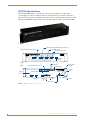
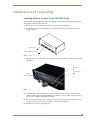
2. Remove the three screws by turning them in a counter-clockwise direction and then remove the
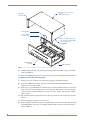
faceplate (FIG. 1).
Thumbscrews
NXC Card Slot faceplate
FIG. 1 NI-4000 front faceplate
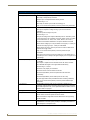
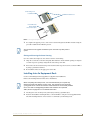
3. Align the edges of the card with the internal guide slots and gently slide the card all the way into the
slot (FIG. 2).
Card slots
Sample
NXC cards
Internal Guide
slots
FIG. 2 Sample NXC cards inserted into an NI-4000 unit
4. Carefully apply a small amount of force to insert the cards into their respective connectors. If the
cards have LEDs on them, those LEDs will initiate a lighting sequence to indicate they are receiving
power and are communicating with the Controller.
5. Re-align the faceplate and secure it to the chassis by inserting the three screws by turning them in a
clockwise direction and securing the front plate to the Integrated Controller.
6. Install all rear connectors and apply power.
NI-2000, NI-3000, NI-4000 Hardware Reference Guide
15