1
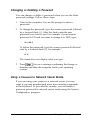
FCC COMPLIANCE STATEMENT
FOR AMERICAN USERS
This equipment has been tested and found to comply with the limits for a class B digital
device, pursuant to Part 15 of the FCC Rules. These limits are designed to provide
reasonable protection against harmful interference in a residential installation. This
equipment generates, uses, and can radiate radio frequency energy and, if not installed
and used in accordance with the instructions, may cause harmful interference to radio and
television reception. However, there is no guarantee that interference will not occur in a
particular installation. If this equipment does cause interference to radio and television
reception, which can be determined by turning the equipment off and on, the user is
encouraged to try to correct the interference by one or more of the following measures:
Cl Reorient or relocate the receiving antenna
0 Increase the separation between the equipment and receiver
0 Connect the equipment into an outlet on a circuit different from that to which the
receiver is connected
Cl Consult the dealer or an experienced radio/TV technician for help.
WARNING
The connection of a non-shielded equipment interface cable to this equipment will
invalidate the FCC Certification of this device and may cause interference levels that
exceed the limits established by the FCC for this equipment. It is the responsibility of the
user to obtain and use a shielded equipment interface cable with this device. If this
equipment has more than one interface connector, do not leave cables connected to unused
interfaces.
Changes or modifications not expressly approved by the manufacturer could void the
user’s authority to operate the equipment.
FOR CANADIAN USERS
This digital apparatus does not exceed the Class B limits for radio noise emissions from
digital apparatus as set out in the radio interference regulations of the Canadian
Department of Communications.
Le présent appareil numérique n’émet pas de bruits radioélectriques dépassant les limites
applicables aux appareils numériques de Classe B prescrites dans le règlement sur le
brouillage radioélectrique édicté par le Ministère des Communications du Canada.
EPSON
EISA
User’s Guide
IMPORTANT NOTICE
Epson America, Inc., makes no representations or warranties, either express or implied,
by or with respect to anything in this manual, and shall not be liable for any implied
warranties of merchantability and fitness for a particular purpose or for any indirect,
special, or consequential damages. Some states do not allow the exclusion of incidental or
consequential damages, so this exclusion may not apply to you.
COPYRIGHT NOTICE
All rights reserved. No part of this publication may be reproduced, stored in a retrieval
system, or transmitted, in any form or by any means, electronic, mechanical,
photocopying, recording, or otherwise, without the prior written permission of Epson
America, Inc. No patent liability is assumed with respect to the use of information
contained herein. Nor is any liability assumed for damages resulting from the use of the
information contained herein. Further, this publication and features described herein are
subject to change without notice.
The power-on diagnostic error messages and error tone codes in Appendix C are copyright
1985-1989, Phoenix Technologies Ltd.
TRADEMARKS
Epson is a registered trademark and the EISA Series design is a trademark of Seiko Epson
Corporation.
General notice: Other product names used herein are for identification purposes only and
may be trademarks of their respective companies.
Copyright © 1991 by Epson America, Inc.
Torrance, California
ii
Y735991001
Important Safety Instructions
1. Read all of these instructions and save them for later reference.
2.
Follow all warnings and instructions marked on the computer.
3.
Unplug the computer from the wall outlet before cleaning. Use a
damp cloth for cleaning; do not use liquid or aerosol cleaners.
4.
Do not spill liquid of any kind on the computer.
5.
Do not place the computer on an unstable cart, stand, or table.
6.
Slots and openings in the cabinet and the back or bottom are
provided for ventilation; do not block or cover these openings.
Do not place the computer near or over a radiator or heat
register.
7.
Operate the computer using the type of power source indicated on
its label. If you are not sure of the type of power available,
consult your dealer or local power company.
8.
If you plan to operate the computer in Germany, observe the
following safety precaution:
To provide adequate short-circuit protection and over-current
protection for this computer, the building installation must be
protected by a 16 Amp circuit breaker.
Beim Anschulß des Computers an die Netzversorgung muß
sichergestellt werden daß die Gebäudeinstallation mit einem
16 A Überstromschutzschalter abgesichert ist.
9.
Connect all equipment to properly grounded (earthed) power
outlets. If you are unable to insert the plug into an outlet, contact
your electrician to replace your outlet. Avoid using outlets on
the same circuit as photocopiers or air control systems that
regularly switch on and off.
iii
10. Do not allow the computer’s cord to become damaged or frayed.
11. If you use an extension cord with the computer, make sure the
total of the ampere ratings of the devices plugged into the
extension cord does not exceed the ampere rating for the
extension cord. Also, make sure the total of all products plugged
into the wall outlet does not exceed 15 amperes.
12. Do not insert objects of any kind into this product through the
cabinet slots.
13. Except as specifically explained in this User’s Guide, do not
attempt to service the computer yourself. Refer all servicing to
qualified service personnel.
14. Unplug the computer from the wall outlet and refer servicing to
qualified service personnel under the following conditions:
A. When the power cord or plug is damaged.
B. If liquid has entered the computer.
C. If the computer does not operate normally when the operating
instructions are followed. Adjust only those controls that are
covered by the operating instructions. Improper adjustment
of other controls may result in damage and often requires
extensive work by a qualified technician to restore the
computer to normal operation.
D. If the computer has been dropped or the cabinet has been
damaged.
E. If the computer exhibits a distinct change in performance.
iv
Instructions Importantes de Sécurité
1. Lire complètement les instructions qui suivant et les conserver
pour references futures.
2.
Bien suivre tous les avertissements et les instructions indiqués sur
l’ordinateur.
3.
Debrancher l’ordinateur de toute sortie murale avant le nettoyage.
Utiliser un chiffon humide; ne jamais utiliser un nettoyeur
liquide ou une bonbonne aérosol.
4.
Ne jamais renverser un liquide d’aucune sorte sur l’ordinateur.
5.
Ne pas placer l’ordinateur sur un chariot, un support, ou une table
instable.
6.
Les évents dans le meubles, à l’arrière et en dessous sont conçus
pour l’aération; on ne doit jamais les bloquer. Ne pas placer
l’ordinateur près d’une source de chaleur directe.
7.
Le fonctionnement de l’ordinateur doit s’effectuer conformément
au type de source d’alimentation indiquée sur l’étiquette. Dans le
cas d’un doute de la source disponible, on doit communiquer
avec le concessionaire ou la compagnie d’électricité.
8.
Lorsqu’ on désire utiliser l’ordinateur en Allemagne, on doit
observer les normes sécuritaires qui suivent:
l
Afin d’assurer une protection adequate à l’ordinateur contre
les court-circuits et le survoltage, l'installation de l’édifice
doit comprendre un disjoncteur de 16 amp.
9.
On doit brancher tout l’equipement dans une sortie reliée à la
masse. Lorsqu’il est impossible d’insérer la fiche dans la prise, on
doit retenir les services d’un électricien ou remplacer la prise. Ne
jamais utiliser une prise sur le même circuit qu’un appareil à
photocopie ou un système de contrôle d’aération avec
commutation marche-arrêt.
V
10. S’assurer que le cordon d’alimentation de l’ordinateur n’est pas
effrité.
11. Dans le cas où on utilise un cordon de rallonge avec l’ordinateur,
on doit s’assurer que la valeur totale d'ampères branches dans le
cordon n’excède en aucun temps les amperes du cordon de
rallonge. La quantité totale des appareils branches dans la prise
murale ne doit jamais excéder 15 amperes.
12. Ne jamais insérer un objet de quelque sorte que ce soit dans les
cavités de cet appareil.
13. Sauf tel que spécifié dans la notice d’utilisation, on ne doit jamais
tenter d’effectuer une réparation de l’ordinateur. On doit référer
le service de cet appareil à un technicien qualifié.
14. Débrancher l’ordinateur de la prise murale et confier le service au
personnel de service qualifié selon les conditions qui suivent:
A. Lorsque le cordon d’alimentation ou la prise sont endommagés.
B. Lorsqu’un liquide s’est infiltré dans l’ordinateur.
C. Lorsque l’ordinateur refuse de fonctionner normalement
même en suivant les instructions. N’ajuster que les
commandes qui sont énumérées dans les instructions de
fonctionnement. Tout ajustement inadéquat de tout autre
contrôle peut provoquer un dommage et souvent nécessiter
des réparations élaborées par un technicien qualifié afin de
remettre l’appareil en service.
D. Lorsqu’on a échappé l’ordinateur ou que l’on a endommagé le
boîtier.
E. Lorsque l’ordinateur démontre un changement noté au niveau
de sa performance.
vi
Contents
Introduction
Optional Equipment . .
Software . . . . . . . . .
How to Use This Manual
Where to Get Help . . .
Chapter 1
.
.
.
.
.
.
.
.
.
.
.
.
.
.
.
.
.
.
.
.
.
.
.
.
.
.
.
.
.
.
.
.
.
.
.
.
.
.
.
.
.
.
.
.
.
.
.
.
.
.
.
.
.
.
.
.
.
.
.
.
.
.
.
.
.
.
.
.
.
.
.
.
.
.
.
.
.
.
.
.
.
.
.
.
.
.
.
.
Setting Up Your System
Preparing to Set Up the System . . . . . . . . . . . . . . . . . .
Installation Overview . . . . . . . . . . . . . . . . . . . . . . . .
Installing Optional Equipment . . . . . . . . . . . . . . . . . .
Connecting Peripheral Devices . . . . . . . . . . . . . . . . . .
Turning On the Computer . . . . . . . . . . . . . . . . . . . . .
Running the Change Country Code Utility . . . . . . . . . . .
Setting the Country Code for the First Time . . . . . . . .
Changing the Country Code . . . . . . . . . . . . . . . . .
Chapter 2
3
3
4
5
l-l
l-3
l-4
l-5
l-6
l-7
l-8
l-10
Running System Configuration
How to Use This Chapter . . . . ............
The Configuration Process . . . ............
Using Configuration Files . . . . . . . . .............
Using the Keyboard . . . . ............
Using a Mouse . . . . . . ............
Using On-line Help . . . . ............
2-2
2-3
2-3
2-4
2-4
2-5
vii
Configuring Your System . . . . . . . . . . . . . . . . . . . . . .
Starting the Program . . . . . . . . . . . . . . . . . . . . . .
Setting the Date and Time . . . . . . . . . . . . . . . . . . .
Performing the Configuration Steps . . . . . . . . . . . . .
Adding or Removing a Board . . . . . . . . . . . . . . . . .
Defining the Configuration Settings . . . . . . . . . . . . .
Using Advanced Configuration Options . . . . . . . . . . .
Using Alternate Configuration Files . . . . . . . . . . . . . . . .
Creating an Alternate SCI File . . . . . . . . . . . . . . . . .
Loading an Alternate SCI File . . . . . . . . . . . . . . . . .
Using Special Modes . . . . . . . . . . . . . . . . . . . . . . . . .
Using the SD Command . . . . . . . . . . . . . . . . . . . .
Using the CF Command . . . . . . . . . . . . . . . . . . . .
Copying the Configuration Files to a Hard Disk . . . . . .
Chapter 3
Using Your Computer
Locking the Computer’s Cover . . . . . . . . . . . . . . . . . . .
Using a Power-on Password . . . . . . . . . . . . . . . . . . . .
Changing or Deleting a Password . . . . . . . . . . . . . .
Using a Password in Network Server Mode . . . . . . . . .
Changing the Processor Speed . . . . . . . . . . . . . . . . . . .
Entering Keyboard Commands . . . . . . . . . . . . . . . .
Using the ESPEED Program . . . . . . . . . . . . . . . . . .
Parking the Hard Disk Drive Heads . . . . . . . . . . . . . . . .
Chapter 4
3-1
3-2
3-3
3-3
3-5
3-6
3-7
3-8
Accessing lnternal Components
Special Precautions . . . . . . . . . . . . .
Removing the Cover . . . . . . . . . . . .
Removing the Front Panel . . . . . . . . .
Removing the Subassembly . . . . . . . .
Replacing the Subassembly . . . . . . . .
Replacing the Front Panel . . . . . . . . .
Replacing the Cover . . . . . . . . . . . .
Post-installation Setup Procedures . . . . .
viii
2-6
2-6
2-8
2-9
2-10
2-10
2-17
2-19
2-19
2-20
2-21
2-21
2-22
2-24
.
.
.
.
.
.
.
.
.
.
.
.
.
.
.
.
.
.
.
.
.
.
.
.
.
.
.
.
.
.
.
.
.
.
.
.
.
.
.
4-l
4-2
4-4
4-6
4-8
4-10
4-11
4-12
Chapter 5
Installing and Removing Options
Main System Board Map . . . . . . . . . . . . . . . . . . . . . .
Processor Board Maps . . . . . . . . . . . . . . . . . . . . . . .
Option Cards . . . . . . . . . . . . . . . . . . . . . . . . . . . . .
Installing Option Cards . . . . . . . . . . . . . . . . . . . .
Removing Option Cards . . . . . . . . . . . . . . . . . . .
Processor Boards . . . . . . . . . . . . . . . . . . . . . . . . . . .
Removing the Processor Board . . . . . . . . . . . . . . . .
Installing the Processor Board . . . . . . . . . . . . . . . .
Math Coprocessor . . . . . . . . . . . . . . . . . . . . . . . . . .
Installing a Math Coprocessor . . . . . . . . . . . . . . . .
Removing a Math Coprocessor . . . . . . . . . . . . . . .
Memory Modules . . . . . . . . . . . . . . . . . . . . . . . . . .
Installing Memory Modules . . . . . . . . . . . . . . . . .
Removing Memory Modules . . . . . . . . . . . . . . . .
Chapter 6
Installing and Removing Drives
Using the Correct Drive Bay . . . . . . . . . . . . . . . . . . . .
Setting the IDE Hard Disk Drive Jumpers . . . . . . . . . . . .
Changing the Jumper Settings . . . . . . . . . . . . . . . .
Installing or Removing a Drive in the External Bay . . . . . . .
Installing a Drive . . . . . . . . . . . . . . . . . . . . . . .
Removing a Drive . . . . . . . . . . . . . . . . . . . . . . .
Installing or Removing a Drive in the Internal Bay . . . . . . .
Removing a Drive . . . . . . . . . . . . . . . . . . . . . . .
Installing a Drive . . . . . . . . . . . . . . . . . . . . . . . .
Connecting the Cables . . . . . . . . . . . . . . . . . . . . .
Appendix A
5-2
5-3
5-4
5-5
5-6
5-7
5-7
5-8
5-9
5-9
5-10
5-11
5-13
5-15
6-2
6-3
6-4
6-5
6-6
6-12
6-14
6-15
6-16
6-18
Running System Diagnostics
Starting the Program . . . . . . . . . . . . . . . . . . . . . . . .
Deleting Tests . . . . . . . . . . . . . . . . . . . . . . . . .
Adding Tests . . . . . . . . . . . . . . . . . . . . . . . . . .
A-2
A-3
A-4
ix
Running Tests . . . . . . . . .
Resuming From an Error
System Diagnostic Tests . . .
Error Messages . . . . . . . .
Appendix B
.
.
.
.
.
.
.
.
.
.
.
.
.
.
.
.
.
.
.
.
.
.
.
.
.
.
.
.
.
.
.
.
. . . . . . . . . . . .
. . . . . . . . . . . .
. . . . . . . . . . . .
. . . . . . . . . . . .
A-5
A-6
A-7
A-8
Formatting a Hard Disk
Starting the Program . . . . . . . . . . . . . . . . . . . . . . . . .
Formatting a New Disk . . . . . . . . . . . . . . . . . . . .
Reformatting a Used Disk . . . . . . . . . . . . . . . . . . .
Selecting an Option . . . . . . . . . . . . . . . . . . . . . . .
Starting the Formatting Process . . . . . . . . . . . . . . . .
Option 1, Format . . . . . . . . . . . . . . . . . . . . . . . . . . .
Modifying the Defective Track Table . . . . . . . . . . . .
Formatting the Disk . . . . . . . . . . . . . . . . . . . . . .
Option 2, Destructive Surface Analysis . . . . . . . . . . . . . .
Option 3, Non-destructive Surface Analysis . . . . . . . . . . .
Exiting the Program . . . . . . . . . . . . . . . . . . . . . . . . .
B-2
B-3
B-4
B-4
B-4
B-5
B-7
B-8
B-9
B-11
B-12
Appendix C Troubleshooting
Identifying Your System . .
Error Messages . . . . . . .
Power or Lock-up Problems
Password Problems . . . . .
Keyboard Problems . . . . .
Monitor Problems . . . . . .
Diskette Problems . . . . .
Diskette Drive Problems . .
Hard Disk Problems . . . .
Software Problems . . . . .
Printer Problems . . . . . .
Option Card Problems . . .
Memory Module Problems
Mouse Problems . . . . . .
Math Coprocessor Problems
x
.
.
.
.
.
.
.
.
.
.
.
.
.
.
.
.
.
.
.
.
.
.
.
.
.
.
.
.
.
.
.
.
.
.
.
.
.
.
.
.
.
.
.
.
.
.
.
.
.
.
.
.
.
.
.
.
.
.
.
.
.
.
.
.
.
.
.
.
.
.
.
.
.
.
.
.
.
.
.
.
.
.
.
.
.
.
.
.
.
.
.
.
.
.
.
.
.
.
.
.
.
.
.
.
. . . . . . . . . . . . . .
. . . . . . . . . . . . . .
. . . . . . . . . . . . . .
. . . . . . . . . . . . . .
. . . . . . . . . . . . . .
. . . . . . . . . . . . . .
. . . . . . . . . . . . . .
. . . . . . . . . . . . . .
. . . . . . . . . . . . . .
. . . . . . . . . . . . . .
. . . . . . . . . . . . . .
. . . . . . . . . . . . . .
. . . . . . . . . . . . . .
. . . . . . . . . . . . . .
. . . . . . . . . . . . . .
C-l
C-2
C-5
C-9
C-11
C-11
C-12
C-13
C-14
C-15
C-16
C-16
C-17
C-17
C-18
Appendix D Specifications
Main System Board . . . . . . . . . . . . . . . .
Interfaces . . . . . . . . . . . . . . . . . . . . . .
Controllers . . . . . . . . . . . . . . . . . . . . .
Processor Board . . . . . . . . . . . . . . . . . .
Mass Storage Bays . . . . . . . . . . . . . . . . .
Power Supply. . . . . . . . . . . . . . . . . . . .
Keyboard . . . . . . . . . . . . . . . . . . . . . .
Environmental Requirements . . . . . . . . . .
Physical Characteristics . . . . . . . . . . . . . .
Power Source Requirements . . . . . . . . . . .
System Memory Map . . . . . . . . . . . . . . .
.
.
.
.
.
.
.
.
.
.
.
.
.
.
.
.
.
.
.
.
.
.
D-l
D-l
D-2
D-3
D-3
D-4
D-5
D-5
D-5
D-6
D-7
Glossary
Index
xi
Tables
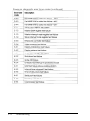
Key commands . . . . . . . . . . . . . . . . . . . . . . . .
System board options . . . . . . . . . . . . . . . . . . . . . .
Default non-cache address blocks . . . . . . . . . . . . . . .
Hard disk drive types . . . . . . . . . . . . . . . . . . . . . .
Advanced configuration options . . . . . . . . . . . . . . .
SD command parameters . . . . . . . . . . . . . . . . . . .
CF command parameters . . . . . . . . . . . . . . . . . . .
Keyboard speed setting commands . . . . . . . . . . . . . .
ESPEED program parameters . . . . . . . . . . . . . . . . .
Option slot power limits . . . . . . . . . . . . . . . . . . . .
Coprocessors . . . . . . . . . . . . . . . . . . . . . . . . . . .
SIMM descriptions . . . . . . . . . . . . . . . . . . . . . . .
Example SIMM configurations . . . . . . . . . . . . . . . .
Hard disk drive number settings . . . . . . . . . . . . . . . .
System diagnostic tests . . . . . . . . . . . . . . . . . . . . .
System diagnostic error messages . . . . . . . . . . . . . . .
Power-on diagnostic error messages . . . . . . . . . . . . .
Power-on diagnostic error tone codes . . . . . . . . . . . .
Power supply maximum outputs . . . . . . . . . . . . . . .
Option slot power limits . . . . . . . . . . . . . . . . . . . .
Environmental requirements . . . . . . . . . . . . . . . . .
120 Volt power source requirements . . . . . . . . . . . . .
240 Volt power source requirements . . . . . . . . . . . . .
xii
2-4
2-11
2-14
2-15
2-18
2-22
2-23
3-6
3-8
5-4
5-9
5-12
5-13
6-5
A-7
A-8
C-2
C-3
D-4
D-4
D-5
D-6
D-6
Introduction
The Epson® EISA Series computer is a powerful, versatile
system ideally suited for use as either a network server or a
high-performance personal workstation. It incorporates the
latest EISA (Extended Industry Standard Architecture)
technology into a convenient desktop design. Its exceptional
features and flexibility enable you to use the most advanced
peripheral devices and software while maintaining full
compatibility with ISA technology.
Your system includes the following features:
Ll
4MB of RAM on single inline memory modules (SIMMs)
cl
SIMM sockets for installing up to 64MB of memory using
lMB, 2MB, 4MB, or 8MB SIMMs
cl
8KB of extended CMOS RAM for EISA configuration
information
cl
Upgradable processor board providing high speed cache
memory and math coprocessor support
cl
One built-in parallel and two built-in serial interfaces
tl
IBM® PS/2® compatible mouse port and keyboard port
Ll
Five EISA expansion slots compatible with 32-bit EISA bus
master cards and 8- or 16-bit ISA cards
cl
IDE hard disk drive interface for up to two hard disk drives
CJ
Diskette drive controller for up to two diskette drives and
one tape drive
Ll
Mass storage bays for up to five drives.
Introduction 1
The built-in interfaces let you connect basic peripheral devices
(such as a printer and mouse) directly to the computer, leaving
the expansion slots for optional devices such as a SCSI adapter
or a networking card.
Your computer’s EISA technology allows the 32-bit processor
to access EISA-compatible I/O expansion boards 32 bits at a
time optimizing system throughput. In addition, the EISA burst
mode capability enables data transfers of up to 33MB of data per
second through the EISA bus.
The powerful EISA configuration program automatically
configures any EISA boards you install and provides all the
necessary information for configuring most ISA boards. The
result is a configuration that manages your system resources in
the most efficient manner possible.
The EISA Series computer offers several other features to
enhance system performance:
2
tl
Automatic shadow RAM support. This speeds up access to
the system and video BIOS.
0
Processor speed simulation support. You can set the
processor to emulate a variety of system speeds from
8 MHz up to your processor’s highest speed to provide
compatibility with a wide variety of software.
0
Password security. You can set a password in either regular
or network server mode.
Introduction
Optional Equipment
By adding SIMMs to the main system board, you can expand
the computer’s memory up to 64MB.
On the upgradeable processor board, you can install a math
coprocessor or another processor, depending on the board you
have.
You can also install a variety of other options, such as diskette
drives, hard disk drives, a tape drive, or a SCSI subsystem.
Check with your authorized Epson dealer to see which options
are available.
Software
Your system comes with three diskettes (Reference 1,2, and 3)
containing the following software:
EISA System Configuration program
ISA configuration files for popular ISA boards
System diagnostics program
Hard disk drive low-level formatting utility
HDDPARK program to park the hard disk drive
read/write heads
ESPEED program to change the processor simulation speed
CHGCTR program to set country-dependent keyboard and
configuration information.
Introduction 3
How to Use This Manual
This manual explains how to set up, configure, and operate
your computer, as well as how to install options and run
diagnostic tests. It does not cover your operating system; see
your operating system manual for instructions on installing
and using it.
Although you should be sure to follow the steps in Chapter 1
and Chapter 2 to set up and configure your system, you may
not need to read everything in this book. See the following
chapter summaries to find the sections you need.
Chapter 1 provides instructions for setting up your system.
Chapter 2 describes how to run the System Configuration
program to configure your computer.
Chapter 3 provides instructions for certain operating
procedures, such as locking the computer’s cover, using a
password, and changing the operating speed.
Chapter 4 describes how to remove and replace the cover and
front panel to access the internal components.
Chapter 5 gives instructions for installing and removing options.
Chapter 6 explains how to install and remove disk drives.
Appendix A outlines the system diagnostic tests.
Appendix B describes how to perform a hardware-level format
on a hard disk.
Appendix C contains troubleshooting tips.
Appendix D gives the technical specifications for the computer.
At the end of the manual, you’ll find a glossary and an index.
4
Introduction
Where to Get Help
If you purchased your computer outside of the United States,
please contact your dealer or the marketing location nearest
you for customer support and service. International marketing
locations are listed on the inside of this manual’s back cover.
If you purchased your Epson product in the United States,
Epson America provides local customer support and service
through a nationwide network of authorized Epson dealers and
Service Centers.
Epson also provides the following support services through the
Epson Customer Resource Center at (800) 922-8911:
Technical assistance with the installation, configuration,
and operation of Epson products
Assistance in locating your nearest Authorized Epson
Reseller or Service Center
Sales of ribbons, supplies, parts, documentation, and
accessories for your Epson product
Customer Relations
Epson technical information library fax service
Product literature with technical specifications on our
current and new products.
Introduction 5
Chapter 1
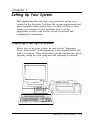
Setting Up Your System
This chapter describes the steps you perform to set up your
system for the first time. It defines the system requirements and
gives a general outline of the steps you need to follow to start
using your computer. It also describes how to set the
appropriate country code for the system’s keyboard and
configuration information.
Preparing to Set Up the System
Before you set up your system, be sure to read “Important
Safety Instructions” at the beginning of this manual (before the
table of contents). These instructions provide information about
properly caring for your computer and operating it correctly.
Setting Up Your System
1-1
It is important to choose a safe, convenient location for your
system. Make sure your location provides the following:
A flat, hard surface. Surfaces like carpeted floors and beds
attract static electricity, which can erase data on your disks,
damage the computer’s circuitry, and prevent proper
ventilation.
Good air circulation. Leave several inches of space around
the computer so air can move freely.
Moderate environmental conditions. Select a cool, dry area
and protect your computer from extremes in temperature,
humidity, dust, and smoke. Avoid direct sunlight or any
other source of heat.
No electromagnetic interference. Do not place your system
too close to any electrical device, such as a telephone, that
generates an electromagnetic field.
Appropriate power sources. Connect all your equipment to
the appropriate power source. See “Power Source
Requirements” in Appendix D for more information.
Remove the protector card. If you have a 5¼-inch diskette
drive, be sure to remove the protector card from the
diskette slot. This card is inserted at the factory to protect
the read/write heads in the drive.
1-2
Setting Up Your System
Installation Oveview
This section lists the general steps you follow to install options,
connect peripheral devices, and configure your system. For
detailed instructions on performing these steps, see the
appropriate sections specified below.
1.
Install any optional equipment you want to add to your
computer, such as disk drives, a math coprocessor, memory
modules, or EISA option cards. Do not install any ISA
option cards yet (unless you will be using an ISA card to
control your monitor). See “Installing Optional Equipment”
below.
2.
Connect a monitor, a printer, and the keyboard. See
“Connecting Peripheral Devices” below.
3.
Then see “Turning On Your Computer,” below, before you
turn on the system.
4.
Run the Change Country Code utility (CHGCTR) to install
the correct keyboard driver and configuration information
for your system. See “Running the Change Country Code
Utility,” below, for instructions.
5.
Read “The Configuration Process” in Chapter 2 to familiarize
yourself with the use of the System Configuration program.
6.
Run the System Configuration program, as described in
Chapter 2, to configure your system.
7.
If you have other ISA option cards to install, turn off the
system, unplug all the power cords, and disconnect any
peripheral devices from the computer.
8.
Set any switches or jumpers on your ISA cards, if necessary,
and install them in the computer. See Chapter 5 for
instructions on installing option cards.
Setting Up Your System
1-3
9.
Connect all of your peripheral devices.
10. Install your operating system and any other application
programs. See the manuals that came with your software
for installation instructions.
Installing Optional Equipment
The first time you set up your computer, you should install any
disk drives, math coprocessor, memory modules, or EISA
option cards you plan to use. Do not install any ISA option
cards yet, unless you will be installing an ISA video adapter
card to control your monitor.
You can install the rest of your ISA cards after you run the
System Configuration program. This program provides
information about the jumper and switch settings for the ISA
option cards you will install.
Follow the instructions in Chapters 5 and 6 to install optional
equipment in your computer. Be sure to check your computer’s
option slot power limits on page 5-4 before you install any
option cards.
You may need to unlock the computer’s cover to access the
internal components. See Chapter 3 for instructions.
When you are finished installing optional equipment, return to
this chapter for guidelines on connecting the peripheral devices
necessary to run the System Configuration program.
1-4
Setting Up Your System
Connecting Peripheral Devices
You may not want to connect all your peripheral devices before
you run the System Configuration program for the first time. If
you’ll be installing ISA cards after running the program, you
may want to connect only those devices necessary to perform
the program’s functions. If you connect other devices, you will
need to disconnect them to install the ISA cards.
You must connect a monitor and a keyboard to run the System
Configuration program. You may also want to connect a
printer.
As you set up your computer, leave this manual’s back cover
foldout open so you can refer to the illustrations identifying the
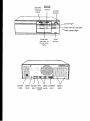
different parts of the computer.
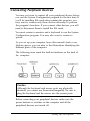
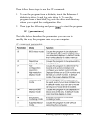
The following icons mark the built-in interfaces on the back of
the computer:
Caution
Although the keyboard and mouse ports are physically
identical, you cannot use them interchangeably. Be sure to
plug the keyboard and the mouse into the correct ports.
Before connecting your peripheral devices, make sure the
power buttons or switches on the computer and all the
peripheral devices are turned off.
Setting Up Your System
1-5
Then connect the devices in the following order:
1.
Connect your peripheral device cables to the computer.
2.
Connect the power cords to the computer and other devices,
if necessary.
3.
Plug the power cords into their electrical outlets.
Be sure to read the next section before you turn on your
computer.
Turning On the Computer
After you set up your system, you’re ready to turn on the
power. But first, read the following safety rules to avoid
accidentally damaging your computer or injuring yourself:
Lt
Do not connect or disconnect any power or peripheral
device cables when the computer’s power is on.
Cl
Never turn on the computer with a protector card in the
diskette drive.
tl
Never turn on the computer when its cover is off.
Ll Never turn off or reset your computer while a disk drive
light is on. This can destroy data stored on disk.
1-6
Ci
Always wait at least five seconds after you turn off the
power before you turn it on again. This allows the
computer to clear and reset its memory.
Ci
Do not leave a beverage near your system or any of its
components. Spilled liquid can damage the circuitry of
your equipment.
Setting Up Your System
Cl
Always turn off the power, disconnect the computer’s
power cord, and wait 30 seconds before you remove the
cover. Only remove the cover to access internal devices.
Now you can run the Change Country Code utility.
Running the Change Country Code Utility
Before you configure your computer or perform any other
operations, you need to create new AUTOEXEC.BAT and
CONFIG.SYS files for your country on the Reference 1 diskette.
You do this by running the Change Country Code utility.
This utility creates files that contain the appropriate keyboard
driver and configuration information for the country you select.
The program runs automatically the first time you boot your
computer from the Reference 1 diskette.
Country codes are available for the following countries:
tl United States
tl United Kingdom
Q France
0 Germany
CI Italy
Cl Spain.
The default country code is United States. See the instructions
in the next section to set the appropriate country code and
create the correct AUTOEXEC.BAT and CONFIG.SYS files.
Later, if you need to change the country code and create new
files, see the “Changing the Country Code” section.
Setting Up Your System
1-7
Setting the Country Code for the first Time
To run the Change Country Code utility the first time you boot
your computer from the Reference 1 diskette, follow these steps:
1.
Insert the Reference 1 diskette in drive A.
2.
Turn on your computer or press the RESET button.
3.
After a moment, you see a screen describing the Change
Country Code utility. The screen includes the following
message and prompt:
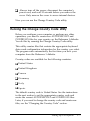
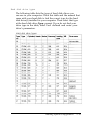
Current country c o d e i s U n i t e d S t a t e s .
Change country code? (Y/N)
If you want to select the default country code, United States,
press m. You see a message telling you that the program
still must update your files. Then the program copies the
files. Go to step 4.
If you want to select another country code, press m. You see
the following:
Press Fl - US Version (United States)
Press
Press
Press
Press
Press
F2
F3
F4
F5
F6
- UK Version (United Kingdom)
- FR Version (French)
- GR Version (German)
- IT Version (Italian)
- SP Version (Spanish)
Press any other key to accept the
current country code.
Press the appropriate function key for your country. The
program copies the files and displays a message confirming
the change.
1-8
Setting Up Your System
4.
When you see the following message, press any key to reboot
the system and run the System Configuration program:
Now you should reboot the system to run
the appropriate AUTOEXEC.BAT and
CONFIG.SYS files and start the System
Configuration program.
Press any key to reboot . . .
After a moment, you see the System Configuration program
title screen. If you want to run the program now, see the
information in Chapter 2 before you begin.
If you do not want to configure your computer now, remove
the diskette from drive A and turn off your computer.
The AUTOEXEC.BAT and CONFIG.SYS files on your
Reference 1 diskette are now customized for your country’s
keyboard and configuration information. Whenever you boot
your system from the Reference 1 diskette, the computer runs
the appropriate files for your country.
The System Configuration program also sets the format of the
date and time in your computer’s real-time clock to the
appropriate format for your country.
Setting Up Your System
l-9
Changing the Country Code
If you need to change the country code for your system’s
keyboard driver and configuration information, you can run
the CHGCTR utility. Follow these steps:
1. Insert the Reference 1 diskette in drive A and log onto
drive A.
2.
At the A> prompt, type CHGCTR and press [Enter. You see the
information screen for the Change Country Code utility
followed by this prompt:
Change country code? (Y/N)
3.
If you want to keep the current country code, press IN).
You see a message telling you that the program still must
update your files. Then the program copies the files. Go to
step 4.
If you want to select another country code, press [VI. You see
a list of the function keys to press to select a different code.
Press the appropriate function key for the country code you
want. The program copies the files and displays a message
confirming the change.
4.
When you see the following message, press any key to reboot
the system and run the System Configuration program:
Now you should reboot the system to run
the appropriate AUTOEXEC.BAT and
CONFIG.SYS files and start the System
Configuration program.
Press any key to reboot . . .
After a moment, you see the System Configuration title
screen. If you want to run that program now, see Chapter 2
for instructions.
l-10
Setting Up Your System
If you do not want to run System Configuration, remove the
Reference 1 diskette from drive A and turn off your
computer.
The AUTOEXEC.BAT and CONFIG.SYS files on your
Reference 1 diskette are now customized for the country you
selected.
The System Configuration program also sets the format of the
date and time in your computer’s real-time clock to the
appropriate format for the country you selected.
Setting Up Your System
1-11
Chapter 2
Running System Configuration
The System Configuration program, provided with your
system on the Reference 1 diskette, allows you to configure
your computer. Use the program to do the following:
Learn about the configuration process
Set the date and time
Copy the configuration (CFG) files for any option cards you
install
Configure the system board and any option cards
Create one or more System Configuration Information
(SCI) files
Access other system utilities, such as System diagnostics
and hard disk utilities.
You must run the System Configuration program to configure
your system before you can use your computer for any other
purpose. You may need to run it again later if you add or
remove options, such as memory, disk drives, or option cards.
After running the program, you save your current
configuration in the computer’s CMOS and in a file called
SYSTEM.SCI. Your computer checks this information each time
you turn it on and assigns your system resources based on the
configuration options you selected.
If you want to create an alternate configuration file for your
computer or another computer, you can create an alternate SCI
file. See page 2-19 for more information.
Running System Configuration
2-1
Note
The first time you configure your computer, you must run
the program from the Reference 1 diskette and it is best to
always run it from there.
How to Use This Chapter
This chapter is divided into the following four sections:
CI
The Configuration Process describes the various aspects of
configuring your computer using the System Configuration
program. It also tells you how to use the keyboard or a
mouse with the program and how to use on-line help.
tl
Configuring Your System provides step-by-step
instructions for running the System Configuration program
and is organized in the order in which you should perform
the operations.
CI
Using Alternate Configuration Files tells you how to
create and use alternate configuration files, should you find
it necessary to do so.
Ll
Using Special Modes tells you how to configure your
computer by running it in special operating modes, such as
non-target modeling mode.
Read “The Configuration Process” first to familiarize yourself
with all aspects of the configuration process. Then perform the
configuration operations in the order they are described under
“Configuring Your System.”
If you need to create alternate configuration files or run the
program in special modes, see pages 2-19 or 2-21, respectively.
2-2
Running System Configuration
The Configuration Process
This section describes the following configuration operations:
Ci
Using the configuration files
Ll Using the keyboard or a mouse with the program
Li
Using on-line help.
Using Configuration Files
Configuration (or CFG) files provide information to the system
about a card’s functions and resource requirements so your
computer can allocate its resources efficiently. They also
provide instructions for setting any switches and jumpers on
ISA cards.
You copy to your Reference 1 diskette a configuration file for
each card you install using the System Configuration program.
EISA cards come with the necessary CFG file to allow the
program to configure the card automatically. See your EISA
card documentation for more information.
ISA option cards may come with the necessary CFG file for this
program. If not, Epson provides many ISA configuration files
on the Reference 3 diskette. You can also write to the
manufacturer of your option card and request a CFG file for it.
Use the file provided by your ISA card manufacturer, if
possible, and do not copy more than one file for a card.
If you do not have a configuration file for your ISA card, you
can still install the card in your system. However, you should
configure the rest of your system and then follow the
instructions that came with the card to set any of its switches or
jumpers.
Running System Configuration
2-3
Using the Keyboard
If you use a keyboard when you run the System Configuration
program, refer to the table below for a description of the keys
you can use to move the cursor and select items. If you’ll be
using a mouse with the program, see “Using a Mouse” below.
Most of the screens show which keys you can press to perform
various operations. Follow the instructions on each screen.
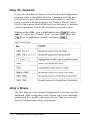
Whenever the <OK> icon is highlighted, press w to select
<OK>. To select the <Cancel> icon, you can either press the
m key or highlight <cancel> and press IEnter
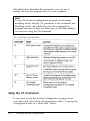
Key commands
Using a Mouse
The first time you run System Configuration, you must use the
keyboard. After configuring your system, load your operating
system and then install your mouse driver. Then you can run
System Configuration using your mouse.
2-4
Running System Configuration
To select most options, place the cursor on the option and click
the left button once to highlight it and again to select it.
When you see m or m on the screen, you can scroll the
text. Place the cursor on the arrow indicating the scroll
direction and hold down the left button. Release it to stop.
Keep in mind that this chapter gives keyboard instructions
when describing how to use the System Configuration
program. You should substitute the appropriate mouse
equivalents when performing the same operations.
Using On-line Help
The System Configuration program provides extensive on-line
help information. You can obtain help in the following ways:
Q
Highlight a menu option to see a description of its function.
tl Select Step 1: Important EPSON EISA
configuration information for detailed information
about each step in the configuration process.
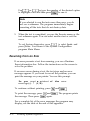
Q Press the m key whenever you see Help=Fl. The
following menu appears:
EPSON EISA Configuration Help
Current screen
Selected item or board
All boards
Keys
Using help
EPSON EISA configuration
Press D to select the help information you need; then press
IEnter
Running System Configuration
2-5
Configuring Your System
Follow the instructions in this section and on your screen to
configure your computer using the System Configuration
program. You configure your system in the following order:
Set the date and time
Add or remove boards; when you add an option card, the
program copies the necessary configuration files
View or edit the details of your configuration; use this
selection to define your configuration options
View your jumper and switch settings
Save the configuration as you exit the program.
Starting the Program
Follow these steps to start the System Configuration program
from the Reference 1 diskette:
1.
Insert the Reference 1 diskette in drive A and turn on or reset
the computer.
Note
If you installed any EISA option cards in your system,
you see a message telling you to run the configuration
program. Press I to continue.
2.
2-6
After a moment, you see the title screen for the System
Configuration program. Press any key to continue. You see
the Welcome screen.
Running System Configuration
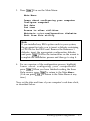
3.
Press IEnter You see the Main Menu:
Main Menu
Learn about configuring your computer
Configure computer
Set date
Set time
Access to other utilities
Maintain system configuration diskette
Exit from this utility
Note
If you installed any EISA option cards in your system,
the program first asks you to insert a diskette containing
a CFG file for the EISA card. Remove the Reference 1
diskette, insert the appropriate configuration diskette,
and press IEnter Follow the instructions on the screen to
complete the installation process and then go to step 4.
4.
For an overview of the configuration process, highlight
Learn about configuring your computerand
press IEnter When you have finished reading the three
Help screens, press m to return to the Main Menu.
(You can press m to return to the Main Menu at any
time.)
Now set the date and time of your computer’s real-time clock,
as described below.
Running System Configuration
2-7
Setting the Date and Time
The real-time clock in your computer continuously tracks the
date and time-even when the computer is turned off. The first
time you run the configuration program, set the date and time
for your computer. You can set them again later to adjust your
clock for seasonal time adjustments, such as daylight savings
time. The computer automatically changes the date for leap
years.
Follow these steps to set the date and time:
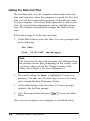
1.
At the Main Menu, select Set date. You see a prompt such
as the following:
Set Date
Date
06-08-1992 (mm-dd-yyyy)
Note
The format for the date and time may look different from
the prompts shown here, depending on the country code
you chose when you ran the Change Country Code
utility. (See Chapter 1 for more information.)
2.
The current setting for Date is highlighted. Correct it as
necessary. You can use the arrow keys to move the cursor
and overtype the date. Then press (Enter.
3.
At the Main Menu, select Set time. You see a prompt
similar to the Set Date prompt.
4.
Type the current time and press IEnter You see the Main
Menu.
Now you can configure your computer, as described below.
2-8
Running System Configuration
Performing the Configuration Steps
Follow these steps to configure your computer:
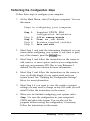
1. At the Main Menu, select Configure computer. You see
this menu:
Steps in configuring your computer
Step 1:
Step
Step
Step
Step
2:
3:
4:
5:
Important EPSON EISA
configuration information
Add or remove boards
View or edit details
Examine required switches
Save and exit
2.
Select Step 1 and read the information displayed on your
screen about configuring your system. If you want to print
any of the screens, press the [K] key.
3.
Select Step 2 and follow the instructions on the screen to
add, remove, or move option cards in your configuration
and copy any necessary CFG files to your Reference 1
diskette. See the next section for more information.
4.
Select Step 3 and follow the instructions on the screen to
view or edit the details of your option cards and your
system board. See “Defining the Configuration Settings”
below for more information.
5.
Select Step 4 if you want to view the switch or jumper
settings you may need to change on any ISA cards you will
install. Follow the instructions on the screen.
6.
When you are finished configuring your system, select
Step 5 to save the configuration in your computer’s
CMOS and reboot the system. You can also exit the
program without saving the configuration, if necessary.
Follow the instructions on the screen.
Running System Configuration
2-9
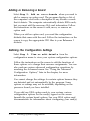
Adding or Removing a Board
Select Step 2: Add or remove boards when you need to
add or remove an option card. The program displays a list of
the computer’s slots with a description of any boards or cards
that it detects. The computer automatically detects EISA cards,
but you must add the necessary ISA card information. Follow
the instructions on the screen to add, move, or remove an
option card.
When you add an option card, you need the configuration
diskette that came with the card. Follow the instructions on the
screen to copy the appropriate CFG files to your Reference 1
diskette.
Defining the Configuration Settings
Select Step 3: View or edit details from the
configuration menu to view your system configuration options.
Follow the instructions on the screen to edit the functions of
these options or to change their resource assignments. You can
also perform various advanced configuration operations by
accessing the Advanced menu. See “Using the Advanced
Configuration Options,” later in the chapter, for more
information.
You cannot change the settings for certain options because they
are detected and set automatically by the program. Some
options or settings may not be available, depending on the
processor board you have installed.
If you add any EISA option cards to your system, various
configuration options for the card(s) appear on the screen
beneath the system board options. See your EISA option card
documentation for information about configuring your card(s).
2-10
Running System Configuration
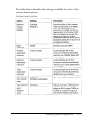
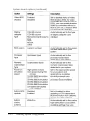
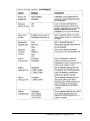
The table below describes the settings available for each of the
system board options.
System board options
Running System Configuration
2-11
System board options (continued)
2-12
Running System Configuration
System board options (continued)
Running System Configuration
2-13
System board options (continued)
Non-cache areas
Your computer automatically caches all of your memory except
for the six non-cache memory blocks listed in the table below.
You can define up to three additional, 16KB, non-cache
memory blocks by selecting the User defined non-cache area(s)
option and entering the block addresses. For example, if you
install a network or bus-mastering option card, such as a SCSI
controller, you should set the address blocks used by these
boards as non-cache blocks to avoid any memory conflicts.
Default non-cache address blocks
2-14
Running System Configuration
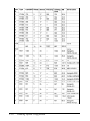
Hard disk drive types
The following table lists the types of hard disk drives you
can use in your computer. Check this table and the manual that
came with your hard disk to find the correct type for the hard
disk drive(s) installed in your computer. Then select that type
at the hard disk drive Type prompt. If you do not find your
drive type in the table, select User defined and enter your
drive’s parameters.
Hard disk drive types
Running System Configuration
2-15
2-16
Running System Configuration
Hard disk drive types (continued)
(1) Miniscribe 8425F. Seagate ST125
(2) For Seagate (formerly CDC Imprimis) default setting (34 sectors per track)
(3) Micropolis 1325, Atasi 3085, Lanstor Lan64, Maxtor XT1085, Newbury
NDR1085
(4) Micropolis 1323A. Miniscribe 3035, Microscience HH1050. Seagate ST4053
(5) Epson IDE drives: 40MB (type 59). 1 OOMB (type 60). 200MB (type 64)
(6) The BIOS translates the actual parameters for Cylinders, Heads, and
Landing zone to these values, The parameters listed in your drive’s
documentation may be the following: Cylinders (1366), Heads (8), and
Landing zone (1365).
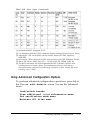
Using Advanced Configuration Options
To perform advanced configuration operations, press In] at
the View or edit details screen. You see the Advanced
menu:
Lock/unlock boards
View additional system information menu
Set verification mode menu
Maintain SC1 files menu
Running System Configuration
2-17
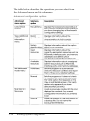
The table below describes the operations you can select from
the Advanced menu and its submenus.
Advanced configuration options
2-18
Running System Configuration
Using Alternate Configuration Files
When you save your configuration in your computer’s CMOS,
the computer also creates or updates the System Configuration
file called SYSTEM.SCI. You can also create an alternate SCI file
with a different name for your own computer or for another
Epson EISA computer.
You may want to create an alternate configuration for your
own computer that includes a different set of option cards.
Then, whenever you need to use that configuration, you can
load the alternate SCI file and save it in your computer’s CMOS.
If you run System Configuration on a non-target computer
(an IBM AT compatible computer or another Epson EISA
computer), you can create an file for the target computer. Then
you can transport the alternate SCI file to the target computer,
load it, and save it in that computer’s CMOS.
To create an alternate SCI file, follow the guidelines in the next
section. To load an alternate SCI file when you need to use one,
see “Loading an Alternate SCI File” below.
Creating an Alternate SCI File
You can create an alternate SCI file using the following
methods:
U Select Create backup SCI file from the Maintain
system configuration diskettemenu.
Q Select the Save as option from the Maintain SCI
files menu when you are using the advanced
configuration options.
CI
Run the System Configuration program in non-target
modeling mode and save the configuration you create to a
backup SCI file when you exit.
Running System Configuration
2-19
The program asks you to name the alternate SCI file you create.
Do not name the file SYSTEM.SCI; this is the name of your
current configuration file.
Use the third method only when you are running the
configuration program on a non-target computer. This method
protects you from accidentally saving the configuration you
create in that computer’s CMOS. See “Using Special Modes” for
instructions on using non-target modeling mode.
Loading an Alternate SCI File
To load an alternate SCI file and store it in the target
computer’s CMOS, follow these steps:
1.
Run the System Configuration program and select
Maintain system configuration diskettefrom
the Main Menu.
2.
Select Load a backup SCI file.
3.
Select the alternate SCI file you want to load from the list of
SCI files displayed on the screen,
4.
Exit and save the SCI file in the computer’s CMOS.
Note
You can also load an alternate SCI file by selecting Open
from the Maintain SCI files menu when you are using the
advanced configuration options. (See page 2-18.) This
method allows you to load the file while you are looking at
the View or edit details screen for another configuration.
However, the Open option erases the currently loaded
configuration before loading the new file.
Now the computer is configured according to the information
in the alternate SCI file.
2-20
Running System Configuration
Using Special Modes
You can run the System Configuration program in various
special modes, including non-target modeling mode, by
starting the program with one of the two commands described
in this section. You can also use these commands to run the
program from a hard disk that runs MS-DOS if you copy the
necessary files to the disk first.
The SD command starts the System Configuration program
and allows you to run that program or any of the other utilities
available on the Access to other utilities menu. The CF
command also starts the System Configuration program, but
you cannot run any other utilities.
You can run the program(s) in different modes by including
one or more parameters on the SD or CF command line, as
described in the next sections.
Using the SD Command
If you want to run the program from your hard disk, first
follow the instructions under “Copying the Configuration Files
to a Hard Disk” below. Then follow these steps to use the SD
command:
1.
To run the program from a diskette, insert the Reference 1
diskette in drive A and log onto drive A.
To run the program from a hard disk, log onto the drive and
directory where you copied the configuration files.
2.
Type the following and press m to start the program:
SD
[parameters1
Running System Configuration
2-21
The table below describes the parameters you can use to
modify the way the program runs on your computer.
Note
To run the System Configuration program in non-target
modeling mode, add the /N parameter to the command line.
Modeling mode only affects the way the configuration
program operates; it does not affect any of the other utilities
you can run using the SD command.
SD command parameters
Using the CF Command
If you want to run the System Configuration program from
your hard disk, first follow the instructions under “Copying the
Configuration Files to a Hard Disk” below.
2-22
Running System Configuration
Then follow these steps to use the CF command:
1.
To run the program from a diskette, insert the Reference 1
diskette in drive A and log onto drive A. To run the
program from a hard disk, log onto the drive and directory
where you copied the configuration files.
2.
Then type the following and press B to start the program:
CF [parameters]
The table below describes the parameters you can use to
modify the way the program runs on your computer.
CF command parameters
Running System Configuration
2-23
Copying the Configuration Files to a Hard Disk
To run the System Configuration program from your hard disk,
you must be running the MS-DOS operating system from that
disk.
To copy all the configuration files from the Reference 1 diskette
to the hard disk, insert the diskette in drive A, type the
following command, and press I:
COPY A:*.* [d:] [path]
where d: and path are the drive and directory to which you
want to copy the files.
2-24
Running System Configuration
Chapter 3
Using Your Computer
This chapter briefly describes the following operations:
II Locking the computer’s cover
Ll Using a power-on password
Ll Changing the processor speed
Cl
Parking the hard disk drive heads.
Locking the Computer’s Cover
You can lock the cover onto the computer to prevent
unauthorized users from accessing its internal components.
To lock the cover, insert the key as shown on the left and turn it
clockwise. To unlock the cover, insert the key as shown on the
right and turn it counterclockwise.
Using Your Computer
3-1
Using a Power-on Password
If you set a power-on password when you ran the System
Configuration program, you must enter it every time you turn
on the computer. Follow these steps to enter your password:
1. When you turn on the computer, you see the following
prompt:
Enter password:
2.
Type your password. The screen does not display the
characters you type. Then press [Enter.
After you enter the correct password, you see Password
Then the computer loads your operating system.
OK.
Note
If you turned on network server mode and booted your
computer from a hard disk, you use a different procedure to
enter your password. See “Using a Password in Network
Server Mode,” below.
If you do not enter the correct password, you see the message
Password is incorrect and another prompt to enter the
password. You have two more chances to enter the correct
password; try typing it again.
If you do not enter the correct password at the third prompt,
the screen displays the following message:
System halted! Reset your system.
The system locks the keyboard and you cannot use your
computer. Press RESET and try to enter the correct password
again.
3-2
Using Your Computer
Changing or Deleting a Password
You can change or delete a password when you see the Enter
password prompt. Follow these steps:
1.
Turn on the computer. You see the prompt to enter a
password.
2.
To change the password, type the current password followed
by a forward slash (/). After the slash, enter the new
password you want to use. For example, if your current
password is 123 and you want to change it to ABC, type:
123/ABC
To delete the password, type the current password followed
only by a forward slash (/), for example:
123/
The screen does not display what you type.
3.
Press IEnter You see a message confirming the change or
deletion and then the computer loads your operating
system.
Using a Password in Network Server Mode
If you are using your system as a network server, you may
want to prevent unauthorized users from entering commands
at the keyboard. To provide this security, you can enable a
power-on password in network server mode using the System
Configuration program.
Using Your Computer
3-3
If you set a password but do not turn on network server mode,
you must enter the password before the computer loads the
operating system or the network software. Once you load it,
anyone can access your system by typing commands on the
keyboard. However, if you set a password and turn on network
server mode, you can load the operating system and network
software before you enter the password. This allows other
computers in the network to access the system, but prevents
unauthorized users from entering commands at your keyboard
and using any network server access privileges.
When you boot the computer from the hard disk in network
server mode, you do not see the Enter password prompt
(as you would if network server mode was turned off). The
password prompt is hidden to prevent unauthorized users
from knowing that a password is required. If you boot the
computer from a diskette, you still see the prompt.
See Chapter 2 for instructions on using System Configuration
to set a password and turn on network server mode. Then
follow these steps to enter your password:
1. Turn on your computer. If you boot from the hard disk, you
do not see the password prompt.
2.
Type your password and press IEnter The screen does not
display what you type.
Now you should be able to use your computer. Press a key
such as m to see if the keyboard accepts your command.
If you entered an incorrect password, the computer does not
respond. Type the correct password, press (Enter, and try using
the computer again. You can try as many times as you want.
3-4
Using Your Computer
Note
If you boot from a diskette, you see the Enter password
prompt. Enter your password as described under “Using a
Power-on Password” above.
You cannot change or delete a password when you boot from
the hard disk in network server mode. First insert a bootable
diskette in drive A and turn on the computer. Then change or
delete the password, as described in the previous section. If you
delete the password, the computer automatically turns off
network server mode.
Changing the Processor Speed
Your computer’s processor can operate at high speed, low
speed, and automatic speed, as well as other processor
simulation speeds. When it is at high speed, the TURBO speed
light is on.
You set the default (or power-on simulation) speed in the
System Configuration program, described in Chapter 2. If
necessary, you can temporarily change the processor speed
using keyboard commands or the ESPEED program.
High speed is the highest speed available on your processor
board and low speed simulates an 8 MHz processor speed.
Automatic speed switches from high to low speed whenever
the computer accesses a diskette. You can set simulation speeds
for various other processors using the System Configuration
program. See Chapter 2 for more information.
Certain application programs may have specific timing
requirements for diskette access and can run only at low speed.
See the manual for your program to determine if this is the case.
Using Your Computer
3-5
If you often use a copy-protected program diskette, you may
want to set your processor speed to change automatically to
low speed when accessing the diskette and return to high speed
when it is finished.
There are three ways to change the processor speed:
LI
Run the System Configuration program (power-on
simulation speed setting)
U
Enter a keyboard command (temporary speed setting)
Q
Run the ESPEED program (temporary speed setting).
If you use programs that require the processor to operate at low
or automatic speed only occasionally, you should use the
keyboard commands or the ESPEED program, described
below, to change the processor speed.
Entering Keyboard Commands
To change the processor speed, enter one of the keyboard
commands in the table below.
Keyboard speed setting commands
You must use the a, a, or m key located on the numeric
keypad.
The speed setting remains in effect until you press RESET or
turn off the computer, or until you change it again.
3-6
Using Your Computer
Note
You can use the commands listed above while you are
running a program. However, if that program uses one of
these commands for another function, you cannot use it to
change the processor speed. For example, if the program
uses the (F] [AltIlT] command to move the cursor, you
cannot enter [xl IAltll~] to change the processor speed
to low. Another alternative is to use the ESPEED program,
described below.
Using the ESPEED Program
ESPEED allows you to change the processor speed to high or
low, or set the speed to change automatically. This method is
convenient if your application program does not recognize the
m key commands or if you want to include the command
in a batch file.
The ESPEED program is provided with your system on the
Reference 1 diskette. If you do not have a hard disk, insert your
Reference 1 diskette in drive A and log onto drive A before you
enter the command to start the program.
If you have a hard disk from which you are running MS-DOS,
copy the file ESPEED.EXE from your Reference 1 diskette onto
your hard disk and run the program from there.
To run the ESPEED program, type the following at the
command prompt and press (Enterl:
ESPEED
[parameter]
Using Your Computer
3-7
You can use one of these parameters:
ESPEED program parameters
If you do not include the parameter when you type the ESPEED
command, the program displays the command syntax and
parameter options.
The processor speed you set remains in effect until you press
RESET or turn off the computer, or until you change it to a
different setting.
Parking the Hard Disk Drive Heads
If you need to move your computer to a new location, you may
want to park the hard disk drive heads to protect the disk
during the move. You do this by running the HDDPARK
program. HDDPARK moves the drive’s read/write heads to a
region on the disk surface that does not contain data, and locks
them securely in place so you cannot damage the disk.
Many hard disk drives, including all the Epson drives,
automatically park their heads when you turn off the
computer. If your drive does not do this, or if you are not
sure that it does, be sure to run the HDDPARK program.
3-8
Using Your Computer
Follow these steps to run HDDPARK:
1.
Insert the Reference 2 diskette in drive A and log onto that
drive.
2.
Type HDDPARK and press IEnter The computer locks the
heads and disables the keyboard.
3.
Remove any diskettes and turn off the computer.
Note
You can also run HDDPARK by selecting Access t o
o t h e r utilities from the Main Menu of the System
Configuration program. Then select Park hard disk.
You can also copy the files HDDPARK.COM and
HDDPARK.VER to your hard disk and run the program
from there.
Using Your Computer
3-9
Chapter 4
Accessing lnternal Components
To access your computer’s internal components, you need to
remove the cover. You may also need to remove the front panel
and the subassembly (the metal case that holds the drive bays).
The instructions in this chapter explain how to do these tasks:
tl
Remove and replace the cover
Ll Remove and replace the front panel
0
Remove and replace the subassembly
0
Perform post-installation setup procedures.
Read the following safety precautions before you begin.
Special Precautions
As you perform the procedures described in this chapter and in
Chapters 5 and 6, observe the following precautions to avoid
damaging your equipment or injuring yourself:
0
While this manual provides detailed instructions for
installing a variety of optional equipment, do not attempt a
procedure if you have any reservations about performing it;
ask your dealer for assistance.
tl
Always turn off the computer, disconnect all cables to the
computer and any peripheral devices, and then wait at least
30 seconds before you remove the cover. First disconnect
the power cord from the electrical outlet and then from the
computer’s back panel. Then disconnect all peripheral
devices from the computer, including the monitor and
keyboard.
Accessing Internal Components
4-1
0
Every time you remove the cover, be sure to ground
yourself by touching the inside of the computer’s back
panel before you touch any components inside. If you are
not properly grounded, you could conduct static electricity
and damage your components. Also, do not touch any
components except those that this manual instructs you to
touch.
Ll
When disconnecting cables from sockets on the computer’s
main system board or any devices (such as disk drives),
avoid pulling on the cable; grasp the plastic connector to
remove it from a socket.
CI
When plugging a connector or a component into a socket,
be sure to position it correctly. Carefully align any
connector pins with the corresponding holes in the socket
before you push in the connector. Otherwise, you can
severely damage the equipment.
LI
Always replace the computer’s cover before you turn on
the power, or the computer may overheat.
Removing the Cover
Remove the computer’s cover to do any of the following:
4-2
Ct
Install or remove option cards
Ll
Install or remove single inline memory modules (SIMMs)
Ll
Remove the processor board to access its components
Lt
Install or remove disk drives or other storage devices.
Accessing Internal Components
Follow these steps to remove the cover:
1. Turn off the computer and any peripheral devices connected
to it. Then disconnect the computer’s power cord from the
electrical outlet and from the back panel. Also disconnect
any peripheral device cables that are connected to the
computer, including the keyboard cable.
2.
Turn the computer around so you are facing the back panel.
3.
If necessary, unlock the computer’s cover. (See Chapter 3 for
instructions.)
4.
Loosen the three thumbscrews on the computer’s back panel
by turning them counterclockwise, as shown below. (The
screws will disengage, but they do not come all the way off.)
Accessing Infernal Components
4-3
5.
Grasp the sides of the cover (toward the front of the
computer) and pull it firmly back toward you, as shown
below. Then lift it up and off the computer.
Removing the Front Panel
You must remove the computer’s front panel to install or
remove a disk drive from the external drive bay or to remove
the subassembly from the computer.
Follow these steps:
1.
4-4
Turn the computer so you are facing the front panel.
Accessing Internal Components
2.
Release the six tabs securing the front panel to the computer
case, as shown below. You may want to use a flat-blade
screwdriver to release the tabs.
3.
Once these tabs are free, grasp the sides of the front panel
and pull it straight toward you, as shown below. Be careful
not to pull the panel off at an angle; this may bend or pop
off the power and RESET buttons. If a button pops off,
carefully place it back onto its post.
Accessing Infernal Components
4-5
Removing the Subassembly
You need to remove the subassembly if you are installing your
first hard disk drive, removing your only hard disk drive, or
installing or removing a hard disk drive that is mounted next to
the power supply.
Follow these steps:
1. Turn the computer so you are facing its front side.
4-6
2.
Disconnect the power supply and drive cables from the backs
of all the drives installed in your computer. Note which
cables are connected to which drives so you can easily
reconnect them later.
3.
Open the clasps holding the power supply and drive cables
to the side of the subassembly, as shown in the following
illustration. Then remove all the cables from the clasps.
Accessing Infernal Components
4.
Grasp the back of the subassembly by the edge on its upper
left side, as shown below, and lift up the back end.
5.
Pull the subassembly forward slightly to release it from the
two pins beneath the front panel opening.
Accessing Infernal Components
4-7
6.
Holding the subassembly up, disconnect the diskette and
hard disk drive cable connectors from their sockets on the
main system board.
7.
Now lift the subassembly out of the computer and place it on
your work surface.
Replacing the Subassembly
Follow these steps to replace the subassembly:
1. Turn the computer so you are facing its front side.
4-8
2.
Make sure the diskette drive cable connector and the hard
disk drive cable connector (if necessary) are connected to
the appropriate sockets on the main system board.
3.
Hold the subassembly at a slight angle and guide the front of
it down through the opening in the front of the computer.
4.
Fit the two holes in the lower front of the subassembly over
the two posts on the front of the computer case.
Accessing Internal Components
5.
Lower the back end of the subassembly into the computer.
If necessary, align the post beneath the back right edge of
the subassembly with the hole on the top of the power
supply. Then lower the subassembly all the way down.
6.
Gather the power supply and drive cables and place them in
the clasps on the side of the subassembly, as shown below.
Snap the clasps shut.
Accessing Internal Components
4-9
7.
Connect the necessary power supply and drive cables to the
backs of all your drives, as described in Chapter 6.
Replacing the Front Panel
Follow these steps to replace the computer’s front panel:
4-10
1.
Turn the computer so you are facing its front side.
2.
Align the openings in the front panel with the power button,
RESET button, and drives that extend out from the front of
your computer case. Also align the front panel tabs with
their corresponding notches in the case. Then guide the
front panel straight onto the computer case, as shown
below.
3.
Press the front panel onto the computer to fully insert all the
tabs into the notches on the computer case. If all the front
panel tabs do not snap into position, remove the front panel
and try again.
Accessing Internal Components
Replacing the Cover
Follow these steps to replace the computer’s cover:
1. Turn the computer so you are facing the back panel.
2.
Hold the cover at a slight angle, as shown below, and lower
the front part onto the computer. Then lower the back of
the cover.
3.
Slide the cover forward until the front edge overlaps the top
edge of the front panel.
4.
Tighten the three thumbscrews on the back panel to secure
the cover to the computer.
5.
Lock the cover onto the computer, if desired.
6.
Reconnect the monitor, printer, keyboard, and any other
peripheral devices you have. Then reconnect the power
cord to the back of the computer and to an electrical outlet.
Accessing Infernal Components
4-11
Post-installation Setup Procedures
After you install or remove options, you need to run the System
Configuration program on your Reference 1 diskette so you can
update your system’s configuration information. The program
will automatically update the information about some optional
equipment, such as additional memory or a math coprocessor.
See Chapter 2 for instructions.
If you installed a hard disk drive that has never received a
low-level format, you need to format the disk. Check the
manual that came with your drive, and then, if necessary,
follow the instructions in Appendix B to format your new hard
disk.
You may also want to test a newly-installed option. Some
options come with their own diagnostic test programs. You can
test the following options with the System diagnostics program
on your Reference 2 diskette:
Q System memory
0 Numeric coprocessor
Q
Serial and parallel ports
Ll Disk drives
Cl Dot matrix printers.
See Appendix A for instructions.
4-12
Accessing Internal Components
Chapter 5
Installing and Removing Options
This chapter provides instructions for installing and removing
the following optional equipment:
Q Option cards
Ll Math coprocessor
Q Memory modules (SIMMs).
It also includes instructions for removing and installing the
processor board to replace it or to add a math coprocessor.
At the beginning of this chapter, you’ll find maps of your main
system board and the available processor boards. Refer to these
illustrations to locate the different components on the boards.
Before you perform any of the procedures given here, read the
“Special Precautions” on page 4-1 and then remove the
computer’s cover, as described in Chapter 4.
When you have finished installing or removing options, replace
the computer’s cover as described in Chapter 4; then follow the
“Post-installation Setup Procedures” on page 4-12 to update
your configuration.
Installing and Removing Options
5-1
Main System Board Map
Use the following illustration to locate components on your
main system board.
5-2
Installing and Removing Options
Processor Board Maps
Refer to the appropriate illustration below to locate
components on your processor board.
486DX/33 processor board
486SX/25 processor board
Installing and Removing Options
5-3
Option Cards
Your computer has five option slots, each of which
accommodate one card of the following types:
0
32-bit EISA bus master option card
tl
16-bit ISA compatible option card
Ll
8-bit ISA compatible option card.
can
Before you install an option card, check all the power
requirements given in the documentation that came with the
card. Make sure that the power required by the card does not
exceed the power limit for its slot, and that the total power for
all the cards does not exceed the power limit for all five slots.
The table below lists the power limits.
Option slot power limits
Maximum current
+5 Volts
+ 12 Volts
-5 Volts
-12 volts
For each slot
7 Amps
1.5 Amps
0.5 Amps
0.5 Amps
For all five slots
16 Amps
3 Amps
0.5 Amps
0.5 Amps
Caution
Although your power supply is protected against excessive
power loads, you could still damage the main system board
if you install an option card that draws more power than the
limits shown in this table.
5-4
Installing and Removing Options
Installing Option Cards
Follow these steps to install an option card:
1. Unpack the option card and adjust any switches or jumpers
on it, if necessary. Check the option card instructions and
any of the jumper and switch settings you viewed when
you ran the System Configuration program. See Chapter 2
for more information.
2.
Remove the retaining screw from the top of the metal option
slot cover and lift out the slot cover, as shown below.
Keep the screw to secure the option card to the computer. Store
the slot cover in a safe place in case you remove the option
card later.
Installing and Removing Options
5-5
3. Insert the card into the slot with the connector pins pointing
down, as shown below. If you are installing a full-length
card, insert the other end of the card into the appropriate
card guide near the front of the computer.
Push the card downward firmly to insert it as far as it will go.
4.
Secure the end of the card to the back of the computer with
the retaining screw.
Removing Option Cards
If you need to remove an option card, reverse the steps outlined
above. Be sure to replace the option slot cover over the empty
slot to ensure proper airflow inside the computer.
5-6
Installing and Removing Options
Processor Boards
Your computer comes with an upgradeable processor board.
To upgrade the board, you can:
Ll
Install a math coprocessor
Ll
Install a new coprocessor (486SX/25 only)
Q Replace the processor board with a different board.
Removing the Processor Board
You need to remove the processor board to install or remove a
math coprocessor on the board, or if you want to install a
different processor board. Follow these steps:
1.
Disconnect any cables connected to the processor board and
any cables connected to other devices that lay over the
processor board.
2.
Remove the retaining screws securing the processor board
brackets to the inside of the computer case.
Installing and Removing Options
5-7
3.
Pull the board straight up and out of the system board
interface sockets; do not rock it back and forth.
4.
If you are installing a math coprocessor, place the board on a
static-free surface with the component side facing up and
see the “Math Coprocessor” section in this chapter.
If you are replacing the processor board, store it in an anti-static
bag in a safe location. See the next section for instructions
on installing the new processor board.
Installing the Processor Board
Follow these steps to install the processor board:
1. Insert the connectors on the bottom of the processor board
into the processor board connectors on the main system
board. Guide the board straight into the connectors; do not
insert it at an angle or rock it back and forth.
5-8
2.
Secure each end of the board with the retaining screws.
3.
If you disconnected any cables to remove the processor board,
reconnect them.
Installing and Removing Options
Math Coprocessor
A math coprocessor speeds up the numeric calculations your
computer performs when using some applications. It also
increases the speed at which graphic images are displayed on
your monitor when you use graphics-oriented software.
You can install the following coprocessors:
Coprocessors
Installing a Math Coprocessor
Carefully follow the steps below to install a math coprocessor.
1. Remove the processor board from the computer. See page 5-7
for instructions.
2.
Place the processor board on your work surface so that the
board’s connectors are closest to you and the top edge of
the board is away from you. Locate the math coprocessor
socket(s). (See the illustration on page 5-3 if necessary.)
Installing and Removing Options
5-9
3.
Turn the coprocessor so that the orientation dot in one corner
is in the position shown below. Align the coprocessor pins
with the holes in the socket and gently push the
coprocessor into the socket, pressing evenly on all sides.
Caution
If you insert the math coprocessor in the wrong position,
you could permanently damage it.
Examine the coprocessor to be sure it is inserted all the way
into the socket.
4.
Reinstall the processor board. See page 5-8.
Removing a Math Coprocessor
If you need to remove the math coprocessor from your
processor board, contact your dealer for assistance. The
procedure requires a special extracting tool, and if you try to
remove it without this tool you can easily damage it.
5-10
Installing and Removing Options
Memory Modules
Your computer comes with 4MB of memory provided by
SIMMs (single inline memory modules) which are installed on
the main system board. You can install additional SIMMs to
increase your computer’s memory to 64MB.
There are eight SIMM sockets on the main system board. Each
socket can contain either a single-sided or double-sided SIMM.
The SIMMs must all be 70ns (nanosecond), 36-bit, 72-pin,
gold-leaded, fast-page mode SIMMs.
The SIMM sockets are organized in two banks, as shown below.
Facing the computer’s back panel, the four left-hand sockets
(U12, U13, U14, and U15) are in Bank 0 and the four right-hand
sockets (U16, U17, U18, and U19) are in Bank 1, as shown
below.
Installing and Removing Options
5-11
The table below describes the type of SIMMs you can install in
these sockets.
SIMM description
The SIMMs for your computer are usually described first by
their number of logical sides (single or double) and then by the
number of bits they contain multiplied by the width of the data
bus (256Kbx36). Check with your dealer to make sure you
install the correct type of SIMMs.
You can install these SIMMs in many different ways. For best
performance, however, follow these guidelines:
5-12
0
Fill each bank with four SIMMs of the same size
tl
Install SIMMs in Bank 0 first and then use Bank 1
Ll
Install the highest capacity SIMMs in Bank 0 and the same
or lower capacity SIMMs in Bank 1.
Installing and Removing Options
The table below gives examples of valid SIMM configurations
you can use in your computer.
Example SIMM configurations
l
Factory configuration
Once you have determined where to add SIMMs, follow the
instructions below to install them. If you need to remove the
four 1MB SIMMs that came with your system, see “Removing
Memory Modules” on page 5-15.
Installing Memory Modules
Follow these steps to install SIMMs:
1. If necessary, see the main system board illustration
5-2 to locate the SIMM sockets.
2.
on
page
It is easiest to install the SIMMs in the sockets farthest from
the processor board first. Then work your way toward the
sockets closest to the processor board.
Installing and Removing Options
5-13
Position each SIMM so its notched edge is toward the back of
the computer; then insert it in the socket at an angle as
shown below.
3.
5-14
Gently press down on the SIMM and, at the same time, press
the top to the left until it is vertical and clicks into place
between the metal tabs and the retaining posts.
Installing and Removing Options
Make sure the SIMM is fully inserted into the socket and that
the retaining posts pins fit into the holes at both ends.
4.
Repeat steps 2 and 3 for each SIMM you want to install.
Removing Memory Modules
If you need to remove memory modules from your computer,
follow the steps below. Check the information on page 5-11 to
be sure you remove SIMMs from the correct sockets.
1. It is easiest to remove the SIMMs from the sockets closest to
the processor board first. Then work your way toward the
sockets farthest from them.
Use your fingers or two small screwdrivers to pull away the
metal tabs securing the SIMM at each end. Be careful not to
pull the tabs too far, or they may break.
As you pull away the tabs, the SIMM falls to the right at an
angle. Carefully remove the SIMM.
2.
Repeat step 1 for each SIMM you need to remove.
Installing and Removing Options
5-15
Chapter 6
Installing and Removing Drives
The instructions in this chapter describe how to install and
remove optional Epson drives in your computer. You can use
these instructions to install a variety of devices, including
diskette drives, hard disk drives, and tape drives. Even if your
drive looks a bit different from the one illustrated here, you
install it the same way.
If you are installing or removing a non-Epson drive, you can
follow these instructions, although some of the steps in this
chapter may not apply. See the manual that came with your
drive for more information.
This chapter describes how to do the following:
Li
Use the correct drive bay
Ll
Set the IDE (Integrated Drive Electronics) jumpers on a
hard disk drive
Cl
Install or remove a drive in the external drive bay
Li
Install or remove an internal drive.
Before you perform any of the procedures described below,
remove the computer’s cover as described in Chapter 4. You
may also need to remove the front panel and subassembly; the
instructions in this chapter tell you when this is necessary.
Installing and Removing Drives
6-1
Using the Correct Drive Bay
Your system can hold up to five half-height drives or a
combination of third-, half-, and full-height drives.
As shown below, there are two drive bays: the external drive
bay and the internal drive bay.
subassembly
internal drive bay
external drive bay
The external bay can accommodate up to three drives in the
following configurations:
Ll One third-height drive and two half-height drives
tl
One third-height drive and one full-height drive.
You can install either two half-height drives or one full-height
drive in the internal bay.
6-2
Installing and Removing Drives
If you are installing a hard disk, it is best to install it in the
internal bay. This reserves the external bay for any accessible
drives you may want to add later. If you prefer, however, you
can install a hard disk in the external bay; just leave the drive
slot cover installed in the front panel.
You can install 3½-inch drives in the internal bay. In the
external bay, you can install 5¼-inch drives or 3½-inch drives
with 5¼-inch mounting frames attached.
You also need to attach metal drive brackets to each drive you
install in the external bay. Two sets of these brackets (and their
retaining screws) came in the box with your computer. The
instructions in this chapter tell you how to install them.
Setting the IDE Hard Disk Drive Jumpers
You may need to change the hard disk drive jumper settings if
you install or remove an IDE hard disk drive. The jumpers tell
the computer whether you are using one hard disk drive or two.
Note
You do not need to set any jumpers if you are removing
your only hard disk drive.
If you are installing only one hard disk drive, see “Changing
the Jumper Settings” below to check your drive’s jumpers.
If you are removing one hard disk drive and leaving another in
your computer, you need to change the jumper settings on the
remaining drive to indicate that it is the only hard disk drive
installed.
Installing and Removing Drives
6-3
If you install two hard disk drives, you must change the jumper
settings on each drive to indicate which is the master (primary)
and which is the slave (secondary). The primary drive is the
one from which you boot your computer.
Changing the Jumper Settings
The following illustration shows the location of the jumpers on
the optional Epson 200MB IDE hard disk drive.
If you are installing another type of Epson hard disk drive, the
jumpers may be in a different location, and there may be four
jumper positions instead of two. The 200MB drive has only two
jumper positions: C/D and DSP. Your drive may have four
positions: HSP, C/D, DSP, and ACT.
6-4
Installing and Removing Drives
Set the jumpers according to the table below.
Hard disk drive jumper settings
X = jumper installed
— = no jumper installed
Note
If you install two 200MB hard disk drives, install one jumper
from each drive in the two jumper positions on the master
drive. Do not install any jumpers on the slave drive.
To install or remove a drive in the internal bay, see page 6-14.
To install or remove a drive in the external bay, see the next
section.
Installing or Removing a Drive in the External Bay
This section describes how to install or remove an Epson
diskette drive. You can also use these instructions to install or
remove another type of storage device; see the manual that
came with it for additional installation instructions.
Installing and Removing Drives
6-5
Installing a Drive
On each interior side of the external drive bay, there is a plastic
guide with four support grooves, as shown below. You need to
select the appropriate grooves for your drive depending on the
size of the drive and where you want to locate it.
The third-height diskette drive that came with your computer
is installed in the grooves at the top of the bay.
instructions that came with the drive to install the frame.
6-6
Installing and Removing Drives
Follow the steps below to install a drive in the external bay.
1.
Locate the following parts that came with your computer for
each drive you will install:
Ct
two metal drive brackets
Ct
four retaining screws (with attached flat washers)
Ll
two nuts (with attached star washers)
Q small wrench.
2.
Attach one bracket to each side of the drive, as shown below.
Loosely secure each bracket with two retaining screws.
Installing and Removing Drives
6-7
3.
Slide the drive into the bay as shown below, aligning the
bracket screws on each side with the appropriate grooves in
the drive bay guide.
4.
Guide the holes in the front of the brackets over the threaded
posts on the front of the subassembly. Then push the drive
all the way into the drive bay.
5. Secure the drive to the drive bay with the two nuts.
6. You may need to adjust the drive’s position in the drive bay
by sliding it along the drive brackets. A diskette drive (or
other externally-accessible device) should extend out of the
bay and its faceplate should be flush with the front panel.
A hard disk drive should fit all the way into the bay. If
necessary, replace the front panel (as described in Chapter
4) to check the drive’s position.
7.
6-8
When the drive position is correct, remove the two nuts
securing it to the drive bay and slide it out of the bay. Then
tighten the four drive bracket screws, slide the drive back
into the bay, and replace the two nuts.
Installing and Removing Drives
8.
Locate one of the power supply cables (labelled Pl through
P5) in the clasps on the left side of the subassembly. (You
can use any one that is available.) Align the notched corners
on the cable connector and the socket on the back of the
drive, as shown below. Then push in the connector.
9.
Locate the appropriate drive cable for the drive. If you
installed a diskette or tape drive, go to step 10. If you
installed a hard disk drive, go to step 12.
Note
If you are installing a non-Epson drive, see the manual
that came with it for instructions on connecting the drive
cable.
10. If you are connecting diskette drive A, use the connector
labelled FDDl on the end of the diskette drive cable. If you
are connecting diskette drive B, use the middle cable
connector labelled FDD2. If you are connecting a tape drive,
use the cable connector labelled TAPE DRIVE ONLY.
Installing and Removing Drives
6-9
Align the cable connector with the drive interface so that the
divider in the connector lines up with the gap in the
interface, as shown below. Then push in the connector.
11. To remove the slot cover for the drive you just installed, turn
the front panel so you are looking at the inside of the panel.
Press outward on the slot cover tabs, as shown below, and
pop out the slot cover.
6-10
Installing and Removing Drives
12. Locate the hard disk drive cable. If you are installing your
first hard disk drive, this cable came in the box with your
computer. If you are installing a second drive, the cable is
attached to your internal hard disk drive.
Align the available cable connector with the drive socket so the
row in the connector with the blocked hole lines up with
the row in the socket with the missing pin, as shown below.
Then push in the connector.
Note
If you are installing your first IDE hard disk drive, you
must also connect the hard disk drive cable connector to
the appropriate connector on the main system board.
First follow the instructions in Chapter 4 to remove the
subassembly. Then connect the cable to the main system
board connector. (This connector, labelled IDE, is located
next to the diskette drive connector.) Next, follow the
steps in Chapter 4 to replace the subassembly.
13. Replace the computer’s front panel and cover as described in
Chapter 4; then follow the “Post-installation Setup
Procedures” on page 4-12 to update your configuration.
Installing and Removing Drives
6-11
Removing a Drive
Follow these steps to remove a drive from the external bay:
1.
2.
6-12
Disconnect the power supply and drive cables from the back
of the drive you want to remove, as shown below.
Use the small wrench to remove the two nuts securing the
metal drive brackets to the front of the drive bay, as shown
below.
Installing and Removing Drives
3. Grasp the drive from the front and pull it out.
Note
If you are removing an IDE hard disk drive from the
external bay and it is your only hard disk drive, you
must also remove the hard disk drive cable from its
connector on the main system board. First follow the
instructions in Chapter 4 to remove the subassembly.
After disconnecting the cable from the main system
board connector, replace the subassembly in the
computer as described in Chapter 4.
4.
I
If the drive you removed was accessible from the front of the
computer, you need to reinstall the front panel slot cover
for that drive.
Turn the front panel so you are looking at the inside. Then
press the slot cover into the slot until it is seated in the tabs
on both sides.
5.
Replace the computer’s front panel and cover as described in
Chapter 4; then follow the “Post-installation Setup
Procedures” on page 4-12 to update your configuration.
Installing and Removing Drives
6-13
Installing or Removing a Drive in the Internal Bay
You can install only 3½-inch hard disk drives in your
computer’s internal drive bay. If you are installing your first
hard disk drive, install it in the position farthest from the power
supply.
If you are installing your first hard disk drive, removing your
only hard disk drive, or installing or removing a hard disk
drive in the position next to the power supply, first remove the
front panel and subassembly as described in Chapter 4.
The following procedures explain how to do these tasks:
D
Remove a drive
D Install a drive
tl
6-14
Connect the drive cables.
Installing and Removing Drives
Removing a Drive
Follow these steps to remove an internal drive:
1.
Disconnect the power supply and drive cables from the drive
(if you have not already done so), as shown below.
2.
Remove the four screws securing the drive to the internal bay.
Installing and Removing Drives
6-15
Note
If you remove one IDE hard disk drive and leave another
one in the computer, you must set the jumpers on the
remaining drive to indicate that you now have only one
drive installed. Remove the remaining drive by
following steps 1 and 2 above; then see page 6-3 for
instructions on setting the jumpers.
3.
If you are removing your only IDE hard disk drive, you have
already disconnected the cable from the main system board
connector. Store the cable in a safe place in case you install
a hard disk drive later.
4.
If you need to connect the drive cable on your remaining
drive, see “Connecting the Cables” below.
Installing a Drive
Follow these steps to install a new drive (or reinstall a drive
you removed):
1.
6-16
Position the drive so its mounting screw holes face the
outside of the drive bay and its power supply and drive
connectors face the front of the subassembly, as shown in
the following illustration. Then lower the drive into the
drive bay.
lnstalling and Removing Drives
2. Adjust the drive’s position so that the four mounting screw
holes on the drive are aligned with the corresponding holes
in the drive bay. Then secure the drive with the four
retaining screws that came with it.
Installing and Removing Drives
6-17
3.
If you are installing your first hard disk drive, you must
locate the hard disk drive cable that came with your
computer. You connect this cable to the appropriate
connector on the main system board. This connector,
labelled IDE, is located next to the diskette drive connector.
Connect the cable to the IDE connector, aligning the tab on the
cable with the notch on the connector.
tab
notch
IDE
4.
Connect the power supply and drive cables, as described
below.
Connecting the Cables
Follow these steps to connect the power supply and drive
cables:
6-18
1.
If the subassembly is out of the computer, follow the steps in
Chapter 4 to replace it.
2.
Locate one power supply cable for each drive you installed in
the internal drive bay. You can use any of the free cables
labelled Pl through P5. If you removed the subassembly
earlier, also reconnect the power supply cable(s) to the
drive(s) in the external drive bay.
Installing and Removing Drives
Align the notched corners of the cable connector with the
notched comers of the drive socket, as shown below. Then
push in the connector.
3.
Locate the cable for each drive installed in the internal drive
bay. If you removed the subassembly earlier, also reconnect
the drive cable(s) to the drive(s) in the external bay. See
page 6-9 for instructions on connecting a diskette drive
cable.
If you are installing your first hard disk drive, you just attached
the drive cable to your main system board; use the first
connector on that cable. If you are installing your second
drive, the cable is attached to your other drive; you use the
second connector on that cable.
Installing and Removing Drives
6-19
To connect the cable, align the cable connector with the drive
interface so the connector row that has a blocked hole lines
up with the interface row that has a missing pin, as shown
below. Then push in the connector.
missing pin
blocked hole
Note
If you are connecting a non-Epson drive, see the manual
that came with it for instructions on connecting the drive
cable.
6-20
4.
Arrange the drive and power cables so you can close the
clasps on the side of the subassembly.
5.
Replace the computer’s front panel and cover as described in
Chapter 4; then follow the “Post-installation Setup
Procedures” on page 4-12 to update your configuration.
Installing and Removing Drives
Appendix A
Running System Diagnostics
You can test the following devices using the System diagnostics
program:
tl System board
Lt Numeric coprocessor
Cl System memory
0 Diskette drive(s)
LI Hard disk drive(s)
c3 Serial port(s)
tl Parallel port(s)
Cl
Dot matrix printer(s).
For some devices, you can run more than one type of test. See
the table on page A-7 for a list of the tests available for each
device.
Note
The Write, read checks for the hard disk drive(s) and
diskette drive(s) destroy data on the disk. Be sure to back up
any data on your hard disk or insert a blank, formatted
diskette before you run this test. Also be sure to do this if
you select Run all above checks.
Running System Diagnostics
A-l
Starting the Program
Follow these steps to start the System diagnostics program:
1.
Insert the Reference 1 diskette in drive A and turn on or reset
the computer.
Note
Always boot the computer from the Reference 1 diskette
to start System diagnostics. This clears from memory
any protected mode terminate-and-stay-resident (TSR)
programs or other utilities and frees it for use by the
diagnostics program.
2. After a moment, you see the title screen for the System
Configuration program. Press any key to continue.
3. When you see the Welcome screen, press IEnter
4. From the Main Menu, select Access to other
utilities. Then select System diagnostics.
5. When prompted, remove the Reference 1 diskette, insert the
Reference 2 diskette, and then press [Enter.
6.
You see a menu bar at the top of the screen with Items
Detected highlighted. Press IEnter
7. You see a list of all the testable devices the computer detects
in your system. Check to be sure the list is correct.
8.
A-2
If the list is not correct, press I-] to select Quit and press
IEnter Run the System Configuration program to make
sure any missing devices are configured properly. Then run
System diagnostics again.
Running System Diagnostics
When the list is correct, you can run diagnostic tests on each
device. If you do not want to test a device, you can remove
it from the list. You can also add a device to the list.
Deleting Tests
To remove devices from the Items Detected list so the System
diagnostics program cannot test them, follow these steps:
1. Press m to select Delete Tests. You see the Delete
menu, such as the following:
System Board
Numeric Coprocessor
System Memory
Diskette Drive A
Hard Disk Drive #l
Serial Port COMl
Serial Port COM2
Parallel Port LPTl
LPTl Printer Test
2.
Press m or Ir) to highlight the device you want to
delete and press (Enter. The device is removed from the
Delete menu. You can delete as many devices as you want.
3.
When you are finished deleting devices, press It) to select
Execute and see the “Running Tests” section.
Running System Diagnostics
A-3
Adding Tests
If you want to add devices to the Items Detected list, follow
these steps:
1.
Press It) or a to select Add Tests. You see the Add
menu, such as the following:
Diskette Drive B
Hard Disk Drive #2
Parallel Port LPT2
Parallel Port LPT3
LPT2 Printer Test
The Add menu lists the testable devices that the computer has
not detected in your system. You also see any devices that
you deleted from the Delete menu in case you want to be
able to test them.
A-4
2.
Press m or [tl to highlight the device you want to add
and press IEnter The device is removed from the Add
menu and added to the Items Detected list. You can add as
many devices as you want.
3.
When you are finished adding devices, press It) to select
Execute and see the next section.
Running System Diagnostics
Running Tests
Follow these steps to run a test from the Execute menu:
1.
Press It) or m to select Execute. You see the Execute
menu, such as the following:
System Board
Numeric Coprocessor
System Memory
Diskette Drive A
Hard Disk Drive #l
Serial Port COMl
Serial Port COM2
Parallel Port LPTl
LPTl Printer Test
2.
Press m or m to highlight the device you want to test
and press m. You seethe Repeat prompt:
How often to repeat test?
1
3.
If you want to run the test once, press IEnter To run the test
more than once, type the number of times you want to run
it and press IEnter
4.
If there is only one test for a device, the program begins
testing immediately. If there is more than one test for the
device, you see a submenu of test selections, such as the
following:
HARD DISK DRIVE(S) AND CONTROLLER
CHECK MEND
1
2
3
4
0
-
Seek check
W r i t e , read check
Read, verify check
Run all above checks
Exit
Running System Diagnostics
A-S
Use [rl or m or type the number of the desired option
to highlight a test and then press CEnter] to run it.
Note
If you selected to run the tests more than once, you do
not see a submenu. The program immediately begins
executing all the tests that do not destroy data.
5.
When the test is completed, you see the Execute menu or the
test submenu again. You can select another test or exit the
menu.
To exit System diagnostics, press (-1) to select Quit and
press [Enter. You return to the System Configuration
program Main Menu.
Resuming From an Error
If an error prevents a test from running, you see a Runtime
Error information box. Follow the instructions on the screen to
solve the problem.
If an error occurs during a test, the test stops and an error
message appears. If you want to record the problem, you can
print the message on your printer. You see this prompt:
Do you want a printout of the error
message(s) ? (Y/N)
To continue without printing, press [Nl and IEnter
To print the message, press m and IEnter The program prints
the message. Then press [Enter again.
For a complete list of the error messages the program may
display, see the table at the end of this appendix.
A-6
Running System Diagnostics
System Diagnostic Tests
The table below lists all the System diagnostic tests you can run
on your system.
System diagnostic tests
l
The Write, read check destroys data on the disk. Be sure to back up data
on a hard disk or insert a blank, formatted diskette before running this test.
Running System Diagnostics
A-7
Error Messages
The following table lists all the error messages that may appear
during System diagnostic testing.
System diagnostic error messages
A-8
Running System Diagnostics
System diagnostic error messages (continued)
Running System Diagnostics
A-9
Appendix B
Formatting a Hard Disk
This appendix describes how to low-level (or physically)
format a hard disk. This procedure should not be confused
with the logical format performed by your operating system.
The physical formatting of a hard disk is a separate step that is
usually done at the factory by the disk manufacturer.
If your computer came with a factory-installed hard disk, or if
you installed an optional Epson IDE hard disk, it has already
been physically formatted. You need only follow the
instructions in your operating system manual to prepare your
hard disk for use.
If you installed a hard disk that came with its own format
utility, use that program to physically format the disk.
You may need to use the procedure in this chapter to physically
format a hard disk if you installed a non-Epson hard disk in
your computer that has never received the low-level format
and did not come with its own format utility.
Caution
If you are unsure whether formatting is necessary, contact
your Epson dealer for assistance.
Physically formatting a hard disk erases any data it contains.
Be sure to back up any data on your hard disk before you
format it.
In addition to destroying all the data on the hard disk,
formatting removes any partitions and logical formatting
defined on the disk by your operating system. After you
physically format a new or used hard disk, you need to
logically format the disk again using your operating system.
Formatting a Hard Disk
B-l
Note
Sometimes, after a hard disk has been used for a long time,
its data becomes fragmented, causing the disk to perform
less efficiently or produce errors. If this happens, check your
operating system manual for procedures you can perform to
reorganize your data on the hard disk. If those procedures
(or a commercial defragmenting utility) do not solve the
problem, you may want to reformat the disk by following
the instructions in this chapter.
Starting the Program
Follow these steps to start the hard disk formatting program:
1.
Insert the Reference 1 diskette in drive A.
2.
Turn on or reset the computer. After a moment you see the
title screen for the System Configuration program.
3.
Press any key to continue. You see the Welcome screen.
4.
Press (Enter. You see the Main Menu.
5. Press m to highlight Access to other utilities
and press IEnter
B-2
6.
At the next menu, highlight Low- level format hard
disk and press [Enter.
7.
You see a prompt to insert the Reference 2 diskette. Remove
the Reference 1 diskette, insert the Reference 2 diskette, and
press ml.
Formatting a Hard Disk
You see the Hard Disk Format Menu:
1 - Format
2 - Destructive surface analysis
3 - Non-destructive surface analysis
0 - Exit
The option you choose depends on whether you are
formatting a new disk or reformatting a used disk.
The options work as follows:
Ll
Format first scans the disk for defective (bad) tracks (if
it has no defective track table) and lets you decide
which tracks to mark as bad. Then it formats the disk
and marks the bad tracks so they are never used to
store data.
Ll Destructive surface analysis tests the entire
disk for read/write errors or unflagged bad tracks and
updates the defective track table. Because this option
writes and reads data on the disk, it destroys all data on
any track that produces an error. You cannot run this test
on a disk that has never been formatted.
c1 Non-destructive surface analysis checksthe
disk for unflagged bad tracks without destroying data.
You cannot run this test on a disk that has never been
formatted.
Formatting a New Disk
To format a new hard disk that has never been formatted, select
the Format option. You may need to modify the defective track
table to add bad tracks when you format the disk. Many hard
disk drives come with a printed list of bad tracks, but the bad
tracks are not flagged on the disk. Other hard disks (such as
Epson disks) come with the bad tracks already flagged.
Formatting a Hard Disk
B-3
Reformatting a Used Disk
To reformat a disk you have been using, follow these steps:
1. Use the Non-destructive surface analysis option to check for
unflagged bad tracks.
2.
If errors occur during the Non-destructive surface analysis,
back up your hard disk to diskettes.
3.
Run the Destructive surface analysis option to update the
defective track table.
4. Run the Format option to format the disk.
Selecting an Option
When you use this program, you often need to select an option
from a menu. There are two ways to do this:
LJ
Use the arrow keys (IT), IT], It], [:I ) to
highlight the option and press CEnter)
0
Type the number of the option and press IEnter
You can select almost any option that appears on the screen
using either method.
Starting the Formatting Process
If you have more than one hard disk drive, you see this prompt:
Enter drive number ? (l/2)
Select 1 for the first hard disk or 2 for the second hard disk.
Then see the instructions below for the Hard Disk Format
Menu option you want to use.
B-4
Formatting a Hard Disk
Option I, Format
If you select Format from the Hard Disk Format Menu, you
see the following (for a disk with no defective track table):
Format
Hard
Disk
< Drive n: >
Scan hard disk to get defective track
information? (Y/N)
(If the disk already has a defective track table, you do not see
this because you do not need to scan for bad tracks.)
1.
Select
Y
to scan the disk or N to skip the scanning process.
If you select Y, the program scans the disk and displays these
messages during the process:
Scanning for flagged
Head : n n n
bad
Cylinder
tracks...
: nnnnn
You see the head and cylinder numbers decrease as the
program progresses. After scanning the disk, the program
displays the results, such as the following:
Scanning finished.
=
Count of tracks flagged bad
1
Count of tracks with other errors =
0
Count of good tracks
= 4884
2.
Next you see the following prompt:
Accept recommended skewed sectors in
format : 1 ? (Y/N)
Formatting a Hard Disk
B-5
For an Epson hard disk drive, it is best to accept the
recommended skewed sector (also called the interleave
factor) of 1, since this setting allows your drive to perform
more efficiently. For other hard disk drives, you may need
to change this value if the documentation that came with
the disk recommends a different number.
To accept the default, select Y. Then go to step 3.
To enter a new value, select N. You see the following prompt:
Enter new skewed sectors in
format (l-16):
Enter the recommended number, which equals the maximum
sector number for the drive minus 1. Then press IEnter
3.
Next you see this prompt:
Accept recommended skewed sectors per
head in format : 0 ? (Y/N)
For an Epson hard disk drive, accept the recommended value
of 0. For another type of drive, use the value recommended
in the documentation for the drive.
To accept the default, select Y. Then go to step 4.
To enter a new value, select N. You see the following prompt:
Enter new skewed sectors per head
in format (0-16):
Enter the recommended number, which equals the maximum
sector number for the drive minus 1. The maximum sector
number varies, depending on the drive type. Then press
IEnter
B-6
Formatting a Hard Disk
4. The program now allows you to edit the defective track table.
At the bottom of the table is this prompt:
Modify defective track table ? (Y/N)
Select N if you want to leave the table as it is. Then skip the
next section and go to “Formatting the Disk” on page B-9.
To add bad tracks to the defective track table, see the next
section.
Modifying the Defective Track Table
If you select Y to modify the table, you see the following
options at the bottom of the table:
Defective Track Table : Move box cursor to
desired track with cursor key
A = Add track, C = Change track,
D = Delete track, F = Finish editing
Enter command :
To add a bad track, follow these steps:
1.
Press IA]. You see this prompt:
Enter cylinder number (1 - nnnn):
2.
Type the number of the cylinder containing the bad track and
press [Enter. You see this prompt:
Enter head number (0 - nn):
3.
Type the head number for the bad track and press [Enter. (To
cancel the operation, press m without typing a value.)
When you complete a valid entry, it appears in the table and
you can add the next bad track, if necessary.
Formatting a Hard Disk
B-7
If you make a mistake, move the cursor block to the incorrect
track and press a to change the track data or [Dl to delete the
track from the table. Change the track data in the same way as
you add a track.
The maximum valid cylinder number and head number (nnnn
and nn) vary according to the capacity of the hard disk. If you
enter an invalid cylinder or head number, a reminder of the
range of values appears and the program asks you to enter the
value again.
When you finish adding all the bad tracks, press [Enter] without
typing a value. Then check the entries in the defective track
table. When you are sure the table is correct, press [F). The
program displays a warning about the consequences of
proceeding with formatting, as described in the next section.
Formatting the Disk
When you are ready to start formatting the disk, you see the
following warning:
WARNING! ALL DATA WILL BE DESTROYED IN ALL
PARTITIONS OF HARD DISK, NOT JUST IN MS-DOS
PARTITION!
Do you want to start formatting ? (Y/N)
If you are not sure you want to format the hard disk, select N. If
you are sure, select Y; the program gives you one more chance
to cancel:
DOUBLE
COPIES
Do you
copies
Select
B-8
CHECK THAT YOU HAVE BACKUP DISKETTE
OF ALL YOUR FILES.
want to exit and check your file
? (Y/N)
Y to cancel formatting or N to continue.
Formatting a Hard Disk
If you continue with formatting, you see:
Format
started.
Head : n n n
Cylinder : nnnnn
You see the head and cylinder numbers decrease as the
program progresses.
When formatting is complete, the program flags any bad tracks
and you see a series of messages like these:
Format finished.
Flagging bad tracks...
Cylinder is nnnn, head is nn
Format completed.
Press ENTER to return to the menu.
Press m to return to the Hard Disk Format Menu.
Option 2, Destructive Surface Analysis
You can perform a Destructive surface analysis of your hard
disk to accurately locate any bad tracks and flag them, if they
are not flagged. The test writes, reads, and verifies information
on every track of the hard disk, except for tracks that are
already flagged as bad tracks.
Caution
If any errors occur during this check, all data on the track
that caused the error is destroyed. If you think that an
unflagged bad track is causing trouble, first run the
Non-destructive surface analysis to check the disk surface.
Formatting a Hard Disk
B-9
To start this test, select Destructive surface analysis
from the Hard Disk Format Menu. You see these messages:
Analyze Hard Disk
<Drive n:>
Read/Save/Write/Read/Restore/Read
check for all tracks...
Current cylinder is nnnn
As the program checks each track, it decreases the cylinder
numbers to zero.
When the test is complete, the program displays a report on the
status of the disk, including a table of unflagged tracks that
produced write, read errors-such as the following:
Analysis
finished.
Count of tracks flagged bad
Count of tracks with write, read errors
Count of good tracks
No write, read error was detected.
No data was destroyed.
Press ENTER to return to the menu.
B-10
Formatting a Hard Disk
=
n
=
n
= nnnn
If the program finds an unflagged bad track, the report is
followed by a table like this:
Write, Read Error Tracks
Cylinder Head
237
Cylinder Head
Cylinder Head
Cylinder Head
2
Confirm to register the tracks in the Write, Read Error
Track Table as bad tracks.
Do you want to register the error tracks as bad tracks?
(Y/N)
To flag these tracks as bad, select Y. You see a list of the tracks
as they are flagged. When the process is complete, press CEnter)
to return to the Hard Disk Format Menu.
Option 3, Non-destructive Surface Analysis
The Non-destructive surface analysis does not destroy any
data, and you can use it to safely check the condition of your
hard disk drive. However, this test does not flag any bad tracks
it detects.
To start the test, select Non-destructive s u r f a c e
analysis from the Hard Disk Format Menu. You see these
messages:
Analyze Hard Disk
<Drive n:>
Read/Verify check for all tracks...
Current cylinder is nnnn
Formatting a Hard Disk
B-11
As the program checks each track, it decreases the cylinder
numbers to zero. When the test is complete, the program
displays a report on the status of the disk, such as the following:
Analysis
finished.
=
n
Count of tracks flagged bad
n
Count of tracks with read, verify errors =
= nnnn
Count of good tracks
No read, verify error was detected.
If the program finds errors, the screen displays a table of the
tracks that produced the errors. Then you see this message:
Press
ENTER
to return to the menu.
Check the information displayed. Then press m to return to
the Hard Disk Format Menu.
Exiting the Program
To leave the Hard Disk Format Menu, select Exit . You see a
prompt to insert the Reference 1 diskette. Remove the
Reference 2 diskette, insert the Reference 1 diskette, and press
[Enter. Now you can use any of the other utilities or return to
the Main Menu.
If you formatted the hard disk or ran the Destructive surface
analysis option, you must now prepare your hard disk for use
with your operating system. See your operating system manual
for instructions.
B-12
Formatting a Hard Disk
Appendix C
Troubleshooting
You should not encounter any difficulties as you set up and use
your computer, but if anything out of the ordinary happens,
refer to this appendix. You can also run System diagnostic tests
on various system components. See Appendix A for
instructions.
If the suggestions here or in Appendix A do not help solve the
problem, see “Where to Get Help” in the Introduction for
instructions on contacting your dealer or Epson customer
service.
Identifying Your System
When you contact your dealer, be ready to provide the serial
number of your computer and its current configuration. You
should also provide the version number of the computer’s
ROM BIOS, as well as the names and version numbers of your
operating system and any application programs you are using.
You can find the serial number on the computer’s back panel.
If you are able to use your computer, run the System
Configuration program to view your current configuration
information.
Follow these steps to obtain the other information:
1.
Turn on your computer or press the RESET button. When the
computer performs its memory test, the version number of
your system’s ROM BIOS appears at the top of the screen.
Write down the number. (This number is also included in
your System Configuration program information.)
Troubleshooting C-Z
2.
At the command prompt, enter the appropriate command to
display the version number of your operating system.
Write it down, and then obtain the version numbers of any
application programs you are using.
Error Messages
Your computer’s built-in memory (ROM) contains a series of
diagnostic programs, called power-on diagnostics. These
programs check various internal devices every time you turn
on the computer. The RAM test displays a count of the memory
currently installed in your system.
If the computer finds an error, it may display an error message
on the screen or sound an error tone code that identifies the
error, such as one beep-two beeps-one beep. If the error is
serious, the computer cancels further checking. The computer
locks up, and if there is an error message, it remains on the
screen. Write down the error message or the tone code pattern
and give it to your dealer when reporting a problem.
The tables below list the error messages and tone codes.
Power-on diagnostic error messages
C-2
Troubleshooting
Power-on diagnostic error tone codes
Troubleshooting C-3
Power-on diagnostic error tone codes (continued)
C-4
Troubleshooting
Power or Lock-up Problems
If you are having trouble with the computer’s power or the
system locks up, see the suggestions below.
The computer does not start when you turn if on.
Turn off the power and check the following:
U
Be sure all cables are securely connected to the computer.
Ll
Check that the computer and monitor power cords are
plugged completely into their electrical outlets.
tl Test the outlet to see if it supplies power.
The computer starts but the screen is blank.
See “Monitor Problems” below.
The computer stuffs but does not boot.
If the computer starts but does not load your operating system,
the problem could be caused by many different factors. Try the
following:
Lt
First make sure you correctly formatted your hard disk and
properly installed your operating system on it. See “Hard
Disk Problems” later in this chapter for more information.
Cl
If you do not have a hard disk, be sure you inserted a
system diskette in drive A and then press the RESET button
to boot the computer again.
Troubleshooting
C-5
Q
If you think the problem may be caused by a loose physical
connection inside the computer, follow these steps:
1.
Remove any diskettes and then turn off your peripheral
devices and your computer.
2.
Disconnect the computer’s power cord and peripheral
device cables and then remove the computer’s cover, as
described in Chapter 4.
3.
Ground yourself by touching the inside back panel of the
computer case before you perform the next step.
4.
Check to be sure all of the internal cable connections are
secure and that the processor board and any option
cards are completely seated in their connectors. Then
press down firmly, but gently, on each socketed chip on
the main system board to ensure that they are also
completely seated.
5.
Replace the computer’s cover and reconnect the
peripheral device and power cables, as described in
Chapter 4.
6.
Turn on your system and try booting it again.
If the computer still does not load your operating system,
contact your dealer.
C-6 Troubleshooting
The computer does not respond when you type.
If you have just turned on the computer, check the following:
Li
Make sure your keyboard is securely connected to the
computer.
Ct
If you entered the wrong password and cannot access your
system, see “Password Problems” below.
If you are running a software program, try these procedures:
D
If your computer is processing a complicated command or
performing a complex task, it may take a long time to
complete its work. If your computer does not respond after
a reasonable length of time, proceed to the next step.
Cl Press [=I [T] [E) or press the RESET button to exit
the software program and reboot the computer.
Ll
If resetting the computer does not work, turn it off and wait
at least five seconds. If you do not have a hard disk drive,
insert a bootable diskette in drive A. Then turn on the
computer and try running the program again.
U
If none of these procedures work, check your software
documentation or contact your software manufacturer for
technical support.
The computer suddenly stops operating.
Your computer may have stopped operating because its power
supply contains detection circuits that automatically shut down
the power if they detect excessive operating temperatures. This
protects your system from damage due to overheating.
Troubleshooting C-7
When these circuits detect a high temperature, they shut off all
the DC outputs in the power supply and your computer stops
operating. This does not damage the power supply, but you
must remove the cause of the high temperature before you can
use your system again,
To restore normal power supply operation, follow these steps:
1.
Turn off the computer and leave it off for at least
30 seconds to reset the power supply logic.
2.
To determine the cause of the high temperature and correct
the condition, check for the following:
Cl
A blocked power supply fan. Make sure that nothing
blocks the power supply fan vents in the back of the
computer case. Check both inside and outside the
computer for blockage. Make sure there is ample room
around your system for air circulation.
Cl
Room temperatures of 95° F (35° C) or above. If this is
the case, move the computer to a cooler area.
tl
An overload of the power supply limitations. Check the
table on page D-4 to see if you have exceeded the
option slot power limits. See your option card manual
for the power requirements of your card(s).
3.
After you eliminate the problem causing the overheating,
allow the computer to cool down for at least five minutes at
a room temperature of about 78° F (25” C). This resets the
thermal detection circuits.
4.
If you removed the computer’s cover, replace it now. Then
turn on the computer.
If the power supply shuts off again after you follow the steps
above to correct the problem, contact your dealer.
C-8 Troubleshooting
Password Problems
If you set a password using the System Configuration program
and you have trouble using your password, check the section
below that describes the problem you are having.
You enter the password, but nothing happens.
Type the password again and press [Enter. You have three
chances to enter it correctly before the system locks up. If this
happens, press RESET to reboot the computer and try again.
If you turned on network server mode when you set your
password, type your password and press m twice to see if
your system responds. If not, enter the password again or press
RESET and start over.
You want to change or delete the password.
See Chapter 3 for instructions on changing or deleting your
password.
You have forgotten the current password.
If you have forgotten the current password and cannot use
your computer, follow these steps:
1.
Turn off the computer, remove the cover, and disable the
password function by setting jumper Jl on the main system
board to position A. See Chapter 4 for instructions on
accessing the main system board and page 5-2 for the
location of the jumper.
If any option cards are blocking access to the jumper, follow the
instructions in Chapter 5 to remove them.
Troubleshooting C-9
2.
Replace the computer’s cover. (See Chapter 4 for
instructions.)
3.
If you do not have a hard disk, insert a bootable diskette in
drive A. Turn on the computer and allow it to load the
operating system.
4.
Then turn off the computer, remove the cover, and enable the
password function by setting jumper Jl on the main system
board to position B.
If you removed any option cards, follow the instructions in
Chapter 5 to replace them now.
5.
Replace the computer’s cover.
If you do not want to set a new password, you do not need to
do anything else. (When you turn on your computer, you
will not see the Enter password prompt.)
If you want to set a new password, go to step 6.
6.
Insert the Reference 1 diskette in drive A and turn on the
computer. You do not see the Enter password prompt.
7.
Run the System Configuration program as described in
Chapter 2.
Select View or edit details for the system board. Then
highlight the Power-on password option and press
Enter .
CA3
8.
Type a new password at the next prompt and press (Enter. If
you want to use network server mode, turn it on now.
9.
Save your configuration as you exit the System
Configuration program.
C-10 Troubleshooting
When the computer reboots, you see the Enter password
prompt. Enter the password to access your system.
Note
If you turned on network server mode when you set a new
password and then booted your system from the hard disk,
you do not see the Enter password prompt. Follow the
instructions in Chapter 3 to enter your password in network
server mode.
Keyboard Problems
Q
Make sure the keyboard is securely connected to its port.
0
If you are still having problems, see “Power or Lock-up
Problems” above.
Monitor Problems
See the suggestions below if you have trouble with your
monitor display.
There is no display on the screen.
Cl
Make sure the monitor cables are securely connected to the
monitor, the computer, and the electrical outlet.
tl
Check that the monitor’s power switch is on and that the
power light on the monitor is lit. If the power light is on but
you still do not see anything on the screen, check the
monitor’s brightness and contrast controls.
Ll Check to see if the electrical outlet supplies power.
Troubleshooting
C-11
The monitor does not display images correctly.
Ll
Make sure your monitor and display adapter card match.
Also, be sure any switches or jumpers on the card are set
properly. See the documentation that came with your
monitor and display adapter for instructions.
0
Be sure you chose the correct display adapter type in
the System Configuration program. Also check the
recommended switch and jumper settings. (See Chapter 2.)
CI
If you are running an application program, see if you need
to configure the program for the type of monitor and
display adapter you have. Also, make sure you are using
the appropriate monitor and display adapter for your
software.
Diskette Problems
LI
Be sure you turned down the diskette drive latch or pressed
the drive button to secure the diskette in the drive.
Cl
Check to see if you inserted the diskette upside down or if
you did not insert it all the way.
Ll
Check to see if you inserted the right type of diskette.
tl
If the diskette is blank, make sure it is formatted.
Ll Place the diskette in another drive and repeat the operation.
If this works, the trouble may be in your diskette drive. See
“Diskette Drive Problems” below.
tl
C-12
Check to see if you entered an incorrect diskette drive type
when you ran the System Configuration program. See
Chapter 2 for instructions.
Troubleshooting
Diskette Drive Problems
If you think there is something wrong with your diskette drive,
check this section.
You see an error message or have difficulty with a diskette
drive.
D If you are having problems with a new diskette drive that
your dealer installed for you, consult the dealer about the
problem.
If you installed the drive yourself, review all the
instructions in Chapter 6. Check all the cable connections
and make sure you have installed the drive correctly.
Be sure that you ran the System Configuration program to
define the correct type of diskette drive as part of the
computer’s configuration. See Chapter 2.
If you are still having trouble, test the drive by running the
System diagnostic tests described in Appendix A. If the
diagnostics program indicates an error, contact your Epson
dealer.
The diskette drive is making loud or unusual noises.
Contact your Epson dealer.
Troubleshooting
C-13
Hard Disk Problems
If you think there is something wrong with your hard disk, see
the suggestions below.
You have problems with a newly-installed drive.
0
If your dealer installed the drive, consult your dealer about
the problem.
LI
If you installed the hard disk yourself, make sure you
carefully followed all the instructions in Chapter 6. Review
the instructions and check all the cable connections to make
sure you have installed it correctly. Also, check the jumper
settings on your drive to be sure they are set correctly.
Ll If you installed a non-Epson hard disk drive, verify that it
was physically formatted. This type of format is usually
done by the manufacturer; if yours was not, you must do it
yourself. If the drive came with its own format utility, use
that program; if not, follow the instructions in Appendix B.
Ci
Verify that you ran the System Configuration program to
define your hard disk drive type correctly. See Chapter 2.
tl
If you are sure the hard disk has been installed and
prepared properly but you cannot access the drive, review
the instructions in your operating system manual. Make
sure you performed the necessary steps in the installation
process for your configuration.
Ll If you still have trouble, test the drive by running the
System diagnostic tests described in Appendix A.
CI
C-24
If you still cannot identify the problem, consult the dealer
from whom you purchased the drive.
Troubleshooting
You notice a reduction in hard disk performance.
Cl
The data on the disk may have become fragmented. You
may want to back up all your data and then use a disk
compaction utility to reorganize the files on your disk.
Contact your dealer for information.
Cl
If you cannot access data on your hard disk or you are
receiving read/write errors, the disk may have a physical
problem. Try running the Hard drive System diagnostic
tests on the drive, as described in Appendix A.
Ll
If the problem persists, contact the dealer from whom you
purchased the drive.
Software Problems
LI
Make sure you are using the correct procedure for starting
the program and that it is installed correctly.
tl
Be sure you are logged onto or specifying the correct drive
and directory.
CI
Some programs must run at a slower operating speed.
Check your software manual to see if this is the case, and
change the operating speed of the processor if necessary.
See “Changing the Processor Speed” in Chapter 3 for
instructions and for information on accommodating
copy-protected programs.
LI
If you are still having problems with your software, consult
your software documentation or contact the manufacturer
for technical support.
Troubleshooting
C-15
Printer Problems
Ll
Make sure the printer has power and is properly connected
to the computer. (Also, be sure your printer has paper in it.)
LI
Check the printer manual for the printer’s correct DIP
switch or control panel settings.
Q
If you are using more than one parallel port or more than
one serial port, check the primary and secondary port
settings in the System Configuration program to make sure
they are correct. See Chapter 2 for instructions.
Ll
Try running the System diagnostic tests described in
Appendix A. If either the parallel or serial port test
indicates an error, contact your printer dealer.
If you are having trouble with a dot matrix printer, also try
running the printer diagnostic test. (See Appendix A.)
Option Card Problems
C-16
Ci
Make sure the option card is properly inserted in its slot.
Check the installation procedure described in Chapter 5
and also see the instructions that came with the card.
Ll
Be sure that you ran the System Configuration program to
update your configuration after installing the card. See
Chapter 2.
LI
Check to see if you set the necessary DIP switches or
jumpers on the option card. Also be sure you performed the
correct setup procedures for the software you are using
with the option card. See your option card manual and
check your System Configuration information for that card.
Troubleshooting
Q
If necessary, make sure that you used the proper cable to
connect the device to the option card connector.
Memory Module Problems
tl
If the memory count displayed by power-on diagnostics or
the System Configuration program is incorrect, you or your
dealer may not have installed the SIMMs correctly. The
SIMMs may be installed in the wrong sockets, they may be
the wrong type of SIMM, or they may not be inserted all the
way into their sockets.
If your dealer installed the SIMMs for you, contact your
dealer; do not attempt to correct the problem yourself. If
you installed them, see “Memory Modules” in Chapter 5
and make sure you followed all the instructions correctly.
Ll Check the speed of your SIMMs. Install only 70ns, 36-bit,
72-pin, gold-leaded, fast-page mode SIMMs.
0
Be sure to run the System Configuration program after you
install or remove memory modules to automatically update
your configuration. See Chapter 2 for instructions.
D
If you are still having trouble with your SIMMs, write
down any error messages you see and contact your dealer.
Mouse Problems
CI
Make sure that your mouse is securely connected to its
port.
tl
Check to see if you installed your mouse driver program
and loaded it into your computer’s memory correctly.
Troubleshooting
C-17
Ll Be sure that you set the built-in mouse port option in the
System Configuration program correctly for your mouse
port. See Chapter 2 for more information.
Q If you are still having trouble with your mouse, check the
documentation that came with it for troubleshooting
information or contact your mouse dealer.
Math Coprocessor Problems
Cl
Run the System Configuration program and make sure that
the math coprocessor is listed as Installed on the View
or edit details screen for the system board. If it is not, you
or your dealer may have installed the coprocessor
incorrectly. See Chapters 2 and 5 for more information.
Caution
Do not attempt to remove the math coprocessor yourself.
Contact your dealer for information about a special
extraction tool that is needed to remove it.
C-18
Ll
Check the manual that came with the coprocessor for
troubleshooting information and for any diagnostic
procedures you can perform.
Cl
Test the coprocessor by running the System diagnostics
program. See Appendix A for instructions.
Troubleshooting
Appendix D
Specifications
Main System Board
System memory
4MB RAM standard on SIMMs; expandable
using lMB, 2MB, 4MB, or 8MB SIMMs up
to 64MB (maximum); SIMMs must be
70ns, 36-bit, 72-pin, gold-leaded, fast-page
mode type
BIOS
Two-part system BIOS; one 64KB
permanent BIOS on an EPROM; one 64KB
CPU-dependent BIOS in a FLASH ROM
device
Shadow RAM
Automatically copies the system BIOS
from ROM into RAM; shadow RAM for
video BIOS and external BIOS is software
selectable
EISA configuration 8KB SRAM; battery-backup
Clock/calendar
Real-time clock, calendar, and CMOS RAM
for configuration; battery backup
Interfaces
Serial
Two RS-232-C, ISA compatible,
asynchronous; 9-pin D-shell connectors
Parallel
ISA compatible, 25-pin, D-shell
connector
Specifications
D-l
Mouse
Mini DIN, 6-pin connector for PS/2
compatible mouse or other device
Keyboard
Mini DIN, 6-pin connector for PS/2
compatible keyboard
Option slots
Five 32-bit EISA expansion slots (16-bit and
B-bit ISA compatible); bus-mastering
option cards allowable in all slots
Speaker
Internal; operation and volume controllable
by software
Controllers
Diskette and
tape drive
Controller on the main system board
supports up to two diskette drives in any
of these formats:
5¼-inch, high-density, 1.2MB
5¼-inch, double-density, 360KB
3½-inch, high-density, 1.44MB
3½-inch, double-density, 720KB
Supports one optional tape drive
Hard disk
D-2
Specifications
Interface on the main system board
supports up to two IDE drives with
embedded controllers
Processor Board
CPU
486SX/25 board: Intel 80486SX, 25 MHz
microprocessor
486DX/33 board: Intel 80486DX, 33 MHz
microprocessor
Both boards: simulated 8 MHz and other
processor simulation speeds selectable
through software
Cache memory
486SX/25 board: 8KB internal cache in the
80486SX microprocessor
486DX/33 board: 8KB internal cache in the
80486DX microprocessor; 64KB Intel
82485MA-33 Turbocache module with
write-through, two-way set associative
cache memory and controller
Math coprocessor
486SX/25 board: two sockets available for
optional Weitek WTL4167 and Intel
80487SX math coprocessors
486DX/33 board: internal coprocessor in
the 80486DX and one socket for an
optional Weitek WTL4167 coprocessor
Mass Storage Bays
Up to five devices maximum; internal bay
for two half-height or one full-height hard
disk drives; externally-accessible bay for
two half-height and one third-height or
one full-height and one third-height drives
Specifications
D-3
Power Supply
Type
235W, fan-cooled, automatic input voltage
sensing, thermally protected
Input ranges
98 to 132 VAC and 196 to 264 VAC,
47 to 63 Hz
Maximum current
At 110 Volts, 6 Amps; at 240 Volts,
3.3 Amps
Power supply maximum outputs
l
The +12 V peak current is limited to 30 seconds maximum.
Output cables
Two main system board cables; five mass
storage cables
Option slot power limits
D-4
Specifications
Keyboard
Detachable, two position, 101 or 102
sculpted keys
Layout
Country-dependent main typewriter
keyboard; numeric/cursor control
keypad; four-key cursor control
keypad; 12 function keys
Environmental Requirements
Physical Characteristics
Width
17 inches (432 mm)
Depth
16 inches (406 mm)
Height
6.5 inches (165 mm)
Weight
Single diskette drive model
(without keyboard): 26 lb (11.7 kg)
Specifications D-5
Power Source Requirements
120 Volt power source requirements
240 Volt power source requirements
D-6
Specifications
System Memory Map
Use of the memory areas for video memory and the video BIOS depends
upon the type of video adapter card installed.
Specifications D-7
Glossary
Address
A number or name that identifies the location where
information is stored in a computer’s memory.
Application program
A software program designed to perform a specific task, such
as a word processing or spreadsheet program.
ASCII
American Standard Code for Information Interchange. A
standardized coding system for representing characters, such
as numbers, letters, and graphic symbols. An ASCII character
occupies one byte of storage. Many different computers,
printers, and programs can use files transmitted in ASCII code.
Asynchronous
A method of data transmission in which one machine sends
data one character at a time to another machine at irregular
intervals that do not need to be synchronized to a timing device.
AUTOEXEC.BAT file
The batch file that is executed automatically when you load
MS-DOS. See also Batch file.
Automatic speed
The feature that enables the computer to switch automatically
from high speed to low speed when accessing a diskette drive.
Glossary 1
Base memory
The memory in the computer below 1MB that is available to
MS-DOS and application programs-usually 640KB. Also
called conventional memory or main memory.
Batch file
A type of file that lets you execute a series of commands by
typing one command. Batch files are text files with the filename
extension .BAT. When you type the filename, the operating
system executes all the commands in that file sequentially.
BIOS
Basic Input/Output System. Routines in ROM (Read Only
Memory) that handle basic input/output functions of the
operating system and the video controller.
Bit
A binary digit (0 or 1). The smallest unit of computer storage.
The value of a bit represents the presence (1) or absence (0) of
an electric charge.
Boot
To load the operating system into the computer’s memory.
Byte
A sequence or group of eight bits that represents one character.
Cache memory
A high-speed type of memory buffer that stores information
from base or extended memory where your system can access it
faster.
2
Glossary
CFG (configuration) file
A file that provides the System Configuration program with all
the information it needs about your system board or an option
card. Most EISA and ISA cards come with CFG files. Some CFG
files for ISA cards are included on the Reference 3 diskette.
CGA
Color Graphics Adapter. A type of display adapter card that
can generate up to 25 lines of text with 80 characters on each
line, monochrome graphics at 640 x 200 resolution, or fourcolor graphics at 320 x 200 resolution.
CMOS
Complementary Metal-Oxide Semiconductor. A type of
low-power silicon chip.
A system of symbols for representing data or instructions. Also
any software program or part of a program.
Command prompt
The symbol or message that tells you your operating system is
loaded and ready to receive instructions. The default command
prompt displays the current drive and directory. If you are
logged onto drive C, the command prompt may look like this:
c:>.
Configuration
The particular setup of a group of components. A typical
system configuration consists of a computer with one diskette
drive and one hard disk drive connected to a monitor and a
printer.
Glossary 3
Control code
A command (generated when you hold down C and press
another key on the keyboard) that instructs the computer to
perform a specific function.
Coprocessor
An optional device that enables the computer to process certain
mathematical calculations faster.
Copy-protected program
A type of program that cannot be copied. Some copy-protected
programs require you to leave the program diskette in the
drive while you are using it. Some also require the computer to
be running at low speed instead of high speed. See also
Automatic speed.
CPU
Central Processing Unit. The primary unit of the computer that
interprets instructions, performs the tasks you indicate, keeps
track of stored data, and controls all input and output
operations.
Cylinders
The vertical alignment of tracks in a hard disk that can be lined
up under one read/write head. The number of tracks on a disk
is equal to the number of cylinders times the number of heads.
Data
Information such as text or graphics stored or processed by a
computer.
4
Glossary
Default
Any value or setting that takes effect when the computer is
turned on or reset. A default value stays in effect unless you
override it temporarily by changing a setting or you reset the
default value itself.
Device driver
A file containing instructions that allow your computer to
recognize and control a device.
Diagnostics
The tests and procedures the computer performs to check its
internal circuitry and set up its configuration.
DIP switch
Dual Inline Package switch. A small switch on a computer,
option card, or printer that controls a particular function.
Directory
A list of files stored in a particular area on a disk; part of a
structure for organizing files into groups. A directory listing
shows the name, location, and size of the files in the directory.
A directory can contain both files and subdirectories.
Display adapter card
A circuit board installed in one of the computer’s option slots to
provide the monitor interface. A display adapter card controls
the way the monitor displays text and graphics. Also known as
Video card.
Glossary 5
DMA channel
Direct Memory Access channel. The pathway through which
data is transferred between main storage and I/O devices. This
transfer method requires no processor intervention.
DOS
Disk Operating System. A commonly used operating system
that controls the computer’s input and output functions. See
also Operating system.
Double-density
A type of diskette format that allows you to store twice as
much data as the standard-density format. A 5¼-inch
double-density diskette can store 360KB of data. A 3½-inch
double-density diskette can store 720KB of data.
Drive designator
The letter name of a disk drive, followed by a colon-for
example, C : .
EGA
Enhanced Graphics Adapter. A type of display adapter card
that allows you to display high-resolution graphics on a
compatible monitor. It can display up to 43 lines of text with 80
characters on each line, or it can display monochrome or
16-color graphics at resolutions up to 640 x 350.
EISA
Extended Industry Standard Architecture. A bus standard for
IBM compatible computers that extends the ISA bus
architecture to 32 bits and allows more than one computer to
share the bus easily.
6
Glossary
Expanded memory
Memory that specially written MS-DOS application programs
can use with an Expanded Memory Specification (EMS) device
driver.
Extended Memory
Memory above 1MB that is accessed by the protected mode of
the microprocessor and is available to some application
programs and operating systems.
Fast-page mode
A dynamic memory mode that allows successive addresses to
access the same DRAM page by changing the column addresses.
FLASH memory
Non-volatile, rewritable, random access memory. Your
computer’s CPU-dependent BIOS information is stored in a
FLASH memory device.
Format
To prepare a new disk (or an old one you want to reuse) so that
it can store information. Formatting divides a disk into tracks
and sectors and creates addressable locations on it.
Graphics
Lines, angles, curves, and other nonalphanumeric data.
Hexadecimal
A numbering system with a base of 16, frequently used by
programmers. Any decimal number between 0 and 255 can be
expressed by a two-digit hexadecimal number.
Glossary 7
High-density
A type of format that allows you to store more data than on
single- or double-density diskettes. A 5¼-inch high-density
diskette can store 1.2MB of data. A 3½-inch high-density
diskette can store 1.44MB of data.
Input/output (I/O) port
See Port.
Interface
A physical or software connection used to transmit data
between equipment or programs.
ISA
Industry Standard Architecture. The 8- or 16-bit bus standard
developed for IBM compatible computers.
Jumper
A small device that connects two pins on an option card, a disk
drive, or the main system board to close an electrical circuit and
activate a particular function.
Key disk
A diskette containing a copy-protected program that must
remain in the diskette drive while you are using the program.
Kilobyte (KB)
A unit used to measure storage space in a computer’s memory
or on a disk. One kilobyte equals 1024 bytes.
8
Glossary
LIM 4.0 EMS
Version 4.0 of the Lotus/Intel/Microsoft Expanded Memory
Specification-a protocol that allows certain application
programs to use memory that MS-DOS cannot use.
Main system board
The board built into your computer containing the circuitry the
computer requires to operate.
Mapping
The method used to mark to the geographic location of a
resource within the memory address space.
Math coprocessor
An optional device that enables the computer to process certain
mathematical calculations and display certain graphic images
faster.
MCGA
Monochrome/Color Graphics Adapter. A type of display
adapter that runs either a monochrome or color graphics
monitor.
MDA
Monochrome Display Adapter. A type of display adapter that
displays text in only one color, such as green or amber.
Megabyte (MB)
A unit used to measure storage space in a computer’s memory
or on a disk. One megabyte equals 1024KB.
Glossary 9
Megahertz(MHz)
A unit used to measure oscillation frequency (of a computer’s
internal timing clock). A megahertz is one million cycles per
second.
Memory
The area where your computer stores data. Memory contents
are stored permanently (in ROM) or temporarily (in RAM).
Memorymodule
A small circuit board that contains memory chips. You can
add memory modules to the main system board inside the
computer to expand the computer’s memory. A memory
module is commonly called a SIMM (single inline memory
module).
Memory on card
The additional memory on an option card installed in the
computer.
MGA
Multi-mode Graphics Adapter. A type of display adapter card
that can display monochrome text and color graphics on the
screen.
Microprocessor
A small version of a CPU contained on one semiconductor chip.
Modem
A device that allows a computer to transmit signals over
telephone lines so it can send and receive data. Modem stands
for MOdulator/DEModulator.
10
Glossary
Monitor
The piece of hardware that contains the screen and displays
information.
Monochrome monitor
A monitor that displays in only one color, such as green or
amber, as opposed to a color monitor which can display in
several colors.
Mouse
A hand-held pointing device with one or more buttons. When
you slide the mouse over a flat surface in a certain direction, the
cursor moves in the same direction on the screen.
MS-DOS
Microsoft Disk Operating System. The operating system most
commonly used with personal computers. See also Operating
system.
Network
A group of connected computers configured so they can share
resources.
Network server
The master computer in a network which provides storage
space for the other computers connected to it. The network
server can write files to and read files from the other computers
in the network.
Network server mode
An optional password mode that provides extra security for a
computer that is operating as a network server.
Glossary 21
Non-target modeling mode
A method you can use to run the System Configuration
program to create an SCI file for another computer. This mode
prevents you from saving the information in the CMOS of the
computer on which you are running the program.
Numeric keypad
The number and cursor control keys grouped on the right side
of the keyboard.
Operating speed
The speed at which the central processing unit can execute
commands.
Operating system
A collection of programs (such as MS-DOS, OS/2, or UNIX)
that manages a computer’s operations. The operating system
determines how programs run on the computer and supervises
all input and output.
Option card
A circuit board you install inside the computer to provide
additional capabilities, such as a modem.
OS/2
Operating System/2. The enhanced operating system by
Microsoft that provides dual mode processing and
multi-tasking capabilities. See also Operating system.
Parallel
The type of interface that transmits all the bits in a byte of data
simultaneously over separate lines. See also Interface and Serial.
12
Glossary
Parameter
A qualifier added to a command that tells MS-DOS what
particular conditions to look for and specifies information such
as what data to process and where to locate or store a file.
Parity
A method used to verify the accuracy of data transmissions by
adding a bit that makes the total of the byte odd for odd parity
or even for even parity.
Password
The sequence of characters you type after you turn on the
computer in order to access and use your system.
Pathname
The directory name(s) you specify to locate a file. For example,
the pathname for the file SALES, stored in the subdirectory
BUSINESS, is \ BUSINESS\ SALES.
Peripheral device
An external device (such as a printer or a modem) connected to
a computer that depends on the computer for its operation.
Port
A physical input/output socket on a computer to which you
can connect a peripheral device.
Power-on diagnostics
Tests that the computer runs to check its internal circuitry and
configuration each time you turn it on.
Glossary 13
Processor board
A special, upgradable circuit board connected to the main
system board containing the microprocessor, cache memory,
and a socket for a math coprocessor.
Processor speed
See Operating speed.
RAM
Random Access Memory. The portion of the computer’s
memory used to run programs and store data while you work.
All data stored in RAM is erased when you turn off or reset the
computer; so you must store all your data on disk.
Read/write head
The physical device inside a disk drive that reads data from
and records data on the magnetic surface of a disk.
Real-time clock
A battery-powered clock inside the computer that keeps track
of the time and date, even when the computer is turned off.
Reset
To reload a computer’s operating system so you can retry a
task or begin using a different operating system. Resetting
erases all information in RAM.
RGB
Red Green Blue. A type of color monitor.
14
Glossary
ROM
Read Only Memory. A portion of memory that can only be read
and cannot be used for temporary storage. ROM retains its
contents even when you turn off the power.
Roof directory
The top-level directory in MS-DOS, designated by a \
(backslash). All other directories are subdirectories of the root
directory.
RS-232-C
A widely used, standard type of serial interface. You can
connect up to two RS-232-C compatible devices to the built-in
ports on your computer.
SCI files
System Configuration Information files. The file(s) created by
the System Configuration program that contain all the
information about the option cards you have installed and how
all of your system resources are allocated. The most current SCI
file is called SYSTEM.SCI.
SCSl adapter card
Small Computer System Interface adapter card. An
input/output bus card that can be installed in one of your
computer’s option slots to provide a standard interface
between your computer and SCSI peripheral devices.
Sector
A contiguous section of a disk track that provides an address at
which the computer can access data.
Glossary 15
Serial
The type of interface that transmits data one bit at a time. See
also Interface and Parallel.
Shadow RAM
The feature provided by your computer that enables it to copy
ROM BIOS information into the RAM area of memory to speed
up processing.
SIMM
See Memory module.
Subdirectory
A directory or group of files that branches down from another
subdirectory or from the root directory.
Switch
An option added to a command that modifies the way the
command works. Switches are usually preceded by a /
(forward slash). See also Parameter.
System diagnostics
A series of checks you can perform on your system components
to make sure they are functioning correctly.
System diskette
A diskette that contains the operating system.
16
Glossary
Tracks
Addressable, concentric circles on a disk, resembling the
grooves on a record, which help to divide the disk into separate
accessible areas.
UNIX
An operating system that supports multitasking and is suited
to multi-user environments. UNIX is compatible with a range
of computers, from personal computers to mainframes. See also
Operating system.
VGA
Video Graphics Array. A type of high-resolution display
adapter.
Video card
See Display adapter card.
Write-protect
To protect the data on a diskette from being changed by placing
a write-protect tab over the notch on a 5¼-inch diskette or by
setting the write-protect switch on a 3½-inch diskette. When a
diskette is write-protected, you cannot erase, change, or record
over its contents.
Glossary 17
Index
A
C
Accessing components, 4-l-12
Address blocks, 2-14
Advanced configuration,
commands, 2-11, 2-19-20
options, 2-17-18
Alternate configuration files, 2-2,
2-19-20
AUTOEXEC.BAT, l-7-11
Automatic speed change, 2-12,
3-6-8
Available resources, 2-18
Cable(s),
diskette drive, 4-2, 6-9-10
hard disk drive, 4-2, 6-11-19,
C-13
peripheral device, l-5-6, 4-3
power, l-6-7, D-4
power supply, 4-2, 6-9, 6-12,
6-15, 6-19-20, D-4
Cache memory, 2-12, 5-3, D-3
Cache module, 5-3
Cards, see Option card(s)
Caring for your computer, l-l-2
CF command, 2-22-23
CFG files, l-3, 2-1,2-3,2-10,2-24
Change Country Code utility, l-3,
l-7-11, 2-8
CHGCTR program, Intro-3, 1-3,
l-7-11
Clock/calendar, D-l
Clock, real-time, l-9, 1-11,2-8, D-l
CMOS, Intro-l, 2-1, 2-9, 2-19-20,
D-l
CONFIG.SYS, l-7-11
Configuration, Intro-2, 1-3-4,
2-l-24
alternate, 2-2, 2-19-20
BIOS shadow, 2-11-12
BIOS version, 2-12
cache, 2-12
coprocessor, 2-12
diskette drive(s), 2-14
display adapter, 2-12
files, see CFG files Or SCI files
hard disk controller, 2-14
hard disk drive types, 2-15-17
hard disk drive(s), 2-14-17
key commands, 2-4
keyboard repeat rate, 2-13
memory, 2-11, 2-14, 5-13
B
Backing up diskettes, 2-20
Base memory, 2-11, D-7
Batch files, l-7-11, 3-7
AUTOEXEC.BAT, l-7-11
Battery, D-l
Bays, mass storage, Intro-l,
6-l-3, D-3
Beeps, error, C-2-4
BIOS, Intro-2
shadow, 2-11
specifications, D-3, D-7
system update, 2-12
version, 2-12, 2-22-23, C-l-2
video shadow, 2-12
Board(s),
adding or removing, 2-10
main system, see Main system
board
option, see Option cards
processor, see Processor board
specifications, 2-18
Built-in interfaces, Intro-2
Burst mode, Intro-2
Bus, EISA, Intro-l-2
Bus-mastering option card, 2-14,
5-4, D-2
Index
1
Configuration (continued),
modes, 2-2, 2-21
mouse, 2-4-5
network server mode, 2-13
non-cache area(s), 2-11, 2-14
num lock mode, initial, 2-13
numeric coprocessor, 2-12
options, 2-1, 2-10-14, 2-17-18
parallel port(s), 2-13
password, 2-13
printing, 2-9
process, 2-3-5
processor, simulation speed, 2-12
processor, type, 2-12
RAM, EISA, Intro-l, D-l
saving, 2-6, 2-9, 2-19
serial ports, 2-13
settings, 2-10-17
SIMM, 2-11, 5-11-13
steps, 2-9
Configuration program, see
System Configuration program
Configuring your system, 2-6-18
Connectors, system board, 5-2
Connecting peripheral devices,
l-3, 1-5-6,4-3
Control codes,
CTRL ALT +, 3-6
CTRL ALT -, 3-6
CTRL ALT *, 3-6
Controllers, 2-14, D-2
Coprocessor, see Math coprocessor
Copying, configuration files, 2-24
Copy-protected programs, 3-6
Cord(s), power, l-6-7, D-4
Country code, 1-7-11
changing, l-10-11
setting, l-8-9
Cover,
locking, 3-l
removing, 4-24
replacing, 4-2, 4-11
unlocking, 3-1, 4-3
2
Index
CPU, see Processor board
CPU speed, see Processor speed
Customer Resource Center, Intro-5
D
Data transfers, Intro-2
Date,
format, 1-11
setting, 2-1, 2-8
Defective track table, B-3-8
Depth, of computer, D-5
Destructive surface analysis, B-3,
B-9-11
Diagnostic tests, A-l-9
Diagnostics,
power-on, C-2-4
system, 2-1, A-l-9, C-l
Disk drive, see Diskette drive Or
Hard disk drive
Diskette drive,
cable, 4-2, 6-9-10
configuring, 2-14
connector, 5-2
controller, Intro-l, D-2
diagnostic test, A-l-3, A-7, C-12
installing, 6-l-3, 6-6-11
problems, C-13
protector card, l-2
removing, 6-l-3, 6-12-13
setting types, 2-14
socket, 5-2
specifications, D-2
Diskettes,
backing up, 2-19-20
copying, 2-3
problems, C-12
system, 2-6-7
Display adapter, type, 2-12
Display screen, see Monitor
Dot matrix printer, diagnostic test,
A-l, A-7, C-15
Drive,
bays, 6-2-3
see Diskette drive Or Hard disk
drive
Driver, mouse, 2-4-5
Drives,
installing and removing, 6-l-20
E
EGA (Enhanced Graphics
Adapter), 2-12, 2-14
EISA (Extended Industry Standard
Architecture), Intro-l-3, 2-5-7
bus, Intro-2
configuration RAM, Intro-l, D-l
expansion slots, see Option slots
option cards, see Option card(s)
Electrical outlet(s), l-6, D-6
Enhanced graphics adapter (EGA),
2-12, 2-14
Environmental,
conditions, l-2, D-5
requirements, D-5
Error messages,
power-on diagnostic, C-2-4
printing, A-7
system diagnostic, A-8-9
ESPEED program, Intro-3, 3-5,
3-7-8
Expansion boards, see Option
card(s)
Expansion slots, see Option slots
Extended memory, 2-11, 5-11-15,
D-7
External bay, 6-2-3, 6-5-13
External BIOS shadow, 2-11
F
Fast-page mode SIMMs, 5-11, D-l
Files,
alternate configuration, 2-2,
2-19-20
AUTOEXEC.BAT, l-7-11
Files (continued),
batch, l-7-11, 3-7
CONFIG.SYS, l-7-11
configuration (CFG), see CFG files
copying, 2-24
ESPEED.EXE, 3-7-8
HDDPARK, 3-8-9
SYSTEMSCI, 2-1, 2-19-20
Floppy disk drive, see Diskette
drive
Floppy disks, see Diskettes
Formatting, hard disk, B-1-12
Front panel,
removing, 4-4-5
replacing, 4-10
G
Grounding, 4-2
H
Hard disk drive,
cable, 4-2, 6-10-19, C-13
configuration files, 2-24
configuring, 2-14
connector, 5-2
controller, 2-14, D-2
diagnostic test, A-l, A-7, C-14
formatting, B-1-12
HDDPARK, Intro-3, 3-8-9
IDE, 6-1, 6-3-5, 6-11, 6-16, 6-18
installing, 6-1-19
interface, Intro-l, D-2
interleave factor, B-6
jumpers, 5-5, 6-3-5, C-13
low-level formatting, Intro-3, B-l-9
master drive, 6-4-5
mounting frames, 6-3
parking the heads, 3-8-9
physically formatting, B-l-9
post-installation setup, 4-12, 5-l
preparing for moving, 3-8-9
preparing for use, B-l-2
problems, C-14-15
Index
3
Hard disk drive (continued),
removing, 6-1-16
setting types, 2-15-17
skewed sector, B-5-6
slave drive, 6-4-5
socket, 5-2
specifications, D-2
tracks, B-3-12
types, 2-15-17
utilities, 2-1, 3-8-9, B-1-13
HDDPARK, 3-8-9
Height, of computer, D-5
Help, where to get, Intro-5,
High-resolution VGA graphics,
2-22-23
I
Icons, l-5
IDE hard disk drives,
interface, Intro-l, 6-1, 6-11, 6-18
jumpers, 6-3-5
Initial num lock mode, 2-13
Installation,
optional equipment, l-4, 5-1-15
overview, l-3
Interfaces, Intro-l-2, 1-5, D-l-2
built-in, Intro-l
Interleave factor, B-6
Internal bay, 6-2-3, 6-14-20
Internal components, 4-l
International marketing locations,
Intro-5
ISA (Industry Standard Architecture),
Intro-l-2
configuration files, see CFG files
option cards, see Option card(s)
J
Jumper(s),
hard disk drive, 6-3-5, C-13
main system board, 5-2
option card, 2-3, 5-4
viewing settings, 2-6
4
Index
K
Key commands,
configuration, 2-4
speed setting, 3-6-7
Keyboard,
connecting, l-3, 1-5
controller check, C-2
country code, l-8-11
icon, l-5
interface, D-2
layout, D-5
port, Intro-l, 5-2
problems, C-7, C-11
repeat rate, 2-13
specifications, D-2, D-5
using, 2-4
L
Layout, keyboard, D-5
Location, choosing, l-2
Locking,
boards, 2-18
the cover, 3-l
Lock-up problems, C-5-8
Low-level formatting, B-1-12
M
Main system board,
jumper, 5-2
map, 5-2
specifications, D-l
Map,
main system board, 5-2
processor boards, 5-3
system memory, D-7
Marketing locations, international,
Intro-5
Mass storage bays, Intro-l, 6-2-3,
D-3
Master drive, 6-4-5
Math coprocessor,
configuring, 2-12
diagnostic test, A-l, A-7, C-17
installing, l-3, 5-7, 5-9-10
problems, C-18
removing, 5-10
socket, 5-3, 5-9-10, D-3
specification, 5-9, D-3
Memory,
address blocks, 2-14, D-7
banks, 5-11-13
base, 2-11, D-7
cache, see Cache memory
CMOS, see CMOS
configuration, 2-11, 5-13
configuration RAM, Intro-l, D-l
diagnostic test, A-l, A-7
extended, 2-11, 5-11-15, D-7
map, D-7
modules, see SIMMs
non-cache areas, 2-14
problems, C-17
remap control, 2-11
shadow RAM, Intro-2, D-l, D-7
SIMMs, see SIMMs
specifications, 5-11-13, D-l, D-7
Microprocessor, 5-3, D-3
Modes, see Configuration modes
Monitor,
connecting, l-3, 1-5
interface, l-6
problems, C-11-12
Mounting frames, hard disk, 6-3
Mouse,
configuring, 2-4-5
connecting, l-3, 1-5
driver, loading, 2-4-5
icon, l-5
interface, l-6, D-2
port, Intro-l, 5-2
port specifications, D-2
problems, C-17-18
MS-DOS, 2-21, 3-7
N
Network card, 2-13
Network server mode, Intro-l-2,
2-13, 3-3-5
Non-cache areas, 2-14
Non-destructive surface analysis,
B-3, B-11-12
Non-target modeling mode,
2-21-22
Num lock mode, initial, 2-13
Numeric coprocessor, see
Math coprocessor
0
On-line help, 2-5
Operating speed, see Processor speed
Option card(s),
bus-mastering, 2-14, 5-4, D-2
CFG files, 2-3
configuring, 2-l-14, 5-4
EISA, Intro-l-2, 1-34,2-34,2-6,
2-9-14, 5-4
installing, 1-4, 5-l, 5-5-6
ISA, Intro-l, l-4-5, 2-3-4,2-9-14,
5-5
jumpers, 2-3, 5-5
power limits, l-4, 5-4, C-6-7, D-4
problems, C-16-17
removing, 5-1, 5-6
video, see Video cards
Option slots, Intro-l, 5-2, 5-4, C-7,
D-2, D-4
Options, Intro-3, l-3-4
configuration, 2-1, 2-10-24
installing, l-4, 4-2,5-1-16,6-1-20
post-installation setup, 4-12, 5-l
removing, 5-6, 5-10, 5-15-16,
6-l-20
testing, A-1-10
Outlet(s), electrical, l-6, D-6
Overheating, 4-2, C-6-7
Index
5
P
Parallel,
icon, l-5
interface, Intro-l, D-l
port(s), configuring, 2-13
port diagnostic tests, A-l, A-7
Password,
changing, 3-3
deleting, 3-3
disabling, C-8-10
jumper, C-8-10
network server mode, 2-13, 3-3-5
problems, C-9-11
setting, Intro-2, 2-13
using, 3-2-5
Peripheral devices, l-3, l-5-6, 4-3
Physical characteristics, D-5
Ports, see Interfaces
Post-installation setup, 4-12, 5-l
Power,
button(s), l-5
cord(s), l-6-7, D-6
limits, option slot, 5-4, C-7, D-4
maximum outputs, D-4
problems, C-5-8
source requirements, l-2, D-6
supply, 6-14, C-6-7, D-4
supply cables, 6-9, 6-12, 6-15,
6-19-20, D-4
supply sockets, 5-2
turning off, l-7, 4-1
turning on, l-2, 1-6-7, 4-1
Power-on diagnostics, C-24
Precautions, l-l-2, 1-6, 4-1-2
Preparing hard disk,
for moving, 3-8-9
for use, B-l-2
Preparing, system set up, l-l-2
Printer,
connecting, l-2, 1-5-6
diagnostic test, A-l, A-7, C-15
problems, C-16
6
Index
Printing,
configuration file list, 2-3
error messages, A-9-10
Problems, see Troubleshooting
Processor board, Intro-l, Intro-3
cache memory, D-3
connector, 5-2-3
coprocessor sockets, 5-3
CPU, D-3
installing, 5-8
maps, 5-3
math coprocessor, 5-3, 5-7, D-2
removing, 5-8-8
specifications, D-3
Processor speed, Intro-2, D-3
changing, 2-12, 3-5-8
ESPEED program, 3-7-8
key commands, 3-6-7
problems, C-14
simulation speeds, 2-13, 3-5-8, D-3
Processor type, 2-12
Protector card, l-2, 1-6
R
RAM test, C-2
Random access memory (RAM),
see Memory
Read only memory (ROM),
C-l-2, D-l, D-7
Read/write heads, l-2, 3-8
Real-time clock, l-11, 2-8, D-l
Reference 1 diskette, 2-l-3, 2-6,
2-10, 3-7, A-2, B-2
Resetting the computer, l-6
Resolutions, VGA, 2-22-23
ROM BIOS, C-l
ROM, see Read only memory
S
Safety instructions, iii, l-l-2,
l-6-7, 4-1-2
SCI files, 2-1, 2-18-20
SCSI, subsystem, Intro-3
SD command, 2-21-22
Serial,
icons, l-6
interfaces, Intro-l, D-l
port connectors, 5-2
ports, configuring, 2-13
port diagnostic tests, A-l, A-7
Service, where to get, Intro-5
Setting up your system, l-l-11
Setup, post-installation, 4-12, 5-l
Shadow RAM, Intro-2, D-l, D-7
SIMMs,
installing, 5-13-15
problems, C-17
removing, 5-15
sockets, 5-2, 5-11-12
specifications, 5-11-13, D-7
types, 5-11-12, D-l
Simulation speeds, see Processor
speed
Skewed sector, B-5-6
Slave drive, 6-4-5
Slots, see Option slots
Socket(s),
cache module, 5-3
diskette drive, 5-2
hard disk drive, 5-2
math coprocessor, 5-3, 5-9-10, D-3
power supply, 5-2
SIMM, 5-2, 5-11-15
Software, Intro-3, C-15
Sorting CFG files, 2-3
Speaker, 2-13, D-2
Special precautions, 4-l-2
Specifications, D-l-7
Speed, see Processor speed
Support services, Intro-5
Switches, viewing settings, 2-6
System,
BIOS update, 2-12
board diagnostic test, A-l, A-7
board options, 2-11-14
cache scheme, 2-12
configuration information
(SCI) file, 2-1, 2-18-20
diagnostics, 2-1, A-l-9, C-l
diskettes, 2-3, 2-6-7
identifying, C-l-2
memory map, D-7
memory, see Memory
setting up, l-1-11
specifications, 2-18
utilities, 2-l
System Configuration program,
l-34, 2-1-24
key commands, 2-4
main menu, 2-7
mouse, using, 2-4-5
power-on speed, 3-6
running from a hard disk, 2-24
running in special modes, 2-2, 2-21
special modes, 2-21-24
starting, 2-6
System diagnostics, Intro-3, 2-l,
A-l-9, C-l
adding tests, A-4
deleting tests, A-3
error messages, A-8-9
errors, resuming, A-6
running, A-5-6
starting, A-2
System memory map, D-7
SYSTEM.SCI, 2-1, 2-18, 2-18-20
Index
7
T
V
Tape drive, Intro-3, 6-9, D-2
Technical specifications, see
Specifications
Temperature, l-2, C-6-7, D-5
Terminate-and-stay resident (TSR)
programs, A-2
Time,
format, l-11
setting, 2-8
Timer check, C-2
Tone codes, error, C-34
Tracks, hard disk, B-3-12
Transfers, data, Intro-2
Troubleshooting, C-1-18
TURBO speed light, 3-5
Turning off computer, l-6, 4-1-2
Turning on computer, l-2, 1-6-7,
4-l-2
Ventilation, l-2, C-7
Verification mode, 2-18
VGA, 2-12, 2-14, 2-23
VGA card, see Video cards
Video adapter card, see Video cards
Video cards, see also Option card(s)
configuring, 2-12
connecting monitor, l-3-6
EGA, 2-12, 2-14, 2-23
installing, l-3-5
problems, C-15-16
removing, 5-6
resolutions, 2-22-23
setting display adapter type, 2-12
Video monitors, see Monitor
U
Unlocking boards, 2-18
Unlocking the cover, 3-1, 4-3
Used resources, 2-18
User-defined,
hard disk drive type, 2-15-17
non-cache area(s), 2-14
Utilities,
hard disk, 2-1, 3-8-9, B-1-13
system diagnostics, 2-1, A-l-9, C-l
8
index
W
Weight, of computer, D-5
Where to get help, Intro-5
Width, of computer, D-5
Write, read checks, A-l, A-7
EPSON’
EISA
Epson Overseas Marketing Locations
Epson Deutschland GmbH
Zülpicher Straße 6,
4000 Düsseldorf 11
Germany
Phone: 211-56030
Telex: 41-8584786
Epson France S.A.
BP. 320, 68 Bis Rue Marjolin
92305 Levallois-Perret Cedex
France
Phone: 33-l-4737-3333
Telex: 42-610657
Epson (U.K.) Ltd.
Business Management Dept. (PC)
Campus 100, Maylands Avenue
Hemel Hempstead, Hertfordshire,
HP2 7EZ, UK
Phone: 0442 61144
Free phone: linkline 0800 289622
Fax: 0422 227227
Telex: 51-824767
Epson ltalia s.p.a.
V.le F.lli Casiraghi, 427
20099 Sesto S. Giovanni
Milano, Italy
Phone: 2-262331
Fax: 2-2440641 or 2-2440750
Telex: 315132
Epson lberica, S.A.
Avda. de Roma 18-26
08290 Cerdanyola de1 valles
08036 Barcelona, Spain
Phone: 3-582-15-00
Fax: 3-582-15-55
Telex: 50129
Epson Australia Pty. Ltd.
17 Rodborough Road
Frenchs Forest, N.S.W. 2086
Australia
Phone: 2-452-0666
Fax: 2-451-0251
Telex: 71-75052
Epson Electronics Trading Ltd.
Taiwan Branch
10F, No. 287, Nanking E. Road,
Sec. 3, Taipei, Taiwan R.O.C.
Phone: 886-2-717-7360
Free phone: 886-080-211172
Fax: 886-2-712-9164
Telex: 785-24444
Epson Hong Kong Ltd.
25/F., Harbour Centre,
25 Harbour Road
Wanchai, Hong Kong
Phone: 831-4600
Fax: 572-5792
Telex: 65542 EPSCO HX
Epson Singapore Pte. Ltd.
No. 1 Raffles Place #26-00,
Oub Centre, Singapore 0104
Phone: 533-0477
Telex: 87-39536