1
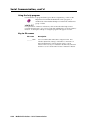
Serial Communication, cont’d
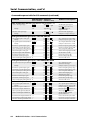
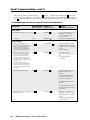
Command/response table for SIS commands (continued)
Command
ASCII Command Response
(host to switcher)
Additional description
(switcher to host)
Video configuration (MLS 506 series switchers only, for inputs 1 – 3)
Set the video signal type.
Example:
View the video signal type.
Example:
X2 * X3 \
Typ
1*0\
Typ0=YUV
X2 \
Typ X3 = ____
Typ1=Vid
3\
X3
= ____
Set the input signal type for
input X2 . (Type = Vid or YUV)
Example: set input 1 to
component video.
Show the video signal type.
Example: show input 3 video type.
Audio gain/attenuation (per input) — MLS 306, MLS 506
○
○
X8 * X4 G
Set a specific input’s audio gain.
Example:
5*9G
Set a specific input’s audio attenuation. X8 * X5 g
Example:
12g
X8 *+G
Increment a specific input’s gain.
X8 *-G
Decrement a specific input’s gain.
View a specific input’s audio gain level. X8 *G
X4 G
Set current input’s audio gain.
Set current input’s audio attenuation. X5 g
Increment current input’s gain.
+G
Decrement current input’s gain.
-G
View current input’s audio gain level. G
○
○
○
○
○
○
○
○
○
○
○
○
○
○
○
○
○
○
○
○
○
○
○
○
○
○
○
In X8
In X8
In X8
In X8
In X8
In X8
In X8
In X8
In X8
In X8
In X8
In X8
○
○
Aud= X4
Aud=+09
Aud= X5
Aud=-11
Aud= X4
Aud= X4
Aud= X4
Aud= X4
Aud= X5
Aud= X4
Aud= X4
Aud= X4
○
○
○
○
○
○
○
○
○
○
Set a single input’s gain (in dB).
Example: set input 5’s gain to +9dB.
Set an input’s attenuation (in dB).
Example: set attenuation to -11dB.
Increase an input’s gain by 1dB.
Decrease an input’s gain by 1dB.
Show an input’s audio level.
Set the current input’s gain (in dB).
Set attenuation (in dB).
Increase the gain by 1dB.
Decrease the gain by 1dB.
Show the audio level.
○
○
○
○
○
○
○
○
○
○
○
○
○
○
○
○
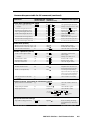
Audio gain/attenuation (per input) — MLS 506MA, MLS 506SA
X8 * X4
Set a specific input’s audio gain/attenuation.
G
In X8 Aud= X4
Example:
Increment a specific input’s gain.
Decrement a specific input’s gain.
4*53G
X8 *+G
X8 *-G
View a specific input’s audio gain level. X8 *G
X4 G
Set current input’s audio gain.
○
○
○
○
○
○
○
○
○
○
○
○
○
○
○
○
○
○
○
○
○
In X8
In X8
In X8
In X8
In X8
○
○
○
○
○
○
○
○
○
Aud=053
Aud= X4
Aud= X4
Aud= X4
Aud= X4
○
○
○
○
○
○
○
○
○
○
○
In X8 Aud= X4
In X8 Aud= X4
In X8 Aud= X4
Increment current input’s gain.
+G
Decrement current input’s gain.
-G
View current input’s audio gain level. G
Set a single input’s gain/
attenuation (in steps).
Example: set input 4’s gain to step 53.
Increase an input’s gain by 1 step.
Decrease an input’s gain by 1 step.
Show an input’s audio level.
Set the current input’s gain/
attenuation (in steps).
Increase the gain by 1 step.
Decrease the gain by 1 step.
Show the audio level.
○
○
○
○
○
○
○
○
○
○
○
○
○
○
○
○
Audio treble adjustment (per input)
○
○
Set a specific input’s treble level.
Example:
Increment an input’s treble level.
Decrement an input’s treble level.
View a specific input’s treble level.
Set the current input’s treble level.
○
○
○
○
○
○
○
○
○
○
○
○
○
○
○
○
X2 * X9 >
4*6>
X2 *+ >
X2 *– >
X2 * >
X2 >
○
○
Increment current input’s treble level. + >
Decrement the current input’s treble. – >
View the current input’s treble level. >
4-4
○
○
○
○
○
○
○
○
In X2
In X2
In X2
In X2
In X2
In X2
○
○
○
Trb= X9
Trb=-02
Trb= X9
Trb= X9
Trb= X9
Trb= X9
○
○
○
In X2 Trb= X9
In X2 Trb= X9
In X2 Trb= X9
MediaLink Switchers • Serial Communication
○
○
○
○
○
○
○
Set a specific input’s treble level.
Example: set input 4’s treble to -2dB.
Increase input X9 ’s treble level.
Decrease input X9 ’s treble level.
Show input X9 ’s treble level.
Set the currently selected
input’s treble level.
○
○
○
○
○
○
○
○
○
○
○
○
○
○
○
Increase the current input’s treble.
Decrease the current input’s treble.
Show the current input’s treble level.
○