1
General Information
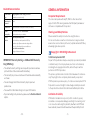
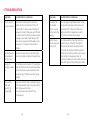
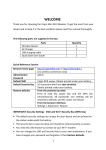
Quick Reference Section
Browser home
page
http://virginmf62.com or http://192.168.0.1
(via wireless connection only)
Administrator
Password
admin
Default SSID
Virgin Wifi xxxxxx. Details printed under your battery.
Default
Security Key
10 characters which are case sensitive.
Details printed under your battery.
Restore
defaults
From the powered up state:
Press & hold the power key and the WPS key
simultaneously. All passwords and settings will be
restored to defaults and the router will reboot.
From the browser interface:
Settings > Advanced > Restore
IMPORTANT: Security Settings - SSID and WiFi Security
Key (WPA Key)
•The default security settings are unique for your device and are
printed on the sticker underneath the battery.
•The Security Key is case sensitive and should be entered exactly
as shown.
•You can change the SSID and Security Key to your own
preferences.
•You need this information to log on to your WiFi modem.
•If you cannot log on to your device, please use the Restore defaults
option.
- 10 -
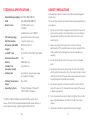
Computer Requirements
The router will operate with any PC, MAC or other device that
supports WiFi. ZTE cannot guarantee that third party hardware or
software is compatible with this product.
Warnings and Safety Notices
Please read all the safety notices before using this device.
Do not use the device near fuel or chemicals or in any prescribed
area such as service stations, refineries, hospitals and aircraft. Obey
all warning signs where posted.
Copyright © 2011 All Rights Reserved.
1st Edition September 2011
No part of this publication may be excerpted, reproduced, translated
or utilized in any form or by any means, electronic or mechanical,
including photocopying and microfilm, without the prior written
permission of ZTE Corporation.
The pictures, symbols and contents in this manual are for reference
only. They might not be completely identical with your product.
ZTE Corporation operates a policy of continuous development. ZTE
Corporation reserves the right to make changes and improvements
to the products described in this document without prior notice.
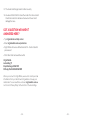
Limitation of Liability
ZTE shall not be liable for any loss of profits or indirect, special,
incidental or consequential damages resulting from or arising out of
or in connection with using this product, whether or not ZTE had
been advised, knew or should have known thepossibility of such
- 11 -