1
Web Interface (continued)
System
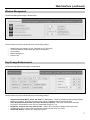
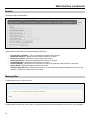
The System page is shown below:
Use the buttons shown above to send the following commands:
o
o
o
o
o
o
o
o
Ping (Healthy, Unhealthy) – Test a command and response with a monitor.
Get Software Version – Reads the main software version of a monitor.
Get Protocol Version – Reads the protocol version of a monitor.
Get Keypad Version – Reads the keypad software version of a monitor
Get Model Number – Reads the model number of a monitor.
Protocol Standby – Set monitor into “serial ignore” mode, for programming other monitors on same bus
System Reset – Resets the system software on a monitor
Set Power State (Off, On) – Switches the monitor on or off. Note that although the backlight is off, power is still
supplied to monitor even when monitor is set to off.
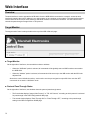
Message Box
The Message Box frame is shown below:
The Message Box shows the current status of commands being sent and acknowledged, as well as any error messages.
20