1
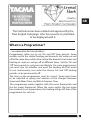
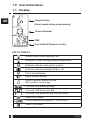
6.0 INFO Button (COPY/i)
The INFO button will allow various information to be accessed and
displayed, although the information available will depend on how
the unit is set up. The information elements are shown in sequence
as the info key is pressed repeatedly.
GB
Model number
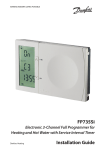
The Danfoss model number is displayed at the top of the display.
Software version
The user application software version of the programmer is
displayed.
Next event time
The next event time of the currently displayed channel is displayed.
Service Due Date (if applicable)
The Service Due date is displayed if set by the installer.
In holiday mode, the info key provides the information.
Holiday End Date
If the holiday mode has been set, a press of the INFO button will
display the holiday end date.
22
FP735SI