1
OPERATING GUIDE: FULL SERVICE OVEN
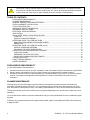
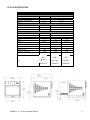
EASYTOUCH MAIN MENU & KEYBOARD SCREEN
1. DEVELOPMENT MODE enables multistage
cooking programs to be developed, then store
under a name and symbol for reuse.
2. PRESS & GO allows quick access to use the
cooking programs that are already stored.
3. COOKBOOK contains the oven’s cooking
programs. It displays Favorites, Cooking
Program Groups and a complete listing of all
cooking programs available.
4. CLEANING/TEMP CHANGE allows the oven
temperature to be changed and the oven to be
prepared for cleaning with reminders displayed
to assist during the cleaning process.
1
DEVELOPMENT
MODE
2
MENU SHORTCUT
3
COOKBOOK
4
CLEANING/TEMP
CHANGE
5
SETTINGS
5. SETTINGS are used to control the oven
settings and functions including time and
language, loading cooking programs and for
service and maintenance purposes.
6. KEYBOARD SCREEN is used to enter an
authorized password to enter data for
programs and may restrict operator access to
some functions.
PRESS & GO
1
2
3
Running a cooking program from the Press & Go
menu:
1. Select ‘PRESS & GO’ from the main menu screen.
2. Select the item required to cook.
3. The display shows the temperature, cooking time,
fan speed and microwave power while the timer
counts down. The timer bar turns red to indicate the
cooking cycle has finished.
Choosing which cooking programs are shown in the
‘PRESS & GO’ menu screen.
2
1
1. After selecting ‘PRESS & GO’ from the main menu
screen, select the EDIT symbol.
2. Two lists are displayed, the ‘PRESS & GO’ menu
items are shown in the upper list and the lower list
shows other menu items which are available. Both lists
can be scrolled up or down using the arrows on the
extreme right.
3. Select an item, then choose whether to change its
order within the menu or to remove it into the lower
list.
4. Select an item to move into the upper list, making it
available in the ‘PRESS & GO’ menu.
5. Select backspace to return to the menu screen when
finished.
12
Change the
order of a
selected item
shown in the
Press & Go
screen.
3
Move a
selected item
to or from
the Press &
Go screen.
4
5
Select to scroll a
list up or down.
20000403 – A – E6 Oven Operator Manual