1
FRONT PANEL
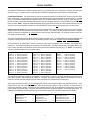
ADVANTAGE EQ 281/8
Digitally Controlled EQ
preset
peak
preset
peak
bypass
peak
on
ADVANTAGE EQ 282/8
Digitally Controlled EQ
preset
Channel 1
Preset: This seven segment LED display indicates which
preset is currently selected. There are eight presets available
(per channel), which can be recalled from non-volatile memory
via RS-232 or Logic Input control. Each preset stores settings
for input level, 28 filter bands, a high-pass filter, and a low-pass
filter. These settings are adjusted, and presets are stored, via
RS-232 control, using the PC Control Software and serial cable
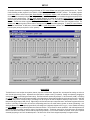
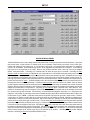
provided with the equalizer (see Setup on pg. 4). The equalizer
may also be controlled via RS-232 from third-party controllers.
bypass
bypass
on
Channel 2
Peak: This red LED indicates output level has reached +14dBu
balanced (+8dBu unbalanced). When the Peak indicator lights,
10dB of headroom remains before clipping. If increased signal
levels or equalizer adjustments cause the Peak indicator to light
frequently, reduce the equalizer input level to avoid distortion
caused by overdriving the equalizer output section.
Bypass: This red LED indicates the equalizer has been
bypassed via RS-232 control. When bypassed, all filters are
temporarily set flat, the high-pass & low-pass filters are set to
their extremes (9.1Hz & 34.7kHz respectively), and the equalizer
input levels are set to unity gain (see Setup on pg. 6).
On: This red LED indicates power is applied to the equalizer.
2