1
Reference
Troubleshooting Tables
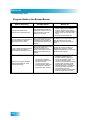
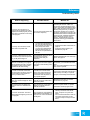
Program Guide or the Browse Banner
What Is Happening
Possible Reason
What to Do
In the Program Guide, some
channels have a red background.
Red means that you have not
subscribed to that channel. You
must subscribe to a channel
before you can view it.
• If you want to buy a channel, go to
mydish.com/myaccount, select the
Customer Support option from the
receiver’s menu, or call the Customer
Service Center at 1-800-333-DISH
(3474).
• Reset the receiver (page 100).
You try to display future programs in
the Program Guide or Browse
Banner, but find you cannot.
The Program Guide and Browse
Banner can display programs
scheduled for an extended, but
not unlimited time beyond the
present.
Try displaying the Program Guide again
later. By that time, it may show
programs for the time and date you
want.
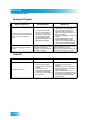
You try to display programs that have
ended in the Program Guide or
Browse Banner, but find you cannot.
The Program Guide and Browse
Banner can display only
programs that have not yet
ended. These features cannot
display a time earlier than the
present.
Contact the program providers (for
example, the channel or network
affiliate that broadcast the program) for
details on past programs.
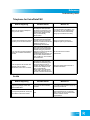
• You may have applied a
Favorites List other than the
list named All Chan.
• You may have set up the
Program Guide so that when
the receiver is locked, the
Guide hides adult channels
• You can change the applied
Favorites List while using the
Program Guide by pressing the
remote control GUIDE button. You
can choose another custom
Favorites List, the All Chan list, which
includes all the channels, the My
Channels list, which includes all
subscribed channels, or the My HD
Channels list, which includes all
subscribed HD channels.
• Unlock the receiver for the Program
Guide to display adult channels.
When you are using the Program
Guide or Browse Banner, some
channels are missing.
108