1
NEVER charge a frozen battery.
PREPARING TO CHARGE
If it is necessary to remove the battery or batteries to charge, always remove grounded terminal from
battery first. Make sure all accessories are off, so as not to cause battery arcing.
Be sure the area around any battery is well ventilated while batteries are being charged. On occasion,
“gas fumes” may be present during charging and can be forcefully blown away by using a piece of
cardboard or other nonmetallic material as a fan. Proper ventilation is always recommended in the
charging area.
Clean all of the battery terminals. Be careful to keep corrosion from coming into contact with eyes.
Add distilled water in each cell (wet cell batteries) until battery acid reaches level specified by battery
manufacturer. This helps purge excessive gas from cells. Do not overfill. For a battery without cell caps,
carefully follow manufacturer’s recharging instructions.
Study all battery manufacturers’ specific precautions such as removing or not removing cell caps while
charging and recommended rates of charge.
Extension cords should be industrial grade/heavy duty UL approved and grounded. Check extension
cord before use for damage, bent prongs and cuts. Replace if damaged.
Always make your extension cord connection on the charger side first. After connecting the extension
cord to the charger, proceed to plug the extension cord into a 120VAC GFCI protected (Ground Fault
Circuit Interrupt) A/C outlet. The unit will operate with a VAC input range of 90VAC-264VAC.
Always remove the extension cord from the A/C outlet first when charging is completed followed by
unplugging the charger.
PRODUCT SUMMARY
General Operation:
Use the following guidelines in this manual to install your fully automatic PCS battery charging system.
Assure that the area around your charger and batteries is properly ventilated. Connect your extension
cord with no A/C power present to the battery charger and proceed to plug your extension cord in at a
nearby A/C outlet.
Once you plug in your PCS battery charging system, your batteries will be simultaneously and
independently charged to 100%. Unlike systems that utilize one large charger to attempt to charge
multiple batteries, your system utilizes a totally independent battery charger for each battery. Each
charging bank will remain in a “float” stage once the battery is charged and then monitor and/or maintain
the battery indefinitely.
We recommend that you leave your system plugged in. This will reduce sulfation on the lead plates of
the batteries and allow your PCS charging system to keep your batteries fully maintained and ready to
perform at their best.
Independent Charging Bank Indications
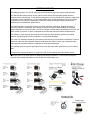
When your battery charging system is activated, each bank provides charging information utilizing 1 red
Light Emitting Diode (LED) indicator and one green Light Emitting Diode (LED) indicator. The Red
(CHARGING) LED indicates d/c current is flowing to the battery and the Green (READY) LED indicates
that the charger has finished it's bulk and absorption stage and has entered the float maintenance mode.
There is also a Green (POWER) LED that illuminates to indicate that power is supplied to the charger
when it is plugged in properly to a functioning A/C outlet.
4