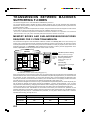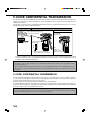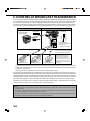
1
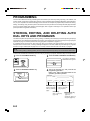
PROGRAMMING, EDITING, AND DELETING FCODE MEMORY BOXES
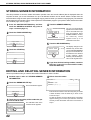
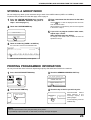
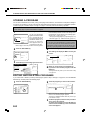
The procedure for programming a memory box for F-code transmission is explained here. There are three types of Fcode memory boxes: F-code polling memory (page 4-4), F-code confidential transmission (page 4-6), and F-code
relay broadcast (page 4-8). Memory boxes are programmed, edited, and deleted as follows.
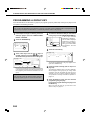
PROGRAMMING AN F-CODE MEMORY BOX
A box name, sub-address/passcode, and function must be programmed in a memory box.
NOTES
• When programming a new memory box, a sub-address that is being used for another box cannot be used. The passcode,
however, can be the same as a passcode used in another box.
• A passcode can be omitted.
• Up to 100 F-code memory boxes can be programmed. If 100 F-code memory boxes have already been programmed, a
warning message will appear and you will not be able to program a new box. First delete an unneeded F-code memory box
(page 6-13) and then program the new box.
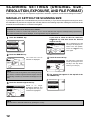
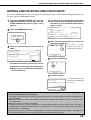
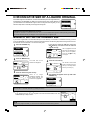
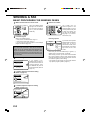
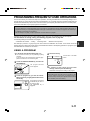
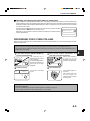
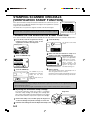
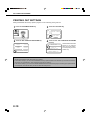
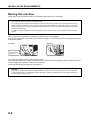
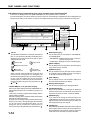
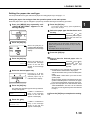
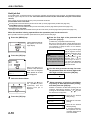
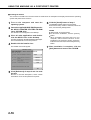
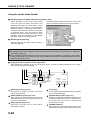
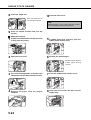
the CUSTOM SETTINGS key and then
1 Press
touch the ADDRESS CONTROL key (refer to
steps 1 and 2 on page 6-2).
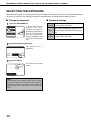
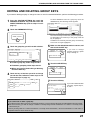
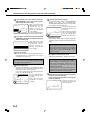
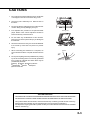
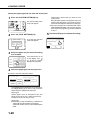
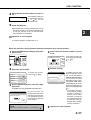
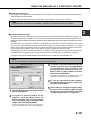
5 Touch the SUB ADDRESS key.
F-CODE MEMORY BOX / POLLING MEMORY
No.001
2
Touch the F-CODE MEMORY BOX key.
BOX NAME
The sub-address/passcode
entry screen appears.
FAX INFORMATION
SUB ADDRESS
POLLING TIMES
F-CODE MEMORY BOX
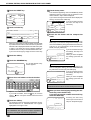
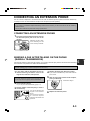
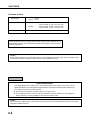
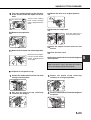
the numeric keys (0 through 9) to enter a
6 Use
sub-address (max. 20 digits).
F-CODE MEMORY BOX / POLLING MEMORY
NEXT
EXIT
CANCEL
OK
No.001
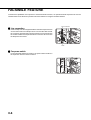
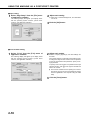
one of the memory box keys (POLLING
3 Touch
MEMORY, CONFIDENTIAL, or RELAY
BROADCAST) on the top line (STORE).
SUB ADDRESS / PASS CODE
ENTER THE SUB ADDRESS / PASS CODE VIA THE 10-KEY PAD, THEN PARESS [OK].
214341434
PASS CODE
CUSTOM SETTINGS
F-CODE MEMORY BOX
OK
STORE
POLLING MEMORY
CONFIDENTIAL
RELAY
BROADCAST
AMEND/DELETE
POLLING MEMORY
CONFIDENTIAL
RELAY
BROADCAST
(POLLING MEMORY is touched in the example here.)
The F-code memory box programming screen appears.
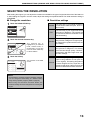
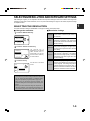
4 Touch the BOX NAME key.
The "No." that automatically
appears is the lowest number
No.001
from 001 to 100 that has not
BOX NAME
yet been programmed. When
SUB ADDRESS
the BOX NAME key is
touched, the letter-entry
POLLING TIMES
screen appears. Enter up to
18 characters for the name.
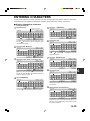
Refer to page 6-15 for the procedure for entering letters.
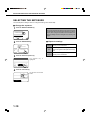
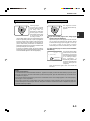
The characters " " and "#" cannot be used in a subaddress.
If you enter an incorrect digit, press the C key and reenter the correct digit.
If you do not wish to enter a passcode, proceed to step 9.
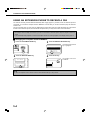
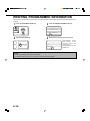
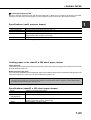
7 To set a passcode, touch the PASS CODE key.
CANCEL
THE 10-KEY PAD, THEN PRESS [OK].
F-CODE MEMORY BOX / POLLING MEMORY
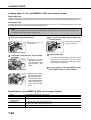
6-10
OK
PASS CODE
A slash (/) appears after the
sub-address.
If you make a mistake,
press the C key to clear the
mistake.