1
Watching TV (TV Guide On Screen)
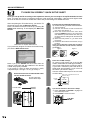
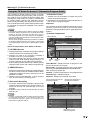
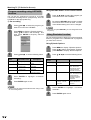
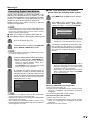
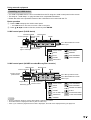
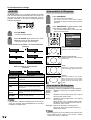
● Info Box
Info Box contains information about a show, service,
ad, or provides general help. A Show Listing Info Box
can have up to three sizes: Small, Large, and “No”.
The default size of the Info Box is Small. Press INFO
to cycle among the sizes.
● Info Button
The Info button appears on the button bar, if the Info
box size can change and/or if there are additional Info
screens.
• Press INFO on the remote control to cycle between Info
box sizes, as available.
• In some instances, the Info key is used to page forward, if
there are additional pages of information, such as a Panel
Ad, Channel Ad, or help text.
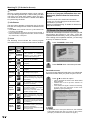
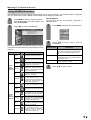
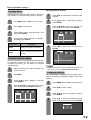
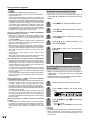
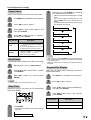
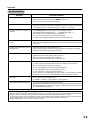
● Icons
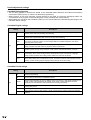
The following icons indicate the current program
information and the current and future actions & status.
Name
20
Icon
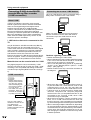
IMPORTANT: When using TV Guide On
Screen or if program information does not
download, please follow the instructions
below.
The TV must be off to download information.
Leave your TV off overnight to receive the initial
download in your area.
(Refer to Troubleshooting-TV Guide On Screen on
page 82 for details.)
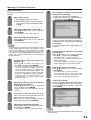
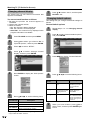
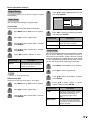
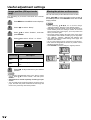
TV Guide On Screen Initial setup
The Guide uses Setup information to provide you with
show listings and lineups in your area - which are
updated several times a day. Once you setup the LCDTV according to this operation manual, you are ready
to set up TV Guide On Screen.
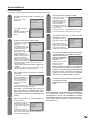
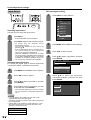
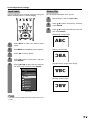
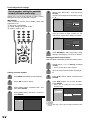
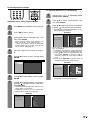
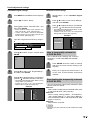
1
Press TV GUIDE to start setup.
2
Press ENTER. Basic initial setup will start.
Description
INFO
button
• Display the additional information.
Progress
bar
• Elapsed time in current program.
This appears in LISTINGS,
SEARCH and when INFO is
pressed while watching TV.
HDTV
• The program is presented in HighDefinition TV, if available.
New
• The program is new (not a repeat
program).
Stereo
• The program is available in Stereo.
CC
• Closed Caption is available for the
program.
TV Rating
• TV rating for the program.
Record
once
• The program is set to record once.
• Other frequencies are Daily
(manual recording only), Regularly,
and Weekly.
Record
off
• The program is set to Record but
is currently off. (The program
remains in schedule.)
Record
suspend
• The program is suspended due to
a schedule conflict. (The program
remains in Schedule.)
• Recording resumes when the
conflict no longer exists.
Remind
once
• The program is set to remind once.
Other frequencies are Daily
(manual reminder only), Regularly,
and Weekly.
Remind
off
• The program is set to remind but is
currently off. (The program remains
in Schedule.)
Remind
suspend
• The program is suspended due to
a schedule conflict. (The program
remains in Schedule.)
• Remind resumes when the conflict
no longer exists.
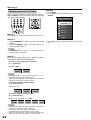
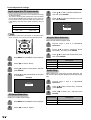
Reminder screen
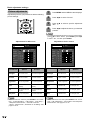
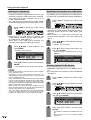
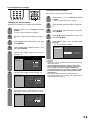
If you previously skipped Guide setup you will see the
Reminder Screen when you power on your LCD-TV.
1
Press a/b to select an option.
• “Set up TV Guide On Screen now”: Basic initial
setup will start.
• “Remind me to set it up later”: Returns to
watching TV.
• “Don’t remind me again”: Returns to watching
TV and stops the reminder screen from
appearing upon powering on.
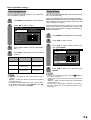
NOTE
• If you decide not to set up the Guide now, this reminder
screen will appear each time you power on the LCD-TV
(except if you selected “Don’t remind me again”).